
Notes : <Hands-on ML with Sklearn & TF> Chapter 1
<Hands-on ML with Sklearn & TF> Chapter 1
- what is ml
- from experience E with respect to some task T and some performance measure P, if its performance on T, as measured by P, improves with experience E.
- what problems to solve
- exist solution but a lot of hand-tuning/rules
- no good solutions using a traditional approach
- fluctuating environment
- get insight about conplex problem and large data
- type
- whether or not trained with human supervision(supervised, unsupervised, semisupervised, reinforcement)
- whether or not learn incrementally on the fly(online, batch)
- whether or not work by simply comparing new data point vs know data point,or instance detect pattern in training data and build a prediction model(instace-based, model-based)
- (un)supervision learning
- supervision : include the desired solution called labels
- classification,K-Nearest Neighbors, Linear Regression, Logistic Regression, SVM, Decision Trees, Random Forests, Neural network
- unsupervision : without labels
- Clustering : k-means, HCA, ecpectation maximization
- Viualization and dimensionality reducation : PCA, kernal PCA, LLE, t-SNE
- Association rule learning : Apriori, Eclat
- semisupervision
- unsupervision --> supervision
- reinforcement : an agent in context
- observe the environment
- select and perform action
- get rewards in return
- supervision : include the desired solution called labels
- batch/online learning
- batch : offline, to known new data need to train a new version from scratch one the full dataset
- online : incremental learning : challenge is bad data
- instance-based/model-based
- instance-based : the system learns the examples by heart, then the generalizes to the new cases using a similarity measure
- model-based : studied the data; select a model; train it on the training data; applied the model to make predictions on new cases
- Challenge
- insufficient quantity of training data
- nonrepresentative training data
- poor-quality data
- irrelevant features : feature selection; feature extraction; creating new feature by gathering new data
- overfitting : regularization -> hyperparameter
- underfitting : powerful model; better feature; reduce construct
- Testing and Validating
- 80% of data for training 20% for testing
- validating : best model and hyperparameter for training set unliking perform as well on new data
- train multiple models with various hyperparameters using training data
- to get generatlization error , select the model and hyperparamaters that perform best on the validation set
- cross-validating : the training set is split into complementary subsets, ans each model is trained against a different conbination of thse subsets and validated against the remain parts.
Example 1-1:
import matplotlib

import matplotlib.pyplot as plt

import numpy as np

import pandas as pd

import sklearn.linear_model

#load the data

oecd_bli = pd.read_csv("datasets/lifesat/oecd_bli_2015.csv",thousands=',')

gdp_per_capita = pd.read_csv("datasets/lifesat/gdp_per_capita.csv",thousands=',',delimiter='\t',encoding='latin1',na_values='n/a')

#prepare the data

def prepare_country_stats(oecd_bli, gdp_per_capita):

    #get the pandas dataframe of GDP per capita and Life satisfaction

    oecd_bli = oecd_bli[oecd_bli["INEQUALITY"]=="TOT"]

    oecd_bli = oecd_bli.pivot(index="Country", columns="Indicator", values="Value")

    gdp_per_capita.rename(columns={"": "GDP per capita"}, inplace=True)

    gdp_per_capita.set_index("Country", inplace=True)

    full_country_stats = pd.merge(left=oecd_bli, right=gdp_per_capita, left_index=True, right_index=True)

    return full_country_stats[["GDP per capita", 'Life satisfaction']]

country_stats = prepare_country_stats(oecd_bli, gdp_per_capita)
#regularization remove_indices = [0, 1, 6, 8, 33, 34, 35]

country_stats.to_csv('country_stats.csv',encoding='utf-8')

X = np.c_[country_stats["GDP per capita"]]

Y = np.c_[country_stats["Life satisfaction"]]

#Visualize the data

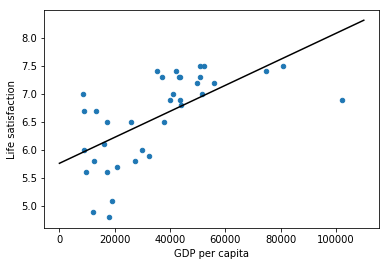
country_stats.plot(kind='scatter',x='GDP per capita',y='Life satisfaction')

#Select a linear model

lin_reg_model = sklearn.linear_model.LinearRegression()

#Train the model

lin_reg_model.fit(X, Y)

#plot Regression model

t0, t1 = lin_reg_model.intercept_[0], lin_reg_model.coef_[0][0]

X = np.linspace(0, 110000, 1000)

plt.plot(X, t0 + t1 * X, "k")

plt.show()

#Make a prediction for Cyprus

X_new=[[22587]]

print(lin_reg_model.predict(X_new))
课后练习挺好的
Notes : <Hands-on ML with Sklearn & TF> Chapter 1的更多相关文章
- Notes : <Hands-on ML with Sklearn & TF> Chapter 5
.caret, .dropup > .btn > .caret { border-top-color: #000 !important; } .label { border: 1px so ...
- Notes : <Hands-on ML with Sklearn & TF> Chapter 7
.caret, .dropup > .btn > .caret { border-top-color: #000 !important; } .label { border: 1px so ...
- Notes : <Hands-on ML with Sklearn & TF> Chapter 6
.caret, .dropup > .btn > .caret { border-top-color: #000 !important; } .label { border: 1px so ...
- Notes : <Hands-on ML with Sklearn & TF> Chapter 4
.caret, .dropup > .btn > .caret { border-top-color: #000 !important; } .label { border: 1px so ...
- Notes : <Hands-on ML with Sklearn & TF> Chapter 3
Chapter 3-Classification .caret, .dropup > .btn > .caret { border-top-color: #000 !important; ...
- Book : <Hands-on ML with Sklearn & TF> pdf/epub
非常好的书,最近发现了pdf版本,链接:http://www.finelybook.com/hands-on-machine-learning-with-scikit-learn-and-tensor ...
- H5 Notes:PostMessage Cross-Origin Communication
Javascript中要实现跨域通信,主要有window.name,jsonp,document.domain,cors等方法.不过在H5中有一种新的方法postMessage可以安全实现跨域通信,并 ...
- H5 Notes:Navigator Geolocation
H5的地理位置API可以帮助我们来获取用户的地理位置,经纬度.海拔等,因此我们可以利用该API做天气应用.地图服务等. Geolocation对象是我们获取地理位置用到的对象. 首先判断浏览器是否支持 ...
- notes:spm多重比较校正
SPM做完统计后,statistical table中的FDRc实际上是在该p-uncorrected下,可以令FDR-correcred p<=0.05的最小cluster中的voxel数目: ...
随机推荐
- django 分页和中间件
分页 Django的分页器(paginator) view from django.shortcuts import render,HttpResponse # Create your views h ...
- JS高级-ES6
let/const case1 { //js var a = 10 a = 20 // es6 let b = 10 b = 30 const c = 10 c = 40 //报错 } case2 { ...
- 爬虫:输入网页之后爬取当前页面的图片和背景图片,最后打包成exe
环境:py3.6 核心库:selenium(考虑到通用性,js加载的网页).pyinstaller 颜色显示:colors.py colors.py 用于在命令行输出文字时,带有颜色,可有可无. # ...
- 性能测试day07_性能瓶颈和分析
其实如果之前都做的很到位的话,那么再加上APM工具(dynaTrace等),监控到非常细节,那么我们跑一个业务,我们就能完全清楚的知道每个请求的时间,也能知道请求所产生sql的时间,这样你自然而然都知 ...
- Python中的正则表达式(re)
import re re.match #从开始位置开始匹配,如果开头没有则无 re.search #搜索整个字符串 re.findall #搜索整个字符串,返回一个list 举例: r(raw)用在p ...
- CMake,win10,64位,简单配置测试
https://cmake.org/download/ 下载完成后,解压即可. 创建文件夹,文件路径自己选择: 这里,就近选择在桌面--创建HelloWorld档,在该文档下,分别创建CMakeLis ...
- 再谈PHP设计模式
设计模式 单例模式解决的是如何在整个项目中创建唯一对象实例的问题,工厂模式解决的是如何不通过new建立实例对象的方法. 单例模式 $_instance必须声明为静态的私有变量 构造函数和析构函数必须声 ...
- ABAP-FTP-执行
1.界面 2.程序 ZFID0004_FTP_EXEC 主程序: *&------------------------------------------------------------- ...
- ReactiveX 学习笔记(23)RxCpp
RxCpp RxCpp 是 ReactiveX 的 C++ 语言实现. 下载 RxCpp $ git clone --recursive https://github.com/ReactiveX/Rx ...
- linux 强制删除yum安装的php7.2
由于支付宝SDK只支持php7.1,因为需要删除之前安装的7.2版,进行降级.通过yum remove不能完全删除php,必须通过rpm方式卸载.由于php安装模块间有依赖,因此需要按顺序进行卸载.如 ...