
.NET Core 3.0 System.Text.Json 和 Newtonsoft.Json 行为不一致问题及解决办法
行为不一致
.NET Core 3.0 新出了个内置的 JSON 库, 全名叫做尼古拉斯 System.Text.Json - 性能更高占用内存更少这都不是事...
对我来说, 很多或大或小的项目能少个第三方依赖项, 还能规避多个依赖项的依赖 Newtonsoft.Json 版本不一致的问题, 是件极美的事情.
但是, 结果总是不如预期那么简单和美好, 简单测试了下, 有一些跟 Newtonsoft.Json 行为不一致的地方, 代码如下:
using Microsoft.VisualStudio.TestTools.UnitTesting;

namespace UnitTestProject3

{

    [TestClass]

    public class TestJsonDiff

    {

        [TestMethod]

        [Description(description: "测试数字序列化")]

        public void TestNumber()

        {

            object jsonObject = new { number = 123.456 };

            string aJsonString = Newtonsoft.Json.JsonConvert.SerializeObject(value: jsonObject);

            string bJsonString = System.Text.Json.JsonSerializer.Serialize(value: jsonObject);

            Assert.AreEqual(expected: aJsonString, actual: bJsonString, message: "测试数字序列化失败");

        }

        [TestMethod]

        [Description(description: "测试英文序列化")]

        public void TestEnglish()

        {

            object jsonObject = new { english = "bla bla" };

            string aJsonString = Newtonsoft.Json.JsonConvert.SerializeObject(value: jsonObject);

            string bJsonString = System.Text.Json.JsonSerializer.Serialize(value: jsonObject);

            Assert.AreEqual(expected: aJsonString, actual: bJsonString, message: "测试英文序列化失败");

        }

        [TestMethod]

        [Description(description: "测试中文序列化")]

        public void TestChinese()

        {

            object jsonObject = new { chinese = "灰长标准的布咚发" };

            string aJsonString = Newtonsoft.Json.JsonConvert.SerializeObject(value: jsonObject);

            string bJsonString = System.Text.Json.JsonSerializer.Serialize(value: jsonObject);

            Assert.AreEqual(expected: aJsonString, actual: bJsonString, message: "测试中文序列化失败");

        }

        [TestMethod]

        [Description(description: "测试英文符号")]

        public void TestEnglishSymbol()

        {

            object jsonObject = new { symbol = @"~`!@#$%^&*()_-+={}[]:;'<>,.?/ " };

            string aJsonString = Newtonsoft.Json.JsonConvert.SerializeObject(value: jsonObject);

            string bJsonString = System.Text.Json.JsonSerializer.Serialize(value: jsonObject);

            Assert.AreEqual(expected: aJsonString, actual: bJsonString, message: "测试英文符号失败");

        }

        [TestMethod]

        [Description(description: "测试中文符号")]

        public void TestChineseSymbol()

        {

            object jsonObject = new { chinese_symbol = @"~·@#¥%……&*()—-+={}【】;:“”‘’《》,。?、" };

            string aJsonString = Newtonsoft.Json.JsonConvert.SerializeObject(value: jsonObject);

            string bJsonString = System.Text.Json.JsonSerializer.Serialize(value: jsonObject);

            Assert.AreEqual(expected: aJsonString, actual: bJsonString, message: "测试中文符号失败");

        }

        [TestMethod]

        [Description(description: "测试反序列化数值字符串隐式转换为数值类型")]

        public void TestDeserializeNumber()

        {

            string ajsonString = "{\"Number\":\"123\"}";

            TestClass aJsonObject = Newtonsoft.Json.JsonConvert.DeserializeObject<TestClass>(ajsonString);

            // 报错,The JSON value could not be converted to System.Int32. Path: $.number | LineNumber: 0 | BytePositionInLine: 15

            TestClass bJsonObject = System.Text.Json.JsonSerializer.Deserialize<TestClass>(json: ajsonString);

            Assert.AreEqual(expected: aJsonObject.Number, actual: bJsonObject.Number, message: "测试反序列化数值字符串隐式转换为数值类型失败");

        }

        public class TestClass

        {

            public int Number { get; set; }

        }

    }

}
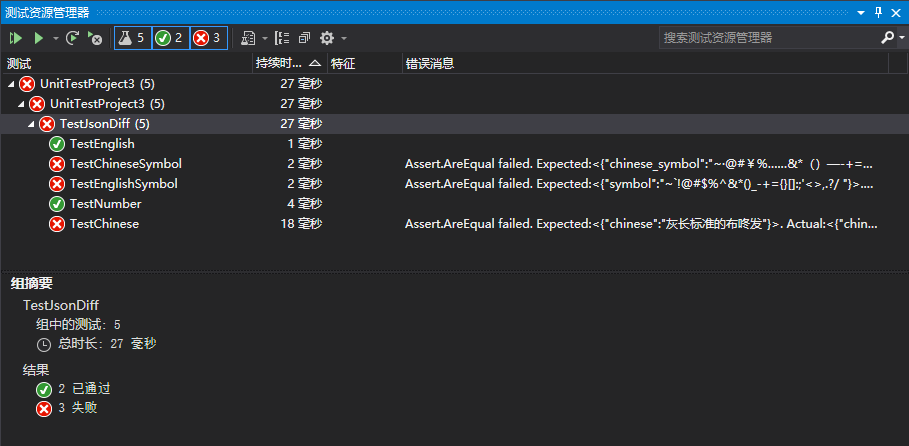
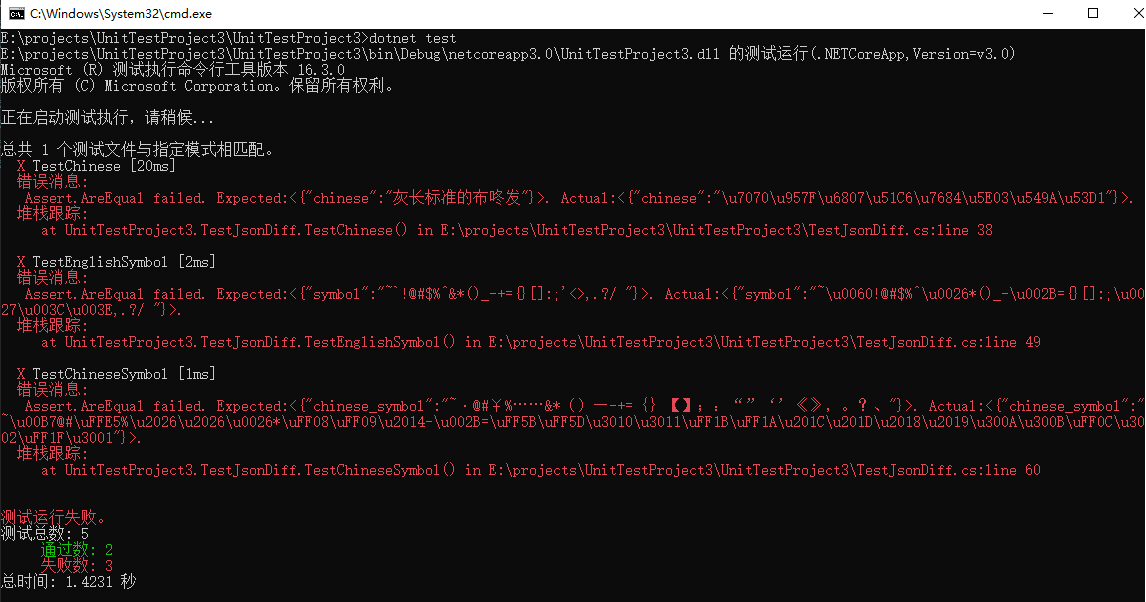
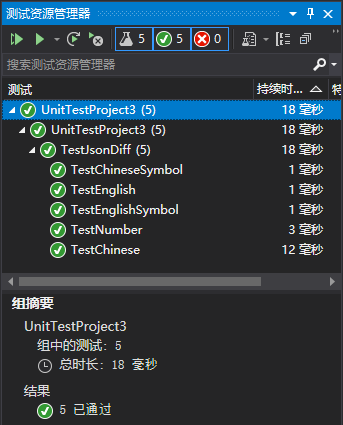
先来看看总体的测试结果:
这是 VS 显示的结果
这是执行 dotnet test 命令行显示的结果
这个时候需要配个图

那么问题来了, 国庆去哪玩比较好呢, 我是谁? 这是哪? 发生了什么?
可以罗列为以下行为不一致, 当然可能还有更多, 欢迎补充...让更多小伙伴看到
中文被编码
部分符号被转义
数值字符串不能隐式转换为数值类型
这里有个相关的 issue System.Text.Json: Deserialization support for quoted numbers #39473
隐式转换会出现精度缺失, 但依旧会转换成功最终导致数据计算或者数据落库等安全隐患, 是个潜在的问题, 而 Newtonsoft.Json 等默认支持隐式转换, 不一定是个合理的方式.
但是大家习惯用了, 先找找如何让二者行为一致的办法吧, 可以通过自定义类型转换器来实现.
// 自定义类型转换器

public class IntToStringConverter : JsonConverter<int>

{

    public override int Read(ref Utf8JsonReader reader, Type type, JsonSerializerOptions options)

    {

        if (reader.TokenType == JsonTokenType.String)

        {

            ReadOnlySpan<byte> span = reader.HasValueSequence ? reader.ValueSequence.ToArray() : reader.ValueSpan;

            if (Utf8Parser.TryParse(span, out int number, out int bytesConsumed) && span.Length == bytesConsumed)

            {

                return number;

            }

            if (Int32.TryParse(reader.GetString(), out number))

            {

                return number;

            }

        }

        return reader.GetInt32();

    }

    public override void Write(Utf8JsonWriter writer, int value, JsonSerializerOptions options)

    {

        writer.WriteStringValue(value.ToString());

    }

}
使用的时候添加到配置即可, 依此类推可以自行添加更多其他类型转换器
JsonSerializerOptions options = new System.Text.Json.JsonSerializerOptions();

options.Converters.Add(item: new IntToStringConverter());

//options.Converters.Add(item: new OthersConverter());

System.Text.Json.JsonSerializer.Deserialize<TestClass>(json: ajsonString, options: options);
枚举类型的转换
System.Text.Json/tests/Serialization/EnumConverterTests.cs#L149 - 官方测试源码例子很全
[TestMethod]

[Description(description: "测试枚举反序列化")]

public void TestDeserializeEnum()

{

    // 场景: 前端传过来字符串, 转成枚举

    JsonSerializerOptions options = new System.Text.Json.JsonSerializerOptions();

    options.Converters.Add(item: new JsonStringEnumConverter(namingPolicy: null, allowIntegerValues: false));

    string jsonString = "{\"State\":\"2\"}";

    Some aJsonObject = Newtonsoft.Json.JsonConvert.DeserializeObject<Some>(value: jsonString);

    Some bJsonObject = System.Text.Json.JsonSerializer.Deserialize<Some>(json: jsonString, options: options);

    Assert.AreEqual(expected: aJsonObject.State, actual: bJsonObject.State, message: "测试枚举反序列化失败");

}

[TestMethod]

[Description(description: "测试枚举序列化")]

public void TestSerializeEnum()

{

    // 场景: 后端枚举返回前端, 需要数值

    Some some = new Some

    {

        State = State.Delete

    };

    string aJsonString = Newtonsoft.Json.JsonConvert.SerializeObject(value: some);

    string bJsonString = System.Text.Json.JsonSerializer.Serialize(value: some);

    Assert.AreEqual(expected: aJsonString, actual: bJsonString, message: "测试枚举序列化失败");

}

public enum State

{

    Create = 1,

    Update = 2,

    Delete = 4,

}

public class Some

{

    public State State { get; set; }

}
不过这里延伸了一个问题, 在 ASP.NET Core 中的全局 JsonOptions 中怎么处理输入序列化和输出序列化设置不同的问题?
解决办法
解决中文会被 Unicode 编码的问题
这个问题是在博客园里找到的一种答案: .NET Core 3.0 中使用 System.Text.Json 序列化中文时的编码问题
[TestMethod]

[Description(description: "测试中文序列化")]

public void TestChinese()

{

    object jsonObject = new { chinese = "灰长标准的布咚发" };

    string aJsonString = Newtonsoft.Json.JsonConvert.SerializeObject(value: jsonObject);

    string bJsonString = System.Text.Json.JsonSerializer.Serialize(

        value: jsonObject,

        options: new System.Text.Json.JsonSerializerOptions

        {

            Encoder = System.Text.Encodings.Web.JavaScriptEncoder.Create(allowedRanges: UnicodeRanges.All)

        });

    Assert.AreEqual(expected: aJsonString, actual: bJsonString, message: "测试中文序列化失败");

}
关键在于序列化配置加了一句
new System.Text.Json.JsonSerializerOptions

{

    Encoder = System.Text.Encodings.Web.JavaScriptEncoder.Create(allowedRanges: UnicodeRanges.All)

}
但是一些符号被转义的问题还是不管用, 寻思了一上午暂时没找到答案...
至于什么时候修复此类问题,
我去源码 corefx 溜个一圈, 暂时的发现是归到了 .NET Core 3.1 和 5.0 的开发时间线里...后面回来发现这不应该啊
但是...难道就这样了?
怀着受伤的核桃心, 中午又吃了3只大闸蟹...
诡异的是新建 ASP.NET Core API (.NET Core 3.0) 输出的 JSON 中文和转义字符都是正常, 如图:
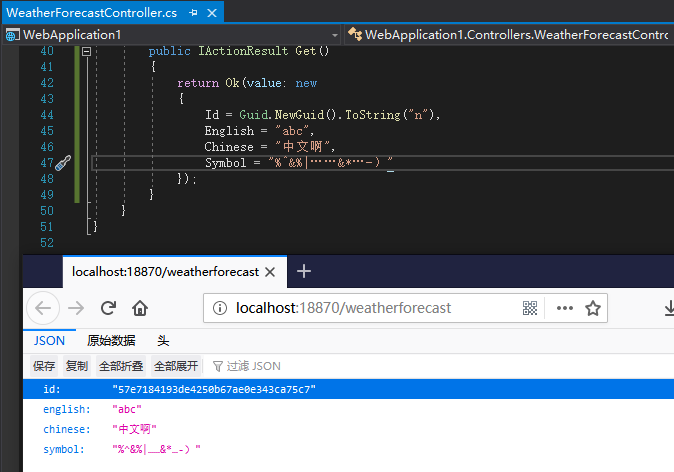
说明一定是我们打开的方式不对...回娘家找源码, 寻寻匿匿最后发现这么一句
// If the user hasn't explicitly configured the encoder, use the less strict encoder that does not encode all non-ASCII characters.

jsonSerializerOptions = jsonSerializerOptions.Copy(JavaScriptEncoder.UnsafeRelaxedJsonEscaping);
less strict ? 那对照的意思是 Newtonsoft.Json 一直使用的就是非严格模式咯, 而我们习惯使用的也是这种模式.
那么改下, 还报错的单元测试都加上配置 JavaScriptEncoder.UnsafeRelaxedJsonEscaping, 果然测试结果顺眼多了. 连上面的 UnicodeRanges.All 都不需要配置了.
string bJsonString = System.Text.Json.JsonSerializer.Serialize(

	value: jsonObject,

	options: new System.Text.Json.JsonSerializerOptions

	{

		Encoder = System.Text.Encodings.Web.JavaScriptEncoder.UnsafeRelaxedJsonEscaping

	});
边上新开了家店, 晚上去吃吃看...

写在最后
划重点: 如果之前项目使用的是 Newtonsoft.Json, 升级之后建议还是继续使用 Newtonsoft.Json, 可以规避上诉N多可能的问题. 如果是新项目或者想少个三方依赖, 可以试试 System.Text.Json, 毕竟更轻量性能更好.
.NET Core 3.0 System.Text.Json 和 Newtonsoft.Json 行为不一致问题及解决办法的更多相关文章
- asp.net core 3.0 JObject The collection type 'Newtonsoft.Json.Linq.JObject' is not supported
在asp.net core 3.0 中,如果直接在Controller中返回 Jobject 类型,会抛出如下错误: The collection type 'Newtonsoft.Json.Linq ...
- WCF JSON DATETIME JSON.NET (Newtonsoft.Json.dll)
[DataMember] public DateTime? myTime { get; set; } var timeFormat = new JsonSerializerSettings() { D ...
- npm install 报错 error Unexpected end of JSON input while parsing near '...sShrinkwrap":false,"d' 解决办法
npm install 报错 : error Unexpected end of JSON input while parsing near '...sShrinkwrap":false,& ...
- .netcore3.0 System.Text.Json 日期格式化
.netcore3.0 的json格式化不再默认使用Newtonsoft.Json,而是使用自带的System.Text.Json来处理. 理由是System.Text.Json 依赖更少,效率更高. ...
- .net core中关于System.Text.Json的使用
在.Net Framework的时候序列化经常使用Newtonsoft.Json插件来使用,而在.Net Core中自带了System.Text.Json,号称性能更好,今天抽空就来捣鼓一下. 使用起 ...
- 【Json】Newtonsoft.Json高级用法
手机端应用讲究速度快,体验好.刚好手头上的一个项目服务端接口有性能问题,需要进行优化.在接口多次修改中,实体添加了很多字段用于中间计算或者存储,然后最终用Newtonsoft.Json进行序列化返回数 ...
- 【ASP.NET MVC】"[A]System.Web.WebPages.Razor.Configuration.HostSection 无法强制转换为 ..."的解决办法
1.错误页面: “/”应用程序中的服务器错误. [A]System.Web.WebPages.Razor.Configuration.HostSection 无法强制转换为 [B]System.Web ...
- C#如何Json转字符串;字符串转Json;Newtonsoft.Json(Json.Net)
Newtonsoft.Json,一款.NET中开源的Json序列化和反序列化类库(下载地址http://json.codeplex.com/). 下面是Json序列化和反序列化的简单封装: /// & ...
- Sublime Text 3 注册码激活码被移除的解决办法
新版的sublime text3中加入了验证功能,之前成功注册的也被移除了,在网上搜索的验证码要么已经失效要么已经被封,少数几个正常的注册输入进去注册成功后几分钟之内这个注册码就会被莫名其妙的被移除. ...
随机推荐
- 微软产品开发文档:包括.net core .net vs等等
Browse all https://docs.microsoft.com/en-us/learn/browse/?roles=developer&products=xamarin%2Cef- ...
- 数据存储在哪里? Java是值传递还是引用传递?
寄存器 : 最快的存储区,位于处理器中,寄存器会按需求自行分配空间,java不能控制寄存器,所以在程序中感觉不到它的存在 栈(stack) : 位于RAM(内存)中,速度仅次于寄存器,存储对象的引用( ...
- Linux下yum安装Redis
检验是否有yum源: [root@localhost ~]# yum install redis 显示没有软件包Redis,安装epel仓库(提供一些RHEL/CentOS默认不提供的软件包). [r ...
- PHP 面试题 一
1.用PHP打印出前一天的时间格式是2017-5-10 22:21:21(2分) 月,日没有前导零:2017-5-1 22:21:21echo date("Y-n-j H:i:s" ...
- Python--day62--Django安装,配置,web请求流程,views.py总结
1,安装Django 2,创建Django项目: 3,配置Django项目 1.settinngs.py文件 1.templates文件夹的位置 2.静态文件 1,STATIC_URL ----- ...
- Codeforces Round #189 (Div. 1 + Div. 2)
A. Magic Numbers 不能出现连续的3个4,以及1.4以外的数字. B. Ping-Pong (Easy Version) 暴力. C. Malek Dance Club 考虑\(x\)二 ...
- 怎么让FOXMAIL关了以后在右下角自动收取邮件
1.缩小到任务栏:打开foxmail,在工具-系统设置-常规,选项中有一项最小化时在任务栏显示,勾选上即可.2.要自动收取邮件,选中邮件账户,右键打开菜单,属性-接收邮件,右边勾选上“每隔*分钟自动收 ...
- H3C RIP协议概述
- UVa 1374 - Power Calculus——[迭代加深搜索、快速幂]
解题思路: 这是一道以快速幂计算为原理的题,实际上也属于求最短路径的题目类型.那么我们可以以当前求出的幂的集合为状态,采用IDA*方法即可求解.问题的关键在于如何剪枝效率更高.笔者采用的剪枝方法是: ...
- junit 测试套件Suite
junit测试套件,就是可以运行一个测试类使得一个或一些测试类被junit测试运行 见代码: 测试套件类: import org.junit.runner.RunWith; import org.ju ...