
【Mybatis】MyBatis之插件开发(十)
MyBatis插件开发原理
MyBatis采用责任链模式,通过动态代理组织多个插件(拦截器),通过这些插件可以改变MyBatis的默认行为(诸如SQL重写之类的),由于插件会深入到MyBatis的核心,因此在编写自己的插件前最好了解下它的原理,以便写出安全高效的插件。
MyBatis在四大对象的创建过程中,都会有插件进行介入。插件可以利用动态代理机制一层层的包装目标对象,而实现目标对象在执行目标方法之前进行拦截的效果。
插件介入指的是:创建过程中都会涉及到调用interceptChain.pluginAll()方法对四大对象进行重新包装,返回一个代理对象。
MyBatis 允许在已映射语句执行过程中的某一点进行拦截调用,默认情况下,MyBatis 允许使用插件来拦截的方法调用包括:
1、拦截执行器的方法:Executor(update, query, flushStatements, commit, rollback, getTransaction, close, isClosed)
2、拦截参数的处理:ParameterHandler(getParameterObject, setParameters)
3、拦截结果集的处理:ResultSetHandler(handleResultSets, handleOutputParameters)
4、拦截Sql语法构建的处理:StatementHandler(prepare, parameterize, batch, update, query)
默认情况下,Mybatis允许使用插件来拦截的接口和方法包括以下几个:
插件开发是基于动态代理实现的,所有有必要对动态代理有所了解。
我们可以看一下MyBatis是怎么创建这四大接口对象的。找到源码BaseStatementHandler
 this.parameterHandler = configuration.newParameterHandler(mappedStatement, parameterObject, boundSql);

 this.resultSetHandler = configuration.newResultSetHandler(executor, mappedStatement, rowBounds, parameterHandler, resultHandler, boundSql);
进入configuration类,下面几处都是在创建newParameterHandler,ResultSetHandler,StatementHandler这几个对象,在调用的过程中,大家都看到了都使用了interceptorChain.pluginAll方法分别对每一个对象进行了重新包装并返回
 public ParameterHandler newParameterHandler(MappedStatement mappedStatement, Object parameterObject, BoundSql boundSql) {

     ParameterHandler parameterHandler = mappedStatement.getLang().createParameterHandler(mappedStatement, parameterObject, boundSql);

     parameterHandler = (ParameterHandler) interceptorChain.pluginAll(parameterHandler);

     return parameterHandler;

 }

 public ResultSetHandler newResultSetHandler(Executor executor, MappedStatement mappedStatement, RowBounds rowBounds, ParameterHandler parameterHandler,

       ResultHandler resultHandler, BoundSql boundSql) {

     ResultSetHandler resultSetHandler = new DefaultResultSetHandler(executor, mappedStatement, parameterHandler, resultHandler, boundSql, rowBounds);

     resultSetHandler = (ResultSetHandler) interceptorChain.pluginAll(resultSetHandler);

     return resultSetHandler;

 }

 public StatementHandler newStatementHandler(Executor executor, MappedStatement mappedStatement, Object parameterObject, RowBounds rowBounds, ResultHandler resultHandler, BoundSql boundSql) {

     StatementHandler statementHandler = new RoutingStatementHandler(executor, mappedStatement, parameterObject, rowBounds, resultHandler, boundSql);

     statementHandler = (StatementHandler) interceptorChain.pluginAll(statementHandler);

     return statementHandler;

 }
点进interceptorChain.pluginAll方法里面
 /**

 *每一个拦截器对目标类都进行一次代理

 *@target

 *@return 层层代理后的对象

 **/

 public Object pluginAll(Object target) {

     for (Interceptor interceptor : interceptors) {

       target = interceptor.plugin(target);

     }

     return target;

 }
这一段代码可以看到:获取所有的Interceptor(拦截器),我们如果需要自定义拦截器就得实现Interceptor这个接口。然后调用interceptor.plugin(target);返回target包装之后的对象。
所以,我们可以使用插件为目标对象创建一个代理对象,这Spring的AOP一样,其实都是动态代理,面向切面的编程。
MyBatis插件开发
下面我们通过案例为StatementHandler创建代理对象
1、新建一个maven工程,引入mybatis依赖及相关数据库依赖

2、新建一个MyFirstPlugin拦截器类,并且实现Interceptor接口
 package com.test.mybatis.plugin;

 import java.util.Properties;

 import org.apache.ibatis.executor.statement.StatementHandler;

 import org.apache.ibatis.plugin.Interceptor;

 import org.apache.ibatis.plugin.Intercepts;

 import org.apache.ibatis.plugin.Invocation;

 import org.apache.ibatis.plugin.Plugin;

 import org.apache.ibatis.plugin.Signature;

 /**

  * 完成插件签名:

  *        告诉MyBatis当前插件用来拦截哪个对象的哪个方法

  *    @Intercepts(org.apache.ibatis.plugin.Intercepts)和

  *    签名注解@Signature(org.apache.ibatis.plugin.Signature),这两个注解用来配置拦截器要拦截的接口的方法。

  *

  *    @Intercepts注解中的属性是一个@Signature(签名)数组,可以在同一个拦截器中同时拦截不同的接口和方法。

  *

  *  @Signature中

  *      type:设置拦截的接口,可选值是4个:Executor、ParameterHandler、ResultSetHandler、StatementHandler

  *      method:设置拦截接口中的方法名,需要和接口匹配

  *      args:设置拦截方法的参数类型数组,通过方法名和参数类型可以确定唯一一个方法

  */

 @Intercepts(

         {

             @Signature(type=StatementHandler.class,method="parameterize",args=java.sql.Statement.class)

         })

 public class MyFirstPlugin implements Interceptor {

     /**

      * intercept:拦截: 拦截目标对象的目标方法的执行;

      */

     public Object intercept(Invocation invocation) throws Throwable {

         // TODO Auto-generated method stub

         System.out.println("MyFirstPlugin...intercept:" + invocation.getMethod());

         // 执行目标方法

         Object proceed = invocation.proceed();

         // 返回执行后的返回值

         return proceed;

     }

     /**

      * plugin: 包装目标对象的:包装:为目标对象创建一个代理对象

      */

     public Object plugin(Object target) {

         // TODO Auto-generated method stub

         // 我们可以借助Plugin的wrap方法来使用当前Interceptor包装我们目标对象

         System.out.println("MyFirstPlugin...plugin:mybatis将要包装的对象" + target);

         Object wrap = Plugin.wrap(target, this);

         // 返回为当前target创建的动态代理

         return wrap;

     }

     /**

      * setProperties:

      *         将插件注册时 的property属性设置进来

      */

     public void setProperties(Properties properties) {

         // TODO Auto-generated method stub

         System.out.println("插件配置的信息:" + properties);

     }

 }
3、在mybatis的全局配置文件中配置
 <!--plugins:注册插件 -->

 <plugins>

     <plugin interceptor="com.test.mybatis.plugin.MyFirstPlugin">

         <property name="username" value="root" />

         <property name="password" value="123456" />

     </plugin>

 </plugins>
4、编辑测试类TestMybatis.java
 public static void main(String[] args) throws IOException {

     // 获取SqlSessionFactory

     InputStream inputStream = Resources.getResourceAsStream("mybatis-config.xml");

     SqlSessionFactory sqlSessionFactory = new SqlSessionFactoryBuilder().build(inputStream);

     SqlSession session = sqlSessionFactory.openSession();

     try {

         EmployeeMapper mapper = session.getMapper(EmployeeMapper.class);

         Employee employee01 = mapper.selectByPrimaryKey(1);

         System.out.println(employee01.getId());

     } finally {

         session.close();

     }

 }
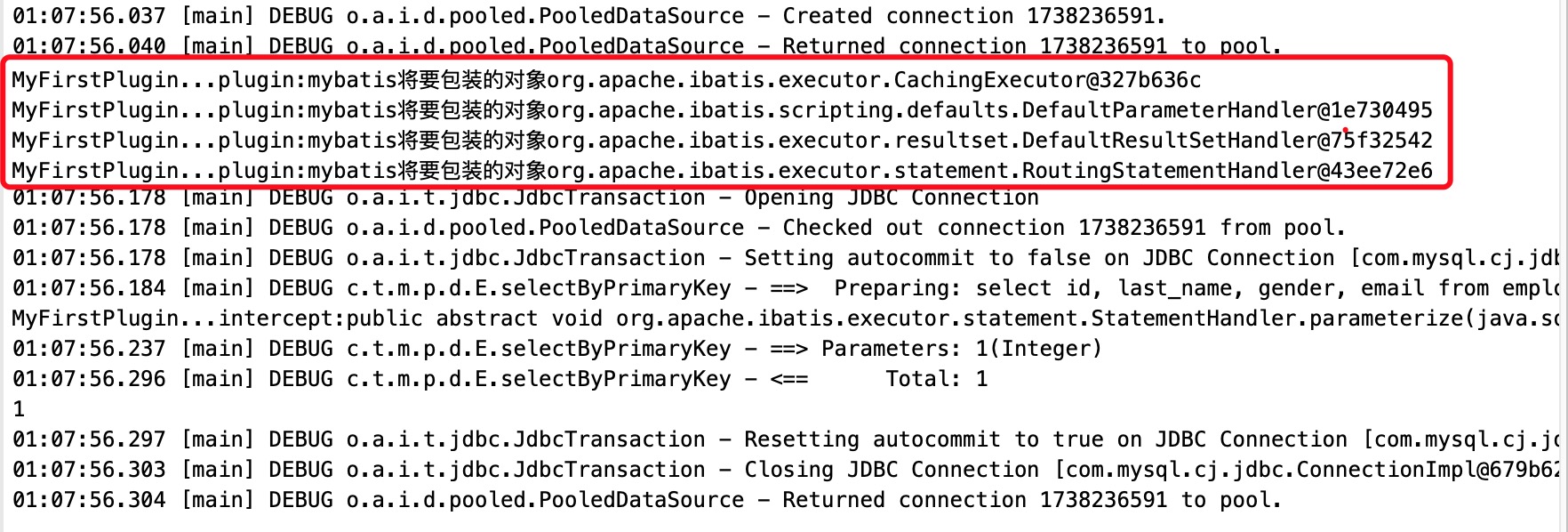
5、运行结果如下:
插件开发总结
插件开发步骤如下
1、编写插件实现Interceptor接口,并使用@Intercepts注解完成插件签名
 @Intercepts({                                  @Signature(type=StatementHandler.class,method="parameterize",args=java.sql.Statement.class)

 })

 public class MyFirstPlugin implements Interceptor {
2、在全局配置文件中注册插件
 <!--plugins:注册插件 -->

 <plugins>

     <plugin interceptor="com.test.mybatis.plugin.MyFirstPlugin">

         <property name="username" value="root" />

         <property name="password" value="123456" />

     </plugin>

 </plugins>
插件的原理
按照插件注解声明,按照插件配置顺序调用插件plugin方法,生成被拦截对象的动态代理
多个插件依次生成目标对象的代理对象,层层包裹,先声明的先包裹;形成代理链
目标方法执行时依次从外到内执行插件的intercept方法
插件的作用
1、可以统计SQL的执行时间
2、可以进行分页操作,如插件:Mybatis-PageHelper
......
【Mybatis】MyBatis之插件开发(十)的更多相关文章
- MyBatis基础入门《十九》动态SQL(set,trim)
MyBatis基础入门<十九>动态SQL(set,trim) 描述: 1. 问题 : 更新用户表数据时,若某个参数为null时,会导致更新错误 2. 分析: 正确结果: 若某个参数为nul ...
- MyBatis基础入门《十八》动态SQL(if-where)
MyBatis基础入门<十八>动态SQL(if-where) 描述: 代码是在<MyBatis基础入门<十七>动态SQL>基础上进行改造的,不再贴所有代码,仅贴改动 ...
- MyBatis基础入门《十六》缓存
MyBatis基础入门<十六>缓存 >> 一级缓存 >> 二级缓存 >> MyBatis的全局cache配置 >> 在Mapper XML文 ...
- MyBatis基础入门《十五》ResultMap子元素(collection)
MyBatis基础入门<十五>ResultMap子元素(collection) 描述: 见<MyBatis基础入门<十四>ResultMap子元素(association ...
- MyBatis基础入门《十四》ResultMap子元素(association )
MyBatis基础入门<十四>ResultMap子元素(association ) 1. id: >> 一般对应数据库中改行的主键ID,设置此项可以提高Mybatis的性能 2 ...
- MyBatis基础入门《十二》删除数据 - @Param参数
MyBatis基础入门<十二>删除数据 - @Param参数 描述: 删除数据,这里使用了@Param这个注解,其实在代码中,不使用这个注解也可以的.只是为了学习这个@Param注解,为此 ...
- MyBatis基础入门《十 一》修改数据
MyBatis基础入门<十 一>修改数据 实体类: 接口类: xml文件: 测试类: 测试结果: 数据库: 如有问题,欢迎纠正!!! 如有转载,请标明源处:https://www.cnbl ...
- MyBatis基础入门《十》添加数据
MyBatis基础入门<十>添加数据 描述: 修改了实体类:TblClient.java,将其字段:cbirthday 由String类型改成了Date类型. TblClient.java ...
- MyBatis实现与插件开发
分析源码之前也需要源码下载并安装到本地仓库和开发工具中,方便给代码添加注释:安装过程和mybatis源码的安装过程是一样的,这里就不再重复描述了:下载地址:https://github.com/myb ...
- springmvc 项目完整示例04 整合mybatis mybatis所需要的jar包 mybatis配置文件 sql语句 mybatis应用
百度百科: MyBatis 本是apache的一个开源项目iBatis, 2010年这个项目由apache software foundation 迁移到了google code,并且改名为MyBat ...
随机推荐
- vue-cli 3 按需引入 element-ui
1.安装按需引入必要插件 npm install babel-plugin-component --save-dev 2.修改babel.config.js 3.在main.js中引入用到的组件,例如 ...
- VS Code中配置Markdown
其实,对我来说是反过来的,我是为了使用Markdown而安装VS Code(虽然久仰大名) 安装VS Code 安装Markdown插件 使用篇 1. 安装vscode 之所以啰嗦一下,是因为据说安装 ...
- 关灯问题II 状压DP
关灯问题II 状压DP \(n\)个灯,\(m\)个按钮,每个按钮都会对每个灯有不同影响,问最少多少次使灯熄完. \(n\le 10,m\le 100\) 状压DP的好题,体现了状压的基本套路与二进制 ...
- 洛谷 P5436 【XR-2】缘分 题解
P5436 [XR-2]缘分 题目背景 世间万物都置身于缘分编织的大网中.缘分未到,虽历经千劫,却不能相遇.缘分到了,在草原上都能等到一艘船.--<一禅小和尚> 题目描述 一禅希望知道他和 ...
- 2017.10.5 国庆清北 D5T2 整除
80分暴力 /*找规律80分TLE俩点 忘了啥规律了. */ #include<iostream> #include<cstdio> #include<cmath> ...
- sed、awk命令速查
awk与sed.grep一样都是为了加工数据流而做成的文本加工过滤器命令.awk会事先把输入的数据根据字段单位进行分割.在没有指定分割单位的情况下,以输入数据中的空格或Tab为分隔符.与sed相比,它 ...
- Processing 中玩增强现实 Argument Reality
其实2009年Processing就能做AR了,只是我不知道而已~ 需要以下几个东西: 1.JMyron 2.GSVideo 3.nyar4psg 4.Picking 5.OBJLoader 或者大伙 ...
- JSP了解点基础
了解即可: 1.JSP本质: 是将jsp文件解析为java servlet类! 生成.class文件 存放在工程的work文件夹内! 2.注释 <%-- --%> html ...
- xftp实现本地与服务器的文件上传下载(windows)
背景: Jemter环境搭建,需上传下载服务器文件到aws服务器上,由于secureCRT的局限性它只支持pub格式的密钥,不支持pem格式密钥,xshell是支持pem格式的,所以尝试安装xshel ...
- mac webstorm 安装破解
下载: 链接:https://pan.baidu.com/s/1A1afhcpPWMrQtOr1Suqs-g 密码:5r7b 激活码 K6IXATEF43-eyJsaWNlbnNlSWQiOiJLN ...