
wpf模仿QQ表情
效果图:
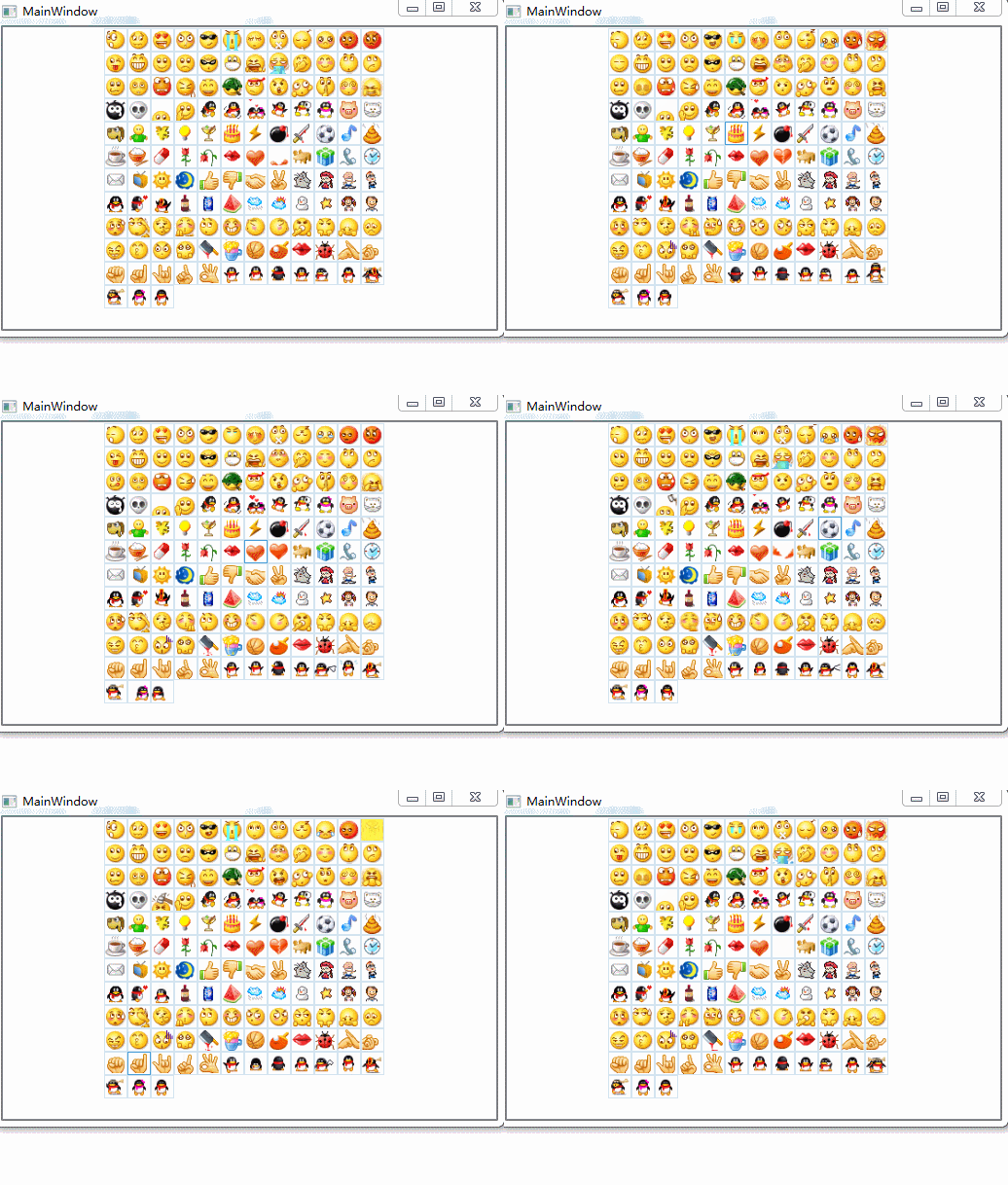
style:
<Style x:Key="LBXITEM_VERTICAL" TargetType="ListBoxItem">
            <Setter Property="Template">
                <Setter.Value>
                    <ControlTemplate TargetType="ListBoxItem">
                        <Border x:Name=">
                            <local:GifImage x:Name="
                                            BorderBrush="#D3E4F0" Source="{Binding gifImg}"
                                            Stretch="Uniform"/>
                        </Border>
                        <ControlTemplate.Triggers>
                            <Trigger Property="IsMouseOver" Value="True">
                                <Setter Property="BorderBrush" TargetName="gif" Value="#4CA0D9"/>
                            </Trigger>
                            <Trigger Property="IsSelected" Value="True">
                                <Setter Property="BorderBrush" TargetName="gif" Value="#4CA0D9"/>
                            </Trigger>
                        </ControlTemplate.Triggers>
                    </ControlTemplate>
                </Setter.Value>
            </Setter>
        </Style>

        <Style x:Key="LBX_VERTICAL" TargetType="ListBox">
            <Setter Property="ItemContainerStyle" Value="{DynamicResource LBXITEM_VERTICAL}"/>
            <Setter Property="ItemsPanel">
                <Setter.Value>
                    <ItemsPanelTemplate>
                        <WrapPanel Orientation=">
                        </WrapPanel>
                    </ItemsPanelTemplate>
                </Setter.Value>
            </Setter>
        </Style>
local:GifImage 在WPF中动态显示gif http://www.cnblogs.com/zhouyinhui/archive/2007/12/23/1011555.html
xaml:
  <ListBox x:Name="listboGif" Style="{StaticResource LBX_VERTICAL}">
        </ListBox>
xaml.CS:
Loaded:
string xmlPath = "../../Face/emoticons.xml";
            XmlDocument xmlDoc = new XmlDocument();
            xmlDoc.Load(xmlPath);//xmlPath为xml文件路径
            XmlNode xmlNode = xmlDoc.SelectSingleNode("/Emoticons");
            XmlNodeList oList = xmlNode.ChildNodes;
            //XmlNode xmlNode1 = xmlDoc.SelectSingleNode("/Emoticons/Emoticon");
            XmlNode oCurrentNode;
            List<gifModel> list = new List<gifModel>();
            gifModel gif;
            ; i < oList.Count; i++)
            {
                gif = new gifModel();
                oCurrentNode = oList[i];
                , oCurrentNode.BaseURI.LastIndexOf("e"));
                gif.gifImg =str+oCurrentNode.InnerText;
                list.Add(gif);
            }
            listboGif.ItemsSource = list;
emoticons.xml:
<?xml version="1.0"?>
<Emoticons>
<Emoticon id="0" tip="微笑">0.gif</Emoticon>
<Emoticon id="1" tip="撇嘴">1.gif</Emoticon>
<Emoticon id="2" tip="色">2.gif</Emoticon>
<Emoticon id="3" tip="发呆">3.gif</Emoticon>
<Emoticon id="4" tip="得意">4.gif</Emoticon>
<Emoticon id="5" tip="流泪">5.gif</Emoticon>
<Emoticon id="6" tip="害羞">6.gif</Emoticon>
<Emoticon id="7" tip="闭嘴">7.gif</Emoticon>
<Emoticon id="8" tip="睡">8.gif</Emoticon>
<Emoticon id="9" tip="大哭">9.gif</Emoticon>
<Emoticon id="10" tip="尴尬">10.gif</Emoticon>
<Emoticon id="11" tip="发怒">11.gif</Emoticon>
<Emoticon id="12" tip="调皮">12.gif</Emoticon>
<Emoticon id="13" tip="呲牙">13.gif</Emoticon>
<Emoticon id="14" tip="惊讶">14.gif</Emoticon>
<Emoticon id="15" tip="难过">15.gif</Emoticon>
<Emoticon id="16" tip="酷">16.gif</Emoticon>
<Emoticon id="17" tip="冷汗">17.gif</Emoticon>
<Emoticon id="18" tip="抓狂">18.gif</Emoticon>
<Emoticon id="19" tip="吐">19.gif</Emoticon>
<Emoticon id="20" tip="偷笑">20.gif</Emoticon>
<Emoticon id="21" tip="可爱">21.gif</Emoticon>
<Emoticon id="22" tip="白眼">22.gif</Emoticon>
<Emoticon id="23" tip="傲慢">23.gif</Emoticon>
<Emoticon id="24" tip="饥饿">24.gif</Emoticon>
<Emoticon id="25" tip="困">25.gif</Emoticon>
<Emoticon id="26" tip="惊恐">26.gif</Emoticon>
<Emoticon id="27" tip="流汗">27.gif</Emoticon>
<Emoticon id="28" tip="憨笑">28.gif</Emoticon>
<Emoticon id="29" tip="大兵">29.gif</Emoticon>
<Emoticon id="30" tip="奋斗">30.gif</Emoticon>
<Emoticon id="31" tip="咒骂">31.gif</Emoticon>
<Emoticon id="32" tip="疑问">32.gif</Emoticon>
<Emoticon id="33" tip="嘘...">33.gif</Emoticon>
<Emoticon id="34" tip="晕">34.gif</Emoticon>
<Emoticon id="35" tip="折磨">35.gif</Emoticon>
<Emoticon id="36" tip="衰">36.gif</Emoticon>
<Emoticon id="37" tip="骷髅">37.gif</Emoticon>
<Emoticon id="38" tip="敲打">38.gif</Emoticon>
<Emoticon id="39" tip="再见">39.gif</Emoticon>
<Emoticon id="40" tip="擦汗">40.gif</Emoticon>
<Emoticon id="41" tip="抠鼻">41.gif</Emoticon>
<Emoticon id="42" tip="鼓掌">42.gif</Emoticon>
<Emoticon id="43" tip="糗大了">43.gif</Emoticon>
<Emoticon id="44" tip="坏笑">44.gif</Emoticon>
<Emoticon id="45" tip="左哼哼">45.gif</Emoticon>
<Emoticon id="46" tip="右哼哼">46.gif</Emoticon>
<Emoticon id="47" tip="哈欠">47.gif</Emoticon>
<Emoticon id="48" tip="鄙视">48.gif</Emoticon>
<Emoticon id="49" tip="委屈">49.gif</Emoticon>
<Emoticon id="50" tip="快哭了">50.gif</Emoticon>
<Emoticon id="51" tip="阴险">51.gif</Emoticon>
<Emoticon id="52" tip="亲亲">52.gif</Emoticon>
<Emoticon id="53" tip="吓">53.gif</Emoticon>
<Emoticon id="54" tip="可怜">54.gif</Emoticon>
<Emoticon id="55" tip="菜刀">55.gif</Emoticon>
<Emoticon id="56" tip="西瓜">56.gif</Emoticon>
<Emoticon id="57" tip="啤酒">57.gif</Emoticon>
<Emoticon id="58" tip="篮球">58.gif</Emoticon>
<Emoticon id="59" tip="乒乓">59.gif</Emoticon>
<Emoticon id="60" tip="咖啡">60.gif</Emoticon>
<Emoticon id="61" tip="饭">61.gif</Emoticon>
<Emoticon id="62" tip="猪头">62.gif</Emoticon>
<Emoticon id="63" tip="玫瑰">63.gif</Emoticon>
<Emoticon id="64" tip="凋谢">64.gif</Emoticon>
<Emoticon id="65" tip="示爱">65.gif</Emoticon>
<Emoticon id="66" tip="爱心">66.gif</Emoticon>
<Emoticon id="67" tip="心碎">67.gif</Emoticon>
<Emoticon id="68" tip="蛋糕">68.gif</Emoticon>
<Emoticon id="69" tip="闪电">69.gif</Emoticon>
<Emoticon id="70" tip="炸弹">70.gif</Emoticon>
<Emoticon id="71" tip="刀">71.gif</Emoticon>
<Emoticon id="72" tip="足球">72.gif</Emoticon>
<Emoticon id="73" tip="瓢虫">73.gif</Emoticon>
<Emoticon id="74" tip="便便">74.gif</Emoticon>
<Emoticon id="75" tip="月亮">75.gif</Emoticon>
<Emoticon id="76" tip="太阳">76.gif</Emoticon>
<Emoticon id="77" tip="礼物">77.gif</Emoticon>
<Emoticon id="78" tip="拥抱">78.gif</Emoticon>
<Emoticon id="79" tip="强">79.gif</Emoticon>
<Emoticon id="80" tip="弱">80.gif</Emoticon>
<Emoticon id="81" tip="握手">81.gif</Emoticon>
<Emoticon id="82" tip="胜利">82.gif</Emoticon>
<Emoticon id="83" tip="抱拳">83.gif</Emoticon>
<Emoticon id="84" tip="勾引">84.gif</Emoticon>
<Emoticon id="85" tip="拳头">85.gif</Emoticon>
<Emoticon id="86" tip="差劲">86.gif</Emoticon>
<Emoticon id="87" tip="爱你">87.gif</Emoticon>
<Emoticon id="88" tip="NO">88.gif</Emoticon>
<Emoticon id="89" tip="OK">89.gif</Emoticon>
<Emoticon id="90" tip="爱情">90.gif</Emoticon>
<Emoticon id="91" tip="飞吻">91.gif</Emoticon>
<Emoticon id="92" tip="跳跳">92.gif</Emoticon>
<Emoticon id="93" tip="发抖">93.gif</Emoticon>
<Emoticon id="94" tip="怄火">94.gif</Emoticon>
<Emoticon id="95" tip="转圈">95.gif</Emoticon>
<Emoticon id="96" tip="磕头">96.gif</Emoticon>
<Emoticon id="97" tip="回头">97.gif</Emoticon>
<Emoticon id="98" tip="跳绳" >98.gif</Emoticon>
<Emoticon id="99" tip="挥手">99.gif</Emoticon>
<Emoticon id="100" tip="激动">100.gif</Emoticon>
<Emoticon id="101" tip="街舞">101.gif</Emoticon>
<Emoticon id="102" tip="献吻">102.gif</Emoticon>
<Emoticon id="103" tip="左太极">103.gif</Emoticon>
<Emoticon id="104" tip="右太极">104.gif</Emoticon>
<Emoticon id="105" tip="非典">105.gif</Emoticon>
<Emoticon id="106" tip="闪人">106.gif</Emoticon>
<Emoticon id="107" tip="找">107.gif</Emoticon>
<Emoticon id="108" tip="美眉">108.gif</Emoticon>
<Emoticon id="109" tip="猫咪">109.gif</Emoticon>
<Emoticon id="110" tip="小狗">110.gif</Emoticon>
<Emoticon id="111" tip="钱">111.gif</Emoticon>
<Emoticon id="112" tip="灯泡">112.gif</Emoticon>
<Emoticon id="113" tip="酒杯">113.gif</Emoticon>
<Emoticon id="114" tip="音乐">114.gif</Emoticon>
<Emoticon id="115" tip="药丸">115.gif</Emoticon>
<Emoticon id="116" tip="吻">116.gif</Emoticon>
<Emoticon id="117" tip="会议">117.gif</Emoticon>
<Emoticon id="118" tip="电话">118.gif</Emoticon>
<Emoticon id="119" tip="时间">119.gif</Emoticon>
<Emoticon id="120" tip="邮件">120.gif</Emoticon>
<Emoticon id="121" tip="电视">121.gif</Emoticon>
<Emoticon id="122" tip="多多">122.gif</Emoticon>
<Emoticon id="123" tip="美女">123.gif</Emoticon>
<Emoticon id="124" tip="汉良">124.gif</Emoticon>
<Emoticon id="125" tip="毛毛">125.gif</Emoticon>
<Emoticon id="126" tip="Q仔">126.gif</Emoticon>
<Emoticon id="127" tip="白酒">127.gif</Emoticon>
<Emoticon id="128" tip="汽水">128.gif</Emoticon>
<Emoticon id="129" tip="下雨">129.gif</Emoticon>
<Emoticon id="130" tip="多云">130.gif</Emoticon>
<Emoticon id="131" tip="雪人">131.gif</Emoticon>
<Emoticon id="132" tip="星星">132.gif</Emoticon>
<Emoticon id="133" tip="女">133.gif</Emoticon>
<Emoticon id="134" tip="男">134.gif</Emoticon>
</Emoticons>
gifModel:
 internal class gifModel
        {
            public string gifImg { get; set; }
        }
wpf模仿QQ表情的更多相关文章
- WPF模仿QQ登录按钮
原文:WPF模仿QQ登录按钮 如下图,第一张是未点击时按钮样式,第二张是鼠标划过时按钮样式. 样式代码: <Style TargetType="{x:Type Button}" ...
- WPF 微信 MVVM 【续】发送部分QQ表情
今天主要记录的就是发送QQ表情, WPF 微信 MVVM里写了,后期为了发送QQ表情,需要把TextBox替换为RichTextBox,接下来就说说替换的过程. 一.支持Binding的RichTex ...
- WPF仿QQ聊天框表情文字混排实现
原文:WPF仿QQ聊天框表情文字混排实现 二话不说.先上图 图中分别有文件.文本+表情.纯文本的展示,对于同一个list不同的展示形式,很明显,应该用多个DataTemplate,那么也就需要Data ...
- wpf仿qq边缘自动停靠,支持多屏
wpf完全模仿qq边缘自动隐藏功能,采用鼠标钩子获取鼠标当前状态,在通过当前鼠标的位置和点击状态来计算是否需要隐藏. 以下是实现的具体方法: 一.鼠标钩子实时获取当前鼠标的位置和点击状态 /// &l ...
- QQ表情的发送与接收
我想大家对QQ表情一定不会陌生,一个个小头像极大丰富了聊天的乐趣,使得聊天不再是简单的文字叙述,还能够配上喜.怒.哀.乐等表达人物心情的小图片.本文重点要介绍的内容就是如何在微信公众平台使用QQ表情, ...
- QQ表情动图,增加写博客的乐趣
QQ表情动图,增加写博客的乐趣 body{margin:0px;}
- 活跃天数计算用户等级模仿QQ的升级方式
QQ等级的算法:设当前等级为N,达到当前等级最少需要的活跃天数为D,当前活跃天数为Dc,升级剩余天数为Dr,则: 从而推出: 好了,引述完成,懒得写字了,贴出代码: 复制内容到剪贴板 代码: < ...
- 模仿QQ空间 网页设计
目的:1.通过模仿QQ空间,全自主写代码,熟悉网页设计的流程 2.熟练的掌握HTML.CSS.JS的应用 3.将在此过程中遇到的问题及其解决方法记录在此,以便取用. 开始: 一.登陆界面(index. ...
- 消除QQ表情小游戏
<!doctype html> <html> <head> <meta charset="utf-8"> <title> ...
随机推荐
- python自动化测试(4)-使用第三方python库技术实现
python自动化测试(4)-使用第三方python库技术实现 1 概述 关于测试的方法论,都是建立在之前的文章里面提到的观点: 功能测试不建议做自动化 接口测试性价比最高 接口测试可以做自动化 ...
- Python黑帽编程 3.2 ARP监控
Python黑帽编程 3.2 ARP监控 在第3.1节<ARP欺骗>中,我们学习了ARP的基本原理,使用Python实现了我们自己的ARP欺骗工具.在上一节的基础上,我们来实现一个ARP监 ...
- 一个App完成入门篇(七)- 完成发现页面
第七章是入门篇的倒数第二篇文章了,明天整个APP将进入收官. 本节教程主要要教会大家使用二维码扫描和用do_WebView组件加在html页面. 导入项目 do_WebView组件 扫描功能 自定义事 ...
- [nRF51822] 13、浅谈nRF51822和NRF24LE1/NRF24LU1/NRF24L01经典2.4G模块无线通信配置与流程
前言: nRF51可以支持基于2.4G的互相通信.与NRF24LE1的通信.与NRF24LU1的通信.与NRF24L01的通信. 一.nRF51822基于2.4G和nRF51822通信 其中nRF5 ...
- SQL Server 的 Statistics 簡介
當你要清空「資料表(table)」,或倒入大量「資料(data;record)」,或公司「資料庫(database)」改用新版本要資料大搬家…等情形,不只是要重建「索引(index)」,還應要重建或更 ...
- C#并行编程系列-文章导航
菜鸟初步学习,不对的地方请大神指教,参考<C#并行编程高级教程.pdf> 目录 C#并行编程-相关概念 C#并行编程-Parallel C#并行编程-Task C#并行编程-并发集合 C# ...
- java线程 公平锁 ReentrantLock(boolean fair)
一.公平锁 1.为什么有公平锁 CPU在调度线程的时候是在等待队列里随机挑选一个线程,由于这种随机性所以是无法保证线程先到先得的(synchronized控制的锁就是这种非公平锁).但这样就会产生饥饿 ...
- OpenCASCADE General Transformation
OpenCASCADE General Transformation eryar@163.com Abstract. OpenCASCADE provides a general transforma ...
- 前端学PHP之函数
× 目录 [1]函数定义 [2]函数参数[3]返回值[4]变量函数[5]回调函数[6]递归函数[7]加载函数[8]匿名函数 前面的话 PHP 的真正力量来自它的函数:它拥有超过 1000 个内建的函数 ...
- Android NDK开发Hello Word!
在之前的博客中已经为大家介绍了,如何在win环境下配置DNK程序,本篇我将带大家实现一个简单的Hello jni程序,让大家真正感受一下NDK开发的魅力.这里我们选择使用C+JAVA开发Android ...