
java导出标题多行且合并单元格的EXCEL
场景:项目中遇到有需要导出Excel的需求,并且是多行标题且有合并单元格的,参考网上的文章,加上自己的理解,封装成了可自由扩展的导出工具
先上效果,再贴代码:
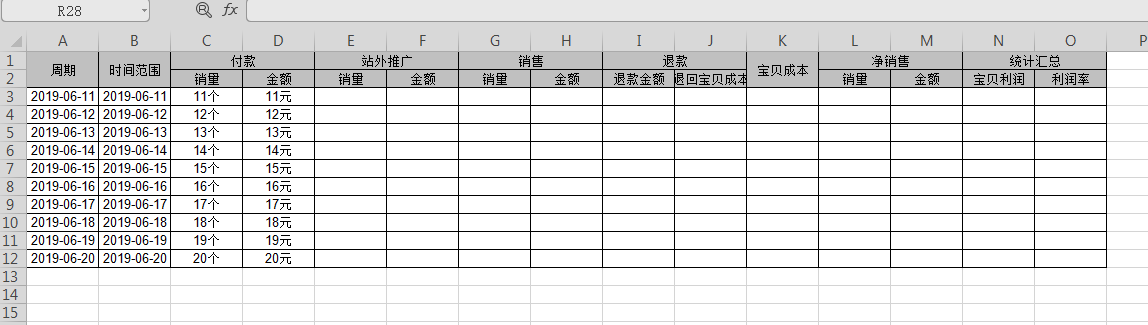
调用工具类进行导出:
 public static void main(String[] args) throws Exception {

        FileOutputStream fos=new FileOutputStream("D:\\test.xls");

        String[] head0 = new String[]{"周期", "时间范围", "付款", "付款", "站外推广", "站外推广", "销售", "销售", "退款", "退款", "宝贝成本", "净销售", "净销售", "统计汇总", "统计汇总"};

        String[] head1 = new String[]{" ", " ", "销量", "金额", "销量", "金额", "销量", "金额", "退款金额", "退回宝贝成本", "", "销量", "金额", "宝贝利润", "利润率"};

        //对应excel中的行和列,("开始行,结束行,开始列,结束列")

        String[] headnum0 = new String[]{"0,1,0,0", "0,1,1,1,", "0,0,2,3", "0,0,4,5", "0,0,6,7", "0,0,8,9", "0,1,10,10", "0,0,11,12", "0,0,13,14"};

        List<String> attrList = Lists.newArrayList("reportDate", "dateRange", "saleNum", "payFee", "specialSaleNum", "specialSaleFee", "totalSaleNum", "saleFee", "refundFee",

                "refundCost", "costFee", "retaSaleNum", "retaProfitFee", "profitFee", "profitPercent");

        //组装头部Map

        Map<Integer, Map<String, String[]>> headMap = Maps.newHashMap();

        Map<String, String[]> head0InfoMap = Maps.newHashMap();

        head0InfoMap.put(ExcelUtil.HEADNAME, head0);

        head0InfoMap.put(ExcelUtil.HEADNUM, headnum0);

        Map<String, String[]> head1InfoMap = Maps.newHashMap();

        head1InfoMap.put(ExcelUtil.HEADNAME, head1);

        headMap.put(0, head0InfoMap);

        headMap.put(1, head1InfoMap);

        //数据列表

        List<ItemProfitExcelVo> itemProfitExcelVoList = Lists.newArrayList();

        int i =10;

        while (i<20){

            i++;

            ItemProfitExcelVo itemProfitExcelVo = new ItemProfitExcelVo();

            itemProfitExcelVo.setReportDate("2019-06-"+i);

            itemProfitExcelVo.setDateRange("2019-06-"+i);

            itemProfitExcelVo.setPayFee(i+"元");

            itemProfitExcelVo.setSaleNum(i+"个");

            itemProfitExcelVoList.add(itemProfitExcelVo);

        }

        Workbook workbook = ExcelUtil.exportMergeXls(sheetName, itemProfitExcelVoList, attrList, headMap, ItemProfitExcelVo.class);

        workbook.write(fos);

        fos.close();

    }
工具类ExcelUtil:
package com.verse.hades.web.stats.util;

import com.google.common.base.Predicates;

import com.verse.hades.core.constant.ResultCodeConstant;

import com.verse.hades.core.exception.BusinessException;

import com.verse.hades.excel.annotaion.ExcelNum;

import com.verse.hades.excel.annotaion.ExcelPercent;

import com.verse.hades.excel.annotaion.ExcelUnit;

import com.verse.hades.utils.LocalDateUtil;

import com.verse.hades.utils.MoneyUtil;

import com.verse.hades.utils.ReflectionHelper;

import org.apache.poi.ss.usermodel.*;

import org.apache.poi.ss.util.CellRangeAddress;

import org.apache.poi.xssf.usermodel.XSSFWorkbook;

import org.reflections.ReflectionUtils;

import java.lang.reflect.Field;

import java.lang.reflect.Method;

import java.lang.reflect.Modifier;

import java.time.LocalDate;

import java.time.LocalDateTime;

import java.util.*;

public class ExcelUtil {

    public static final String HEADNAME = "headName";  //列名 key的值

    public static final String HEADNUM = "headNum";     //合并单元格下标 key的值

    /**

     * @param: sheetName

     * @param: objList 导出的数据对象列表

     * @param: attr 导出数据对象对应的字段

     * @param: headMap 头部列表名称数组与合并单元格数组的Map

     * @param: clazz 对象类

     * @Return: org.apache.poi.ss.usermodel.Workbook

     * @Decription:

     * @Modify:

     */

    public static <T> Workbook exportMergeXls(String sheetName, List<T> objList, List<String> attr, Map<Integer/*行标*/,

            Map<String/*头部列表key的名字*/, String[]/*对应的值*/>> headMap, Class<T> clazz) {

        //String[] head0, String[] headnum0, String[] head1, String[] headnum1,

        Workbook workbook = new XSSFWorkbook();

        Sheet sheet = workbook.createSheet(sheetName);

        //头部单元格样式

        CellStyle cellStyle = workbook.createCellStyle();

        setAlign(cellStyle, HorizontalAlignment.CENTER, VerticalAlignment.CENTER);

        setBorder(cellStyle, BorderStyle.THIN, IndexedColors.BLACK);

        setColor(cellStyle, IndexedColors.GREY_25_PERCENT.index, FillPatternType.SOLID_FOREGROUND);

        Font font = workbook.createFont();

        font.setFontName("Arial");

        font.setFontHeightInPoints((short) 10);//设置字体大小

        cellStyle.setFont(font);

        Set<Integer> headKeySet = headMap.keySet();

        if (headKeySet.size() > 0) {

            headKeySet.stream().sorted();

            for (Integer rowNum : headKeySet) {

                Map<String, String[]> rowInfo = headMap.get(rowNum);

                String[] headName = rowInfo.get(HEADNAME);

                String[] headNum = rowInfo.get(HEADNUM);

                if (null != headName && headName.length > 0) {

                    Row row1 = sheet.createRow(rowNum);

                    for (int i = 0; i < headName.length; i++) {

                        Cell cell = row1.createCell(i);

                        cell.setCellValue(headName[i]);

                        cell.setCellStyle(cellStyle);

                    }

                }

                if (null != headNum && headNum.length > 0) {

                    //动态合并单元格

                    for (String aHeadNum : headNum) {

                        String[] temp = aHeadNum.split(",");

                        Integer startrow = Integer.parseInt(temp[0]);

                        Integer overrow = Integer.parseInt(temp[1]);

                        Integer startcol = Integer.parseInt(temp[2]);

                        Integer overcol = Integer.parseInt(temp[3]);

                        CellRangeAddress cra = new CellRangeAddress(startrow, overrow, startcol, overcol);

                        sheet.addMergedRegion(cra);

                    }

                }

            }

        }

        return insertData(workbook, sheet, objList, clazz, attr, headKeySet.size(), attr.size());

    }

    /**

     * @param: workbook

     * @param: sheet

     * @param: objList  对象列表

     * @param: clazz 对象类

     * @param: attr  对象的字段名数组

     * @param: startRow  数据开始的行数

     * @param: colNum 总共的列数

     * @Return: org.apache.poi.ss.usermodel.Workbook

     * @Decription: 插入数据

     * @Modify:

     */

    private static <T> Workbook insertData(Workbook workbook, Sheet sheet, List<T> objList, Class<T> clazz, List<String> attr, int startRow, int colNum) {

        CellStyle cellStyle = workbook.createCellStyle();

        setAlign(cellStyle, HorizontalAlignment.CENTER, VerticalAlignment.CENTER);

        setBorder(cellStyle, BorderStyle.THIN, IndexedColors.BLACK);

        Font font = workbook.createFont();

        font.setFontName("Arial");

        font.setFontHeightInPoints((short) 10);//设置字体大小

        cellStyle.setFont(font);

        List<List<Object>> lists = getValueList(objList, clazz, attr);

        for (List<Object> list : lists) {

            Row row = sheet.createRow(startRow++);

            for (int col = 0; col < colNum; col++) {

                Cell cell = row.createCell(col);

                //设置单元格换行

                cell.setCellStyle(cellStyle);

                writeCell(workbook, list.get(col), cell);

            }

        }

        return workbook;

    }

    /**

     * @param: workbook

     * @param: obj

     * @param: cell

     * @Return: void

     * @Decription: 将数据写入单元格

     * @Modify:

     */

    private static void writeCell(Workbook workbook, Object obj, Cell cell) {

        if (obj == null) {

            cell.setCellValue("");

        } else if (obj instanceof String) {

            cell.setCellValue((String) obj);

        } else if (obj instanceof Character) {

            cell.setCellValue((Character) obj);

        } else if (obj instanceof Long) {

            cell.setCellValue((Long) obj);

        } else if (obj instanceof Integer) {

            cell.setCellValue((Integer) obj);

        } else if (obj instanceof Short) {

            cell.setCellValue((Short) obj);

        } else if (obj instanceof Byte) {

            cell.setCellValue((Byte) obj);

        } else if (obj instanceof Float) {

            cell.setCellValue((Float) obj);

        } else if (obj instanceof Double) {

            cell.setCellValue((Double) obj);

        } else if (obj instanceof Boolean) {

            cell.setCellValue((Boolean) obj);

        } else if (obj instanceof Date) {

            CellStyle cellStyle = workbook.createCellStyle();

            CreationHelper createHelper = workbook.getCreationHelper();

            cellStyle.setDataFormat(

                    createHelper.createDataFormat().getFormat("yyyy/m/d h:mm:ss"));

            cell.setCellValue((Date) obj);

            cell.setCellStyle(cellStyle);

        } else if (obj instanceof LocalDate) {

            cell.setCellValue(LocalDateUtil.getDateAsString((LocalDate) obj));

        } else if (obj instanceof LocalDateTime) {

            cell.setCellValue(LocalDateUtil.getDateTimeAsString((LocalDateTime) obj));

        }

    }

    /**

     * @param: objList

     * @param: clazz

     * @param: attr

     * @Return: java.util.List<java.util.List<java.lang.Object>>

     * @Decription: 获取对象对应的字段的值

     * @Modify:

     */

    private static <T> List<List<Object>> getValueList(List<T> objList, Class<T> clazz, List<String> attr) {

        Set<Method> methods = ReflectionUtils.getAllMethods(clazz, Predicates.and(ReflectionUtils.withModifier(Modifier.PUBLIC),

                ReflectionUtils.withPrefix("get")));

        Map<String, Object> annotationMap = getAnnotaions(clazz);

        Map<String, Method> methodMap = new HashMap<>();

        for (Method method : methods) {

            String attrName = ReflectionHelper.getAttrNameFromMethod(method.getName());

            if (attr.contains(attrName)) {

                methodMap.put(attrName, method);

            }

        }

        if (methodMap.keySet().size() != attr.size()) {

            throw new BusinessException(ResultCodeConstant.ERROR_SERVICE_CODE, "excel格式错误,列表和数据不一致,处理失败");

        }

        List<List<Object>> res = new ArrayList<>();

        for (T obj : objList) {

            List<Object> list = new ArrayList<>();

            for (String name : attr) {

                Method method = methodMap.get(name);

                list.add(wrapperValue(method, name, annotationMap.get(name), obj));

            }

            res.add(list);

        }

        return res;

    }

    private static Object wrapperValue(Method method, String name, Object annotation, Object obj) {

        String hasConvert = "";

        Object value;

        try {

            value = method.invoke(obj);

        } catch (Exception e) {

            throw new BusinessException(ResultCodeConstant.ERROR_SERVICE_CODE, "excel格式错误,不能获取对应列的数据|" + name);

        }

        if (value != null) {

            if (annotation instanceof ExcelPercent) {

                ExcelPercent excelPercent = (ExcelPercent) annotation;

                hasConvert = excelPercent.pre() + MoneyUtil.convertCentToString(getLongValue(value, name), 2) + "%";

            } else if (annotation instanceof ExcelNum) {

                ExcelNum excelNum = (ExcelNum) annotation;

                hasConvert = excelNum.pre() + MoneyUtil.convertCentToString(getLongValue(value, name), 2) + excelNum.unit();

            } else if (annotation instanceof ExcelUnit) {

                ExcelUnit excelUnit = (ExcelUnit) annotation;

                hasConvert = excelUnit.pre() + value + excelUnit.value();

            }

        }

        if (hasConvert.equals("")) {

            return value;

        } else {

            return hasConvert;

        }

    }

    private static Long getLongValue(Object value, String name) {

        Long conver2Long = 0L;

        if (value instanceof Integer) {

            conver2Long = ((Integer) value).longValue();

        } else if (value instanceof Long) {

            conver2Long = (Long) value;

        } else {

            throw new BusinessException(ResultCodeConstant.ERROR_SERVICE_CODE, "excel格式错误,当前类型无法转换" + name);

        }

        return conver2Long;

    }

    private static Map<String, Object> getAnnotaions(Class c) {

        Map<String, Object> annotationMap = new HashMap<>();

        Field[] fields = c.getDeclaredFields();

        for (Field field : fields) {

            if (field.getAnnotation(ExcelPercent.class) != null) {

                annotationMap.put(field.getName(), field.getAnnotation(ExcelPercent.class));

            } else if (field.getAnnotation(ExcelNum.class) != null) {

                annotationMap.put(field.getName(), field.getAnnotation(ExcelNum.class));

            } else if (field.getAnnotation(ExcelUnit.class) != null) {

                annotationMap.put(field.getName(), field.getAnnotation(ExcelUnit.class));

            }

        }

        return annotationMap;

    }

    private static void setAlign(CellStyle cellStyle, HorizontalAlignment halign, VerticalAlignment valign) {

        cellStyle.setAlignment(halign);

        cellStyle.setVerticalAlignment(valign);

    }

    private static void setBorder(CellStyle cellStyle, BorderStyle borderSize, IndexedColors colorIndex) {

        cellStyle.setBorderBottom(borderSize);

        cellStyle.setBottomBorderColor(colorIndex.index);

        cellStyle.setBorderLeft(borderSize);

        cellStyle.setLeftBorderColor(colorIndex.index);

        cellStyle.setBorderRight(borderSize);

        cellStyle.setRightBorderColor(colorIndex.index);

        cellStyle.setBorderTop(borderSize);

        cellStyle.setTopBorderColor(colorIndex.index);

    }

    private static void setColor(CellStyle cellStyle, short color, FillPatternType fillPattern) {

        cellStyle.setFillForegroundColor(color);

        cellStyle.setFillPattern(fillPattern);

    }

}
java导出标题多行且合并单元格的EXCEL的更多相关文章
- Java Controller下兼容xls和xlsx且可识别合并单元格的excel导入功能
1.工具类,读取单元格数据的时候,如果当前单元格是合并单元格,会自动读取合并单元格的值 package com.shjh.core.util; import java.io.IOException; ...
- 【记录】解析具有合并单元格的Excel
最近公司让做各种数据表格的导入导出,就涉及到电子表格的解析,做了这么多天总结一下心得. 工具:NOPI 语言:C# 目的:因为涉及到导入到数据库,具有合并单元格的多行必然要拆分,而NPOI自动解析的时 ...
- 【开发者笔记】解析具有合并单元格的Excel
最近公司让做各种数据表格的导入导出,就涉及到电子表格的解析,做了这么多天总结一下心得. 工具:NOPI 语言:C# 目的:因为涉及到导入到数据库,具有合并单元格的多行必然要拆分,而NPOI自动解析的时 ...
- python-利用xlrd模块中读取有合并单元格的excel数据
前言 对于excel中有合并单元格的情况,合并的单元格只能取到第一个单元格的值,合并的单元格后面的单元格内容的值为空,针对这个情况,写了下面一段代码实现, 对单元格进行判断,如果是传入的索引是合并单元 ...
- (二)数据源处理3-python处理包含合并单元格的excel
分析:
- 让我头疼一下午的Excel合并单元格
Excel导出常见问题 excel导出其实不算什么难事 在网上copy下模板代码,填充自己的业务数据,提供一个http接口基本就可以得到你要导出的数据了. 但是,凡事都有例外,截止今天,excel导出 ...
- POI导入具有合并了单元格的Excel
POI进行单行单行地导入的数据在网上有许多的文章,但是要导入一个具有合并单元格的excel貌似比较难找.刚好最近完成了这样的一个需求,要求导入具有合并单元格的excel: /** * 读取excel数 ...
- GridView中合并单元格
using System; using System.Collections.Generic; using System.Linq; using System.Web; using System.Da ...
- 复杂的POI导出Excel表格(多行表头、合并单元格)
poi导出excel有两种方式: 第一种:从无到有的创建整个excel,通过HSSFWorkbook,HSSFSheet HSSFCell, 等对象一步一步的创建出工作簿,sheet,和单元格,并添加 ...
随机推荐
- vue做的项目每次打开新页面不会显示页面顶部的解决办法
在main.js 中添加代码: router.afterEach((to,from, next) => { window.scrollTo(0,0) }) 然后就会发现每次打开页面都是显示的是页 ...
- pycharm报错:ImportError: libcusolver.so.8.0: cannot open shared object file: No such file or directory
pycharm报错:ImportError: libcusolver.so.8.0: cannot open shared object file: No such file or directory ...
- redis延迟队列
异步消息队列 Redis 的 list(列表) 数据结构常用来作为异步消息队列使用,使用rpush/lpush操作入队列, 使用 lpop 和 rpop 来出队列. > rpush notify ...
- 配置每次git push 不需要输入账号密码
配置每次git push 不需要输入账号密码 .gitconfig文件地址 C:\Users\Admin
- sudo: ulimit: command not found
在这看到的:http://stackoverflow.com/questions/17483723/command-not-found-when-using-sudo-ulimit 修改系统文件打开数 ...
- 基于 K8s 做应用发布的工具那么多, 阿里为啥选择灰姑娘般的 Tekton ?
作者 | 邓洪超,阿里云容器平台工程师, Kubernetes Operator 第二人,云原生应用标准交付与管理领域知名技术专家 导读:近年来,越来越多专门给 Kubernetes 做应用发布的 ...
- Dockerfile 中的 CMD 与 ENTRYPOINT(转)
add by zhj: CMD和ENTRYPOINT的差异很小,可以认为完全可以相互代替.两者都支持shell模式和exec模式, shell模式:跟你在shell下执行命令的格式一样,简单方便,但 ...
- Lambda(一)lambda表达式初体验
Lambda(一)lambda表达式初体验 Lambda引入 : 随着需求的不断改变,代码也需要随之变化 需求一:有一个农场主要从一堆苹果中挑选出绿色的苹果 解决方案:常规做法,source code ...
- Lucene queryParser和analysis有什么不同?
在Lucene1.4.3中,queryParser和analysis分成独立的两个包,queryParser作用是解析查询语句,analysis作用是分词,queryParser在解析查询语句的时候会 ...
- Scrum 冲刺第二篇
我们是这次稳了队,队员分别是温治乾.莫少政.黄思扬.余泽端.江海灵 一.会议 1.1 26号站立式会议照片: 1.2 昨天已完成的事情 团队成员 任务内容 黄思扬 Web 端首页.内容管理页开发. ...