
IOS自动布局
- (void)viewDidLoad

{

    [super viewDidLoad];

    [self addNavigationBar:FEEDBACK_VIEW_CONTROLLER];

    UILabel *note = [[UILabel alloc] init];

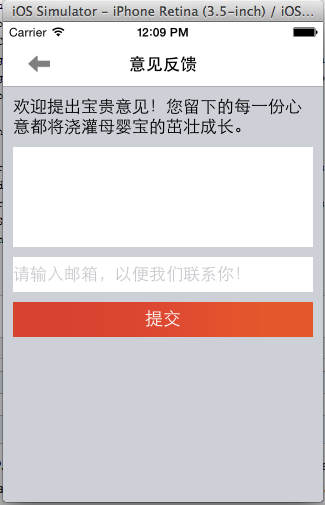
    [note setText:@"欢迎提出宝贵意见!您留下的每一份心意都将浇灌母婴宝的茁壮成长。"];

    [note setLineBreakMode:NSLineBreakByWordWrapping];

    note.numberOfLines = 0;

    [self.view addSubview:note];

    //将自适应向布局约束的转化关掉(根据情况有时需要有时不需要)

    [note setTranslatesAutoresizingMaskIntoConstraints:NO];

    [self.view addConstraint:[NSLayoutConstraint constraintWithItem:note

                                                          attribute:NSLayoutAttributeTop

                                                          relatedBy:NSLayoutRelationEqual

                                                             toItem:navBar

                                                          attribute:NSLayoutAttributeBottom

                                                         multiplier:1.0

                                                           constant:10]];

    [self.view addConstraint:[NSLayoutConstraint constraintWithItem:note

                                                          attribute:NSLayoutAttributeLeft

                                                          relatedBy:NSLayoutRelationEqual

                                                             toItem:self.view

                                                          attribute:NSLayoutAttributeLeft

                                                         multiplier:1.0

                                                           constant:10]];

    [self.view addConstraint:[NSLayoutConstraint constraintWithItem:note

                                                          attribute:NSLayoutAttributeRight

                                                          relatedBy:NSLayoutRelationEqual

                                                             toItem:self.view

                                                          attribute:NSLayoutAttributeRight

                                                         multiplier:1.0

                                                           constant:-10]];

    UITextView *tfContent = [[UITextView alloc] init];

    [tfContent setTranslatesAutoresizingMaskIntoConstraints:NO];

    [tfContent setBackgroundColor:[UIColor whiteColor]];

    [tfContent setReturnKeyType:UIReturnKeyDone];

    [self.view addSubview:tfContent];

    [self.view addConstraint:[NSLayoutConstraint constraintWithItem:tfContent

                                                          attribute:NSLayoutAttributeTop

                                                          relatedBy:NSLayoutRelationEqual

                                                             toItem:note

                                                          attribute:NSLayoutAttributeBottom

                                                         multiplier:1.0

                                                           constant:10]];

    [self.view addConstraint:[NSLayoutConstraint constraintWithItem:tfContent

                                                          attribute:NSLayoutAttributeLeft

                                                          relatedBy:NSLayoutRelationEqual

                                                             toItem:self.view

                                                          attribute:NSLayoutAttributeLeft

                                                         multiplier:1.0

                                                           constant:10]];

    [self.view addConstraint:[NSLayoutConstraint constraintWithItem:tfContent

                                                          attribute:NSLayoutAttributeRight

                                                          relatedBy:NSLayoutRelationEqual

                                                             toItem:self.view

                                                          attribute:NSLayoutAttributeRight

                                                         multiplier:1.0

                                                           constant:-10]];

    [self.view addConstraint:[NSLayoutConstraint constraintWithItem:tfContent

                                                          attribute:NSLayoutAttributeHeight

                                                          relatedBy:NSLayoutRelationEqual

                                                             toItem:nil

                                                          attribute:NSLayoutAttributeNotAnAttribute

                                                         multiplier:1.0

                                                           constant:100]];

    UITextField *tfEmail = [UITextField new];

    [tfEmail setTranslatesAutoresizingMaskIntoConstraints:NO];

    [tfEmail setBackgroundColor:[UIColor whiteColor]];

    [tfEmail setClearButtonMode:UITextFieldViewModeAlways];

    [tfEmail setReturnKeyType:UIReturnKeyDone];

    [tfEmail setPlaceholder:@"请输入邮箱,以便我们联系你!"];

    [self.view addSubview:tfEmail];

    [self.view addConstraint:[NSLayoutConstraint constraintWithItem:tfEmail

                                                          attribute:NSLayoutAttributeTop

                                                          relatedBy:NSLayoutRelationEqual

                                                             toItem:tfContent

                                                          attribute:NSLayoutAttributeBottom

                                                         multiplier:1.0

                                                           constant:10]];

    [self.view addConstraint:[NSLayoutConstraint constraintWithItem:tfEmail

                                                          attribute:NSLayoutAttributeLeft

                                                          relatedBy:NSLayoutRelationEqual

                                                             toItem:self.view

                                                          attribute:NSLayoutAttributeLeft

                                                         multiplier:1.0

                                                           constant:10]];

    [self.view addConstraint:[NSLayoutConstraint constraintWithItem:tfEmail

                                                          attribute:NSLayoutAttributeRight

                                                          relatedBy:NSLayoutRelationEqual

                                                             toItem:self.view

                                                          attribute:NSLayoutAttributeRight

                                                         multiplier:1.0

                                                           constant:-10]];

    [self.view addConstraint:[NSLayoutConstraint constraintWithItem:tfEmail

                                                          attribute:NSLayoutAttributeHeight

                                                          relatedBy:NSLayoutRelationEqual

                                                             toItem:nil

                                                          attribute:NSLayoutAttributeNotAnAttribute

                                                         multiplier:1.0

                                                           constant:35]];

    UIButton *btnSubmit = [[UIButton alloc] init];

    [btnSubmit setTranslatesAutoresizingMaskIntoConstraints:NO];

    [btnSubmit setTitle:STRING_COMMON_SUBMIT forState:UIControlStateNormal];

    [btnSubmit setBackgroundImage:[UIImage imageNamed:@"bg_red_orange"] forState:UIControlStateNormal];

    [btnSubmit setBackgroundImage:[UIImage imageNamed:@"bg_red"] forState:UIControlStateHighlighted];

    [self.view addSubview:btnSubmit];

    NSMutableArray *tmpConstraints = [NSMutableArray array];

    [tmpConstraints addObjectsFromArray:[NSLayoutConstraint constraintsWithVisualFormat:@"V:[tfEmail]-10-[btnSubmit(==35)]" options:0 metrics:nil views:NSDictionaryOfVariableBindings(tfEmail,btnSubmit)]];

    [tmpConstraints addObjectsFromArray:[NSLayoutConstraint constraintsWithVisualFormat:@"H:|-10-[btnSubmit]-10-|" options:0 metrics:nil views:NSDictionaryOfVariableBindings(btnSubmit)]];

    [self.view addConstraints:tmpConstraints];

}
IOS自动布局的更多相关文章
- iOS 自动布局详细介绍
1. 自动布局的理解 iOS自动布局很有用,可以在不同size的屏幕上运行,原先看的头痛,还是习惯用最蠢的[UIScreen mainScreen].bounds.size.width等来布局,后来实 ...
- iOS自动布局——Masonry详解
欢迎大家前往腾讯云+社区,获取更多腾讯海量技术实践干货哦~ 本文由鹅厂新鲜事儿发表于云+社区专栏 作者:oceanlong | 腾讯 移动客户端开发工程师 前言 UI布局是整个前端体系里不可或缺的一环 ...
- 掌握iOS自动布局
1,自动布局是一种基于约束的布局(constraint-based layout)引擎,它可以根据开发者在对象上的约束自动调整大小与位置. 2.在iOS 6之前使用的布局模型是“spring& ...
- iOS自动布局之autoresizingi
对于iOS的app开发者来说,不会像Android开发者一样为很多的屏幕尺寸来做界面适配,因此硬编码的坐标也能工作良好,但是从设计模式上来说这不是好的做法.而且也还有一些问题,如iPhone5的适配, ...
- 学会爱上iOS自动布局(Auto Layout) - 剑尖
本文翻译自Yari Dareglia的LEARN TO LOVE AUTO LAYOUT文章先生们,女士们,让我们以正确的心态开始本教程吧:自动布局就是简单!我花了一段时间来掌握自动布局是如何工作的, ...
- iOS 自动布局过程
自动布局将视图显示在屏幕上的步骤: 更新约束,它会从子视图传递到父视图,设置布局信息:约束更新时自动触发setNeedsUpdateConstraints:updateConstraints可以增加本 ...
- iOS 自动布局框架 – Masonry 详解
目前iOS开发中大多数页面都已经开始使用Interface Builder的方式进行UI开发了,但是在一些变化比较复杂的页面,还是需要通过代码来进行UI开发的.而且有很多比较老的项目,本身就还在采用纯 ...
- iOS自动布局框架-Masonry详解
首先,在正式使用Masonry之前,我们先来看看在xib中我们是如何使用AutoLayout 从图中我们可以看出,只要设置相应得局限,控制好父视图与子视图之间的关系就应该很ok的拖出你需要的需 ...
- IOS 自动布局-UIStackPanel和UIGridPanel(四)
为什么说scrollview的自动化布局是难点? 对scrollview做自动化布局,无非就是想对scrollview里面的subviews来做自动化布局.但是scrollview里面的subview ...
随机推荐
- git忽略文件【转】
转自: http://cwind.iteye.com/blog/1666646 有很多文件不必使用git管理.例如Eclipse或其他IDE生成的项目文件,编译生成的各种目标或临时文件等.使用git ...
- Types of Entity in Entity Framework:
http://www.entityframeworktutorial.net/Types-of-Entities.aspx We created EDM for existing database i ...
- selenium-webdriver(python) (十) 如何处理下拉框
本节重点 处理下拉框 switch_to_alert() accept() 下拉框是我们最常见的一种页面元素,对于一般的元素,我们只需要一次就定位,但下拉框里的内容需要进行两次定位,先定位到下拉框,再 ...
- android 内存溢出问题分析
最近的项目中,内存一直再增长,但是不知道是什么问题,导致内存溢出,在网上看到了这么一篇关于内存分析与管理的文章,解决了部分问题,感觉这篇文 章还不错,就转帖到我的blog上了,希望对大家有所帮助. ...
- IIS7或者IIS7.5部署MVC项目时出现404错误
IIS7或者IIS7.5部署MVC项目时出现404错误 服务器上需要安装Windows 补丁 kb980368 下载链接:http://support.microsoft.com/kb/980368
- HDU 1244 Max Sum Plus Plus Plus
虽然这道题看起来和 HDU 1024 Max Sum Plus Plus 看起来很像,可是感觉这道题比1024要简单一些 前面WA了几次,因为我开始把dp[22][maxn]写成dp[maxn][2 ...
- mysql二
日期 MONTHNAME(birth) 月份的英文 模式匹配 变量 统计
- setAttribute一个兼容性问题
前几天工作中遇到一个js问题,本来js就不大会,倒腾了好长时间,并在做弹窗的时候用到了setAttribute,出现了不兼容的问题,在网上查了好多,真是郁闷,看来啥都得学啊. 主要的工作是做一个根据时 ...
- 【转】itunes connect 如何修改主要语言
原文网址:http://blog.csdn.net/yuedong56/article/details/50662181 刚开始提交app,没有做国际化(本地化),提交的app只有简体中文一种语言,第 ...
- 所有 HTTP 状态代码及其定义
所有 HTTP 状态代码及其定义. 代码 指示 2xx 成功 200 正常:请求已完成. 201 正常:紧接 POST 命令. 202 正常:已接受用于处理,但处理尚未完成. 20 ...