
[Python Cookbook] Pandas Groupby
Groupby Count
# Party’s Frequency of donations

nyc.groupby(’Party’)[’contb receipt amt’].count()
The command returns a series where the index is the name of a Party and the value is the count of that Party. Note that the series is ordered by the name of Party alphabetically.

Multiple Variables
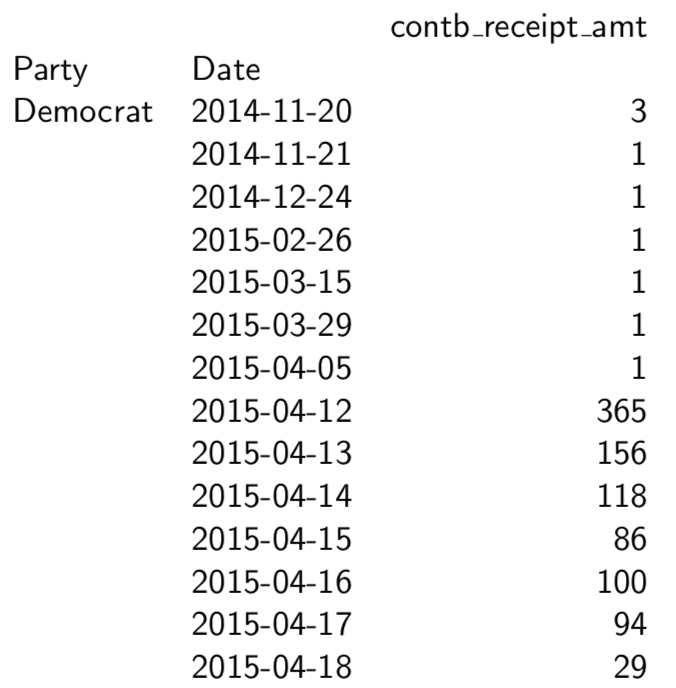
# Party’s Frequency of donations by Date

nyc.groupby([’Party’, ’Date’])[’contb receipt amt’].count()
Groupby Sum
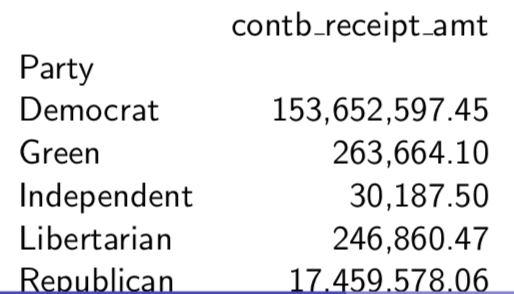
# Party’s Sum of donations

nyc.groupby(’Party’)[’contb receipt amt’].sum()

# Define the format of float

pd.options.display.float format = ’{:,.2f}’.format
nyc.groupby(’Party’)[’contb receipt amt’].sum()
Groupby Order
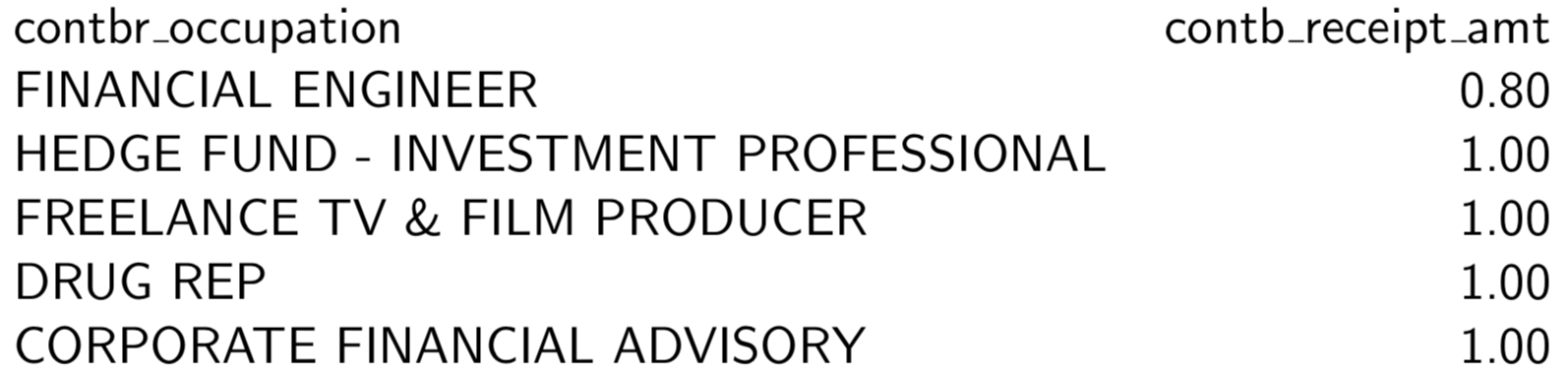
# Top 5 Donors, by Occupation

df7 = nyc.groupby(’contbr occupation’)[’contb receipt amt’]. sum(). reset  index ()

df7.sort_values(’contb receipt amt’, ascending=False, inplace =True)

df7.head(5)

#or

df7.nlargest(5,’contb receipt amt’)

# Bottom 5 Donors, by Occupation

df8 = nyc.groupby(’contbr occupation’)[’contb receipt amt’]. sum() . reset   index ()

df8 . sort_values (by=’ contb receipt amt ’ , inplace=True) df8.head(5)

# OR

df7.tail(5)

#OR

df8.nsmallest(5,’contb receipt amt’)

Get rid of negative values:
df8 [ df8 . contb receipt amt >0].head(5)
The following commands give an example to find the Top 5 occupations that donated to each cadidate. Note that we need to sort the table based on two variables, firtly sorted by candidate name alphabetically and then sorted by contribution amount in a descending order. Finally, we hope to show the Top 5 occupations for each candidate.
# Top 5 Occupations that donated to Each Candidate

df10 = nyc.groupby ([ ’cand_nm’ , ’contbr_occupation’ ]) [ ’contb_receipt_amt’ ].sum().reset_index ()

df10.sort_values ([ ’cand_nm’ , ’contb_receipt_amt’ ] , ascending =[True , False ], inplace=True)

df10.groupby(’cand_nm’).head(5)
Groupby Plot
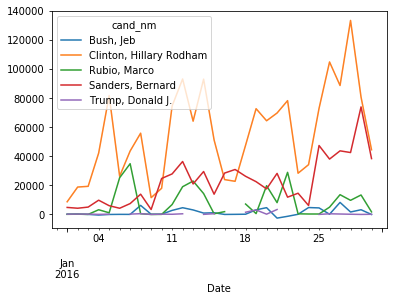
#Top 5 Fundraising Candidates Line Graph

df11 = nyc.groupby(’cand_nm’)[’contb_receipt_amt’].sum(). reset_index ()

df11_p = df11.nlargest(5,’contb_receipt_amt’)

df11_g = nyc[nyc.cand_nm.isin(df11_p.cand_nm)][[ ’cand_nm’,’Date’,’contb_receipt_amt’]]

dfpiv=pd.pivot table(df11_g , values=’contb_receipt_amt’, index=[’Date’],columns=[’cand_nm’], aggfunc=np.sum)
dfpiv.loc['2016-01-01':'2016−01−30'].plot.line()
[Python Cookbook] Pandas Groupby的更多相关文章
- [Python Cookbook] Pandas: 3 Ways to define a DataFrame
Using Series (Row-Wise) import pandas as pd purchase_1 = pd.Series({'Name': 'Chris', 'Item Purchased ...
- [Python Cookbook] Pandas: Indexing of DataFrame
Selecting a Row df.loc[index] # if index is a string, add ' '; if index is a number, no ' ' or df.il ...
- [Python Cookbook]Pandas: How to increase columns for DataFrame?Join/Concat
1. Combine Two Series series1=pd.Series([1,2,3],name='s1') series2=pd.Series([4,5,6],name='s2') df = ...
- Python数据分析--Pandas知识点(三)
本文主要是总结学习pandas过程中用到的函数和方法, 在此记录, 防止遗忘. Python数据分析--Pandas知识点(一) Python数据分析--Pandas知识点(二) 下面将是在知识点一, ...
- python之pandas用法大全
python之pandas用法大全 更新时间:2018年03月13日 15:02:28 投稿:wdc 我要评论 本文讲解了python的pandas基本用法,大家可以参考下 一.生成数据表1.首先导入 ...
- Python 的 pandas 实践
Python 的 pandas 实践: # !/usr/bin/env python # encoding: utf-8 __author__ = 'Administrator' import pan ...
- 用Python的pandas框架操作Excel文件中的数据教程
用Python的pandas框架操作Excel文件中的数据教程 本文的目的,是向您展示如何使用pandas 来执行一些常见的Excel任务.有些例子比较琐碎,但我觉得展示这些简单的东西与那些你可以在其 ...
- python中pandas数据分析基础3(数据索引、数据分组与分组运算、数据离散化、数据合并)
//2019.07.19/20 python中pandas数据分析基础(数据重塑与轴向转化.数据分组与分组运算.离散化处理.多数据文件合并操作) 3.1 数据重塑与轴向转换1.层次化索引使得一个轴上拥 ...
- python cookbook学习1
python cookbook学习笔记 第一章 文本(1) 1.1每次处理一个字符(即每次处理一个字符的方式处理字符串) print list('theString') #方法一,转列表 结果:['t ...
随机推荐
- 《Cracking the Coding Interview》——第17章:普通题——题目3
2014-04-28 22:18 题目:计算N的阶乘尾巴上有多少个零? 解法:计算5的个数即可,因为2 * 5 = 10,2的个数肯定比5多.计算5的个数可以在对数时间内搞定. 代码: // 17.3 ...
- Pythonyield使用浅析
转自:https://www.ibm.com/developerworks/cn/opensource/os-cn-python-yield/ 您可能听说过,带有 yield 的函数在 Python ...
- VS配置使用第三方库
VS使用第三方库 项目设置 调整头文件引用目录 C/C++ -> General -> Additional Include Directories 添加库文件目录 Linker -> ...
- 云效(阿里云)流水线 + nginx + uWsgi + flask + python3 基础环境搭建 --备忘
一.开发环境搭建 1.安装python3 yum -y groupinstall "Development tools" yum -y install zlib-devel bzi ...
- Codeforces Round #327 (Div2) A~E
CodeForces 591A 题意:在距离为L的两端A,B,相向发射魔法,a(以P1的速度)-->B,A<--b(以P2的速度).假设a-->B,途中相遇,则返回到原点A<- ...
- jQuery基础知识点(上)
jQuery是一个优秀的.轻量级的js库 ,它兼容CSS3,还兼容各种浏览器(IE 6.0+, FF1.5+, Safari 2.0+, Opera 9.0+),而jQuery2.0及后续版本将不再支 ...
- 当发送ICMP包的时候不一定能收得到(arp已经应答了)【复现不了了】
arp已经应答了,然后再返回ICMP应答的时候竟然不被回复. 其实这里想想也很容易想清楚: 虽然arp给了回复,但是真正到ICMP报文到的时候,我理解报文到的时候,我理解还是要进行与本地网络兑换的,本 ...
- 六、vue侦听属性
$watch 实际上无论是 $watch 方法还是 watch 选项,他们的实现都是基于 Watcher 的封装.首先我们来看一下 $watch 方法,它定义在 src/core/instance/s ...
- Dictionary & Chinese
Dictionary & Chinese DC & dict https://github.com/zollero/simplified-chinese https://github. ...
- [zoj] 1081 Points Within || 判断点是否在多边形内
原题 多组数据. n为多边形顶点数,m为要判断的点数 按逆时针序给出多边形的点,判断点是否在多边形内,在的话输出"Within",否则输出"Outside" / ...