
解决Springboot整合ActiveMQ发送和接收topic消息的问题
环境搭建
1.创建maven项目(jar)
2.pom.xml添加依赖
    <parent>

        <groupId>org.springframework.boot</groupId>

        <artifactId>spring-boot-starter-parent</artifactId>

        <version>1.4.0.RELEASE</version>

    </parent>

    <dependencies>

        <dependency>

            <groupId>org.springframework.boot</groupId>

            <artifactId>spring-boot-devtools</artifactId>

        </dependency>

        <dependency>

            <groupId>org.springframework.boot</groupId>

            <artifactId>spring-boot-starter-web</artifactId>

        </dependency>

        <dependency>

            <groupId>org.springframework.boot</groupId>

            <artifactId>spring-boot-starter-activemq</artifactId>

        </dependency>

    </dependencies>
3.编写引导类
@SpringBootApplication

public class Application {

    public static void main(String[] args) {

        SpringApplication.run(Application.class,args);

    }

}
4.在resources下的application.properties配置文件中添加对应的配置
spring.activemq.broker-url=tcp://192.168.25.131:61616

#此url为activeMQ所在服务器的链接
5.在类中注入JmsMessageTemplate
@Autowired

private JmsMessagingTemplate jmsMessagingTemplate;
6.调用JmsMessageTemplate的方法发送消息
jmsMessagingTemplate.convertAndSend(“queue消息名称”,"消息内容");
设置消息发送类型
在引导类中配置消息类型
Queue
@Bean(name="queue")

public Destination getQueue(){

    return new ActiveMQQueue("queue_test");

}
Topic
@Bean(name="topic")

public Destination getTopic(){

    return new ActiveMQTopic("topic_test");

}
类中注入发送消息类型
在发送消息的类中注入发送消息类型对象Destination
Queue
@Resource(name="queue")

private Destination queue;
Topic
@Autowired

@Qualifier(value="topic")

private Destination topic;
消息发送
jmsMessageTemplate.convertAndSend(queue,"消息内容");

jmsMessageTemplate.convertAndSend(topic,"消息内容");
编写消费者
@Component

public class ActiveMQConsumer {

    //接收queue消息

    @JmsListener(destination = "queue_test")

    public void handler(String message){

        System.out.println(message);

    }

    //接收topic消息

    @JmsListener(destination = "topic_test")

    public void handlerTopic(String msessage){

        System.out.println(msessage);

    }

}
启动测试
controller类的方法中添加

@RequestMapping("/send")

public void sendQueue(){

    jmsMessagingTemplate.convertAndSend(queue,"这是Queue的消息");

    jmsMessagingTemplate.convertAndSend(topic,"这是Topic的消息");

}
运行后,在控制台只输出了Queue的消息
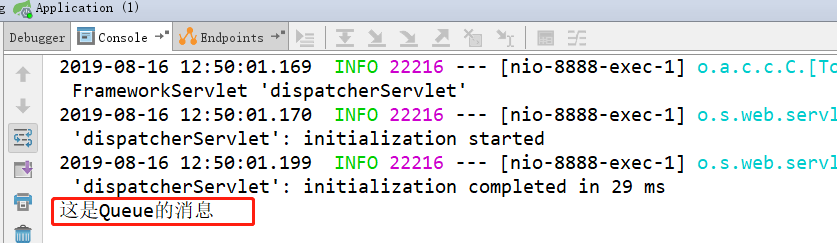
问题
Springboot整合ActiveMQ模式只能监听Queue队列的消息进行处理,所以如何处理topic消息?
解决:
在Springboot的application.properties文件中添加如下内容
spring.jms.pub-sub-domain=true //默认是false,开启发布订阅模式
启动测试
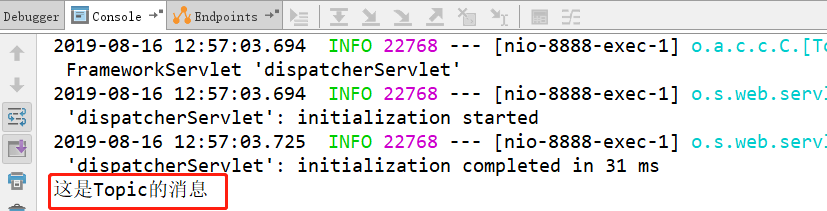
经过上述修改,又只能监听topic的消息,queue的消息又无法获取。
解决:
只有通过自定义监听器类来处理
在监听器类的@JmsListener添加connectionFactory属性
@Component

public class ActiveMQConsumer {

    //接收queue消息

   @JmsListener(destination = "queue_test",containerFactory =

                   "queueListenerContainerFactory")

    public void handler(String message){

        System.out.println(message);

    }

    //接收topic消息

    @JmsListener(destination = "topic_test",containerFactory =

                "topicListenerContainerFactory")

    public void handlerTopic(String msessage){

        System.out.println(msessage);

    }

}
创建一个配置类,在配置类中提供两个监听工厂配置
@Configuration

public class ConsumerConfiguration {

    @Value("${spring.activemq.broker-url}")

    private String host;

    @Bean

    public ConnectionFactory getActiveMqConnection(){

        return new ActiveMQConnectionFactory(host);

    }

    @Bean(name="queueListenerContainerFactory")

    public JmsListenerContainerFactory queueListenerContailerFactory(ConnectionFactory connectionFactory){

        DefaultJmsListenerContainerFactory factory = new DefaultJmsListenerContainerFactory();

        factory.setConnectionFactory(connectionFactory);

        factory.setPubSubDomain(false);

        return factory;

    }

    @Bean(name="topicListenerContainerFactory")

    public JmsListenerContainerFactory topicListenerContainerFactory(ConnectionFactory connectionFactory){

        DefaultJmsListenerContainerFactory factory = new DefaultJmsListenerContainerFactory();

        factory.setConnectionFactory(connectionFactory);

        factory.setPubSubDomain(true);

        return factory;

    }

}
运行测试

解决Springboot整合ActiveMQ发送和接收topic消息的问题的更多相关文章
- SpringBoot整合ActiveMq实现Queue和Topic两种模式(看不懂你来打我)
目录 一.前言 二.ActiveMq的下载和使用 三.依赖准备 四.yml文件配置 五.配置Bean 六.创建生产者(Queue+Topic) 七.创建消费者(Topic模式下) 八.测试结果(Top ...
- SpringBoot系列八:SpringBoot整合消息服务(SpringBoot 整合 ActiveMQ、SpringBoot 整合 RabbitMQ、SpringBoot 整合 Kafka)
声明:本文来源于MLDN培训视频的课堂笔记,写在这里只是为了方便查阅. 1.概念:SpringBoot 整合消息服务 2.具体内容 对于异步消息组件在实际的应用之中会有两类: · JMS:代表作就是 ...
- ActiveMQ 笔记(四)Spring\SpringBoot 整合 Activemq
个人博客网:https://wushaopei.github.io/ (你想要这里多有) 一.Spring 整合Activemq 1.所需jar包 <dependencies> &l ...
- Web项目容器集成ActiveMQ & SpringBoot整合ActiveMQ
集成tomcat就是随项目启动而启动tomcat,最简单的方法就是监听器监听容器创建之后以Broker的方式启动ActiveMQ. 1.web项目中Broker启动的方式进行集成 在这里采用Liste ...
- SpringBoot整合ActiveMQ快速入门
Spring Boot 具有如下特性: 为基于 Spring 的开发提供更快的入门体验 开箱即用,没有代码生成,也无需 XML 配置.同时也可以修改默认值来满足特定的需求. 提供了一些大型项目中常见的 ...
- SpringBoot整合ActiveMQ和开启持久化
一.点对点 1.提供者目录展示 2.导入依赖 <dependency> <groupId>org.springframework.boot</groupId> &l ...
- 2.技巧: 用 JAXM 发送和接收 SOAP 消息—Java API 使许多手工生成和发送消息方面必需的步骤自动化
转自:https://www.cnblogs.com/chenying99/archive/2013/05/23/3094128.html 技巧: 用 JAXM 发送和接收 SOAP 消息—Java ...
- (七)发送、接收SOAP消息(以HttpClient方式)(2)
一.为什么要用soap 原本我们使用web服务都是根据wsdl生成客户端(生成一堆java文件)然后再调用,本章节讲解如何用soap消息来替代这种方式. 二.SOAP消息格式 SOAP(简单对象访问协 ...
- SpringBoot整合ActiveMQ,看这篇就够了
ActiveMQ是Apache提供的一个开源的消息系统,完全采用Java来实现,因此它能很好地支持JMS(Java Message Service,即Java消息服务)规范:本文将详细介绍下Activ ...
随机推荐
- ~~函数基础(三):嵌套函数&匿名函数~~
进击のpython 嵌套函数&匿名函数 讲完作用域之后 对变量的作用范围有大致的了解了吗? 讲个稍微小进阶的东西吧 能够帮助你更加的理解全局和局部变量 嵌套函数 玩过俄罗斯套娃不? 没玩过听过 ...
- Communicating with the UI Thread_翻译
In the previous lesson you learned how to start a task on a thread managed by ThreadPoolExecutor. Th ...
- 【基础算法-模拟-例题-玩具谜题】-C++
原题链接P1563 玩具谜题 这道题依然是一道模拟题目,就简单讲讲坑点: 1.有些时候在转圈的时候要用到它们站成了一个环的性质! 2.小人面朝的方向影响了它们左右的方向! 3.注意考虑顺时针逆时针与小 ...
- bs4——BeautifulSoup模块:解析网页
解析由requests模块请求到的网页 import requests from bs4 import BeautifulSoup headers = {'User-Agent': 'Mozilla/ ...
- Ubuntu搭建hugo博客
自己搭建了一个博客用hugo,后因自己搭建的博客上传文章,搞一些东西不方便,就创建了现在这个博客,不过还是把如何搭建hugo的过程记录以下. Ubuntu下的操作 1. 下载Git 打开终端 Ctrl ...
- list模板题
题面: 设计一个int类型的动态链表L,L中有一个代表当前位置的光标,支持下列操作: insert(x): 在光标前面插入元素x,插入后光标指向新插入的元素x move(d): 如果d为正数,则光标向 ...
- Netty中的责任链模式
适用场景: 对于一个请求来说,如果有个对象都有机会处理它,而且不明确到底是哪个对象会处理请求时,我们可以考虑使用责任链模式实现它,让请求从链的头部往后移动,直到链上的一个节点成功处理了它为止 优点: ...
- 《VR入门系列教程》之12---转换矩阵
转换矩阵 模型网格的三维空间位置都是由它们的顶点坐标决定的,如果每次想要移动一下模型位置都要依次改变每个网格的顶点坐标,这将一件非常头疼的事,要是遇上需要显示动画效果那就更糟了.为了解决这个问 ...
- datatables editor fields type
其实editor fields type 默认支持的输入类型就是w3c输入框类型. text number password textarea select checkbox ...
- Calico 网络通信原理揭秘
Calico 是一个纯三层的数据中心网络方案,而且无缝集成像 OpenStack 这种 Iaas 云架构,能够提供可控的 VM.容器.裸机之间的 IP 通信.为什么说它是纯三层呢?因为所有的数据包都是 ...