
监听iOS检测屏幕旋转状态,不需开启屏幕旋转
- -(void)rotation_icon:(float)n {
- UIButton *history_btn= [self.view viewWithTag:<#(NSInteger)#>][self.view viewWithTagName:@"home_history"];
- UIButton *cam_btn = [self.view viewWithTagName:@"cam_btn"]; UIButton *cut_btn = [self.view viewWithTagName:@"cut_btn"]; UIButton *light_btn=[self.view viewWithTagName:@"light_btn"];
- history_btn.transform = CGAffineTransformMakeRotation(n*M_PI/180.0);
- cam_btn.transform = CGAffineTransformMakeRotation(n*M_PI/180.0);
- cut_btn.transform = CGAffineTransformMakeRotation(n*M_PI/180.0);
- light_btn.transform = CGAffineTransformMakeRotation(n*M_PI/180.0);
- }
- - (void)orientationChanged:(NSNotification *)note { UIDeviceOrientation o = [[UIDevice currentDevice] orientation];
- switch (o) {
- case UIDeviceOrientationPortrait: // Device oriented vertically, home button on the bottom
- [self rotation_icon:0.0];
- break;
- case UIDeviceOrientationPortraitUpsideDown: // Device oriented vertically, home button on the top
- [self rotation_icon:180.0];
- break;
- case UIDeviceOrientationLandscapeLeft: // Device oriented horizontally, home button on the right
- [[UIApplication sharedApplication] setStatusBarOrientation:UIInterfaceOrientationLandscapeRight animated:YES];
- [self rotation_icon:90.0*3];
- break;
- case UIDeviceOrientationLandscapeRight: // Device oriented horizontally, home button on the left
- [[UIApplication sharedApplication] setStatusBarOrientation:UIInterfaceOrientationLandscapeLeft animated:YES];
- [self rotation_icon:90.0];
- break;
- default:
- break;
- }
- }
- -(void)viewWillDisappear:(BOOL)animated {
- NSNotificationCenter *nc = [NSNotificationCenter defaultCenter];
- UIDevice *device = [UIDevice currentDevice]; //Get the device object
- [nc removeObserver:self name:UIDeviceOrientationDidChangeNotification object:device];
- }
- - (void)viewDidAppear:(BOOL)animated {
- // Do any additional setup after loading the view from its nib.
- //----- SETUP DEVICE ORIENTATION CHANGE NOTIFICATION -----
- UIDevice *device = [UIDevice currentDevice]; //Get the device object
- [device beginGeneratingDeviceOrientationNotifications]; //Tell it to start monitoring the accelerometer for orientation
- NSNotificationCenter *nc = [NSNotificationCenter defaultCenter]; //Get the notification centre for the app
- [nc addObserver:self selector:@selector(orientationChanged:) name:UIDeviceOrientationDidChangeNotification object:device];
在特别的场景下,需要针对屏幕旋转作特殊处理。在ios系统下实现相关的功能还是比较方便的。
我下面介绍两种方法:
1.注册UIApplicationDidChangeStatusBarOrientationNotification通知(举例:在一个viewcontroller类的viewdidload中注册该通知),示例代码如下:
[[NSNotificationCenter defaultCenter] addObserver:self selector:@selector(statusBarOrientationChange:)name:UIApplicationDidChangeStatusBarOrientationNotification object:nil];
- (void)statusBarOrientationChange:(NSNotification *)notification
{
UIInterfaceOrientation orientation = [[UIApplication sharedApplication] statusBarOrientation];
if (orientation == UIInterfaceOrientationLandscapeRight) // home键靠右
{
//
}
if (
orientation ==UIInterfaceOrientationLandscapeLeft) // home键靠左
{
//
}
if (orientation == UIInterfaceOrientationPortrait)
{
//
}
if (orientation == UIInterfaceOrientationPortraitUpsideDown)
{
//
}
}
注意这种方式监听的是StatusBar也就是状态栏的方向,所以这个是跟你的布局有关的,你的布局转了,才会接到这个通知,而不是设备旋转的通知。
当我们关注的东西和布局相关而不是纯粹设备旋转,我们使用上面的代码作为实现方案比较适合。
2.注册UIDeviceOrientationDidChangeNotification通知(举例:我们同样在一个viewcontroller类的viewdidload中注册该通知),示例代码如下:
[[NSNotificationCenter defaultCenter] addObserver:self selector:@selector(orientChange:) name:UIDeviceOrientationDidChangeNotification object:nil];
- (void)orientChange:(NSNotification *)noti
{
NSDictionary* ntfDict = [noti userInfo];
UIDeviceOrientation orient = [UIDevice currentDevice].orientation;
/*
UIDeviceOrientationUnknown,
UIDeviceOrientationPortrait, // Device oriented vertically, home button on the bottom
UIDeviceOrientationPortraitUpsideDown, // Device oriented vertically, home button on the top
UIDeviceOrientationLandscapeLeft, // Device oriented horizontally, home button on the right
UIDeviceOrientationLandscapeRight, // Device oriented horizontally, home button on the left
UIDeviceOrientationFaceUp, // Device oriented flat, face up
UIDeviceOrientationFaceDown // Device oriented flat, face down */
switch (orient)
{
case UIDeviceOrientationPortrait:
break;
case UIDeviceOrientationLandscapeLeft:
break;
case UIDeviceOrientationPortraitUpsideDown:
break;
case UIDeviceOrientationLandscapeRight:
break;
default:
break;
}
}
注意到这种方式里面的方向还包括朝上或者朝下,很容易看出这个完全是根据设备自身的物理方向得来的,当我们关注的只是物理朝向时,我们通常需要注册该通知来解决问题(另外还有一个加速计的api,可以实现类似的功能,该api较底层,在上面两个方法能够解决问题的情况下建议不要用,使用不当性能损耗非常大)。
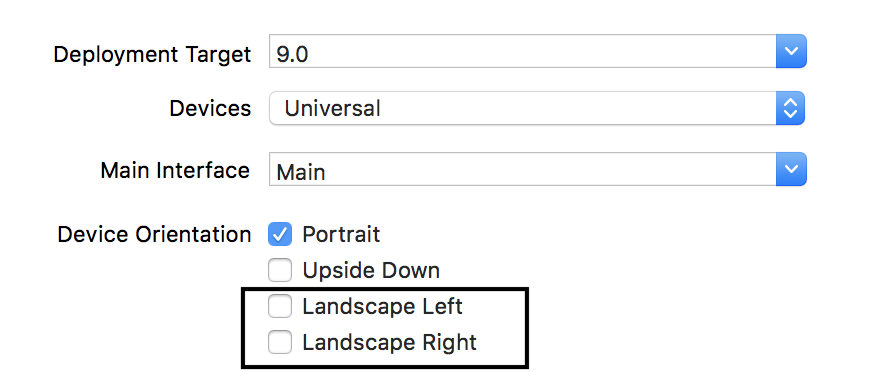
- (UIInterfaceOrientationMask)application:(UIApplication *)application supportedInterfaceOrientationsForWindow:(nullable UIWindow *)window
{
return UIInterfaceOrientationMaskPortrait;
}
参考链接 https://blog.csdn.net/nadeal/article/details/79542682
监听iOS检测屏幕旋转状态,不需开启屏幕旋转的更多相关文章
- 监听iOS检测屏幕旋转状态,不需开启屏幕旋转-b
-(void)rotation_icon:(float)n { UIButton *history_btn= [self.view viewWithTag:<#(NSInteger)#>] ...
- 短信状态监听 - iOS
当使用 App 时若短信介入需要对当前状态进行监听操作,根据不同的状态实行相关的需求操作,废话不多说步骤如下. 首先,常规操作先引用对应的头文件,来为后续功能铺路. #import <Messa ...
- 截屏状态监听 - iOS
既接到电话状态监听的需求之后再次添加了截屏状态的监听,当使用 App 时若用户执行截屏操作需要对当前状态进行监听操作,下面有两种方法,其中可以替换截屏的图片内容(Plan A),也可以弹出提示框(Pl ...
- iOS 实时监听app的网络连接状态
实际iOS开发中,在网络通信中我们大部分使用第三方(只谈短链),譬如 AFNetworking.ASIHttpRequest(这个停更了,想必现在没多少人用),swift的 Alamofire 等. ...
- 电话状态监听 - iOS
今天接到一个监听状态的需求,当使用 App 时若电话介入需要对当前状态进行监听操作(注:并非通话内容),根据不同的状态实行相关的需求操作,废话不多说步骤如下. 首先,常规操作先引用对应的头文件,来为后 ...
- 监听列表ListVIew的滑动状态
/*监听列表的滑动状态:暂时用不到 * SCROLL_STATE_FLING 时让图片不显示,提高滚动性能让滚动小姑更平滑 * SCROLL_STATE_IDLE 时显示当前屏幕可见的图片*/ mLi ...
- Android监听外部存储设备的状态(SD卡、U盘等等)
近期在项目中须要对外部存储设备的状态进行监听,所以整理了此笔记,以便日后查看. 外部存储设备的状态变化时发出的广播 对照不同状态下的广播 1. 插入外部SD卡时: 2. 移除外部SD卡时: 3. 连接 ...
- Android开发——监听Android手机的网络状态
0. 前言 在Android开发中监听手机的网络状态是一个常见的功能,比如在没网的状态下进行提醒并引导用户打开网络设置,或者在非wifi状态下开启无图模式等等.因此本篇将网上的资料进行了整理总结,方便 ...
- 监听事件动态改变dom状态
html代码: <table class="table table-striped"> <thead> <tr> <th>分类ID& ...
随机推荐
- [usaco jan 09] 安全路径 travel [最短路径树]
题面: 传送门 思路: 既然最后一条边不能走,那么就一定是换了一条路,一条不经过这最后一条边的路 如果想要这条路最短,那么其在路上一定尽可能多地走了最短路径 因此,我们对这张图跑一遍从1开始的单源最短 ...
- xml的并发
网站整站的缓存方式都是依靠的DataSet的ReadXml和WriteXml的方式实现的,这种方式在访问量不是很大的网站中是一点问题都没有的(最大可承受的日IP估计在8000-15000左右),但是当 ...
- 座位安排(seat)
座位安排(seat) 题目描述 费了一番口舌,wfj_2048终于成功地说服了n∗mn∗m个妹子来陪自己看电影. 为了这次声势浩大,wfj_2048包下了一座有n∗mn∗m个座位的电影院. (wfj_ ...
- Python 读取 pkl文件
使用python 的cPickle 库中的load函数,可以读取pkl文件的内容 import cPickle as pickle fr = open('mnist.pkl') #open的参数是pk ...
- python中文注释报错
# -*- coding: utf-8 -*-#coding=utf-8 在开头加这个
- 【POJ3667】Hotel(线段树)
题意:有n个依次编号的元素,要求维护以下两个操作: 1.询问整个数列中是否有长度>=x的连续的一段未被标记的元素,若无输出0,若有输出最小的开始编号ans并将[ans,ans+x-1]标记 2. ...
- Mongoose 表实例
/********** 用户表 BY Jaysir 2015.6.21 *********** *********** 可搜索以下关键词来查看未实现功能 *********** *********** ...
- [LeetCode] Search in Rotated Sorted Array II 二分搜索
Follow up for "Search in Rotated Sorted Array":What if duplicates are allowed? Would this ...
- PE笔记之NT头PE文件头
typedef struct _IMAGE_FILE_HEADER { WORD Machine; //014C-IMAGE_FILE ...
- Scrapy学习-23-分布式爬虫
scrapy-redis分布式爬虫 分布式需要解决的问题 request队列集中管理 去重集中管理 存储管理 使用scrapy-redis实现分布式爬虫 github开源项目: https://g ...