
Spring Boot (七)MyBatis代码自动生成和辅助插件
一、简介
1.1 MyBatis Generator介绍
MyBatis Generator 是MyBatis 官方出品的一款,用来自动生成MyBatis的 mapper、dao、entity 的框架,让我们省去规律性最强的一部分最基础的代码编写。
1.2 MyBatis Generator使用
MyBatis Generator的使用方式有4种:
- 命令行生成
- Maven方式生成
- 使用Ant任务生成
- 使用Java代码生成
其中推荐使用Maven方式进行代码生成,因为集成和使用比较简单。
1.3 开发环境
MySQL:8.0.12
MyBatis Generator:1.3.7
Maven:4.0
IDEA:2018.2
二、代码自动生成配置
上面介绍了使用MyBatis Generator的几种方式,其中最推荐使用的是Maven方式,所以下面我们来看Maven方式的MyBatis代码生成,分为四步:
Step1:添加依赖
配置pom.xml文件,增加依赖和配置生成文件(“generatorConfig.xml”)路径:
<plugin>

    <groupId>org.mybatis.generator</groupId>

    <artifactId>mybatis-generator-maven-plugin</artifactId>

    <version>1.3.7</version>

    <dependencies>

        <dependency>

            <groupId>mysql</groupId>

            <artifactId>mysql-connector-java</artifactId>

            <version>8.0.12</version>

        </dependency>

        <dependency>

            <groupId>org.mybatis.generator</groupId>

            <artifactId>mybatis-generator-core</artifactId>

            <version>1.3.7</version>

        </dependency>

    </dependencies>

    <executions>

        <execution>

            <id>Generate MyBatis Artifacts</id>

            <phase>package</phase>

            <goals>

                <goal>generate</goal>

            </goals>

        </execution>

    </executions>

    <configuration>

        <!--允许移动生成的文件 -->

        <verbose>true</verbose>

        <!-- 是否覆盖 -->

        <overwrite>true</overwrite>

        <!-- 自动生成的配置 -->

        <configurationFile>generatorConfig.xml</configurationFile>

    </configuration>

</plugin>
Step2:添加配置文件
根据上面在pom里的配置,我们需要添加generatorConfig.xml在项目的根目录:
<?xml version="1.0" encoding="UTF-8"?>

<!DOCTYPE generatorConfiguration

        PUBLIC "-//mybatis.org//DTD MyBatis Generator Configuration 1.0//EN"

        "http://mybatis.org/dtd/mybatis-generator-config_1_0.dtd">

<generatorConfiguration>

    <!--加载配置文件,为下面读取数据库信息准备-->

    <properties resource="application.properties"/>

    <!--defaultModelType="flat" 大数据字段,不分表 -->

    <context id="Mysql" targetRuntime="MyBatis3Simple" defaultModelType="flat">

        <property name="autoDelimitKeywords" value="true" />

        <property name="beginningDelimiter" value="`" />

        <property name="endingDelimiter" value="`" />

        <property name="javaFileEncoding" value="utf-8" />

        <plugin type="org.mybatis.generator.plugins.SerializablePlugin" />

        <plugin type="org.mybatis.generator.plugins.ToStringPlugin" />

        <!-- 注释 -->

        <commentGenerator >

            <property name="suppressAllComments" value="true"/><!-- 是否取消注释 -->

            <property name="suppressDate" value="true" /> <!-- 是否生成注释代时间戳-->

        </commentGenerator>

        <!--数据库链接地址账号密码-->

        <jdbcConnection driverClass="${spring.datasource.driver-class-name}"

                        connectionURL="${spring.datasource.url}"

                        userId="${spring.datasource.username}"

                        password="${spring.datasource.password}">

        </jdbcConnection>

        <!-- 类型转换 -->

        <javaTypeResolver>

            <!-- 是否使用bigDecimal, false可自动转化以下类型(Long, Integer, Short, etc.) -->

            <property name="forceBigDecimals" value="false"/>

        </javaTypeResolver>

        <!--生成Model类存放位置-->

        <javaModelGenerator targetPackage="com.hello.springboot.entity" targetProject="src/main/java">

            <property name="enableSubPackages" value="true"/>

            <property name="trimStrings" value="true"/>

        </javaModelGenerator>

        <!-- 生成mapxml文件 -->

        <sqlMapGenerator targetPackage="mapper" targetProject="src/main/resources/mybatis" >

            <property name="enableSubPackages" value="false" />

        </sqlMapGenerator>

        <!-- 生成mapxml对应client,也就是接口dao -->

        <javaClientGenerator targetPackage="com.hello.springboot.dao" targetProject="src/main/java" type="XMLMAPPER" >

            <property name="enableSubPackages" value="false" />

        </javaClientGenerator>

        <table tableName="article" enableCountByExample="true" enableUpdateByExample="true" enableDeleteByExample="true" enableSelectByExample="true" selectByExampleQueryId="true">

            <generatedKey column="id" sqlStatement="Mysql" identity="true" />

        </table>

        <table tableName="user_log" enableCountByExample="true" enableUpdateByExample="true" enableDeleteByExample="true" enableSelectByExample="true" selectByExampleQueryId="true">

            <generatedKey column="id" sqlStatement="Mysql" identity="true" />

        </table>

    </context>

</generatorConfiguration>
其中数据库连接的配置,是从application.properties直接读取的。
Step3:配置全局属性文件
全局属性文件application.properties的配置,和Spring Boot增加MyBatis的配置是一样的,如果你的Spring Boot项目里面已经配置了MyBatis支持,请忽略此步骤。
# MyBatis 配置

spring.datasource.url=jdbc:mysql://172.16.10.79:3306/mytestdb?serverTimezone=UTC&useSSL=false&allowPublicKeyRetrieval=true

spring.datasource.username=root

spring.datasource.password=123456

spring.datasource.driver-class-name=com.mysql.cj.jdbc.Driver

mybatis.type-aliases-package=com.hello.springboot.mapper

mybatis.config-locations=classpath:mybatis/mybatis-config.xml

mybatis.mapper-locations=classpath:mybatis/mapper/*.xml
注意: MySQL 6以后JDBC的配置就不一样了,参照如上MySQL 8的配置。
Step4:点击Maven生成代码
如果你使用的是IDEA,点击最右侧的Maven Projects => 点击mybatis-generator => 右键mybatis-generator:generate => Run Maven Build,如下图所示:
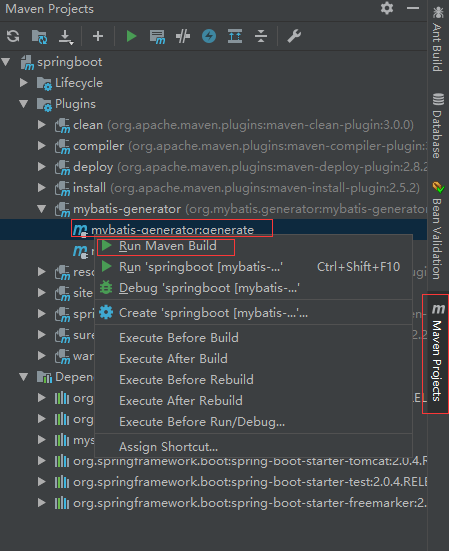
正常控制台输出“BUILD SUCCESS”说明生成已经成功了,如果出现错误,根据错误提示信息排除处理错误即可。
MyBatis Generator 示例源码:https://github.com/vipstone/springboot-example/tree/master/springboot-mybatis-xml
三、安装IDEA插件
如果你使用的是 IDEA,那么强烈建议你安装一款免费的IDEA插件“Free MyBatis plugin”,可以实现dao到mapper xml对应方法的快速映射,点击任意一个快速调整到相应的方法,提高工作效率,效果如下图所示:

点击绿色的箭头直接跳转到了mapper xml对应的方法了,如下图所示:
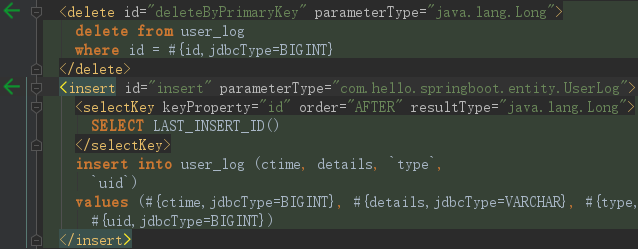
可以相互点击,进行对应的跳转。
安装步骤
- 点击菜单栏Flie => Settings
- 点击Browse repostitories..
- 输入“Free MyBatis plugin”查找插件
- 点击安装,重启IDEA
关键步骤的截图如下:

四、总结
使用了MyBatis Generator可以帮我们自动生成实体类,和5个最基础的方法,大大的提高我们的工作效率,用户只需要按需写自己独有的一些业务即可。同时增加“Free MyBatis plugin”插件,可以很方便的帮我们开发和调试代码,真是实实在在的福利。
Spring Boot (七)MyBatis代码自动生成和辅助插件的更多相关文章
- MyBatis代码自动生成(利用eclipse插件)
上一篇文章已经介绍了利用命令的方式自动生成mybatis代码,但是每次都去运行cmd命令感觉还是有点麻烦,所以找了些资料发现eclipse里面也可以安装插件自动生成代码,下面简单介绍一下,也是给自己以 ...
- (转)MyBatis框架的学习(七)——MyBatis逆向工程自动生成代码
http://blog.csdn.net/yerenyuan_pku/article/details/71909325 什么是逆向工程 MyBatis的一个主要的特点就是需要程序员自己编写sql,那么 ...
- eclipse生成mybatis的逆向工程-mybatis代码自动生成
首先,工作中一直在使用命令方式的mybatis的代码自动生成,今天把自己的笔记本直接搞一个在eclipse中生成的逆向代码生成工程,方便自己在家学习使用,在搞这个工程的过程中由于自己搞了一套环境,所i ...
- Mybatis代码自动生成(含测试)
一.建立数据库 create database shixun; use shixun; create table user( id int primary key auto_increment , u ...
- MyBatis代码自动生成(利用命令)
这几天在学习springmvc,需要用到mybatis,所以研究了一下mybatis自动代码生成,当然也可以手动敲,但是那样效率非常的慢,并且出错率也是很高的,利用MyBatis生成器自动生成实体类. ...
- MyBatis代码自动生成
MyBatis的代码自动生成的功能,由于MyBatis属于一种半自动的ORM框架,所以主要的工作就是配置Mapping映射文件,但是由于手写映射文件很容易出错,所以可利用MyBatis生成器自动生成实 ...
- Mybatis 代码自动生成[myeclipse版]
使用环境说明: OS:windows 7 64位 myeclipse: 2017 CI 1.安装 打开myeclipse--help---Install from catalog--选择eclipse ...
- Mybatis 代码自动生成(generatorConfig.xml配置)
博客推荐: Mybatis最入门---代码自动生成(generatorConfig.xml配置) MyBatis Generator generatorConfig.xml配置详解 pom.xml&l ...
- mybatis-generator-gui--一个mybatis代码自动生成界面工具
mybatis-generator-gui是什么 介绍mybatis-generator-gui之前,有必要介绍一下什么是mybatis generator(熟悉的同学可以跳过这一节).我们都知道,通 ...
随机推荐
- soapUI启动报错:The JVM could not be started. The maximum heap size (-Xmx) might be too large or an antivirus or firewall tool could block the execution.
版本: soapUI-5.2.1 问题: 启动soapUI时报错:The JVM could not be started. The maximum heap size (-Xmx) might be ...
- vue 验证电话
<el-form :model="orderaddForm" :rules="rulesPhone" ref="orderaddForm&quo ...
- 从url中获得域名
import java.net.MalformedURLException; import java.net.URL; /** * * @author csh * */ public class AA ...
- 数组的初始化&缩窄转换
1.初始化: 初始化就是在声明变量的同时给变量赋值,而不是声明后再赋值. 先声明,后赋值: int a; //先声明,由于没有初始化,所以当前a的值是变量a创建前,相应的内存单元中保留的值,是未知的 ...
- python print 中文重定向失败
一直以来认为解决python字符集编码,不一定需要通过sys.setdefaultencoding.因为既然python实现过程中,默认禁用了该操作,说明是不推荐的. 通过不断的字符转换,也cover ...
- SELECT 语句
常见表的操作 查看数据库的表 show table 查看表结构 desc 表名 删除表 drop table表 修改表的结构 添加列 alter table 表名 add 列名 ...
- 深入理解JVM(七)——性能监控工具
前言 工欲善其事必先利其器,性能优化和故障排查在我们大都数人眼里是件比较棘手的事情,一是需要具备一定的原理知识作为基础,二是需要掌握排查问题和解决问题的流程.方法.本文就将介绍利用性能监控工具,帮助开 ...
- .NET Core跨平台的奥秘[下篇]:全新的布局
从本质上讲,按照CLI规范设计的.NET从其出生的那一刻就具有跨平台的基因,这与Java别无二致.由于采用了统一的中间语言,微软只需要针对不同的平台设计不同的虚拟机(运行时)就能弥合不同操作系统与处理 ...
- Jenkins(Docker容器内)使用宿主机的docker命令
1.Jenkins镜像 Docker容器内的Jenkins使用容器外宿主机的Docker(即DooD,还有另外的情况就是DioD),google一下有几种说法,但是都没试成功(试过一种就是修改宿主机/ ...
- 【安富莱】【RL-TCPnet网络教程】第8章 RL-TCPnet网络协议栈移植(RTX)
第8章 RL-TCPnet网络协议栈移植(RTX) 本章教程为大家讲解RL-TCPnet网络协议栈的RTX操作系统移植方式,学习了第6章讲解的底层驱动接口函数之后,移植就比较容易了,主要 ...