
MSIL实用指南-创建字段
本篇讲解怎么创建字段,主要是在修饰符的创建上。
创建字段的方法是TypeBuilder.DefineField,传入字段名称、字段类型、字段修饰符等参数,返回一个FieldBuilder对象。
先看这一句程序
FieldBuilder nameFieldBuilder = typeBuilder.DefineField("Name", typeof(string), FieldAttributes.Private);
上面一条程序是创建一个叫"Name"的数据类型为"string"的字段,等同于
private string Name;
FieldAttributes是枚举类型,决定字段的修饰符。详细说明如下
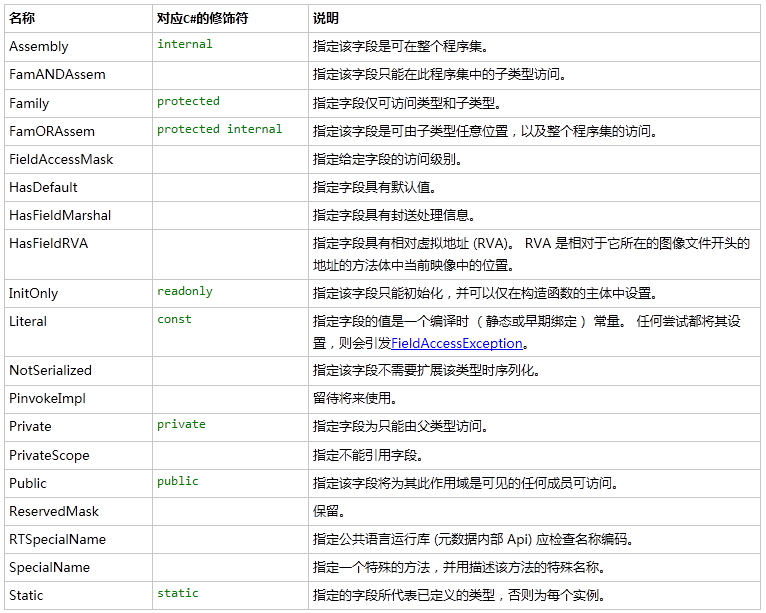
C#语言规范只是用到了FieldAttributes的一部分枚举,并没有用到全部。
FieldBuilder ageFieldBuilder = typeBuilder.DefineField("Arg", typeof(int), FieldAttributes.Public);
等同于C#语言
public int Arg;
FieldBuilder maxCountFieldBuilder = typeBuilder.DefineField("MaxCount", typeof(long), FieldAttributes.Family);
等同于C#语言
protected long MaxCount;
FieldBuilder IFFieldBuilder = typeBuilder.DefineField("IF", typeof(string), FieldAttributes.Assembly);
等同于C#语言
internal string IF;
FieldBuilder PIFFieldBuilder = typeBuilder.DefineField("PIF", typeof(string),

FieldAttributes.Family | FieldAttributes.FamORAssem);
等同于C#语言
protected internal string PIF;
FieldBuilder PRFieldBuilder = typeBuilder.DefineField("RF", typeof(string),

FieldAttributes.Private | FieldAttributes.InitOnly);
等同于C#语言
private readonly string RF;
FieldBuilder CFFieldBuilder = typeBuilder.DefineField("CF", typeof(string),

FieldAttributes.Private | FieldAttributes.Literal);
等同于C#语言
private const string CF;
FieldBuilder SFFieldBuilder = typeBuilder.DefineField("SF", typeof(string),

FieldAttributes.Private | FieldAttributes.Static);
等同于C#语言
private static string SF;
完成的程序如下:
using System;

using System.Reflection;

using System.Reflection.Emit;

namespace LX1_ILDemo

{

    class Demo05_FieldCreate

    {

        static string binaryName = "Demo05_FieldCreate.dll";

        static string namespaceName = "LX1_ILDemo";

        static string typeName = "EmitFieldCreate";

        static AssemblyBuilder assemblyBuilder;

        static ModuleBuilder moduleBuilder;

        static TypeBuilder typeBuilder;

        static void Create_Fileds()

        {

            /* private string Name; */

            FieldBuilder nameFieldBuilder = typeBuilder.DefineField("Name", typeof(string), FieldAttributes.Private);

            /* public int Arg; */

            FieldBuilder ageFieldBuilder = typeBuilder.DefineField("Arg", typeof(int), FieldAttributes.Public);

            /* protected long MaxCount; */

            FieldBuilder maxCountFieldBuilder = typeBuilder.DefineField("MaxCount", typeof(long), FieldAttributes.Family);

            /* internal string IF; */

            FieldBuilder IFFieldBuilder = typeBuilder.DefineField("IF", typeof(string), FieldAttributes.Assembly);

            /* protected internal string PIF; */

            FieldBuilder PIFFieldBuilder = typeBuilder.DefineField("PIF", typeof(string),

                FieldAttributes.Family | FieldAttributes.FamORAssem);

            /* private readonly string RF; */

            FieldBuilder PRFieldBuilder = typeBuilder.DefineField("RF", typeof(string),

                FieldAttributes.Private | FieldAttributes.InitOnly);

            /* private const string CF; */

            FieldBuilder CFFieldBuilder = typeBuilder.DefineField("CF", typeof(string),

                FieldAttributes.Private | FieldAttributes.Literal);

            /* private static string SF; */

            FieldBuilder SFFieldBuilder = typeBuilder.DefineField("SF", typeof(string),

                FieldAttributes.Private | FieldAttributes.Static);

        }

        public static void Generate()

        {

            InitAssembly();

            typeBuilder = moduleBuilder.DefineType(namespaceName + "." + typeName, TypeAttributes.Public);

            Create_Fileds();

            SaveAssembly();

            Console.WriteLine("生成成功");

        }

        static void InitAssembly()

        {

            AssemblyName assemblyName = new AssemblyName(namespaceName);

            assemblyBuilder = AppDomain.CurrentDomain.DefineDynamicAssembly(assemblyName, AssemblyBuilderAccess.RunAndSave);

            moduleBuilder = assemblyBuilder.DefineDynamicModule(assemblyName.Name, binaryName);

        }

        static void SaveAssembly()

        {

            Type t = typeBuilder.CreateType(); //完成Type,这是必须的

            assemblyBuilder.Save(binaryName);

        }

    }

}
MSIL实用指南-创建字段的更多相关文章
- MSIL实用指南-给字段、属性、方法、类、程序集加Attribute
C#编程中可以给字段.方法.类以及程序集加特性即继承于Attribute的类.这里讲解怎么在IL中给它们加上特性. 生成字段的对应的类是FieldBuilder,生成属性的对应的类是PropertyB ...
- MSIL实用指南-创建枚举类型
创建枚举类型比较简单,主要使用moduleBuilder.DefineEnum 和enumBuilder.DefineLiteral. 第一步:创建 EnumBuilder 创建 EnumBuilde ...
- MSIL实用指南-创建方法和定义参数
本篇讲解实现创建方法.指定参数的名称.实现参数加out和ref修饰符.以及参数加默认值. 创建方法 创建方法用类TypeAttributes的 DefineMethod(string name, Me ...
- MSIL实用指南-生成索引器
MSIL实用指南-生成索引器 索引器是一种特殊的属性,它有参数的,也有get和set方法,属性名称一般是"Item",并且方法名称一般名称是"get_Item" ...
- MSIL实用指南-Action的生成和调用
MSIL实用指南-Action的生成和调用 System.Action用于封装一个没有参数没有返回值的方法.这里生成需要Ldftn指令. 下面讲解怎生成如下的程序. class ActionTest ...
- MSIL实用指南-闭包的生成和调用
闭包(Closure)是词法闭包(Lexical Closure)的简称.对闭包的具体定义有很多种说法,这些说法大体可以分为两类: 一种说法认为闭包是符合一定条件的函数,比如参考资源中这样定义闭包:闭 ...
- MSIL实用指南-字段的加载和保存
字段有静态字段和非静态字段之分,它们的加载保存指令也是不一样的,并且非静态字段要生成this. 静态字段的加载加载静态字段的指令是Ldsfld.ilGenerator.Emit(OpCodes.Lds ...
- MSIL实用指南-生成属性
本篇讲解怎么生成属性,包括get和set方法. 第一步,生成一个字段生成字段用TypeBuilder.DefineField方法.实例代码: FieldBuilder customerNameBldr ...
- MSIL实用指南-局部变量的声明、保存和加载
这一篇讲解方法内的局部变量是怎么声明.怎样保存.怎样加载的. 声明局部变量声明用ILGenerator的DeclareLocal方法,参数是局部变量的数据类型,得到一个局部变量对应的创建类LocalB ...
随机推荐
- C语言_初步了解一下指针
指针的基本概念 在计算机中,所有的数据都是存放在存储器中的. 一般把存储器中的一个字节称为一个内存单元, 不同的数据类型所占用的内存单元数不等,如整型量占2个单元,字符量占1个单元等.为了正确地访问这 ...
- Java集合框架(六)—— Collections工具类
操作集合的工具类Collections Java提供了一个操作Set.List和Map等集合的工具类:Collections,该工具类里提供了大量方法对集合元素进行排序.查询和修改等操作,还提供了将集 ...
- spring oauth2 ,spring security整合oauth2.0 JdbcTokenStore实现 解决url-pattern .do .action
参考以下两个文章: http://www.cnblogs.com/0201zcr/p/5328847.html http://wwwcomy.iteye.com/blog/2230265 web.xm ...
- chmod 与大写 X
chmod(1) 手册页中对权限位的描述中提及到 rwxXst 六个权限标记, rwx 是几乎所有 Linux 初学者都会学到的,更进者会了解到 st 两个标记,但 X 却少有提起.所以笔者大致了解了 ...
- Ironic中pxe driver和agent driver的区别
历史问题: 以pxe_ipmitool 和agent_ipmitool为例,看起来似乎前者不使用ironic-python-agent,后者使用,但是实际上两者都使用ironic-python-age ...
- python 常见错误和异常 函数 正则表达式及多线程编程
生成随机密码#!/usr/bin/env python import stringfrom random import choice def gen_pass(num=9): all_chs = st ...
- 【前端】Vue2全家桶案例《看漫画》之七、webpack插件开发——自动替换服务器API-URL
转载请注明出处:http://www.cnblogs.com/shamoyuu/p/vue_vux_app_7.html 项目github地址:https://github.com/shamoyuu/ ...
- 笔记本CPU低压和标压有什么区别?
笔记本CPU英文称Mobile CPU(移动CPU),它除了追求性能,也追求低热量和低耗电,最早的笔记本电脑直接使用台式机的CPU,但是随CPU主频的提高, 笔记本电脑狭窄的空间不能迅速散发CPU产生 ...
- tomcat证书配置
第一步:为服务器生成证书 1.进入%JAVA_HOME%/bin目录 2.使用keytool为Tomcat生成证书,假定目标机器的域名是"localhost",keystore文件 ...
- Windows PE入门基础知识:Windows PE的作用、命名规则、启动方式、启动原理
Windows PE的全名是WindowsPreinstallationEnvironment(WinPE)直接从字面上翻译就 是"Windows预安装环境".微软的本意是:Win ...