
CentsOS7无网情况下安装mysql5.7
1.需求就不用讲了,客户现场,政府环境,银行环境,大多是没网的,所以无网安装是很有必要的
mysql下载路径:https://dev.mysql.com/downloads/mysql/

查看自己Linux系统版本
[root@kylintest ~]# cat /etc/redhat-release

CentOS Linux release 7.3.1611 (Core)
往下拉继续选择

选择对应的下载,mysql-5.7.20-1.el7.x86_64.rpm-bundle.tar
这样几分钟就下载了。
2.准备依赖包:
a.numactl 软件包:
- numactl-2.0.9-6.el7_2.x86_64.rpm
- numactl-devel-2.0.9-6.el7_2.x86_64.rpm
- numactl-libs-2.0.9-6.el7_2.x86_64.rpm
b.其他相关支持:
- perl-Data-Dumper-2.145-3.el7.x86_64.rpm
- libaio-0.3.109-13.el7.x86_64.rpm
下载方式:https://pkgs.org
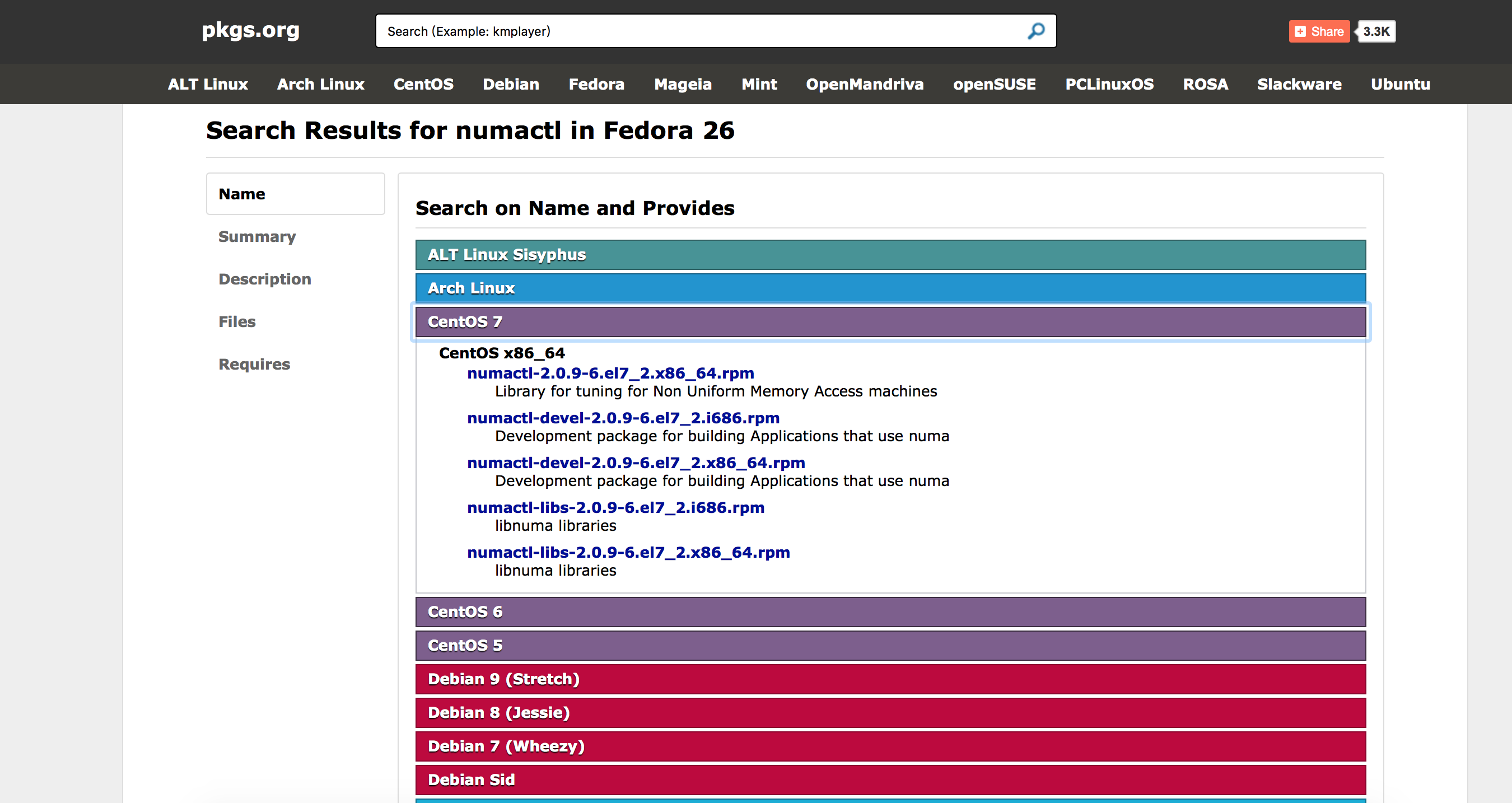
下面是下载路径:
libaio-0.3.109-13.el7.x86_64.rpm
perl-Data-Dumper-2.145-3.el7.x86_64.rpm
numactl-libs-2.0.9-6.el7_2.x86_64.rpm
numactl-devel-2.0.9-6.el7_2.x86_64.rpm
numactl-2.0.9-6.el7_2.x86_64.rpm
3.上传文件到服务器上
localhost:Downloads kylin$ scp -r numactl-2.0.9-6.el7_2.x86_64.rpm root@kylintest:/root/

root@kylintest's password:

numactl-2.0.9-6.el7_2.x86_64.rpm              100%   65KB   2.1MB/s   00:00

localhost:Downloads kylin$ scp -r numactl-libs-2.0.9-6.el7_2.x86_64.rpm root@kylintest:/root/

root@kylintest's password:

numactl-libs-2.0.9-6.el7_2.x86_64.rpm         100%   29KB   1.7MB/s   00:00

localhost:Downloads kylin$ scp -r numactl-devel-2.0.9-6.el7_2.x86_64.rpm root@kylintest:/root/

root@kylintest's password:

numactl-devel-2.0.9-6.el7_2.x86_64.rpm        100%   23KB   1.5MB/s   00:00

localhost:Downloads kylin$ scp -r perl-Data-Dumper-2.145-3.el7.x86_64.rpm root@kylintest:/root/

root@kylintest's password:

perl-Data-Dumper-2.145-3.el7.x86_64.rpm       100%   47KB   1.2MB/s   00:00

localhost:Downloads kylin$ scp -r libaio-0.3.109-13.el7.x86_64.rpm root@kylintest:/root/

root@kylintest's password:

Permission denied, please try again.

root@kylintest's password:

libaio-0.3.109-13.el7.x86_64.rpm              100%   24KB 618.3KB/s   00:00

localhost:Downloads kylin$ scp -r mysql-5.7.20-1.el7.x86_64.rpm-bundle.tar root@kylintest:/root/

root@kylintest's password:

mysql-5.7.20-1.el7.x86_64.rpm-bundle.tar                     100%  566MB   4.5MB/s   02:05
查看上传的包
[root@kylintest ~]# ls

anaconda-ks.cfg                           numactl-devel-2.0.9-6.el7_2.x86_64.rpm

libaio-0.3.109-13.el7.x86_64.rpm          numactl-libs-2.0.9-6.el7_2.x86_64.rpm

miniconda2                                perl-Data-Dumper-2.145-3.el7.x86_64.rpm

mysql-5.7.20-1.el7.x86_64.rpm-bundle.tar  pythonshell

numactl-2.0.9-6.el7_2.x86_64.rpm
4.安装
第一步,先安装依赖,安装 perl-Data-Dumper-2.145-3.el7.x86_64.rpm 和 libaio-0.3.109-13.el7.x86_64.rpm
[root@kylintest ~]# rpm -ivh libaio-0.3.109-13.el7.x86_64.rpm

Preparing...                          ################################# [100%]

	package libaio-0.3.109-13.el7.x86_64 is already installed

[root@kylintest ~]# rpm -ivh perl-Data-Dumper-2.145-3.el7.x86_64.rpm

Preparing...                          ################################# [100%]

Updating / installing...

   1:perl-Data-Dumper-2.145-3.el7     ################################# [100%]
第二步,继续安装 numactl相关
[root@kylintest ~]# rpm -ivh numactl*

Preparing...                          ################################# [100%]

	package numactl-libs-2.0.9-6.el7_2.x86_64 is already installed
如果不安装这个包会报错,错误如下(本人未测试):
error: Failed dependencies:

libnuma.so.1()(64bit) is needed by mysql-community-server-5.7.18-1.el7.x86_64

libnuma.so.1(libnuma_1.1)(64bit) is needed by mysql-community-server-5.7.18-1.el7.x86_64

libnuma.so.1(libnuma_1.2)(64bit) is needed by mysql-community-server-5.7.18-1.el7.x86_64
若此时直接安装mysql,还会异常:
warning: mysql-community-libs-5.7.18-1.el7.x86_64.rpm: Header V3 DSA/SHA1 Signature, key ID 5072e1f5: NOKEY error: Failed dependencies:

 mysql-community-common(x86-64) >= 5.7.9 is needed by mysql-community-libs-5.7.18-1.el7.x86_64

 mariadb-libs is obsoleted by mysql-community-libs-5.7.18-1.el7.x86_64
第一行还能看明白,是依赖问题,第二行的“mariadb-libs 被废弃”是什么鬼?废弃了为什么不提供一个新的还要出现这种弱智提示呢?经过一番搜寻,才发现是因为在CentOS 7上已经有一个mariadb 而这个会与 MySQL的mariadb发生冲突。所以此时我们需要将系统自带的mariadb卸载掉,然后使用mysql自带的mariadb。
接下来查看mariadb版本
[root@kylintest ~]# rpm -qa | grep mariadb

mariadb-libs-5.5.52-1.el7.x86_64
卸载系统安装的mariadb
[root@kylintest ~]# rpm -e --nodeps mariadb-libs-5.5.52-1.el7.x86_64

[root@kylintest ~]# rpm -qa | grep mariadb

[root@kylintest ~]#
解决好这个问题后,就可以安装mysql了,先解压mysql,并查看安装包
[root@kylintest ~]# tar -xf mysql-5.7.20-1.el7.x86_64.rpm-bundle.tar

[root@kylintest ~]# ls

anaconda-ks.cfg

libaio-0.3.109-13.el7.x86_64.rpm

miniconda2

mysql-5.7.20-1.el7.x86_64.rpm-bundle.tar

mysql-community-client-5.7.20-1.el7.x86_64.rpm

mysql-community-common-5.7.20-1.el7.x86_64.rpm

mysql-community-devel-5.7.20-1.el7.x86_64.rpm

mysql-community-embedded-5.7.20-1.el7.x86_64.rpm

mysql-community-embedded-compat-5.7.20-1.el7.x86_64.rpm

mysql-community-embedded-devel-5.7.20-1.el7.x86_64.rpm

mysql-community-libs-5.7.20-1.el7.x86_64.rpm

mysql-community-libs-compat-5.7.20-1.el7.x86_64.rpm

mysql-community-minimal-debuginfo-5.7.20-1.el7.x86_64.rpm

mysql-community-server-5.7.20-1.el7.x86_64.rpm

mysql-community-server-minimal-5.7.20-1.el7.x86_64.rpm

mysql-community-test-5.7.20-1.el7.x86_64.rpm

numactl-2.0.9-6.el7_2.x86_64.rpm

numactl-devel-2.0.9-6.el7_2.x86_64.rpm

numactl-libs-2.0.9-6.el7_2.x86_64.rpm

perl-Data-Dumper-2.145-3.el7.x86_64.rpm

pythonshell
直接安装,报错:
[root@kylintest ~]# rpm -ivh mysql-community-*

warning: mysql-community-client-5.7.20-1.el7.x86_64.rpm: Header V3 DSA/SHA1 Signature, key ID 5072e1f5: NOKEY

error: Failed dependencies:

	net-tools is needed by mysql-community-server-5.7.20-1.el7.x86_64

	perl(JSON) is needed by mysql-community-test-5.7.20-1.el7.x86_64
貌似不能直接全安装,有顺序,继续:
[root@kylintest ~]# rpm -ivh mysql-community-common-5.7.20-1.el7.x86_64.rpm

warning: mysql-community-common-5.7.20-1.el7.x86_64.rpm: Header V3 DSA/SHA1 Signature, key ID 5072e1f5: NOKEY

Preparing...                          ################################# [100%]

Updating / installing...

   1:mysql-community-common-5.7.20-1.e################################# [100%]

[root@kylintest ~]# rpm -ivh mysql-community-libs-*

warning: mysql-community-libs-5.7.20-1.el7.x86_64.rpm: Header V3 DSA/SHA1 Signature, key ID 5072e1f5: NOKEY

Preparing...                          ################################# [100%]

Updating / installing...

   1:mysql-community-libs-5.7.20-1.el7################################# [ 50%]

   2:mysql-community-libs-compat-5.7.2################################# [100%]

[root@kylintest ~]# rpm -ivh mysql-community-devel-5.7.20-1.el7.x86_64.rpm

warning: mysql-community-devel-5.7.20-1.el7.x86_64.rpm: Header V3 DSA/SHA1 Signature, key ID 5072e1f5: NOKEY

Preparing...                          ################################# [100%]

Updating / installing...

   1:mysql-community-devel-5.7.20-1.el################################# [100%]

[root@kylintest ~]#

[root@kylintest ~]# rpm -ivh mysql-community-server-5.7.20-1.el7.x86_64.rpm

warning: mysql-community-server-5.7.20-1.el7.x86_64.rpm: Header V3 DSA/SHA1 Signature, key ID 5072e1f5: NOKEY

error: Failed dependencies:

	mysql-community-client(x86-64) >= 5.7.9 is needed by mysql-community-server-5.7.20-1.el7.x86_64

	net-tools is needed by mysql-community-server-5.7.20-1.el7.x86_64
说缺少net-tools ,下载下来装呗,继续:
net-tools-2.0-0.22.20131004git.el7.x86_64.rpm
[root@kylintest ~]# rpm -ivh net-tools-2.0-0.22.20131004git.el7.x86_64.rpm

Preparing...                          ################################# [100%]

Updating / installing...

   1:net-tools-2.0-0.22.20131004git.el################################# [100%]

[root@kylintest ~]# rpm -ivh mysql-community-server-5.7.20-1.el7.x86_64.rpm

warning: mysql-community-server-5.7.20-1.el7.x86_64.rpm: Header V3 DSA/SHA1 Signature, key ID 5072e1f5: NOKEY

error: Failed dependencies:

	mysql-community-client(x86-64) >= 5.7.9 is needed by mysql-community-server-5.7.20-1.el7.x86_64

[root@kylintest ~]# rpm -ivh mysql-community-c

mysql-community-client-5.7.20-1.el7.x86_64.rpm  mysql-community-common-5.7.20-1.el7.x86_64.rpm

[root@kylintest ~]# rpm -ivh mysql-community-client-5.7.20-1.el7.x86_64.rpm

warning: mysql-community-client-5.7.20-1.el7.x86_64.rpm: Header V3 DSA/SHA1 Signature, key ID 5072e1f5: NOKEY

Preparing...                          ################################# [100%]

Updating / installing...

   1:mysql-community-client-5.7.20-1.e################################# [100%]

[root@kylintest ~]# rpm -ivh mysql-community-server-5.7.20-1.el7.x86_64.rpm

warning: mysql-community-server-5.7.20-1.el7.x86_64.rpm: Header V3 DSA/SHA1 Signature, key ID 5072e1f5: NOKEY

Preparing...                          ################################# [100%]

Updating / installing...

   1:mysql-community-server-5.7.20-1.e################################# [100%]
中间安装server时,又说必须安装client,至此,mysql安装成功,打完收工。
5.启动查看配置
[root@kylintest ~]# service mysqld start

Redirecting to /bin/systemctl start  mysqld.service

[root@kylintest ~]# service mysqld status

Redirecting to /bin/systemctl status  mysqld.service

● mysqld.service - MySQL Server

   Loaded: loaded (/usr/lib/systemd/system/mysqld.service; enabled; vendor preset: disabled)

   Active: active (running) since Sat 2017-11-04 13:56:37 CST; 24s ago

     Docs: man:mysqld(8)

           http://dev.mysql.com/doc/refman/en/using-systemd.html

  Process: 4644 ExecStart=/usr/sbin/mysqld --daemonize --pid-file=/var/run/mysqld/mysqld.pid $MYSQLD_OPTS (code=exited, status=0/SUCCESS)

  Process: 4571 ExecStartPre=/usr/bin/mysqld_pre_systemd (code=exited, status=0/SUCCESS)

 Main PID: 4647 (mysqld)

   CGroup: /system.slice/mysqld.service

           └─4647 /usr/sbin/mysqld --daemonize --pid-file=/var/run/mysqld/mysqld.pid

Nov 04 13:56:07 kylintest systemd[1]: Starting MySQL Server...

Nov 04 13:56:37 kylintest systemd[1]: Started MySQL Server.
至此,无网安装难的历史已经结束,至少的我实验没问题了,好像还缺点是什么,数据库密码是啥?
[root@kylintest ~]# cat /var/log/mysqld.log | grep password

2017-11-04T05:56:08.454323Z 1 [Note] A temporary password is generated for root@localhost: ps1DY?%T.Vc4
这样就可以登录数据库了,try一下:
[root@kylintest ~]# mysql -u root

ERROR 1045 (28000): Access denied for user 'root'@'localhost' (using password: NO)
报错了,连输入密码的机会也没有。
[root@kylintest ~]# mysql -uroot -p

Enter password:

Welcome to the MySQL monitor.  Commands end with ; or \g.

Your MySQL connection id is 6

Server version: 5.7.20

Copyright (c) 2000, 2017, Oracle and/or its affiliates. All rights reserved.

Oracle is a registered trademark of Oracle Corporation and/or its

affiliates. Other names may be trademarks of their respective

owners.

Type 'help;' or '\h' for help. Type '\c' to clear the current input statement.

mysql>
登陆成功试试,数据库好使不
mysql> show databases;

ERROR 1820 (HY000): You must reset your password using ALTER USER statement before executing this statement.
不改密码,用不了,继续:
mysql> ALTER USER 'root'@'localhost' IDENTIFIED BY '你的密码';

Query OK, 0 rows affected (0.02 sec)

mysql> FLUSH PRIVILEGES;

Query OK, 0 rows affected (0.01 sec)
然后再使用SQL就没问题了
mysql> show databases;

+--------------------+

| Database           |

+--------------------+

| information_schema |

| mysql              |

| performance_schema |

| sys                |

+--------------------+

4 rows in set (0.00 sec)
用数据库工具链接,出现问题:

不允许远程访问,改继续:
mysql>  GRANT ALL PRIVILEGES ON *.* TO 'root'@'%' IDENTIFIED BY '你的密码' WITH GRANT OPTION;

Query OK, 0 rows affected, 1 warning (0.00 sec)

mysql> FLUSH PRIVILEGES;

Query OK, 0 rows affected (0.00 sec)
再试就没有问题了,至此数据库安装问题基本没有。
查看mysql配置文件地址:
[root@kylintest ~]# find / -iname '*.cnf' -print

/etc/pki/tls/openssl.cnf

/etc/my.cnf

/root/miniconda2/pkgs/openssl-1.0.2l-0/ssl/openssl.cnf

/root/miniconda2/ssl/openssl.cnf

/var/lib/mysql/auto.cnf
查看字符集:
mysql> show variables like 'char%';

+--------------------------+----------------------------+

| Variable_name            | Value                      |

+--------------------------+----------------------------+

| character_set_client     | utf8                       |

| character_set_connection | utf8                       |

| character_set_database   | latin1                     |

| character_set_filesystem | binary                     |

| character_set_results    | utf8                       |

| character_set_server     | latin1                     |

| character_set_system     | utf8                       |

| character_sets_dir       | /usr/share/mysql/charsets/ |

+--------------------------+----------------------------+

8 rows in set (0.01 sec)
至此数据库安装完毕。
CentsOS7无网情况下安装mysql5.7的更多相关文章
- Python离线断网情况下安装numpy、pandas和matplotlib等常用第三方包
联网情况下在命令终端CMD中输入“pip install numpy”即可自动安装,pandas和matplotlib同理一样方法进行自动安装. 工作的电脑不能上外网,所以不能通过直接输入pip命令来 ...
- linux 无外网情况下安装 mysql
由于工作需要,需要在一台装有 CentOS 系统的测试服务器上安装 MySQL ,由于该服务器上存有其他比较重要的测试数据,所以不能连接外网.由于之前安装 MySQL 一直都是使用 yum 命令一键搞 ...
- Kali Linux ——在无网络情况下安装无线网卡驱动
1.背景: 今日刚刚开始学习kali linux,众所周知,安装完成后,系统是没有无线网卡驱动的,这就对学生党造成相当的困扰:校园网要连接有线是需要认证客户端的,而认证客户端只有windows端,如此 ...
- 无网情况下linux安装django
创建虚拟环境~/project/hanqin/django> virtualenv monitor2~/project/hanqin/django/monitor2> cd bin~/pr ...
- centos7服务器无GUI情况下安装使用Xvfb、selenium、chrome和selenium-server
最近需要用到selenium浏览器抓取,在windows下对照chrome浏览器开发的代码,在linux服务器上换成phantomjs驱动后,却不能运行了,通过截图发现phantomjs渲染效果和ch ...
- linux无网络情况下安装rpm包
首先理清楚两个东西:rpm和yum.rpm全称redhat package manager,用来管理软件包:yum全称yellow dog updater,modified,它是rpm的前端程序,因为 ...
- 【Docker】CentOS7 上无网络情况下安装
自建虚拟机,但是连接不上网络,只能通过下载rpm包进行安装docker 环境:CentOS 7.3.1611 x64 rpm镜像下载地址用的阿里的https://mirrors.aliyun.com/ ...
- 【无网条件下】Linux系统、jdk、redis及集群、rabbitmq、nginx、weblogic和oracle安装及配置
本篇文章为原创,仅供参考使用,如果需要文章中提到的所有软件安装包和依赖包(即data),请以博客园邮箱联系获取链接. 准备资料 软件 主要软件包版本 路径 系统镜像 CentOS-6.10-x86_6 ...
- Linux下安装mysql5.6.11(找点有用的信息太费劲)(转)
Linux下安装mysql5.6.11(找点有用的信息太费劲) (2013-04-25 10:25:09) 1.申请阿里云Linux服务器 昨天在阿里云申请了一个免费试用5天的Linux云服务 ...
随机推荐
- vb代码之-------当窗体BorderStyle属性为0时,添加窗口预览到任务栏
入吾QQ群183435019 (学习 交流+唠嗑) 有很多时候,我们为了美观,将会自己画一个标题栏,这时候我们会把原来的标题栏取消掉,最简单的方法是吧窗体的BorderStyle设置成为0, 然后自己 ...
- windows server,nginx安装,配置,运行nodeJS后端的web项目的实现,以及错误分析及解决方法
一.安装nginx 下载windows版nginx (http://nginx.org/download/nginx-1.12.2.zip),之后解压到需要放置的位置(C:\nginx) 二.将Ngi ...
- 学习笔记-echarts点击数据添加跳转链接
原链接:http://echarts.baidu.com/demo.html#pie-rich-text 这个一段官方提供的实例. var weatherIcons = { 'Sunny': './d ...
- 51 nod 1297 管理二叉树
原题链接:https://www.51nod.com/onlineJudge/questionCode.html#!problemId=1297 先是暴力加优化T了最后两个点…… 我还是来想想正解吧. ...
- Gym101473A Gym101473E Gym101473F-前缀和
代码: #include<iostream> #include<cstring> #include<cstdio> #include<cmath> #i ...
- webpack运行常见错误归纳
今天在运行项目的时候,又遇到坑了,在公司运行的好好的项目,到我自己电脑上就报错,提示跨域,想了好久都不明白为啥,webpack配置文件里的ip地址我也改成与本地ip对应的,百思不得其解,在寻求别人帮助 ...
- Windows7下远程操作虚拟机
⒈分别查看两台物理机的IP地址 ⒉查看虚拟机的IP地址 ⒊两台物理机和虚拟机必须都要处于同一网段,上图中我已经做过了修改(每个节点都要修改,修改见步骤6 ) ⒋打开VMware,编辑虚拟机设置(每个节 ...
- 【ELK_Log4net】.net Core重写一个TcpAppender
最近再搞ELK,三个工具部署完毕,想再继承上log4net.没想到.net core版Log4net竟然没有直接Tcp发送消息的appender.醉了.log4net 1.RemotingAppend ...
- CentOS、Ubuntu、Debian三个linux比较异同[转]
Linux有非常多的发行版本,从性质上划分,大体分为由商业公司维护的商业版本与由开源社区维护的免费发行版本. 商业版本以Redhat为代表,开源社区版本则以debian为代表.这些版本各有不同的特点, ...
- Mysql Nested-Loop Join Algorithms
MySQL在多表之间执行join时,利用一种nested-loop algorithm 或者其变种:(嵌套循环) Nested-Loop Join Algorithm 一个简单的嵌套循环连 ...