
Ubuntu 之 Personal Package Archive (PPA)
How do I use software from a PPA?
To start installing and using software from a Personal Package Archive, you first need to tell Ubuntu where to find the PPA.
Important: The contents of Personal Package Archives are not checked or monitored. You install software from them at your own risk.
If you're using the most recent version of Ubuntu (or any version from Ubuntu 9.10 onwards), you can add a PPA to your system with a single line in your terminal.
Step 1: On the PPA's overview page, look for the heading that reads Adding this PPA to your system. Make a note of the PPA's location, which looks like:
ppa:gwibber-daily/ppa
Step 2: Open a terminal and enter:
sudo add-apt-repository ppa:user/ppa-name
Replace ppa:user/ppa-name with the PPA's location that you noted above.
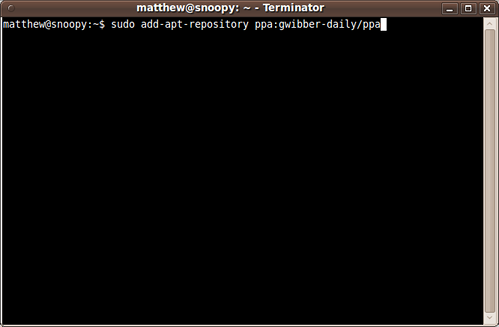
Your system will now fetch the PPA's key. This enables your Ubuntu system to verify that the packages in the PPA have not been interfered with since they were built.
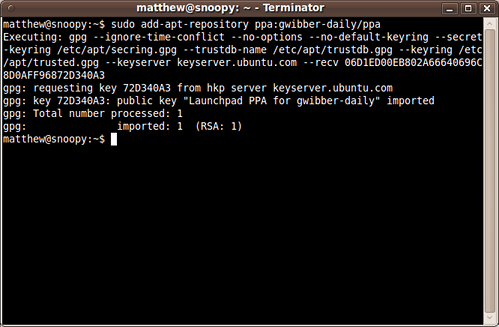
Step 3: Now, as a one-off, you should tell your system to pull down the latest list of software from each archive it knows about, including the PPA you just added:
sudo apt-get update
Now you're ready to start installing software from the PPA!
Read more about Personal Package Archives in our help wiki.
Ubuntu 之 Personal Package Archive (PPA)的更多相关文章
- Linux之Ubuntu添加/移除个人软件包存档的源[PPA,Personal Package Archives]
现在很多第三方软件还需要添加PPA软件源到Ubuntu系统当中,但是添加了PPA之后,软件可以直接在软件中心进行安装并会自动提示升级,这就是Ubuntu带来的方便,现在我们就来看看如何添加PPA软件源 ...
- PPA(Personal Package Archives)简介、兴起、使用
1.简介 PPA是Personal Package Archives,个人软件包文档,是默认情况下并未被包含在Ubuntu中的软件的一个集合.通常这些存储库的侧重点是单个的程序,不过他们也可以包含更多 ...
- 在Ubuntu中添加和删除PPA的软件源
PPA,英文全称为 Personal Package Archives,即个人软件包档案.是 Ubuntu Launchpad 网站提供的一项源服务,允许个人用户上传软件源代码,通过 Launchpa ...
- Ubuntu系统apt添加第三方PPA源
一.前言 1.1目的 在使用Ubuntu时往往apt源会自带很多常用软件,但是大部分都是比较老的版本,本文主要是为了实现以下两个目的: 通过添加第三方的PPA源解决软件版本过低或者没有安装包的情况: ...
- [ubuntu]E: The package firmware-upgrade needs to be reinstalled, but I can't find an archive for it.
解决办法把firmware-upgrade卸载 sudo dpkg --remove --force-all firmware-upgrade 然后 sudo apt-get update 即可
- ubuntu - 14.04,常用PPA源(第三方提供的deb格式安装文件)!!
说明: 1,下面所有PPA源的执行命令,均为在shell中执行的命令,需要依次执行! 2,下面所有测试方法,均为在shell中执行的命令!! PPA源: 一,Oracle JDK:Oracle公司提供 ...
- Ubuntu 出现apt-get: Package has no installation candidate问题
今天在安装软件的时候出现了Package has no installation candidate的问题,如: # apt-get install <packagename> Read ...
- ubuntu 软件包(package)更换源(source)为阿里云镜像 update&upgrade
在ubuntu下用apt-get install安装软件时,发现package list中没有所需的软件, 估计可能是package list太旧了,于是需要apt-get update & ...
- ubuntu如何添加新的PPA
首先要知道PPA源地址,比如: ppa:gwibber-daily/ppa 然后用apt-get指令添加: sudo add-apt-repository ppa:gwibber-daily/ppa ...
随机推荐
- 2014-10-28——iframe多层嵌套时获取元素总结
同域: 父页面获取子页面元素: 注意:onload事件 jQuery获取:$("iframe").contents().find("holder")...... ...
- 20145221 《信息安全系统设计基础》实验五 简单嵌入式WEB服务器实验
20145221 <信息安全系统设计基础>实验五 简单嵌入式WEB服务器实验 实验报告 队友博客:20145326蔡馨熠 实验博客:<信息安全系统设计基础>实验五 简单嵌入式W ...
- Safari 下用 "location.href = filePath" 实现下载功能的诡异 bug
Safari 下的一些诡异 bug 我们已经领教一二,比如前文中说的 无痕浏览模式下使用 localStorage 的 API 就会报错.今天我们要讲的是利用 location.href = file ...
- 拥抱 HTML5:storage 简介以及使用方法
前言 storage 其实是个很简单的东西,基本上只要知道 javascript 中对象的概念,然后读完此文,storage 的用法也就了然于胸了. 简单来说,你可以把 storage 想象成是储存在 ...
- 通向高可扩展性之路(推特篇) ---- 一个推特用来支撑1亿5千万活跃用户、30万QPS、22MB每秒Firehose、以及5秒内推送信息的架构
原文链接:http://highscalability.com/blog/2013/7/8/the-architecture-twitter-uses-to-deal-with-150m-active ...
- rsync实现负载均衡集群文件同步,搭建线上测试部署环境
闲来无事,搭建一个负载均衡集群,至于负载均衡集群搭建过程,找时间写下.这次主要写集群之间的文件同步,以及线上测试环境的搭建. 笔者看过很多公司都没有线上测试环境,真是崩溃了,不造怎么确保线上线下环境一 ...
- JVM内存管理------杂谈(借此也论一论obj=null)
各位园友好,LZ是从某网站转战过来的博主,看到这里很多博主都称看友们为园友,LZ斗胆模仿一下,不过以前,LZ其实都是称看友们为猿友的.之前LZ在某网站已经写了一系列文章,已经全部复制到了园内的新博客, ...
- jquery插件之jquery-validation
equalTo方法: equalTo: function( value, element, param ) { // Bind to the blur event of the target in o ...
- extjs5 一个容器中有几个组件公用一个控制器和一个模型
Ext.define('TestViewModel', { extend: 'Ext.app.ViewModel', alias: 'viewmodel.test', // connects to v ...
- 转 漫谈linux文件IO
在Linux 开发中,有几个关系到性能的东西,技术人员非常关注:进程,CPU,MEM,网络IO,磁盘IO.本篇文件打算详细全面,深入浅出.剖析文件IO的细节.从多个角度探索如何提高IO性能.本文尽量用 ...