
Spring Boot 中使用 spring-boot-devtools (使用 Gradle 作为构建工具)
Spring Boot 中使用 spring-boot-devtools (使用 Gradle 作为构建工具)
本文使用 Gradle 作为构建工具,关于 Gradle 构建工具,可以理解为是 Maven 的升级版,我个人认为比 Maven 好的地方是 Gradle 的 Groovy 的语法,比起 Maven 的 xml 语法,看起来要简洁得多。
首先,我们引入阿里巴巴的 Maven 仓库,加快构建下载的速度
allprojects {

    repositories {

        maven { url 'http://maven.aliyun.com/nexus/content/groups/public/' }

    }

}
引入基本依赖
引入 Spring Boot 最最基础的依赖:
compile group: 'org.springframework.boot', name: 'spring-boot-starter-web', version: '1.5.2.RELEASE'
引入 spring-boot-devtools 的依赖:
compile("org.springframework.boot:spring-boot-devtools")
所以最后看起来是这样:
dependencies {

    testCompile group: 'junit', name: 'junit', version: '4.12'

    compile group: 'org.springframework.boot', name: 'spring-boot-starter-web', version: '1.5.2.RELEASE'

    compile("org.springframework.boot:spring-boot-devtools")

}
加入仓库(很重要,决定了 spring-boot-devtools 能否正确下载)
buildscript {

    ext {

        springBootVersion = '1.5.2.RELEASE'

    }

    repositories {

        // NOTE: You should declare only repositories that you need here

        mavenLocal()

        mavenCentral()

        maven{ url 'http://maven.aliyun.com/nexus/content/groups/public/'}

        maven { url "http://repo.spring.io/release" }

        maven { url "http://repo.spring.io/milestone" }

        maven { url "http://repo.spring.io/snapshot" }

    }

    dependencies {

        classpath("org.springframework.boot:spring-boot-gradle-plugin:${springBootVersion}")

    }

}
加入插件(很重要,决定了 spring-boot-devtools 能否正确下载)
这里就一句话,这句话,我测试了很久才发现这句话必须加上去。
apply plugin: 'spring-boot'
这时,我们就可以刷新 Gradle,看到所有的依赖都正常下载。
到这里配置文件的配置就告一段落了,下面我们还要配置 IntelliJ IDEA。
配置 IntelliJ IDEA
勾选 Build project automatically 选项前的单选按钮。

接下来的设置
1、mac 电脑按下 command + alt + shift + / 出现:
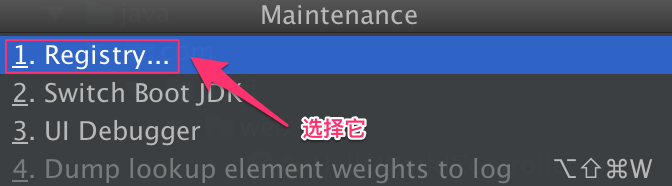
2、找到 “compiler.automake.allow.when.app.running” 这个选项,并且勾选:

此致,就大功告成了。
示例项目 GitHub 所在地址:https://github.com/weimingge14/SpringBootDevTool
参考资料:
1、Intellij IDEA 使用Spring-boot-devTools无效解决办法
Spring Boot 中使用 spring-boot-devtools (使用 Gradle 作为构建工具)的更多相关文章
- Spring Boot中使用 Spring Security 构建权限系统
Spring Security是一个能够为基于Spring的企业应用系统提供声明式的安全访问控制解决方案的安全框架.它提供了一组可以在Spring应用上下文中配置的Bean,为应用系统提供声明式的安全 ...
- Spring Framework------>version4.3.5.RELAESE----->Reference Documentation学习心得----->Spring Framework中的spring web MVC模块
spring framework中的spring web MVC模块 1.概述 spring web mvc是spring框架中的一个模块 spring web mvc实现了web的MVC架构模式,可 ...
- 通过spring.net中的spring.caching CacheResult实现memcached缓存
通过spring.net中的spring.caching CacheResult实现memcached缓存1.SpringMemcachedCache.cs2.APP.config3.Program. ...
- Spring Boot 中应用Spring data mongdb
摘要 本文主要简单介绍下如何在Spring Boot 项目中使用Spring data mongdb.没有深入探究,仅供入门参考. 文末有代码链接 准备 安装mongodb 需要连接mongodb,所 ...
- Spring Boot中使用Spring Security进行安全控制
我们在编写Web应用时,经常需要对页面做一些安全控制,比如:对于没有访问权限的用户需要转到登录表单页面.要实现访问控制的方法多种多样,可以通过Aop.拦截器实现,也可以通过框架实现(如:Apache ...
- 【swagger】1.swagger提供开发者文档--简单集成到spring boot中【spring mvc】【spring boot】
swagger提供开发者文档 ======================================================== 作用:想使用swagger的同学,一定是想用它来做前后台 ...
- Spring Boot中集成Spring Security 专题
check to see if spring security is applied that the appropriate resources are permitted: @Configurat ...
- 如何在静态方法或非Spring Bean中注入Spring Bean
在项目中有时需要根据需要在自己new一个对象,或者在某些util方法或属性中获取Spring Bean对象,从而完成某些工作,但是由于自己new的对象和util方法并不是受Spring所 ...
- 怎么在项目中使用前端包管理器bower和构建工具gulp
下面以WeUI(微信官方网页开发样式库)介绍一下,怎么把WeUi引入到自己的项目中,我的开发环境Visual Studio 2012,当然了Visual Studio 2015对此已有了更好的支持(h ...
随机推荐
- ajax的contentType和dataType
1.contentType,明确告诉服务器我的请求的编码类型是json(严格来说是application/json),不设置的话,有默认值application/x-www-form-urlencod ...
- linux中文件IO
一. linux常用文件IO接口 1.1. 文件描述符 1.1.1. 文件描述符的本质是一个数字,这个数字本质上是进程表中文件描述符表的一个表项,进程通过文件描述符作为index去索引查表得到文件表指 ...
- Centos7Yum安装PHP7.2流程
Centos7Yum安装PHP7.21.安装源 安装php72w,是需要配置额外的yum源地址的,否则会报错不能找到相关软件包. php高版本的yum源地址,有两部分,其中一部分是epel-relea ...
- PyCharm控制台python shell 和 IPython shell的切换
1. IPython介绍 IPython 是一个 python 的交互式 shell,比默认的python shell 好用得多,支持变量自动补全,自动缩进,支持 bash shell 命令,内置了许 ...
- linux查看端口是否被占用
1.使用lsof lsof -i:端口号查看某个端口是否被占用 2.使用netstat 使用netstat -anp|grep 80
- Spark-Streaming获取kafka数据的两种方式:Receiver与Direct的方式
简单理解为:Receiver方式是通过zookeeper来连接kafka队列,Direct方式是直接连接到kafka的节点上获取数据 Receiver 使用Kafka的高层次Consumer API来 ...
- 2018 Web 开发者路线图[转载]
2018 Web 开发者路线图[转载] https://qianduan.group/posts/5a66f36e0cf6b624d2239c74?hmsr=toutiao.io&utm_me ...
- WPS专业版及序列号
目录 1. 软件下载 2. 序列号(永久) 1. 软件下载 城通网盘:https://sn9.us/dir/13403389-35833830-3fc98f (仅Android版) 官网: https ...
- 关于<input type="hidden"/>标签的记录
<input type="hidden" name="pid" value="10"/>标签放在一个input标签后可以使用,但 ...
- 定时任务crond、crontab
crontab命令是用来设置定时任务规则的配置命令,配置文件/etc/crontab 与/var/spool/cron/目录下当前用户名的文件. -l 显示当前定时任务 -e 编辑定时任务 对于roo ...