
Win10 UI入门 导航滑动条 求UWP工作
借鉴了 段博琼 大哥写的导航滑动,自己实现了一个类似安卓 IOS 导航滑动条
支持等比例 分割 tabView 支持动画滑动
效果如下图
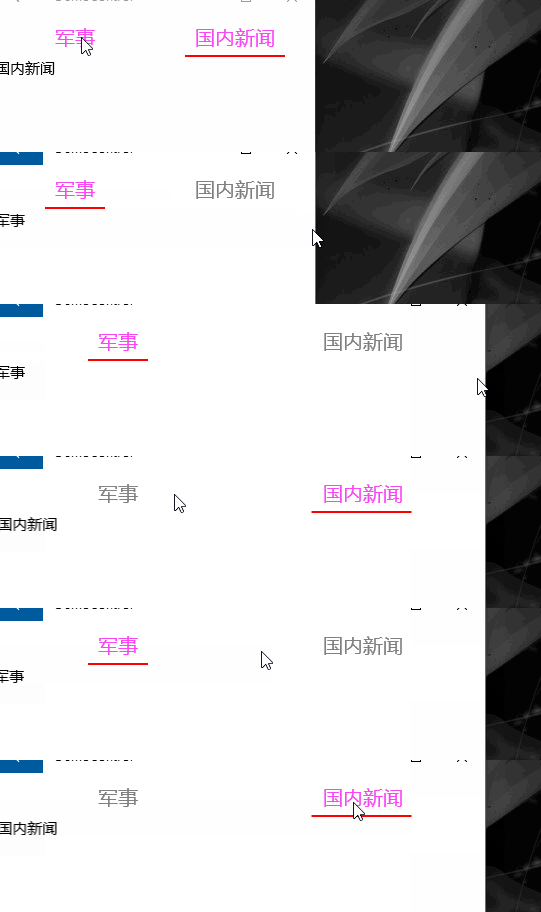
WYGrid 你可以想象一个GridView  itemsWrapGridPanel.Orientation = Orientation.Vertical; 垂直方向的控件

自定义一个项高 ItemHeight 并绑定到最高属性
                var itemsWrapGridPanel = ItemsPanelRoot as ItemsWrapGrid;

                var b = new Binding()

                {

                    Source = this,

                    Path = new PropertyPath("ItemHeight")

                };

                if (itemsWrapGridPanel != null)

                {

                    itemsWrapGridPanel.Orientation = Orientation.Vertical;

                }

                this.SetBinding(MaxHeightProperty, b);
容器样式来自于 GridViewItem styles and templates
xaml实现
<Grid>
<Grid.RowDefinitions>
<RowDefinition Height="Auto" />
<RowDefinition Height="*" />
</Grid.RowDefinitions>
<ctl:WYGrid x:Name="PART_ListViewStateName" Background="RoyalBlue" Padding="" Margin="" BorderThickness=""
ScrollViewer.HorizontalScrollBarVisibility="Hidden"
ScrollViewer.HorizontalScrollMode="Enabled"
ScrollViewer.VerticalScrollBarVisibility="Disabled"
ScrollViewer.VerticalScrollMode="Disabled" ItemHeight=""
ItemTemplate="{StaticResource DT_Pivot}"
ItemsSource="{Binding MyItemSources}">
<ctl:WYGrid.ItemContainerStyle>
<Style TargetType="GridViewItem">
<Setter Property="FontFamily" Value="{ThemeResource ContentControlThemeFontFamily}" />
<Setter Property="FontSize" Value="{ThemeResource ControlContentThemeFontSize}" />
<Setter Property="Background" Value="Transparent" />
<Setter Property="Foreground" Value="{ThemeResource SystemControlForegroundBaseHighBrush}" />
<Setter Property="TabNavigation" Value="Local" />
<Setter Property="IsHoldingEnabled" Value="True" />
<Setter Property="HorizontalContentAlignment" Value="Center" />
<Setter Property="VerticalContentAlignment" Value="Center" />
<Setter Property="Margin" Value="" />
<Setter Property="MinWidth" Value="{ThemeResource GridViewItemMinWidth}" />
<Setter Property="MinHeight" Value="{ThemeResource GridViewItemMinHeight}" />
<Setter Property="AllowDrop" Value="False" />
<Setter Property="UseSystemFocusVisuals" Value="True" />
<Setter Property="FocusVisualMargin" Value="-2" />
<Setter Property="FocusVisualPrimaryBrush" Value="{ThemeResource SystemControlFocusVisualPrimaryBrush}" />
<Setter Property="FocusVisualPrimaryThickness" Value="" />
<Setter Property="FocusVisualSecondaryBrush" Value="{ThemeResource SystemControlFocusVisualSecondaryBrush}" />
<Setter Property="FocusVisualSecondaryThickness" Value="" />
<Setter Property="Template">
<Setter.Value>
<ControlTemplate TargetType="GridViewItem">
<Grid x:Name="ContentBorder"
Control.IsTemplateFocusTarget="True"
BorderThickness=""
RenderTransformOrigin="0.5,0.5">
<Grid.RenderTransform>
<ScaleTransform x:Name="ContentBorderScale" />
</Grid.RenderTransform>
<VisualStateManager.VisualStateGroups>
<VisualStateGroup x:Name="FocusStates">
<VisualState x:Name="Focused"/>
<VisualState x:Name="Unfocused"/>
</VisualStateGroup>
<VisualStateGroup x:Name="CommonStates">
<VisualState x:Name="Normal"/>
<VisualState x:Name="PointerOver">
<Storyboard>
<ObjectAnimationUsingKeyFrames Storyboard.TargetName="ContentPresenter" Storyboard.TargetProperty="Foreground">
<DiscreteObjectKeyFrame KeyTime="" Value="{ThemeResource SystemControlForegroundBaseHighBrush}" />
</ObjectAnimationUsingKeyFrames>
<ObjectAnimationUsingKeyFrames Storyboard.TargetName="ContentBorder" Storyboard.TargetProperty="FocusVisualSecondaryBrush">
<DiscreteObjectKeyFrame KeyTime="" Value="{ThemeResource SystemControlHighlightListLowBrush}" />
</ObjectAnimationUsingKeyFrames>
<ObjectAnimationUsingKeyFrames Storyboard.TargetName="ContentBorder" Storyboard.TargetProperty="FocusVisualSecondaryThickness">
<DiscreteObjectKeyFrame KeyTime="" Value="" />
</ObjectAnimationUsingKeyFrames>
<PointerUpThemeAnimation Storyboard.TargetName="ContentPresenter" />
</Storyboard>
</VisualState>
<VisualState x:Name="Pressed">
<Storyboard>
<ObjectAnimationUsingKeyFrames Storyboard.TargetName="ContentPresenter" Storyboard.TargetProperty="Foreground">
<DiscreteObjectKeyFrame KeyTime="" Value="{ThemeResource SystemControlForegroundBaseHighBrush}" />
</ObjectAnimationUsingKeyFrames>
<ObjectAnimationUsingKeyFrames Storyboard.TargetName="ContentBorder" Storyboard.TargetProperty="FocusVisualSecondaryBrush">
<DiscreteObjectKeyFrame KeyTime="" Value="{ThemeResource SystemControlHighlightListMediumBrush}" />
</ObjectAnimationUsingKeyFrames>
<ObjectAnimationUsingKeyFrames Storyboard.TargetName="ContentBorder" Storyboard.TargetProperty="FocusVisualSecondaryThickness">
<DiscreteObjectKeyFrame KeyTime="" Value="" />
</ObjectAnimationUsingKeyFrames>
<PointerDownThemeAnimation TargetName="ContentPresenter" />
</Storyboard>
</VisualState>
<VisualState x:Name="Selected">
<Storyboard>
<ObjectAnimationUsingKeyFrames Storyboard.TargetName="ContentPresenter" Storyboard.TargetProperty="Foreground">
<DiscreteObjectKeyFrame KeyTime="" Value="{ThemeResource SystemControlForegroundBaseHighBrush}" />
</ObjectAnimationUsingKeyFrames>
<ObjectAnimationUsingKeyFrames Storyboard.TargetName="ContentBorder" Storyboard.TargetProperty="FocusVisualSecondaryBrush">
<DiscreteObjectKeyFrame KeyTime="" Value="{ThemeResource SystemControlHighlightAccentBrush}" />
</ObjectAnimationUsingKeyFrames>
<ObjectAnimationUsingKeyFrames Storyboard.TargetName="ContentBorder" Storyboard.TargetProperty="FocusVisualSecondaryThickness">
<DiscreteObjectKeyFrame KeyTime="" Value="" />
</ObjectAnimationUsingKeyFrames> <PointerUpThemeAnimation Storyboard.TargetName="ContentPresenter" />
</Storyboard>
</VisualState>
<VisualState x:Name="PointerOverSelected">
<Storyboard>
<ObjectAnimationUsingKeyFrames Storyboard.TargetName="ContentPresenter" Storyboard.TargetProperty="Foreground">
<DiscreteObjectKeyFrame KeyTime="" Value="{ThemeResource SystemControlForegroundBaseHighBrush}" />
</ObjectAnimationUsingKeyFrames>
<ObjectAnimationUsingKeyFrames Storyboard.TargetName="ContentBorder" Storyboard.TargetProperty="FocusVisualSecondaryBrush">
<DiscreteObjectKeyFrame KeyTime="" Value="{ThemeResource SystemControlHighlightListAccentMediumBrush}" />
</ObjectAnimationUsingKeyFrames>
<ObjectAnimationUsingKeyFrames Storyboard.TargetName="ContentBorder" Storyboard.TargetProperty="FocusVisualSecondaryThickness">
<DiscreteObjectKeyFrame KeyTime="" Value="" />
</ObjectAnimationUsingKeyFrames> <PointerUpThemeAnimation Storyboard.TargetName="ContentPresenter" />
</Storyboard>
</VisualState>
<VisualState x:Name="PressedSelected">
<Storyboard>
<ObjectAnimationUsingKeyFrames Storyboard.TargetName="ContentPresenter" Storyboard.TargetProperty="Foreground">
<DiscreteObjectKeyFrame KeyTime="" Value="{ThemeResource SystemControlForegroundBaseHighBrush}" />
</ObjectAnimationUsingKeyFrames>
<ObjectAnimationUsingKeyFrames Storyboard.TargetName="ContentBorder" Storyboard.TargetProperty="FocusVisualSecondaryBrush">
<DiscreteObjectKeyFrame KeyTime="" Value="{ThemeResource SystemControlHighlightListAccentHighBrush}" />
</ObjectAnimationUsingKeyFrames>
<ObjectAnimationUsingKeyFrames Storyboard.TargetName="ContentBorder" Storyboard.TargetProperty="FocusVisualSecondaryThickness">
<DiscreteObjectKeyFrame KeyTime="" Value="" />
</ObjectAnimationUsingKeyFrames> <PointerDownThemeAnimation TargetName="ContentPresenter" />
</Storyboard>
</VisualState>
</VisualStateGroup>
<VisualStateGroup x:Name="DisabledStates">
<VisualState x:Name="Enabled" />
<VisualState x:Name="Disabled">
<Storyboard>
<DoubleAnimation Storyboard.TargetName="ContentBorder"
Storyboard.TargetProperty="Opacity"
Duration=""
To="{ThemeResource ListViewItemDisabledThemeOpacity}" />
</Storyboard>
</VisualState>
</VisualStateGroup>
</VisualStateManager.VisualStateGroups>
<ContentPresenter x:Name="ContentPresenter" VerticalAlignment="Center" HorizontalAlignment="Stretch" HorizontalContentAlignment="Center"
Background="SkyBlue" FontSize="" Margin="0,10,0,10"/>
<Rectangle x:Name="PlaceholderRect" Visibility="Visible" Fill="Red" Height="" Width="" VerticalAlignment="Bottom"/>
</Grid>
</ControlTemplate>
</Setter.Value>
</Setter>
</Style>
</ctl:WYGrid.ItemContainerStyle>
</ctl:WYGrid>
<Rectangle x:Name="PART_RectStateName" Fill="Red" Height="" Width="" Grid.Row="" Opacity="" Margin="0,-2,0,0" HorizontalAlignment="Left" >
<Rectangle.RenderTransform>
<TranslateTransform/>
</Rectangle.RenderTransform>
</Rectangle>
</Grid>
基本实现思路是
初始化的时候 PivotItemLoading 来初始化导航条的位置
PART_RectStateName 显示动画 透明为1, gridview 里面的 PlaceholderRect 透明 为0

当点击的时候 SelectionChanged 被call 查找ContentPresenter 和 Rectangle 来确定位置和宽度,启动动画,之后让
PART_RectStateName 显示动画 透明为0, gridview 里面的 PlaceholderRect 透明 为1

下面是动画的代码,思路清楚了接下来很快就做好了。
        private Storyboard StoryBordTemp(double formW, double toW, Point newPoint, Point oldPoint)

        {

            var storyBoard = new Storyboard();

            var extendAnimation = new DoubleAnimation { Duration = new Duration(TimeSpan.FromSeconds(0.5)), From = formW, To = toW, EnableDependentAnimation = true };

            QuarticEase easing = new QuarticEase();

            easing.EasingMode = EasingMode.EaseOut;

            easing.Ease(0.3);

            extendAnimation.EasingFunction = easing;

            Storyboard.SetTarget(extendAnimation, _rectangle);

            Storyboard.SetTargetProperty(extendAnimation, "Width");

            var xAnimation = new DoubleAnimation { Duration = new Duration(TimeSpan.FromSeconds(0.5)), From = newPoint.X, To = oldPoint.X, EnableDependentAnimation = true };

            QuarticEase xEasing = new QuarticEase();

            xEasing.EasingMode = EasingMode.EaseOut;

            xEasing.Ease(0.3);

            xAnimation.EasingFunction = xEasing;

            Storyboard.SetTarget(xAnimation, _rectangle);

            Storyboard.SetTargetProperty(xAnimation, "(UIElement.RenderTransform).(TranslateTransform.X)");

            storyBoard.Children.Add(extendAnimation);

            storyBoard.Children.Add(xAnimation);

            storyBoard.Begin();

            return storyBoard;

        }
详情请查看 https://github.com/androllen/CCUWPToolkit
Win10 UI入门 导航滑动条 求UWP工作的更多相关文章
- Win10 UI入门 SliderRectangle
看了@段博琼大哥导航滑动的思路,自己又做了一个类似与黄油相机里面的一个功能 <Grid x:Name="> <Grid.ColumnDefinitions> < ...
- Win10 UI入门窗口由默认500px to 320px
https://code.msdn.microsoft.com/Layout-for-windows-that-ba648e1c/ https://msdn.microsoft.com/library ...
- Win10 UI入门 pivot multiable DataTemplate
this is a dynamic pivot with sliderable navigation and multiableDatatemplate Control 看了 alexis 大哥的pi ...
- Win10 UI入门 圆形控件
动态模版绑定 http://blog.csdn.net/XXChen2/article/details/4552554
- Win10 UI入门RelativePanel(2)
自适应 1) Gif: 添加动画 2)
- Win10 UI入门 RenderTransform属性分析之Translate 平移变形
对齐方式是中心底部对齐: HorizontalAlignment="Center" VerticalAlignment="Bottom" 以底部边为起始线,向上 ...
- Win10 UI入门RelativePanel
<RelativePanel Background="Black" > <Rectangle x:Name=" RelativePanel.AlignH ...
- UWP Control Toolkit Collections 求UWP工作
1. it is like wechat wait-sliderdeleteitem in iOS 看起来比较像微信删掉项 now support listview and gridview in C ...
- IOS开发-UI学习-UISlider(滑动条)的使用
滑动条即UISlider,是我们常见的软件中设置音量,亮度等的滑条,初始化及基本设置如下: // 新建滑动条 UISlider *slider = [[UISlider alloc]initWithF ...
随机推荐
- Spring Boot 项目学习 (三) Spring Boot + Redis 搭建
0 引言 本文主要介绍 Spring Boot 中 Redis 的配置和基本使用. 1 配置 Redis 1. 修改pom.xml,添加Redis依赖 <!-- Spring Boot Redi ...
- 10分钟 PySimpleGUI 图形界面入门
import PySimpleGUI as sg layout = [ [sg.Text('Enter a Number')], [sg.Input()], [sg.OK()] ] event,(nu ...
- jmeter图片的上传
首先添加一个线程组,然后在线程组里面添加一个http请求,因为是发送数据,所有是post请求,写好上传的地址,然后写好文件路径 1.添加线程组 :右键测试计划,添加-Threads(Users)-线程 ...
- Scala 技术笔记之 可变长参数
转自 http://www.cnblogs.com/rollenholt/p/4112833.html Scala 允许你指明函数的最后一个参数可以是重复的.这可以允许客户向函数传入可变长度参数列表. ...
- MySQL笔记5-----索引(覆盖索引等)
1.概念: 覆盖索引:(个人理解)就是包含所有查询记录的索引.当查询量过大时可以采用覆盖索引来进行查询,效率较高. 回表:建立覆盖索引就是避免回表,回表效率会很慢. select查询的字段只有索引列, ...
- django rest-farme-work 的使用(2)
serialization (序列化) 本测试项目例子地址为: tomchristie/rest-framework-tutorial 开始构建一个新的程序 创建一个新的环境 virtualenv e ...
- 通过腾讯地图api获取用户位置限制在指定位置区域
<!--在微信中获取用户位置--><script src="http://res.wx.qq.com/open/js/jweixin-1.0.0.js">& ...
- nginx反向代理时保持长连接
·[场景描述] HTTP1.1之后,HTTP协议支持持久连接,也就是长连接,优点在于在一个TCP连接上可以传送多个HTTP请求和响应,减少了建立和关闭连接的消耗和延迟. 如果我们使用了nginx去作为 ...
- hibernate框架总结
实体类编写规则1 实体类里面属性私有的 2 私有属性使用公开的set和get方法操作 3 要求实体类有属性作为唯一值(一般使用id值) 4 实体类属性建议不使用基本数据类型,使用基本数据类型对应的包装 ...
- Vijos—— T 1359 Superprime
https://vijos.org/p/1359 描述 农民约翰的母牛总是生产出最好的肋骨.你能通过农民约翰和美国农业部标记在每根肋骨上的数字认出它们. 农民约翰确定他卖给买方的是真正的质数肋骨,是因 ...