
WebAPI使用多个xml文件生成帮助文档(转)
http://www.cnblogs.com/idoudou/p/xmldocumentation-for-web-api-include-documentation-from-beyond-the-main.html
一、前言
上篇有提到在WebAPI项目内,通过在Nuget里安装(Microsoft.AspNet.WebApi.HelpPage)可以根据注释生成帮助文档,查看代码实现会发现是基于解析项目生成的xml文档来作为数据源从而展示出来的。在我们的项目帮助文档需要的类(特指定义的Request和Response)与项目在同一个项目时是没有问题的,但是我们实际工作中会因为其他项目也需要引用该(Request和Response)时,我们会将其抽出来单独作为一个项目供其它调用来引用,这时,查看帮助文档不会报错,但是注释以及附加信息将会丢失,因为这些信息是我们的代码注释和数据注释(如 [Required]标识为必填),也是生成到xml文档中的信息,但因不在同一项目内,将读取不到从而导致帮助文档无法显示我们的注释(对应的描述)和附加信息(是否必填、默认值、Range等).
二、帮助文档注释概要
我们的注释就是帮助文档的说明或者说是描述,那么这个功能是安装了HelpPage就直接具有的吗,这里分两种方式。
1:创建项目时是直接选择的Web API,那么这时在创建初始化项目时就配置好此功能的。
2:创建项目时选择的是Empty,选择的核心引用选择Web API是不具有此功能。
对于方式1来说生成的项目代码有一部分我们是不需要的,我们可以做减法来删掉不必要的文件。
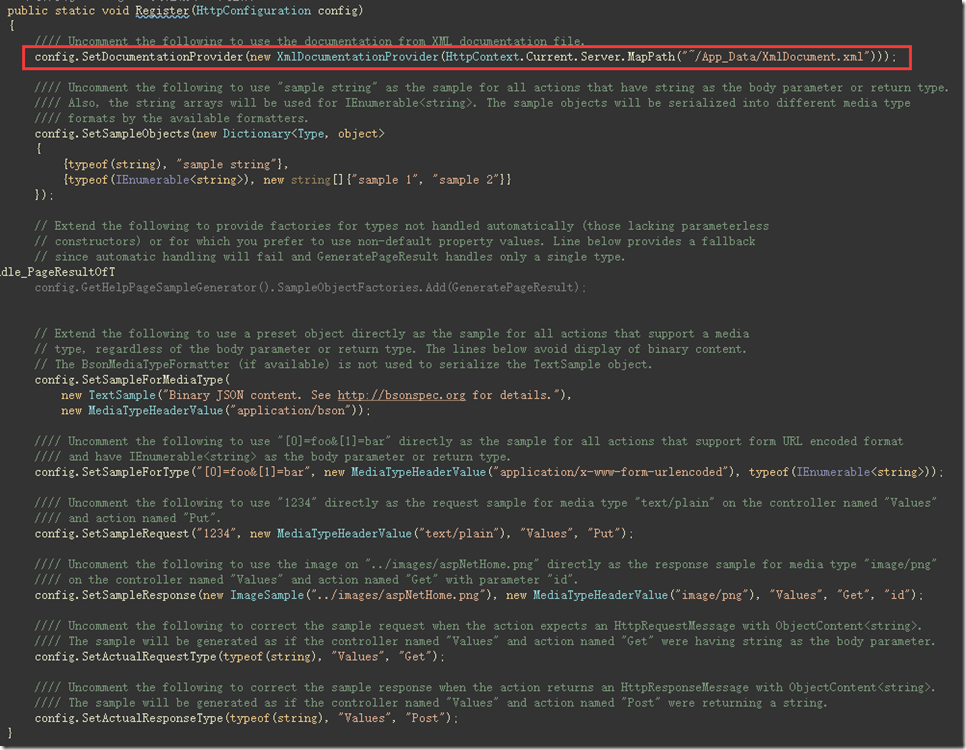
对于方式2来说,需要在Nuget内安装HelpPage,需要将文件~/Areas/HelpPage/HelpPageConfig.cs内的配置注释取消,具体的可以根据需要。
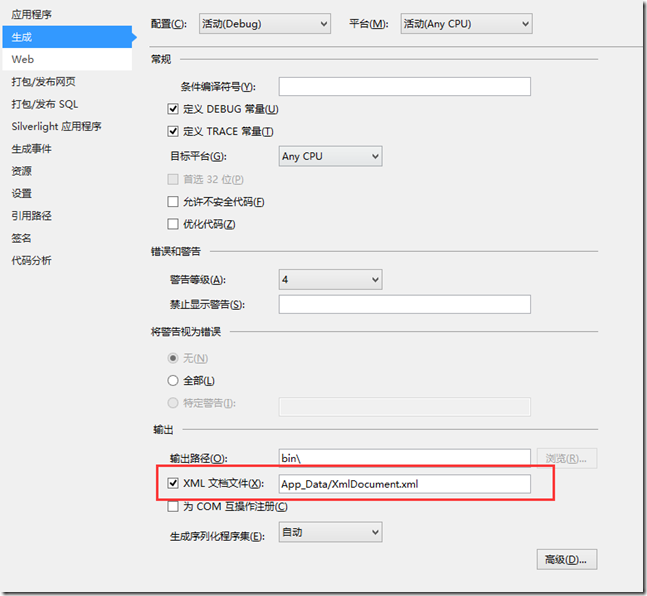
并且设置项目的生成属性内的输出,勾选Xml文档文件,同时设置值与~/Areas/HelpPage/HelpPageConfig.cs
内的配置一致。
并在Global.asax文件Application_Start方法注册。
- AreaRegistration.RegisterAllAreas();
这时帮助文档已经可用,但却没有样式。你可以选择手动将需要的css及js拷入Areas文件夹内。并添加文件
- public class BundleConfig
- {
- // 有关绑定的详细信息,请访问 http://go.microsoft.com/fwlink/?LinkId=301862
- public static void RegisterBundles(BundleCollection bundles)
- {
- bundles.Add(new ScriptBundle("~/bundles/jquery").Include(
- "~/Areas/HelpPage/Scripts/jquery-{version}.js"));
- // 使用要用于开发和学习的 Modernizr 的开发版本。然后,当你做好
- // 生产准备时,请使用 http://modernizr.com 上的生成工具来仅选择所需的测试。
- bundles.Add(new ScriptBundle("~/bundles/modernizr").Include(
- "~/Areas/HelpPage/Scripts/modernizr-*"));
- bundles.Add(new ScriptBundle("~/bundles/bootstrap").Include(
- "~/Areas/HelpPage/Scripts/bootstrap.js",
- "~/Areas/HelpPage/Scripts/respond.js"));
- bundles.Add(new StyleBundle("~/Content/css").Include(
- "~/Areas/HelpPage/Content/bootstrap.css",
- "~/Areas/HelpPage/Content/site.css"));
- }
- }
并在Global.asax文件Application_Start方法将其注册。
- BundleConfig.RegisterBundles(BundleTable.Bundles);
最后更改~/Areas/HelpPage/Views/Shared/_Layout.cshtml 为
- @using System
- @using System.Web.Optimization
- <!DOCTYPE html>
- <html>
- <head>
- <meta http-equiv="Content-Type" content="text/html; charset=utf-8" />
- <meta charset="utf-8" />
- <meta name="viewport" content="width=device-width" />
- <title>@ViewBag.Title</title>
- @Styles.Render("~/Content/css")
- @Scripts.Render("~/bundles/modernizr")
- </head>
- <meta http-equiv="Content-Type" content="text/html; charset=utf-8" />
- <body>
- <div class="navbar navbar-inverse navbar-fixed-top">
- <div class="container">
- <div class="navbar-header">
- <button type="button" class="navbar-toggle" data-toggle="collapse" data-target=".navbar-collapse">
- <span class="icon-bar"></span>
- <span class="icon-bar"></span>
- <span class="icon-bar"></span>
- </button>
- </div>
- <div class="navbar-collapse collapse">
- <ul class="nav navbar-nav">
- <li>@Html.Raw("<a href='/Help'>首页</a>")</li>
- <li>@Html.Raw("<a href='/PostMan' target='_blank'>PostManFeture</a>")</li>
- </ul>
- </div>
- </div>
- </div>
- <div class="container body-content">
- @RenderBody()
- <hr />
- <footer>
- <p>© @DateTime.Now.Year - 逗豆豆</p>
- </footer>
- </div>
- @Scripts.Render("~/bundles/jquery")
- @Scripts.Render("~/bundles/bootstrap")
- @RenderSection("scripts", required: false)
- </body>
- </html>
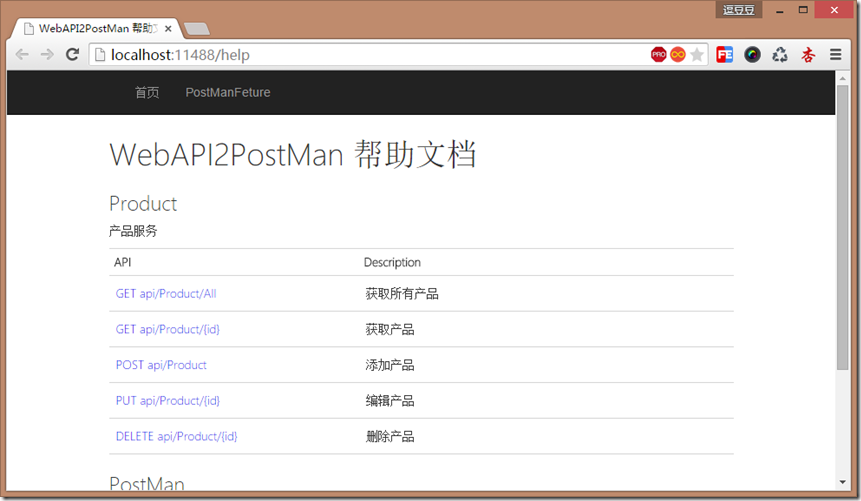
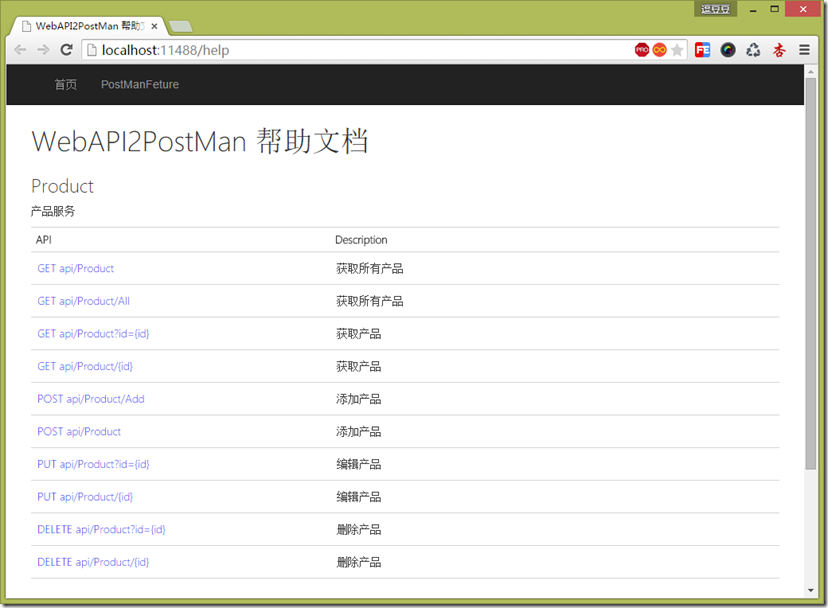
此时你看到的才会是如下的文档。
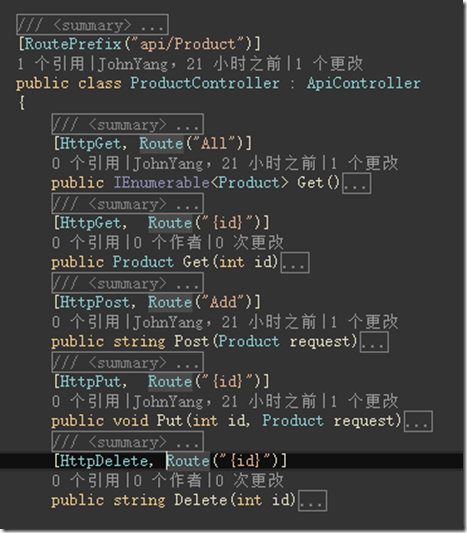
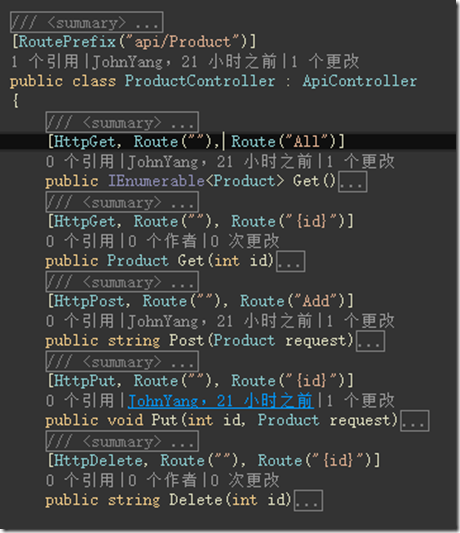
对应的路由结构如下
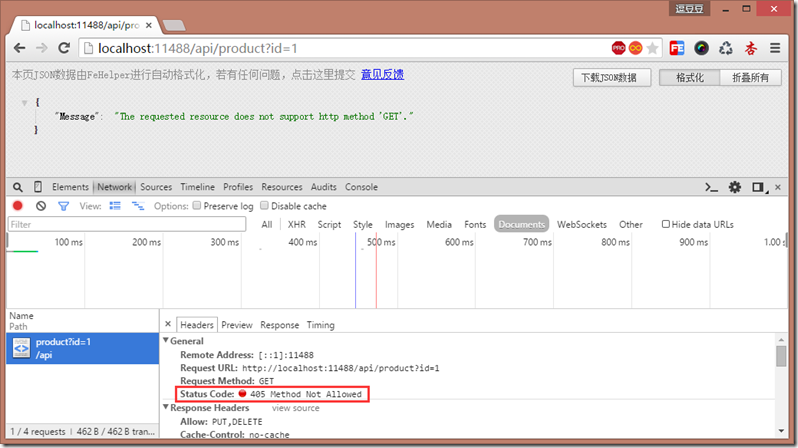
查看Route可以发现其 AllowMultiple = true 意味着我们可以对同一个Action定义多个不同的路由,但同时也意味着该Action只允许定义的路由访问。
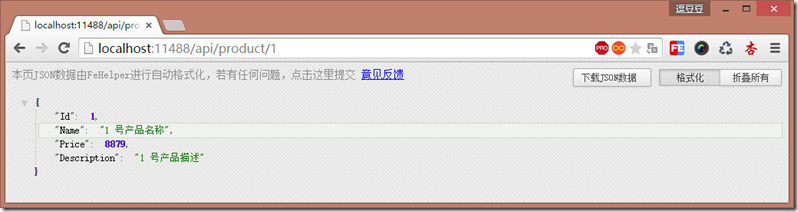
比如这里的Get方法,这时在浏览器只能以这种方式访问 http://localhost:11488/api/product/{id}
用 http://localhost:11488/api/product?id={id} 则会抛出405,如下。
为了支持多种方式我们将路由增加,如下。
这时文档会将两种路由都生成出来。
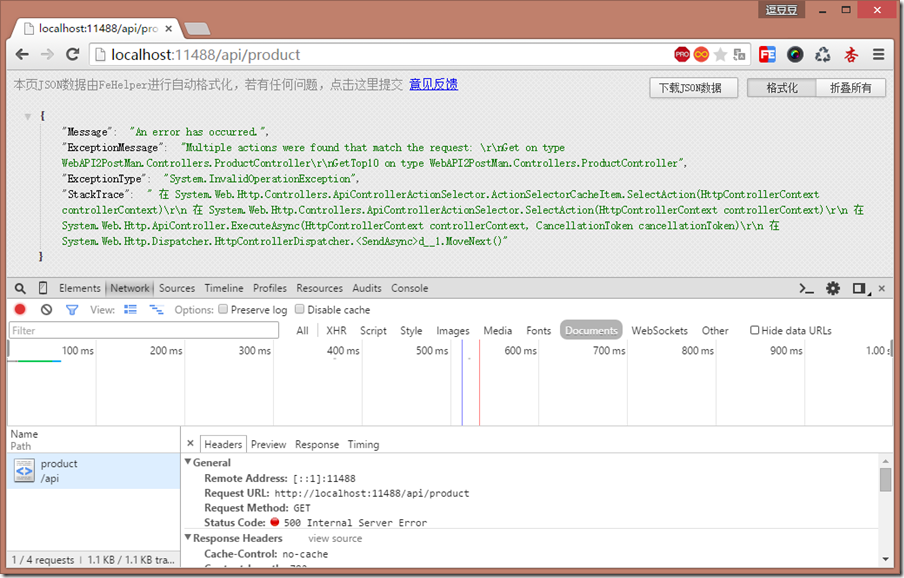
这里有个原则是同类型的请求且响应的类型相同不允许定义相同的路由,如下,都是HttpGet 且响应类型相同。
- /// <summary>
- /// 获取所有产品
- /// </summary>
- [HttpGet, Route("")]
- public IEnumerable<Product> Get()
- {
- return _products;
- }
- /// <summary>
- /// 获取前三产品
- /// </summary>
- [HttpGet, Route("")]
- public IEnumerable<Product> GetTop3()
- {
- return _products.Take(3);
- }
此时访问 http://localhost:11488/api/product 会发现500错误,提示为匹配到多个Action,且这时候查看帮助文档也只会显示一个匹配的Action(前提是你没有指定Route的Order属性)。
路由内可以做一些基本的限制,我们将上面的Top3方法改造为可以根据传入参数来决定Top多少,并且最少是前三条。
- /// <summary>
- /// 获取前几产品
- /// </summary>
- [HttpGet, Route("Top/{count:min(3)}")]
- public IEnumerable<Product> GetTop(int count)
- {
- return _products.Take(3);
- }
这时访问 http://localhost:11488/api/product/Top/1 或 http://localhost:11488/api/product/Top/2 将会是抛出404
但是我希望直接访问 http://localhost:11488/api/product/Top 默认取前3条,这时直接访问会是405,因为并没有定义出Route(“Top”)的路由,我们改造下
- /// <summary>
- /// 获取前几产品
- /// </summary>
- [HttpGet, Route("Top/{count:min(3):int=3}")]
- public IEnumerable<Product> GetTop(int count)
- {
- return _products.Take(3);
- }
这时在访问 http://localhost:11488/api/product/Top 就会默认返回前3条了,除此之外还有一些定义包括正则可以 看这里 和 这里 。
路由的文档相关的基本就这些,有遗漏的地方欢迎指出。
接下来就是单个接口的Request和Response的文档,先来看看我们分别以Request和Response分开来看。
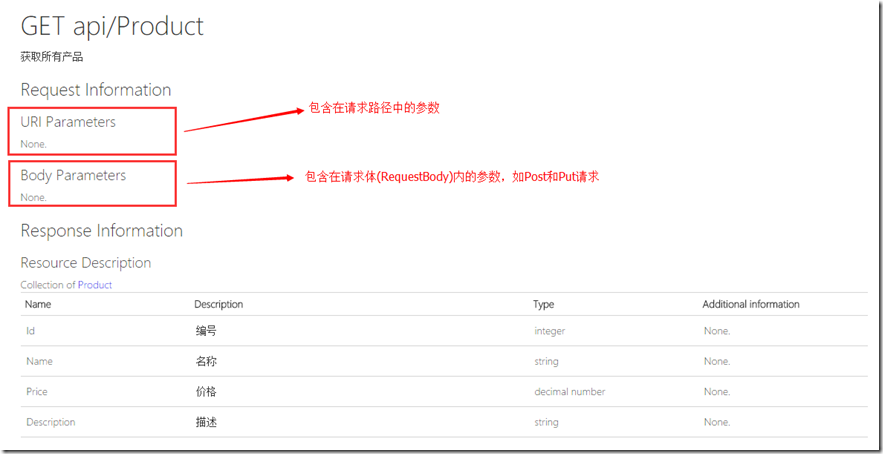
首先看下 api/Product/All 这个接口的显示,会发现分为两类。
api/Product 这个接口本身是就不需要任何参数的,因此都是None。
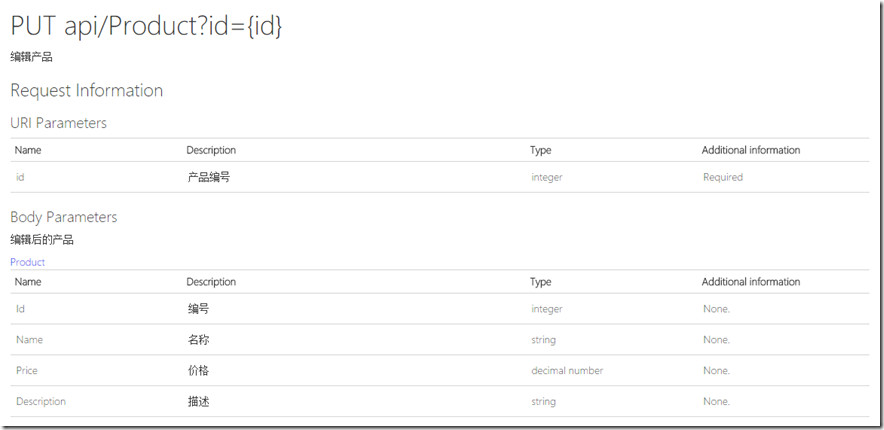
Put api/Product?id={id} 这接口确是都包含。他的定义如下。
- /// <summary>
- /// 编辑产品
- /// </summary>
- /// <param name="id">产品编号</param>
- /// <param name="request">编辑后的产品</param>
- [HttpPut, Route(""), Route("{id}")]
- public string Put(int id, Product request)
- {
- var model = _products.FirstOrDefault(x => x.Id.Equals(id));
- if (model == null) return "未找到该产品";
- model.Name = request.Name;
- model.Price = request.Price;
- model.Description = request.Description;
- return "ok";
- }
那其实,实际中我们可能只会使用Get和Post来完成我们所有的操作。因此,就会是Get只显示URI Parameters 而 Post只显示Body Parameters。
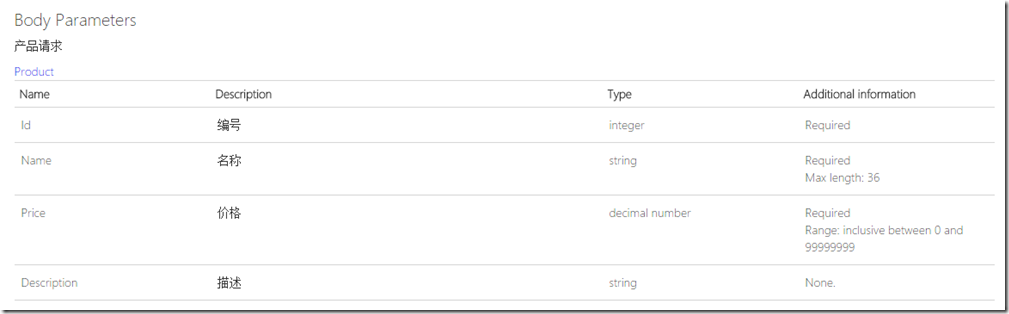
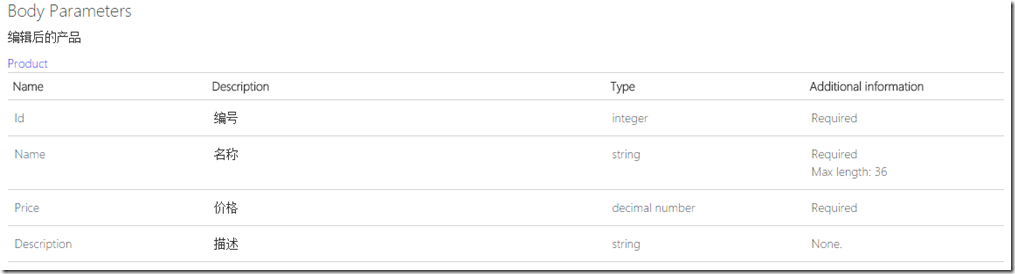
可以看到Description就是我们对属性的注释,Type就是属性的类型,而Additional information 则是“约束”的描述,如我们会约束请求的参数哪些为必填哪些为选填,哪些参数的值具有使用范围。
比如我们改造一下Product。
- /// <summary>
- /// 产品
- /// </summary>
- public class Product
- {
- /// <summary>
- /// 编号
- /// </summary>
- [Required]
- public int Id { get; set; }
- /// <summary>
- /// 名称
- /// </summary>
- [Required, MaxLength(36)]
- public string Name { get; set; }
- /// <summary>
- /// 价格
- /// </summary>
- [Required, Range(0, 99999999)]
- public decimal Price { get; set; }
- /// <summary>
- /// 描述
- /// </summary>
- public string Description { get; set; }
- }
可以看见对应的“约束信息”就改变了。
有人可能会说,我自定义了一些约束该怎么显示呢,接下来我们定义一个最小值约束MinAttrbute。
- /// <summary>
- /// 最小值特性
- /// </summary>
- [AttributeUsage(AttributeTargets.Property, AllowMultiple = false)]
- public class MinAttribute : ValidationAttribute
- {
- /// <summary>
- /// 最小值
- /// </summary>
- public int MinimumValue { get; set; }
- /// <summary>
- /// 构造函数
- /// </summary>
- /// <param name="minimun"></param>
- public MinAttribute(int minimun)
- {
- MinimumValue = minimun;
- }
- /// <summary>
- /// 验证逻辑
- /// </summary>
- /// <param name="value">需验证的值</param>
- /// <returns>是否通过验证</returns>
- public override bool IsValid(object value)
- {
- int intValue;
- if (value != null && int.TryParse(value.ToString(), out intValue))
- {
- return (intValue >= MinimumValue);
- }
- return false;
- }
- /// <summary>
- /// 格式化错误信息
- /// </summary>
- /// <param name="name">属性名称</param>
- /// <returns>错误信息</returns>
- public override string FormatErrorMessage(string name)
- {
- return string.Format("{0} 最小值为 {1}", name, MinimumValue);
- }
- }
将其加在Price属性上,并将最小值设定为10。
- /// <summary>
- /// 价格
- /// </summary>
- [Required, Min(10)]
- public decimal Price { get; set; }
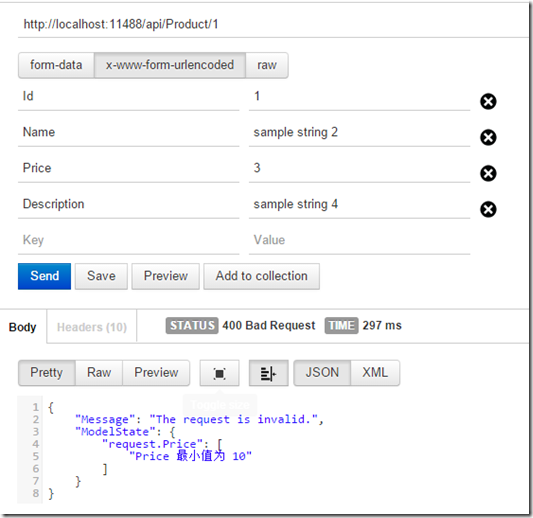
这时通过PostMan去请求,会发现验证是通过的,并没有预计的错误提示。那是因为我们没有启用验证属性的特性。
我们自定义一个ValidateModelAttribute,可用范围指定为Class和Method,且不允许多次,并将其加到刚才的Put接口上。
- /// <summary>
- /// 验证模型过滤器
- /// </summary>
- [AttributeUsage(AttributeTargets.Class | AttributeTargets.Method, AllowMultiple = false, Inherited = true)]
- public class ValidateModelAttribute : ActionFilterAttribute
- {
- /// <summary>
- /// Action执行前验证
- /// </summary>
- /// <param name="actionContext">The action context.</param>
- public override void OnActionExecuting(HttpActionContext actionContext)
- {
- if (actionContext.ActionArguments.Any(kv => kv.Value == null))
- {
- actionContext.Response = actionContext.Request.CreateErrorResponse(HttpStatusCode.BadRequest, "参数不能为空");
- }
- if (actionContext.ModelState.IsValid) return;
- actionContext.Response = actionContext.Request.CreateErrorResponse(HttpStatusCode.BadRequest, actionContext.ModelState);
- }
- }
- /// <summary>
- /// 编辑产品
- /// </summary>
- /// <param name="id">产品编号</param>
- /// <param name="request">编辑后的产品</param>
- [HttpPut, Route(""), Route("{id}")]
- [ValidateModel]
- public string Put(int id, Product request)
- {
- var model = _products.FirstOrDefault(x => x.Id.Equals(id));
- if (model == null) return "未找到该产品";
- model.Name = request.Name;
- model.Price = request.Price;
- model.Description = request.Description;
- return "ok";
- }
这是我们使用PostMan请求,验证提示便出现了。
但这时候看我们的帮助文档,Price的“约束信息”就仅剩Required一个了。
那我要将自定义的MinAttribute的约束信息也显示出来该怎么办呢,观察文档的生成代码可以发现是在Areas.HelpPage.ModelDescriptions.ModelDescriptionGenerator类中的AnnotationTextGenerator内的定义生成的。
那既然如此就好办了,我将我自定义的也加进去。
- // Modify this to support more data annotation attributes.
- private readonly IDictionary<Type, Func<object, string>> AnnotationTextGenerator = new Dictionary<Type, Func<object, string>>
- {
- { typeof(RequiredAttribute), a => "Required" },
- { typeof(RangeAttribute), a =>
- {
- RangeAttribute range = (RangeAttribute)a;
- return String.Format(CultureInfo.CurrentCulture, "Range: inclusive between {0} and {1}", range.Minimum, range.Maximum);
- }
- },
- { typeof(MaxLengthAttribute), a =>
- {
- MaxLengthAttribute maxLength = (MaxLengthAttribute)a;
- return String.Format(CultureInfo.CurrentCulture, "Max length: {0}", maxLength.Length);
- }
- },
- { typeof(MinLengthAttribute), a =>
- {
- MinLengthAttribute minLength = (MinLengthAttribute)a;
- return String.Format(CultureInfo.CurrentCulture, "Min length: {0}", minLength.Length);
- }
- },
- { typeof(StringLengthAttribute), a =>
- {
- StringLengthAttribute strLength = (StringLengthAttribute)a;
- return String.Format(CultureInfo.CurrentCulture, "String length: inclusive between {0} and {1}", strLength.MinimumLength, strLength.MaximumLength);
- }
- },
- { typeof(DataTypeAttribute), a =>
- {
- DataTypeAttribute dataType = (DataTypeAttribute)a;
- return String.Format(CultureInfo.CurrentCulture, "Data type: {0}", dataType.CustomDataType ?? dataType.DataType.ToString());
- }
- },
- { typeof(RegularExpressionAttribute), a =>
- {
- RegularExpressionAttribute regularExpression = (RegularExpressionAttribute)a;
- return String.Format(CultureInfo.CurrentCulture, "Matching regular expression pattern: {0}", regularExpression.Pattern);
- }
- },
- { typeof(MinAttribute), a =>
- {
- MinAttribute minAttribute = (MinAttribute)a;
- return String.Format(CultureInfo.CurrentCulture, "最小值: {0}", minAttribute.MinimumValue);
- }
- },
- };
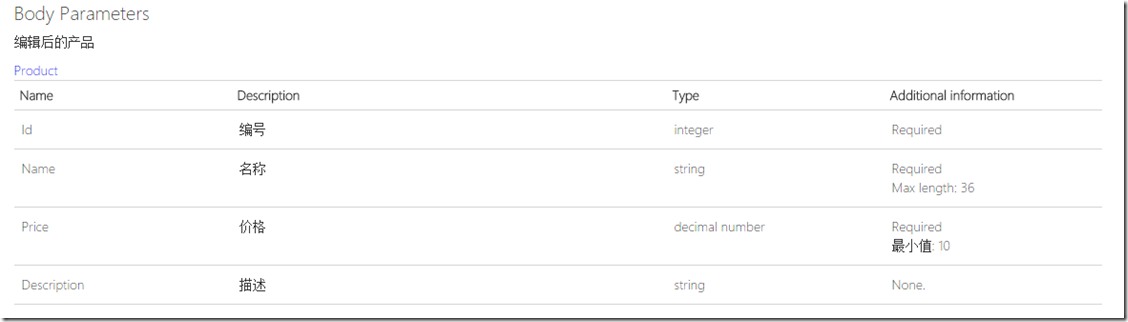
接着再看文档,我们的“约束信息”就出来了。
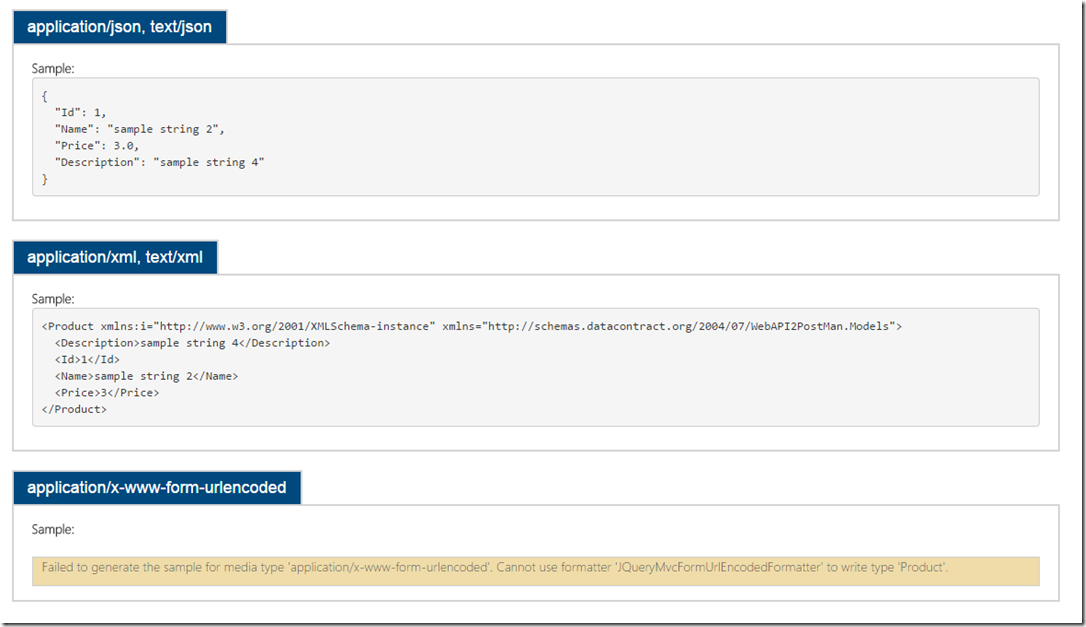
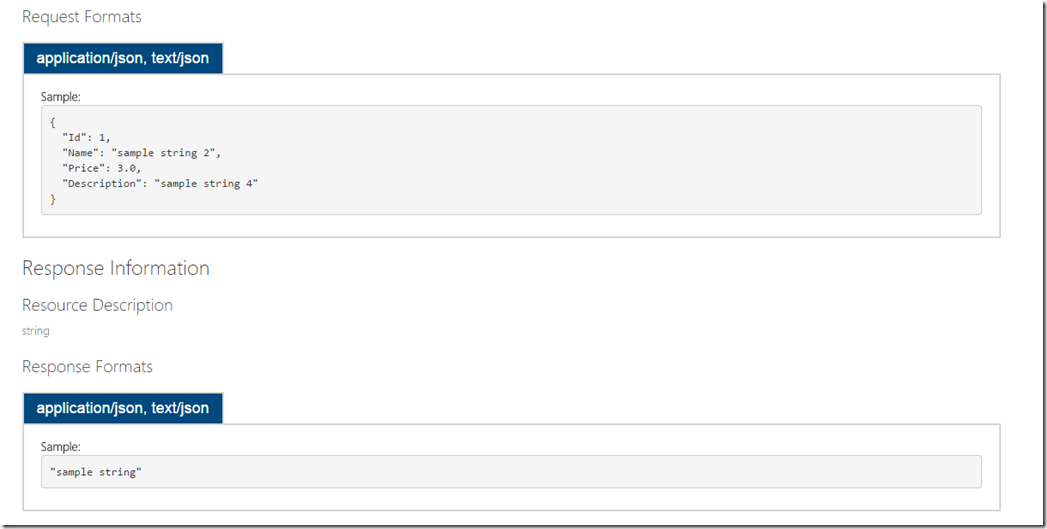
Request部分基本也就这些了。Response部分没太多内容,主要就是Sample的显示会有一个问题,你若是一步一步写到这里看到的帮助文档Sample会有三个,分别是
application/json,text/json application/xml,text/xml application/x-www-from-urlencoded
这里我们会发现它生成不了 application/x-www-form-urlencoded,是因为无法使用JqueryMvcFormUrlEncodeFomatter来格式我们的类。至于为什么,我没有去找,因为除了application/json是我需要的之外其余的我都不需要。
有兴趣的朋友可以找找为什么。然后告知一下~那这里我们将不需要的移除,如下。
- public static class WebApiConfig
- {
- public static void Register(HttpConfiguration config)
- {
- // Web API 配置和服务
- config.Formatters.Remove(config.Formatters.XmlFormatter);
- // Web API 路由
- config.MapHttpAttributeRoutes();
- }
- }
这里只移除了XmlFormatter,因为application/x-www-form-urlencoded我们在请求的时候还需要,但我不想让他显示在文档中,于是…
在Areas.HelpPage.SampleGeneration.HelpPageSampleGenerator类中的 GetSample 方法内将
foreach (var formatter in formatters)
更改为
foreach (var formatter in formatters.Where(x => x.GetType() != typeof(JQueryMvcFormUrlEncodedFormatter)))
然后,文档就干净了,这难道是洁癖么…
三、使用多个项目生成Xml文件来显示帮助文档
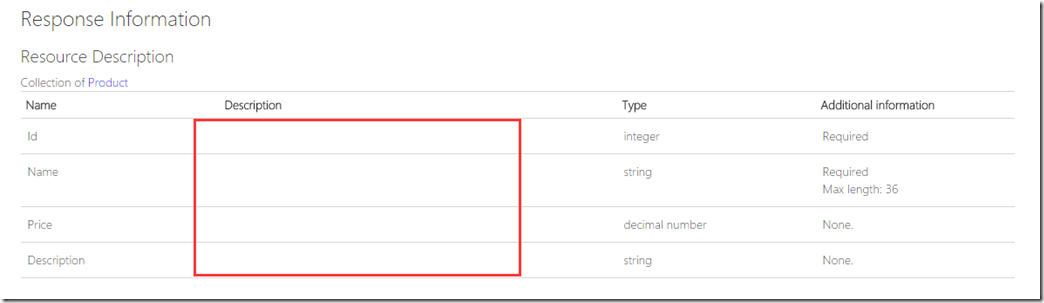
终于到这了,我们首先将Product单独作为一个项目 WebAPI2PostMan.WebModel 并引用他,查看文档如下。
你会发现,你的注释也就是属性的描述没有了。打开App_Data/XmlDocument.xml文件对比之前P没移动roduct的xml文件确实Product类的描述确实没有了,因为此处的XmlDocument.xml文件是项目的生成描述文件,不在此项目
内定义的文件是不会生成在这个文件内的,那真实的需求是我们确确实实需要将所有Request和Response单独定义在一个项目内供其它项目引用,可能是单元测试也可能是我们封装的WebAPI客户端(此处下篇文章介绍)。
带着这个疑问找到了这样一篇文章 http://stackoverflow.com/questions/21895257/how-can-xml-documentation-for-web-api-include-documentation-from-beyond-the-main
该文章提供了3种办法,这里只介绍我认为合理的方法,那那就是我们就需要将 WebAPI2PostMan.WebModel 的生成属性也勾选XML文档文件,就是也生成一个xml文档,同时拓展出一个新的Xml文档加载方式
在目录 ~/Areas/HelpPage/ 下新增一个名为 MultiXmlDocumentationProvider.cs 的类。
- using System;
- using System.Linq;
- using System.Reflection;
- using System.Web.Http.Controllers;
- using System.Web.Http.Description;
- using Xlobo.RechargeService.Areas.HelpPage.ModelDescriptions;
- namespace Xlobo.RechargeService.Areas.HelpPage
- {
- /// <summary>A custom <see cref="IDocumentationProvider"/> that reads the API documentation from a collection of XML documentation files.</summary>
- public class MultiXmlDocumentationProvider : IDocumentationProvider, IModelDocumentationProvider
- {
- /*********
- ** Properties
- *********/
- /// <summary>The internal documentation providers for specific files.</summary>
- private readonly XmlDocumentationProvider[] Providers;
- /*********
- ** Public methods
- *********/
- /// <summary>Construct an instance.</summary>
- /// <param name="paths">The physical paths to the XML documents.</param>
- public MultiXmlDocumentationProvider(params string[] paths)
- {
- this.Providers = paths.Select(p => new XmlDocumentationProvider(p)).ToArray();
- }
- /// <summary>Gets the documentation for a subject.</summary>
- /// <param name="subject">The subject to document.</param>
- public string GetDocumentation(MemberInfo subject)
- {
- return this.GetFirstMatch(p => p.GetDocumentation(subject));
- }
- /// <summary>Gets the documentation for a subject.</summary>
- /// <param name="subject">The subject to document.</param>
- public string GetDocumentation(Type subject)
- {
- return this.GetFirstMatch(p => p.GetDocumentation(subject));
- }
- /// <summary>Gets the documentation for a subject.</summary>
- /// <param name="subject">The subject to document.</param>
- public string GetDocumentation(HttpControllerDescriptor subject)
- {
- return this.GetFirstMatch(p => p.GetDocumentation(subject));
- }
- /// <summary>Gets the documentation for a subject.</summary>
- /// <param name="subject">The subject to document.</param>
- public string GetDocumentation(HttpActionDescriptor subject)
- {
- return this.GetFirstMatch(p => p.GetDocumentation(subject));
- }
- /// <summary>Gets the documentation for a subject.</summary>
- /// <param name="subject">The subject to document.</param>
- public string GetDocumentation(HttpParameterDescriptor subject)
- {
- return this.GetFirstMatch(p => p.GetDocumentation(subject));
- }
- /// <summary>Gets the documentation for a subject.</summary>
- /// <param name="subject">The subject to document.</param>
- public string GetResponseDocumentation(HttpActionDescriptor subject)
- {
- return this.GetFirstMatch(p => p.GetDocumentation(subject));
- }
- /*********
- ** Private methods
- *********/
- /// <summary>Get the first valid result from the collection of XML documentation providers.</summary>
- /// <param name="expr">The method to invoke.</param>
- private string GetFirstMatch(Func<XmlDocumentationProvider, string> expr)
- {
- return this.Providers
- .Select(expr)
- .FirstOrDefault(p => !String.IsNullOrWhiteSpace(p));
- }
- }
- }
接着替换掉原始 ~/Areas/HelpPage/HelpPageConfig.cs 内的配置。
- //config.SetDocumentationProvider(new XmlDocumentationProvider(HttpContext.Current.Server.MapPath("~/App_Data/XmlDocument.xml")));
- config.SetDocumentationProvider(new MultiXmlDocumentationProvider(HttpContext.Current.Server.MapPath("~/App_Data/XmlDocument.xml"), HttpContext.Current.Server.MapPath("~/App_Data/WebAPI2PostMan.WebModel.XmlDocument.xml")));
那这里你可以选择多个文档xml放置于不同位置也可以采用将其都放置于WebAPI项目下的App_Data下。
为了方便我们在WebAPI项目下,这里指 WebAPI2PostMan,对其添加生成事件
- copy $(SolutionDir)WebAPI2PostMan.WebModel\App_Data\XmlDocument.xml $(ProjectDir)\App_Data\WebAPI2PostMan.WebModel.XmlDocument.xml
每次生成成功后将 WebAPI2PostMan.WebModel.XmlDocument.xml 文件拷贝到 WebAPI2PostMan项目的App_Data目录下,并更名为 WebAPI2PostMan.WebModel.XmlDocument.xml。
至此,重新生成项目,我们的描述就又回来了~
这篇文章若耐心看完会发现其实就改动几处而已,没必要花这么大篇幅来说明,但是对需要的人来说还是有一点帮助的。
为了方便,源代码依然在:https://github.com/yanghongjie/WebAPI2PostMan ,若你都看到这里了,顺手点下【推荐】吧(●'◡'●)。
WebAPI使用多个xml文件生成帮助文档(转)的更多相关文章
- WebAPI使用多个xml文件生成帮助文档
一.前言 上篇有提到在WebAPI项目内,通过在Nuget里安装(Microsoft.AspNet.WebApi.HelpPage)可以根据注释生成帮助文档,查看代码实现会发现是基于解析项目生成的xm ...
- 【转】WebAPI使用多个xml文件生成帮助文档
来自:http://www.it165.net/pro/html/201505/42504.html 一.前言 上篇有提到在WebAPI项目内,通过在Nuget里安装(Microsoft.AspNet ...
- Java 读取txt文件生成Word文档
本文将以Java程序代码为例介绍如何读取txt文件中的内容,生成Word文档.在编辑代码前,可参考如下代码环境进行配置: IntelliJ IDEA Free Spire.Doc for Java T ...
- C# 读取txt文件生成Word文档
本文将以C#程序代码为例介绍如何来读取txt文件中的内容,生成Word文档.在编辑代码前,可参考如下代码环境进行配置: Visual Studio 2017 .Net Framework 4.6.1 ...
- 使用apidoc根据JS文件生成接口文档
1.安装nodejs.下载网址:http://www.nodejs.org: 2.安装apidoc.运行cmd,切换到nodejs的安装目录,在命令行输入: 1 npm install apidoc ...
- Chimm.Excel —— 使用Java 操作 excel 模板文件生成 excel 文档
Chimm.Excel -- 设置模板,填充数据,就完事儿了~ _____ _ _ _____ _ / __ \ | (_) | ___| | | | / \/ |__ _ _ __ ___ _ __ ...
- [转]java 根据模板文件生成word文档
链接地址:https://blog.csdn.net/ai_0922/article/details/82773466
- webAPI 自动生成帮助文档
之前在项目中有用到webapi对外提供接口,发现在项目中有根据webapi的方法和注释自动生成帮助文档,还可以测试webapi方法,功能很是强大,现拿出来与大家分享一下. 先看一下生成的webapi文 ...
- asp.net webAPI 自动生成帮助文档并测试
之前在项目中有用到webapi对外提供接口,发现在项目中有根据webapi的方法和注释自动生成帮助文档,还可以测试webapi方法,功能很是强大,现拿出来与大家分享一下. 先看一下生成的webapi文 ...
随机推荐
- Android开发笔记——常见BUG类型之内存泄露与线程安全
本文内容来源于最近一次内部分享的总结,没来得及详细整理,见谅. 本次分享主要对内存泄露和线程安全这两个问题进行一些说明,内部代码扫描发现的BUG大致分为四类:1)空指针:2)除0:3)内存.资源泄露: ...
- win+Nginx+php+mysql 环境配置
1.准备工作 (1)PHP 版本5.6.17 下载地址 PHP官网 (2)Nginx 版本1.8.0 下载地址 Nginx官网 (3)MySQL 版本5.7.10 MySQL官网 2.php的安 ...
- Effective Java 50 Avoid strings where other types are more appropriate
Principle Strings are poor substitutes for other value types. Such as int, float or BigInteger. Stri ...
- js日期时间函数
日期时间脚本库方法列表 Date.prototype.isLeapYear 判断闰年Date.prototype.Format 日期格式化Date.prototype.DateAdd 日期计算Date ...
- index merge的一次优化
手机微博4040端口SQL优化 现象 某端口常态化延迟,通过使用pt-query-digest发现主要由于一条count(*)语句引发,具体如下: # .5s .58M rss, .84M vsz # ...
- 6天的巴厘岛旅行 I love Bali
6天的巴厘岛旅游今天结束了,从第一天的踏进异国之域的新奇,到最后一天的将且回程的恋恋不舍,要记下的.不愿忘记的东西太多太多. 1.下午5点半抵达巴厘岛登巴萨国际机场,7点半才出机场,让Ricky导游和 ...
- Python开发之【简单计算器】
开发一个简单的python计算器 1.实现加减乘除及括号优先级解析 2.用户输入 1 - 2 * ( (60-30 +(-40/5) * (9-2*5/3 + 7 /3*99/4*2998 +10 * ...
- 获取tomcat上properties文件的内容——方便文件存储位置的修改,解耦和
在java web开发的时候经常会用到读取读取或存放文件,这个文件的默认路径在哪里呢?写死在程序里面显然是可以的,但这样子不利于位于,假如有一天项目从window移植到linux,或者保存文件的路径变 ...
- linux timezone
首先需要了解下“UTC时间”与“本地时间”UTC时间:世界协调时间(又称世界标准时间.世界统一时间),在一般精度要求下,它与GMT(Greenwich Mean Time,格林威治标准时间)是一样的, ...
- [麦先生]初学Laravel框架与ThinkPHP的不同(1)
作为一个PHP菜鸟初学Laravel框架 在学习过程中我发现了其与TP框架的不同点,由于时间问题和认识还不够完善我先写出其中几点,有错误的地方希望各位大牛斧正... 1.渲染模版方式的不同:在Lara ...