
仿iOS底部弹出popUpWindow
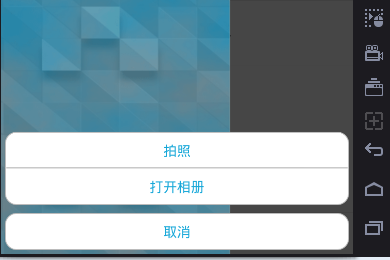
上面为弹出来的效果
popUpWindow布局:
<?xml version="1.0" encoding="utf-8"?>

<LinearLayout xmlns:android="http://schemas.android.com/apk/res/android"

    android:layout_width="match_parent"

    android:layout_height="wrap_content"

    android:padding="5dp"

    android:orientation="vertical">

    <LinearLayout

        android:padding="2dp"

        android:layout_width="match_parent"

        android:layout_height="match_parent"

        android:gravity="center_horizontal"

        android:background="@drawable/popwindow_bg"//使用shape画出圆角矩形,边框为为灰色,背景为白色。颜色不要再线性布局中设置,也会掩盖圆角矩形。

        android:orientation="vertical">

        <TextView

            android:id="@+id/takePhoto"

            style="@style/bottom_pop_textview"//宽不能设为match_parent,否则外层的圆角矩形会被遮盖。

            android:text="拍照"

            />

        <TextView

            android:layout_width="match_parent"

            android:layout_height="1dp"

            android:background="@android:color/darker_gray"

            />

        <TextView

            android:id="@+id/openPhotos"

            style="@style/bottom_pop_textview"

            android:layout_marginTop="1dp"

            android:text="打开相册"

            />

    </LinearLayout>

    <LinearLayout

        android:padding="2dp"

        android:layout_width="match_parent"

        android:layout_height="match_parent"

        android:gravity="center_horizontal"

        android:layout_marginTop="10dp"

        android:background="@drawable/popwindow_bg"//使用shape画出圆角矩形,边框为为灰色,背景为白色。

        android:orientation="vertical">

        <TextView

            android:id="@+id/cancel"

            style="@style/bottom_pop_textview"

            android:text="取消"

            />

    </LinearLayout>

</LinearLayout>
shape画出圆角矩形 代码:
<?xml version="1.0" encoding="utf-8"?>

<shape xmlns:android="http://schemas.android.com/apk/res/android"

    android:shape="rectangle"

    >

    <stroke android:width="1dip" android:color="#ffbbbbbb"/>

    <corners android:topLeftRadius="15dip"

        android:topRightRadius="15dip"

        android:bottomLeftRadius="15dip"

        android:bottomRightRadius="15dip" />

    <solid android:color="@android:color/white"/>

</shape>
从底部弹出popupwindow:
/**

     * 从底部弹出popupwindow

     */

    private void showBottomPop(View parent) {

        final View popView = View.inflate(getActivity(), R.layout.bottom_pop_layout, null);

        showAnimation(popView);//开启动画

        PopupWindow mPopWindow = new PopupWindow(popView, LinearLayout.LayoutParams.MATCH_PARENT, LinearLayout.LayoutParams.WRAP_CONTENT);

        clickPopItem(popView, mPopWindow);//条目的点击

        mPopWindow.setBackgroundDrawable(new ColorDrawable(Color.TRANSPARENT));

        mPopWindow.showAtLocation(parent,

                Gravity.BOTTOM | Gravity.CENTER_HORIZONTAL, 0, 0);

        mPopWindow.setOutsideTouchable(true);

        mPopWindow.setFocusable(true);

        mPopWindow.update();

        // 设置背景颜色变暗

        WindowManager.LayoutParams lp = activity.getWindow().getAttributes();

        lp.alpha = 0.7f;

        getActivity().getWindow().setAttributes(lp);

        mPopWindow.setOnDismissListener(new PopupWindow.OnDismissListener() {

            @Override

            public void onDismiss() {

                WindowManager.LayoutParams lp = activity.getWindow().getAttributes();

                lp.alpha = 1f;

                getActivity().getWindow().setAttributes(lp);

            }

        });

    }
弹出的动画:
/**

     * 给popupwindow添加动画

     *

     * @param popView

     */

    private void showAnimation(View popView) {

        AnimationSet animationSet = new AnimationSet(false);

        AlphaAnimation alphaAnimation = new AlphaAnimation(0f, 1.0f);

        alphaAnimation.setDuration(300);

        TranslateAnimation translateAnimation = new TranslateAnimation(

                Animation.RELATIVE_TO_SELF, 0f, Animation.RELATIVE_TO_SELF, 0f,

                Animation.RELATIVE_TO_SELF, 1f, Animation.RELATIVE_TO_SELF, 0f

        );

        translateAnimation.setDuration(300);

        animationSet.addAnimation(alphaAnimation);

        animationSet.addAnimation(translateAnimation);

        popView.startAnimation(animationSet);

    }
仿iOS底部弹出popUpWindow的更多相关文章
- Android仿IOS底部弹出选择菜单ActionSheet
使用Dialog的实现方式,解决原ActionSheet使用Fragment实现而出现的部分手机取消按钮被遮盖的问题 java部分代码: import android.app.Dialog; impo ...
- Android仿ios底部弹出框效果
准备: public class ActionSheet { public interface OnActionSheetSelected { void onClick(int whichButton ...
- PopupWindowFromBottom 从底部弹出popupwindow
自定义PopupWindowFromBottom public class PopupWindowFromBottom extends PopupWindow { public PopupWindow ...
- 转 android 从底部弹出一个popuwindow,渐入渐出效果。我这里是用在购物车需要选择购买选项的操作。
最近要改客户端,需要实现一个从底部弹出的popuwindow,像我这种渣渣android技术,能整出popuwindow但是整不出动画,百度之,记录一下. 从下面这个地址转的 http://blog. ...
- 通用的popupwindow底部弹出框
前段时间做项目的时候,有几个底部弹出框,当时因为忙着赶进度所有就单独写了好几个popupwindow.后来就想着怎么实现一个通用的PopupWindow工具类 就是在要用到的时候创建该工具类的对象,并 ...
- h5页面ios键盘弹出收起后页面底部留白问题
<input placeholder="验证码" type="tel" v-model="verify" maxlength=&quo ...
- 仿QQ空间根据位置弹出PopupWindow显示更多操作效果
我们打开QQ空间的时候有个箭头按钮点击之后弹出PopupWindow会根据位置的变化显示在箭头的上方还是下方,比普通的PopupWindow弹在屏幕中间显示好看的多. 先看QQ空间效果图: ...
- PopupWindow底部弹出
说明:从屏幕底部弹出PopupWindow,有弹出隐藏动画效果.背景设置透明度. 效果图如下: 1.MainActivity.java 显示popwindow,宽高跟屏幕大小一样,设置一个透明度背 ...
- Android项目实战(十七):QQ空间实现(二)—— 分享功能 / 弹出PopupWindow
这是一张QQ空间说说详情的截图. 分析: .点击右上角三个点的图标,在界面底部弹出一个区域,这个区域有一些按钮提供给我们操作 .当该区域出现的时候,详情界面便灰了,也说成透明度变化了 .当任意选了一个 ...
随机推荐
- 清除UIWebView的缓存
//清除cookies NSHTTPCookie *cookie; NSHTTPCookieStorage *storage = [NSHTTPCookieStorage sharedHTTPCook ...
- ECharts 在同一个页面添加多个图表 并 给图表绑定事件
<!DOCTYPE html> <head> <meta charset="utf-8"> <title>ECharts< ...
- 用get方式提交请求的url带有中文参数
又碰到JSP页面中文乱码问题,经过一次encodeURI处理后仍旧是乱码,后来经过两次encodeURI后正常显示中文 以前也碰到过同样的问题,没深究,这次网上搜集了一些资料,记录下来留做备份 ___ ...
- oracle导sql脚本
在plsql里,新建命令窗口,输入如下命令 @d:\test.sql
- F面经:painting house
There are a row of houses, each house can be painted with three colors red, blue and green. The cost ...
- Struts2的Action名称搜索顺序:2014.12.30
struts.xml配置: <struts> <package name="hw" namespace="/test" extends=&qu ...
- JAVA通过poi对Excel数据在(jsp+ssh)环境下导入导出
POI的下载与安装 请到网站http://www.apache.org/dyn/closer.cgi/poi/右击超链接2.5.1.zip下载压缩包poi-bin-2.5.1-final-20040 ...
- 夺命雷公狗---DEDECMS----20dedecms取出栏目页对应的内容
取出栏目页对应的内容 现在我们的栏目页面是可以完全正常跳转了,那么我们现在需要完成的就是让他的内容全部(电影,连续剧,综艺)分类的显示出来. 我们还是要使用{dede:arclist}标签来取出我们所 ...
- python False
None 空字符串 空列表 空元组 空字典 false为False
- 鸟哥的linux私房菜学习记录之正则表达式
正则表达式具有强大的字符串处理能力,常常用来搜索删除和替换字符串,用途很广. sed awk数据处理工具 diff,cmp,patch,pr文档对比工具