
【译】Spring 4 基于TaskScheduler实现定时任务(注解)
前言
译文链接:http://websystique.com/spring/spring-job-scheduling-with-scheduled-enablescheduling-annotations/
本文展示如何使用Spring的@Scheduled和@EnableScheduling注解来实现任务调度功能。
涉及技术及开发工具
- Spring 4.0.6.RELEASE
- Maven 3
- JDK 1.6
- Eclipse JUNO Service Release 2
工程目录结构
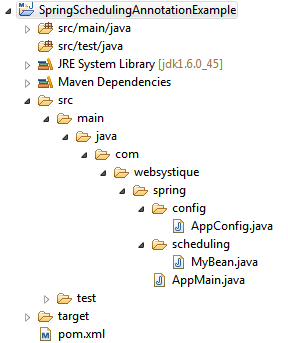
步骤一:往pom.xml中添加依赖
<project xmlns="http://maven.apache.org/POM/4.0.0" xmlns:xsi="http://www.w3.org/2001/XMLSchema-instance"

    xsi:schemaLocation="http://maven.apache.org/POM/4.0.0 http://maven.apache.org/xsd/maven-4.0.0.xsd">

    <modelVersion>4.0.0</modelVersion>

    <groupId>com.websystique.spring</groupId>

    <artifactId>SpringSchedulingAnnotationExample</artifactId>

    <version>1.0.0</version>

    <packaging>jar</packaging>

    <name>SpringSchedulingAnnotationExample</name>

    <properties>

        <springframework.version>4.0.6.RELEASE</springframework.version>

    </properties>

    <dependencies>

        <dependency>

            <groupId>org.springframework</groupId>

            <artifactId>spring-core</artifactId>

            <version>${springframework.version}</version>

        </dependency>

        <dependency>

            <groupId>org.springframework</groupId>

            <artifactId>spring-context</artifactId>

            <version>${springframework.version}</version>

        </dependency>

    </dependencies>

    <build>

        <pluginManagement>

            <plugins>

                <plugin>

                    <groupId>org.apache.maven.plugins</groupId>

                    <artifactId>maven-compiler-plugin</artifactId>

                    <version>3.2</version>

                    <configuration>

                        <source>1.6</source>

                        <target>1.6</target>

                    </configuration>

                </plugin>

            </plugins>

        </pluginManagement>

    </build>

</project>
步骤二:创建Spring配置类
Spring配置类是指用@Configuration注解标注的类,这些类包含了用@Bean标注的方法。这些被@Bean标注的方法可以生成bean并交由spring容器管理。
package com.websystique.spring.config;

import org.springframework.context.annotation.Bean;

import org.springframework.context.annotation.Configuration;

import org.springframework.scheduling.annotation.EnableScheduling;

import com.websystique.spring.scheduling.MyBean;

@Configuration

@EnableScheduling

public class AppConfig {

    @Bean

    public MyBean bean() {

        return new MyBean();

    }

}
这里要注意下@EnableScheduling注解,该注解开启了Spring的定时任务能力,使用该注解后,所有被@Scheduler标注的bean方法将会被注册用于调度。
如下是bean类:
package com.websystique.spring.scheduling;

import org.springframework.scheduling.annotation.Scheduled;

public class MyBean {

    @Scheduled(fixedRate=5000)

    public void printMessage() {

        System.out.println("I am called by Spring scheduler");

    }

}
以上被@Scheduled标注的方法会每隔五秒调用一次;
注意被@Scheduled标注的方法返回值是void且不能有参数,当然你可以注入其它bean,然后在printMessage方法内部实现其它额外功能。
@Scheduled注解提供若干种属性配置用于指定不同的调度时间:
initialDelay:在方法第一次执行之前等待的毫秒数;
fixedRate:方法每次开始执行的毫秒间隔,与该方法什么时候执行结束无关;
fixedDelay:上一次方法执行结束到下一次方法开始执行的毫秒间隔;
cron:提供更加详细的控制,如@Scheduled(cron=*/5 * * * * MON-FRI")表示在工作日每隔五秒执行一次
步骤三:创建main方法执行
package com.websystique.spring;

import org.springframework.context.annotation.AnnotationConfigApplicationContext;

import org.springframework.context.support.AbstractApplicationContext;

import com.websystique.spring.config.AppConfig;

public class AppMain {

    @SuppressWarnings({ "unused", "resource" })

    public static void main(String args[]){

        AbstractApplicationContext  context = new AnnotationConfigApplicationContext(AppConfig.class);

    }

}
注意这里我们并没有显式的调用任何调度类或方法,仅仅简单的注册了我们的配置类;
但是,由于我们使用了@EnableScheduling注解,被@Scheduler标注的bean方法会自动注册为计划任务去执行。
运行以上程序,结果如下:
I am called by Spring scheduler
I am called by Spring scheduler
I am called by Spring scheduler
I am called by Spring scheduler
I am called by Spring scheduler
.....
最后,假如你的任务需要花费很长的时间去完成,而且频率很高,你可以使用指定大小的线程池去处理各个方法中的任务,如下所示:
package com.websystique.spring.config;

import java.util.concurrent.Executor;

import java.util.concurrent.Executors;

import org.springframework.context.annotation.Bean;

import org.springframework.context.annotation.Configuration;

import org.springframework.scheduling.annotation.EnableScheduling;

import org.springframework.scheduling.annotation.SchedulingConfigurer;

import org.springframework.scheduling.config.ScheduledTaskRegistrar;

import com.websystique.spring.scheduling.MyBean;

@Configuration

@EnableScheduling

public class AppConfig implements SchedulingConfigurer {

    @Bean

    public MyBean bean() {

        return new MyBean();

    }

    @Override

    public void configureTasks(ScheduledTaskRegistrar taskRegistrar) {

        taskRegistrar.setScheduler(taskExecutor());

    }

    @Bean(destroyMethod="shutdown")

    public Executor taskExecutor() {

        return Executors.newScheduledThreadPool(10);

    }

}
以上配置使用的线程池大小为10,运行以上程序,可以得到相同的结果。
工程源码
http://websystique.com/?smd_process_download=1&download_id=811
【译】Spring 4 基于TaskScheduler实现定时任务(注解)的更多相关文章
- Spring 中基于 AOP 的 @AspectJ注解实例
@AspectJ 作为通过 Java 5 注释注释的普通的 Java 类,它指的是声明 aspects 的一种风格.通过在你的基于架构的 XML 配置文件中包含以下元素,@AspectJ 支持是可用的 ...
- Spring 3.1新特性之二:@Enable*注解的源码,spring源码分析之定时任务Scheduled注解
分析SpringBoot的自动化配置原理的时候,可以观察下这些@Enable*注解的源码,可以发现所有的注解都有一个@Import注解.@Import注解是用来导入配置类的,这也就是说这些自动开启的实 ...
- spring boot集成swagger,自定义注解,拦截器,xss过滤,异步调用,guava限流,定时任务案例, 发邮件
本文介绍spring boot集成swagger,自定义注解,拦截器,xss过滤,异步调用,定时任务案例 集成swagger--对于做前后端分离的项目,后端只需要提供接口访问,swagger提供了接口 ...
- Spring @Bean注解 (基于java的容器注解)
基于java的容器注解,意思就是使用Java代码以及一些注解,就可以取代spring 的 xml配置文件. 1-@Configuration & @Bean的配合 @Configuration ...
- Spring:基于注解的Spring MVC
什么是Spring MVC Spring MVC框架是一个MVC框架,通过实现Model-View-Controller模式来很好地将数据.业务与展现进行分离.从这样一个角度来说,Spring MVC ...
- 【Spring】Spring的定时任务注解@Scheduled原来如此简单
1 简介 定时任务的实现非常多,JDK的Timer.Spring提供的轻量级的Scheduled Task.QuartZ和Linux Cron等,还有一些分布式的任务调度框架.本文主要介绍Schedu ...
- Spring基于SchedulingConfigurer实现定时任务
Spring 基于 SchedulingConfigurer 实现定时任务,代码如下: import org.springframework.scheduling.annotation.Schedul ...
- Spring boot 基于注解方式配置datasource
Spring boot 基于注解方式配置datasource 编辑 Xml配置 我们先来回顾下,使用xml配置数据源. 步骤: 先加载数据库相关配置文件; 配置数据源; 配置sqlSessionF ...
- Spring boot 基于Spring MVC的Web应用和REST服务开发
Spring Boot利用JavaConfig配置模式以及"约定优于配置"理念,极大简化了基于Spring MVC的Web应用和REST服务开发. Servlet: package ...
随机推荐
- Nodejs之MEAN栈开发(六)---- 用Angular创建单页应用(上)
在上一节中我们学会了如何在页面中添加一个组件以及一些基本的Angular知识,而这一节将用Angular来创建一个单页应用(SPA).这意味着,取代我们之前用Express在服务端运行整个网站逻辑的方 ...
- Spring Batch在大型企业中的最佳实践
在大型企业中,由于业务复杂.数据量大.数据格式不同.数据交互格式繁杂,并非所有的操作都能通过交互界面进行处理.而有一些操作需要定期读取大批量的数据,然后进行一系列的后续处理.这样的过程就是" ...
- ABP源码分析九:后台工作任务
文主要说明ABP中后台工作者模块(BackgroundWorker)的实现方式,和后台工作模块(BackgroundJob).ABP通过BackgroundWorkerManager来管理Backgr ...
- Entity Framework 6 Recipes 2nd Edition(13-1)译 -> 优化TPT继承模型的查询
问题 你想提高在一个TPT继承模型里的查询 解决方案 让我们假设有一个简单的TPT继承模型,如图Figure 13-1 Figure 13-1. A simple Table per Type inh ...
- 【转】java.util.Arrays.asList 的用法
DK 1.4对java.util.Arrays.asList的定义,函数参数是Object[].所以,在1.4中asList()并不支持基本类型的数组作参数. JDK 1.5中,java.util.A ...
- Redis数据结构详解(一)
前言 Redis和Memcached最大的区别,Redis 除啦支持数据持久化之外,还支持更多的数据类型而不仅仅是简单key-value结构的数据记录.Redis还支持对这些数据类型做更多的服务端操作 ...
- JavaScript语言精粹--执行环境及作用域,this
1.执行环境定义了变量或函数有权访问的其他数据,决定了他们各自的行为. 每个执行环境都有一个与之关联的变量对象,环境中定义的所有变量和函数都保存在这个对象中. 虽然我们无法访问,但是解析器在处理数据时 ...
- 用原始方法解析复杂字符串,json一定要用JsonMapper么?
经常采集数据,肯定会碰到解析字符串,包括整个页面的html,或者json以及一些不标准的json格式... 以前用json序列化,有时候需要实体类,有的时候没有,比较麻烦,听说可以用JsonMappe ...
- MySQL升级
MySQL的升级相对来说还是比较简单的. 它支持两种方式的升级: 原地升级(In-place Upgrade) 关闭数据库,替换旧的二进制文件,重启数据库,执行mysql_upgrade 逻辑升级(L ...
- IDEA+weblogic部署运行项目
前段时间再服务器上为了部署一个系统,一直存在各种问题,不过过程中倒是把weblogic的部署掌握地特别熟练,下面就一些主要步骤做个记录:1.自己用的是IDEA,所以打开项目之后需要设置src/main ...