
flutter Form表单
import 'package:flutter/material.dart';

class FormDemo extends StatelessWidget {

  @override

  Widget build(BuildContext context) {

    return Scaffold(

      appBar: AppBar(

        title: Text('FormDemo'),

        elevation: 0.0,

      ),

      body: Theme(

        data: Theme.of(context).copyWith(

          primaryColor: Colors.black,

        ),

        child: Container(

          padding: EdgeInsets.all(16.0),

          child: Column(

            mainAxisAlignment: MainAxisAlignment.center,

            children: <Widget>[

              RegisterForm(),

            ],

          ),

        ),

      ),

    );

  }

}

class RegisterForm extends StatefulWidget {

  @override

  RegisterFormState createState() => RegisterFormState();

}

class RegisterFormState extends State<RegisterForm> {

  final registerFormKey = GlobalKey<FormState>();

  String username, password;

  bool autovalidate = false;

  void submitRegisterForm() {

    if (registerFormKey.currentState.validate()) {

      registerFormKey.currentState.save();

      debugPrint('username: $username');

      debugPrint('password: $password');

      Scaffold.of(context).showSnackBar(

        SnackBar(

          content: Text('Registering...'),

        )

      );

    } else {

      setState(() {

        autovalidate = true;

      });

    }

  }

  String validateUsername(value) {

    if (value.isEmpty) {

      return 'Username is required.';

    }

    return null;

  }

  String validatePassword(value) {

    if (value.isEmpty) {

      return 'Password is required.';

    }

    return null;

  }

  @override

  Widget build(BuildContext context) {

    return Form(

      key: registerFormKey,

      child: Column(

        children: <Widget>[

          TextFormField(

            decoration: InputDecoration(

              labelText: 'Username',

              helperText: '',

            ),

            onSaved: (value) {

              username = value;

            },

            validator: validateUsername,

            autovalidate: autovalidate,

          ),

          TextFormField(

            obscureText: true,

            decoration: InputDecoration(

              labelText: 'Password',

              helperText: '',

            ),

            onSaved: (value) {

              password = value;

            },

            validator: validatePassword,

            autovalidate: autovalidate,

          ),

          SizedBox(height: 32.0,),

          Container(

            width: double.infinity,

            child: RaisedButton(

              color: Theme.of(context).accentColor,

              child: Text('Register', style: TextStyle(color: Colors.white)),

              elevation: 0.0,

              onPressed: submitRegisterForm,

            ),

          ),

        ],

      ),

    );

  }

}

class TextFieldDemo extends StatefulWidget {

  @override

  TextFieldDemoState createState() => TextFieldDemoState();

}

class TextFieldDemoState extends State<TextFieldDemo> {

  final textEditingController = TextEditingController();

  @override

  void dispose() {

    textEditingController.dispose();

    super.dispose();

  }

  @override

  void initState() {

    super.initState();

    // textEditingController.text = 'hi';

    textEditingController.addListener(

      () {

        debugPrint('input: ${textEditingController.text}');

      }

    );

  }

  @override

  Widget build(BuildContext context) {

    return TextField(

      controller: textEditingController,

      // onChanged: (value) {

      //   debugPrint('input: $value');

      // },

      onSubmitted: (value) {

        debugPrint('submit: $value');

      },

      decoration: InputDecoration(

        icon: Icon(Icons.subject),

        labelText: 'Title',

        hintText: 'Enter the post title.',

        // border: InputBorder.none,

        // border: OutlineInputBorder(),

        filled: true,

      ),

    );

  }

}

class ThemeDemo extends StatelessWidget {

  @override

  Widget build(BuildContext context) {

    return Container(

      color: Theme.of(context).accentColor,

    );

  }

}
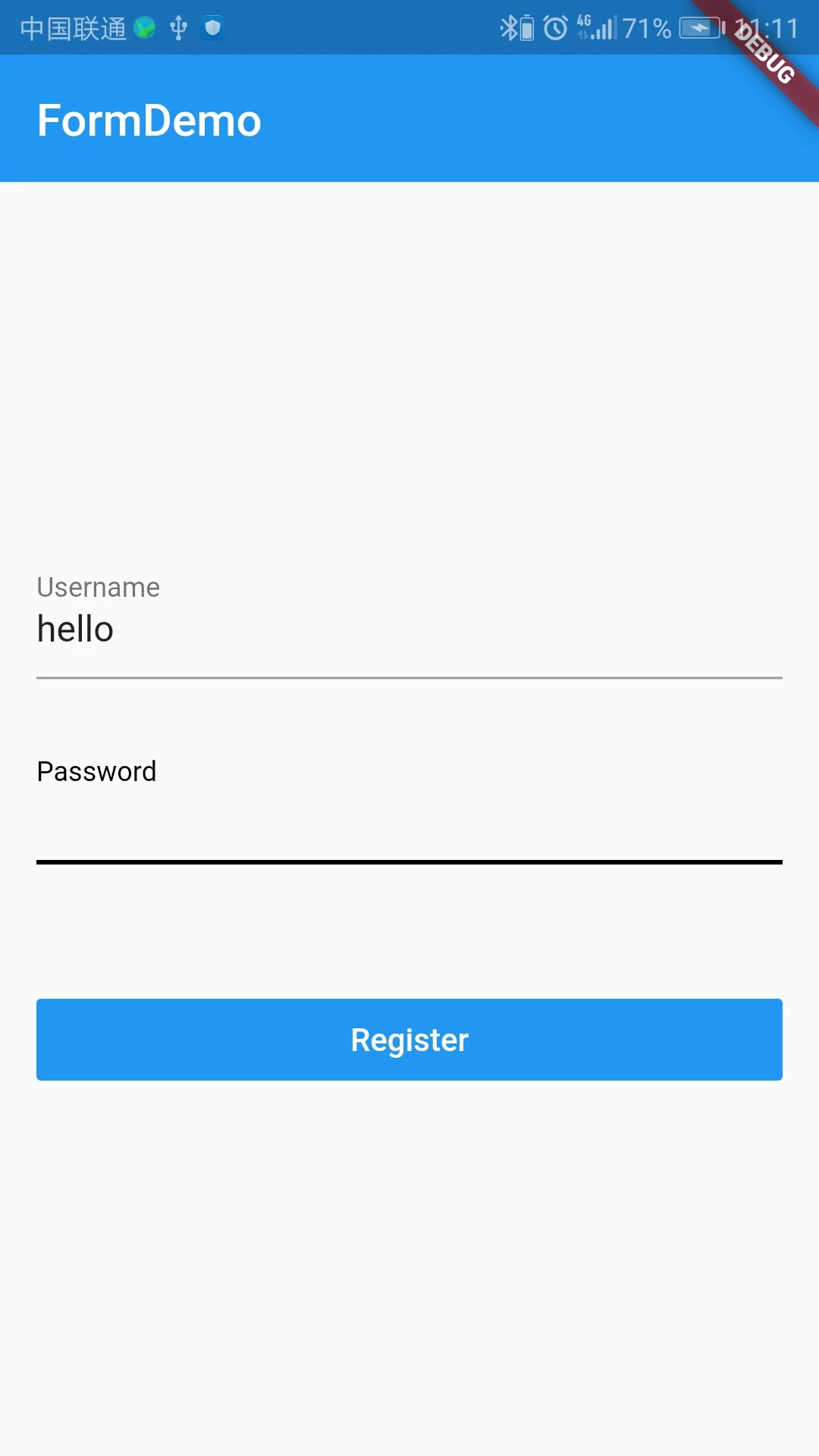
效果:
flutter Form表单的更多相关文章
- Flutter Form表单控件超全总结
注意:无特殊说明,Flutter版本及Dart版本如下: Flutter版本: 1.12.13+hotfix.5 Dart版本: 2.7.0 Form.FormField.TextFormField是 ...
- form表单验证-Javascript
Form表单验证: js基础考试内容,form表单验证,正则表达式,blur事件,自动获取数组,以及css布局样式,动态清除等.完整代码如下: <!DOCTYPE html PUBLIC &qu ...
- Form 表单提交参数
今天因为要额外提交参数数组性的参数给form传到后台而苦恼了半天,结果发现,只需要在form表单对应的字段html空间中定义name = 后台参数名 的属性就ok了. 后台本来是只有模型参数的,但是后 ...
- form表单 ----在路上(15)
form 表单就是将用户的信息提交到服务器,服务器会将信息存储活着根据信息查询数据进行增删改查,再将其返回给用户. 基本格式: <form action="" method ...
- form表单的字符串进行utf-8编码
<form>表单有assept-charset属性.该属性规定字符的编码方式,默认是"unknown",与文档的字符集相同. 该属性除了Internet explore ...
- 细说 Form (表单)
细说 Form (表单) Form(表单)对于每个WEB开发人员来说,应该是再熟悉不过的东西了,可它却是页面与WEB服务器交互过程中最重要的信息来源. 虽然Asp.net WebForms框架为了帮助 ...
- 通过form表单的形式下载文件。
在项目中遇到问题,要求动态拼接uri下载文件.但是由于项目的安全拦截导致window.location.href 和 window.open等新建窗口的方法都不行. 无意间百度到了通过form表单来下 ...
- form 表单跨域提交
<!DOCTYPE html><html> <head> <title>form 表单上传文件</title> <script src ...
- form表单的属性标签
form表单的常用标签 表单: <form id="" name="" method="post/get" action=" ...
随机推荐
- 28.XSD(XML Schema Definition)用法实例介绍以及C#使用xsd文件验证XML格式
转自https://www.cnblogs.com/gdjlc/archive/2013/09/08/3308229.html XML Schema 语言也称作 XML Schema 定义(XML S ...
- 《Exceptioning团队》第四次作业:项目需求调研与分析
一.项目基本介绍 项目 内容 这个作业属于哪个课程 任课教师博客主页链接 这个作业的要求在哪里 作业链接地址 团队名称 Exception 作业学习目标 1.探索团队软件项目需求获取技巧与方法2.学会 ...
- 评估预测函数(3)---Model selection(选择多项式的次数) and Train/validation/test sets
假设我们现在想要知道what degree of polynomial to fit to a data set 或者 应该选择什么features 或者 如何选择regularization par ...
- Spring源码窥探之:ImportBeanDefinitionRegistrar
1. 编写实现ImportBeanDefinitionRegistrar的类 /** * description * * @author 70KG * @date 2018/11/13 */ publ ...
- Web开发技术---简单的登录验证
制作一个APP或系统最基础的是登录界面,下面通过一个简单的登录注册界面的程序,来熟练掌握Web开发的技术. 一.知识点: 1.在网页界面获取用户的输入信息 2.标签的基本应用 3.用户输入结果的错误提 ...
- python 不能加载pip install的site-package文件
python -m pip install tensorflow-gpu==1.0.1 -i https://pypi.tuna.tsinghua.edu.cn/simple/
- spring mvc 坑之PUT,DELETE方法接收不到请求参数
https://www.cnblogs.com/roobtyan/p/9576685.html 原因: Tomcat处理参数的问题: 1.将请求体中的数据,封装成一个map 2.request. ...
- map json 字符串 对象之间的相互转化
1.对象与字符串之间的互转 将对象转换成为字符串 String str = JSON.toJSONString(infoDo); 字符串转换成为对象 InfoDo infoDo = JSON.pars ...
- php自定义函数之内部函数
内部函数,是指在函数内部又声明了一个函数. 注意事项: 1.内部函数名,不能是已存在的函数名 2.假设在函数a里面定义了一个内部函数,不能定用两次函数a. 我们下面来看代码,你将很快的学习会: < ...
- java实现大文件上传分片上传断点续传
我们平时经常做的是上传文件,上传文件夹与上传文件类似,但也有一些不同之处,这次做了上传文件夹就记录下以备后用. 这次项目的需求: 支持大文件的上传和续传,要求续传支持所有浏览器,包括ie6,ie7,i ...