
springboot---发送邮件

1、pom.xml配置
 <dependencies>

        <dependency>

            <groupId>org.springframework.boot</groupId>

            <artifactId>spring-boot-starter-web</artifactId>

        </dependency>

        <dependency>

            <groupId>org.springframework.boot</groupId>

            <artifactId>spring-boot-starter-test</artifactId>

            <scope>test</scope>

        </dependency>

        <!-- SpringBoot 发送邮件 -->

        <dependency>

            <groupId>org.springframework.boot</groupId>

            <artifactId>spring-boot-starter-mail</artifactId>

        </dependency>

 </dependencies>
2、在application.properties中添加邮箱配置
spring.mail.default-encoding=UTF-8

spring.mail.host=smtp.qq.com

#发送者的邮箱密码

spring.mail.password=xxx

#端口

spring.mail.port=25

#协议

spring.mail.protocol=smtp

#发送者的邮箱账号

spring.mail.username=xxx@qq.com

server.port=8081
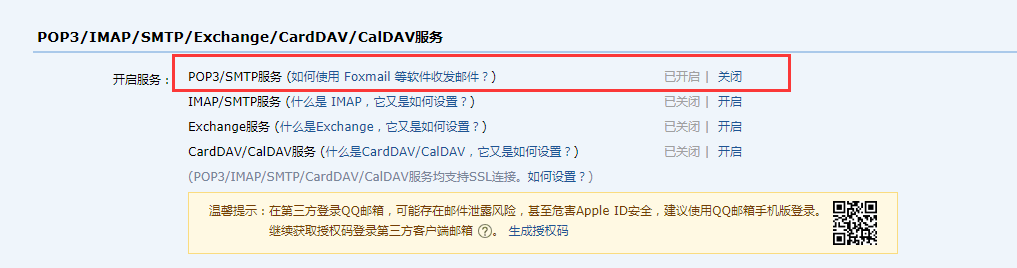
邮箱密码:
QQ邮箱 --> 邮箱设置 --> 账号
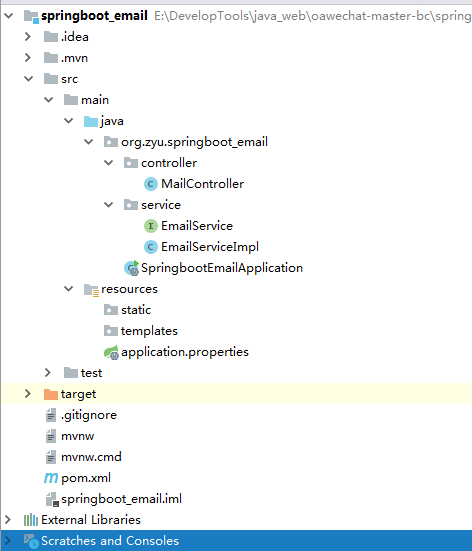
3、项目整体结构
4、业务层service接口
package org.zyu.springboot_email.service;

public interface EmailService {

    /**

     * 发送简单邮件

     * @param sendTo    接收人

     * @param title     邮件标题

     * @param content   邮件内容

     */

    void sendSimpleMail(String sendTo,String title,String content);

    /**

     * 发送带静态资源的邮件

     * @param sendTo    接收人

     * @param title     邮件标题

     * @param content   邮件内容

     * @param path      资源路径

     */

    void sendInlineMail(String sendTo,String title,String content,String path);

    /**

     * 发送带附件的邮件

     * @param sendTo    接收人

     * @param title     邮件标题

     * @param content   邮件内容

     * @param filePath  附件路径

     */

    void sendAttachmentsMail(String sendTo,String title,String content,String filePath);

}
5、serviceImpl实现service接口
package org.zyu.springboot_email.service;

import org.springframework.beans.factory.annotation.Autowired;

import org.springframework.beans.factory.annotation.Value;

import org.springframework.core.io.FileSystemResource;

import org.springframework.mail.SimpleMailMessage;

import org.springframework.mail.javamail.JavaMailSender;

import org.springframework.mail.javamail.MimeMessageHelper;

import org.springframework.stereotype.Service;

import javax.mail.internet.MimeMessage;

import java.io.File;

@Service

public class EmailServiceImpl implements EmailService {

    @Autowired

    JavaMailSender mailSender;

    //发送人

    @Value("${spring.mail.username}")

    private String sendFrom;

    @Override

    public void sendSimpleMail(String sendTo, String title, String content) {

        SimpleMailMessage mainMessage = new SimpleMailMessage();

        mainMessage.setFrom(sendFrom);

        //接收者

        mainMessage.setTo(sendTo);

        //发送的标题

        mainMessage.setSubject(title);

        //发送的内容

        mainMessage.setText(content);

        mailSender.send(mainMessage);

    }

    @Override

    public void sendInlineMail(String sendTo, String title, String content,String path) {

        MimeMessage mimeMessage = mailSender.createMimeMessage();

        try {

            FileSystemResource file = new FileSystemResource(new File(path));

            MimeMessageHelper helper = new MimeMessageHelper(mimeMessage, true);

            helper.setFrom(sendFrom);

            helper.setTo(sendTo);

            helper.setSubject(title);

            helper.setText(content, true);

            helper.addInline("weixin", file);

        } catch (Exception e) {

            System.out.println("发送带静态资源的邮件失败");

        }

        mailSender.send(mimeMessage);

    }

    @Override

    public void sendAttachmentsMail(String sendTo, String title, String content, String filePath) {

        MimeMessage message=mailSender.createMimeMessage();

        try {

            MimeMessageHelper helper=new MimeMessageHelper(message,true);

            helper.setFrom(sendFrom);

            helper.setTo(sendTo);

            helper.setSubject(title);

            helper.setText(content);

            FileSystemResource file=new FileSystemResource(new File(filePath));

            String fileName=filePath.substring(filePath.lastIndexOf(File.separator));

            //添加多个附件可以使用多条

            //helper.addAttachment(fileName,file);

            helper.addAttachment(fileName,file);

            mailSender.send(message);

            System.out.println("带附件的邮件发送成功");

        }catch (Exception e){

            e.printStackTrace();

            System.out.println("发送带附件的邮件失败");

        }

    }

}
5、业务层Controller
package org.zyu.springboot_email.controller;

import org.springframework.beans.factory.annotation.Autowired;

import org.springframework.mail.SimpleMailMessage;

import org.springframework.mail.javamail.JavaMailSender;

import org.springframework.stereotype.Controller;

import org.springframework.web.bind.annotation.GetMapping;

import org.springframework.web.bind.annotation.RequestMapping;

import org.springframework.web.bind.annotation.RestController;

import org.zyu.springboot_email.service.EmailService;

import java.nio.file.Path;

@RestController

public class MailController {

    @Autowired

    private EmailService emailService;

    /**

     * 简单发送邮件

     * @return

     */

    @GetMapping("/send")

    public String send(){

        emailService.sendSimpleMail( "393488908@qq.com", "测试标题", "hello world");

        return "发送成功";

    }

    /**

     * 发送静态资源邮件

     * @return

     */

    @GetMapping("/sendInlineMail")

    public String sendInlineMail(){

        emailService.sendInlineMail("393488908@qq.com", "主题:嵌入静态资源", "<html><body><img src=\"cid:weixin\" ></body></html>","C:\\Users\\Administrator\\Desktop\\timg.jpg");

        return "发送成功";

    }

    /**

     * 发送带附件的邮件

     * @return

     */

    @GetMapping("/sendAttachmentsMail")

    public String sendAttachmentsMail(){

        emailService.sendAttachmentsMail("393488908@qq.com", "主题:携带附件邮件", "hello world", "D:\\谷歌下载\\注册补贴明细列表.xlsx");

        return "发送成功";

    }

}
springboot---发送邮件的更多相关文章
- SpringBoot 发送邮件功能实现
背景 有个小伙伴问我你以前发邮件功能怎么弄的.然后我就给他找了个demo,正好在此也写一下,分享给大家. 理清痛点 发送邮件,大家可以想一下,坑的地方在哪? 我觉得是三个吧. 第一:邮件白名单问题. ...
- 记录一次简单的springboot发送邮件功能
场景:经常在我们系统中有通过邮件功能找回密码,或者发送生日祝福等功能,今天记录下springboot发送邮件的简单功能 1.引入maven <!-- 邮件开发--><dependen ...
- 1.使用javax.mail, spring的JavaMailSender,springboot发送邮件
一.java发邮件 电子邮件服务器:这些邮件服务器就类似于邮局,它主要负责接收用户投递过来的邮件,并把邮件投递到邮件接收者的电子邮箱中,按功能划分有两种类型 SMTP邮件服务器:用户替用户发送邮件和接 ...
- 3.4 SpringBoot发送邮件
spring官方提供了spring-boot-starter-mail来整合邮件发送功能,本质上还是利用了JavaMailSender类. 首先我们要在项目中引入相关依赖 <parent & ...
- (入门SpringBoot)SpringBoot发送邮件(十一)
SpringBoot配置邮件服务: 1.引入jar <!-- 邮件 --> <dependency> <groupId>org.springframework ...
- springboot发送邮件,以及携带邮件附件简单使用
可以通过springboot官方文档中Sending Email,找到类似如下java mail的使用文档 https://docs.spring.io/spring/docs/5.1.9.RELEA ...
- 【快学springboot】使用springboot发送邮件
前言 在实际项目中,经常需要用到邮件通知功能.比如,用户通过邮件注册,通过邮件找回密码等:又比如通过邮件发送系统情况,通过邮件发送报表信息等等,实际应用场景很多.这篇文章,就教大家通过springbo ...
- 使用 FreeMarker模板 Springboot 发送邮件
四.使用 FreeMarker模板 HTML 标签的字符串拼接是一件很棘手的事.因为在你的大脑中解析HTML标签并想象它在渲染时会是什么样子是挺困难的.而将HTML混合在Java代码中又会使得这个问题 ...
- 最简单的 springboot 发送邮件,使用thymeleaf模板
1,导入需要的包 <dependency> <groupId>org.springframework.boot</groupId> <artifactId&g ...
- springboot发送邮件
1.在发送端邮箱平台开通SMTP服务 1)以163邮箱为例: step 1: step 2: 2.编写代码: 1)添加发送邮箱maven依赖 <dependency> <groupI ...
随机推荐
- 地图的折线:Polyline
(1)var polyline = new BMap.Polyline([new BMap.Point(X1,Y1),new BMap.Point(X2,Y2),new BMap.Point(X3,Y ...
- Laravel .env 多环境配置文件
项目开发中,通常会有本地开发环境.内网测试环境.线上真实环境.这三种环境的配置通常都不尽相同,Laravel 可以通过环境变量 APP_ENV 的值来加载不同的 .env 配置文件.下面会介绍两种方 ...
- Redis分片机制
文章原创于公众号:程序猿周先森.本平台不定时更新,喜欢我的文章,欢迎关注我的微信公众号. 前两篇文章对Redis主从复制和主从切换的知识点进行了介绍,但是也很明显的有一点小弊端: 需要定时进行主从复制 ...
- Butter Knife
Butter Knife,专门为Android View设计的绑定注解,专业解决各种findViewById. 简介 对一个成员变量使用@BindView注解,并传入一个View ID, Butter ...
- 手把手教你安装Eclipse最新版本的详细教程 - 大佬的鸡肋,菜鸟的盛宴(非常详细,非常实用)
简介 首先声明此篇文章主要是针对测试菜鸟或者刚刚入门的小伙们或者童鞋们,大佬就没有必要往下看了. 写这篇文章的由来是因为后边要用这个工具,但是由于某些原因有部分小伙伴和童鞋们可能不会安装此工具,为了方 ...
- 用OllyDbg爆破一个小程序
用OllyDbg爆破一个小程序 一.TraceMe小程序 TraceMe是对用户名.序列号判断是否合法的一个小程序.我们任意输入一组用户名.序列号进行check判断,结果如下: 二.用OllyDbg对 ...
- QCustomPlot 基础
QCutomPlot简介 官网网址及介绍 https://www.qcustomplot.com/ QCustomPlot is a Qt C++ widget for plotting and da ...
- Ubuntu16.04安装Docker、nvidia-docker
Ubuntu16.04安装Docker.nvidia-docker Docker安装 1.更换国内软件源,推荐中国科技大学的源,稳定速度快(可选) sudo cp /etc/apt/sources.l ...
- hihoCode 1075 : 开锁魔法III
时间限制:6000ms 单点时限:1000ms 内存限制:256MB 描述 一日,崔克茜来到小马镇表演魔法. 其中有一个节目是开锁咒:舞台上有 n 个盒子,每个盒子中有一把钥匙,对于每个盒子而言有且仅 ...
- 本人亲测-SSM整合后的基础包(供新手学习使用,可在本基础上进行二次开发)
本案例是在eclipse上进行开发的,解压后直接添加到eclipse即可.还需要自己配置maven环境.链接:https://pan.baidu.com/s/1siuvhCJASuZG_jqY5utP ...