
测试框架httpclent 3.获取cookie的信息,然后带cookies去发送请求
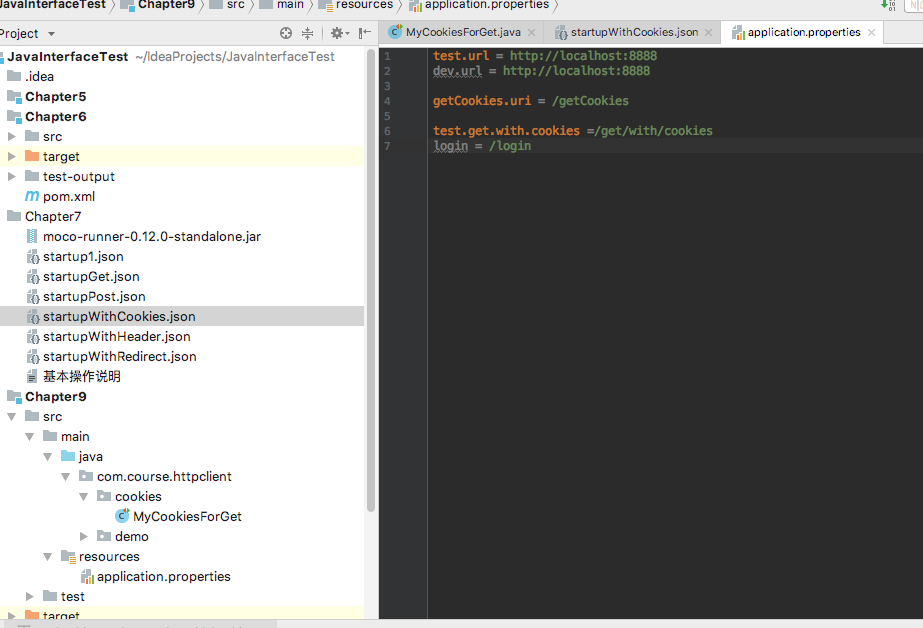
在properties文件里面:
startupWithCookies.json
[

  {

    "description":"这是一个会返回cookies信息的get请求",

    "request":{

      "uri":"/getCookies",

      "method":"get"

    },

    "response":{

      "cookies":{

        "login":"true"

      },

      "text":"恭喜获得cookies信息成功"

    }

  },

  {

    "description":"这是一个带cookies的请求",

    "request":{

      "uri":"/get/with/cookies",

      "method":"get",

      "cookies":{

        "login":"true"

      }

    },

    "response":{

      "text":"这是一个需要携带cookies信息才能访问的get请求"

    }

  },

  {

    "description":"这是一个带cookies的post请求",

    "request":{

      "uri":"/post/with/cookies",

      "method":"post",

      "cookies":{

        "login":"true"

      },

      "json":{

        "name":"huhanshan",

        "age":"18"

      }

    },

    "response":{

      "status":200,

      "json":{

        "huhanshan":"success",

        "status":"1"

      }

    }

  }

]
进入moco和json文件的所在目录:运行以下命令
java -jar ./moco-runner-0.12.0-standalone.jar http -p 8888 -c startupWithCookies.json
Java文件:
package com.course.httpclient.cookies;

import org.apache.http.HttpResponse;

import org.apache.http.client.CookieStore;

import org.apache.http.client.methods.HttpGet;

import org.apache.http.cookie.Cookie;

import org.apache.http.impl.client.DefaultHttpClient;

import org.apache.http.util.EntityUtils;

import org.testng.annotations.BeforeTest;

import org.testng.annotations.Test;

import java.io.IOException;

import java.util.List;

import java.util.Locale;

import java.util.ResourceBundle;

public class MyCookiesForGet {

    private String url;

    private ResourceBundle bundle;

    //用来存储cookies信息的变量

    private CookieStore store;

    @BeforeTest

    public void beforeTest(){

        bundle = ResourceBundle.getBundle("application",Locale.CHINA);

        url = bundle.getString("test.url");

    }

    @Test

    public void testGetGookies() throws IOException {

        String result;

        String uri = bundle.getString("getCookies.uri");

        HttpGet get = new HttpGet(this.url + uri);

        DefaultHttpClient client = new DefaultHttpClient();

        HttpResponse response = client.execute(get);

        result = EntityUtils.toString(response.getEntity(),"utf-8");

        System.out.println(result);

        //获取cookies的信息,因为cookie里面不只是一个,他是一个cookie类型的list

        store = client.getCookieStore();

        List<Cookie> cookieList = store.getCookies();

        for(Cookie cookie : cookieList){

            String name = cookie.getName();

            String value = cookie.getValue();

            System.out.println("name = "+name+",value = "+value);

        }

    }

    @Test(dependsOnMethods = "testGetGookies")

    public void testGetWithCookies() throws IOException {

        String uri = bundle.getString("test.get.with.cookies");

        HttpGet get = new HttpGet(this.url + uri);

        DefaultHttpClient client = new DefaultHttpClient();

        //设置cookies信息

        client.setCookieStore(store);

        HttpResponse response = client.execute(get);

        //获取响应的状态码

        int statusCode = response.getStatusLine().getStatusCode();

        System.out.println("statusCode="+statusCode);

        if(statusCode==200){

            String result = EntityUtils.toString(response.getEntity(),"utf-8");

            System.out.println(result);

        }

    }

}
测试框架httpclent 3.获取cookie的信息,然后带cookies去发送请求的更多相关文章
- 测试框架httpclent 4.HttpClient Post方法实现
startupWithCookies.json [ { "description":"这是一个会返回cookies信息的get请求", "reques ...
- Android -- junit测试框架,logcat获取log信息
1. 相关概念 白盒测试: 知道程序源代码. 根据测试的粒度分为不同的类型 方法测试 function test 单元测试 unit test 集成 ...
- 测试框架httpclent 2.配置优化方法
优化就是为了使代码看起来更简便,如果代码里面的每一个请求都写一次url,那么整体代码看起来很乱,而且一旦某个服务器的端口号或者域名有变动,那么所有的url都需要改变,成本太大.为了让代码看起来更简便, ...
- 测试框架httpclent 1.HttpClient简介及第一个demo
httpclient就是一个模拟 发送http请求的一个工具. 首先在pom.xml文件里面添加工具类 <dependencies> <dependency> <grou ...
- selenium:IE浏览器获取cookie提示Could not retrieve cookies
from selenium import webdriver url = "https://www.baidu.com" dr = webdriver.Ie() dr.get(ur ...
- Mock8 moco框架如何返回一个cookie信息
还是用之前的startupWithCookies.json这个文件,直接往里面添加上面的一个代码: [ { "description":"这是一个会返回cookies信息 ...
- 创建和获取cookie
创建和获取cookie 制作人:全心全意 cookie:在互联网中,cookie是小段的文本信息,在网络服务器上生成,并发送给浏览器.通过使用cookie可以标识用户身份,记录用户名和密码,跟踪重复用 ...
- 模拟用户登录(获取cookie/实例化session)
第一种方法:通过本地浏览器保存的cookie进行登陆 url1 = 'https://passport.cnblogs.com/user/signin?ReturnUrl=https%3A%2F%2F ...
- C#开发BIMFACE系列24 服务端API之获取模型数据9:获取单个房间信息
系列目录 [已更新最新开发文章,点击查看详细] 大厦建筑模型中,基本上包含多个楼层,每个楼层包含多个房间等信息.在<C#开发BIMFACE系列21 服务端API之获取模型数据6:获取单模 ...
随机推荐
- 防xss攻击
官方:https://jsxss.com/zh/index.html xss csrf https://www.cnblogs.com/443855539-wind/p/6055816.html 一. ...
- Actor模型浅析 一致性和隔离性
一.Actor模型介绍 在单核 CPU 发展已经达到一个瓶颈的今天,要增加硬件的速度更多的是增加 CPU 核的数目.而针对这种情况,要使我们的程序运行效率提高,那么也应该从并发方面入手.传统的多线程方 ...
- SQL c# 程序报错:未在本地计算机上注册“Microsoft.Jet.OLEDB.4.0”提供程序
报错:未在本地计算机上注册“Microsoft.Jet.OLEDB.4.0”提供程序.System.Data 需要注意的问题和解决方法: 1.Microsoft.Jet.OLEDB.4.0不要写成Mi ...
- centos下Django+uwsgi+nginx
本篇章主要讲解uwsgi和nginx的作用,并利用两者对django项目进行部署 一.概述 在开发过程中,我们一般是在该项目的虚拟环境中启用django自带的web服务:python manage.p ...
- c/c++ 多线程 利用条件变量实现线程安全的队列
多线程 利用条件变量实现线程安全的队列 背景:标准STL库的队列queue是线程不安全的. 利用条件变量(Condition variable)简单实现一个线程安全的队列. 代码: #include ...
- Ubuntu17.04 sudo apt-get update升级错误
最近在折腾Ubuntu,安装的是17.04版本的.想安装PHP7.X最新版本,但是要先升级.利用sudo apt-get update命名后,出现了以下报错: 忽略:1 http://cn.archi ...
- ansible学习(二)
什么是YAML? YAML是一种标记语言.适合用来表达层次结构式的数据结构. YAML的基本组件:清单(短杠——空白字符)和散列表(短杠+空白字符分隔key:value对). Playbook的核心元 ...
- Vue学习之路2-项目初搭建
1.检查环境是否全部安装成功 2.创建项目 2.1.打开dos命令窗口,使用dos命令转到项目文件夹下: 2.2.输入创建项目命令:vue init webpack myproject1 创建不同的打 ...
- hashlib模块
老师博客:http://www.cnblogs.com/Eva-J/articles/7228075.html#_label12 摘要算法 什么是摘要算法呢?摘要算法又称哈希算法.散列算法.它通过一个 ...
- 超哥笔记--shell 基本命令(4)
一 linux 命令行的组成结构 自定义命令行结构 PS1变量来控制 \u \W 最后一位工作目录 \w 绝对路径工作目录 \t 显示24h制的时间 \h PS1="[\u@\h \w \t ...