
asp.net core 2.1 生成swagger文档
新建asp.netcore2.1 api项目 “WebApplication1”
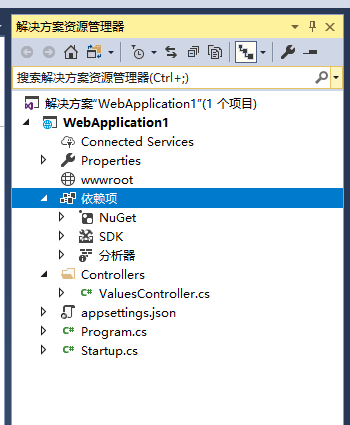
在nuget管理器中添加对Swashbuckle.AspNetCore 3.0.0、Microsoft.AspNetCore.StaticFiles 2.1.1 的引用
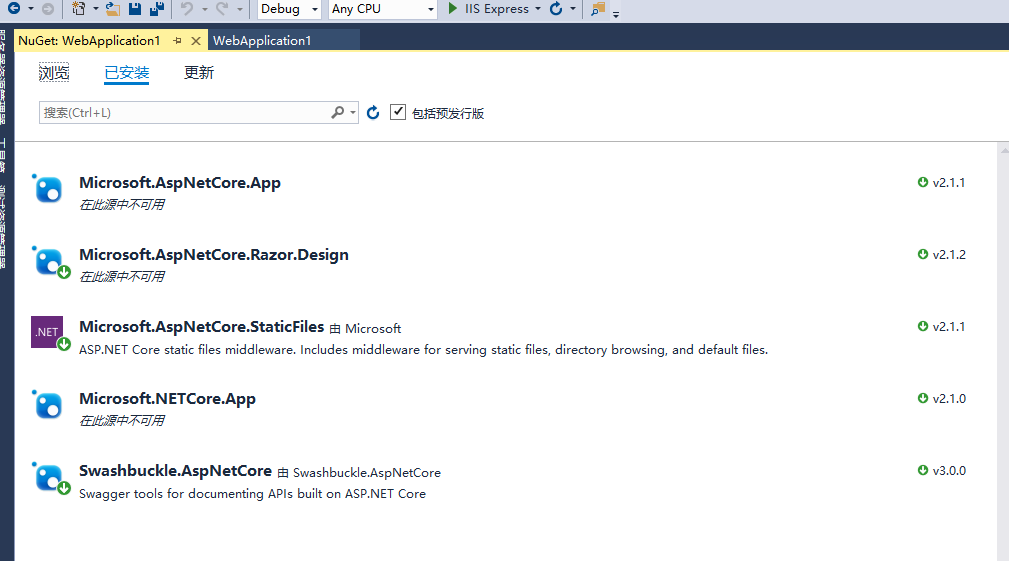
右键WebApplication1打开属性面板 左侧找到“生成”,把“XML文档文件”打钩 将路径修改为 “bin\Debug\netcoreapp2.1\WebApplication1.xml” (默认的路径会在项目里生成一个xml文件 这不是我们希望看到的)
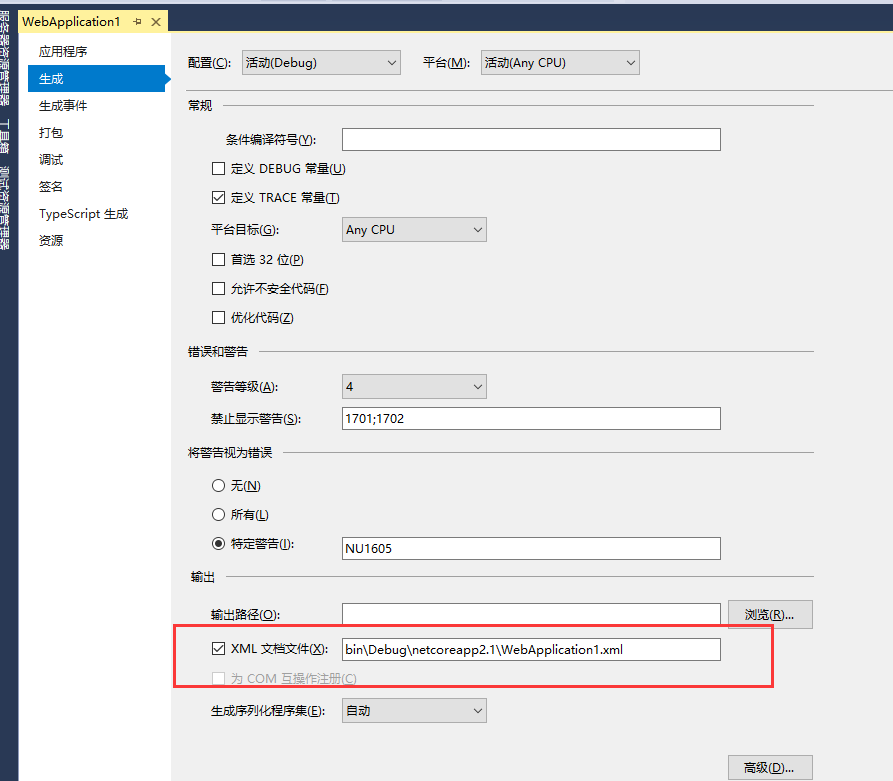
右键WebApplication1打开属性面板 左侧找到“调试”,按照下图设置
在项目Properties下找到launchSettings.json文件进行修改,如下图
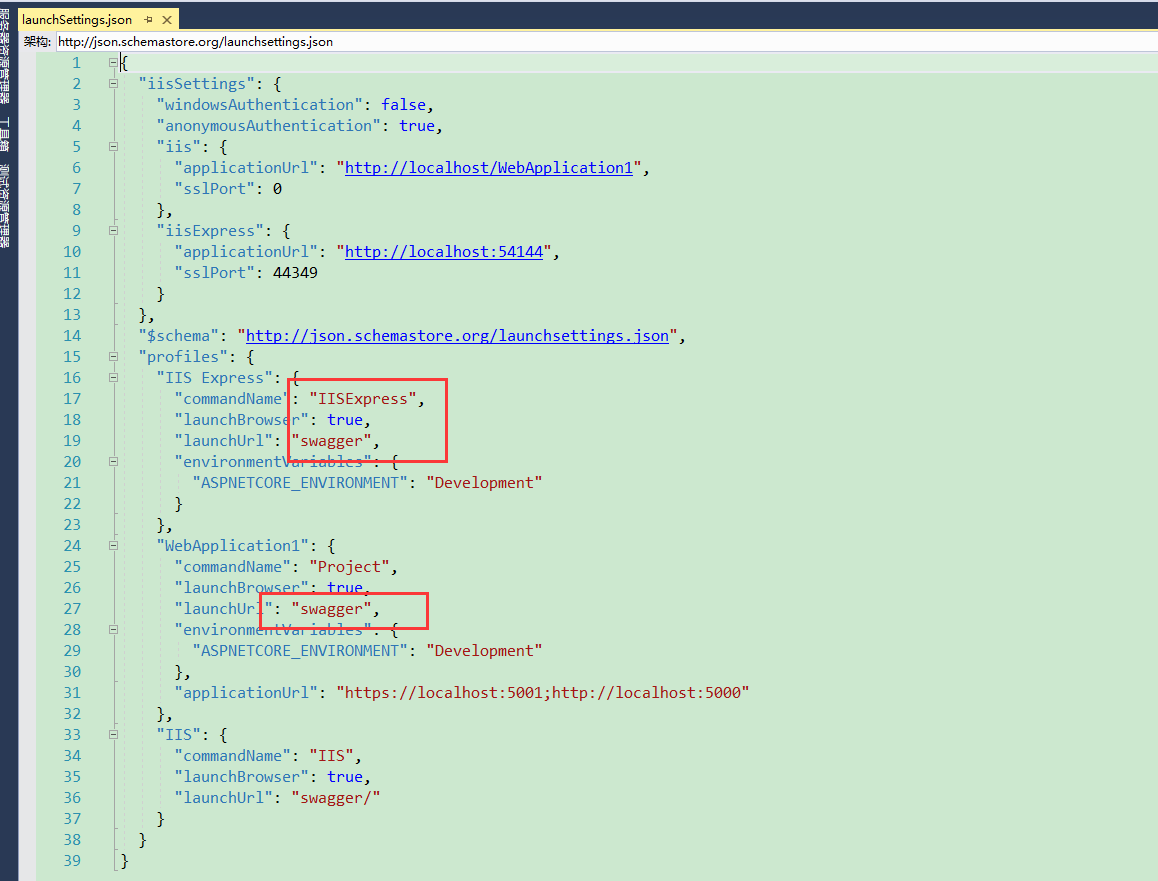
修改Startup.cs文件 内容如下
 using System;

 using System.Collections.Generic;

 using System.IO;

 using System.Linq;

 using System.Threading.Tasks;

 using Microsoft.AspNetCore.Builder;

 using Microsoft.AspNetCore.Hosting;

 using Microsoft.AspNetCore.HttpsPolicy;

 using Microsoft.AspNetCore.Mvc;

 using Microsoft.Extensions.Configuration;

 using Microsoft.Extensions.DependencyInjection;

 using Microsoft.Extensions.Logging;

 using Microsoft.Extensions.Options;

 using Swashbuckle.AspNetCore.Swagger;

 namespace WebApplication1

 {

     public class Startup

     {

         private readonly IHostingEnvironment _hostingEnv;

         public Startup(IHostingEnvironment env, IConfiguration configuration)

         {

             _hostingEnv = env;

             Configuration = configuration;

         }

         public IConfiguration Configuration { get; }

         // This method gets called by the runtime. Use this method to add services to the container.

         public void ConfigureServices(IServiceCollection services)

         {

             services.AddMvc().SetCompatibilityVersion(CompatibilityVersion.Version_2_1);

             services.AddSwaggerGen(c =>

             {

                 c.SwaggerDoc("v1", new Info

                 {

                     Title = "WebApplication1接口",

                     Version = "v1",

                     Description = ""

                 });

                 // 注释

                 c.IncludeXmlComments($"{AppContext.BaseDirectory}{Path.DirectorySeparatorChar}{_hostingEnv.ApplicationName}.xml");

             });

             services.ConfigureSwaggerGen(option =>

             {

             });

         }

         // This method gets called by the runtime. Use this method to configure the HTTP request pipeline.

         public void Configure(IApplicationBuilder app, IHostingEnvironment env)

         {

             if (env.IsDevelopment())

             {

                 app.UseDeveloperExceptionPage();

             }

             else

             {

                 app.UseHsts();

             }

             app.UseStaticFiles();

             // TODO 可以设置filter,根据权限返回对应操作API文档

             app.UseSwagger(c =>

             {

                 c.PreSerializeFilters.Add((swaggerDoc, httpReq) => swaggerDoc.Host = httpReq.Host.Value);

             });

             app.UseSwaggerUI(c =>

             {

                 c.SwaggerEndpoint("/swagger/v1/swagger.json", "WebApplication1接口V1");

             });

             app.UseHttpsRedirection();

             app.UseMvc();

         }

     }

 }
最后:启动项目就能看到swagger文档界面了
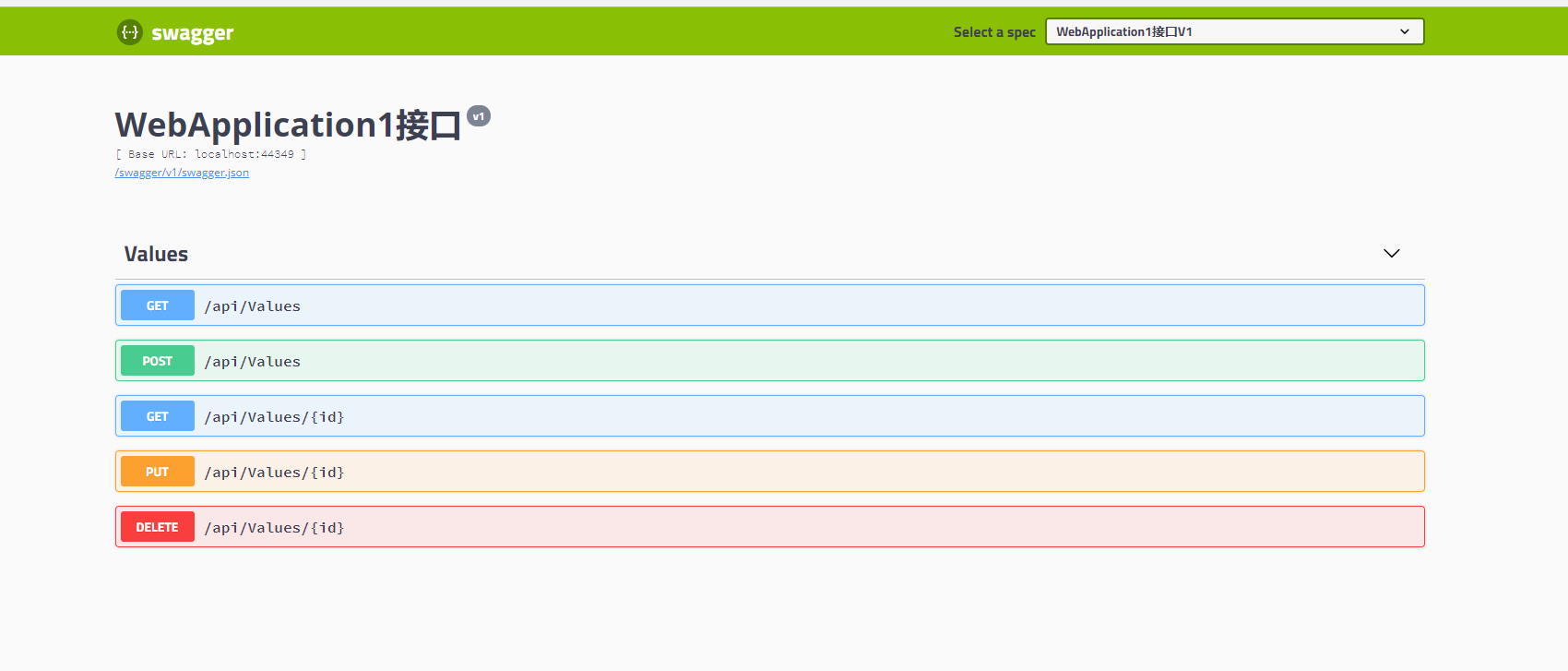
下一步对swagger文档进行详细的配置
asp.net core 2.1 生成swagger文档的更多相关文章
- asp.net core web api 生成 swagger 文档
asp.net core web api 生成 swagger 文档 Intro 在前后端分离的开发模式下,文档就显得比较重要,哪个接口要传哪些参数,如果一两个接口还好,口头上直接沟通好就可以了,如果 ...
- 利用typescript生成Swagger文档
项目地址:https://github.com/wz2cool/swagger-ts-doc demo代码地址:https://github.com/wz2cool/swagger-ts-doc-de ...
- ASP.NET CORE 1.0 MVC API 文档用 SWASHBUCKLE SWAGGER实现
from:https://damienbod.com/2015/12/13/asp-net-5-mvc-6-api-documentation-using-swagger/ 代码生成工具: https ...
- 如何在ASP.NET Core 中快速构建PDF文档
比如我们需要ASP.NET Core 中需要通过PDF来进行某些简单的报表开发,随着这并不难,但还是会手忙脚乱的去搜索一些资料,那么恭喜您,这篇帖子会帮助到您,我们就不会再去浪费一些宝贵的时间. 在本 ...
- Asp.Net MVC WebApi2 自动生成帮助文档
WebAPI Help文档配置 开发环境VS2013+mvc5+WebApi2 一.通过NuGet引用Web API Test Client 安装后会多一个Areas文件夹 二.设置xml文档项目-- ...
- .net core 使用swagger自动生成接口文档
前言 swagger是一个api文档自动生动工具,还集成了在线调试. 可以为项目自动生成接口文档, 非常的方便快捷 Swashbuckle.AspNetCore 是一个开源项目,用于生成 ASP.N ...
- 第二十节:Asp.Net Core WebApi生成在线文档
一. 基本概念 1.背景 使用 Web API 时,了解其各种方法对开发人员来说可能是一项挑战. Swagger 也称为OpenAPI,解决了为 Web API 生成有用文档和帮助页的问题. 它具有诸 ...
- Asp.Net Core Web Api 使用 Swagger 生成 api 说明文档
最近使用 Asp.Net Core Web Api 开发项目服务端.Swagger 是最受欢迎的 REST APIs 文档生成工具之一,进入我的视野.以下为学习应用情况的整理. 一.Swagger 介 ...
- .NET Core 3.0 使用Nswag生成Api文档和客户端代码
摘要 在前后端分离.Restful API盛行的年代,完美的接口文档,成了交流的纽带.在项目中引入Swagger (也称为OpenAPI),是种不错的选择,它可以让接口数据可视化.下文将会演示 利用N ...
随机推荐
- GoogLeNet InceptionV2/V3/V4
仅用作自己学习 这篇文章中我们会详细讲到Inception V2/V3/V4的发展历程以及它们的网络结构和亮点. GoogLeNet Inception V2 GoogLeNet Inc ...
- 洛谷P3901 数列找不同(莫队)
传送门 我不管我不管我就是要用莫队 直接用莫队裸上 //minamoto #include<iostream> #include<cstdio> #include<alg ...
- StampedLock原理
原文链接:https://blog.csdn.net/sunhaoning/article/details/68924625 StamppedLock是Java 8中引入的一种新的锁机制.读写锁虽然分 ...
- IDEA mybatis-generator 逆向工程
1.在maven工程中的resource中创建generatorConfig.xml 2.配置generatorConfig.xml <?xml version="1.0" ...
- std::ostream_iterator用法
Defined in header <iterator> template< class T, class CharT = char, class Traits = std:: ...
- 20.Add Two Numbers(两个链表的和)
Level: Medium 题目描述: You are given two non-empty linked lists representing two non-negative integer ...
- 添加fping监控
第一步:安装fping服务 yum -y install fping 第二步:在zabbix-server服务端上启用fping服务 重启zabbix-server 第三步:在主机上添加fping监控 ...
- sharepoint_study_12
描述:SharePoint新建Web应用程序时提示如下错误: 解决: 1. Go to IIS 2. Select the DefaultAppPool and Go to the Advanced ...
- git学习中遇到的疑难杂症
GIT仓库如何恢复到前一次提交 一.通过使用Git版本恢复命令reset,可以回退版本 reset命令有3种方式: 1.git reset –mixed:此为默认方式,不带任何参数的git r ...
- ORA-14517: Subpartition of index "string.string" is in unusable state
今天碰到个ORA-03113, 原因不明. 猜测因为某些table DDL操作过后导致index unuable的case, 然后进行analyze table, 再碰到ORA-14517. 最后通 ...