
Vue.js基础语法(三)
vue学习的一系列,全部来自于表哥---表严肃,是我遇到过的讲课最通透,英文发音最好听的老师,想一起听课就去这里吧 https://biaoyansu.com/i/hzhj1206
1过滤器filter
例如商城中商品的价格,既是动态的,而且重复出现的频率非常高,这就意味着,一些信息是重复的,像前面可以加一个“¥”,后面接一个单位“元”:¥10元。想实现只传价格10,其他信息让其自动生成,vue里提供了过滤器filter来实现。
例1:
<!DOCTYPE html>

<html>

    <head>

        <meta charset="utf-8">

        <title>过滤器</title>

    </head>

    <body>

        <div id="app">

            <div>

                <input v-model="price">

                {{price | currency}}

            </div>

        </div>

    </body>

    <script src="js/vue.js"></script>

    <script>

        Vue.filter('currency', function(val, unit) {

            val = val || 0;

            unit = unit || '元';

            return val + unit;

        });

        var app = new Vue({

            el: '#app',

            data: {

                price: 10

            }

        })

    </script>

</html>
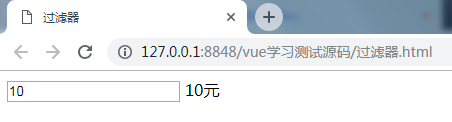
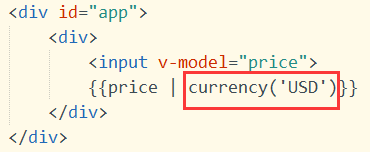
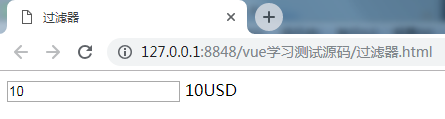
说明:
通过管道符|,将前面的数据price传到后面的过滤器currency中,
Vue.filter(),第一个参数是过滤器的名字,第二个参数是一个function,function也有两个参数(可以自定义的),第一个是传进来的值,第二个是过滤器的值,可以写在括号中传过来,就像调用函数时带着参数一样。
例2:单位换算
<!DOCTYPE html>

<html>

    <head>

        <meta charset="utf-8">

        <title>过滤器2</title>

    </head>

    <body>

        <div id="app">

            <div>

                请输入毫米数:<input type="text" v-model="length">

                <br>换算成米:{{length|meter}}

            </div>

        </div>

    </body>

    <script src="js/vue.js"></script>

    <script>

        Vue.filter('meter', function(val, unit) {

            val = val || 0;

            unit = unit || '米';

            return (val / 1000).toFixed(2) + unit;  //保留两位小数

        });

        var app = new Vue({

            el: '#app',

            data: {

                length: 100

            }

        })

    </script>

</html>
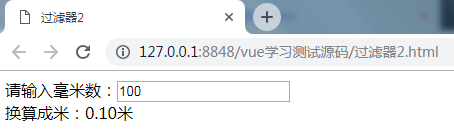
总结:filter就是解决一些格式的问题,可以提升用户体验的。如果filter内部非常复杂,建议写成计算属性computed,因为computed带有缓存,可重用性强。而filter都是做一些简单的事情。
2自定义指令
2.1基础配置
如果vue自带的指令无法满足需求,就要自定义一个指令,用法就像自定义属性一样,只要在元素上加上这个属性,就具有相应的功能,
组件和指令的区别,组件就像一个人物角色,指令就是人物所拥有的技能,一个人物可以有多种技能,不同的人物也可以有相同的技能。
用v-来自定义一个属性,
用directive来定义一个指令,第一个参数是指令名,这里就不用以v-开头了,第二个参数是回调函数,函数中第一个参数el是元素,就是指令所在的元素会自动传进来,这个元素可以用原生api来调用,也可以用jquery来调用$(el),第二个参数binding是指令传进来的值和其他基本信息,值在binding.value中
实例:钉住指令
<!DOCTYPE html>

<html>

    <head>

        <meta charset="utf-8" />

        <title>自定义指令</title>

        <style>

            .card {

                border: 1px solid #ccc;padding: 10px;margin: 10px;width: 20%;background: #eee;

            }

        </style>

    </head>

    <body style="height: 2000px;">

        <div id="zyx">

            <div v-pin='card1.pinned' class="card">

                这是一张卡片

                <p><button @click="card1.pinned=!card1.pinned">钉住/取消</button></p>

            </div>

            <div v-pin='card2.pinned' class="card">

                这是一张卡片

                <p><span @click="card2.pinned=!card2.pinned">钉住/取消</span></p>

            </div>

        </div>

        <script src="lib/vue.js"></script>

        <script>

            Vue.directive('pin',function(el,binding){

                console.log(binding);

                //var $el=$(el);

                if(binding.value){

                    el.style.position='fixed';

                    el.style.top='10px';

                    el.style.left='10px';

                }else{

                    el.style.position='static';

                }

            });

            var zyx = new Vue({

                el: '#zyx',

                data: {

                    card1:{

                        pinned:false

                    },

                    card2:{

                        pinned:false

                    }

                }

            });

        </script>

    </body>

</html>
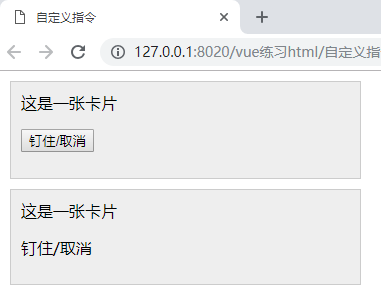
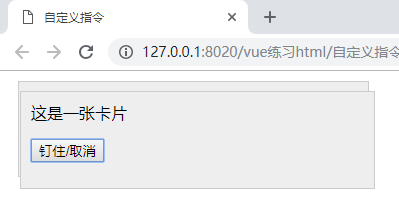
2.2配置传参及修饰符
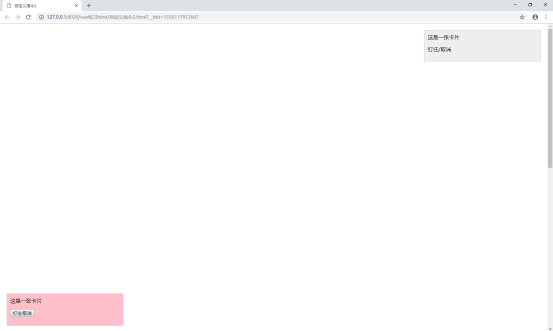
上面的钉住指令,想进一步实现,可以钉在不同的方向位置,可以通过加修饰符,是指令后面加.,然后通过binding.modifiers来获取,
传参是指令后面加:,然后通过binding.arg来获取,
<!DOCTYPE html>

<html>

    <head>

        <meta charset="utf-8" />

        <title>自定义指令2</title>

        <style>

            .card {

                border: 1px solid #ccc;padding: 10px;margin: 10px;width: 20%;background: #eee;

            }

        </style>

    </head>

    <body style="height: 2000px;">

        <div id="zyx">

            <div v-pin:true.bottom.left='card1.pinned' class="card">

                这是一张卡片

                <p><button @click="card1.pinned=!card1.pinned">钉住/取消</button></p>

            </div>

            <div v-pin.top.right='card2.pinned' class="card">

                这是一张卡片

                <p><span @click="card2.pinned=!card2.pinned">钉住/取消</span></p>

            </div>

        </div>

        <script src="lib/vue.js"></script>

        <script>

            Vue.directive('pin',function(el,binding){

                var pined=binding.value; //值

                var posi=binding.modifiers; //修饰符

                var waring=binding.arg;  //参数

                if(pined){

                    el.style.position='fixed';

                    for(var key in posi){

                        if(posi[key]){

                            el.style[key]='10px';

                        }

                    }

                    if(waring==='true'){

                        el.style.background='pink';

                    }

                }else{

                    el.style.position='static';

                }

            });

            var zyx = new Vue({

                el: '#zyx',

                data: {

                    card1:{

                        pinned:false

                    },

                    card2:{

                        pinned:false

                    }

                }

            });

        </script>

    </body>

</html>
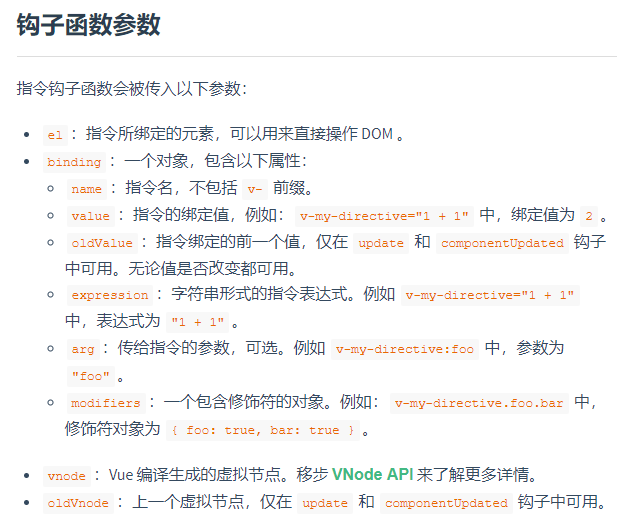
其他参数:(来自vue官网)
3混合mixins
Mixins就像一个重复功能和数据的储存器。
例:页面中有两个组件,一个是点击显示,点击关闭按钮隐藏;一个是鼠标移入显示,移出隐藏,
<!DOCTYPE html>

<html>

    <head>

        <meta charset="utf-8">

        <title>混合mixins</title>

        <style>

            *{padding: 0;margin: 0;}

            body{padding: 10px 0 0 10px;}

            .show-box{border: 1px solid #ccc;background: blanchedalmond;padding: 20px;margin-top: 10px;}

            .tips-word{margin-top: 20px;}

            .close-btn{display: inline-block;width: 20px;height: 20px;border: 1px solid #333;text-align: center;line-height: 20px;margin-left: 10px;cursor: pointer;}

        </style>

    </head>

    <body>

        <div id="app">

            <popup></popup>

            <tooltip></tooltip>

        </div>

    </body>

    <script src="js/vue.js"></script>

    <script>

        Vue.component('popup',{

            template:`

            <div>

                <button @click="toggle">点击</button>

                <div v-if="visible" class="show-box">

                    <span title="关闭" class="close-btn" @click="hide">×</span>

                    显示的内容

                </div>

            </div>

            `,

            data:function(){

                return{

                    visible:false

                }

            },

            methods:{

                toggle:function(){

                    this.visible=!this.visible;

                },

                hide:function(){

                    this.visible=false;

                }

            }

        });

        Vue.component('tooltip',{

            template:`

            <div>

                <p @mouseenter="show" @mouseleave="hide" class="tips-word">鼠标移入</p>

                <div v-if="visible" class="show-box">提示信息</div>

            </div>

            `,

            data:function(){

                return{

                    visible:false

                }

            },

            methods:{

                show:function(){

                    this.visible=true;

                },

                hide:function(){

                    this.visible=false;

                },

            }

        });

        var app=new Vue({

            el:'#app'

        })

    </script>

</html>
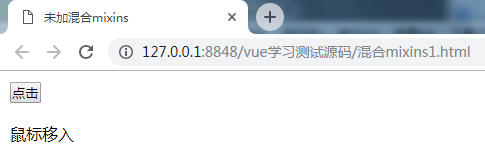
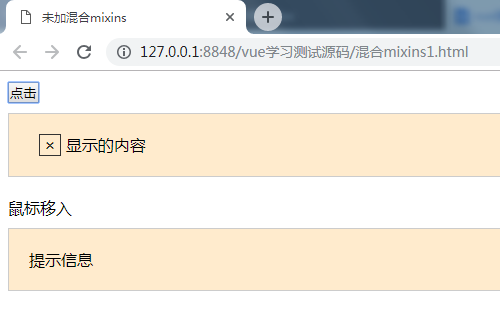
这里面重复的地方非常多,显得代码很啰嗦,实现的功能很简单,却要写这么多重复的东西。
Vue里面提供Mixins机制,可以把一些功能定义到Mixins中。定义一个base,然后把两个组件都要用的放进去,然后把原来那些替换成mixins,他的值是一个数组,值就是定义的base。Vue会自动合并这个对象和组件,组件就自动携带了mixins的功能,
<!DOCTYPE html>

<html>

    <head>

        <meta charset="utf-8">

        <title>混合mixins</title>

        <style>

            *{padding: 0;margin: 0;}

            body{padding: 10px 0 0 10px;}

            .show-box{border: 1px solid #ccc;background: blanchedalmond;padding: 20px;margin-top: 10px;}

            .tips-word{margin-top: 20px;}

            .close-btn{display: inline-block;width: 20px;height: 20px;border: 1px solid #333;text-align: center;line-height: 20px;margin-left: 10px;cursor: pointer;}

        </style>

    </head>

    <body>

        <div id="app">

            <popup></popup>

            <tooltip></tooltip>

        </div>

    </body>

    <script src="js/vue.js"></script>

    <script>

        var base={

            data:function(){

                return{

                    visible:false

                }

            },

            methods:{

                show:function(){

                    this.visible=true;

                },

                hide:function(){

                    this.visible=false;

                },

                toggle:function(){

                    this.visible=!this.visible;

                }

            }

        }

        Vue.component('popup',{

            template:`

            <div>

                <button @click="toggle">点击</button>

                <div v-if="visible" class="show-box">

                    <span title="关闭" class="close-btn" @click="hide">×</span>

                    显示的内容

                </div>

            </div>

            `,

            mixins:[base]

        });

        Vue.component('tooltip',{

            template:`

            <div>

                <p @mouseenter="show" @mouseleave="hide" class="tips-word">鼠标移入</p>

                <div v-if="visible" class="show-box">提示信息</div>

            </div>

            `,

            mixins:[base]

        });

        var app=new Vue({

            el:'#app'

        })

    </script>

</html>
这样代码就简洁多了,页面不管有多少个组件,只要他需要用到base的功能,直接加个mixins就可以了。
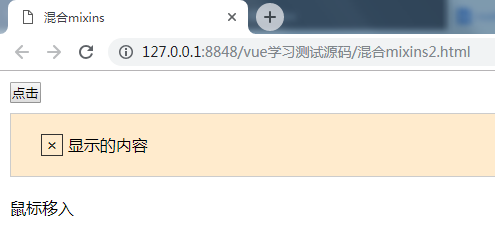
如果想让某个组件中的visible默认等于true呢?在组件中再定义一个data,里面指定visible为true就可以了,这样会把base里面的相应的内容覆盖掉,类似“就近原则”
<!DOCTYPE html>

<html>

    <head>

        <meta charset="utf-8">

        <title>混合mixins</title>

        <style>

            *{padding: 0;margin: 0;}

            body{padding: 10px 0 0 10px;}

            .show-box{border: 1px solid #ccc;background: blanchedalmond;padding: 20px;margin-top: 10px;}

            .tips-word{margin-top: 20px;}

            .close-btn{display: inline-block;width: 20px;height: 20px;border: 1px solid #333;text-align: center;line-height: 20px;margin-left: 10px;cursor: pointer;}

        </style>

    </head>

    <body>

        <div id="app">

            <popup></popup>

            <tooltip></tooltip>

        </div>

    </body>

    <script src="js/vue.js"></script>

    <script>

        var base={

            data:function(){

                return{

                    visible:false

                }

            },

            methods:{

                show:function(){

                    this.visible=true;

                },

                hide:function(){

                    this.visible=false;

                },

                toggle:function(){

                    this.visible=!this.visible;

                }

            }

        }

        Vue.component('popup',{

            template:`

            <div>

                <button @click="toggle">点击</button>

                <div v-if="visible" class="show-box">

                    <span title="关闭" class="close-btn" @click="hide">×</span>

                    显示的内容

                </div>

            </div>

            `,

            mixins:[base],

            data:function(){

                return{

                    visible:true

                }

            },

        });

        Vue.component('tooltip',{

            template:`

            <div>

                <p @mouseenter="show" @mouseleave="hide" class="tips-word">鼠标移入</p>

                <div v-if="visible" class="show-box">提示信息</div>

            </div>

            `,

            mixins:[base]

        });

        var app=new Vue({

            el:'#app'

        })

    </script>

</html>
4插槽slots
例:页面上有两个同样的组件
<!DOCTYPE html>

<html>

    <head>

        <meta charset="utf-8">

        <title>插槽slots</title>

        <style>

            .panel{border: 1px solid #ccc;margin-top: 20px;width: 300px;}

            .panel > *{padding: 10px;}

            .panel .content{border-top: 1px solid #ccc;border-bottom: 1px solid #ccc;}

        </style>

    </head>

    <body>

        <div id="app">

            <panel></panel>

            <panel></panel>

        </div>

        <template id="panel_tpl">

            <div class="panel">

                <div class="title">

                    标题

                </div>

                <div class="content">

                    内容

                </div>

                <div class="footer">更多...</div>

            </div>

        </template>

    </body>

    <script src="js/vue.js"></script>

    <script>

        Vue.component('panel',{

            template:'#panel_tpl'

        })

        var app=new Vue({

            el:'#app',

            data:{

            }

        })

    </script>

</html>
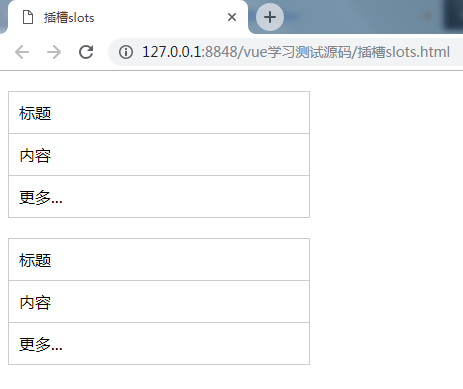
想实现里面的内容动态,就可以把内容换成<slot></slot>,然后在<panel></panel>中写内容,这样就可以分别设置内容了。可以为slot指定一个name,就能定义多个slot了,然后在组件标签中,加上属性slot=”name”,就可以了。写在<slot></slot>中的为默认值。
<!DOCTYPE html>

<html>

    <head>

        <meta charset="utf-8">

        <title>插槽slots</title>

        <style>

            .panel{border: 1px solid #ccc;margin-top: 20px;width: 300px;}

            .panel > *{padding: 10px;}

            .panel .content{border-top: 1px solid #ccc;border-bottom: 1px solid #ccc;}

        </style>

    </head>

    <body>

        <div id="app">

            <panel>

                <div slot="title">标题1</div>

                <div slot="content">内容1</div>

            </panel>

            <panel>

                <div slot="title">标题2</div>

                <div slot="content">内容2</div>

                <div slot="footer">更多2</div>

            </panel>

        </div>

        <template id="panel_tpl">

            <div class="panel">

                <div class="title">

                    <slot name="title"></slot>

                </div>

                <div class="content">

                    <slot name="content"></slot>

                </div>

                <div class="footer">

                    <slot name="footer">更多1</slot>

                </div>

            </div>

        </template>

    </body>

    <script src="js/vue.js"></script>

    <script>

        Vue.component('panel',{

            template:'#panel_tpl'

        })

        var app=new Vue({

            el:'#app',

            data:{

            }

        })

    </script>

</html>
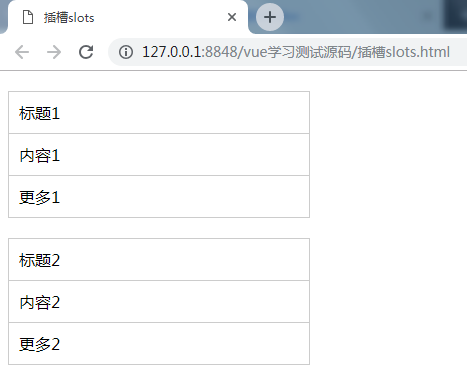
Slot特别常用,灵活、简洁、强大,可以用这种方式实现组件的嵌套。
Vue.js基础语法(三)的更多相关文章
- Vue.js基础语法(一)
vue学习的一系列,全部来自于表哥---表严肃,是我遇到过的讲课最通透,英文发音最好听的老师,想一起听课就去这里吧 https://biaoyansu.com/i/hzhj1206 前言: 前端解析数 ...
- Vue.js基础语法(二)组件
vue学习的一系列,全部来自于表哥---表严肃,是我遇到过的讲课最通透,英文发音最好听的老师,想一起听课就去这里吧 https://biaoyansu.com/i/hzhj1206 把一段经常要用的东 ...
- Vue.js 数据绑定语法详解
Vue.js 数据绑定语法详解 一.总结 一句话总结:Vue.js 的模板是基于 DOM 实现的.这意味着所有的 Vue.js 模板都是可解析的有效的 HTML,且通过一些特殊的特性做了增强.Vue ...
- JavaScript进阶 - 第2章 你要懂的规则(JS基础语法)
第2章 你要懂的规则(JS基础语法) 2-1什么是变量 什么是变量? 从字面上看,变量是可变的量:从编程角度讲,变量是用于存储某种/某些数值的存储器.我们可以把变量看做一个盒子,盒子用来存放物品,物品 ...
- Python 基础语法(三)
Python 基础语法(三) --------------------------------------------接 Python 基础语法(二)------------------------- ...
- Vue.js 模板语法
本章节将详细介绍 Vue.js 模板语法,如果对 HTML +Css +JavaScript 有一定的了解,学习起来将信手拈来. Vue.js 使用了基于 HTML 的模版语法,允许开发者声明式地将 ...
- 【JS基础语法】---学习roadmap---6 parts
JS基础语法---roadmap Part 1 - 2: Part 3 - 4: Part 5 - 6
- vue.js初学(三)模板语法
1:介绍 vue.js允许开发者声明式地将Dom元素绑定至Vue实例的底层,所有的模板都是合法的html,所以能够被遵循规范的浏览器和html解析器解析 在底层的实现上,vue将模板编译成虚拟Dom渲 ...
- 两万字Vue.js基础学习笔记
Vue.js学习笔记 目录 Vue.js学习笔记 ES6语法 1.不一样的变量声明:const和let 2.模板字符串 3.箭头函数(Arrow Functions) 4. 函数的参数默认值 5.Sp ...
随机推荐
- [SinGuLaRiTy] 数论题目复习
[SinGuLaRiTy-1020] Copyright (c) SinGuLaRiTy 2017. All Rights Reserved. [CQBZOJ 1464] Hankson 题目描述 H ...
- ASP.NET-GridView之表头设计
我们 见过许多网页呈现表格的 时候,表头的形式多种多样.下面来看看,怎么制定多样的表头吧. 效果显示: 需要在后台写一个方法,网页一加载在前端写个事件调用这个方法. DEMO 前端 <span ...
- JAVA进阶----ThreadPoolExecutor机制(转)
http://825635381.iteye.com/blog/2184680 ThreadPoolExecutor机制 一.概述 1.ThreadPoolExecutor作为java.util.co ...
- Spark大数据处理 之 从WordCount看Spark大数据处理的核心机制(2)
在上一篇文章中,我们讲了Spark大数据处理的可扩展性和负载均衡,今天要讲的是更为重点的容错处理,这涉及到Spark的应用场景和RDD的设计来源. Spark的应用场景 Spark主要针对两种场景: ...
- 【三支火把】--- shell脚本中变量的类型及作用域
一直对shell脚本有一种特殊的感觉,因此花了一段时间学习,本人擅长C语言编程,深受C语言荼毒,在学习其他任何类似于编程语言的东东的时候,都会不自觉的与C进行对比,因此对于shell中的变量的作用域一 ...
- docker搭建数据库主从复制
首先需要安装docker镜像: docker pull mysql:5.7 由于需要启动数据库才可以进入数据修改my.cnf文件,可以选择安装vi命令,也可以选择挂在 在此选择是挂载的方法进行安装: ...
- windows_study_2
描述:如何确定像%ProgramFiles%这样格式的目录的具体位置? 解决:运行——cmd——echo %ProgramFiles%——回车——界面就显示出目录位置了.
- Codeforces Round #335 (Div. 2) A
A. Magic Spheres time limit per test 2 seconds memory limit per test 256 megabytes input standard in ...
- Xshell添加快捷按钮
1.打开xshell,点击[查看],勾[快速命令]: 2.点击xshell右下角[三],选择[添加按钮],在弹出框的“标签栏”和“文本”栏分别输入名称和命令,最后点击[确定]即可.
- 转 from __future__ import unicode_literals
转自 https://www.liaoxuefeng.com/wiki/001374738125095c955c1e6d8bb493182103fac9270762a000/0013868200230 ...