
屏幕分辨率测试工具(舍弃)---chrome开发者工具devTools(强烈建议系统学习)
2019-01-25
<!DOCTYPE html PUBLIC "-//W3C//DTD XHTML 1.0 Transitional//EN"

    "http://www.w3.org/TR/xhtml1/DTD/xhtml1-transitional.dtd">

<html xmlns="http://www.w3.org/1999/xhtml">

<head>

<title>分辨率测试工具</title>

<meta http-equiv="content-type" content="text/xml; charset=utf-8" />

<style type="text/css">

* {margin:0;padding:0;border:0}

body,p,td,div,input,select {font-family:Times,Helvetica,Arial,sans-serif;font-size:16px;letter-spacing:2px;font-style:italic}

body {background:#fff}

.fixed {font-family:Courier;font-style:normal}

input.submit {font-weight:bold}

h1 {font-style:normal;float:left;color:#000;padding-right:20px;padding-top:10px;font-size:50px;line-height:30px;font-family:"Arial Black",Arial,Helvetica;letter-spacing:-2px;font-variant:small-caps}

a:link, a:visited {color:#30f}

a:hover {color:#fff;background:#30f;text-decoration:none}

#canvas {padding:10px 20px;background:#eee}

#info {float:left;padding:0 0px 20px 20px}

#footer {padding:10px;border-top:1px dashed #aaa}

input, select {font-size:20px;padding:4px}

select {border:1px solid #666;background:#eee}

.blurred {background:#e8e8e8;color:#666;border:1px solid #999}

.focused {background:#eee;color:#000;border:1px solid #000}

.normal {border-style:solid}

.hovered {background:#eee;border:1px solid #f66}

.button {padding:4px 12px;font-weight:bold}

iframe {border:1px solid #999}

.d {float:left;padding:0px 10px 0px 0}

.fluffless h1, .fluffless form,.fluffless #footer, .fluffless #info {display:none}

.fluffless #canvas {background:#fff}

@media projection {

#footer, #info {display:none}

#canvas {background:#fff}

}

</style>

<script type="text/javascript">

//<![CDATA[

fluffstate=false

function changeStyle(el,classname){

if(el.className)el.className=classname

}

function getobject(e){

if(typeof(e)=='object')return(e)

if(document.getElementById)return(document.getElementById(e))

return(eval(e))

}

function update_iframe(){

iframe=getobject('iframe')

url=get_url()

if((iframe.src!=url)&&(url!='')){

iframe.src=url

}

iframe.width=getobject('width').value

iframe.height=getobject('height').value

}

function get_url(){

uo=getobject('url')

url=uo.value

if(url!=''){

  if((url.indexOf('.')<0)&&(url.indexOf('/')<0))url+='.com'

if((url.indexOf('/')<0)&&(url.indexOf('\\')<0))url+='/'

if((url.indexOf('://')<0)&&(url.indexOf('\\')<0))url='http://'+url

uo.value=url

}

return(url)

}

function change_dims(){

size=getobject('size').value

if(size==1)dims=[240,320]

if(size==2)dims=[320,480]

if(size==3)dims=[640,480]

if(size==4)dims=[800,600]

if(size==5)dims=[1024,600]

if(size==6)dims=[1024,768]

if(size==7)dims=[1280,800]

if(size==8)dims=[1280,1024]

if(size==9)dims=[1366,768]

if(size==10)dims=[1920,1024]

if(size==11){

	dims=[null,null]

	getobject('width').value=null

	getobject('height').value=null

	return

}

getobject('width').value=dims[0]

getobject('height').value=dims[1]

update_iframe()

}

// key handling code

inputfocused='url'

document.onkeypress=handle_keys

function handle_keys(ev){

// don't zoom when an input field has focus

if(inputfocused=='url')return(true)

// get the ascii value of the pressed key

e=ev||window.event

key=e.which||e.keyCode

width=getobject('width').value

height=getobject('height').value

// bugfix for opera: remove spaces which appear when pressing arrow up

width=width.replace(/[^0-9]*/, '')

height=height.replace(/[^0-9]*/, '')

switch(key){

	case 102:

		// toggle fluff (key: f)

		if(fluffstate){

			fluffstate=false

			classname=''

		}else{

			fluffstate=true

			classname='fluffless'

		}

		document.getElementById('body').className=classname

		return(false)

	case 97:

		// zoom out to next step (a)

		break

	case 115:

		// zoom in to next step (s)

		break

	case 40:

	case 45:

	case 113:

		// smooth zoom out (q or -)

		width=width*.95

		height=height*.95

		break

	case 38:

	case 43:

	case 119:

		// smooth zoom in (+ or w)

		width=width*1.05

		height=height*1.05

		break

	case 32:

		// space: cycle through size menu

		size_object=getobject('size')

		size=size_object.value

		size++

		if(size>9)size=1

		size_object.value=size

		change_dims()

		return(false)

//		document.getElementById('imgzoom').style.width=''

//		document.getElementById('current_size').innerHTML='Original image size'

	default:

		if((inputfocused=='width')||(inputfocused=='height')){

			if((47<key)&&(key<58))return(true) // key was a number - let it be typed into the input box

			switch(key){

				// allowed keys when focus is on width or height field:

				case 8: // backspace

				case 46: // delete

				case 9: // tab

				case 37: // arrow left

				case 39: // arrow right

				case 116: // F5

					return(true)

					break;

			}

			// don't accept illegal keys - return false to stop the input

			return(false)

		}

		// Return 'true' to indicate that the key has NOT been handled

		return(true)

}

width=parseInt(width)

height=parseInt(height)

if(width<20)width=20

if(height<20)height=20

// don't change height if width field has focus

if(inputfocused!='height')getobject('width').value=width

// don't change width if height field has focus

if(inputfocused!='width')getobject('height').value=height

update_iframe()

// Return 'false' to indicate that the key HAS been handled. This stops Opera's built in zoom on + and -.

return(false)

}

function bluritem(e){

e.className=e.className.replace('focused','blurred')

inputfocused=false

}

function focusitem(e){

e.className=e.className.replace('blurred','focused')

e.select()

}

function mouseover(e){

e.className=e.className.replace('normal','hovered')

}

function mouseout(e){

e.className=e.className.replace('hovered','normal')

}

function wopen() {

urlv=getobject('url').value

window.resizeTo(getobject('width').value,getobject('height').value)

if(urlv!='')window.open(urlv,'TestSizePopup','width='+getobject('width').value+',height='+getobject('height').value+',scrollbars=yes,resizable=no')

}

//]]>

</script>

<!--[if gte IE 7]>

<script type="text/javascript">

function update_iframe(){

url=get_url()

}

</script>

<![endif]-->

</head>

<body id="body" onload="getobject('url').focus()">

<div id="canvas">

<h1>分辨率测试工具 <span style="font-size:12px;letter-spacing:2px;font-variant:normal;font-style:italic;font-weight:normal;font-family:Times;color:#444"><br/>By wanghongli 00197123</span></h1>

<form action="./" method="get" id="testsizeform" onsubmit="update_iframe();return(false)">

<!--[if gte IE 7]>

</form>

<form action="./" method="get" id="testsizeformIE">

<![endif]-->

<div style="padding:10px;background:#fff;border:1px dashed #999;float:left;margin-bottom:10px">

<div class="d">

测试网址:<br />

<input type="text" value="http://w3.huawei.com/" style="width:170px" id="url" name="url"

class="normal blurred" onfocus="focusitem(this);inputfocused='url'" onblur="bluritem(this);update_iframe()" onmouseover="mouseover(this)" onmouseout="mouseout(this)" />

</div>

<script type="text/javascript">

//<![CDATA[

document.write('<div class="d">\

分辨率:<br />\

<select id="size" name="size" onchange="change_dims()"\

class="normal" onmouseover="mouseover(this)" onmouseout="mouseout(this)" >\

<option value="1">240x320</option>\

<option value="2">320x480</option>\

<option value="3">640x480</option>\

<option value="4">800x600</option>\

<option value="5" selected="selected">1024x600</option>\

<option value="6">1024x768</option>\

<option value="7">1280x800</option>\

<option value="8">1280x1024</option>\

<option value="9">1366x768</option>\

<option value="10">1920x1024</option>\

<option value="11">自定义</option>\

</select>\

</div>')

//]]>

</script>

<div class="d">

Width:<br />

<input type="text" maxlength="4" value="1024" style="width:50px" id="width" name="width" class="normal blurred"

 onfocus="focusitem(this);inputfocused='width'" onblur="bluritem(this)" onmouseover="mouseover(this)" onmouseout="mouseout(this)" />

</div>

<div class="d">

Height:<br />

<input type="text" maxlength="4" value="600" style="width:50px" id="height" name="height" class="normal blurred"

 onfocus="focusitem(this);inputfocused='height'" onblur="bluritem(this)" onmouseover="mouseover(this)" onmouseout="mouseout(this)" />

</div>

<script type="text/javascript">

//<![CDATA[

document.write('<div class="d">\

 <br />\

<input type="button" id="popup" name="popup" value="确定"\

class="button normal blurred" onfocus="this.className=this.className.replace(\'blurred\',\'focused\')" onblur="bluritem(this)" onmouseover="mouseover(this)" onmouseout="mouseout(this)"\

onclick="wopen()" />\

</div>')

//]]>

</script>

<!--[if gte IE 7]>

<script type="text/javascript">

document.write('<div class="d">\

 <br />\

<input type="submit" id="iframerefresh" value="Refresh iframe"\

class="button normal blurred" onfocus="this.className=this.className.replace(\'blurred\',\'focused\')" onblur="bluritem(this)" onmouseover="mouseover(this)" onmouseout="mouseout(this)"\

 />\

</div>')

</script>

<![endif]-->

<noscript>

<div class="d">

 <br />

<input type="submit" id="iframerefresh_noscript" value="Refresh iframe"

class="button normal blurred" onfocus="this.className=this.className.replace('blurred','focused')" onblur="bluritem(this)" onmouseover="mouseover(this)" onmouseout="mouseout(this)"

 />

</div>

</noscript>

</div>

</form>

<div style="clear:both">

<br/>

<h3>

使用说明:请在一个独立窗口中使用该工具,即窗口中只包含本工具这一个页签

</h3>

<iframe id="iframe" src="" width="1024" height="600"></iframe>

</div>

</div>

</div>

</body>

</html>
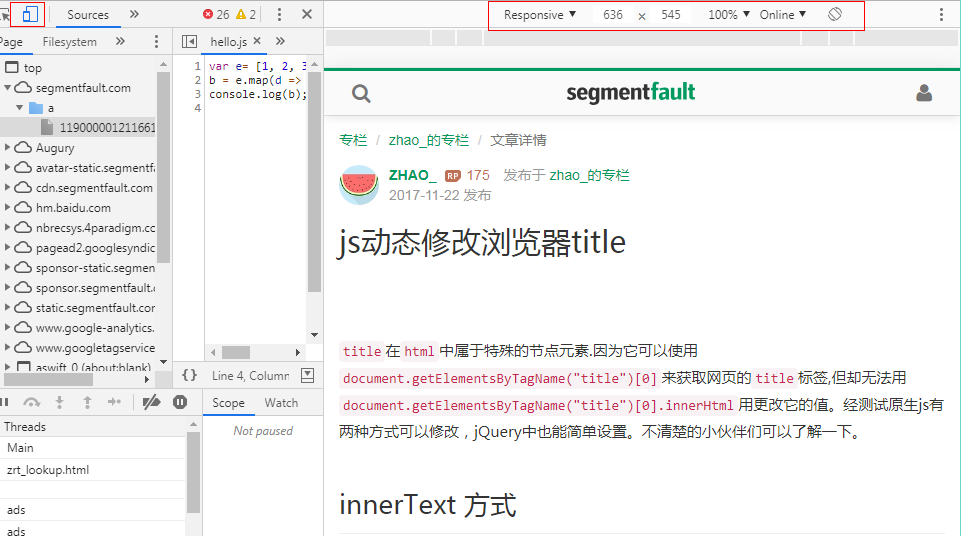
其实,完全可以不用这个工具,强大的Chrome 浏览器devTools里面就有这个调试技巧,由于没有接触移动端开发(菜鸟一枚),也没有系统学习一下浏览器调试技巧,竟然不知道身在金山银山,‘哎,只缘身在此山中’。如下图:
强烈建议学习一下这个chrome开发者工具中文文档
屏幕分辨率测试工具(舍弃)---chrome开发者工具devTools(强烈建议系统学习)的更多相关文章
- 使用 Chrome 开发者工具进行 JavaScript 问题定位与调试
转自:https://www.ibm.com/developerworks/cn/web/1410_wangcy_chromejs/ 引言 Google Chrome 是由 Goole 公司开发的一款 ...
- 爬虫必备工具-chrome 开发者工具
在某个网站上,分析和抓取数据,我们用的最多的工具就是 Chrome 开发者工具 01 元素面板 通过元素(Element)面板,我们能查看发哦想抓取页面渲染内容所在的标签.使用什么 CSS 属性(例如 ...
- Chrome开发者工具之测试应用
一.Chrome开发者工具简介 浏览器的开发者工具(DevTools)可以帮助开发人员对网页进行布局,比如HTML+CSS,帮助前端工程师更好的调试脚本(JavaScript.jQuery)之类的,还 ...
- 前端调试效率低?试试这10个“Chrome开发者工具”使用技巧
摘要:今天给大家分享一些使用“Chrome开发者工具”的小技巧.包括调试,优化页面渲染速度等.希望能提升Web开发人员的工作效率. 今天给大家分享一些使用“Chrome开发者工具”的小技巧.包括调试, ...
- Chrome开发者工具不完全指南(五、移动篇)
前面介绍了Chrome开发者工具的大部分内容工具,现在介绍最后两块功能Audits和Console面板.一.Audits Audits面板会针对目前网页提出若干条优化的建议,这些建议分为两大类,一类是 ...
- 前端开发必备之Chrome开发者工具(一)
本文介绍的 Chrome 开发者工具基于 Chrome 65版本,如果你的 Chrome 开发者工具没有下文提到的那些内容,请检查下 Chrome 的版本 简介 Chrome 开发者工具是一套内置于 ...
- 前端开发必备之Chrome开发者工具(上篇)
本文介绍的 Chrome 开发者工具基于 Chrome 65版本,如果你的 Chrome 开发者工具没有下文提到的那些内容,请检查下 Chrome 的版本 简介 Chrome 开发者工具是一套内置于 ...
- Chrome开发者工具使用指南
前言 工欲善其事,必先利其器. 在前端工作中,我们常常使用到Chrome开发者工具去做各种各样的事情. 但是您真的了解这些开发者工具吗? 官方文档还是挺详细的:chrome-devtools文档. 但 ...
- Chrome开发者工具不完全指南(四、性能进阶篇)
前言 Profiles面板功能的作用主要是监控网页中各种方法执行时间和内存的变化,简单来说它就是Timeline的数字化版本.它的功能选项卡不是很多(只有三个),操作起来比较前面的几块功能版本来说简单 ...
随机推荐
- Jmeter学习前的基本了解
参考:九州八神的软件测试视频资料---来自于网络 jmeter基于java,跨平台的. 下载:官网http://jmeter.apache.org/ 最好下载最新版,有一些新的功能.注 ...
- idea创建maven中的 jar、war、 pom项目
我用的是:2019.1版本的idea 创建maven项目时候的选项: 1: 2: 3:之后的步骤都一样按照自己的来就行
- Proteus报错处理经验:power rails ‘GND’ and 'VCC/VDD' are interconnected in net VCC
1 前言 初学Proteus,画好原理图后遇到了power rails 'GND' and 'VCC/VDD' are interconnected in net VCC的报错. 尝试了网上的解决办法 ...
- Linux 系统下的7个运行级别
转自:http://blog.chinaunix.net/uid-22746363-id-383989.html Linux系统有7个运行级别(runlevel)运行级别0:系统停机状态,系统默认运行 ...
- [Git] 003 初识 Git 与 GitHub 之加入文件 第二弹
在 GitHub 的 UI 界面使用 Git 往仓库里加文件 第二弹 1. 选择已有的文件,点击右侧的 edit 2. 在文件中继续写入文字 小发现:我只写到第 6 行,commit 后再点进去,发现 ...
- Poj 3268 Silver cow party 迪杰斯特拉+反向矩阵
Silver cow party 迪杰斯特拉+反向 题意 有n个农场,编号1到n,每个农场都有一头牛.他们想要举行一个party,其他牛到要一个定好的农场中去.每个农场之间有路相连,但是这个路是单向的 ...
- spark复习笔记(5):API分析
0.spark是基于hadoop的mr模型,扩展了MR,高效实用MR模型,内存型集群计算,提高了app处理速度. 1.特点:(1)在内存中存储中间结果 (2)支持多种语言:java scala pyt ...
- GB28181 To RTMP/HLS/HTTP-FLV/DASH Gateway
I. Deployment / Architecture Block Diagram II. Resources Used 1. freeswitch —— sip server https://f ...
- "不能将值 NULL 插入列 'ID',表 列不允许有 Null 值."
问题: "不能将值 NULL 插入列 'ID',表 列不允许有 Null 值." 原因: 在进行表创建的时候没有将主键自增字段添加标识. 在使用navicat进行表创建的时候一定要 ...
- vue+element ui 滚动加载
<div id="app"> <div class="infinite-list-wrapper" style="overflow: ...