
yii2.0增删改查实例讲解
yii2.0增删改查实例讲解
一.创建数据库文件.
创建表

CREATE TABLE `resource` (

  `id` int(10) NOT NULL AUTO_INCREMENT,

  `texture` varchar(50) NOT NULL COMMENT '材质',

  `mark` varchar(50) NOT NULL COMMENT '牌号',

  `manufacturers` varchar(100) NOT NULL COMMENT '厂家',

  `price` int(11) NOT NULL COMMENT '价格',

  PRIMARY KEY (`id`)

) ENGINE=MyISAM AUTO_INCREMENT=10 DEFAULT CHARSET=utf8;
INSERT INTO `resource` VALUES ('1', 'PP', '300H', '中沙石化', '8300');

INSERT INTO `resource` VALUES ('2', 'LDPE', 'LD605', '燕山石化', '9850');

INSERT INTO `resource` VALUES ('3', 'ABS', 'D-190 ', '镇江奇美', '11300');

INSERT INTO `resource` VALUES ('4', 'ABS', 'D-180 ', '镇江奇美', '11500');

INSERT INTO `resource` VALUES ('5', 'ABS', 'D-2400 ', '镇江奇美', '17600');

INSERT INTO `resource` VALUES ('6', 'YH', 'YH100', '测试', '199466');

INSERT INTO `resource` VALUES ('7', 'YH', 'YH200', '测试', '56256');

INSERT INTO `resource` VALUES ('8', 'QW', 'QW-21', '压紧', '19865');

INSERT INTO `resource` VALUES ('9', 'ZX', 'ZX-82', '水果', '98632');

INSERT INTO `resource` VALUES ('10', 'OP', 'OP98', '叶城', '38941');
二.定义控制器controller
namespace app\controllers;

use Yii;

use yii\web\Controller;

use yii\data\Pagination;

use app\models\Resources;

class ResourcesController extends Controller

{

    /**

     * 数据列表

     */

    public function actionIndex($id = '')

    {

        $query = Resources::find();

        $pages = new Pagination([

            'defaultPageSize' => '4',

            'totalCount' => $query->count(),

        ]);

        $model = $query->orderBy('id DESC')

        ->offset($pages->offset)

        ->limit($pages->limit)

        ->all();

        return $this->render('index', [

            'model' => $model,

            'pages' => $pages,

            'id' => $id,

        ]);

    }

    /**

     * 添加数据

     */

    public function actionAdd($id = '')

    {

        if($id){

            $model = Resources::findOne($id);

        }else{

            $model = new Resources();

        }

        if($model->load(Yii::$app->request->post()) && $model->validate()){

            $model->save();

            return $this->redirect(array('resources/index'));

        }

        return $this->render('add', [

            'model' => $model,

            'id' => $id,

        ]);

    }

     /**

     * 更新数据

     */

    public function actionUpdate($id)

    {

        return $this->redirect(array('resources/add','id' => $id));

    }

    /**

     * 删除数据

     */

    public function actionDelete($id)

    {

        Resources::findOne($id)->delete();

        return $this->redirect(array('resources/index'));

    }

}
三.定义model
namespace app\models;

use Yii;

/**

 * This is the model class for table "resource".

 *

 * @property integer $id

 * @property string $texture

 * @property string $mark

 * @property string $manufacturers

 * @property integer $price

 */

class Resources extends \yii\db\ActiveRecord

{

    /**

     * @inheritdoc

     */

    public static function tableName()

    {

        return 'resource';

    }

    /**

     * @inheritdoc

     */

    public function rules()

    {

        return [

            [['texture', 'mark', 'manufacturers', 'price'], 'required'],

            [['price'], 'integer'],

            [['texture', 'mark'], 'string', 'max' => 50],

            [['manufacturers'], 'string', 'max' => 100],

        ];

    }

    /**

     * @inheritdoc

     */

    public function attributeLabels()

    {

        return [

            'id' => "ID",

            'texture' =>"材质",

            'mark' => Yii::t('app', '牌号'),

            'manufacturers' => Yii::t('app', '厂家'),

            'price' => Yii::t('app', '价格'),

        ];

    }

}
四.定义视图view
1.index.php
<?php

use yii\helpers\Html;

use yii\widgets\LinkPager;

?>

<!DOCTYPE html>

<html>

<head>

    <meta charset="utf-8" />

    <title>资源列表</title>

    <style type="text/css">

        .list-head{margin-bottom:10px;overflow:hidden;}

        .list-head strong{padding:6px 0;font-size:16px;}

        .list-table{width:100%;}

        .list-table thead{font-weight:bold;}

        .list-table td{line-height:30px;text-align:center;border:1px solid #eee;}

        .fl{float:left;}

        .fr{float:right;}

    </style>

</head>

<body>

<?= $id ?>

<div class="list-head">

    <strong class="fl">资源列表</strong>

    <a href="index.php?r=resources/add" class="btn btn-primary fr">添加</a>

</div>

<table class="list-table">

    <thead>

    <tr>

        <td>ID</td>

        <td>材质</td>

        <td>牌号</td>

        <td>厂家</td>

        <td>价格</td>

        <td>操作</td>

    </tr>

    </thead>

    <tbody>

    <?php foreach($model as $resource): ?>

        <tr>

            <td><?= Html::encode($resource->id) ?></td>

            <td><?= Html::encode($resource->texture) ?></td>

            <td><?= Html::encode($resource->mark) ?></td>

            <td><?= Html::encode($resource->manufacturers) ?></td>

            <td><?= Html::encode($resource->price) ?></td>

            <td>

                <a href="index.php?r=resources/update&id=<?= Html::encode($resource->id) ?>">编辑</a>

                <a href="index.php?r=resources/delete&id=<?= Html::encode($resource->id) ?>" onclick="if(confirm('确定删除该条数据?')==false)return false;">删除</a>

            </td>

        </tr>

    <?php endforeach; ?>

    </tbody>

</table>

<?= LinkPager::widget(['pagination' => $pages]) ?>

</body>

</html>
2.add.php
<?php

use yii\helpers\Html;

use yii\widgets\ActiveForm;

?>

<?php $form = ActiveForm::begin(); ?>

<?php if($id): ?>

    <?= $form->field($model, 'id')->textInput(['value' => $id, 'disabled' => 'disabled']) ?>

<?php endif;  ?>

<?= $form->field($model, 'texture') ?>

<?= $form->field($model, 'mark') ?>

<?= $form->field($model, 'manufacturers') ?>

<?= $form->field($model, 'price') ?>

    <div class="form-group">

        <?php if($id): ?>

            <?= Html::submitButton('修改', ['class' => 'btn btn-primary']) ?>

        <?php else:?>

            <?= Html::submitButton('添加', ['class' => 'btn btn-primary']) ?>

        <?php endif;  ?>

    </div>

<?php ActiveForm::end(); ?>
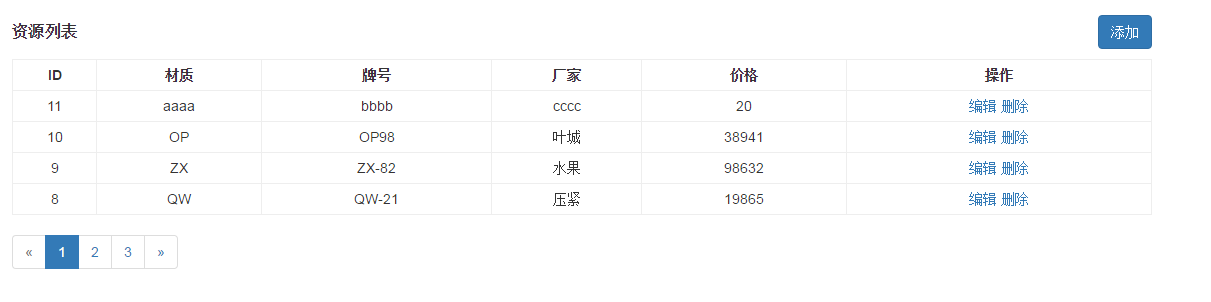
五.运行结果如下:
yii2.0增删改查实例讲解的更多相关文章
- yii2.0增删改查
//关闭csrf public $enableCsrfValidation = false; 1.sql语句 //查询 $db=\Yii::$app->db ->createCommand ...
- python链接oracle数据库以及数据库的增删改查实例
初次使用python链接oracle,所以想记录下我遇到的问题,便于向我这样初次尝试的朋友能够快速的配置好环境进入开发环节. 1.首先,python链接oracle数据库需要配置好环境. 我的相关环境 ...
- java:JSP(JSPWeb.xml的配置,动态和静态导入JSP文件,重定项和请求转发,使用JSP实现数据库的增删改查实例)
1.JSP的配置: <%@ page language="java" import="java.util.*" pageEncoding="UT ...
- EF4.0和EF5.0增删改查的写法区别及执行Sql的方法
EF4.0和EF5.0增删改查的写法区别 public T AddEntity(T entity) { //EF4.0的写法 添加实体 //db.CreateObjectSet<T>(). ...
- MVC ---- EF4.0和EF5.0增删改查的写法区别及执行Sql的方法
EF4.0和EF5.0增删改查的写法区别 public T AddEntity(T entity) { //EF4.0的写法 添加实体 //db.CreateObjectSet<T>(). ...
- python全栈开发中级班全程笔记(第二模块、第三章)(员工信息增删改查作业讲解)
python全栈开发中级班全程笔记 第三章:员工信息增删改查作业代码 作业要求: 员工增删改查表用代码实现一个简单的员工信息增删改查表需求: 1.支持模糊查询,(1.find name ,age fo ...
- 【php增删改查实例】第四节 -自己 DIY 一个数据库管理工具
本节介绍如何自己DIY一个数据库管理工具,可以在页面输入sql 进行简单的增删改查操作. 首先,找到xampp的安装目录,打开htdocs: 新建一个php文件,名称为 mysqladmin.php ...
- YII2生成增删改查
下载完成后在basic/db.php配置数据库参数. 1.配置虚拟主机后进入YII入口文件 index.php 进行get传值 ?r=gii ,进入创建界面 2.点击 Model Generator下 ...
- 百度鹰眼Java接口调用增删改查实例
因感觉百度鹰眼的使用场景比较符合实际业务,于是对百度鹰眼做了简单功能调试.刚开始使用springframework封装的RestTemplate,但是测试提示ak参数不存在.后又试了几种方法,均提示a ...
随机推荐
- Docker 里面新建mysql 容器
1.获取MySQL镜像, a.直接从docker hub 下载docker镜像 docker pull +镜像名称 b.从别的项目上把镜像export出来 dockr load i + 镜像的TAR ...
- 移动端调试 — chrome模拟器基础调试
打开开发者工具,进入chrome调试状态,点击左上角的手机图标,进入手机模拟器调试状态. 模拟器支持操作: 切换设备类型,模拟网络环境,模拟bar,keyboard弹出状态,横屏状态,更改UserAg ...
- firefox SSL_ERROR_RX_RECORD_TOO_LONG burpsuit 报错 解决方案
禁用TLS 1.3 .在Firefox的地址栏中输入“ about:config ”. .在搜索条目“tls.version.max ”.将值从4更改为3. .值4所表示TLS 1.3,3个代表TLS ...
- vs2010修改的内容在浏览器页面不变怎么办
解决方法1: 如果是静态页面, Ctrl+F5 强制刷新浏览器页面 解决方法2: 页面中<%@ Page Language="C#" CodeBehind="Def ...
- redis数据的备份与恢复
redis数据的备份与恢复 持久化分为两种方式:RDB和AOF 1.1 RDB模式 RDB方式的持久化是通过快照(snapshotting)完成的,当符合一定条件时Redis会自动将内存中的所有数据进 ...
- 【报错】The origin server did not find a current representation for the target resource or is not willing to disclose that one exists.
提交表单之后, 报错页面显示: HTTP Status 404 – 未找到 Type Status Report 消息 Not found 描述 The origin server did not f ...
- python 可变类型和不可变类型
1. 什么是不可变类型变量对应的值中的数据是不能被修改,如果修改就会生成一个新的值从而分配新的内存空间.不可变类型: 数字(int,long,float) 布尔(bool) 字符串(string) 元 ...
- Linux:VIM简单入手
现在的Linux系统一般都会默认安装VIM编辑器,如果没有安装VIM编辑器,也默认一定会有VI编辑器,VI编辑器产生的时间比鼠标来的更早,虽然功能很强大,但我建议安装VIM工具,安装了VIM之后,VI ...
- Spring框架中Spring配置文件中<context:annotation-config/>标签说明
<context:annotation-config/>此标签的重要作用就是: 省去系统繁琐的注解标签,加上一个此标签,就可以在此项目程序添加“注解”的功能,使系统识别相应的注解功能!! ...
- Excel 技巧
<!-- Excel跳转到指定行指定列 --> =HYPERLINK("#"&ADDRESS(要跳转到的行数,要跳转到的列数),"跳转")