
iOS开发UI篇—使用picker View控件完成一个简单的选餐应用
iOS开发UI篇—使用picker View控件完成一个简单的选餐应用
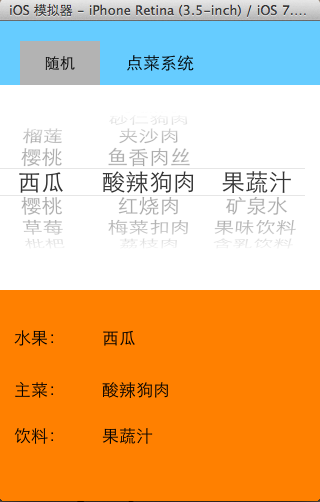
一、实现效果
说明:点击随机按钮,能够自动选取,下方数据自动刷新。
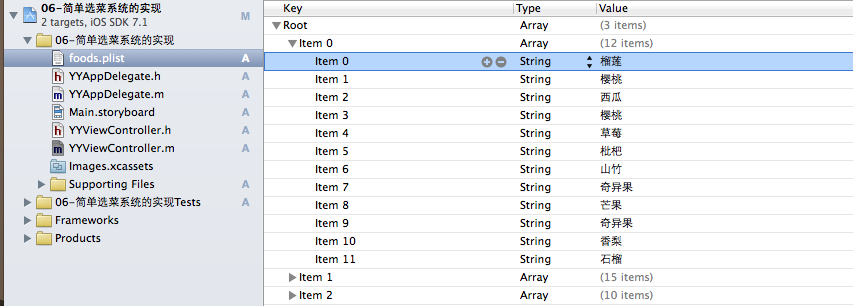
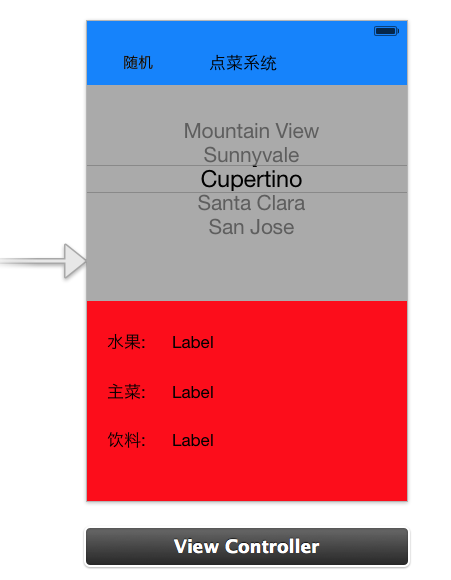
二、实现思路
 //

 //  YYViewController.m

 //  06-简单选菜系统的实现

 //

 //  Created by apple on 14-6-5.

 //  Copyright (c) 2014年 itcase. All rights reserved.

 //

 #import "YYViewController.h"

 //遵守数据源和代理协议

 @interface YYViewController ()<UIPickerViewDataSource,UIPickerViewDelegate>

 /**

  *  水果

  */

 @property (strong, nonatomic) IBOutlet UILabel *fruitLab;

 /**

  *  主菜

  */

 @property (strong, nonatomic) IBOutlet UILabel *stapleLab;

 /**

  *  饮料

  */

 @property (strong, nonatomic) IBOutlet UILabel *drinkLab;

 /**

  *  保存所有的数据

  */

 @property(nonatomic,strong)NSArray *foods;

 @property (weak, nonatomic) IBOutlet UIPickerView *pickerView;

 - (IBAction)randomFood:(id)sender;

 @end

 @implementation YYViewController

 - (void)viewDidLoad

 {

     [super viewDidLoad];

     //在这里设置下方数据刷新部分的初始显示

     for (int component = ; component<self.foods.count; component++) {

         [self pickerView:nil didSelectRow: inComponent:component];

     }

 }

 #pragma mark-使用懒加载,把数据信息加载进来

 -(NSArray *)foods

 {

     if (_foods==nil) {

         NSString *fullpath=[[NSBundle mainBundle]pathForResource:@"foods.plist" ofType:nil];

         NSArray *arrayM=[NSArray arrayWithContentsOfFile:fullpath];

         _foods=arrayM;

     }

     return _foods;

 }

 #pragma mark-处理随机按钮的点击事件

 - (IBAction)randomFood:(id)sender {

     // 让pickerView主动选中某一行

     // 让pickerView选中inComponent列的Row行

     //    [self.pickerView selectRow:1 inComponent:0 animated:YES];

     /*

      [self.pickerView selectRow: arc4random() % 12 inComponent:0 animated:YES];

      [self.pickerView selectRow: arc4random() % 15 inComponent:1 animated:YES];

      [self.pickerView selectRow: arc4random() % 10 inComponent:2 animated:YES];

      */

     //    [self.foods objectAtIndex:0]; == self.foods[0];

     //    [self.foods[0] count];

     /*

      // 根据每一列的元素个数生成随机值

      [self.pickerView selectRow: arc4random() % [self.foods[0] count] inComponent:0 animated:YES];

      [self.pickerView selectRow: arc4random() % [self.foods[1] count] inComponent:1 animated:YES];

      [self.pickerView selectRow: arc4random() % [self.foods[2] count] inComponent:2 animated:YES];

      */

     //设置一个随机数

     for (int component=; component<self.foods.count; component++) {

         //获取当前列对应的数据元素的个数

         int total=[self.foods[component] count];

         //根据每一列的总数生成随机数(当前生成的随机数)

         int randomNumber=arc4random()%total;

         //获取当前选中的行(上一次随机后移动到的行)

         int oldRow=[self.pickerView selectedRowInComponent:];

         //比较上一次的行号和当前生成的随机数是否相同,如果相同的话则重新生成

         while (oldRow==randomNumber) {

                 randomNumber=arc4random()%total;

         }

         //让pickerview滚动到指定的某一行

         [self.pickerView selectRow:randomNumber inComponent:component animated:YES];

         //模拟,通过代码选中某一行

         [self pickerView:nil didSelectRow:randomNumber inComponent:component];

     }

 }

 #pragma mark- 设置数据

 //一共多少列

 -(NSInteger)numberOfComponentsInPickerView:(UIPickerView *)pickerView

 {

     return self.foods.count;

 }

 //每列对应多少行

 -(NSInteger)pickerView:(UIPickerView *)pickerView numberOfRowsInComponent:(NSInteger)component

 {

     //1.获取当前的列

     NSArray *arayM= self.foods[component];

     //2.返回当前列对应的行数

     return arayM.count;

 }

 //每列每行对应显示的数据是什么

 -(NSString *)pickerView:(UIPickerView *)pickerView titleForRow:(NSInteger)row forComponent:(NSInteger)component

 {

     //1.获取当前的列

     NSArray *arayM= self.foods[component];

     //2.获取当前列对应的行的数据

     NSString *name=arayM[row];

     return name;

 }

 #pragma mark-设置下方的数据刷新

 // 当选中了pickerView的某一行的时候调用

 // 会将选中的列号和行号作为参数传入

 // 只有通过手指选中某一行的时候才会调用

 -(void)pickerView:(UIPickerView *)pickerView didSelectRow:(NSInteger)row inComponent:(NSInteger)component

 {

     //获取对应列,对应行的数据

     NSString *name=self.foods[component][row];

     //赋值

     if (==component) {

         self.fruitLab.text=name;

     }else if(==component)

     {

         self.stapleLab.text=name;

     }else

         self.drinkLab.text=name;

 }

 #pragma mark-隐藏状态栏

 -(BOOL)prefersStatusBarHidden

 {

     return YES;

 }

 @end
四、重要补充
请注意在代码实现中为什么使用 [self.foods[0] count]; 而不是直接使用点语法self.foods[0].count取值。
[self.foods objectAtIndex:0]; == self.foods[0];//这两句的效果等价,而self调用objectAtIndex:0这个方法,返回的是一个id类型的万能指针,它的真实类型要到实际运行的时候才能检测得到,因此不能直接使用self.foods[0].count。
iOS开发UI篇—使用picker View控件完成一个简单的选餐应用的更多相关文章
- iOS开发UI篇—Quartz2D(自定义UIImageView控件)
iOS开发UI篇—Quartz2D(自定义UIImageView控件) 一.实现思路 Quartz2D最大的用途在于自定义View(自定义UI控件),当系统的View不能满足我们使用需求的时候,自定义 ...
- ios开发UI篇—使用纯代码自定义UItableviewcell实现一个简单的微博界面布局
本文转自 :http://www.cnblogs.com/wendingding/p/3761730.html ios开发UI篇—使用纯代码自定义UItableviewcell实现一个简单的微博界面布 ...
- iOS开发UI篇—Date Picker和UITool Bar控件简单介绍
iOS开发UI篇—Date Picker和UITool Bar控件简单介绍 一.Date Picker控件 1.简单介绍: Date Picker显示时间的控件 有默认宽高,不用设置数据源和代理 如何 ...
- iOS开发UI篇—控制器的View的创建
iOS开发UI篇—控制器的View的创建 一.6种创建控制器View的方式 #import "NJAppDelegate.h" #import "NJViewContro ...
- 【转】 iOS开发UI篇—控制器的View的创建
最近对view的周期等还不是非常清楚,就找到顶哥的文章,非常不错,就搬运过来了. 原文: http://www.cnblogs.com/wendingding/p/3770760.html 一.6种创 ...
- iOS开发UI篇—CAlayer(创建图层)
iOS开发UI篇—CAlayer(创建图层) 一.添加一个图层 添加图层的步骤: 1.创建layer 2.设置layer的属性(设置了颜色,bounds才能显示出来) 3.将layer添加到界面上(控 ...
- iOS开发UI篇—UIScrollView控件实现图片缩放功能
iOS开发UI篇—UIScrollView控件实现图片缩放功能 一.缩放 1.简单说明: 有些时候,我们可能要对某些内容进行手势缩放,如下图所示 UIScrollView不仅能滚动显示大量内容,还能对 ...
- iOS开发UI篇—UIScrollView控件介绍
iOS开发UI篇—UIScrollView控件介绍 一.知识点简单介绍 1.UIScrollView控件是什么? (1)移动设备的屏幕⼤大⼩小是极其有限的,因此直接展⽰示在⽤用户眼前的内容也相当有限 ...
- iOS开发UI篇—UITableview控件基本使用
iOS开发UI篇—UITableview控件基本使用 一.一个简单的英雄展示程序 NJHero.h文件代码(字典转模型) #import <Foundation/Foundation.h> ...
随机推荐
- C++函数模板template
一. 问题: 强类型语言要求我们为所有希望比较的类型都实现一个实例 int min(int a, int b) { return a < b ? a : b; } double min(dou ...
- csuoj 1114: 平方根大搜索
http://acm.csu.edu.cn/OnlineJudge/problem.php?id=1114 1114: 平方根大搜索 Time Limit: 5 Sec Memory Limit: ...
- 桥接和nat模式区别
bridged networking(桥接模式) 在这种模式下,VMWare虚拟出来的操作系统就像是局域网中的一台独立的主机,它可以访问网内任何一台机器.在桥接模式下,你需要手工为虚拟系统配置IP地址 ...
- Coursera台大机器学习基础课程学习笔记2 -- 机器学习的分类
总体思路: 各种类型的机器学习分类 按照输出空间类型分Y 按照数据标记类型分yn 按照不同目标函数类型分f 按照不同的输入空间类型分X 按照输出空间类型Y,可以分为二元分类,多元分类,回归分析以及结构 ...
- Proteus 8 画原理图仿真 1602 LCD显示字符
以下是源程序: #include <reg52.h> #include<intrins.h> /** * P2 上接的是 D1 ~ D7 */ sbit RS = P3 ^ ; ...
- top free综合监控工具
top选项: -d:指定刷新时间间隔 -n:指定刷新次数 -u:指定只显示user用户的进程信息 -p:指定只显示pid的进程信息 [root@linuxzgf ~]# top Mem: 817449 ...
- windows+caffe(四)——创建模型并编写配置文件+训练和测试
1.模型就用程序自带的caffenet模型,位置在 models/bvlc_reference_caffenet/文件夹下, 将需要的两个配置文件,复制到myfile文件夹内 2. 修改solver. ...
- CSS 盒子模型概述
一.简介 CSS 盒子模型(元素框)由元素内容(content).内边距(padding).边框(border).外边距(margin)组成. 盒子模型,最里面的部分是实际内容:直接包围内 ...
- JavaScript高级应用(一)
1.尺寸 //各种尺寸 s += "\r\n网页可见区域宽(document.body.clientWidth):"+ document.body.clientWidth; s + ...
- [问题2014A04] 复旦高等代数 I(14级)每周一题(第六教学周)
[问题2014A04] 设 \(A,B,C,D\) 均为 \(n\) 阶方阵. (1) 若 \(A^2=A\), \(B^2=B\), \((A+B)^2=A+B\), 证明: \(AB=BA=0\ ...