
SpringBoot入门之基于注解的Mybatis
今天学习下SpringBoot集成mybatis,集成mybatis一般有两种方式,一个是基于注解的一个是基于xml配置的。今天先了解下基于注解的mybatis集成。
一、引入依赖项
因为是mybatis嘛,肯定是要有mybatis相关的,同时用的是mysql,所以也需要引入mysql相关的。
        <!-- https://mvnrepository.com/artifact/org.mybatis.spring.boot/mybatis-spring-boot-starter -->

        <dependency>

            <groupId>org.mybatis.spring.boot</groupId>

            <artifactId>mybatis-spring-boot-starter</artifactId>

            <version>1.3.2</version>

        </dependency>

        <!-- https://mvnrepository.com/artifact/mysql/mysql-connector-java -->

        <dependency>

            <groupId>mysql</groupId>

            <artifactId>mysql-connector-java</artifactId>

            <version>8.0.11</version>

        </dependency>
二、创建model
这里创建了一个User的model,这样方便与数据库的表对照,这里在mysql中创建了一个名为mybatis的数据库,里面创建了一个user的表.同时创建了枚举类UserSexEnum.
CREATE TABLE `user` (

  `id` int(11) NOT NULL AUTO_INCREMENT,

  `name` varchar(20) DEFAULT NULL,

  `age` int(11) DEFAULT NULL,

  `sex` varchar(20) DEFAULT NULL,

  PRIMARY KEY (`id`)

) ENGINE=InnoDB AUTO_INCREMENT=9 DEFAULT CHARSET=utf8;
package com.example.model;

import java.io.Serializable;

public class User implements Serializable{

    @Override

    public String toString() {

        // TODO Auto-generated method stub

        return  "User [id=" + Id + ", name=" + Name + ", age=" + Age + "]";

    }

    public int getId() {

        return Id;

    }

    public void setId(int id) {

        Id = id;

    }

    public String getName() {

        return Name;

    }

    public void setName(String name) {

        Name = name;

    }

    public int getAge() {

        return Age;

    }

    public void setAge(int age) {

        Age = age;

    }

    private int Id;

    private String Name;

    private int Age;

    private UserSexEnum Sex;

    public UserSexEnum getSex() {

        return Sex;

    }

    public void setSex(UserSexEnum sex) {

        Sex = sex;

    }

}
package com.example.model;

public enum UserSexEnum {

    MAN, WOMAN

}
三、创建Mapper
这里需要把model与操作数据库的sql对照起来,用什么对照呢?那就需要创建一个mapper.这里有增删改查。
package com.example.mapper;

import java.util.List;

import org.apache.ibatis.annotations.Delete;

import org.apache.ibatis.annotations.Insert;

import org.apache.ibatis.annotations.Result;

import org.apache.ibatis.annotations.Results;

import org.apache.ibatis.annotations.Select;

import org.apache.ibatis.annotations.Update;

import com.example.model.*;;

public interface  UserMapper {

    @Select("SELECT * FROM user")

    @Results({

        @Result(property = "Sex",  column = "sex", javaType = UserSexEnum.class),

        @Result(property = "Name", column = "name")

    })

    List<User> getAll();

    @Select("SELECT * FROM user WHERE id = #{id}")

    @Results({

        @Result(property = "Sex",  column = "sex", javaType = UserSexEnum.class),

        @Result(property = "Name", column = "name")

    })

    User getOne(int id);

    @Insert("INSERT INTO user(name,age,sex) VALUES(#{name}, #{age}, #{sex})")

    void insert(User user);

    @Update("UPDATE user SET name=#{userName},age=#{age} WHERE id =#{id}")

    void update(User user);

    @Delete("DELETE FROM user WHERE id =#{id}")

    void delete(int id);

}
四、配置扫描
上面配置了mapper,那怎么让系统知道mapper放在哪里呢?于是有了@MapperScan注解。
package com.example.demo;

import org.mybatis.spring.annotation.MapperScan;

import org.springframework.boot.SpringApplication;

import org.springframework.boot.autoconfigure.SpringBootApplication;

@SpringBootApplication

@MapperScan("com.example.mapper")

public class DemoApplication {

    public static void main(String[] args) {

        SpringApplication.run(DemoApplication.class, args);

    }

}
五、创建Controller
这里创建了UserController,一个是显示所有用户,一个是新增一个用户之后再显示所有用户。
package com.example.demo;

import java.util.List;

import org.springframework.beans.factory.annotation.Autowired;

import org.springframework.stereotype.Controller;

import org.springframework.ui.Model;

import org.springframework.web.bind.annotation.RequestMapping;

import org.springframework.web.bind.annotation.RequestMethod;

import com.example.mapper.UserMapper;

import com.example.model.User;

import com.example.model.UserSexEnum;

@Controller

@RequestMapping("/user")

public class UserController {

    @Autowired

    private UserMapper userMapper;

    @RequestMapping(value = "/alluser.do",method = RequestMethod.GET)

    public String getallusers(Model model) {

       List<User> users=userMapper.getAll();

       model.addAttribute("users", users);

       return "userlist";

    }

    @RequestMapping(value = "/insert.do",method = RequestMethod.GET)

    public String adduser(Model model) {

       User user=new User();

       user.setName("cuiyw");

       user.setAge(27);

       user.setSex(UserSexEnum.MAN);

       userMapper.insert(user);

       List<User> users=userMapper.getAll();

       model.addAttribute("users", users);

       return "userlist";

    }

}
六、数据库配置
上面mapper也设置了,model也设置了,那要与数据库交互,肯定要配置数据库地址这些信息吧。这里在运行的时候还报了一个错误.nested exception is java.sql.SQLException: The server time zone value 'Öйú±ê׼ʱ¼ä' is unrecognized or represents more than one time zone. You must configure either the server or JDBC driver (via the serverTimezone configuration property) to use a more specifc time zone value if you want to utilize time zone support.在mysql中设置了下时区:set global time_zone='+8:00';
spring.mvc.view.prefix=/view/

spring.mvc.view.suffix=.jsp

mybatis.type-aliases-package=com.example.model

spring.datasource.driverClassName = com.mysql.cj.jdbc.Driver

spring.datasource.url = jdbc:mysql://localhost:3306/mybatis

spring.datasource.username = root

spring.datasource.password = 123456
七、创建页面显示
这里还是按照上一博客用jsp显示数据。
<%@ page language="java" contentType="text/html; charset=utf-8"

    pageEncoding="utf-8"%>

<%@ taglib prefix="c" uri="http://java.sun.com/jsp/jstl/core" %>

<!DOCTYPE html PUBLIC "-//W3C//DTD HTML 4.01 Transitional//EN" "http://www.w3.org/TR/html4/loose.dtd">

<html>

<head>

<meta http-equiv="Content-Type" content="text/html; charset=utf-8">

<title>Insert title here</title>

</head>

<body>

    <table>

    <tr><th>名字</th><th>年龄</th><th>性别</th></tr>

    <c:forEach items="${users}" var="item">

            <tr><td>${item.name}</td><td>${item.age}</td><td>${item.sex}</td></tr>

        </c:forEach>

     </table>

</body>

</html>
八、测试
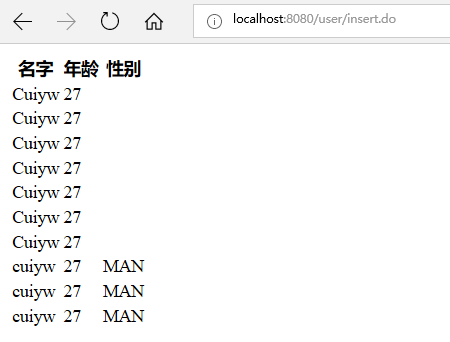
这里先在浏览器打开http://localhost:8080/user/alluser.do,可以看到用户列表,然后输入http://localhost:8080/user/insert.do,就会看到列表显示多了一行数据。
九、小结
使用基于注解的集成mybatis比较省事方便,但有利有弊,对于多表相连的可能就不太方便,使用基于xml配置的可能就更会好些。
SpringBoot入门之基于注解的Mybatis的更多相关文章
- SpringBoot入门之基于XML的Mybatis
上一博客介绍了下SpringBoot基于注解引入Mybatis,今天介绍基于XML引入Mybatis.还是在上一篇demo的基础上进行修改. 一.Maven引入 这个与上一篇的一样,需要引入mybat ...
- SpringBoot入门之基于Druid配置Mybatis多数据源
上一篇了解了Druid进行配置连接池的监控和慢sql处理,这篇了解下使用基于基于Druid配置Mybatis多数据源.SpringBoot默认配置数据库连接信息时只需设置url等属性信息就可以了,Sp ...
- SpringMVC入门(基于注解方式实现)
---------------------siwuxie095 SpringMVC 入门(基于注解方式实现) SpringMVC ...
- 基于注解的Mybatis mapper 接口注意事项
基于注解的Mybatis mapper 接口功能没有mapper xml配置文件丰富,并且动态sql语句的灵活性不能和xml配置相比. 这里仅仅说一下基于注解的动态sql注意事项: Mybatis提供 ...
- (一)SpringBoot入门【基于2.x版本】
SpringBoot入门[基于2.x版本] 一.SpringBoot简介 首先大家学习SpringBoot的话,我希望大家是有一定java基础的,如果是有Spring的基础的话,上手会更加得心应手,因 ...
- SpringBoot入门 (六) 数据库访问之Mybatis
本文记录学习在SpringBoot中使用Mybatis. 一 什么是Mybatis MyBatis 是一款优秀的持久层框架,它支持定制化 SQL.存储过程以及高级映射.MyBatis 避免了几乎所有的 ...
- Springboot入门及常用注解
1.微服务:一个项目 可以由多个 小型服务构成(微服务)2.spring boot可以快速开发 微服务模块 a.简化j2ee开发 b.整个spring技术栈的整合(整合springmvc spring ...
- SpringMVC的入门示例---基于注解的配置
注解版的配置,主要的修改就是将原来使用<bean>创建的业务控制器对象,修改为是扫描标签扫描到容器. 1.导入包 2.在 web.xml 配置核心控制器 <?xml version= ...
- SpringBoot入门笔记(四)、通常Mybatis项目目录结构
1.工程启动类(AppConfig.java) 2.实体类(domain) 3.数据访问层(dao) 4.数据服务层(service) 5.前端控制器(controller) 6.工具类(util) ...
随机推荐
- 51nod 1344
一个很简单的算法题,求最小的前缀和,就是要注意数据范围要开一个longlong #include<iostream> using namespace std; int main() { i ...
- Unity3D中的生命周期函数
生命周期函数:需要继承 MonoBehaviour 类才能使用.生命周期函数全部都是由系统定义好的,系统会自动调用,且调用顺序和我们在代码里面的书写顺序无关. 常用的生命周期函数: Awake():唤 ...
- 【慕课网实战】Spark Streaming实时流处理项目实战笔记十四之铭文升级版
铭文一级: 第11章 Spark Streaming整合Flume&Kafka打造通用流处理基础 streaming.conf agent1.sources=avro-sourceagent1 ...
- jsp页面有一个注册form表单,传值的时候后台接收到的全部是null
[页面上的传值元素一定要有name属性才可在后台接受到参数的值.切记!] 此处一定要注意,form表单里面的元素,比如input元素是否和后台的requset.getparameter();中的参数名 ...
- VDD,VCC,VSS,VEE,VDDA,VSSA,
VDD是主供电电源,也是IO口输出电平的输入电源.VDDA(A表示模拟)是模拟电源,当使用到模拟信号的时候,比如AD(模数)或者DA(数模)的时候,系统会使用VDDA的电压作为参考电压来.不要求精准使 ...
- leetcode437--Path Sum III
https://leetcode.com/problems/path-sum-iii/ 理解比较困难,可以先看https://www.cnblogs.com/albert67/p/10416402.h ...
- ESP32作为接入点AP
作为接入点的第一个任务是使用esp_wifi_set_mode()函数设置ESP32 函数并传递请求,作为接入点,可以把ESP32设置为AP或者APSTA,即 esp_wifi_set_mode(WI ...
- PMP:4.项目整合管理
内容中包含 base64string 图片造成字符过多,拒绝显示
- 如何将uniurlframe中html调用delphi的函数
uniGUI总群中台中cmj朋友为我们总结了如下内容,对于利用delphi+uniGUI开发应用,可以说是精品,必须掌握. 一句话,如何在html与delphi间交互代码,是最好的答案. [Clien ...
- 剑指offer编程题Java实现——面试题9斐波那契数列
题目:写一个函数,输入n,求斐波那契数列的第n项. package Solution; /** * 剑指offer面试题9:斐波那契数列 * 题目:写一个函数,输入n,求斐波那契数列的第n项. * 0 ...