
关于netty的简单实现
1. 新建两个maven项目, 分别为
netty-server: netty的服务端: 消息的消费者
netty-client: netty的客户端: 消息的生产者
2. 分别引入netty的maven依赖
 <dependency>

     <groupId>io.netty</groupId>

     <artifactId>netty-all</artifactId>

     <version>4.1.6.Final</version>

 </dependency>
3. netty-server服务端
3.1. 服务端引导类
 public class EchoServer {

     private int port;

     private EchoServer(int port) {

         this.port = port;

     }

     private void start() throws Exception {

         System.out.println("Echo Server Start");

         EventLoopGroup group = new NioEventLoopGroup();

         try {

             ServerBootstrap b = new ServerBootstrap();

             b.group(group)

                     .channel(NioServerSocketChannel.class)

                     .localAddress(new InetSocketAddress(port))

                     .childHandler(new ChannelInitializer<SocketChannel>() {

                         @Override

                         public void initChannel(SocketChannel ch) throws Exception {

                             ch.pipeline().addLast(new EchoServerHandler());

                         }

                     });

             ChannelFuture f = b.bind().sync();

             System.out.println("Server Start Listen At: " + port);

             f.channel().closeFuture().sync();

         } finally {

             group.shutdownGracefully();

         }

     }

     public static void main(String[] args) throws Exception {

         int port;

         if (args.length > 0) {

             port = Integer.parseInt(args[0]);

         } else {

             port = 8080;

         }

         new EchoServer(port).start();

     }

 }
3.2. 服务端消息消费业务
 public class EchoServerHandler extends ChannelInboundHandlerAdapter {

     @Override

     public void channelRead(ChannelHandlerContext ctx, Object msg) {

         ByteBuf bb = (ByteBuf) msg;

         bb.markReaderIndex();

         System.out.println("Server Received: " + ByteBufUtil.hexDump(bb.readBytes(bb.readableBytes())));

         bb.resetReaderIndex();

         ctx.write(msg);

     }

     @Override

     public void channelReadComplete(ChannelHandlerContext ctx) {

         ctx.writeAndFlush(Unpooled.EMPTY_BUFFER).addListener(ChannelFutureListener.CLOSE);

     }

     @Override

     public void exceptionCaught(ChannelHandlerContext ctx, Throwable cause) {

         cause.printStackTrace();

         ctx.close();

     }

 }
4. netty-client客户端
4.1. 客户端引导类
 public class EchoClient {

     private String host;

     private int port;

     private EchoClient(String host, int port) {

         this.host = host;

         this.port = port;

     }

     private void start() throws Exception {

         System.out.println("Echo Client Start");

         EventLoopGroup group = new NioEventLoopGroup();

         try {

             Bootstrap b = new Bootstrap();

             b.group(group)

                     .channel(NioSocketChannel.class)

                     .remoteAddress(new InetSocketAddress(host, port))

                     .handler(new ChannelInitializer<SocketChannel>() {

                         @Override

                         public void initChannel(SocketChannel ch) throws Exception {

                             ch.pipeline().addLast(new EchoClientHandler());

                         }

                     });

             ChannelFuture f = b.connect().sync();

             System.out.println("Server Client Listen Host: [" + host + "] And Port: [" + port + "]");

             f.channel().closeFuture().sync();

         } finally {

             group.shutdownGracefully();

         }

     }

     public static void main(String[] args) throws Exception {

         String host = "127.0.0.1";

         int port = 8080;

         int len = 2;

         if (args.length == len) {

             host = args[0];

             port = Integer.parseInt(args[1]);

         }

         new EchoClient(host, port).start();

     }

 }
4.2 客户端消息生产业务
public class EchoClientHandler extends SimpleChannelInboundHandler<ByteBuf> {

    @Override

    public void channelActive(ChannelHandlerContext ctx) {

        ctx.writeAndFlush(Unpooled.copiedBuffer("Netty Rocks!", CharsetUtil.UTF_8));

    }

    @Override

    public void channelRead0(ChannelHandlerContext ctx, ByteBuf in) {

        System.out.println("Client Received: " + ByteBufUtil.hexDump(in.readBytes(in.readableBytes())));

    }

    @Override

    public void exceptionCaught(ChannelHandlerContext ctx, Throwable cause) {

        cause.printStackTrace();

        ctx.close();

    }

}
5. 测试:
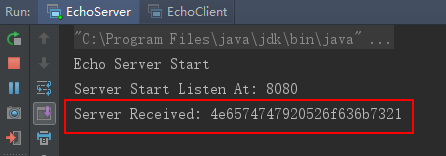
5.1. 启动服务端

5.2. 启动客户端
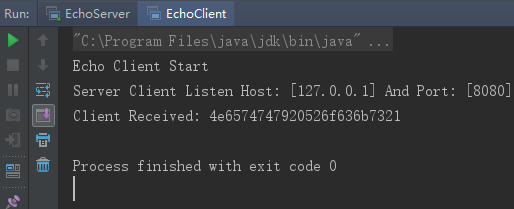
5.3. 再看服务端
关于netty的简单实现的更多相关文章
- Netty学习——基于netty实现简单的客户端聊天小程序
Netty学习——基于netty实现简单的客户端聊天小程序 效果图,聊天程序展示 (TCP编程实现) 后端代码: package com.dawa.netty.chatexample; import ...
- netty 实现简单的rpc调用
yls 2020/5/23 netty 实现简单rpc准备 使用netty传输java bean对象,可以使用protobuf,也可以通过json转化 客户端要将调用的接口名称,方法名称,参数列表的类 ...
- netty的简单的应用例子
一.简单的聊天室程序 public class ChatClient { public static void main(String[] args) throws InterruptedExcept ...
- Netty心跳简单Demo
前面简单地了解了一下IdleStateHandler,我们现在写一个简单的心跳demo: 1)服务器端每隔5秒检测服务器端的读超时,如果5秒没有接受到客户端的写请求,也就说服务器端5秒没有收到读事件, ...
- Netty构建游戏服务器(三)--netty spring简单整合
一,基本方法 上节实现了netty的基本连接,这节加入spring来管理netty,由spring来开启netty服务. 在netty服务器中,我们建立了三个类:HelloServer(程序主入口) ...
- Netty+WebSocket简单实现网页聊天
基于Netty+WebSocket的网页聊天简单实现 一.pom依赖 <dependency> <groupId>io.netty</groupId> ...
- Java使用Netty实现简单的RPC
造一个轮子,实现RPC调用 在写了一个Netty实现通信的简单例子后,萌发了自己实现RPC调用的想法,于是就开始进行了Netty-Rpc的工作,实现了一个简单的RPC调用工程. 如果也有兴趣动手造轮子 ...
- Netty学习笔记之一(Netty解析简单的Http Post Json 请求)
一,HTTP解码器可能会将一个HTTP请求解析成多个消息对象. ch.pipeline().addLast(new HttpServerCodec()); ch.pipeline().addLast( ...
- Netty实例-简单的服务端-client实现,凝视具体
书籍推荐: 实例代码 :http://download.csdn.net/detail/jiangtao_st ...
- Netty实现简单HTTP代理服务器
自上次使用Openresty+Lua+Nginx的来加速自己的网站,用上了比较时髦的技术,感觉算是让自己的网站响应速度达到极限了,直到看到了Netty,公司就是打算用Netty来替代Openresty ...
随机推荐
- [转]使用fdisk磁盘分区和 Linux 文件系统
概述 在本文中,学习磁盘分区和 Linux 文件系统相关内容.学习: 创建分区 使用 mkfs 命令来设置 ext2.ext3.ext4.xfs.Reiser v3 和 vfat 文件系统 创建和管理 ...
- [转]制作一个64M的U盘启动盘(mini linux + winpe +dos toolbox)
自己动手定制winpe+各类dos工具箱U盘启动盘+minilinux 由于一个64M老U盘,没什么用,拿来发挥余热.如果U盘够大,可以使用功能更强大的mini linux和带更多工具的winpe.这 ...
- 中间件序列TDATASET为BUFFER演示代码
procedure SendStream(const AStream: TStream);var Buffer: array[0..4095] of Byte; // 每包最大4K StartPos, ...
- Go和HTTPS(TLS)
原文链接: http://studygolang.com/wr?u=http%3a%2f%2ftonybai.com%2f2015%2f04%2f30%2fgo-and-https%2f 近期在构思一 ...
- HDU 4279 Number(找规律)
Number Time Limit: 2000/1000 MS (Java/Others) Memory Limit: 32768/32768 K (Java/Others) Total Sub ...
- chapter1:using neural nets to recognize handwritten digits
two important types of artificial neuron :the perceptron and the sigmoid neuron Perceptrons 感知机的输入个数 ...
- topcoder srm 553
div1 250pt: 题意:... 解法:先假设空出来的位置是0,然后模拟一次看看是不是满足,如果不行的话,我们只需要关心最后栈顶的元素取值是不是受空白处的影响,于是还是模拟一下. // BEGIN ...
- Office EXCEL 如何保留一位小数,并且单击这个单元格的时候没有一大串小数
左侧有一列数据,即便我设置单元格格式,把小数位数设为1,看上去的确四舍五入,保留一位小数了,但是实际上我鼠标双击任意单元格,还是原来的数值,这样的数据如果是要发给别人的,肯定不好 如果进行选择性粘 ...
- Deepin-文件目录介绍
请参见这篇文件:来自一个强大的网站 我主要介绍的就是: 下面所列文件,全部添加进了path目录(Linux查找命令,请参见man.linux,无论是find 或者是 which等) Deepin默认可 ...
- react 从零开始搭建开发环境
1.创建 package.json 项目 npm init 2.安装 webpack, 并且设置为项目依赖: npm install webpack --save-dev 当然你必须之前已经在 -g ...