
JAVAWEB之文件的上传下载
文件上传下载
文件上传:
本篇文章使用的文件上传的例子使用的都是原生技术,servelt+jdbc+fileupload插件,这也是笔者的习惯,当接触到某些从未接触过的东西时,总是喜欢用最原始的东西将他们表达出来。下面是具体的步骤,大家可以跟着我一步一步的用apache的fileupload插件来完成文件的上传下载。
1.创建一个web工程,我们这里取名为fileupload
2.导入相关jar包, ,数据源使用的是apache-c3p0数据源,以及上传下载插件包,goson库,以及mysql驱动包,大家可以去https://mvnrepository.com/自行下载,系在前请核实jar版本,防止jar冲突。
3.src目录下创建upload.properties文件,用于配置文件上传的限制参数。
 exts=pptx,docx,doc

 file.max.size=1048576

 total.file.max.size=5242880
4.创建工程包结构,
5.创建读取upload.properties的监听器类,初始化上传文件的限制参数,具体代码如下:
 package com.sunyard.listener;

 import java.io.IOException;

 import java.io.InputStream;

 import java.util.Map;

 import java.util.Properties;

 import javax.servlet.ServletContextEvent;

 import javax.servlet.ServletContextListener;

 import com.sunyard.utils.FileUploadAppProperties;

 /**

  * <p>初始化上传文件限制参数的监听器</p>

  * @author:774346810@qq.com

  * @date:2017-6-16

  */

 public class FileUploadAppListener implements ServletContextListener{

     @Override

     public void contextDestroyed(ServletContextEvent arg0) {

     }

     @Override

     public void contextInitialized(ServletContextEvent arg0) {

         InputStream in = this.getClass().getClassLoader().getResourceAsStream("/upload.properties");

         Properties properties = new Properties();

         try {

             properties.load(in);

             for(Map.Entry<Object, Object> prop : properties.entrySet()){

                 String propertyName = (String) prop.getKey();

                 String propertyValue = (String) prop.getValue();

                 FileUploadAppProperties.getInstance().addProperty(propertyName, propertyValue);

             }

         } catch (IOException e) {

             e.printStackTrace();

         }

     }

 }
6.配置web.xml文件
 <?xml version="1.0" encoding="UTF-8"?>

 <web-app version="3.0"

     xmlns="http://java.sun.com/xml/ns/javaee"

     xmlns:xsi="http://www.w3.org/2001/XMLSchema-instance"

     xsi:schemaLocation="http://java.sun.com/xml/ns/javaee

     http://java.sun.com/xml/ns/javaee/web-app_3_0.xsd">

   <display-name></display-name>

   <welcome-file-list>

     <welcome-file>index.jsp</welcome-file>

   </welcome-file-list>

   <!-- 初始化监听器 -->

   <listener>

       <listener-class>com.sunyard.listener.FileUploadAppListener</listener-class>

   </listener>

   <!-- 注册上传servlet -->

   <servlet>

       <servlet-name>upload</servlet-name>

       <servlet-class>com.sunyard.servlet.FileUploadServlet</servlet-class>

   </servlet>

   <servlet-mapping>

       <servlet-name>upload</servlet-name>

       <url-pattern>/upload</url-pattern>

   </servlet-mapping>

   <!-- 注册下载servlet -->

   <servlet>

      <servlet-name>download</servlet-name>

      <servlet-class>com.sunyard.servlet.DownLoadServlet</servlet-class>

   </servlet>

   <servlet-mapping>

       <servlet-name>download</servlet-name>

       <url-pattern>/download</url-pattern>

   </servlet-mapping>

 </web-app>
配置监听器,以及文件上传servlet和文件下载servlet。
6.完善工程所需要的类,
1)创建上传下载实体,FileUploadBean
 package com.sunyard.bean;

 /**

  * <p>文件上传实体</p>

  * @author:774346810@qq.com

  * @date:2017-6-16

  */

 public class FileUploadBean {

     private Integer id;

     // 文件名

     private String fileName;

     // 文件的路径

     private String filePath;

     // 文件的描述

     private String fileDesc;

     public Integer getId() {

         return id;

     }

     public void setId(Integer id) {

         this.id = id;

     }

     public String getFileName() {

         return fileName;

     }

     public void setFileName(String fileName) {

         this.fileName = fileName;

     }

     public String getFilePath() {

         return filePath;

     }

     public void setFilePath(String filePath) {

         this.filePath = filePath;

     }

     public String getFileDesc() {

         return fileDesc;

     }

     public void setFileDesc(String fileDesc) {

         this.fileDesc = fileDesc;

     }

     public FileUploadBean(String fileName, String filePath, String fileDesc) {

         super();

         this.fileName = fileName;

         this.filePath = filePath;

         this.fileDesc = fileDesc;

     }

     public FileUploadBean(Integer id, String fileName, String filePath,

             String fileDesc) {

         this.id = id;

         this.fileName = fileName;

         this.filePath = filePath;

         this.fileDesc = fileDesc;

     }

     public FileUploadBean() {

     }

 }
2)dao操作自定义异常类
 package com.sunyard.db;

 public class DBException extends Exception {

     /**

      *

      */

     private static final long serialVersionUID = -1547402862446161034L;

     public DBException() {

     }

     public DBException(String msg) {

         super(msg);

     }

     public DBException(String msg, Exception ex) {

         super(msg, ex);

     }

 }
3)JDBC连接工具类
 package com.sunyard.db;

 import java.io.InputStream;

 import java.sql.Connection;

 import java.sql.DriverManager;

 import java.sql.ResultSet;

 import java.sql.SQLException;

 import java.sql.Statement;

 import java.util.Properties;

 public class JDBCUtils {

     public static void release(ResultSet rs,

             Statement statement, Connection conn) {

         if(rs != null){

             try {

                 rs.close();

             } catch (SQLException e) {

                 e.printStackTrace();

             }

         }

         if (statement != null) {

             try {

                 statement.close();

             } catch (Exception e2) {

                 e2.printStackTrace();

             }

         }

         if (conn != null) {

             try {

                 conn.close();

             } catch (Exception e2) {

                 e2.printStackTrace();

             }

         }

     }

     /**

      * 关闭 Statement 和 Connection

      * @param statement

      * @param conn

      */

     public static void release(Statement statement, Connection conn) {

         if (statement != null) {

             try {

                 statement.close();

             } catch (Exception e2) {

                 e2.printStackTrace();

             }

         }

         if (conn != null) {

             try {

                 conn.close();

             } catch (Exception e2) {

                 e2.printStackTrace();

             }

         }

     }

     /**

      * 1. 获取连接的方法. 通过读取配置文件从数据库服务器获取一个连接.

      *

      * @return

      * @throws Exception

      */

     public static Connection getConnection() throws Exception {

         // 1. 准备连接数据库的 4 个字符串.

         // 1). 创建 Properties 对象

         Properties properties = new Properties();

         // 2). 获取 jdbc.properties 对应的输入流

         InputStream in = JDBCUtils.class.getClassLoader().getResourceAsStream(

                 "jdbc.properties");

         // 3). 加载 2) 对应的输入流

         properties.load(in);

         // 4). 具体决定 user, password 等4 个字符串.

         String user = properties.getProperty("user");

         String password = properties.getProperty("password");

         String jdbcUrl = properties.getProperty("jdbcUrl");

         String driver = properties.getProperty("driver");

         // 2. 加载数据库驱动程序(对应的 Driver 实现类中有注册驱动的静态代码块.)

         Class.forName(driver);

         // 3. 通过 DriverManager 的 getConnection() 方法获取数据库连接.

         return DriverManager.getConnection(jdbcUrl, user, password);

     }

 }
5)文件上传下载的dao层方法
 package com.sunyard.db;

 import java.sql.Connection;

 import java.sql.ResultSet;

 import java.util.ArrayList;

 import java.util.List;

 import com.mysql.jdbc.PreparedStatement;

 import com.mysql.jdbc.Statement;

 import com.sunyard.bean.FileUploadBean;

 /**

  * <p>文件上传下载dao</p>

  * @author:774346810@qq.com

  * @date:2017-6-25

  */

 public class UploadFileDao {

     /**

      * 查询所有文件信息

      * @return

      */

     public List<FileUploadBean> getFiles(){

         Connection conn = null;

         Statement statement = null;

         ResultSet rs = null;

         List<FileUploadBean> beans = new ArrayList<FileUploadBean>();

         try {

             conn = JDBCUtils.getConnection();

             String sql = "SELECT id, file_name fileName, file_path filePath, " +

                     "file_desc fileDesc FROM upload_files";

             statement = (Statement) conn.createStatement();

             rs = statement.executeQuery(sql);

             while(rs.next()){

                 Integer id = rs.getInt("id");

                 String fileName = rs.getString("file_name");

                 String filePath = rs.getString("file_path");

                 String fileDesc = rs.getString("file_desc");

                 FileUploadBean bean = new FileUploadBean(id, fileName, filePath, fileDesc);

                 beans.add(bean);

             }

         } catch (Exception e) {

             e.printStackTrace();

         } finally{

             JDBCUtils.release(rs, statement, conn);

         }

         return beans;

     }

     /**

      * 将已经上传的文件存放数据库中

      * @param uploadFiles

      */

     public void save(List<FileUploadBean> uploadFiles){

         Connection conn = null;

         PreparedStatement preparedStatement = null;

         try {

             conn = JDBCUtils.getConnection();

             String sql = "INSERT INTO upload_files (file_name, file_path, file_desc) VALUES " +

                     "(?, ?, ?)";

             preparedStatement = (PreparedStatement) conn.prepareStatement(sql);

             for(int i = 0;i < uploadFiles.size();i++){

                 FileUploadBean fileUploadBean = uploadFiles.get(i);

                 preparedStatement.setString(1, fileUploadBean.getFileName());

                 preparedStatement.setString(2, fileUploadBean.getFilePath());

                 preparedStatement.setString(3, fileUploadBean.getFileDesc());

                 preparedStatement.executeUpdate();

             }

         } catch (Exception e) {

             e.printStackTrace();

         } finally{

             JDBCUtils.release(null, preparedStatement, conn);

         }

     }

 }
6)自定义异常类
 package com.sunyard.exception;

 public class InvalidExtNameException extends RuntimeException{

     /**

      *

      */

     private static final long serialVersionUID = -1478119693559275850L;

     public InvalidExtNameException(String msg){

         super(msg);

     }

 }
7)处理文件上传的servlet
 package com.sunyard.servlet;

 import java.io.File;

 import java.io.FileOutputStream;

 import java.io.IOException;

 import java.io.InputStream;

 import java.io.OutputStream;

 import java.io.UnsupportedEncodingException;

 import java.util.ArrayList;

 import java.util.Arrays;

 import java.util.HashMap;

 import java.util.List;

 import java.util.Map;

 import java.util.Random;

 import javax.servlet.ServletException;

 import javax.servlet.http.HttpServlet;

 import javax.servlet.http.HttpServletRequest;

 import javax.servlet.http.HttpServletResponse;

 import org.apache.commons.fileupload.FileItem;

 import org.apache.commons.fileupload.disk.DiskFileItemFactory;

 import org.apache.commons.fileupload.servlet.ServletFileUpload;

 import com.sunyard.bean.FileUploadBean;

 import com.sunyard.db.UploadFileDao;

 import com.sunyard.exception.InvalidExtNameException;

 import com.sunyard.utils.FileUploadAppProperties;

 public class FileUploadServlet extends HttpServlet{

     private static final long serialVersionUID = 6227133615299280663L;

     private static final String FILE_PATH = "/WEB-INF/files/";//类路径

     private static final String TEMP_DIR = "d:\\tempDirectory";//文件临时存储路径

     UploadFileDao uploadFileDao = new UploadFileDao();

     @Override

     protected void doPost(HttpServletRequest request, HttpServletResponse response)

             throws ServletException, IOException {

         request.setCharacterEncoding("UTF-8");

         String path = null;

         //获取 ServletFileUpload 对象.

         ServletFileUpload upload = getServletFileUpload();

         try {

             //把需要上传的 FileItem 都放入到该 Map 中

             //键: 文件的待存放的路径, 值: 对应的 FileItem 对象

             Map<String, FileItem> uploadFiles = new HashMap<String, FileItem>();

             //解析请求, 得到 FileItem 的集合.

             List<FileItem> items = upload.parseRequest(request);

             //1. 构建 FileUploadBean 的集合, 同时填充 uploadFiles

             List<FileUploadBean> beans = buildFileUploadBeans(items, uploadFiles);

             //2. 校验扩展名:

             vaidateExtName(beans);

             //3. 校验文件的大小: 在解析时, 已经校验了, 我们只需要通过异常得到结果.

             //4. 进行文件的上传操作.

             upload(uploadFiles);

             //5. 把上传的信息保存到数据库中

             saveBeans(beans);

             path = "/app/success.jsp";

         } catch (Exception e) {

             e.printStackTrace();

         }

         request.getRequestDispatcher(path).forward(request, response);

     }

     private void saveBeans(List<FileUploadBean> beans) {

         uploadFileDao.save(beans);

     }

     /**

      * 进行文件上传操作

      * @param uploadFiles

      * @throws IOException

      */

     private void upload(Map<String, FileItem> uploadFiles) throws IOException {

         for(Map.Entry<String, FileItem> uploadFile: uploadFiles.entrySet()){

             String filePath = uploadFile.getKey();

             FileItem item = uploadFile.getValue();

             upload(filePath, item.getInputStream());

         }

     }

     /**

      * 文件上传的 IO 方法.

      *

      * @param filePath

      * @param inputStream

      * @throws IOException

      */

     private void upload(String filePath, InputStream inputStream) throws IOException {

         OutputStream out = new FileOutputStream(filePath);

         byte [] buffer = new byte[1024];

         int len = 0;

         while((len = inputStream.read(buffer)) != -1){

             out.write(buffer, 0, len);

         }

         inputStream.close();

         out.close();

         System.out.println(filePath);

     }

     /**

      * 校验文件扩展名是否合法

      * @param beans

      */

     private void vaidateExtName(List<FileUploadBean> beans) {

         String exts = FileUploadAppProperties.getInstance().getProperty("exts");

         List<String> extList = Arrays.asList(exts.split(","));

         System.out.println(extList);

         for(FileUploadBean bean: beans){

             String fileName = bean.getFileName();

             System.out.println(fileName.indexOf("."));

             String extName = fileName.substring(fileName.lastIndexOf(".") + 1);

             System.out.println(extName);

             if(!extList.contains(extName)){

                 throw new InvalidExtNameException(fileName + "文件的扩展名不合法");

             }

         }

     }

     /**

      * 利用传入的 FileItem 的集合, 构建 FileUploadBean 的集合, 同时填充 uploadFiles

      *

      * FileUploadBean 对象封装了: id, fileName, filePath, fileDesc

      * uploadFiles: Map<String, FileItem> 类型, 存放文件域类型的  FileItem. 键: 待保存的文件的名字 ,值: FileItem 对象

      *

      * 构建过程:

      * 1. 对传入 FileItem 的集合进行遍历. 得到 desc 的那个 Map. 键: desc 的 fieldName(desc1, desc2 ...).

      * 值: desc 的那个输入的文本值

      *

      * 2. 对传入 FileItem 的集合进行遍历. 得到文件域的那些 FileItem 对象, 构建对应的 key (desc1 ....) 来获取其 desc.

      * 构建的 FileUploadBean 对象, 并填充 beans 和 uploadFiles

      *

      * @param items

      * @param uploadFiles

      * @return

      * @throws UnsupportedEncodingException

      */

     private List<FileUploadBean> buildFileUploadBeans(List<FileItem> items,

             Map<String, FileItem> uploadFiles) throws UnsupportedEncodingException {

         List<FileUploadBean> beans = new ArrayList<FileUploadBean>();

         Map<String, String> descs = new HashMap<String, String>();

         //处理普通的表单体

         for(int i = 0;i < items.size();i++){

             FileItem item = items.get(i);

             if(item.isFormField()){

                 //desc1 或 desc2 ...

                 String fieldName = item.getFieldName();

                 String desc = item.getString("UTF-8");

                 descs.put(fieldName, desc);

             }

         }

         //处理文件表单体

         for(int i = 0;i < items.size();i++){

             FileItem item = items.get(i);

             FileUploadBean bean = null;

             if(!item.isFormField()){

                 String fieldName = item.getFieldName();

                 String descName = "desc" + fieldName.substring(fieldName.length() - 1);

                 String desc = descs.get(descName);

                 //对应文件名

                 String fileName = item.getName();

                 String filePath = getFilePath(fileName);

                 bean = new FileUploadBean(fileName, filePath, desc);

                 beans.add(bean);

                 uploadFiles.put(bean.getFilePath(), item);

             }

         }

         return beans;

     }

     /**

      * 根据跟定的文件名构建一个随机的文件名

      * 1. 构建的文件的文件名的扩展名和给定的文件的扩展名一致

      * 2. 利用 ServletContext 的 getRealPath 方法获取的绝对路径

      * 3. 利用了 Random 和 当前的系统时间构建随机的文件的名字

      *

      * @param fileName

      * @return

      */

     private String getFilePath(String fileName) {

         String extName = fileName.substring(fileName.lastIndexOf("."));

         Random random = new Random();

         String filePath = getServletContext().getRealPath(FILE_PATH) + "\\" + System.currentTimeMillis() + random.nextInt(100000) + extName;

         return filePath;

     }

     /**

      * 获取 ServletFileUpload 对象.

      * @return

      */

     private ServletFileUpload getServletFileUpload(){

         String fileMaxSize = FileUploadAppProperties.getInstance().getProperty("file.max.size");

         String totalFileMaxSize = FileUploadAppProperties.getInstance().getProperty("total.file.max.size");

         DiskFileItemFactory factory = new DiskFileItemFactory();

         factory.setSizeThreshold(1024 * 500);

         File tempDirectory = new File(TEMP_DIR);

         factory.setRepository(tempDirectory);

         ServletFileUpload upload = new ServletFileUpload(factory);

         upload.setSizeMax(Integer.parseInt(totalFileMaxSize));

         upload.setFileSizeMax(Integer.parseInt(fileMaxSize));

         return upload;

     }

 }
8)用于存储文件上传的单例工具类FileUploadAppProperties
 package com.sunyard.utils;

 import java.util.HashMap;

 import java.util.Map;

 /**

  * <p>上传下载参数单例类</p>

  * @author:774346810@qq.com

  * @date:2017-6-16

  */

 public class FileUploadAppProperties {

     private Map<String, String> properties = new HashMap<String, String>();

     private FileUploadAppProperties(){}

     private static FileUploadAppProperties instance = new FileUploadAppProperties();

     public static FileUploadAppProperties getInstance(){

         return instance;

     }

     public void addProperty(String propertyName,String propertyValue){

         properties.put(propertyName, propertyValue);

     }

     public String getProperty(String propertyName){

         return properties.get(propertyName);

     }

 }
9)JDBC连接数据库的参数properties文件
 #driver=oracle.jdbc.driver.OracleDriver

 #jdbcUrl=jdbc:oracle:thin:@localhost:1521:orcl

 #user=scott

 #password=java

 driver=com.mysql.jdbc.Driver

 jdbcUrl=jdbc:mysql://localhost:3306/upload

 user=root

 password=123456
10)jQuery开发的静态资源文件
11)文件上传的页面upload.jsp
 <%@ page language="java" import="java.util.*" pageEncoding="UTF-8"%>

 <%

 String path = request.getContextPath();

 String basePath = request.getScheme()+"://"+request.getServerName()+":"+request.getServerPort()+path+"/";

 %>

 <!DOCTYPE HTML PUBLIC "-//W3C//DTD HTML 4.01 Transitional//EN">

 <html>

   <head>

     <base href="<%=basePath%>">

     <title>My JSP 'upload.jsp' starting page</title>

     <meta http-equiv="pragma" content="no-cache">

     <meta http-equiv="cache-control" content="no-cache">

     <meta http-equiv="expires" content="0">

     <meta http-equiv="keywords" content="keyword1,keyword2,keyword3">

     <meta http-equiv="description" content="This is my page">

     <!--

     <link rel="stylesheet" type="text/css" href="styles.css">

     -->

     <script type="text/javascript" src="${pageContext.request.contextPath }/scripts/jquery-1.7.2.js"></script>

     <script type="text/javascript">

         $(function(){

             var i = 2;

             $("#addFile").click(function(){

                 $(this).parent().parent().before("<tr class='file'><td>File"

                         + i + ":</td><td><input type='file' name='file"

                         + i + "'/></td></tr>"

                         + "<tr class='desc'><td>Desc"

                         + i + ":</td><td><input type='text' name='desc"

                         + i + "'/><button id='delete"

                         + i + "'>删除</button></td></tr>");

                 i++;

                 //获取新添加的删除按钮

                 $("#delete" + (i-1)).click(function(){

                     var $tr = $(this).parent().parent();

                     $tr.prev("tr").remove();

                     $tr.remove();

                     //对 i 重写排序

                     $(".file").each(function(index){

                         var n = index + 1;

                         $(this).find("td:first").text("File" + n);

                         $(this).find("td:last input").attr("name", "file" + n);

                     });

                     $(".desc").each(function(index){

                         var n = index + 1;

                         $(this).find("td:first").text("Desc" + n);

                         $(this).find("td:last input").attr("name", "desc" + n);

                     });

                     i = i - 1;

                 });

                 return false;

             });

         });

     </script>

   </head>

   <body>

     <font color="red">${message }</font>

     <br><br>

     <form action="upload" method="post" enctype="multipart/form-data">

         <table>

             <tr class="file">

                 <td>File1:</td>

                 <td><input type="file" name="file1"/></td>

             </tr>

             <tr class="desc">

                 <td>Desc1:</td>

                 <td><input type="text" name="desc1"/></td>

             </tr>

             <tr>

                 <td><input type="submit" id="submit" value="提交"/></td>

                 <td><button id="addFile">新增一个附件</button></td>

             </tr>

         </table>

     </form>

   </body>

 </html>
将项目部署服务器,启动,访问http://127.0.0.1:8080/fileupload/app/upload.jsp后出现下面的页面
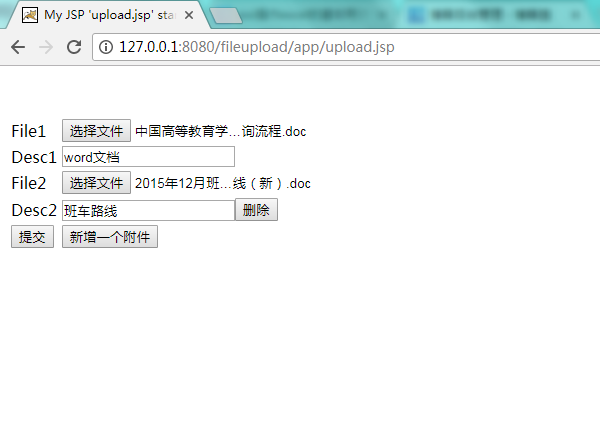
点击上传,就可以完成文件上传的功能。
可以去服务器和数据库中查看是否上传成功,如下:


至此,文件上传功能完成。
***************************************************************
文件下载:
为了演示,我们将需要下载的文件内容写死,处理下载的servlet代码如下。
 package com.sunyard.servlet;

 import java.io.FileInputStream;

 import java.io.IOException;

 import java.io.InputStream;

 import java.io.OutputStream;

 import java.net.URLEncoder;

 import javax.servlet.ServletException;

 import javax.servlet.http.HttpServlet;

 import javax.servlet.http.HttpServletRequest;

 import javax.servlet.http.HttpServletResponse;

 import com.sunyard.db.UploadFileDao;

 /**

  * <p>下载servlet</p>

  * @author:774346810@qq.com

  * @date:2017-6-18

  */

 public class DownLoadServlet extends HttpServlet{

     private static final long serialVersionUID = -1409324086440387753L;

     @Override

     protected void doGet(HttpServletRequest request, HttpServletResponse response)

             throws ServletException, IOException {

         response.setContentType("application/x-msdownload");

         String fileName = "文件下载.docx";

         response.setHeader("Content-Disposition", "attachment;filename=" + URLEncoder.encode(fileName, "UTF-8"));

         OutputStream out = response.getOutputStream();

         String pptFileName = "D:\\apache-tomcat-6.0.16\\webapps\\fileupload\\WEB-INF\\files\\149837444825180585.docx";

         InputStream in = new FileInputStream(pptFileName);

         byte [] buffer = new byte[1024];

         int len = 0;

         while((len = in.read(buffer)) != -1){

             out.write(buffer, 0, len);

         }

         in.close();

     }

 }
同样,开启服务,打开浏览器访问
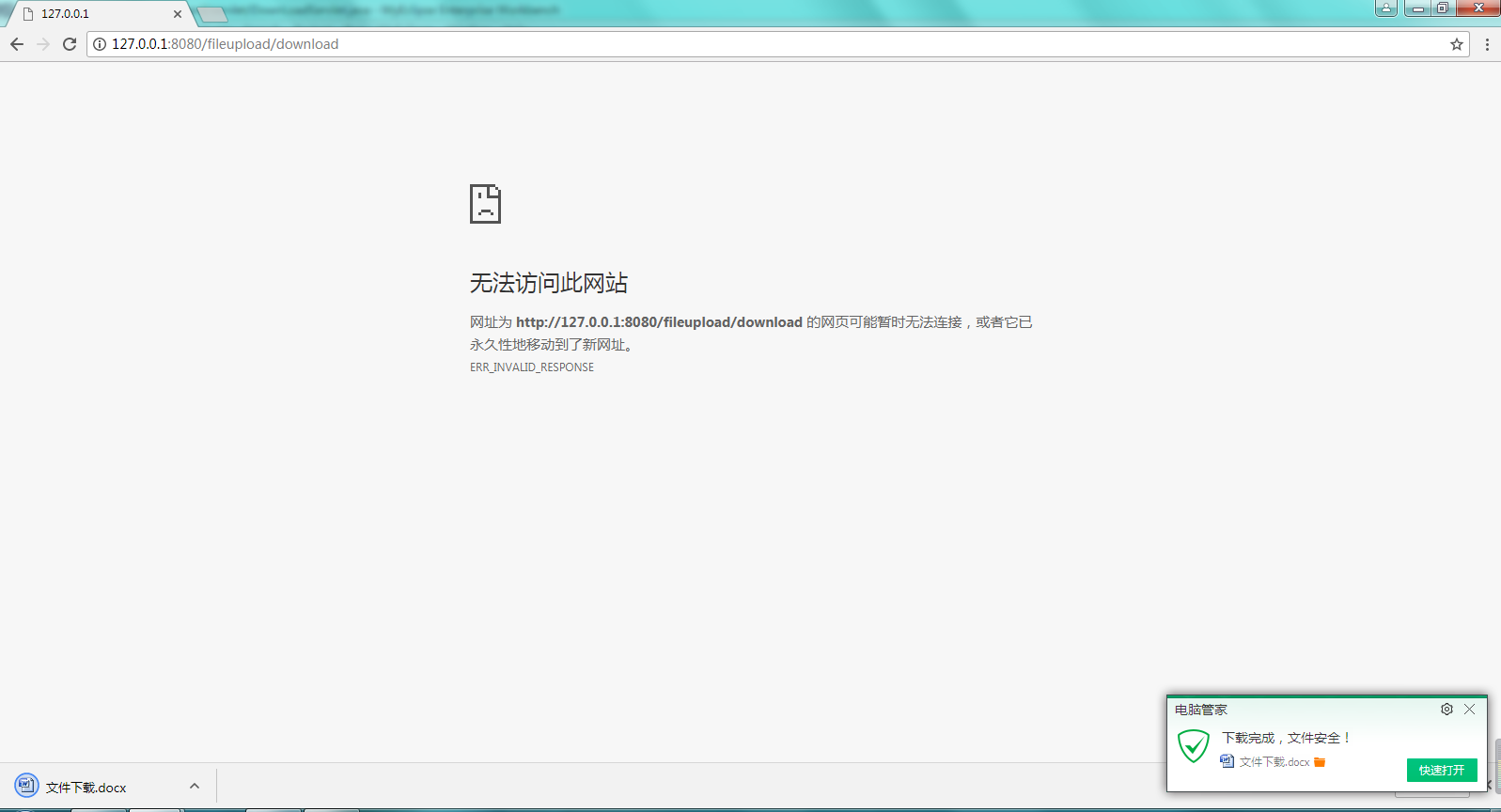
既可以得到需要你下载的文件。
至此,文件上传下载的小案例都在这里了。需要下载demo的同学我已经把工程放在我的百度网盘上大家可以自行下载:
http://pan.baidu.com/s/1pLc6Icb
JAVAWEB之文件的上传下载的更多相关文章
- JavaWeb 之文件的上传下载
又到了每周更新博客的时候了,每看到自己发布的随笔阅读量上涨的时候就特别开心,我也会尽自己的努力提高自己的水平,总结出通俗易读的学习笔记,还望大家能多多支持!!! ------------------- ...
- JavaWeb中文件的上传和下载
JavaWeb中文件的上传和下载 转自: JavaWeb学习总结(五十)——文件上传和下载 - 孤傲苍狼 - 博客园https://www.cnblogs.com/xdp-gacl/p/4200090 ...
- Javaweb之文件的上传与下载
Javaweb之文件的上传与下载 一.基于表单的文件上传 如果在表单中使用表单元素 <input type=“file” />,浏览器在解析表单时,会自动生成一个输入框和一个按钮,输入框可 ...
- 在Window的IIS中创建FTP的Site并用C#进行文件的上传下载
文件传输协议 (FTP) 是一个标准协议,可用来通过 Internet 将文件从一台计算机移到另一台计算机. 这些文件存储在运行 FTP 服务器软件的服务器计算机上. 然后,远程计算机可以使用 FTP ...
- 创建FTP的Site并用C#进行文件的上传下载
创建FTP的Site并用C#进行文件的上传下载 文件传输协议 (FTP) 是一个标准协议,可用来通过 Internet 将文件从一台计算机移到另一台计算机. 这些文件存储在运行 FTP 服务器软件的服 ...
- linux链接及文件互相上传下载
若排版紊乱可查看我的个人博客原文地址 基本操作 本篇博客主要介绍如何去链接远程的linux主机及如何实现本地与远程主机之间文件的上传下载操作,下面的linux系统是CentOS6.6 链接远程linu ...
- Spring实现文件的上传下载
背景:之前一直做的是数据库的增删改查工作,对于文件的上传下载比较排斥,今天研究了下具体的实现,发现其实是很简单.此处不仅要实现单文件的上传,还要实现多文件的上传. 单文件的下载知道了,多文件的下载呢? ...
- SocketIo+SpringMvc实现文件的上传下载
SocketIo+SpringMvc实现文件的上传下载 socketIo不仅可以用来做聊天工具,也可以实现局域网(当然你如果有外网也可用外网)内实现文件的上传和下载,下面是代码的效果演示: GIT地址 ...
- SSM框架之中如何进行文件的上传下载
SSM框架的整合请看我之前的博客:http://www.cnblogs.com/1314wamm/p/6834266.html 现在我们先看如何编写文件的上传下载:你先看你的pom.xml中是否有文件 ...
随机推荐
- postgresql 备份与恢复
备份 C:\PostgreSQL\\bin>pg_dump -h localhost -p -U postgres Mes > d:/.bak 恢复 C:\PostgreSQL\\bin& ...
- String.IsNullOrEmpty 与 String.IsNullOrWhiteSpace
String.IsNullOrEmpty 指示指定的字符串是否为 null 或者 空字符串: 返回值:如果参数为 null 或者 空字符串("" .String.Empty),结果 ...
- emit 方法表翻译
Name Description Add Adds two values and pushes the result onto the evaluation stack.添加两个值并将结果推送到评 ...
- JS 教程
1简介 1.JavaScript 是脚本语言 1.1轻量级的编程语言 1.2可插入 HTML 页面的编程代码 1.3可由所有的现代浏览器执行 2.您将学到什么 2.1JavaScript:写入 HTM ...
- CXF开发WebService
CXF开发Web Service 参考链接 使用 spring 框架来集成 Web Services 开发 浏览器调用接口 大概这样, 没成功 加@WebMethod(action="get ...
- Java反射学习总结
我开始学习反射的初衷是为了理解Spring 里的控制反转,其次可以利用反射来达到类中的解耦. 自己写的一些心得,希望能帮到大家 1.反射指的是对象的反向处理操作,是根据对象来取得对象的来源信息. 反射 ...
- golang 编码转化
在网上搜索golang编码转化时,我们经常看到的文章是使用下面一些第三方库: https://github.com/djimenez/iconv-go https://github.com/qiniu ...
- easy canvas shape with react antdesign 简单的canvas图形in antd & react
//show: //code: import React from "react" import {findDOMNode} from 'react-dom' import { B ...
- cookie和session 区别
cookie机制采用的是在客户端保持状态的方案,session机制采用的是在服务器端保持状态的方案. 1.cookie数据存放在客户的浏览器上,session数据放在服务器上. 2.cookie不是很 ...
- JS获取第二个横杠后面的内容
假设数据为: let str = "zheng-shize-zsz"; 获取第一个横杠的位置: str.indexOf("-") 1. 那获取第二个横杠怎么写呢 ...