
AngularJS学习笔记(2)——与用户交互的动态清单列表
与用户交互的动态清单列表
以我之前写的一个清单列表页面作为例子(MVC模式的清单列表效果),优化前代码如下:
<!DOCTYPE html>

<html ng-app="todoApp">

<head>

    <meta charset="UTF-8">

    <title>TO DO List</title>

    <link href="./bootstrap/css/bootstrap.css" rel="stylesheet"/>

    <link href="./bootstrap/css/bootstrap-theme.css" rel="stylesheet"/>

    <script src="./angularJs/angular.js"></script>

    <script>

        var model = {

            user:"Yimi",

            items:[{action:"练车",done:true},

                {action:"看课外书",done:false}]

        };

        var todoApp = angular.module("todoApp",[]);

        todoApp.controller("ToDoCtrl",function($scope){ //以$开头的变量名表示AngularJS的内置特性

            $scope.todo = model;

        });

    </script>

</head>

<body ng-controller="ToDoCtrl">

    <div class="page-header">

        <h1>{{todo.user}}'s TO DO List</h1>

        <span class="label label-default">{{todo.items.length}}</span>

    </div>

    <div class="panel">

        <div class="input-group">

            <input class="form-control"/>

            <span class="input-group-btn">

                <button class="btn btn-default">Add</button>

            </span>

        </div>

        <table class="table table-striped">

            <thead>

                <tr>

                    <th>Description</th>

                    <th>Done</th>

                </tr>

            </thead>

            <tbody>

                <tr ng-repeat="item in todo.items">

                    <td>{{item.action}}</td>

                    <td>{{item.done}}</td>

                </tr>

            </tbody>

    </table>

    </div>

</body>

</html>
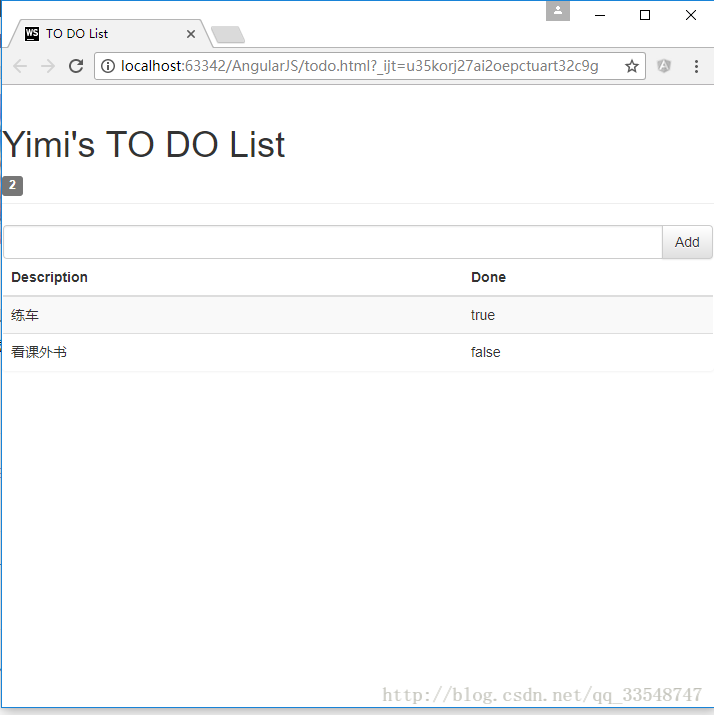
效果如下:
优化过程
1.使复选框状态与布尔值同步(双向模型绑定)
想要为Done属性添加复选框,并与true/false的值同步,即达到以下效果: 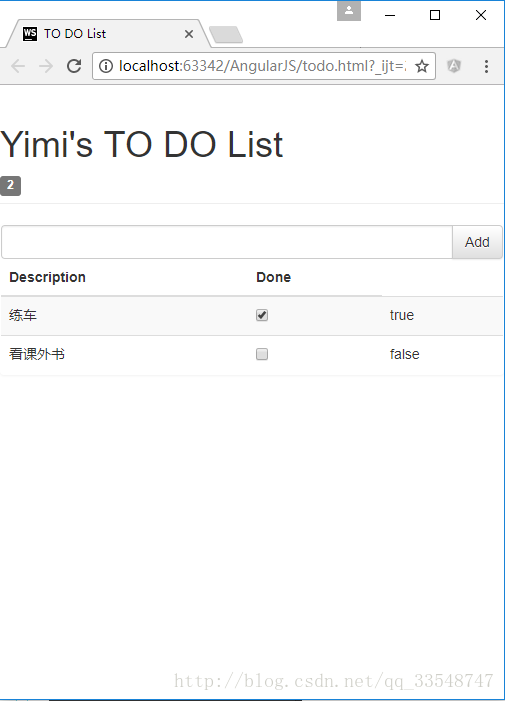
点击复现框会使右侧true/false的值同步变化。
只需要为复选框checkbox指定为与true/false同样的ng-model模型属性:
......

<tbody>

        <tr ng-repeat="item in todo.items">

            <td>{{item.action}}</td>

            <td><input type="checkbox" ng-model="item.done"/></td>

            <td>{{item.done}}</td>

        </tr>

</tbody>

......即checkbox和true/false的模型均为”item.done”,只在原基础上加了一句<td><input type="checkbox" ng-model="item.done"/></td>从而达到双向绑定,同步变化的效果。
2.动态显示待办的事项个数
显示值为false的事项个数,需在控制器todoApp.controller内添加一个计数变量incompleteCount,称为”行为名“。
......

        todoApp.controller("ToDoCtrl",function($scope){ //以$开头的变量名表示AngularJS的内置特性

            $scope.todo = model;

            $scope.incompleteCount = function(){

                var count = 0;

                angular.forEach($scope.todo.items,function(item){

                    if(!item.done){count++;}

                });

                return count;

            }

        });

......
在使用显示待办事项数的标签中调用incompleteCount行为名:
......

<h1>{{todo.user}}'s TO DO List</h1>

    <!--添加ng-hide="incompleteCount() == 0"使未办事项数为0时不显示此标签-->

    <span class="label label-default" ng-hide="incompleteCount() == 0">{{incompleteCount()}}</span>

......
效果如下:
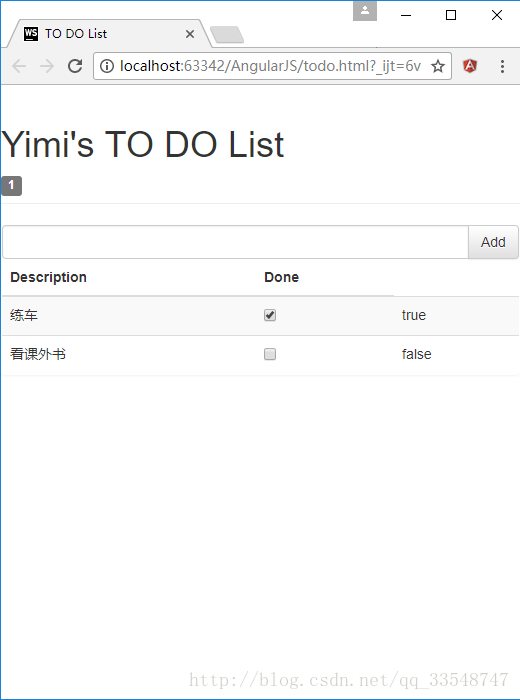
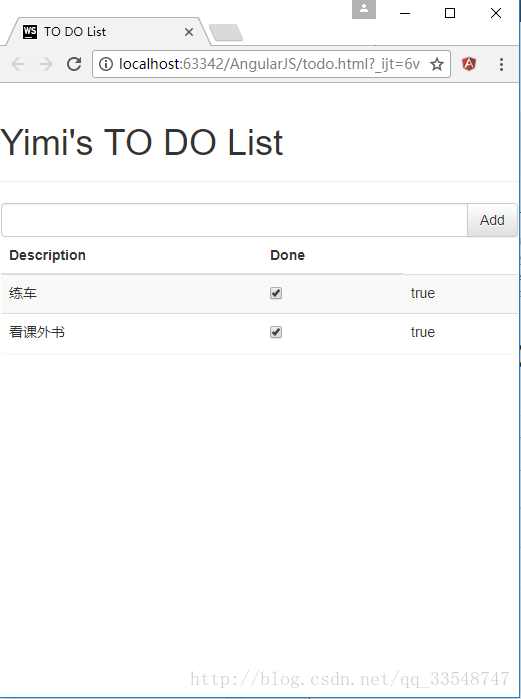
因为使用了ng-hide=”incompleteCount() == 0”,所以当无待办事项时隐藏数量标签:
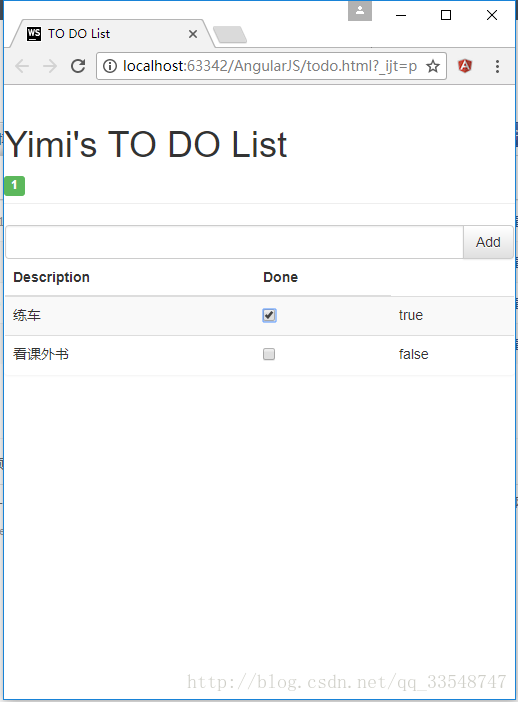
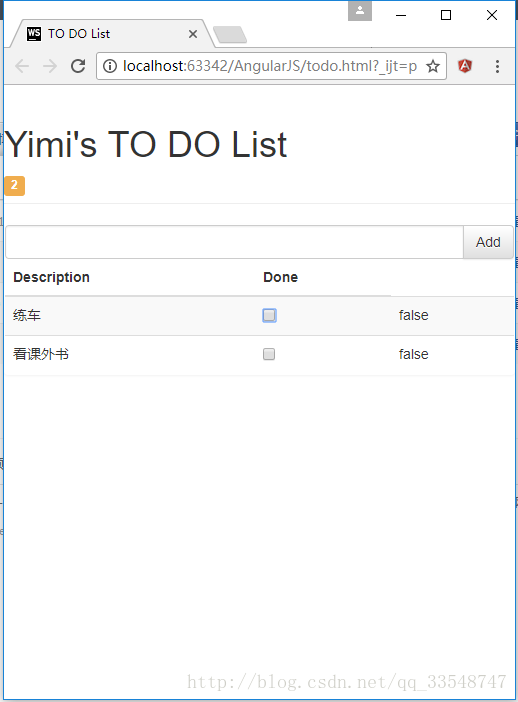
3.根据待办事项数显示不同颜色标签效果
在控制器todoApp.controller中添加逻辑,设置一个根据待办事项数判定标签class属性的$scope.warningLevel行为:
......

todoApp.controller("ToDoCtrl",function($scope){ //以$开头的变量名表示AngularJS的内置特性

            ......

            cope.warningLevel = function(){

                return $scope.incompleteCount() < 2 ? "label-success" : "label-warning";

            }

        });

......
然后为事项数标签添加ng-class=”warningLevel()”属性:
<span class="label label-default" ng-hide="incompleteCount() == 0" ng-class="warningLevel()">{{incompleteCount()}}</span>效果如下:
待办事项数 < 2时
待办事项数 >= 2时
4.响应用户输入
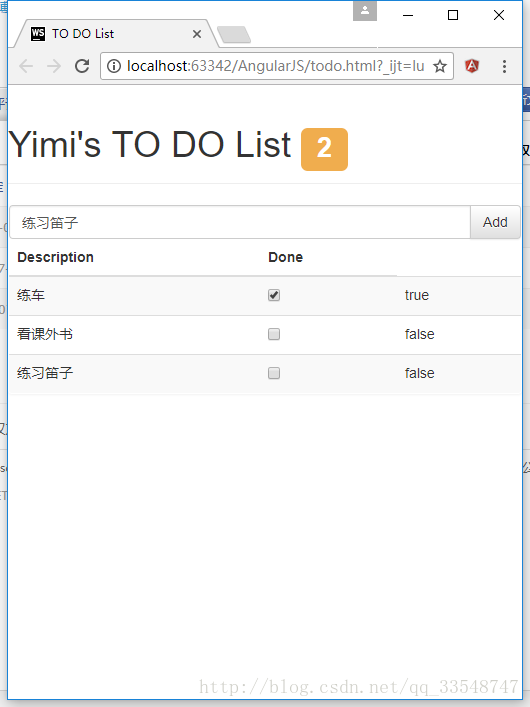
在控制器todoApp.controller中添加逻辑,定义$scope.addNewItem使清单列表具有添加新项的功能:
todoApp.controller("ToDoCtrl",function($scope){ //以$开头的变量名表示AngularJS的内置特性

            ......

            $scope.addNewItem = function(actionText){

                $scope.todo.items.push({action:actionText, done:false});

            }

        });
为输入框与Add按钮双向绑定用户所输入的数据actionText:
<div class="input-group">

        <input class="form-control" ng-model="actionText"/>

        <span class="input-group-btn">

                <button class="btn btn-default" ng-click="addNewItem(actionText)">Add</button>

        </span>

</div>
效果如下(为了更美观,顺便把事项数标签向上移了点儿):
完整源码(所调用的css/js文件需自己再添加)
<!DOCTYPE html>

<html ng-app="todoApp">

<head>

    <meta charset="UTF-8">

    <title>TO DO List</title>

    <link href="./bootstrap/css/bootstrap.css" rel="stylesheet"/>

    <link href="./bootstrap/css/bootstrap-theme.css" rel="stylesheet"/>

    <script src="./angularJs/angular.js"></script>

    <script>

        var model = {

            user:"Yimi",

            items:[{action:"练车",done:true},

                {action:"看课外书",done:false}]

        };

        var todoApp = angular.module("todoApp",[]);

        todoApp.controller("ToDoCtrl",function($scope){ //以$开头的变量名表示AngularJS的内置特性

            $scope.todo = model;

            $scope.incompleteCount = function(){

                var count = 0;

                angular.forEach($scope.todo.items,function(item){

                    if(!item.done){count++;}

                });

                return count;

            }

            $scope.warningLevel = function(){

                return $scope.incompleteCount() < 2 ? "label-success" : "label-warning";

            }

            $scope.addNewItem = function(actionText){

                $scope.todo.items.push({action:actionText, done:false});

            }

        });

    </script>

</head>

<body ng-controller="ToDoCtrl">

<div class="page-header">

    <h1>{{todo.user}}'s TO DO List

    <!--添加ng-hide="incompleteCount() == 0"使未办事项数为0时不显示此标签-->

    <span class="label label-default" ng-hide="incompleteCount() == 0" ng-class="warningLevel()">{{incompleteCount()}}</span></h1>

</div>

<div class="panel">

    <div class="input-group">

        <input class="form-control" ng-model="actionText"/>

        <span class="input-group-btn">

                <button class="btn btn-default" ng-click="addNewItem(actionText)">Add</button>

        </span>

    </div>

    <table class="table table-striped">

        <thead>

        <tr>

            <th>Description</th>

            <th>Done</th>

        </tr>

        </thead>

        <tbody>

        <tr ng-repeat="item in todo.items">

            <td>{{item.action}}</td>

            <td><input type="checkbox" ng-model="item.done"/></td>

            <td>{{item.done}}</td>

        </tr>

        </tbody>

    </table>

</div>

</body>

</html>
AngularJS学习笔记(2)——与用户交互的动态清单列表的更多相关文章
- AngularJS学习笔记(3)——通过Ajax获取JSON数据
通过Ajax获取JSON数据 以我之前写的与用户交互的动态清单列表为例,使用JSON前todo.html代码如下: <!DOCTYPE html> <html ng-app=&quo ...
- AngularJs学习笔记--unit-testing
原版地址:http://docs.angularjs.org/guide/dev_guide.unit-testing javascript是一门动态类型语言,这给她带来了很强的表现能力,但同时也使编 ...
- AngularJs学习笔记--Injecting Services Into Controllers
原版地址:http://docs.angularjs.org/guide/dev_guide.services.injecting_controllers 把service当作被依赖的资源加载到con ...
- AngularJs学习笔记--E2E Testing
原版地址:http://docs.angularjs.org/guide/dev_guide.e2e-testing 当一个应用的复杂度.大小在增加时,使得依靠人工去测试新特性的可靠性.抓Bug和回归 ...
- AngularJs学习笔记--Understanding Angular Templates
原版地址:http://docs.angularjs.org/guide/dev_guide.mvc.understanding_model angular template是一个声明规范,与mode ...
- AngularJs学习笔记--Forms
原版地址:http://code.angularjs.org/1.0.2/docs/guide/forms 控件(input.select.textarea)是用户输入数据的一种方式.Form(表单) ...
- AngularJs学习笔记--expression
原版地址:http://code.angularjs.org/1.0.2/docs/guide/expression 表达式(Expressions)是类Javascript的代码片段,通常放置在绑定 ...
- AngularJs学习笔记--directive
原版地址:http://code.angularjs.org/1.0.2/docs/guide/directive Directive是教HTML玩一些新把戏的途径.在DOM编译期间,directiv ...
- AngularJs学习笔记--Guide教程系列文章索引
在很久很久以前,一位前辈向我推荐AngularJs.但当时我没有好好学习,仅仅是讲文档浏览了一次.后来觉醒了……于是下定决心好好理解这系列的文档,并意译出来(英文水平不足……不能说是翻译,有些实在是看 ...
随机推荐
- 不能访问虚拟机上的nginx网站
VMware虚拟机上配置nginx后,本机无法访问问题 转自:http://www.server110.com/nginx/201407/10794.html 把nginx装在CentOS上,用本机访 ...
- JSP 指令
JSP 指令 JSP指令用来设置整个JSP页面相关的属性,如网页的编码方式和脚本语言. 语法格式如下: <%@ directive attribute="value" %&g ...
- wepy绘制雷达图
代码如下: <style lang='less'> .radar-canvas2 { width: 690rpx; height: 420rpx; } </style> < ...
- SVN 提交代码时强制加入注释内容
参考: 关于SVN提交强制加入注释 方式一是使用的服务器脚本,对所有SVN用户生效. 方式二是使用本地钩子,仅对当前SVN用户生效.
- MySQL多表关联查询与存储过程
-- **************关联查询(多表查询)**************** -- 需求:查询员工及其所在部门(显示员工姓名,部门名称) -- 1.1 交叉连接查询(不推荐.产生笛卡尔乘积 ...
- 改造 Ace Admin 模板的 ace_tree 组件的 folderSelect 样式
*注:我用的Ace Admin版本为1.3.4 Ace Admin 是一个轻量,功能丰富,HTML5.响应式.支持手机及平板电脑上浏览的优秀管理后台模板. 关于tree的使用,html文件夹下tree ...
- BZOJ5090: [Lydsy1711月赛]组题(01分数规划)
5090: [Lydsy1711月赛]组题 Time Limit: 1 Sec Memory Limit: 256 MBSubmit: 785 Solved: 186[Submit][Status ...
- Html页面Dom对象之Event
HTML DOM Event 对象 实例 哪个鼠标按钮被点击? 光标的坐标是? 被按的按键的 unicode 是? 相对于屏幕,光标的坐标是? shift 键被按了吗? 哪个元素被点击了? 哪个事件类 ...
- Python 修饰符, 装饰符
1, 看到@时候, 程序已经开始执行了. 所以@实际上是立即执行的 2, @后面的跟着函数名, 该函数(f1)是之前定义过的. 再后面跟着一个函数(f2), f2是f1的入口. 那么执行顺序是, ...
- java中读取配置文件
若是Javaweb项目,项目运行于tomcat或其他容器时,可以使用下面方式来获取文件的输入流 1.当属性文件放在src下面时 InputStream is = Thread.currentThrea ...