
MQ的demo
public class WorkTest {

 @Test

 public void send() throws Exception{

   //获取连接

   Connection conn = ConnectionUtil.getConn();

   Channel chan = conn.createChannel();

   //声明队列

   chan.queueDeclare("work", false, false, false, null);

   for(int i=0;i<100;i++){

     String msg="1712,hello:"+i+"message";

     chan.basicPublish("", "work", null, msg.getBytes());

     System.out.println("第"+i+"条信息已经发送");

   }

   chan.close();

   conn.close();

 }

 @Test

 public void receive1() throws Exception{

   //获取连接,获取信道

   Connection conn = ConnectionUtil.getConn();

   Channel chan = conn.createChannel();

   chan.queueDeclare("work", false, false, false, null);

   //同一时刻服务器只发送一条消息给同一消费者,消费者空闲,才发送一条

   chan.basicQos(1);

   //定义消费者

   QueueingConsumer consumer=new QueueingConsumer(chan);

   //绑定队列和消费者的关系

   //queue

   //autoAck:消息被消费后,是否自动确认回执,如果false,不自动需要手动在

   //完成消息消费后进行回执确认,channel.ack,channel.nack

   //callback

   //chan.basicConsume(queue, autoAck, callback)

   chan.basicConsume("work", false, consumer);

   //监听

   while(true){

     Delivery delivery=consumer.nextDelivery();

     byte[] result = delivery.getBody();

     String msg=new String(result);

     System.out.println("接受到:"+msg);

     Thread.sleep(50);

     //返回服务器,回执

     chan.basicAck(delivery.getEnvelope().getDeliveryTag(), false);

   }

 }

 @Test

 public void receive2() throws Exception{

   //获取连接,获取信道

   Connection conn = ConnectionUtil.getConn();

   Channel chan = conn.createChannel();

   chan.queueDeclare("work", false, false, false, null);

   //同一时刻服务器只发送一条消息给同一消费者,消费者空闲,才发送一条

   chan.basicQos(1);

   //定义消费者

   QueueingConsumer consumer=new QueueingConsumer(chan);

   //绑定队列和消费者的关系

   //queue

   //autoAck:消息被消费后,是否自动确认回执,如果false,不自动需要手动在

   //完成消息消费后进行回执确认,channel.ack,channel.nack

   //callback

   //chan.basicConsume(queue, autoAck, callback)

   chan.basicConsume("work", false, consumer);

   //监听

   while(true){

     Delivery delivery=consumer.nextDelivery();

     byte[] result = delivery.getBody();

     String msg=new String(result);

     System.out.println("接受到:"+msg);

     Thread.sleep(150);

     //返回服务器,回执

     chan.basicAck(delivery.getEnvelope().getDeliveryTag(), false);

   }

 }


}
publish/fanout发布订阅
public class FanoutTest {

 //交换机,有类型,发布订阅:fanout

 //路由模式:direct

 //主题模式:topic

 @Test

 public void send() throws Exception {

   //获取连接

   Connection conn = ConnectionUtil.getConn();

   Channel chan = conn.createChannel();

   //声明交换机

   //参数意义,1 交换机名称,2 类型:fanout,direct,topic

   chan.exchangeDeclare("fanoutEx", "fanout");

   //发送消息

   for(int i=0;i<100;i++){

     String msg="1712 hello:"+i+"msg";

     chan.basicPublish("fanoutEx", "", null, msg.getBytes());

     System.out.println("第"+i+"条信息已经发送");

   }

 }


 @Test

 public void receiv01() throws Exception{

   //获取连接

   Connection conn = ConnectionUtil.getConn();

   Channel chan = conn.createChannel();

   //生命队列

   chan.queueDeclare("fanout01", false, false, false, null);

   //声明交换机

   chan.exchangeDeclare("fanoutEx", "fanout");

   //绑定队列到交换机

   //参数 1 队列名称,2 交换机名称 3 路由key

   chan.queueBind("fanout01", "fanoutEx", "");

   chan.basicQos(1);

   //定义消费者

   QueueingConsumer consumer=new QueueingConsumer(chan);

   //消费者与队列绑定

   chan.basicConsume("fanout01",false, consumer);

   while(true){

     Delivery delivery= consumer.nextDelivery();

     System.out.println("一号消费者接收到"+

     new String(delivery.getBody()));

     chan.basicAck(delivery.getEnvelope().

         getDeliveryTag(), false);

   }

 }

 @Test

 public void receiv02() throws Exception{

   //获取连接

   Connection conn = ConnectionUtil.getConn();

   Channel chan = conn.createChannel();

   //生命队列

   chan.queueDeclare("fanout02", false, false, false, null);

   //声明交换机

   chan.exchangeDeclare("fanoutEx", "fanout");

   //绑定队列到交换机

   //参数 1 队列名称,2 交换机名称 3 路由key

   chan.queueBind("fanout02", "fanoutEx", "");

   chan.basicQos(1);

   //定义消费者

   QueueingConsumer consumer=new QueueingConsumer(chan);

   //消费者与队列绑定

   chan.basicConsume("fanout02",false, consumer);

   while(true){

     Delivery delivery= consumer.nextDelivery();

     System.out.println("二号消费者接收到"+new String(delivery.getBody()));

     chan.basicAck(delivery.getEnvelope().getDeliveryTag(), false);

   }

 }

}
routing路由模式
public class RoutingTopicTest {


 @Test

 public void routingSend() throws Exception{

   //获取连接

   Connection conn = ConnectionUtil.getConn();

   Channel chan = conn.createChannel();

   //声明交换机

   //参数意义,1 交换机名称,2 类型:fanout,direct,topic

   chan.exchangeDeclare("directEx", "direct");

   //发送消息

   String msg="路由模式的消息";

   chan.basicPublish("directEx", "jt1713",

       null, msg.getBytes());

 }

 @Test

 public void routingRec01() throws Exception{

   System.out.println("一号消费者等待接收消息");

   //获取连接

   Connection conn = ConnectionUtil.getConn();

   Channel chan = conn.createChannel();

   //声明队列

   chan.queueDeclare("direct01", false, false, false, null);

   //声明交换机

   chan.exchangeDeclare("directEx", "direct");

   //绑定队列到交换机

   //参数 1 队列名称,2 交换机名称 3 路由key

   chan.queueBind("direct01", "directEx", "jt1712");

   chan.basicQos(1);

   //定义消费者

   QueueingConsumer consumer=new QueueingConsumer(chan);

   //消费者与队列绑定

   chan.basicConsume("direct01",false, consumer);

   while(true){

     Delivery delivery= consumer.nextDelivery();

     System.out.println("一号消费者接收到"+

     new String(delivery.getBody()));

     chan.basicAck(delivery.getEnvelope().

         getDeliveryTag(), false);

   }

 }

 @Test

 public void routingRec02() throws Exception{

   System.out.println("二号消费者等待接收消息");

   //获取连接

   Connection conn = ConnectionUtil.getConn();

   Channel chan = conn.createChannel();

   //声明队列

   chan.queueDeclare("direct02", false, false, false, null);

   //声明交换机

   chan.exchangeDeclare("directEx", "direct");

   //绑定队列到交换机

   //参数 1 队列名称,2 交换机名称 3 路由key

   chan.queueBind("direct02", "directEx", "jt1711");

   chan.basicQos(1);

   //定义消费者

   QueueingConsumer consumer=new QueueingConsumer(chan);

   //消费者与队列绑定

   chan.basicConsume("direct02",false, consumer);

   while(true){

     Delivery delivery= consumer.nextDelivery();

     System.out.println("二号消费者接收到"+

     new String(delivery.getBody()));

     chan.basicAck(delivery.getEnvelope().

         getDeliveryTag(), false);

   }

 }

}
topic主题模式
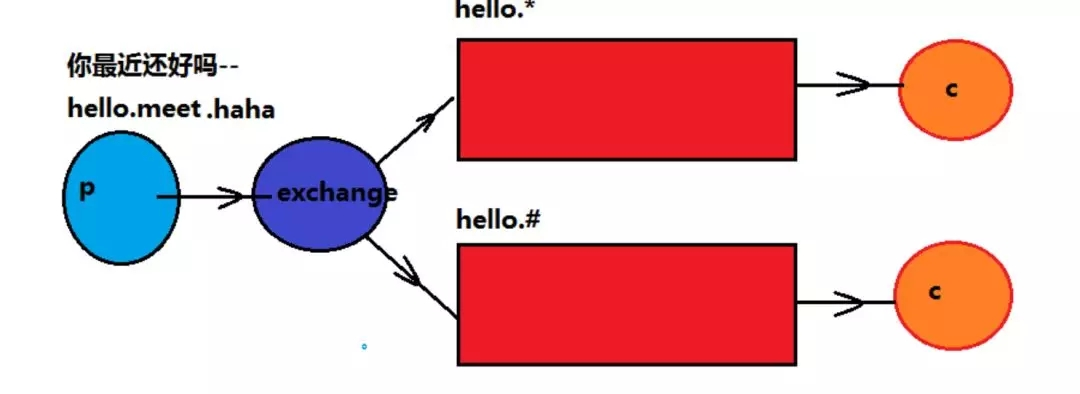
*号代表单个词语
#代表多个词语
其他的内容与routing路由模式一致
public class RoutingTopicTest {


 @Test

 public void routingRec02() throws Exception{

   System.out.println("二号消费者等待接收消息");

   //获取连接

   Connection conn = ConnectionUtil.getConn();

   Channel chan = conn.createChannel();

   //声明队列

   chan.queueDeclare("direct02", false, false, false, null);

   //声明交换机

   chan.exchangeDeclare("directEx", "direct");

   //绑定队列到交换机

   //参数 1 队列名称,2 交换机名称 3 路由key

   chan.queueBind("direct02", "directEx", "jt1711");

   chan.basicQos(1);

   //定义消费者

   QueueingConsumer consumer=new QueueingConsumer(chan);

   //消费者与队列绑定

   chan.basicConsume("direct02",false, consumer);

   while(true){

     Delivery delivery= consumer.nextDelivery();

     System.out.println("二号消费者接收到"+

     new String(delivery.getBody()));

     chan.basicAck(delivery.getEnvelope().

         getDeliveryTag(), false);

   }

 }


 @Test

 public void topicSend() throws Exception{

   //获取连接

   Connection conn = ConnectionUtil.getConn();

   Channel chan = conn.createChannel();

   //声明交换机

   //参数意义,1 交换机名称,2 类型:fanout,direct,topic

   chan.exchangeDeclare("topicEx", "topic");

   //发送消息

   String msg="主题模式的消息";

   chan.basicPublish("topicEx", "jt1712.add.update",

       null, msg.getBytes());

 }

 @Test

 public void topicRec01() throws Exception{

   System.out.println("一号消费者等待接收消息");

   //获取连接

   Connection conn = ConnectionUtil.getConn();

   Channel chan = conn.createChannel();

   //声明队列

   chan.queueDeclare("topic01", false, false, false, null);

   //声明交换机

   chan.exchangeDeclare("topicEx", "topic");

   //绑定队列到交换机

   //参数 1 队列名称,2 交换机名称 3 路由key

   chan.queueBind("topic01", "topicEx", "jt1712");

   chan.basicQos(1);

   //定义消费者

   QueueingConsumer consumer=new QueueingConsumer(chan);

   //消费者与队列绑定

   chan.basicConsume("topic01",false, consumer);

   while(true){

     Delivery delivery= consumer.nextDelivery();

     System.out.println("一号消费者接收到"+

     new String(delivery.getBody()));

     chan.basicAck(delivery.getEnvelope().

         getDeliveryTag(), false);

   }

 }

 @Test

 public void topicRec02() throws Exception{

   System.out.println("二号消费者等待接收消息");

   //获取连接

   Connection conn = ConnectionUtil.getConn();

   Channel chan = conn.createChannel();

   //声明队列

   chan.queueDeclare("topic02", false, false, false, null);

   //声明交换机

   chan.exchangeDeclare("topicEx", "topic");

   //绑定队列到交换机

   //参数 1 队列名称,2 交换机名称 3 路由key

   chan.queueBind("topic02", "topicEx", "jt1712.#");

   chan.basicQos(1);

   //定义消费者

   QueueingConsumer consumer=new QueueingConsumer(chan);

   //消费者与队列绑定

   chan.basicConsume("topic02",false, consumer);

   while(true){

     Delivery delivery= consumer.nextDelivery();

     System.out.println("二号消费者接收到"+

     new String(delivery.getBody()));

     chan.basicAck(delivery.getEnvelope().

         getDeliveryTag(), false);

   }

 }

}
MQ的demo的更多相关文章
- SpringCloud SpringBoot 前后端分离企业级微服务架构源码赠送
基于SpringBoot2.x.SpringCloud和SpringCloudAlibaba并采用前后端分离的企业级微服务敏捷开发系统架构.并引入组件化的思想实现高内聚低耦合,项目代码简洁注释丰富上手 ...
- RabbitMQ:从零开始
目录 一.介绍 二.安装 三.基本配置 四.Java Demo 五.基础API使用 六.ACK机制 七.消息的持久化 八.消息的公平分发 九.消息的优先级 十.消息的路由分发 十一.Spring集成 ...
- MVC+MQ+WinServices+Lucene.Net Demo
前言: 我之前没有接触过Lucene.Net相关的知识,最近在园子里看到很多大神在分享这块的内容,深受启发.秉着“实践出真知”的精神,再结合公司项目的实际情况,有了写一个Demo的想法,算是对自己能力 ...
- ActiveMQ入门实例Demo
前面我们已经搭建和配置好了ActiveMQ,下面来看一个Demo,体验一下MQ. JMS 消息模型 JMS消息服务应用程序结构支持两种模型:点对点模型,发布者/订阅者模型. (1)点对点模型(Queu ...
- JMS与MQ详解(有项目)
<一>m2mGW项目 1.ActiveMQ概述 企业消息软件从80年代起就存在,它不只是一种应用间消息传递风格,也是一种集成风格.因此,消息传递可以满足应用间的通知和互相操作.但是 ...
- socket.io简单说明及在线抽奖demo
socket.io简单说明及在线抽奖demo socket.io 简介 Socket.IO可以实现实时双向的基于事件的通信. 它适用于各种平台,浏览器或设备,也同样注重可靠性和速度. socket.i ...
- kafka2.9.2的伪分布式集群安装和demo(java api)测试
目录: 一.什么是kafka? 二.kafka的官方网站在哪里? 三.在哪里下载?需要哪些组件的支持? 四.如何安装? 五.FAQ 六.扩展阅读 一.什么是kafka? kafka是LinkedI ...
- ubuntu12.04+kafka2.9.2+zookeeper3.4.5的伪分布式集群安装和demo(java api)测试
博文作者:迦壹 博客地址:http://idoall.org/home.php?mod=space&uid=1&do=blog&id=547 转载声明:可以转载, 但必须以超链 ...
- HBase(二): c#访问HBase之股票行情Demo
上一章完成了c#访问hbase的sdk封装,接下来以一个具体Demo对sdk进行测试验证.场景:每5秒抓取指定股票列表的实时价格波动行情,数据下载后,一方面实时刷新UI界面,另一方面将数据放入到在内存 ...
随机推荐
- .net调用word转换pdf出现80080005错误的解决办法
检索 COM 类工厂中 CLSID 为 {000209FF-0000-0000-C000-000000000046} 的组件时失败,原因是出现以下错误: 80080005. 1:在服务器上安装offi ...
- 基于注解的接口限流+统一session认证
代码心得: 一个基本的做法:对于用户身份认证做到拦截器里,针对HandlerMethod进行统一拦截认证,根据方法上的注解标识,判别是否需要身份验证,并将查找出来的User实体存入ThreadLoca ...
- python学习 day08 (3月13日)----函数
函数 一.定义 def 关键字 函数名(): 函数体 函数 ---- 封装#def 关键字 # #定义后的函数就像变量 不调用是不执行的 # #函数名() ==函数的调用 def code(): ...
- 69.查看APP沙盒缓存的内容文件
第一步:链接真机设备,点击Xcode ,按command+shift+2 弹出电脑所运行的APP列表 第二步:选中你需要查看的APP,点击最下面! 类似于设置图标的按钮! 点击第二个Download ...
- mysql之表与表关联和表操作
一 表于表之间的关联 foregin key:设置外键表于表之间建立关联. 多对一关联: 创建步骤,应该先创建好被关联的那一张表,然后再去创建关联的那一张表. 关联表的多条对应着被关联的那张表的一条记 ...
- crt转cer ,6.0以上的android系统证书请求配置
1.在服务器人员,给你发送的crt证书后,进到证书路径,执行下面语句 openssl x509 -in 你的证书.crt -out 你的证书.cer -outform der 这样你就可以得到cer ...
- vue-cli引入mui的步骤
不用npm安装了 1.mui官方GitHub下载mui所需文件 https://github.com/dcloudio/mui 把下载来的dist文件夹整个复制到static文件夹中 2.在index ...
- (16)The beauty of what we'll never know
https://www.ted.com/talks/pico_iyer_the_beauty_of_what_we_ll_never_know/transcript 00:13One hot Octo ...
- P1(2)线性回归
线性回归问题,是监督学习,输出是连续值.(批梯度下降训练参数+平方误差函数做代价函数)
- UVa 11722 Joining with Friend (几何概率 + 分类讨论)
题意:某两个人 A,B 要在一个地点见面,然后 A 到地点的时间区间是 [t1, t2],B 到地点的时间区间是 [s1, s2],他们出现的在这两个区间的每个时刻概率是相同的,并且他们约定一个到了地 ...