
spring security结合数据库验证用户-XML配置方式
之前的用户信息我们都是使用的内存用户,测试例子可以,实际中使用肯定不行,需要结合数据库进行验证用户。这就是本节的重点:
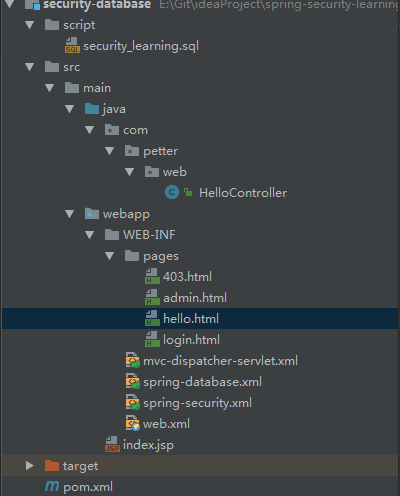
<dependency>

    <groupId>org.springframework</groupId>

    <artifactId>spring-jdbc</artifactId>

    <version>${spring.version}</version>

</dependency>

<!-- 用于thymeleaf中使用security的标签 -->

<dependency>

     <groupId>org.thymeleaf.extras</groupId>

     <artifactId>thymeleaf-extras-springsecurity4</artifactId>

     <version>3.0.2.RELEASE</version>

</dependency>

<!-- mysql -->

 <dependency>

      <groupId>mysql</groupId>

      <artifactId>mysql-connector-java</artifactId>

      <version>${mysql.connector.version}</version>

 </dependency>
spring-jdbc依赖用于数据库查询,thymeleaf-extras-springsecurity4是thymeleaf对security标签的支持
CREATE TABLE users (

  username VARCHAR(45) NOT NULL ,

  password VARCHAR(45) NOT NULL ,

  enabled BOOLEAN DEFAULT TRUE NOT NULL,

  PRIMARY KEY (username)

);

CREATE TABLE user_roles (

  user_role_id int(11) NOT NULL AUTO_INCREMENT,

  username varchar(45) NOT NULL,

  role varchar(45) NOT NULL,

  PRIMARY KEY (user_role_id),

  UNIQUE KEY uni_username_role (role,username),

  KEY fk_username_idx (username),

  CONSTRAINT fk_username FOREIGN KEY (username) REFERENCES users (username)

);

INSERT INTO users(username,password,enabled) VALUES ('hxf','', true);

INSERT INTO users(username,password,enabled) VALUES ('wpp','', true);

INSERT INTO user_roles (username, role) VALUES ('hxf', 'ROLE_USER');

INSERT INTO user_roles (username, role) VALUES ('hxf', 'ROLE_ADMIN');

INSERT INTO user_roles (username, role) VALUES ('wpp', 'ROLE_USER');
这里参考 http://docs.spring.io/spring-security/site/docs/4.2.1.RELEASE/reference/htmlsingle/#user-schema 官网给的配置
<?xml version="1.0" encoding="UTF-8"?>

<beans xmlns="http://www.springframework.org/schema/beans"

       xmlns:xsi="http://www.w3.org/2001/XMLSchema-instance"

       xsi:schemaLocation="http://www.springframework.org/schema/beans http://www.springframework.org/schema/beans/spring-beans.xsd http://www.springframework.org/schema/security http://www.springframework.org/schema/security/spring-security.xsd">

    <bean id="datasource" class="org.springframework.jdbc.datasource.DriverManagerDataSource">

        <property name="driverClassName" value="com.mysql.jdbc.Driver"/>

        <property name="url" value="jdbc:mysql://localhost:3306/security_learning"/>

        <property name="username" value="petter"/>

        <property name="password" value="petter"/>

    </bean>

</beans>
添加完成以后需要在web.xml文件中指定:
<!-- Loads Spring config file -->

    <context-param>

        <param-name>contextConfigLocation</param-name>

        <param-value>

            /WEB-INF/spring-security.xml

            /WEB-INF/spring-database.xml

        </param-value>

    </context-param>
二、修改spring-security.xml配置文件:
<?xml version="1.0" encoding="UTF-8"?>

<beans xmlns="http://www.springframework.org/schema/beans"

       xmlns:xsi="http://www.w3.org/2001/XMLSchema-instance"

       xmlns:security="http://www.springframework.org/schema/security"

       xsi:schemaLocation="http://www.springframework.org/schema/beans http://www.springframework.org/schema/beans/spring-beans.xsd http://www.springframework.org/schema/security http://www.springframework.org/schema/security/spring-security.xsd">

    <!-- use-expressions 允许使用表达式 -->

    <security:http auto-config="true" use-expressions="true">

        <security:intercept-url pattern="/admin**" access="hasRole('ROLE_ADMIN')"/>

        <!-- 拒绝访问页面 -->

        <security:access-denied-handler error-page="/403"/>

        <security:form-login

                login-page="/login"

                default-target-url="/welcome"

                authentication-failure-url="/login?error"

                username-parameter="user-name"

                password-parameter="pwd"/>

        <security:logout

                logout-success-url="/login?logout"/>

        <!-- XML 配置中默认csrf是关闭的,此处设置为打开

            如果这里打开csrf,则在form表单中需要添加

            <input type="hidden" th:name="${_csrf.parameterName}" th:value="${_csrf.token}" />

        -->

        <security:csrf />

    </security:http>

    <security:authentication-manager>

        <security:authentication-provider>

            <security:jdbc-user-service data-source-ref="datasource"

                                        users-by-username-query="select username,password, enabled from users where username = ?"

                                        authorities-by-username-query="select username, role from user_roles where username = ?"/>

        </security:authentication-provider>

    </security:authentication-manager>

</beans>
三、修改登录以后默认进入的页面hello.html
<!DOCTYPE html>

<html xmlns="http://www.w3.org/1999/xhtml"

      xmlns:th="http://www.thymeleaf.org"

      xmlns:sec="http://www.thymeleaf.org/thymeleaf-extras-springsecurity4">

<head>

    <meta charset="UTF-8" />

    <title>hello</title>

</head>

<body>

    <h1 th:text="|标题: ${title}|">Title : XXX</h1>

    <h1 th:text="|信息: ${message}|">Message : XXX</h1>

    <div sec:authentication="name">

        验证用户的名称显示在这里

    </div>

    <div sec:authentication="principal.authorities">

        验证用户的权限显示在这里

    </div>

    <!-- 下面注释掉的两种写法是等价的,但是不起作用,暂时使用第三种方式 -->

    <!--<div sec:authorize="hasRole('ROLE_USER')">-->

    <!--<div sec:authorize="hasAuthority('ROLE_USER')">-->

    <div th:if="${#strings.contains(#authentication.principal.authorities,'ROLE_USER')}">

        <form action="/logout" method="post" id="logoutForm">

            <input type="hidden" th:name="${_csrf.parameterName}" th:value="${_csrf.token}" />

        </form>

        <h2><a href="javascript:formSubmit()">退出</a></h2>

        <script>

            function formSubmit() {

                document.getElementById("logoutForm").submit();

            }

        </script>

    </div>

</body>

</html>
这里需要注意:
<bean id="templateEngine" class="org.thymeleaf.spring4.SpringTemplateEngine">

        <property name="templateResolver" ref="templateResolver"/>

        <property name="additionalDialects">

            <set>

                <!-- Note the package would change to 'springsecurity3' if you are using that version -->

                <bean class="org.thymeleaf.extras.springsecurity4.dialect.SpringSecurityDialect"/>

            </set>

        </property>

    </bean>
3、如上注释所示,两种写法判断只用含有USER角色的用户会显示,不起作用,可能只会会修复。
PS:要想起作用,thymeleaf-spring4 版本必须是 3.0.3.RELEASE以上
记住,role就是一种约定的前面加上ROLE_作为前缀的特殊的authority,所以它们是等价的,具体可以参考http://stackoverflow.com/questions/19525380/difference-between-role-and-grantedauthority-in-spring-security
<!DOCTYPE html>

<html xmlns:th="http://www.thymeleaf.org">

<head>

    <meta charset="UTF-8"/>

    <title>403</title>

</head>

<body>

<h1>HTTP Status 403 - Access is denied</h1>

<div>

    <h2 th:if="username eq null" th:text="您没有权限访问这个页面"></h2>

    <h2 th:if="username ne null" th:text="|用户:${username},您没有权限访问这个页面|"></h2>

</div>

</body>

</html>
并且在HelloController中添加代码:
@RequestMapping(value = "/403", method = RequestMethod.GET)

    public ModelAndView accessDenied() {

        ModelAndView model = new ModelAndView();

        //检查用户是否已经登录

        Authentication auth = SecurityContextHolder.getContext().getAuthentication();

        if (!(auth instanceof AnonymousAuthenticationToken)) {

            UserDetails userDetail = (UserDetails) auth.getPrincipal();

            model.addObject("username", userDetail.getUsername());

        }

        model.setViewName("403");

        return model;

    }
启动程序,访问http://localhost:8080/login http://localhost:8080/admin 登录不同角色的用户进行自行测试
spring security结合数据库验证用户-XML配置方式的更多相关文章
- spring security结合数据库验证用户-注解方式
项目目录结构如下: 首先数据库的建立和数据导入,以及一些类的依赖参考XML配置方式,需要修改一些配置. 一.在AppConfig文件中添加DataSource的配置 @Bean(name = &quo ...
- spring security使用数据库验证的逻辑处理
前面做了多个示例,包括使用jdbc和hibernate两种方式访问数据库获取用户信息和权限信息,其中一些关键步骤如下: 我们在SecurityConfig中配置覆盖configure方法时候,可以 ...
- Spring MVC 的 Java Config ( 非 XML ) 配置方式
索引: 开源Spring解决方案--lm.solution 参看代码 GitHub: solution/pom.xml web/pom.xml web.xml WebInitializer.java ...
- Spring框架(2)---IOC装配Bean(xml配置方式)
IOC装配Bean (1)Spring框架Bean实例化的方式提供了三种方式实例化Bean 构造方法实例化(默认无参数,用的最多) 静态工厂实例化 实例工厂实例化 下面先写这三种方法的applicat ...
- Spring IOC容器装配Bean_基于XML配置方式
开发所需jar包 实例化Bean的四种方式 1.无参数构造器 (最常用) <?xml version="1.0" encoding="UTF-8"?> ...
- spring security关闭http验证 和 springboot 使用h2数据库
spring security关闭http验证 最近在跑demo的过程中,访问swagger页面的时候需要验证登录,记得在之前写的代码中是关闭了security验证,无需登录成功访问,直接在appli ...
- Spring Security 概念基础 验证流程
Spring Security 概念基础 验证流程 认证&授权 认证:确定是否为合法用户 授权:分配角色权限(分配角色,分配资源) 认证管理器(Authentication Manager) ...
- 自定义Spring Security的身份验证失败处理
1.概述 在本快速教程中,我们将演示如何在Spring Boot应用程序中自定义Spring Security的身份验证失败处理.目标是使用表单登录方法对用户进行身份验证. 2.认证和授权(Authe ...
- Spring之AOP原理、代码、使用详解(XML配置方式)
Spring 的两大核心,一是IOC,另一个是AOP,本博客从原理.AOP代码以及AOP使用三个方向来讲AOP.先给出一张AOP相关的结构图,可以放大查看. 一.Spring AOP 接口设计 1.P ...
随机推荐
- ViewPager滑动引导页
ViewPager实现Animation动画引导页 http://blog.csdn.net/ye_scofield/article/details/44831357 SurfaceView实现动 ...
- FineReport---函数
1.NUMTO()需要将数字2345转换成二三四五:NUMTO(2345) 2.Toimage函数:Toimage(path)用于在报表中显示某一路径path下的图片 3.row():为获取当前行号 ...
- Android 短信箱操作
package blackice.android.product; import java.sql.Date; import java.text.SimpleDateFormat; import ja ...
- php 使用imagettftext()函数出问题的原因
<?php header('Content-type: image/png'); $im = imagecreatetruecolor(400, 300); //创建画布 $white = im ...
- java工程编写manifest文件
如果需要一个可以单独运行的jar包“Runnable JAR file”,省事的方法是妥妥的选择打一个可运行的jar包“Runnable JAR file”.如此一来,就可以把程序运行所依赖的类.第三 ...
- x265探索与研究(六):main()函数
x265探索与研究(六):main()函数 x265源代码的入口函数是main(),本文分析main()的主要功能. 首先给出main()函数的功能及其代码结构:其次给出main()函数源代码以及分析 ...
- ps如果换背景
一.魔棒工具 魔棒工具主要是使用户可以选择颜色一致的区域(例如,一朵红花)或者背景比较单调的图片,而不必跟踪其轮廓.魔棒工具选择的颜色范围可以由工具选项栏中的误差范围 参数值来控制. 二.钢笔工具 路 ...
- Python高级教程-Map/Reduce
Python中的map()和reduce() Python内建了map()和reduce()函数. map() map()函数接收两个参数,一个是函数,一个是序列,map将传入的函数依次作用到序列的每 ...
- Windows 7 下 Node.js 连接 Oracle
原创作者: sailtseng 1. 安装 Oracle 11g express 详见: <Windows 7 x64 安装 Oracle 11g Express> 2. 安装 Micr ...
- corethink功能模块探索开发(十八)前台页面插入jit前端数据可视化库
效果图: 1.静态文件放入View目录中 在View目录下新建Public目录,在Public目录下新建js.css目录. 把jit的资源放入对应目录中 2.在html中引入jit Applicati ...