
3月20日html(二) 图片热点,网页划分,表单
1.图片热点:
规划出图片上的一个区域,可以做出超链接,直接点击图片区域就可以完成跳转的效果。
<img src="../图片/5109de19b9c5b.jpg" width="" height="" usemap="map"  name="map" />

<map name="map">

<area shape="rect" coords="244,234,367,354" href="http://www.baidu.com" />

</map> <br/>
2.网页划区:
在一个网页里,规划出一个区域用来展示另一个网页的内容。
<table>

<tr>

<td>

<iframe  src="http://www.baidu.com"  width="" height=""  frameborder=""></iframe>

</td>

</tr>

</table><br />

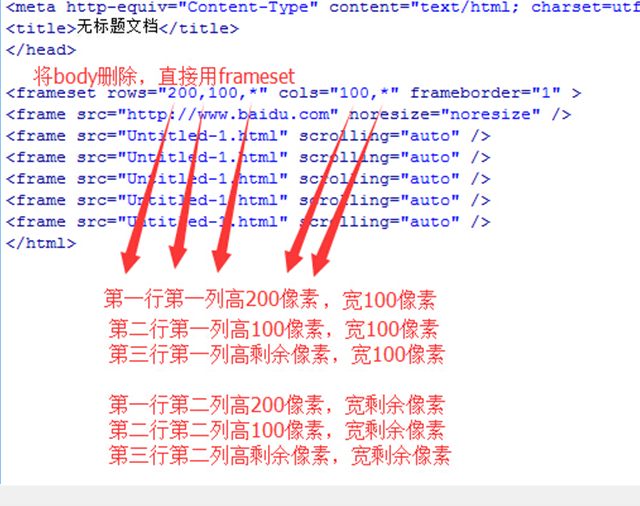
3.网页的拼接:
在一个网络页面内,规划出多个页面窗口,以表格拼接的形式展示出来。
4. 表单:
<form id="" name="" method="post/get" action="负责处理的服务端">
id不可重复,name可重复,get提交有长度限制,并且编码后的内容在地址栏可见,
post提交没有长度限制,且编码后内容不可见。
</form>
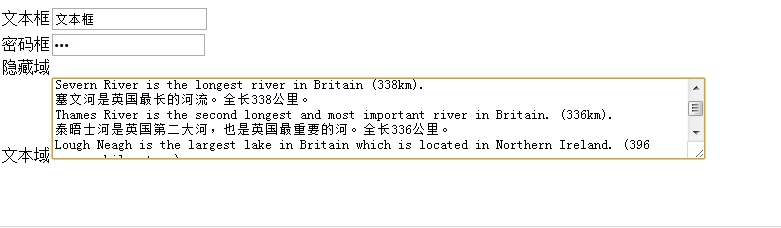
(1)文本输入
文本框<input type="txt" name="" id="" value="" />
密码框<input type="password" name="" id="" value="" />
文本域<textarea name="" id="" cols=""(字符多少) rows=""(几行高)></textarea>
隐藏域<input type="hidden" name="" id="" value="" />
<form>

文本框<input type="txt" value="文本框" /><br />

密码框<input type="password" value="密码框" /><br />

隐藏域<input type="hidden" value="隐藏域" /><br />

文本域<textarea cols="" rows="" name="">
 Ben Nevis is the highest mountain in Britain (,343m).

本尼维斯山为英国最高峰,海拔1,343米。

Severn River is the longest river in Britain (338km).

塞文河是英国最长的河流。全长338公里。

Thames River is the second longest and most important river in Britain. (336km).

泰晤士河是英国第二大河,也是英国最重要的河。全长336公里。

Lough Neagh is the largest lake in Britain which is located in Northern Ireland. ( square kilometres).

讷湖(内伊湖)是英国最大的湖,位于北爱尔兰。面积为396平方公里。

</textarea><br />
(2)按钮
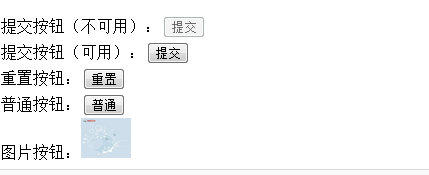
提交按钮<input type="submit" name="" id="" disabled="disabled" value="" />点击后转到form内的提交服务器的地址
重置按钮<input type="reset" name="" id="" disabled="disabled" value="" />
普通按钮<input type="button" name="" id="" disabled="disabled" value="" />
图片按钮<input type="image" name="" id="" disabled="disabled" src="图片地址" />
disabled使按钮失效
enable使按钮可用
提交按钮(不可用):<input type="submit" value="提交" disabled="disabled" /><br />

提交按钮(可用):<input type="submit" value="提交"   /><br />

重置按钮:<input type="reset" value="重置" /><br />

普通按钮:<input type="button" value="普通" /><br />

图片按钮:<input type="image"  src="../图片/u=289739846,1709449352&fm=21&gp=0.jpg" width="" height="" /><br />
(3)选择输入
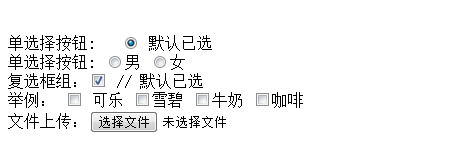
单选按钮组<input type="radio" name="" checked="checked" value="" />
name的值用来分组,value的值看不见,提交给程序用的,checked设置默认选项。
复选框组<input type="checkbox" name="" checked="checked" value="" />
文件上传<input type="file" name="" id="" />
<lable for=""></lable>
(lable标签为input元素定义标注。
lable元素不会向用户呈现任何特殊效果,不过,他为鼠标用户改进了可用性。如果您在lable元素内点击文本,就会触发此控件。
就是说,当用户选择该标签时,浏览器会 将焦点转到和标签相关的表单控件上。
lable标签的for属性应当与相关元素的id属性相同。)
单选择按钮: <input type="radio" checked="checked" /> 默认已选<br />
单选择按钮: <input type="radio" name="a"/>男
<input type="radio" name="a"/>女<br />
复选框组:<input type="checkbox" checked="checked" /> // 默认已选 <br />
举例: <input type="checkbox"/> 可乐
<input type="checkbox" />雪碧
<input type="checkbox" />牛奶
<input type="checkbox" />咖啡
<br/>
文件上传:<input type="file" /> <br />
(4)下拉列表框
<select name="" id="" size="" multiple="multiple">
--size为1时,为菜单;>1时,为列表。multiple为多选。
<option value="值">内容1</option>
<option value="值" selected="selected">内容2</option>
--selected,设为默认
<option value="值">内容3</option>
</select>
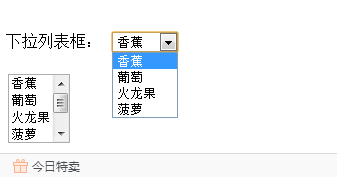
下拉列表框:

<select  size="">

<option>香蕉</option>

<option>葡萄</option>

<option>火龙果</option>

<option>菠萝</option>

</select>

<br/><br />

<select  size=""  multiple="multiple">

<option>香蕉</option>

<option>葡萄</option>

<option>火龙果</option>

<option>菠萝</option>

<option>苹果</option>

<option>橙子</option>

</select>
(5)标签
<label></label>
字段集 (一堆label)
<fieldset></fieldset>
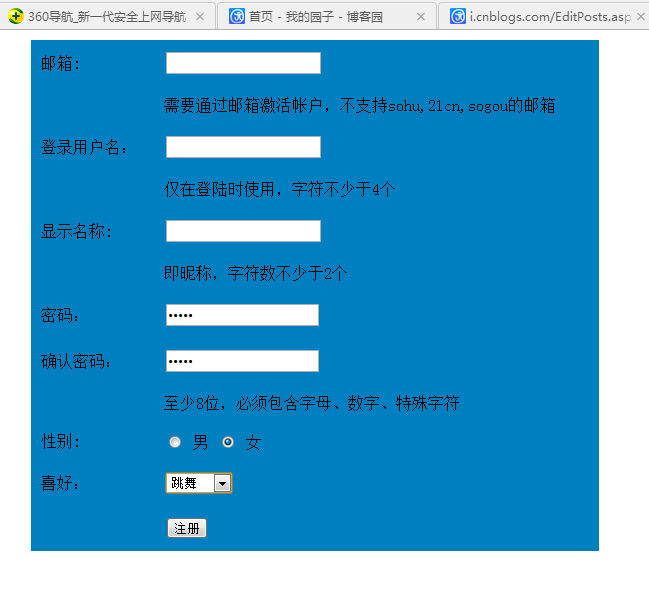
表单练习题:邮箱注册界面(直接贴自己做好的吧。)
<body leftmargin="" rightmargin=""> <table width="" height="" border="" cellpadding="" cellspacing="" bgcolor="#0080C0">
<tr height="">
<td width="">邮箱:</td>
<td width=""> <form> <input type="txt" value="" /></form></td>
</tr> <tr >
<td width="" > </td>
<td width="" ><font>
需要通过邮箱激活帐户,不支持sohu,21cn,sogou的邮箱
</font></td>
</tr> <tr height="">
<td width=""> 登录用户名:</td>
<td> <form> <input type="txt" value="" /></form></td>
</tr> <tr>
<td></td>
<td> 仅在登陆时使用,字符不少于4个</td>
</tr> <tr >
<td width="">显示名称:</td>
<td> <form> <input type="txt" value="" /></form></td>
</tr> <tr>
<td></td>
<td>即昵称,字符数不少于2个</td>
</tr>
<tr>
<td width="">密码:</td>
<td><form> <input type="password" value=""/></form></td>
</tr> <tr>
<td width="">确认密码:</td>
<td><form><input type="password" value=""/></form></td>
</tr> <tr>
<td></td>
<td>至少8位,必须包含字母、数字、特殊字符</td>
</tr> <tr>
<td width="">性别:</td>
<td><form> <input type="radio" name="a" value="" /> 男
<input type="radio" name="a" value="" /> 女</form></td>
</tr> <tr>
<td width="">喜好:</td>
<td><form > <select size="">
<option > 听音乐</option>
<option>看电视</option>
<option>旅游</option>
<option>跳舞</option>
<option>其他</option>
</select></form></td>
</tr> <tr>
<td></td>
<td> <form> <input type="submit" value="注册" /></form> </td>
</tr>
</table>
3月20日html(二) 图片热点,网页划分,表单的更多相关文章
- 厦门Uber优步司机奖励政策(12月14日到12月20日)
滴快车单单2.5倍,注册地址:http://www.udache.com/ 如何注册Uber司机(全国版最新最详细注册流程)/月入2万/不用抢单:http://www.cnblogs.com/mfry ...
- 西安活动 | 4月20日「拥抱开源,又见.NET :云时代 • 新契机」
云计算日渐兴起,成为提升企业效率和生产力的最终解决方案,而云时代也为软件开发模式带来了翻天覆地的变化.可以说 .NET Core就是这个时代催生的产物.自2016年 .NET Core 1.0 发布以 ...
- 北京Uber优步司机奖励政策(1月20日)
滴快车单单2.5倍,注册地址:http://www.udache.com/ 如何注册Uber司机(全国版最新最详细注册流程)/月入2万/不用抢单:http://www.cnblogs.com/mfry ...
- 北京Uber优步司机奖励政策(12月20日)
滴快车单单2.5倍,注册地址:http://www.udache.com/ 如何注册Uber司机(全国版最新最详细注册流程)/月入2万/不用抢单:http://www.cnblogs.com/mfry ...
- 北京Uber优步司机奖励政策(9月14日~9月20日)
滴快车单单2.5倍,注册地址:http://www.udache.com/ 如何注册Uber司机(全国版最新最详细注册流程)/月入2万/不用抢单:http://www.cnblogs.com/mfry ...
- 成都Uber优步司机奖励政策(1月20日)
滴快车单单2.5倍,注册地址:http://www.udache.com/ 如何注册Uber司机(全国版最新最详细注册流程)/月入2万/不用抢单:http://www.cnblogs.com/mfry ...
- 广州Uber优步司机奖励政策(12月14日到12月20日)
滴快车单单2.5倍,注册地址:http://www.udache.com/ 如何注册Uber司机(全国版最新最详细注册流程)/月入2万/不用抢单:http://www.cnblogs.com/mfry ...
- 武汉Uber优步司机奖励政策(12月14日到12月20日)
滴快车单单2.5倍,注册地址:http://www.udache.com/ 如何注册Uber司机(全国版最新最详细注册流程)/月入2万/不用抢单:http://www.cnblogs.com/mfry ...
- 天津Uber优步司机奖励政策(12月14日到12月20日)
滴快车单单2.5倍,注册地址:http://www.udache.com/ 如何注册Uber司机(全国版最新最详细注册流程)/月入2万/不用抢单:http://www.cnblogs.com/mfry ...
随机推荐
- 导入表 IMPORT_DESCRIPTOR
typedef struct _IMAGE_IMPORT_DESCRIPTOR { union { DWORD Characteristics; // 0 for terminating null i ...
- LeetCode _ Word Break
Given a string s and a dictionary of words dict, determine if s can be segmented into a space-separa ...
- 使用AlertDialog创建对话框的大致步骤
1.创建AlertDialog.Builder对象,该对象是AlertDialog的创建器.2.调用AlertDialog.Builder的方法为对话框设置图标.标题.内容等.3.调用AlertDia ...
- Altium Designer 6 快速进行差分对走线
1: 在原理图中让一对网络前缀相同,后缀分别为_N 和_P,并且加上差分队对指示.在原理图中,让一对网络名称的前缀名相同,后缀分别为_N 和_P,左键点击Place DirectivesDiffere ...
- Sum
Problem Description XXX is puzzled with the question below: 1, 2, 3, ..., n (1<=n<=400000) are ...
- 理解i-node
原文链接:http://www.ruanyifeng.com/blog/2011/12/inode.html 感觉讲得挺好,便做个记录.
- redis 网络流程图 <一>
本来一直想好好读下redis源码.可是每次读了一点就不读了. 主要是没坚持每天都读. 隔几天看.就忘记前面的流程.就越来越不想看了. 很是蛋疼.这个还是要坚持读完的.打算这段时间都源码的时候.都大 ...
- aptana 插件离线下载方式
aptana 插件离线下载方式 Aptana 网站改版后取消了eclipse 插件的zip直接下载地址,其实aptana 官网仍还提供aptana 插件的zip包下载不过比较隐蔽而已.很多人在线安装时 ...
- Oracle 常用语句汇总
1.查询当前用户的建表SQL: SELECT DBMS_METADATA.GET_DDL('TABLE','COL_MERCH_INFO') FROM DUAL; 2.查询当前用户的所有表: SELE ...
- http缓存策略
http://foofish.net/blog/95/http-cache-policy