
Centos6和7的区别
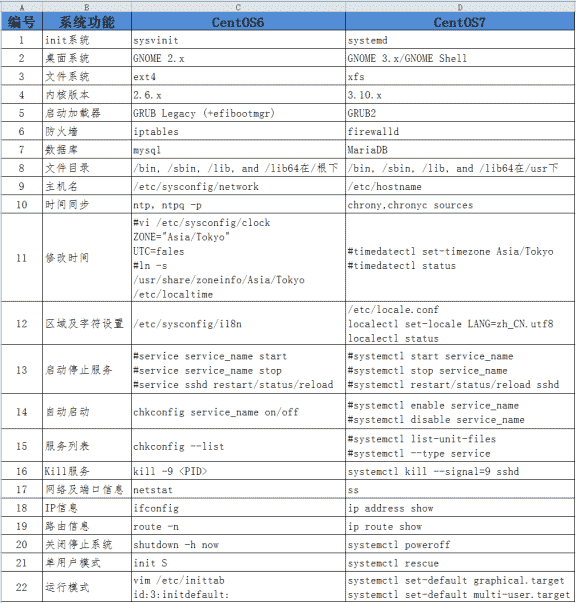
1、init系统
Linux 操作系统的启动首先从 BIOS 开始,接下来进入 boot loader,由 bootloader 载入内核,进行内核初始化。内核初始化的最后一步就是启动 pid 为 1 的 init 进程。这个进程是系统的第一个进程。它负责产生其他所有用户进程。init 以守护进程方式存在,是所有其他进程的祖先。init 进程非常独特,能够完成其他进程无法完成的任务。
Sysvinit就是 system V 风格的 init 系统,Sysvinit 用术语 runlevel 来定义"预订的运行模式"。Sysvinit 检查 '/etc/inittab' 文件中是否含有 'initdefault' 项。 这告诉 init 系统是否有一个默认运行模式。Sysvinit 使用脚本,文件命名规则和软链接来实现不同的 runlevel,串行启动各个进程及服务。
Systemd 是 Linux 系统中最新的初始化系统(init),它主要的设计目标是克服 sysvinit 固有的缺点,提高系统的启动速度。systemd 和 ubuntu 的 upstart 是竞争对手,预计会取代 UpStart。Systemd的目标就是尽可能启动更少的进程,尽可能将更多进程并行启动。
2、桌面系统升级,从gnome2.x----->gnome3.x
3、文件系统由原来的ext4升级到xfs格式
EXT4是第四代文件系统,是Linux下的日志文件系统。
xfs是一个64位文件系统,对于一个32位Linuix系统,文件和文件系统的大小被限制在16TB。
4、内核版本升级,由2.6.x--------->3.10.x
5、防火墙iptables---->firewalld
[root@centos7 ~]# systemctl status firewalld

● firewalld.service - firewalld - dynamic firewall daemon

   Loaded: loaded (/usr/lib/systemd/system/firewalld.service; disabled; vendor preset: enabled)  已经关闭

   Active: inactive (dead)  开机不启动

     Docs: man:firewalld(1)
[root@centos7 ~]# systemctl stop firewalld    #关闭firewalld

[root@centos7 ~]# systemctl disable firewalld.service  #关闭开机启动
安装iptables服务并配置
[root@centos7 ~]# yum install iptables-services -y

[root@centos7 ~]# systemctl status iptables

● iptables.service - IPv4 firewall with iptables

   Loaded: loaded (/usr/lib/systemd/system/iptables.service; disabled; vendor preset: disabled)

   Active: inactive (dead)

[root@centos7 ~]# systemctl start iptables

[root@centos7 ~]# systemctl enable iptables.service

Created symlink from /etc/systemd/system/basic.target.wants/iptables.service to /usr/lib/systemd/system/iptables.service.

[root@centos7 ~]# systemctl status iptables.service

● iptables.service - IPv4 firewall with iptables

   Loaded: loaded (/usr/lib/systemd/system/iptables.service; enabled; vendor preset: disabled)

   Active: active (exited) since Sun 2018-03-25 14:07:03 CST; 44s ago

 Main PID: 9727 (code=exited, status=0/SUCCESS)

Mar 25 14:07:03 centos7 systemd[1]: Starting IPv4 firewall with iptables...

Mar 25 14:07:03 centos7 iptables.init[9727]: iptables: Applying firewall rules: [  OK  ]

Mar 25 14:07:03 centos7 systemd[1]: Started IPv4 firewall with iptables.

[root@centos7 ~]# systemctl restart iptables.service

[root@centos7 ~]# iptables -L -n

Chain INPUT (policy ACCEPT)

target     prot opt source               destination

ACCEPT     all  --  0.0.0.0/0            0.0.0.0/0            state RELATED,ESTABLISHED

ACCEPT     icmp --  0.0.0.0/0            0.0.0.0/0

ACCEPT     all  --  0.0.0.0/0            0.0.0.0/0

ACCEPT     tcp  --  0.0.0.0/0            0.0.0.0/0            state NEW tcp dpt:22

REJECT     all  --  0.0.0.0/0            0.0.0.0/0            reject-with icmp-host-prohibited

Chain FORWARD (policy ACCEPT)

target     prot opt source               destination

REJECT     all  --  0.0.0.0/0            0.0.0.0/0            reject-with icmp-host-prohibited

Chain OUTPUT (policy ACCEPT)

target     prot opt source               destination
[root@centos7 ~]# cat /etc/sysconfig/iptables  #iptables配置文件

# sample configuration for iptables service

# you can edit this manually or use system-config-firewall

# please do not ask us to add additional ports/services to this default configuration

*filter

:INPUT ACCEPT [0:0]

:FORWARD ACCEPT [0:0]

:OUTPUT ACCEPT [0:0]

-A INPUT -m state --state RELATED,ESTABLISHED -j ACCEPT

-A INPUT -p icmp -j ACCEPT

-A INPUT -i lo -j ACCEPT

-A INPUT -p tcp -m state --state NEW -m tcp --dport 22 -j ACCEPT

-A INPUT -j REJECT --reject-with icmp-host-prohibited

-A FORWARD -j REJECT --reject-with icmp-host-prohibited

COMMIT
6、6---->7 默认数据库Mysql---->MariaDB
Centos6和7的区别的更多相关文章
- Linux运维:CentOS6和7的区别
Liunx笔记:CentOS6和CentOS7的区别 路飞学城运维人员 在线流程图软件 Ago linux运维群: 93324526 笔者QQ:578843228 常用安装包下载 yum instal ...
- Linux启动流程CentOS6和7的区别
目 录 Linux启动流程 I 第1章 CentOS6启动流程 1 1.1 BIOS 1 1.2 MBR 1 1.3 GRUB 1 1.4 kernel(加载内核) ...
- 2、centos6和centos7的区别
services使用了systemd来代替sysvinit管理. systemd是Linux下的一种init软件,由Lennart Poettering带头开发,并在LGPL 2.1及其后续版本许可证 ...
- Centos6与Centos7的区别
前言 centos7与6之间最大的差别就是初始化技术的不同,7采用的初始化技术是Systemd,并行的运行方式,除了这一点之外,服务启动.开机启动文件.网络命令方面等等,都说6有所不同.让我们先来了解 ...
- centos6和centos7的区别和常用的简单配置优化
- 本节主要介绍centos6和centos7的区别和常用的简单配置优化:- 第一部分: - 1.对比文件系统 - 2.对比防火墙,内核版本,默认数据库 - 3.对比时间同步,修改时区,修改语言 - ...
- CentOS6跟CentOS7的区别
1.CentOS6在/etc/profile配置环境变量是JAVAHOME,CentOS7是{JAVA_HOME} 2.
- CentOS7中systemctl的使用与CentOS6中service的区别
https://blog.csdn.net/u012834750/article/details/80501440 从CentOS 7.x开始,CentOS开始使用systemd服务来代替daemon ...
- Linux系统发行版本及其区别
1 Linux系统组成 Linux操作系统=Linux内核+GNU软件及系统软件+必要的应用程序.下表为Linux系统各组成部分的贡献人员: Linux内核 GNU组件(gcc.bash) 其他必要应 ...
- RAID磁盘阵列及CentOS7系统启动流程(week2_day3)--技术流ken
RAID概念 磁盘阵列(Redundant Arrays of Independent Disks,RAID),有“独立磁盘构成的具有冗余能力的阵列”之意. 磁盘阵列是由很多价格较便宜的磁盘,以硬件( ...
随机推荐
- Python基础:面向对象基础 (一) 类及其属性和魔法方法
定义类,添加和获取对象属性 # 定义类 格式如下 # class 类名: # 方法列表 # 新式类定义形式 # info 是一个实例方法,第一个参数一般是self,表示实例对象本身 class Her ...
- Java-随机数工具类
import java.util.Random; import java.util.concurrent.ThreadLocalRandom; import org.apache.commons.la ...
- python 类变量 在多线程下的共享与释放问题-乾颐堂
最近被多线程给坑了下,没意识到类变量在多线程下是共享的,还有一个就是没意识到 内存释放问题,导致越累越大 1.python 类变量 在多线程情况 下的 是共享的 2.python 类变量 在多线程情况 ...
- [SoapUI] 通过编程的方式设置当前的Environment
testRunner.testCase.testSuite.project.setActiveEnvironment("Live")
- Ubuntu14.04 下安装Vmware-Tools
1.切换到ubuntu 图形界面 startx , 点击虚拟机菜单栏-安装VMware Tools 2. 在Ubuntu系统中找到VMwareTools-9.2.2-893683.tar.gz ,右键 ...
- python操作mysql数据库系列-操作MySql数据库(二)
接口测试框架层级目录结构示意图: page目录下面的mysqlTest.py:存放的是mysql的操作代码 utils目录下面的helper.py:存放的是公共的配置方法 log目录log.md:存放 ...
- 【转载】Redis Sentinel服务配置
转载地址:http://blog.csdn.net/vtopqx/article/details/49247285 redis官网文档:http://www.redis.cn/topics/senti ...
- MySQL闪退
把配置文档的如图位置打开
- javascript总结45: HTML DOM media 属性
定义和用法 media 属性设置或返回显示文档的设备. 对于样式信息而言,目标媒介非常重要.移动设备和桌面计算机的样式可能是不同的. 实例 <html> <head> < ...
- Local Notification
大家都知道Push Notification,这个东西需要联网才可以用.iOS4起,苹果引入了一种可以在设备内部引发的notification.不需要复杂的服务器编程,或其他复杂的配置.这个技术就是L ...