
Django + mysql 快速搭建简单web投票系统
了解学习pyhton web的简单demo
1. 安装Django, 安装pyhton 自行百度
2. 执行命令创建project django-admin.py startproject mysite
3. 执行命令创建app python manage.py startapp polls
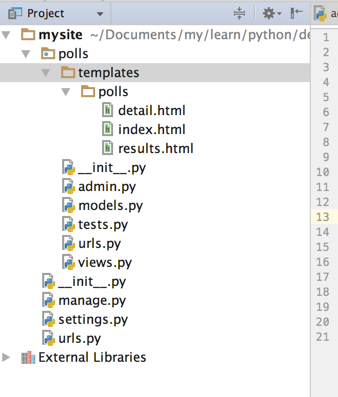
目录结构: polls/templates/polls 目录 和 polls/admin.py 都是自己手动创建的。
4. 编辑setting.py 添加app polls 同时打开admin
INSTALLED_APPS = (

    'django.contrib.auth',

    'django.contrib.contenttypes',

    'django.contrib.sessions',

    'django.contrib.sites',

    'django.contrib.messages',

    'django.contrib.staticfiles',

    'polls',

    # Uncomment the next line to enable the admin:

    'django.contrib.admin',

    # Uncomment the next line to enable admin documentation:

    # 'django.contrib.admindocs',

)
5. 编辑setting.py 添加数据库连接信息
DATABASES = {

    'default': {

        'ENGINE': 'django.db.backends.mysql', # Add 'postgresql_psycopg2', 'postgresql', 'mysql', 'sqlite3' or 'oracle'.

        'NAME': 'polls',                      # Or path to database file if using sqlite3.

        'USER': 'root',                      # Not used with sqlite3.

        'PASSWORD': '123',                  # Not used with sqlite3.

        'HOST': '',                      # Set to empty string for localhost. Not used with sqlite3.

        'PORT': '',                      # Set to empty string for default. Not used with sqlite3.

    }

}
6. 创建Modle模型 :
# coding=utf-8

from django.db import models

# Create your models here.

class Question(models.Model):

    question_text = models.CharField(max_length=200)

    pub_date = models.DateTimeField('date published')

    def __unicode__(self):

        return self.question_text

class Choice(models.Model):

    question = models.ForeignKey(Question)

    choice_text = models.CharField(max_length=200)

    votes = models.IntegerField(default=0)

    def __unicode__(self):

        return self.choice_text
7. 执行数据库同步 (ORM)自动根据model定义创建表接口 (我这里使用的mysql)
首先创建数据库
create database polls;
然后执行命令:
python manage.py syncdb
8. 检查数据库中表的创建:
use polls
show tables
9. 创建admin.py
# coding=utf-8

from django.contrib import admin

from .models import Question, Choice

# Register your models here.

class ChoiceInline(admin.TabularInline):

    model = Choice

    extra = 3

class QuestionAdmin(admin.ModelAdmin):

    fieldsets = [

        (None,               {'fields': ['question_text']}),

        ('Date information', {'fields': ['pub_date'], 'classes': ['collapse']}),

    ]

    inlines = [ChoiceInline]

    list_display = ('question_text', 'pub_date')

admin.site.register(Choice)

admin.site.register(Question, QuestionAdmin)
10. 启动应用
python manage.py runserver
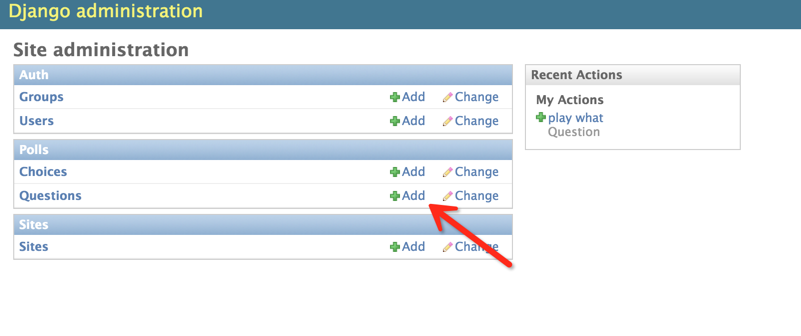
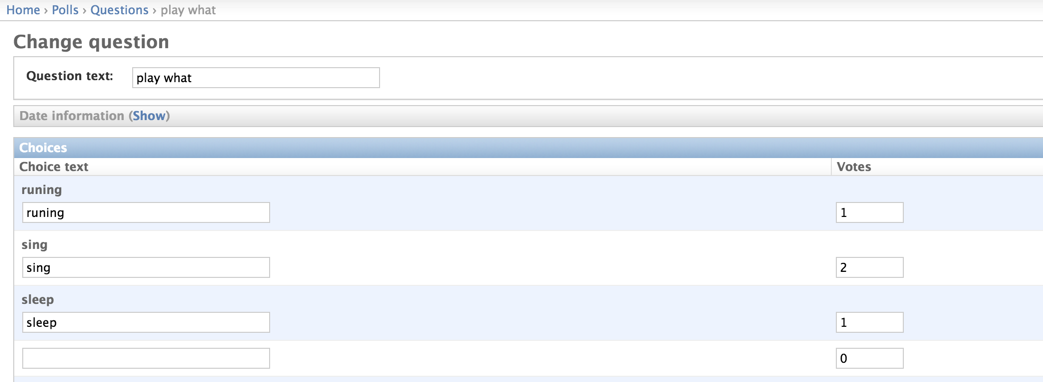
登录后台:http://127.0.0.1:8000/admin 通过Django自动的后台进行问题添加
11. 编写视图控制层
视图起着承前启后的作用,前是指前端页面,后是指后台数据库。将数据库表中的内容查询出来显示到页面上。
编写polls/views.py文件:
# coding=utf-8

from django.shortcuts import render, get_object_or_404

from django.http import HttpResponseRedirect, HttpResponse

from django.core.urlresolvers import reverse

from .models import Question, Choice

# Create your views here.

# 首页展示所有问题

def index(request):

    # latest_question_list2 = Question.objects.order_by('-pub_data')[:2]

    latest_question_list = Question.objects.all()

    context = {'latest_question_list': latest_question_list}

    return render(request, 'polls/index.html', context)

# 查看所有问题

def detail(request, question_id):

    question = get_object_or_404(Question, pk=question_id)

    return render(request, 'polls/detail.html', {'question': question})

# 查看投票结果

def results(request, question_id):

    question = get_object_or_404(Question, pk=question_id)

    return render(request, 'polls/results.html', {'question': question})

# 选择投票

def vote(request, question_id):

    p = get_object_or_404(Question, pk=question_id)

    try:

        selected_choice = p.choice_set.get(pk=request.POST['choice'])

    except (KeyError, Choice.DoesNotExist):

        # Redisplay the question voting form.

        return render(request, 'polls/detail.html', {

            'question': p,

            'error_message': "You didn't select a choice.",

        })

    else:

        selected_choice.votes += 1

        selected_choice.save()

        # Always return an HttpResponseRedirect after successfully dealing

        # with POST data. This prevents data from being posted twice if a

        # user hits the Back button.

        return HttpResponseRedirect(reverse('polls:results', args=(p.id,)))
12. 配置视图展示层与逻辑控制层url映射
url是一个请求配置文件,页面中的请求转交给由哪个函数处理,由该文件决定。
首先配置polls/urls.py(该文件需要创建)
from django.conf.urls import url

from . import views

urlpatterns = [

    # ex : /polls/

    url(r'^$', views.index, name='index'),

    # ex : /polls/5/

    url(r'^(?P<question_id>[0-9]+)/$', views.detail, name='detail'),

    # ex : /polls/5/results/

    url(r'^(?P<question_id>[0-9]+)/results/$', views.results, name='results'),

    # ex : /polls/5/vote

    url(r'^(?P<question_id>[0-9]+)/vote/$', views.vote, name='vote'),

]
接着,编辑mysite/urls.py文件。
from django.conf.urls import include, url

from django.contrib import admin

urlpatterns = [

    url(r'^polls/', include('polls.urls', namespace="polls")),

    url(r'^admin/', include(admin.site.urls)),

]
13. 创建视图模板
模板就是前端页面,用来将数据显示到web页面上。
首先创建polls/templates/polls/目录,分别在该目录下创建index.html、detail.html和results.html文件。
index.html
{% if latest_question_list %}

    <ul>

    {% for question in latest_question_list %}

        <li><a href="{% url polls:detail question.id %}">{{ question.question_text }}</a></li>

    {% endfor %}

    </ul>

{% else %}

    <p>No polls are available.</p>

{% endif %}
detail.html
<h1>{{ question.question_text }}</h1>

{% if error_message %}<p><strong>{{ error_message }}</strong></p>{% endif %}

<form action="{% url polls:vote question.id %}" method="post">

{% csrf_token %}

{% for choice in question.choice_set.all %}

    <input type="radio" name="choice" id="choice{{ forloop.counter }}" value="{{ choice.id }}" />

    <label for="choice{{ forloop.counter }}">{{ choice.choice_text }}</label><br />

{% endfor %}

<input type="submit" value="Vote" />

</form>
results.html
<h1>{{ question.question_text }}</h1>

<ul>

{% for choice in question.choice_set.all %}

    <li>{{ choice.choice_text }} -- {{ choice.votes }} vote{{ choice.votes|pluralize }}</li>

{% endfor %}

</ul>

<a href="{% url polls:detail question.id %}">Vote again?</a>
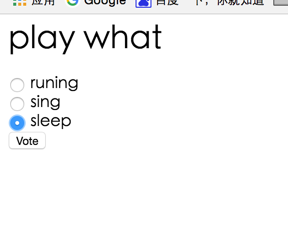
14. 启动web容器,访问:http://127.0.0.1:8000/polls/


Django + mysql 快速搭建简单web投票系统的更多相关文章
- 使用Django快速搭建简单的数据管理后台
使用Django快速搭建简单的数据管理后台 概述 需求描述: 数据表已建好,能可视化操作增删改查,避免直接操作数据库 简版的管理系统 环境 Windows 10 x64 Python 3.6.3 (A ...
- 快速搭建应用服务日志收集系统(Filebeat + ElasticSearch + kibana)
快速搭建应用服务日志收集系统(Filebeat + ElasticSearch + kibana) 概要说明 需求场景,系统环境是CentOS,多个应用部署在多台服务器上,平时查看应用日志及排查问题十 ...
- koa2+koa-generator+mysql快速搭建nodejs服务器
koa2+koa-generator+mysql快速搭建nodejs服务器 用koa的脚手架koa-generator可以快速生成项目骨架,可以用于发开或者测试接口 https://github.co ...
- 拿nodejs快速搭建简单Oauth认证和restful API server攻略
拿nodejs快速搭建简单Oauth认证和restful API server攻略:http://blog.csdn.net/zhaoweitco/article/details/21708955 最 ...
- 使用docker快速搭建Permeate渗透测试系统实践
一.背景 笔者最近在做一场Web安全培训,其中需要搭建一套安全测试环境:在挑选渗透测试系统的时候发现permeate渗透测试系统比较满足需求,便选择了此系统:为了简化这个步骤,笔者将系统直接封装到了d ...
- 巨杉Tech | 十分钟快速搭建 Wordpress 博客系统
介绍 很多互联网应用程序开发人员第一个接触到的网站项目就是博客系统.而全球使用最广的Wordpress常常被用户用来快速搭建个人博客网站.默认情况下,Wordpress一般在后台使用MySQL关系型数 ...
- 用python3.x与mysql数据库构建简单的爬虫系统(转)
这是在博客园的第一篇文章,由于本人还是一个编程菜鸟,也写不出那些高大上的牛逼文章,这篇文章就是对自己这段时间学习python的一个总结吧. 众所周知python是一门对初学编程的人相当友好的编程语言, ...
- 使用Node.js快速搭建简单的静态文件服务器
做前端有时会采用一些复杂框架,在文件系统中直接打开页面(用file:///方式打开),往往会报跨域的错,类似于“XMLHttpRequest cannot load ...(文件名). Cross o ...
- mysql快速搭建从库
基于mysqldump快速搭建从库 https://blog.csdn.net/leshami/article/details/44994329 使用xtrbackup克隆从库 https://blo ...
随机推荐
- css元素排列
有时候元素的排列没有预想的效果,考虑是不是margin和padding的影响
- 创建 MIME 类型////////////zzz
用 Apache 创建 MIME 类型 在 Apache 里, MIME 类型和文件扩展名之间的映射是被存放在配置文件 "apache根目录/conf/mime.types" 里的 ...
- eBox(stm32) 之中断结构
eBox的中断结构参考了mbed,和我们平时所用的中断结构有些差异,不容易理解,最近仔细看了底层代码,终于搞清楚了,总结一下 一 首先要要搞清楚的几个概念:类的静态成员,实例成员 ...
- Visual Studio 2015 显示正忙 正在等待内部操作完成
网上查到的: 1.关闭IntelliTrace 2.进入项目文件夹有.vs的隐藏文件夹,进去找到和项目一样的名字的文件夹,再找v14文件夹,进去,删掉.suo文件 http://www.cnblogs ...
- Web 2D/3d
首选应该是H5,通过现成的js库来实现,兼容性应该不错 其次可以考虑使用Unity3d,开发起来应该比较快 搜集点资料先放起来~ Unity3d: http://unity3d.com/cn/get- ...
- VB6SP6极度精简兼容绿色版
钟爱绿色小巧的软件.怀旧一下,整合了几个资源,做了一个VB6SP6极度精简绿色版. 压缩包大小5M. 网上的极度精简绿色版不是SP6的,特意在其基础上更新了SP6.不是单文件版,所谓单文件版不过是执行 ...
- VS2010 MFC实现启动画面
1.创建一个SDI工程(或者其他工程都可以). 2.创建一个位图资源命名为IDB_BITMAP1. 3.利用类向导添加一个类CMySplashCtrl(名字可以自己随便取). 4.在MySplashC ...
- logstash输出到influxdb
用了这个logstash扩展 https://github.com/PeterPaulH/logstash-influxdb/blob/master/src/influxdb.rb 把这个文件放到 l ...
- Linux Socket编程(不限Linux)【转】
转自:http://www.cnblogs.com/skynet/archive/2010/12/12/1903949.html “一切皆Socket!” 话虽些许夸张,但是事实也是,现在的网络编程几 ...
- 《机器学习实战》学习笔记一K邻近算法
一. K邻近算法思想:存在一个样本数据集合,称为训练样本集,并且每个数据都存在标签,即我们知道样本集中每一数据(这里的数据是一组数据,可以是n维向量)与所属分类的对应关系.输入没有标签的新数据后,将 ...