
ASP.NET MVC中使用FluentValidation验证实体
1、FluentValidation介绍
FluentValidation是与ASP.NET DataAnnotataion Attribute验证实体不同的数据验证组件,提供了将实体与验证分离开来的验证方式,同时FluentValidation还提供了表达式链式语法。
2、安装FluentValidation
FluentValidation地址:http://fluentvalidation.codeplex.com/
使用Visual Studio的管理NuGet程序包安装FluentValidation及FluentValidation.Mvc
3、通过ModelState使用FluentValidation验证
项目解决方案结构图:
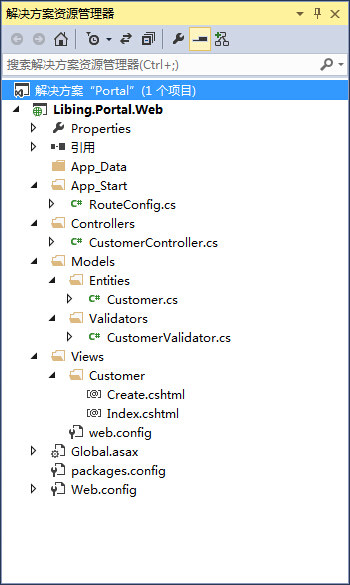
实体类Customer.cs:
using System;

using System.Collections.Generic;

using System.Linq;

using System.Web;

namespace Libing.Portal.Web.Models.Entities

{

    public class Customer

    {

        public int CustomerID { get; set; }

        public string CustomerName { get; set; }

        public string Email { get; set; }

        public string Address { get; set; }

        public string Postcode { get; set; }

        public float? Discount { get; set; }

        public bool HasDiscount { get; set; }

    }

}
数据验证类CustomerValidator.cs:
using System;

using System.Collections.Generic;

using System.Linq;

using System.Web;

using FluentValidation;

using Libing.Portal.Web.Models.Entities;

namespace Libing.Portal.Web.Models.Validators

{

    public class CustomerValidator : AbstractValidator<Customer>

    {

        public CustomerValidator()

        {

            RuleFor(customer => customer.CustomerName).NotNull().WithMessage("客户名称不能为空");

            RuleFor(customer => customer.Email)

                .NotEmpty().WithMessage("邮箱不能为空")

                .EmailAddress().WithMessage("邮箱格式不正确");

            RuleFor(customer => customer.Discount)

                .NotEqual()

                .When(customer => customer.HasDiscount);

            RuleFor(customer => customer.Address)

                .NotEmpty()

                .WithMessage("地址不能为空")

                .Length(, )

                .WithMessage("地址长度范围为20-50字节");

        }

    }

}
控制器类CustomerController.cs:
using System;

using System.Collections.Generic;

using System.Linq;

using System.Web;

using System.Web.Mvc;

using FluentValidation.Results;

using Libing.Portal.Web.Models.Entities;

using Libing.Portal.Web.Models.Validators;

namespace Libing.Portal.Web.Controllers

{

    public class CustomerController : Controller

    {

        public ActionResult Index()

        {

            return View();

        }

        public ActionResult Create()

        {

            return View();

        }

        [HttpPost]

        public ActionResult Create(Customer customer)

        {

            CustomerValidator validator = new CustomerValidator();

            ValidationResult result = validator.Validate(customer);

            if (!result.IsValid)

            {

                result.Errors.ToList().ForEach(error =>

                {

                    ModelState.AddModelError(error.PropertyName, error.ErrorMessage);

                });

            }

            if (ModelState.IsValid)

            {

                return RedirectToAction("Index");

            }

            return View(customer);

        }

    }

}
View页面Create.cshtml,该页面为在添加View时选择Create模板自动生成:
@model Libing.Portal.Web.Models.Entities.Customer

@{

    Layout = null;

}

<!DOCTYPE html>

<html>

<head>

    <meta name="viewport" content="width=device-width" />

    <title>Create</title>

</head>

<body>

    @using (Html.BeginForm())

    {

        @Html.AntiForgeryToken()

        <div class="form-horizontal">

            <h4>Customer</h4>

            <hr />

            @Html.ValidationSummary(true)

            <div class="form-group">

                @Html.LabelFor(model => model.CustomerName, new { @class = "control-label col-md-2" })

                <div class="col-md-10">

                    @Html.EditorFor(model => model.CustomerName)

                    @Html.ValidationMessageFor(model => model.CustomerName)

                </div>

            </div>

            <div class="form-group">

                @Html.LabelFor(model => model.Email, new { @class = "control-label col-md-2" })

                <div class="col-md-10">

                    @Html.EditorFor(model => model.Email)

                    @Html.ValidationMessageFor(model => model.Email)

                </div>

            </div>

            <div class="form-group">

                @Html.LabelFor(model => model.Address, new { @class = "control-label col-md-2" })

                <div class="col-md-10">

                    @Html.EditorFor(model => model.Address)

                    @Html.ValidationMessageFor(model => model.Address)

                </div>

            </div>

            <div class="form-group">

                @Html.LabelFor(model => model.Postcode, new { @class = "control-label col-md-2" })

                <div class="col-md-10">

                    @Html.EditorFor(model => model.Postcode)

                    @Html.ValidationMessageFor(model => model.Postcode)

                </div>

            </div>

            <div class="form-group">

                @Html.LabelFor(model => model.Discount, new { @class = "control-label col-md-2" })

                <div class="col-md-10">

                    @Html.EditorFor(model => model.Discount)

                    @Html.ValidationMessageFor(model => model.Discount)

                </div>

            </div>

            <div class="form-group">

                @Html.LabelFor(model => model.HasDiscount, new { @class = "control-label col-md-2" })

                <div class="col-md-10">

                    @Html.EditorFor(model => model.HasDiscount)

                    @Html.ValidationMessageFor(model => model.HasDiscount)

                </div>

            </div>

            <div class="form-group">

                <div class="col-md-offset-2 col-md-10">

                    <input type="submit" value="Create" class="btn btn-default" />

                </div>

            </div>

        </div>

    }

</body>

</html>
运行效果:

4、通过设置实体类Attribute与验证类进行验证
修改实体类Customer.cs:
using System;

using System.Collections.Generic;

using System.Linq;

using System.Web;

using FluentValidation.Attributes;

using Libing.Portal.Web.Models.Validators;

namespace Libing.Portal.Web.Models.Entities

{

    [Validator(typeof(CustomerValidator))]

    public class Customer

    {

        public int CustomerID { get; set; }

        public string CustomerName { get; set; }

        public string Email { get; set; }

        public string Address { get; set; }

        public string Postcode { get; set; }

        public float? Discount { get; set; }

        public bool HasDiscount { get; set; }

    }

}
修改Global.asax.cs:
using System;

using System.Collections.Generic;

using System.Linq;

using System.Web;

using System.Web.Mvc;

using System.Web.Routing;

using FluentValidation.Attributes;

using FluentValidation.Mvc;

namespace Libing.Portal.Web

{

    public class MvcApplication : System.Web.HttpApplication

    {

        protected void Application_Start()

        {

            AreaRegistration.RegisterAllAreas();

            RouteConfig.RegisterRoutes(RouteTable.Routes);

            // FluentValidation设置

            DataAnnotationsModelValidatorProvider.AddImplicitRequiredAttributeForValueTypes = false;

            ModelValidatorProviders.Providers.Add(new FluentValidationModelValidatorProvider(new AttributedValidatorFactory()));

        }

    }

}
ASP.NET MVC中使用FluentValidation验证实体的更多相关文章
- ASP.NET MVC中使用FluentValidation验证实体(转载)
1.FluentValidation介绍 FluentValidation是与ASP.NET DataAnnotataion Attribute验证实体不同的数据验证组件,提供了将实体与验证分离开来的 ...
- ASP.NET MVC中使用窗体验证出现上下文的模型在数据库创建后发生更改,导致调试失败(一)
在ASP.NET MVC中使用窗体验证.(首先要明白,验证逻辑是应该加在Model.View和Controller哪一个里面?由于Model的责任就是负责信息访问与商业逻辑验证的,所以我们把验证逻辑加 ...
- asp.net mvc 中的自定义验证(Custom Validation Attribute)
前言
- asp.net mvc中的后台验证
asp.net mvc的验证包含后台验证和前端验证.后台验证主要通过数据注解的形式实现对model中属性的验证,其验证过程发生在model绑定的过程中.前端验证是通过结合jquery.validate ...
- 再议ASP.NET MVC中CheckBoxList的验证
在ASP.NET MVC 4中谈到CheckBoxList,经常是与CheckBoxList的显示以及验证有关.我在"MVC扩展生成CheckBoxList并水平排列"中通过扩展H ...
- asp.net MVC 中 Session统一验证的方法
验证登录状态的方法有:1 进程外Session 2 方法过滤器(建一个类继承ActionFilterAttribute)然后给需要验证的方法或控制器加特性标签 3 :新建一个BaseContro ...
- NET MVC中使用FluentValidation
ASP.NET MVC中使用FluentValidation验证实体 1.FluentValidation介绍 FluentValidation是与ASP.NET DataAnnotataion ...
- ASP.NET MVC如何实现自定义验证(服务端验证+客户端验证)
ASP.NET MVC通过Model验证帮助我们很容易的实现对数据的验证,在默认的情况下,基于ValidationAttribute的声明是验证被使用,我们只需 要将相应的ValidationAttr ...
- ASP.NET MVC中商品模块小样
在前面的几篇文章中,已经在控制台和界面实现了属性值的笛卡尔乘积,这是商品模块中的一个难点.本篇就来实现在ASP.NET MVC4下商品模块的一个小样.与本篇相关的文章包括: 1.ASP.NET MVC ...
随机推荐
- awk用法总结笔记
+ : 匹配1或多次出现的字符或正则表达式 awk '/col+/' testfile ? : 匹配0或1次出现的字符或正则表达式 awk '/col+/' testfile | : 匹 ...
- 尝试u3d中将代码与编辑器分离
最近与朋友交流,他一直是做端游,最近接触了u3d以后无法忍受代码与配置文件,美术资源全部纠缠在一起的状况,于是一直在琢磨怎么将编辑器与代码彻底分离. 自己也抽空研究一下,碰到一些问题先记录下来. 首先 ...
- UDP 一个封锁操作被对 WSACancelBlockingCall 的调用中断
using System; using System.Collections.Generic; using System.Text; using System.Net.Sockets; using S ...
- mac os 体验
苹果电脑和苹果手机不同,不需要苹果ID就可以使用. 之后依次安装xcode, visual studio code, flash player. eclipse 还没有安装成功.
- oracle数据库常用查询
一.数据库信息 1.数据库时间 select to_char(sysdate, 'yyyy-mm-dd hh24:mi:ss') AS dbtime from dual; 2.主机OS类型 SELEC ...
- SSIS内存不足
[SSIS.Pipeline] 信息: 缓冲区管理器检测到系统的虚拟内存不足,但无法换出任何缓冲区.考虑了 0 个缓冲区,锁定了 0 个缓冲区.或者是因未安装足够的内存或其他进程正在使用内存,以致于没 ...
- 【转】Eclipse打JAR包,插件FatJar安装与使用
原文地址:http://blog.csdn.net/jikeyzhang/article/details/4731968 下载RUL: 下载fatJar插件,解压缩后是一个.../plugins/(n ...
- .NET Core也可以使用MongoDB了
可能是由于.NET Core还不是正式版的缘故吧,MongoDB的官方Driver(http://mongodb.github.io/mongo-csharp-driver/)一直不支持.NET Co ...
- 使用git将代码push到osc上
1.下载git客户端 2.在osc上创建项目 ①使用:git bash here ②在目录下执行:git init ③ssh-keygen -t rsa -C "xqs@gmail.com& ...
- Homework 1 -- The beginning
我是在北京在读的一位大学生.如果问我学的什么专业,我会用一个冷笑话回答你:我精通多种语言,在老家我说家乡话:跟北京我讲普通话:跟老外就玩English:我跟机器得敲代码.现在你知道我学的就是计算机了. ...