
SignalR + KnockoutJS + ASP.NET MVC4 实现井字游戏
1.1.1 摘要
今天,我们将使用SignalR + KnockoutJS + ASP.NET MVC实现一个实时HTML5的井字棋游戏。
首先,网络游戏平台一定要让用户登陆进来,所以需要一个登陆模块,然后就是游戏设计并且在游戏过程中保持用户连接有效性,假设用户玩着玩着突然掉线这肯定会使用户很不爽;因此,保持客户端和服务端通讯的稳定性变得至关重要了,这里我们将使用SignalR和Html5保持通讯实时和稳定。
近一、两年來HTML5的发展是沸沸扬扬,在这其中你也许听过HTML5的规划给浏览器与服务器之间进行全双工通讯的WebSocket的通讯协定,并提供了的WebSocket API,这一套完整的API设计,在规格的部分,WebSocket的通讯协定已经于2011年被IETF(国际网路工程研究团队)定为标准的RFC 6455,而的WebSocket API则被W3C定为标准。目前各平台的浏览器的主流版本皆已经支援HTML5的WebSocket / WebSocket API。
WebSocket / WebSocket API企图解决开发者长久以来实现服务器推送技术几乎都依赖于轮询的方式所造成的明显缺点,使得服务器接受到太多请求,导致服务器资源过度占用以及带宽的浪费。
那么,我们使用WebSocket / WebSocket API就可以确保客户端和服务器通讯的稳定性,但我们要面对一个事实是不是每个用户的浏览器都支持HTML5,我们必须提高旧的浏览器支持方案。
SignalR的出现让ASP.NET的开发者得到了救赎,兼容的通讯协议设计将Comet Programming概念和WebSocket技术都放在SignalR整个通讯架构中;SignalR会针对目前执行的浏览器进行判断,找到客户端(浏览器)与服务器最合适的建立链接方式。
SignalR会优先选用WebSocket技术与服务器沟通,开发人员就不需要针对浏览器而做出特殊的处理,所有的代码都通过ASP.NET SignalR高级的API进行信息传递。
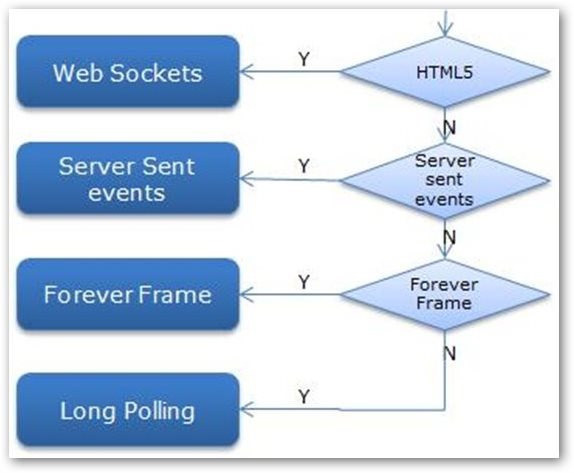
图1 SignalR通讯的链接方式
目录
1.1.2 正文
首先,我们将使用ASP.NET MVC和SignalR实现服务端,客户端使用KnockoutJS和Html5获取和绑定数据到页面,具体设计如下图:
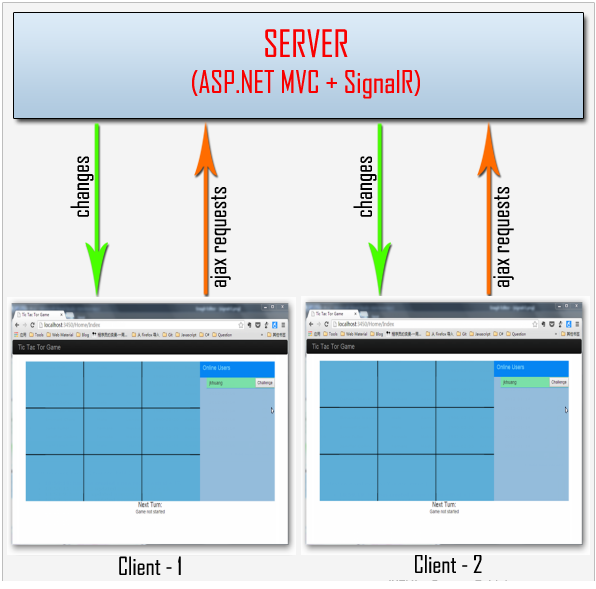
图2 井字棋游戏设计
我们使用SignalR提供一个简单的API用于创建服务器端到客户端的远程过程调用(RPC),以便从服务器端.NET代码中调用客户端浏览器(以及其他客户端平台)中的JavaScript函数;客户端浏览器也可以通过SigalR来调用服务端.NET代码。
ASP.NET MVC4 服务端
接下来,我们要实现.NET服务器端,由于我们游戏平台是让用户登陆后进行游戏的,所以我们将实现用户帐户管理的模块。
首先,我们创建一个ASP.NET MVC4 Web Application。

图3 ASP.NET MVC4 Web Application
这里我们选择Empty模板就可以了。

图4 ASP.NET MVC4 Web Application
然后,我们在项目中使用以下Nuget包:
- install-package Microsoft.AspNet.SignalR
- install-package jQuery
- install-package KnockoutJS
用户权限管理
我们知道ASP.NET MVC自带的权限表的创建是在InitializeSimpleMembershipAttribute.cs中实现的,所以我们在程序中添加Filters文件夹,然后创建InitializeSimpleMembershipAttribute类,具体定义如下:
namespace OnlineTicTacTor.Filters

{

    /// <summary>

    /// Simple Membership initializer.

    /// </summary>

    [AttributeUsage(AttributeTargets.Class | AttributeTargets.Method, AllowMultiple = false, Inherited = true)]

    public sealed class InitializeSimpleMembershipAttribute : ActionFilterAttribute

    {

        private static SimpleMembershipInitializer _initializer;

        private static object _initializerLock = new object();

        private static bool _isInitialized;

        public override void OnActionExecuting(ActionExecutingContext filterContext)

        {

            // Ensure ASP.NET Simple Membership is initialized only once per app start

            LazyInitializer.EnsureInitialized(ref _initializer, ref _isInitialized, ref _initializerLock);

        }

        private class SimpleMembershipInitializer

        {

            public SimpleMembershipInitializer()

            {

                Database.SetInitializer<UsersContext>(null);

                try

                {

                    using (var context = new UsersContext())

                    {

                        if (!context.Database.Exists())

                        {

                            // Create the SimpleMembership database without Entity Framework migration schema

                            ((IObjectContextAdapter)context).ObjectContext.CreateDatabase();

                        }

                    }

                    WebSecurity.InitializeDatabaseConnection("DefaultConnection", "UserProfile", "UserId", "UserName", autoCreateTables: true);

                }

                catch (Exception ex)

                {

                    throw new InvalidOperationException("The ASP.NET Simple Membership database could not be initialized.", ex);

                }

            }

        }

    }

}
上面,我们定义了Web.ConfigInitializeSimpleMembershipAttribute类,接着我们在Web.config中的配置数据库。
  <connectionStrings>

    <add name="DefaultConnection" connectionString="Data Source=(LocalDb)\v11.0;Initial Catalog=GamesDB;Integrated Security=SSPI;AttachDBFilename=|DataDirectory|\GamesDB.mdf" providerName="System.Data.SqlClient" />

  </connectionStrings>
我们定义了数据库GamesDB,现在我们运行整个项目,看到localdb中生成了GamesDB数据库。
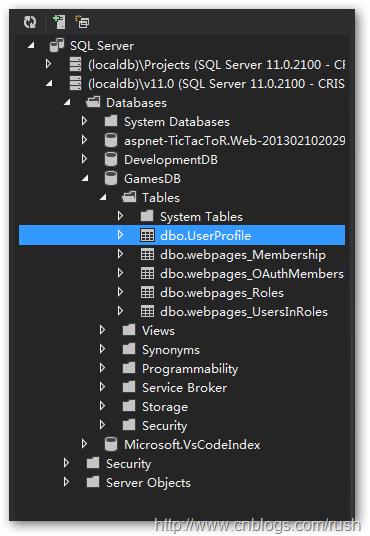
图5 GamesDB数据库
由于,我们使用ASP.NET MVC自带的权限表来管理用户账号,这里会使用到表UserProfile和webpages_Membership,当然,如果有更复杂的权限管理,我们可以使用表webpages_Roles和webpages_UsersInRoles等。
现在,我们已经创建了数据库GamesDB,接下来定义对应于数据表的DTO,首先,我们在Models文件夹中创建AccountModels.cs文件,然后定义类LoginModel具体定义如下:
    /// <summary>

    /// The DTO for user account.

    /// </summary>

    public class LoginModel

    {

        [Required]

        [Display(Name = "User name")]

        public string UserName { get; set; }

        [Required]

        [DataType(DataType.Password)]

        [Display(Name = "Password")]

        public string Password { get; set; }

        [Display(Name = "Remember me?")]

        public bool RememberMe { get; set; }

    }
上面,我们定义了数据传输类LoginModel,它包含了UserName、Password和RememberMe等信息。
接下来,我们在Account文件中创建用户登陆页面Login.cshtml,由于时间的关系我们已经把页面设计好了,具体定下如下:
@model OnlineTicTacTor.Models.LoginModel

@{

    ViewBag.Title = "Login";

}

<section>

    @using (Html.BeginForm(new { ReturnUrl = ViewBag.ReturnUrl }))

    {

        @Html.AntiForgeryToken();

        @Html.ValidationSummary();

        <div class="container">

            <div class="content">

                <div class="form-group">

                    @Html.LabelFor(m => m.UserName)

                    @Html.TextBoxFor(m => m.UserName, new { @class = "form-control", @placeholder = "UserName" })

                    @Html.ValidationMessageFor(m => m.UserName)

                </div>

                <div class="form-group">

                    @Html.LabelFor(m => m.Password)

                    @Html.PasswordFor(m => m.Password, new { @class = "form-control", @placeholder = "Password" })

                    @Html.ValidationMessageFor(m => m.Password)

                </div>

                <div class="checkbox">

                    @Html.CheckBoxFor(m => m.RememberMe)

                    @Html.LabelFor(m => m.RememberMe, new { @class = "checkbox" })

                </div>

                <button type="submit" class="btn btn-primary">Login</button>

            </div>

            <p>

                @Html.ActionLink("Register", "Register") if you don't have an account.

            </p>

        </div>

    }

</section>
我们在登陆页面定义了用户名、密码、登陆按钮和注册账号超链接等控件。

图6 登陆页面
接下来,我们同样在Account文件中创建用户注册页面Register.cshtml,具体定义如下:
@*The Register view.*@

@model OnlineTicTacTor.Models.RegisterModel

@{

    ViewBag.Title = "Register";

}

@using (Html.BeginForm())

{

 @Html.AntiForgeryToken()

 @Html.ValidationSummary()

    <div class="container">

        <div class="content">

            <div class="form-group">

                @Html.LabelFor(m => m.UserName)

                @Html.TextBoxFor(m => m.UserName, new { @class = "form-control", @placeholder = "UserName" })

            </div>

            <div class="form-group">

                @Html.LabelFor(m => m.Password)

                @Html.PasswordFor(m => m.Password, new { @class = "form-control", @placeholder = "Password" })

            </div>

            <div class="form-group">

                @Html.LabelFor(m => m.ConfirmPassword)

                @Html.PasswordFor(m => m.ConfirmPassword, new { @class = "form-control", @placeholder = "ConfirmPassword" })

            </div>

            <button type="submit" class="btn btn-primary">Register</button>

        </div>

    </div>

}

图7 注册页面
现在,我们已经实现了用户注册和登陆的页面了,接下来,我们要把用户注册和登陆数据提交到数据库中。
我们在Controllers文件夹中创建AccountController类,在其中分别定义注册和登陆方法,具体定义如下:
/// <summary>

/// Logins with LoginModel.

/// </summary>

/// <param name="model">The user information.</param>

/// <param name="returnUrl">The return URL.</param>

/// <returns></returns>

[HttpPost]

[AllowAnonymous]

[ValidateAntiForgeryToken]

public ActionResult Login(LoginModel model, string returnUrl)

{

    if (ModelState.IsValid && WebSecurity.Login(model.UserName, model.Password, persistCookie: model.RememberMe))

    {

        return RedirectToLocal(returnUrl);

    }

    // If we got this far, something failed, redisplay form

    ModelState.AddModelError("", "The user name or password provided is incorrect.");

    return View(model);

}

/// <summary>

/// Registers with LoginModel.

/// </summary>

/// <param name="model">The user information.</param>

/// <returns></returns>

[HttpPost]

[AllowAnonymous]

[ValidateAntiForgeryToken]

public ActionResult Register(RegisterModel model)

{

    if (ModelState.IsValid)

    {

        // Attempt to register the user

        try

        {

            WebSecurity.CreateUserAndAccount(model.UserName, model.Password);

            WebSecurity.Login(model.UserName, model.Password);

            return RedirectToAction("Login", "Account");

        }

        catch (MembershipCreateUserException e)

        {

            ModelState.AddModelError("", ErrorCodeToString(e.StatusCode));

        }

    }

    // If we got this far, something failed, redisplay form

    return View(model);

}
上面,我们定义了方法Register ()和 Login(),通过Register()方法把用户信息保存到表UserProfile和webpages_Membership中;Login()方法判断该用户信息是否有效。
现在,我们在Register页面中输入账号名JKhuang和密码,当我们点击创建账号之后,在数据表中查看到已经创建相应的账号。


图8 用户信息表
游戏对象模型
现在,我们已经完成了登陆功能了,接下来我们将实现井字游戏功能;首先,在Models文件夹中创建类ConnectionSession和UserCredential。
/// <summary>

/// The connection session model

/// </summary>

public class ConnectionSession

{

    public int Id { get; set; }

    public string ConnectionId { get; set; }

    public long ConnectedTime { get; set; }

    public long DisconnectedTime { get; set; }

}

/// <summary>

/// The user credential model.

/// </summary>

public class UserCredential

{

    public int Id { get; set; }

    public string UserId { get; set; }

    public ConnectionStatus ConnectionStatus { get; set; }

    // Stores a list of connection session.

    public List<ConnectionSession> Sessions { get; set; }

    /// <summary>

    /// Gets the session length in ticks.

    /// </summary>

    /// <returns></returns>

    public long GetSessionLengthInTicks()

    {

        long totalSession = 0;

        foreach (var session in Sessions)

        {

            if (session.DisconnectedTime != 0)

            {

                totalSession += session.DisconnectedTime - session.ConnectedTime;

            }

            else

            {

                totalSession += DateTime.Now.Ticks - session.ConnectedTime;

            }

        }

        return totalSession;

    }

    /// <summary>

    /// Initializes a new instance of the <see cref="UserCredential"/> class.

    /// </summary>

    public UserCredential()

    {

        Sessions = new List<ConnectionSession>();

    }

}
上面,我们定义了ConnectionSession类,它用于存储SignalR的ConnectionId、连接时间以及断开连接时间,该对象充当着SignalR和实际的用户连接之间沟通桥梁。
UserCredential用来保存所有用户的会话信息。
接下来,让我们定义GameDetails,它用于保存当前游戏的状态和用户等信息。
/// <summary>

/// The game details model.

/// </summary>

public class GameDetails

{

    public Guid GameId { get; set; }

    public int[,] GameMatrix { get; set; }

    public string NextTurn { get; set; }

    public string Message { get; set; }

    public Status GameStatus { get; set; }

    public UserCredential User1Id { get; set; }

    public UserCredential User2Id { get; set; }

    /// <summary>

    /// Initializes a new instance of the <see cref="GameDetails"/> class.

    /// </summary>

    public GameDetails()

    {

        GameMatrix = new int[3,3];

    }

    /// <summary>

    /// Checks the game status.

    /// </summary>

    /// <returns></returns>

    private void CheckGameStatus()

    {

        string status = CheckRows();

        if (string.IsNullOrEmpty(status))

        {

            status = CheckCols();

        }

        if (string.IsNullOrEmpty(status))

        {

            status = CheckDiagonal();

        }

        Message = !string.IsNullOrEmpty(status) ? status + " wins!" : string.Empty;

        if (string.IsNullOrEmpty(status))

        {

            status = CheckDraw();

            Message = status;

        }

    }

    /// <summary>

    /// Checks the game is draw or not.

    /// </summary>

    /// <returns></returns>

    private string CheckDraw()

    {

        bool isDefault = false;

        for (int row = 0; row < 3; row++)

        {

            for (int col = 0; col < 3; col++)

            {

                if (GameMatrix[row, col] == default(int))

                {

                    isDefault = true;

                    GameStatus = Status.Progress;

                    break;

                }

            }

            if (isDefault)

            {

                break;

            }

        }

        if (!isDefault)

        {

            GameStatus = Status.Draw;

        }

        return isDefault ? "In Progress" : "Game Drawn";

    }

    /// <summary>

    /// Sets the player move step.

    /// </summary>

    /// <param name="rowCol">The board cell</param>

    /// <param name="currentPlayerId">The current player identifier.</param>

    /// <returns>The step mark</returns>

    public string SetPlayerMove(dynamic rowCol, string currentPlayerId)

    {

        int x = int.Parse(rowCol.row.ToString());

        int y = int.Parse(rowCol.col.ToString());

        string returnString = string.Empty;

        if (!string.IsNullOrEmpty(currentPlayerId) &&

            GameMatrix[x - 1, y - 1] == default(int))

        {

            if (currentPlayerId == User1Id.UserId)

            {

                returnString = "O";

                GameMatrix[x - 1, y - 1] = 1;

                NextTurn = User2Id.UserId;

            }

            else

            {

                returnString = "X";

                GameMatrix[x - 1, y - 1] = 10;

                NextTurn = User1Id.UserId;

            }

        }

        CheckGameStatus();

        return returnString;

    }

    /// <summary>

    /// Checks the game status rows.

    /// </summary>

    /// <returns></returns>

    protected string CheckRows()

    {

        for (int r = 0; r < 3; r++)

        {

            int value = 0;

            for (int c = 0; c < 3; c++)

            {

                value += GameMatrix[r, c];

            }

            if (3 == value)

            {

                GameStatus = Status.Result;

                return User1Id.UserId;

            }

            else if (30 == value)

            {

                GameStatus = Status.Result;

                return User2Id.UserId;

            }

        }

        return string.Empty;

    }

    /// <summary>

    /// Checks the game status with cols.

    /// </summary>

    /// <returns></returns>

    protected string CheckCols()

    {

        for (int c = 0; c < 3; c++)

        {

            int value = 0;

            for (int r = 0; r < 3; r++)

            {

                value += GameMatrix[r, c];

            }

            if (3 == value)

            {

                GameStatus = Status.Result;

                return User1Id.UserId;

            }

            else if (30 == value)

            {

                GameStatus = Status.Result;

                return User2Id.UserId;

            }

        }

        return string.Empty;

    }

    /// <summary>

    /// Checks the game status in diagonal direction.

    /// </summary>

    /// <returns></returns>

    protected string CheckDiagonal()

    {

        int diagValueF = 0;

        int diagValueB = 0;

        for (int positonF = 0, positonB = 2; positonF < 3; positonF++, positonB--)

        {

            diagValueF += GameMatrix[positonF, positonF];

            diagValueB += GameMatrix[positonF, positonB];

        }

        if (diagValueF == 3)

        {

            GameStatus = Status.Result;

            return User1Id.UserId;

        }

        else if (diagValueF == 30)

        {

            GameStatus = Status.Result;

            return User2Id.UserId;

        }

        if (diagValueB == 3)

        {

            GameStatus = Status.Result;

            return User1Id.UserId;

        }

        else if (diagValueB == 30)

        {

            GameStatus = Status.Result;

            return User2Id.UserId;

        }

        return string.Empty;

    }

}

/// <summary>

/// The game status.

/// </summary>

public enum Status

{

    Progress = 0,

    Result,

    Draw

}
上面,我们定义了井字游戏对象类GameDetails,它保存游戏用户信息,以及包含判断游戏状态的逻辑,当游戏开始时Manager会创建一个游戏实例,用来保存游戏双方和游戏的信息。
在我们日常的工作中经常需要在应用程序中保持一个唯一的实例,如:IO处理,数据库操作等,由于这些对象都要占用重要的系统资源,所以我们必须限制这些实例的创建或始终使用一个公用的实例,这就是我们今天要介绍的——单例模式(Singleton),所以我们把Manager定义为单例类,它包含字段_connections和_games用于保存SignalR的链接和游戏对象到缓存中,具体定义如下:
    /// <summary>

    ///  A manager of games (actions to create games)

    /// </summary>

    public class Manager

    {

        // The single object.

        private static readonly Manager _instance = new Manager();

        private Dictionary<string, UserCredential> _connections;

        private Dictionary<Guid, GameDetails> _games;

        /// <summary>

        /// Prevents a default instance of the class from being created.

        /// </summary>

        static Manager()

        {

        }

        /// <summary>

        /// Prevents a default instance of the <see cref="Manager"/> class from being created.

        /// </summary>

        private Manager()

        {

            _connections = new Dictionary<string, UserCredential>();

            _games = new Dictionary<Guid, GameDetails>();

        }

        public static Manager Instance

        {

            get { return _instance; }

        }

        /// <summary>

        /// When the challenge started, create a game instance.

        /// </summary>

        /// <param name="gameId">The game identifier.</param>

        /// <returns>a game instance</returns>

        public GameDetails Game(Guid gameId)

        {

            if (!_games.ContainsKey(gameId))

            {

                _games[gameId] = new GameDetails { GameId = gameId };

            }

            return _games[gameId];

        }

        /// <summary>

        /// Gets all users in the connection.

        /// </summary>

        /// <returns></returns>

        public object AllUsers()

        {

            var u = _connections.Values.Select(s => new

            {

                UserId = s.UserId,

                ConnectionStatus = (int)s.ConnectionStatus,

                ConnectionId = s.Sessions[s.Sessions.Count - 1].ConnectionId

            });

            return u;

        }

        /// <summary>

        /// Creates the new user session.

        /// </summary>

        /// <param name="userId">The user identifier.</param>

        /// <param name="connectionId">The connection identifier.</param>

        private void CreateNewUserSession(string userId, string connectionId)

        {

            UserCredential curCred = new UserCredential

                {

                    ConnectionStatus = ConnectionStatus.Connected,

                    UserId = userId

                };

            curCred.Sessions.Add(new ConnectionSession

                {

                    ConnectionId = connectionId,

                    ConnectedTime = DateTime.Now.Ticks,

                    DisconnectedTime = 0L

                });

            _connections.Add(userId, curCred);

        }

        /// <summary>

        /// Updates the user session.

        /// </summary>

        /// <param name="userId">The user identifier.</param>

        /// <param name="connectionId">The connection identifier.</param>

        /// <param name="status">The status.</param>

        private void UpdateUserSession(string userId, string connectionId, ConnectionStatus status)

        {

            UserCredential curCred = _connections[userId];

            ExpireSession(curCred);

            curCred.Sessions.Add(new ConnectionSession

            {

                // The connection ID of the calling client.

                ConnectionId = connectionId,

                ConnectedTime = DateTime.Now.Ticks,

                DisconnectedTime = 0L

            });

            curCred.ConnectionStatus = status;

        }

        /// <summary>

        /// Expires the session.

        /// </summary>

        /// <param name="curCred">The current cred.</param>

        private static void ExpireSession(UserCredential curCred)

        {

            var curSession = curCred.Sessions.Find

                (s => s.DisconnectedTime == 0);

            if (curSession != null)

            {

                curSession.DisconnectedTime = DateTime.Now.Ticks;

            }

        }

        /// <summary>

        /// Updates the cache.

        /// </summary>

        /// <param name="userId">The user identifier.</param>

        /// <param name="connectionId">The connection identifier.</param>

        /// <param name="status">The status.</param>

        /// <returns></returns>

        internal GameDetails UpdateCache(string userId, string connectionId, ConnectionStatus status)

        {

            if (!string.IsNullOrWhiteSpace(userId) && _connections.ContainsKey(userId))

            {

                UpdateUserSession(userId, connectionId, status);

            }

            else

            {

                CreateNewUserSession(userId, connectionId);

            }

            var gd = _games.Values.LastOrDefault<GameDetails>(g => g.User1Id.UserId == userId || g.User2Id.UserId == userId);

            return gd;

        }

        /// <summary>

        /// Disconnects the specified connection identifier.

        /// </summary>

        /// <param name="connectionId">The connection identifier.</param>

        internal void Disconnect(string connectionId)

        {

            ConnectionSession session = null;

            if (_connections.Values.Count > 0)

            {

                foreach (var userCredential in _connections.Values)

                {

                    session = userCredential.Sessions.Find(s => s.ConnectionId == connectionId);

                    if (session != null)

                    {

                        session.DisconnectedTime = DateTime.Now.Ticks;

                        break;

                    }

                }

            }

        }

        internal void Logout(string userId)

        {

            ExpireSession(_connections[userId]);

            // Removes the connection.

            _connections.Remove(userId);

        }

        /// <summary>

        /// News the game.

        /// </summary>

        /// <param name="playerAId">The player a identifier.</param>

        /// <param name="playerBId">The player b identifier.</param>

        /// <returns>The GameDetails object</returns>

        internal GameDetails NewGame(string playerAId, string playerBId)

        {

            // Gets the playerA user credential.

            var playerA = _connections.Values.FirstOrDefault<UserCredential>

                (c => c.Sessions.FirstOrDefault<ConnectionSession>

                    (s => s.ConnectionId == playerAId) != null);

            // Gets the playerB user credential.

            var playerB = _connections.Values.FirstOrDefault<UserCredential>

                (c => c.Sessions.FirstOrDefault<ConnectionSession>

                    (s => s.ConnectionId == playerBId) != null);

            // When the game started, created a game instance.

            var newGame = new GameDetails

                {

                    GameId = Guid.NewGuid(),

                    User1Id = playerA,

                    User2Id = playerB,

                    NextTurn = playerA.UserId

                };

            // Stores the game instance into cache.

            _games[newGame.GameId] = newGame;

            return newGame;

        }

    }
上面,我们在服务器端中定义了的对象模型和方法,接下来,我们要公开这些方法让客户端浏览器调用。
SignalR的Hub模式
SignalR内部有两类对象:
Persistent Connection(HTTP持久链接):持久性连接,用来解决长时间连接的能力,而且还可以由客户端主动向服务器要求数据,而服务器端也不需要实现太多细节,只需要处理PersistentConnection内所提供的五个事件:OnConnected、OnReconnected, OnReceived、OnError和OnDisconnect即可。
Hub:信息交换器,用来解决realtime信息交换的功能,服务器端可以利用URL来注册一个或多个Hub,只要连接到这个Hub,就能与所有的客户端共享发送到服务器上的信息,同时服务器端可以调用客户端的脚本,不过它背后还是不离HTTP的标准,所以它看起来神奇,但它并没有那么神奇,只是JavaScript更强,强到可以用像eval()或是动态解释执行的方式,允许JavaScript能够动态的加载与执行方法调用而己。
由于,我们要通过服务端调用客户端浏览器,所以我们使用Hub方式建立服务器和客户端浏览器的链接,我们在文件夹SignalrHubs中创建类GameNotificationHub,它继承了Hub类并且实现方法OnConnected()、OnDisconnected()和OnReconnected(),具体定义如下:
// specifies the hub name for client to use.

[HubName("gameNotificationHub")]

[Authorize]

public class GameNotificationHub : Hub

{

    /// <summary>

    /// Challenges the specified connection identifier.

    /// </summary>

    /// <param name="connectionId">The connection identifier.</param>

    /// <param name="userId">The user identifier.</param>

    public void Challenge(string connectionId, string userId)

    {

        // Calls the specified client by connectionId.

        this.Clients.Client(connectionId).getChallengeResponse(Context.ConnectionId, userId);

        // The calling client wait user response.

        this.Clients.Caller.waitForResponse(userId);

    }

    /// <summary>

    /// Acceptes the challenge.

    /// </summary>

    /// <param name="connectionId">The connection identifier.</param>

    public void ChallengeAccepted(string connectionId)

    {

        // Creates a game instance.

        var details = Manager.Instance.NewGame(Context.ConnectionId, connectionId);

        // Adds the part a and b in the same group by game id.

        this.Groups.Add(Context.ConnectionId, details.GameId.ToString());

        this.Groups.Add(connectionId, details.GameId.ToString());

        // Starts the game between connection client.

        this.Clients.All.beginGame(details);

    }

    /// <summary>

    /// Refuses the challenge.

    /// </summary>

    /// <param name="connectionId">The connection identifier.</param>

    public void ChallengeRefused(string connectionId)

    {

        // Refuses the challenge by connectionId.

        this.Clients.Client(connectionId).challengeRefused();

    }

    /// <summary>

    /// Games the move.

    /// </summary>

    /// <param name="gameGuid">The game unique identifier.</param>

    /// <param name="rowCol">The row col.</param>

    public void GameMove(string gameGuid, dynamic rowCol)

    {

        var game = Manager.Instance.Game(new Guid(gameGuid));

        if (game != null)

        {

            string result = game.SetPlayerMove(rowCol, Context.User.Identity.Name);

            if (!string.IsNullOrEmpty(result))

            {

                // Calls group to draw the user step.

                this.Clients.Group(game.GameId.ToString()).drawPlay(rowCol, game, result);

            }

        }

    }

    /// <summary>

    /// Creates a connection.

    /// </summary>

    /// <returns>

    /// A <see cref="T:System.Threading.Tasks.Task" />

    /// </returns>

    public override System.Threading.Tasks.Task OnConnected()

    {

        string connectionId = Context.ConnectionId;

        string connectionName = string.Empty;

        GameDetails gd = null;

        if (Context.User != null && Context.User.Identity.IsAuthenticated)

        {

            // Retrieves user session in the cache.

            // If not found, create a new one.

            gd = Manager.Instance.UpdateCache(

                Context.User.Identity.Name,

                Context.ConnectionId,

                ConnectionStatus.Connected);

            connectionName = Context.User.Identity.Name;

        }

        if (gd != null && gd.GameStatus == Status.Progress)

        {

            // Creates a group.

            this.Groups.Add(connectionId, gd.GameId.ToString());

            //// No need to update the client by specified id.

            ////this.Clients.Client(connectionId).rejoinGame(Manager.Instance.AllUsers(), connectionName, gd);

            this.Clients.Group(gd.GameId.ToString()).rejoinGame(Manager.Instance.AllUsers(), connectionName, gd);

        }

        else

        {

            // Update the user list in the client.

            this.Clients.Caller.updateSelf(Manager.Instance.AllUsers(), connectionName);

        }

        this.Clients.Others.joined(

            new

                {

                    UserId = connectionName,

                    ConnectionStatus = (int)ConnectionStatus.Connected,

                    ConnectionId = connectionId

                },

                DateTime.Now.ToString());

        return base.OnConnected();

    }

    public override System.Threading.Tasks.Task OnDisconnected()

    {

        Manager.Instance.Disconnect(Context.ConnectionId);

        return Clients.All.leave(Context.ConnectionId,

            DateTime.Now.ToString());

    }

    public override System.Threading.Tasks.Task OnReconnected()

    {

        string connectionName = string.Empty;

        if (!string.IsNullOrEmpty(Context.User.Identity.Name))

        {

            Manager.Instance.UpdateCache(

                Context.User.Identity.Name,

                Context.ConnectionId,

                ConnectionStatus.Connected);

            connectionName = Context.User.Identity.Name;

        }

        return Clients.All.rejoined(connectionName);

    }

}
我们看到GameNotificationHub继承与Hub类,并且我们定义了扩展方法Challenge()、ChallengeAccepted()、ChallengeRefused()和GameMove()。
- Challenge:客户端浏览器通过调用该方法向其他用户发出游戏请求。
- ChallengeAccepted:被请求用户接受游戏请求并且创建游戏对象。
- ChallengeRefused:被请求用户拒绝游戏请求。
- GameMove:当用户点击canvas中的格时,向游戏双方发送canvas更新操作。
还有我们给GameNotificationHub类添加了HubName属性,这样客户端浏览器只能通过HubName访问到服务器端的方法;如果没有指定HubName属性,那么默认通过类名调用服务器端方法。
也许有人会问:“我们是怎样在服务器端(C#)调用Javascript的方法”。
这是由于在服务器端声明的所有hub的信息,一般都会生成JavaScript输出到客户端,.NET则是依赖Proxy来生成代理对象,这点就和WCF/.NET Remoting十分类似,而Proxy的内部则是将JSON转换成对象,以让客户端可以看到对象。
Javascript客户端
现在,我们已经完成了服务端的功能了,接下来,我们将Knockout JS实现客户端功能,我们创建tictactor-signalr.js文件,具体定义如下:
// The game viem model.

var GameViewModel = function () {

    var self = this;

    // The connection user information.

    self.Users = ko.observableArray();

    // The user connection.

    self.UserConnections = [];

    // Stores the game instances.

    self.Game = {};

    // Gets the current user.

    self.CurrentPlayer = ko.observable('Game not started');

    // If the game started, Challenge is disabled.

    self.ChallengeDisabled = ko.observable(false);

};
上面,我们定义了game的ViewModel类型,并且在其中定义了一系列属性和方法。
其中,ChallengeDisabled()方法,判断游戏是否开始,游戏已经开始了就不再接受其他用户的游戏请求,反之,还可以接受用户的游戏请求。
接下来,我们将实现客户端Javascript调用服务器端的方法,具体定义如下:
$(function () {

    // Create a game view model.

    var vm = new GameViewModel();

    ko.applyBindings(vm);

    var $canvas = document.getElementById('gameCanvas'); //$('gameCanvas')[0];

    if ($canvas) {

        var hSpacing = $canvas.width / 3,

            vSpacing = $canvas.height / 3;

    }

    // Declares a proxy to reference the server hub.

    // The connection name is the same as our declared in server side.

    var hub = $.connection.gameNotificationHub;

    // Draws the game with 'X' or 'O'.

    hub.client.drawPlay = function (rowCol, game, letter) {

        vm.Game = game;

        var row = rowCol.row,

            col = rowCol.col,

            hCenter = (col - 1) * hSpacing + (hSpacing / 2),

            vCenter = (row - 1) * vSpacing + (vSpacing / 2);

        writeMessage($canvas, letter, hCenter, vCenter);

        if (game.GameStatus == 0) {

            vm.CurrentPlayer(game.NextTurn);

        } else {

            vm.CurrentPlayer(game.Message);

            alert("Game Over - " + game.Message);

            location.reload();

        }

    };

    // Adds the online user.

    hub.client.joined = function (connection) {

        // Remove the connection by userid.

        vm.Users.remove(function(item) {

            return item.UserId == connection.UserId;

        });

        vm.Users.push(connection);

    };

    // Gets the challenge response.

    hub.client.getChallengeResponse = function (connectionId, userId) {

        vm.ChallengeDisabled(true);

        refreshConnections();

        var cnf = confirm('You have been challenged to a game of Tic-Tac-ToR by \'' + userId + '\'. Ok to Accept!');

        if (cnf) {

            hub.server.challengeAccepted(connectionId);

        } else {

            hub.server.challengeRefused(connectionId);

            vm.ChallengeDisabled(false);

            refreshConnections();

        }

    };

    // Refreshs the user connection.

    function refreshConnections() {

        var oldItems = vm.Users.removeAll();

        vm.Users(oldItems);

    }

    // Stores all connection into the user list, expect the current login user.

    hub.client.updateSelf = function (connections, connectionName) {

        for (var i = 0; i < connections.length; i++) {

            if (connections[i].UserId != connectionName) {

                vm.Users.push(connections[i]);

            }

        }

    };

    // Handles other client refuses the chanllenge.

    hub.client.challengeRefused = function () {

        vm.ChallengeDisabled(false);

        vm.CurrentPlayer('Challenge not accepted!');

        refreshConnections();

    };

    hub.client.waitForResponse = function (userId) {

        vm.ChallengeDisabled(true);

        vm.CurrentPlayer('Waiting for ' + userId + ' to accept challenge');

        refreshConnections();

    };

    // Keeps the connection still alive.

    hub.client.rejoinGame = function (connections, connectionName, gameDetails) {

        if (gameDetails != null) {

            vm.ChallengeDisabled(true);

            refreshConnections();

            vm.Game = gameDetails;

            // Sets the current player.

            vm.CurrentPlayer(gameDetails.NextTurn);

            for (var row = 0; row < 3; row++)

                for (var col = 0; col < 3; col++) {

                    var letter = '';

                    if (gameDetails.GameMatrix[row][col] == 1) {

                        letter = 'O';

                    }

                    else if (gameDetails.GameMatrix[row][col] == 10) {

                        letter = 'X';

                    }

                    if (letter != '') {

                        var hCenter = (col) * hSpacing + (hSpacing / 2);

                        var vCenter = (row) * vSpacing + (vSpacing / 2);

                        writeMessage($canvas, letter, hCenter, vCenter);

                    }

                }

            vm.Users = ko.observableArray();

            for (var i = 0; i < connections.length; i++) {

                if (connections[i].UserId != connectionName) {

                    vm.Users.push(connections[i]);

                }

            }

            vm.Users.remove(function (item) { return item.UserId == gameDetails.User1Id.UserId; });

            vm.Users.remove(function (item) { return item.UserId == gameDetails.User2Id.UserId; });

        }

    };

    // The game begins.

    hub.client.beginGame = function (gameDetails) {

        vm.ChallengeDisabled(true);

        refreshConnections();

        if (gameDetails.User1Id.UserId == clientId ||

            gameDetails.User2Id.UserId == clientId) {

            clearCanvas();

            vm.Game = gameDetails;

            vm.CurrentPlayer(gameDetails.NextTurn);

        }

        var oldArray = vm.Users;

        vm.Users.remove(function (item) { return item.UserId == gameDetails.User1Id.UserId; });

        vm.Users.remove(function (item) { return item.UserId == gameDetails.User2Id.UserId; });

    };

    // Removes the leave user from the user list.

    hub.client.leave = function (connectionId) {

        vm.Users.remove(function (item) { return item.ConnectionId == connectionId; });

    };

    $.connection.hub.start().done(function () {

        var canvasContext;

        $('#activeUsersList').delegate('.challenger', 'click', function () {

            vm.ChallengeDisabled(true);

            // TODO:

            var challengeTo = ko.dataFor(this);

            vm.CurrentPlayer('Waiting for ' + challengeTo.UserId + ' to accept challenge');

            hub.server.challenge(challengeTo.ConnectionId, clientId);

            refreshConnections();

        });

        if ($canvas && $canvas.getContext) {

            canvasContext = $canvas.getContext('2d');

            var rect = $canvas.getBoundingClientRect();

            $canvas.height = rect.height;

            $canvas.width = rect.width;

            hSpacing = $canvas.width / 3;

            vSpacing = $canvas.height / 3;

            // canvas click event handle.

            $canvas.addEventListener('click', function (evt) {

                if (vm.CurrentPlayer() == clientId) {

                    var rowCol = getRowCol(evt);

                    rowCol.Player = 'O';

                    hub.server.gameMove(vm.Game.GameId, rowCol);

                }

            }, false);

            drawGrid(canvasContext);

        }

        // Gets the user clicks on grid row and column position.

        function getRowCol(evt) {

            var hSpacing = $canvas.width / 3;

            var vSpacing = $canvas.height / 3;

            var mousePos = getMousePos($canvas, evt);

            return {

                row: Math.ceil(mousePos.y / vSpacing),

                col: Math.ceil(mousePos.x / hSpacing)

            };

        }

        // Gets the user mouse click relative poisition in the canvas.

        function getMousePos($canvas, evt) {

            var rect = $canvas.getBoundingClientRect();

            return {

                x: evt.clientX - rect.left,

                y: evt.clientY - rect.top

            };

        }

    });

    // When the game end, clear the canvas.

    function clearCanvas() {

        if ($canvas && $canvas.getContext) {

            var canvasContext = $canvas.getContext('2d');

            var rect = $canvas.getBoundingClientRect();

            $canvas.height = rect.height;

            $canvas.width = rect.width;

            if (canvasContext) {

                canvasContext.clearRect(rect.left, rect.top, rect.width, rect.height);

            }

            drawGrid(canvasContext);

        }

    }

    // Draws the grid.

    function drawGrid(canvasContext) {

        var hSpacing = $canvas.width / 3;

        var vSpacing = $canvas.height / 3;

        canvasContext.lineWidth = "2.0";

        for (var i = 1; i < 3; i++) {

            canvasContext.beginPath();

            canvasContext.moveTo(0, vSpacing * i);

            canvasContext.lineTo($canvas.width, vSpacing * i);

            canvasContext.stroke();

            canvasContext.beginPath();

            canvasContext.moveTo(hSpacing * i, 0);

            canvasContext.lineTo(hSpacing * i, $canvas.height);

            canvasContext.stroke();

        }

    }

    // Update the grid with 'X' or 'O'.

    function writeMessage($canvas, message, x, y) {

        var canvasContext = $canvas.getContext('2d');

        canvasContext.font = '40pt Calibri';

        canvasContext.fillStyle = 'red';

        var textSize = canvasContext.measureText(message);

        canvasContext.fillText(message, x - (textSize.width / 2), y + 10);

    }

});
drawPlay:每当用户点击单元格时,绘制相应的标记‘X’或‘O’。
- joined:获取在线用户,保存到User属性中。
- getChallengeResponse:获取用户是否接受挑战请求。
- updateSelf:更新User属性中的在线用户。
- challengeRefused:拒绝游戏请求。
- waitForResponse:等待用户回复请求。
- rejoinGame:保存用户游戏连接状态。
- getRowCol:获取用户点击的单元格位置。
- getMousePos:获取用户鼠标点击相对于Canvas的坐标。
这里我们实现了SignalR JS的done()方法,它用户检测SignalR JS是否加载完毕这相对于jQuery的$.ready()。
我们在里面定义了用户列表和canvas的事件处理方法;当SignalR JS加载完毕后,调用drawGrid()方法绘制井字游戏。
页面设计
现在,我们已经实现了客户端的通过SignalR和Knockout JS调用服务端的方法,接着我们需要把数据绑定到页面中,首先我们在View中创建Index.cshtml页面,具体定义如下:
<div class="container">

    <div class="content">

        @{

            if (Request.IsAuthenticated)

            {

                <!-- Game board START -->

                <div class="game-container">

                    <div id="grid" style="height: 400px">

                        <canvas id="gameCanvas" style="width: 100%; height: 100%"></canvas>

                    </div>

                </div>

                <!-- Game board END -->

                <!-- User list START -->

                <div class="game-player-container">

                    <div class="game-player-header">Online Users</div>

                    <div>

                        <ul id="activeUsersList" class="game-player-list" data-bind="foreach: Users">

                            <li class="game-list-item">

                                <div style="height: 30px">

                                    <div style="float: left; padding-top: 5px">

                                        <span data-bind="text: UserId"></span>

                                    </div>

                                    <div class="game-list-item-button">

                                        <div>

                                            <button data-bind="attr: { disabled: $parent.ChallengeDisabled() }"

                                                    class="challenger game-list-button">Challenge</button>

                                        </div>

                                    </div>

                                    <input type="hidden" data-bind="value: ConnectionId"/>

                                </div>

                            </li>

                        </ul>

                    </div>

                </div>

                <!-- User list END -->

                <div style="width: 100%; text-align: center; font-size: 20px";>

                    Next Turn: <label data-bind="text: CurrentPlayer()"></label>

                </div>

            }

            else

            {

                        <div class="login-placeholder">

            <div id="gridNoLogin" style="height: 400px; text-align: center">

                <h1><a href="@Url.Action("Login", "Account")">Login</a>

                </h1>

            </div>

        </div>

            }

        }

    </div>

</div>
我们在Index页面中定义了三个元素,第一个game-container井字游戏的区域,第二个game-player-container当前在线用户列表,第三个当前游戏操作用户。

图9 井字游戏
现在,我们已经基本实现了井字游戏了,用户登陆后就可以查看到当前在线的用户,然后点击该用户就可以发起游戏请求了,如果其他用户接受游戏请求就可以开始游戏了。
SignalR代理方法
前面,我们说到SignalR在服务器端声明的所有hub的信息,都会一般生成 JavaScript 输出到客户端。
现在,我们查看客户端Javascript文件发现多了一个文件signalr,并且生存了一个hubs.js文件,它里面包含了对应于服务端的方法,这样客户端浏览器就可以通过这些Proxy方法调用我们服务器端中的方法了。
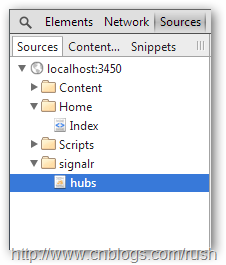
图10 SignalR代理对象
$.hubConnection.prototype.createHubProxies = function () {

    var proxies = {};

    this.starting(function () {

        // Register the hub proxies as subscribed

        // (instance, shouldSubscribe)

        registerHubProxies(proxies, true);

        this._registerSubscribedHubs();

    }).disconnected(function () {

        // Unsubscribe all hub proxies when we "disconnect".  This is to ensure that we do not re-add functional call backs.

        // (instance, shouldSubscribe)

        registerHubProxies(proxies, false);

    });

    proxies.gameNotificationHub = this.createHubProxy('gameNotificationHub');

    proxies.gameNotificationHub.client = { };

    proxies.gameNotificationHub.server = {

        challenge: function (connectionId, userId) {

            return proxies.gameNotificationHub.invoke.apply(proxies.gameNotificationHub, $.merge(["Challenge"], $.makeArray(arguments)));

         },

        challengeAccepted: function (connectionId) {

            return proxies.gameNotificationHub.invoke.apply(proxies.gameNotificationHub, $.merge(["ChallengeAccepted"], $.makeArray(arguments)));

         },

        challengeRefused: function (connectionId) {

            return proxies.gameNotificationHub.invoke.apply(proxies.gameNotificationHub, $.merge(["ChallengeRefused"], $.makeArray(arguments)));

         },

        gameMove: function (gameGuid, rowCol) {

            return proxies.gameNotificationHub.invoke.apply(proxies.gameNotificationHub, $.merge(["GameMove"], $.makeArray(arguments)));

         }

    };

    return proxies;

};
CSS样式
我们使用bootstrap样式,在文件夹Content中添加bootstrap-responsive.css和bootstrap.css文件。
然后,在BundleConfig中添加css文件引用,具体定义如下:
            bundles.Add(new StyleBundle("~/Styles/bootstrap/css").Include(

                "~/Content/bootstrap-responsive.css",

                "~/Content/bootstrap.css"));
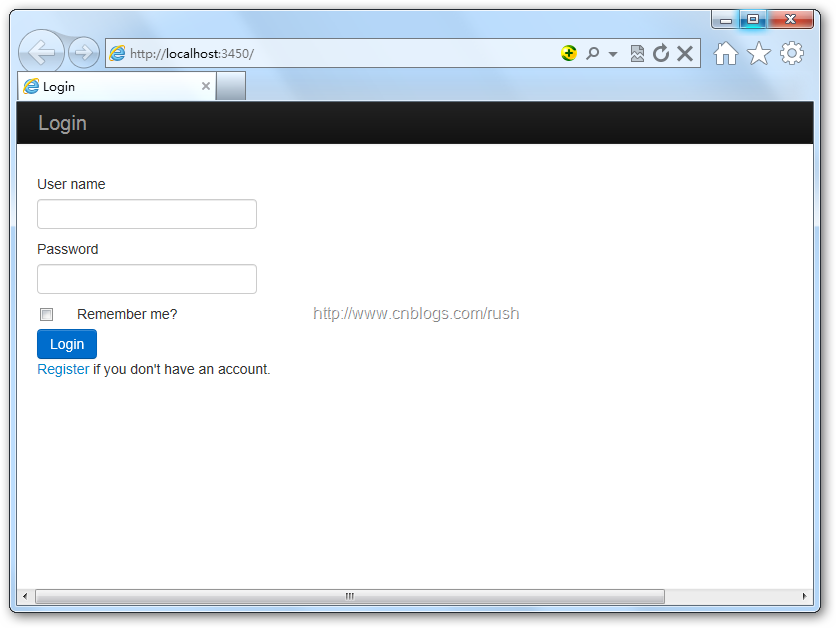
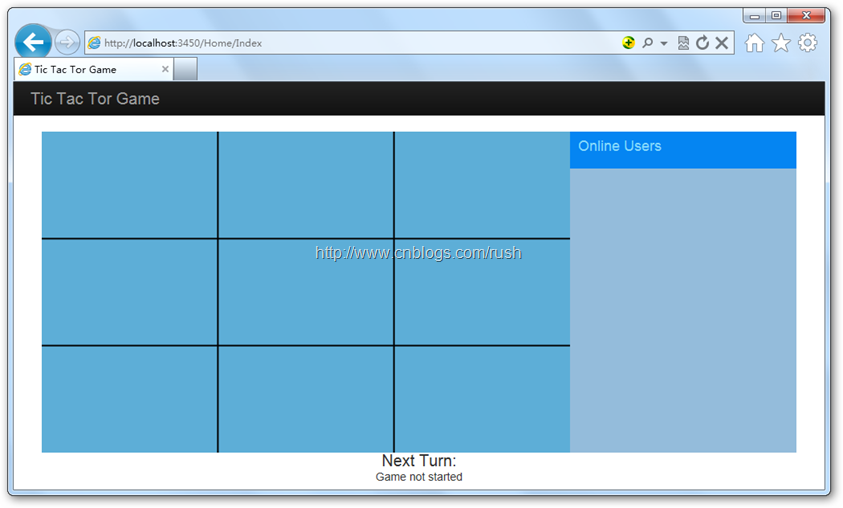
图10 井字游戏
1.1.3 总结
本文我们通过实现一个实时的井字游戏,介绍了通过ASP.NET MVC构建服务器端,并且提供游戏接口让客户端浏览器调用;然后,通过SignalR的Hub方式确保客户端和服务端链接的有效性;最后我们通过KnockoutJS实现页面的实时更新。
参考
[1] http://www.cnblogs.com/shanyou/archive/2012/07/28/2613693.html
[3] http://blogs.msdn.com/b/scott_hanselman/archive/2011/11/10/signalr.aspx
[5] http://www.cnblogs.com/rush/p/3574429.html
[6] https://github.com/dotnetcurry/signalr-tictactoe-dncmag5
SignalR + KnockoutJS + ASP.NET MVC4 实现井字游戏的更多相关文章
- SignalR + KnockoutJS + ASP.NET MVC 实现井字游戏
SignalR + KnockoutJS + ASP.NET MVC 实现井字游戏 1.1.1 摘要 今天,我们将使用SignalR + KnockoutJS + ASP.NET MVC实现一个实 ...
- Asp.net MVC4 Knockoutjs BootStrap Ace NinJect Jqgrid sqlserver2008
Asp.net MVC4 Knockoutjs BootStrap Ace NinJect Jqgrid sqlserver2008
- ASP.NET MVC4.0+ WebAPI+EasyUI+KnockOutJS快速开发框架 通用权限管理系统
1.基于 ASP.NET MVC4.0 + WebAPI + EasyUI + Knockout 的架构设计开发 2.采用MVC的框架模式,具有耦合性低.重用性高.生命周期成本低.可维护性高.有利软件 ...
- 一年开发ASP.NET MVC4项目经验总结
一年开发ASP.NET MVC4项目所用所学技术经验总结 阅读目录 文章背景 前端所用技术摘要 后端所用技术摘要 1. 文章背景 本人2014年从Java转行到C#从事BS项目的开发,刚开始接触的是A ...
- ASP.Net MVC4+Memcached+CodeFirst实现分布式缓存
ASP.Net MVC4+Memcached+CodeFirst实现分布式缓存 part 1:给我点时间,允许我感慨一下2016年 正好有时间,总结一下最近使用的一些技术,也算是为2016年画上一个完 ...
- CentOS上 Mono 3.2.8运行ASP.NET MVC4经验
周一到周三,折腾了两天半的时间,经历几次周折,在小蝶惊鸿的鼎力帮助下,终于在Mono 3.2.8上运行成功MVC4.在此总结经验如下: 系统平台的版本: CentOS 6.5 Mono 3.2.8 J ...
- ASP.NET MVC4入门到精通系列目录汇总
序言 最近公司在招.NET程序员,我发现好多来公司面试的.NET程序员居然都没有 ASP.NET MVC项目经验,其中包括一些工作4.5年了,甚至8年10年的,许多人给我的感觉是:工作了4.5年,We ...
- [MVC4]ASP.NET MVC4+EF5(Lambda/Linq)读取数据
继续上一节初始ASP.NET MVC4,继续深入学习,感受了一下微软的MVC4+EF5(EntityFramework5)框架的强大,能够高效的开发出网站应用开发系统,下面就看一下如何用MVC4+EF ...
- 21、ASP.NET MVC入门到精通——ASP.NET MVC4优化
本系列目录:ASP.NET MVC4入门到精通系列目录汇总 删除无用的视图引擎 默认情况下,ASP.NET MVCE同时支持WebForm和Razor引擎,而我们通常在同一个项目中只用到了一种视图引擎 ...
随机推荐
- 使用 KGDB 调试 Kernel On Red Hat Linux
1. KGDB 简介 KGDB 提供了一种使用 GDB 调试 Linux 内核的机制.使用 KGDB 可以象调试普通的应用程序那样,在内核中进行设置断点.检查变量值.单步跟踪程序运行 ...
- Java Web2
JavaBean组件. 定义方法:(假设有一个JavaBean的类名为CounterBean,它有一个count属性.) //在JSP文件中分别定义4种范围内的JavaBean对象的语法 //in p ...
- Ajax Step By Step2
第二.[$.get()和$.post()方法] .load()方法是局部方法(有需要父$),因为他需要一个包含元素的 jQuery 对象作为前缀.而$.get()和 $.post()是全局方法,无须指 ...
- 1214 - Large Division -- LightOj(大数取余)
http://lightoj.com/volume_showproblem.php?problem=1214 这就是一道简单的大数取余. 还想还用到了同余定理: 所谓的同余,顾名思义,就是许多的数被一 ...
- 优化后的 google提供的汉字转拼音类(针对某些htc等手机的不兼容情况)
/* * Copyright (C) 2011 The Android Open Source Project * * Licensed under the Apache License, Versi ...
- JSON与JAVA数据的转换
1. List集合转换成json代码 List list = new ArrayList(); list.add( "first" ); list.add( "sec ...
- C语言小练习四
题目要求:输入N个数,输出该数列中第k个最大者. 程序源码: #include <stdio.h> #include <string.h> void printResult(i ...
- UVa 11292 Dragon of Loowater
简单贪心 龙头的直径和人的佣金排序,价值小的人和直径小的配 #include<iostream> #include<cstdio> #include<cmath> ...
- n+1 < n , are you sure?
密码终于找回了,原来是我邮箱把改密链接的邮件当垃圾邮件了-- 回到正题,这是道面试题,原话大致是这样的: n+1<n成立吗?请说明. 当时我听到这个题后直觉是成立的,但是想不到怎么回事,后来别人 ...
- WinForm/Silverlight多线程编程中如何更新UI控件的值
单线程的winfom程序中,设置一个控件的值是很easy的事情,直接 this.TextBox1.value = "Hello World!";就搞定了,但是如果在一个新线程中这么 ...