
bootstrap的编辑标记 angularjs input 弹出框

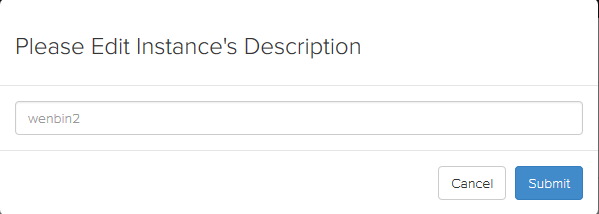
.html
<div>

    {{instance.description}}

    <span class="glyphicon glyphicon-pencil btn-link" ng-click="editInstance(instance)" ></span>

</div>

//以下是做出弹出框

<script type="text/ng-template" id="edit-instance-desc.html">

    <div class="modal-header">

        <h3>Please Edit Instance's Description</h3>

    </div>

    <div class="modal-body">

        <input class="text form-control" value="{$ instance.description $}" onFocus="if(value==defaultValue){value='';this.style.color='#000'}" onBlur="if(!value){value=defaultValue; this.style.color='#999'}" style="color:#999" ng-model="description" id="description" />

    </div>

    <div class="modal-footer">

        <button class="btn btn-default" ng-click="cancel()">Cancel</button>

        <button class="btn btn-primary" ng-click="confirm(description)">Submit</button>

    </div>

</script>
.js
// edit instance's description

    $scope.editInstance = function(instance){

        var modalInstance = $modal.open({

            templateUrl: 'edit-instance-desc.html',

            controller: EditInstanceDescController,

            resolve: {

                instance: function(){

                    return instance;

                }

            }

        });

        modalInstance.result.then(function(data) {

            if (data['error']){

                growl.error(data['error']);

            }else {

                $state.transitionTo($state.current, $stateParams, {

                    reload: true,

                    inherit: false,

                    notify: true

                });

            }

        }, function(){

        });

    };

    var EditInstanceDescController = function($scope, $modalInstance, growl, CommonHttpService, instance){

        $scope.instance = instance;

        $scope.description = instance.description;

        $scope.cancel = function(){

            $modalInstance.dismiss();

        };

        $scope.confirm = function(description){

            api_url = '/api/user/instance/' + instance.id + '/';

            post_data = {

                "editInstance":description

            };

            CommonHttpService.put(api_url, post_data).then(function(data){

                instance.description = description;

                $modalInstance.close(data);

            }, function(){

                $modalInstance.close(data);

            });

        }

    };
bootstrap的编辑标记 angularjs input 弹出框的更多相关文章
- JS组件系列——Bootstrap寒冬暖身篇:弹出框和提示框效果以及代码展示
前言:对于Web开发人员,弹出框和提示框的使用肯定不会陌生,比如常见的表格新增和编辑功能,一般常见的主要有两种处理方式:行内编辑和弹出框编辑.在增加用户体验方面,弹出框和提示框起着重要的作用,如果你的 ...
- 利用BootStrap Table插件实现自己的弹出框分页。
参考链接1: 官网:http://bootstrap-table.wenzhixin.net.cn/zh-cn/home/ 开始使用:http://bootstrap-table. ...
- Bootstrap方法为页面添加一个弹出框
<!DOCTYPE html> <html> <head> <meta charset="utf-8"> <title> ...
- bootstrap插件bootbox参数和自定义弹出框宽度设置
插件官方地址:http://bootboxjs.com/ alert: 1 bootbox.alert("Hello world!", function() {}); dialog ...
- 解决jsp中编辑和删除时候弹出框闪退的问题。
---恢复内容开始--- /* 火箭设备特殊记载</li> <!-- yw4 --> */ function getYw4DL(){ var controlparm={&quo ...
- Bootstrap:弹出框和提示框效果以及代码展示
前言:对于Web开发人员,弹出框和提示框的使用肯定不会陌生,比如常见的表格新增和编辑功能,一般常见的主要有两种处理方式:行内编辑和弹出框编辑.在增加用户体验方面,弹出框和提示框起着重要的作用,如果你的 ...
- JS组件Bootstrap实现弹出框和提示框效果代码
这篇文章主要介绍了JS组件Bootstrap实现弹出框和提示框效果代码,对弹出框和提示框感兴趣的小伙伴们可以参考一下 前言:对于Web开发人员,弹出框和提示框的使用肯定不会陌生,比如常见的表格新增和编 ...
- Bootstrap实现弹出框和提示框效果代码
一.Bootstrap弹出框使用过JQuery UI应该知道,它里面有一个dialog的弹出框组件,功能也很丰富.与jQuery UI的dialog类似,Bootstrap里面也内置了弹出框组件.打开 ...
- Bootstrap篇:弹出框和提示框效果以及代码展示
前言:对于Web开发人员,弹出框和提示框的使用肯定不会陌生,比如常见的表格新增和编辑功能,一般常见的主要有两种处理方式:行内编辑和弹出框编辑.在增加用户体验方面,弹出框和提示框起着重要的作用,如果你 ...
随机推荐
- 走进异步世界-犯傻也值得分享:ConfigureAwait(false)使用经验分享
在上周解决“博客程序异步化改造之后遭遇的性能问题”的过程中,我们干了一件自以为很有成就感的事——在表现层(MVC与WebForms)将所有使用await的地方都加上了ConfigureAwait(fa ...
- 为什么很多APP要有启动页面
我们启动APP时,一般都会是一张含有LOGO的图片.这张图片叫做启动页面. 这个启动页面是必须.一定需要的吗?有什么作用? 这是苹果官方对于iOS启动页的设计说明: 为了增强应用程序启动时的用 ...
- Eclipse统计代码行数
开发过程中,经常需要统计代码行数,这时可以通过Eclipse的Search功能来实现. 步骤: 1.在Package Explorer中选中需要统计的包: 2.单击菜单Search-->File ...
- 【Java每日一题】20161115
package Nov2016; import java.io.Serializable; public class Ques1115 implements Serializable{ private ...
- PostgreSQL类型转换
1.int装string select CAST (1234 AS text) select to_char(1234,’999‘) 2.string转int select cast('999' as ...
- Lucene.net站内搜索—6、站内搜索第二版
目录 Lucene.net站内搜索—1.SEO优化 Lucene.net站内搜索—2.Lucene.Net简介和分词Lucene.net站内搜索—3.最简单搜索引擎代码Lucene.net站内搜索—4 ...
- mac下彻底卸载mysql方法
sudo rm /usr/local/mysqlsudo rm -rf /usr/local/mysql*sudo rm -rf /Library/StartupItems/MySQLCOMsudo ...
- Google Web Designer – 创建引人入胜的 HTML5 网站
Google Web Designer 可以帮助你创建引人入胜,互动的基于 HTML5 的设计和动画,可以在任何设备上运行.如果你喜欢自己动手,设计背后的所有的代码都是可以手工编辑的. 虽然可视化工具 ...
- 常用的css命名规则
头:header 内容:content/container 尾:footer 导航:nav 侧栏:sidebar 栏目:column 页面外围控制整体布局宽度:wrapper 左右中:left rig ...
- 定制Eclipse IDE之插件篇(二)
上文回顾:定制Eclipse IDE之插件篇(一) 延续上一篇的插件篇,这一篇将会讲到一个最关键的插件aptana. 一.aptana插件 官方的解释我就不说了,从下面图可以看到插件提供了什么功能,列 ...