
使用 satis 搭建 composer 本地仓库
环境
- windows
- nginx
- php
- composer
安装
拉取 satis 项目包,并拉取项目依赖
```
composer create-project composer/satis --stability=dev
cd satis
composer install
<h2>配置</h2>

<p>修改 satis/config.json 文件,文件内容如下</p>
{
"name": "composer 本地仓库",
"homepage": "http://packages.example.org", // 访问域名
"repositories": [// 要拉取包的仓库地址
{ "type": "vcs", "url": "https://github.com/test-lin/db.git" },
{ "type": "vcs", "url": "https://github.com/test-lin/queue.git" },
{ "type": "vcs", "url": "https://github.com/test-lin/cache.git" },
{ "type": "vcs", "url": "http://192.168.6.251:3000/php/xjwSpider.git" }
],
"require": { // 要拉取到本地的包文件 注:不会包含包的依赖
"test-lin/db": "",
"test-lin/queue": "",
"test-lin/cache": "",
"php/xjwSpider": ""
},
"archive": {
"directory": "dist",
"format": "tar",
"prefix-url": "http://packages.example.org" // * 这个参数是当前项目的域名,作用是以zip压缩包的方式直接下载包文件
}
}
<h2>拉取包到本地仓库</h2>

<p>web/ 是本地仓库访问地址。</p>
php bin/satis build config.json web/
<p>如果需要定时更新,则需要配置定时任务去定时更新</p>

<h2>设置本地仓库</h2>

<p>nginx 设置虚拟主机</p>
server {
listen 80;
server_name packages.example.org;
root /var/www/satis/web;
index index.php index.html;
location ~* \.php$ {

    include fastcgi_params;

    fastcgi_param SCRIPT_FILENAME $document_root$fastcgi_script_name;

    fastcgi_pass 127.0.0.1:9000;

    fastcgi_index index.php;

}
}
<h2>使用本地仓库中的包</h2>

<p>composer.json 文件中添加以下 json 拉取,即可获取本地库了.</p>

<p>如果本地仓库不存在且有网络会去网络中获取。repositories 参数可以设置多个</p>
{
"repositories": [{
"type": "composer",
"url": "http://packages.example.org"
}]
}
<h2>FQA</h2>

<h3>1. github 的包需要配置 token</h3>
Could not fetch https://api.github.com/repos/test-lin/db/git/refs/heads?per_page=100, please create a GitHub OAuth token to go over the API rate limit
Head to https://github.com/settings/tokens/new?scopes=repo&description=Composer+on+packages.example.org+2018-06-28+0310
to retrieve a token. It will be stored in "/home/vagrant/.config/composer/auth.json" for future use by Composer.
<p>解决方法:</p>
<p>访问命令行中提示的 <a href="https://github.com/settings/tokens/new?scopes=repo&description=Composer+on+packages.example.org+2018-06-28+0310" rel="nofollow noreferrer">https://github.com/settings/t...</a></p>
<p>复制 token description 文本框中内容</p>
<p>拉到页底 点击 generate token</p>
<p>在命令行中粘贴复制内容确认限可</p>
<h3>2. 私有包,拉取不了</h3>
<p>解决方法:</p>
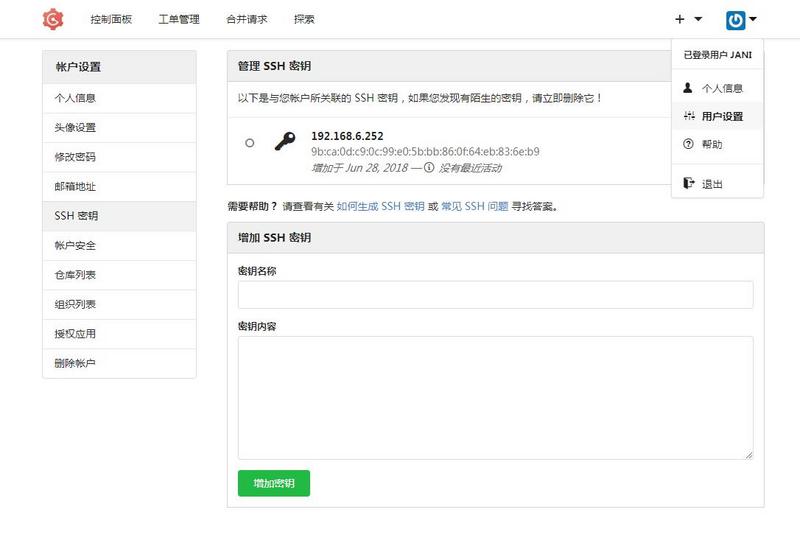
<p>本地生成 ssh key ,配置到要拉取项目的平台即可,免密拉取了</p>
ssh-keygen -t rsa
cat ~/.ssh/id_rsa.pub
<p>以 gogs 为例</p>
<h3>3. composer 不支持 http</h3>
Your configuration does not allow connections to http://192.168.6.251:3000/php/xjwSpider.git. See https://getcomposer.org/doc/06-config.md#secure-http for details.
<p>解决方法:</p>
composer config -g secure-http false
<h3>4. 拉取的包 composer.json 配置有误</h3>
[Composer\Repository\InvalidRepositoryException]
No valid composer.json was found in any branch or tag of http://192.168.6.251:3000/php/xjwSpider.git, could not load a package from it.
<p>解决方法:</p>

<ol>

<li>确保项目根部有 composer.json</li>

<li>composer.json 里需要设置 name</li>

</ol>

原文地址:https://segmentfault.com/a/1190000016523278
使用 satis 搭建 composer 本地仓库的更多相关文章
- 使用Nexus搭建Maven本地仓库
阅读目录 序 Nexus 本文版权归mephisto和博客园共有,欢迎转载,但须保留此段声明,并给出原文链接,谢谢合作. 文章是哥(mephisto)写的,SourceLink 序 在工作中可能存在有 ...
- nexus 搭建maven本地仓库
使用Nexus搭建Maven本地仓库 阅读目录 序 Nexus 序 在工作中可能存在有些开发机器不能上网,大量的机器获取jar包会导致公司网络很慢,还有时候公司会自己发布自己的项目版本,其他的项目 ...
- Linux 用脚本编写搭建yum本地仓库
Linux 用脚本编写搭建yum本地仓库 源码如下: #!/bin/bash #该脚本用于自动化搭建本地yum仓库 #挂载光盘 #作者:雨中落叶 #博客:https://www.cnblogs.com ...
- 搭建YUM本地仓库
本文介绍如何利用CentOS 7 ISO光盘镜像搭建YUM本地仓库. 环境准备: (1)VMware15.5版本虚拟机 (2)CentOS-7-x86_64-DVD-1908光盘镜像文件 1. 搭建Y ...
- 搭建maven本地仓库,idea应用本地maven仓库
提环境: 安装好tomcat.maven.jdk.idea. 打开maven安装目录,在目录下新建 maven仓库文件夹(名子随便): 打开conf\setting.xml 加入<localRe ...
- Satis搭建composer私有库(自定义下载目录)
在我们的日常php开发中需要使用大量的第三方包和类库, 怎么管理是一个问题, 我们用的Yii2框架, 但是并没有把composer用起来, 由于最近更换为docker部署项目, 于是想起来用compo ...
- satis 搭建 Composer 私有库的方法
安装 satis 命令行下执行: php create-project composer/satis --stability=dev --keep-vcs . 配置 创建 satis.json 文件, ...
- 使用apt-mirror搭建debian本地仓库
apt-mirror能够将官方镜像下载到本地,并保证目录结构与其一致,但是不能对镜像仓库进行修改.如果想要修改镜像仓库,需要使用reprepro. 1.安装apt-mirror # aptitude ...
- 使用Nexus2搭建Maven本地仓库
由于OS为WindowsXP,而Nexus3forWindows为x64版本,只能选择安装nexus2了. Windows(x86)平台,Nexus Repository Manager OSS 2. ...
随机推荐
- 洛谷P1427 小鱼的数字游戏
题目描述 小鱼最近被要求参加一个数字游戏,要求它把看到的一串数字(长度不一定,以0结束,最多不超过100个,数字不超过2^32-1),记住了然后反着念出来(表示结束的数字0就不要念出来了).这对小鱼的 ...
- C/C++ 文件路径解析
本系列文章由 @yhl_leo 出品,转载请注明出处. 文章链接: http://blog.csdn.net/yhl_leo/article/details/50782054 首先,看一下C/C++中 ...
- nyoj 115dijkstar求最短路
#include<stdio.h> #include<string.h> #define inf 0x3fffffff #define N 1100 int ma[N][N], ...
- nyoj 2 括号配对问题水
#include<stdio.h> #include<stack> #include<string.h> #define N 11000 using namesp ...
- 关于工作,学习中定时备份的几个方法(cron,git,mail)
首先介绍一下cron这个定时备份的工具: crontab -e : 运行文字编辑器来设定时程表,内定的文字编辑器是 VI.假设你想用别的文字编辑器.则请先设定 VISUAL 环境变数来指定使用那个文字 ...
- Spring进阶之路(10)-Advice简单介绍以及通过cglib生成AOP代理对象
Advice简单介绍 1. Before:在目标方法运行之前运行织入.假设Before的处理中没有进行特殊的处理.那么目标方法终于会运行,可是假设想要阻止目标方法运行时.能够通过抛出一个异常来实现.B ...
- Cocos2d-x3.0 从代码中获取cocostudio编辑的UI控件
依据名字查找控件 须要包括的头文件及名字空间: #include "cocostudio/CocoStudio.h" #include "ui/CocosGUI.h&qu ...
- 数据可视化利器pyechart和matplotlib比较
python中用作数据可视化的工具有多种,其中matplotlib最为基础.故在工具选择上,图形美观之外,操作方便即上乘. 本文着重说明常见图表用基础版matplotlib和改良版pyecharts作 ...
- 南邮JAVA程序设计实验1 综合图形界面程序设计
南邮JAVA程序设计实验1 综合图形界面程序设计 实验目的: 学习和理解JAVA SWING中的容器,部件,布局管理器和部件事件处理方法.通过编写和调试程序,掌握JAVA图形界面程序设计的基本方法. ...
- HDU 2181 DFS
Problem Description 一个规则的实心十二面体,它的 20个顶点标出世界著名的20个城市,你从一个城市出发经过每一个城市刚好一次后回到出发的城市. Input 前20行的第i行有3 ...