
WebApi 参数绑定方法
WebAPI 2参数绑定方法
简单类型参数
Example 1: Sending a simple parameter in the Url
|
01
02
03
04
05
06
07
08
09
10
11
|
[RoutePrefix("api/values")]public class ValuesController : ApiController{ // http://localhost:49407/api/values/example1?id=2 [Route("example1")] [HttpGet] public string Get(int id) { return "value"; }} |
Example 2: Sending simple parameters in the Url
|
01
02
03
04
05
06
07
|
// http://localhost:49407/api/values/example2?id1=1&id2=2&id3=3[Route("example2")][HttpGet]public string GetWith3Parameters(int id1, long id2, double id3){ return "value";} |
Example 3: Sending simple parameters using attribute routing
|
01
02
03
04
05
06
07
|
// http://localhost:49407/api/values/example3/2/3/4[Route("example3/{id1}/{id2}/{id3}")][HttpGet]public string GetWith3ParametersAttributeRouting(int id1, long id2, double id3){ return "value";} |
Example 4: Sending an object in the Url
// http://localhost:49407/api/values/example4?id1=1&id2=2&id3=3

[Route("example4")]

[HttpGet]

public string GetWithUri([FromUri] ParamsObject paramsObject)

{

  return "value:" + paramsObject.Id1;

}
Example 5: Sending an object in the Request body
[Route("example5")]

[HttpPost]

public string GetWithBody([FromBody] ParamsObject paramsObject)

{

  return "value:" + paramsObject.Id1;

}
注意 [FromBody] 只能用一次,多于一次将不能正常工作
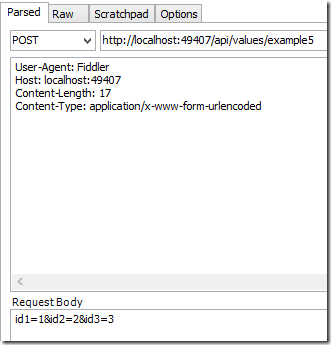
Calling the method using Urlencoded in the body:
|
01
02
03
04
05
06
|
User-Agent: FiddlerHost: localhost:49407Content-Length: 32Content-Type: application/x-www-form-urlencodedid1=1&id2=2&id3=3 |
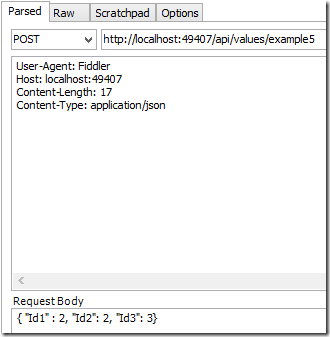
Calling the method using Json in the body
|
01
02
03
04
05
06
|
User-Agent: FiddlerHost: localhost:49407Content-Length: 32Content-Type: application/json{ "Id1" : 2, "Id2": 2, "Id3": 3} |
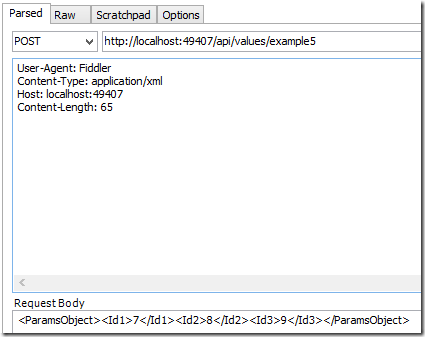
Calling the method using XML in the body
This requires extra code in the Global.asax
|
01
02
03
04
05
06
07
08
09
10
11
12
|
protected void Application_Start(){ var xml = GlobalConfiguration.Configuration.Formatters.XmlFormatter; xml.UseXmlSerializer = true;The client request is as follows:User-Agent: FiddlerContent-Type: application/xmlHost: localhost:49407Content-Length: 65<ParamsObject><Id1>7</Id1><Id2>8</Id2><Id3>9</Id3></ParamsObject> |
数组和列表(Array,List)
Example 6: Sending a simple list in the Url
|
01
02
03
04
05
06
07
08
09
10
11
12
|
// http://localhost:49407/api/values/example6?paramsObject=2,paramsObject=4,paramsObject=9[Route("example6")][HttpGet]public string GetListFromUri([FromUri] List<int> paramsObject){ if (paramsObject != null) { return "recieved a list with length:" + paramsObject.Count; } return "NOTHING RECIEVED...";} |
Example 7: Sending an object list in the Body
|
01
02
03
04
05
06
07
08
09
10
11
12
|
// http://localhost:49407/api/values/example8[Route("example8")][HttpPost]public string GetListFromBody([FromBody] List<ParamsObject> paramsList){ if (paramsList != null) { return "recieved a list with length:" + paramsList.Count; } return "NOTHING RECIEVED...";} |
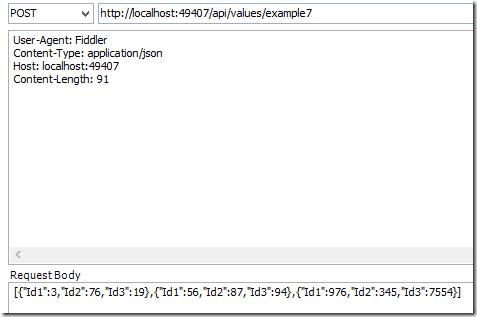
Calling with Json:
|
01
02
03
04
05
06
|
User-Agent: FiddlerContent-Type: application/jsonHost: localhost:49407Content-Length: 91[{"Id1":3,"Id2":76,"Id3":19},{"Id1":56,"Id2":87,"Id3":94},{"Id1":976,"Id2":345,"Id3":7554}] |
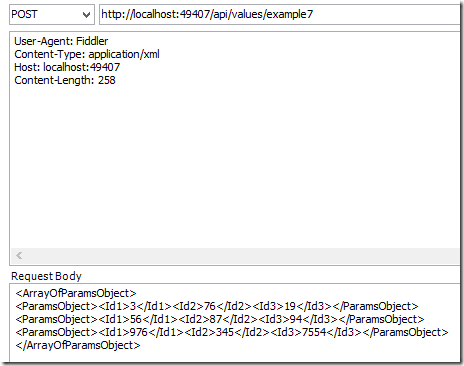
Calling with XML:
|
01
02
03
04
05
06
07
08
09
10
|
User-Agent: FiddlerContent-Type: application/xmlHost: localhost:49407Content-Length: 258<ArrayOfParamsObject><ParamsObject><Id1>3</Id1><Id2>76</Id2><Id3>19</Id3></ParamsObject><ParamsObject><Id1>56</Id1><Id2>87</Id2><Id3>94</Id3></ParamsObject><ParamsObject><Id1>976</Id1><Id2>345</Id2><Id3>7554</Id3></ParamsObject></ArrayOfParamsObject> |
Example 8: Sending object lists in the Body
|
01
02
03
04
05
06
07
08
09
10
11
|
[Route("example8")][HttpPost]public string GetListsFromBody([FromBody] List<List<ParamsObject>> paramsList){ if (paramsList != null) { return "recieved a list with length:" + paramsList.Count; } return "NOTHING RECIEVED...";} |
This is a little bit different to the previous examples. The body can only send one single object to Web API. Because of this, the lists of objects are wrapped in a list or a parent object.
|
01
02
03
04
05
06
07
08
09
10
11
12
13
14
15
16
17
18
|
POST http://localhost:49407/api/values/example8 HTTP/1.1User-Agent: FiddlerContent-Type: application/jsonHost: localhost:49407Content-Length: 185[ [ {"Id1":3,"Id2":76,"Id3":19}, {"Id1":56,"Id2":87,"Id3":94}, {"Id1":976,"Id2":345,"Id3":7554} ], [ {"Id1":3,"Id2":76,"Id3":19}, {"Id1":56,"Id2":87,"Id3":94}, {"Id1":976,"Id2":345,"Id3":7554} ]] |
WebApi 参数绑定方法的更多相关文章
- asp.net webapi 参数绑定总结
首先必须得更正下自己一直以来对于get请求和post请求理解的一个误区:get请求只能通过url传参,post请求只能通过body传参. 其实上面的理解是错误的,翻阅了不少资料及具体实践,正确理解应该 ...
- asp.net webapi参数绑定
content={"content": [{"comb_id": "100323","comb_name": " ...
- WebAPI 2参数绑定方法
简单类型参数 Example 1: Sending a simple parameter in the Url [RoutePrefix("api/values")] public ...
- .net core webapi参数绑定处理
在 Startup的ConfigureServices方法中添加: services.Configure<ApiBehaviorOptions>(options => { optio ...
- springMVC使用HandlerMethodArgumentResolver 自定义解析器实现请求参数绑定方法参数
http://blog.csdn.net/truong/article/details/30971317 http://blog.csdn.net/fytain/article/details/439 ...
- webapi简介及参数绑定
介绍:WebAPI用来开发系统间接口的技术,基于HTTP协议,返回默认是json格式.比wcf简单 更通用,更轻量级,更省流量(json格式):WebAPI尽可能复用MVC路由.ModelBinder ...
- SpringMVC-简单参数绑定
SpringMVC-简单参数绑定 众所周知,springmvc是用来处理页面的一些请求,然后将数据再通过视图返回给用户的,前面的几篇博文中使用的都是静态数据,为了能快速入门springmvc,在 ...
- WebAPI下的如何实现参数绑定
本文将概述在WebAPI方式下将如何将参数绑定到一个action方法,包括参数是如何被读取,一系列规则决定特定环境采用的那种绑定方式,文章最后将给出一些实际的例子. Parameter binding ...
- [译]WebAPI下的如何实现参数绑定
本文将概述在WebAPI方式下将如何将参数绑定到一个action方法,包括参数是如何被读取,一系列规则决定特定环境采用的那种绑定方式,文章最后将给出一些实际的例子. Parameter binding ...
随机推荐
- 【ASP.NET Core】MVC中自定义视图的查找位置
.NET Core 的内容处处可见,刷爆全球各大社区,所以,老周相信各位大伙伴已经看得不少了,故而,老周不考虑一个个知识点地去写,那样会成为年度最大的屁话,何况官方文档也很详尽.老周主要扯一下大伙伴们 ...
- Cisco配置aaa验证
当您的网络中部署了一台集中的radius校验服务器(比如我司的SAM,cisco的ACS等),希望对登陆设备的用户身份进行合法性校验,而账号都统一由该radius服务器集中产生与维护,您希望所有的登入 ...
- 刚买个炼狱蝰蛇1800dpi的下完驱动提示没有发现鼠标
2017-02-19补充:可以下载下面的程序 ,也可以访问 http://cn.razerzone.com/synapse/ 下载雷云 也可解决问题 ------------------------ ...
- mysql SQL语法总结
mysql主键操作 删除表主键: alter table student drop primary key; 增加表主键: alter table student add primary key(id ...
- 我的java之路week2类的无参、带参方法
2.1语法 public 返回值类型 方法名(){ //方法体 } 2.2方法的调用语法 对象名.方法名 计算平均分和总成绩 public class Score { /** * 创建类 ScoreC ...
- python中的time模块
time模块--时间获取和转换 time模块提供各种时间相关的功能 与时间相关的模块有:time,datetime,calendar 必要说明: 这个模块的功能不是适用于所有的平台 这个模块中定义的大 ...
- Python基础篇(七)
加上两个下划线变量或者方法变为私有. >>> class Bird: ... __song = "spark" ... def sing(self): ...
- ant基础[转]
原文链接:http://www.cnblogs.com/wufengxyz/archive/2011/11/24/2261797.html 1,什么是antant是构建工具2,什么是构建概念到处可查到 ...
- git的一些常见命令
一.新建代码库 # 在当前目录新建一个Git代码库 $ git init # 新建一个目录,将其初始化为Git代码库 $ git init [project-name] # 下载一个项目和它的整个代码 ...
- HDU 3374 String Problem
最大最小表示法与KMP求循环节 最大最小表示法 最大最小表示法与KMP求循环节的模板题, #include <iostream> #include <cstdio> #incl ...