
YARN集群的mapreduce测试(五)
将user表计算后的结果分区存储
测试准备:
首先同步时间,然后master先开启hdfs集群,再开启yarn集群;用jps查看:
master上: 先有NameNode、SecondaryNameNode;再有ResourceManager;
slave上: 先有DataNode;再有NodeManager;
如果master启动hdfs和yarn成功,但是slave节点有的不成功,则可以使用如下命令手动启动:
| hadoop-daemon.sh start datanode |
| yarn-daemon.sh start nodemanager |
然后在集群的主机本地环境创建myinfo.txt;内容如下:
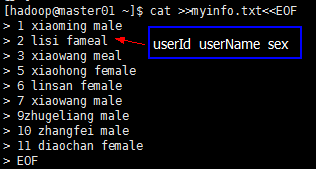
然后将测试文件myinfo.txt上传到集群中:

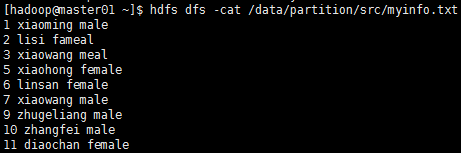
测试目标:
hadoop集群分区及缓存:
1、分区是必须要经历Shuffle过程的,没有Shuffle过程无法完成分区操作
2、分区是通过MapTask输出的key来完成的,默认的分区算法是数组求模法:
数组求模法:
将Map的输出Key调用hashcode()函数得到的哈希吗(hashcode),此哈希吗是一个数值类型,将此哈希吗数值直接与整数的最大值(Integer.MAXVALUE)取按位与(&)操作,将与操作的结果与ReducerTask
的数量取余数,将此余数作为当前Key落入的Reduce节点的索引;
-------------------------
Integer mod = (Key.hashCode()&Integer.MAXVALUE)%NumReduceTask;
被除数=34567234
NumReduceTas=3
------结果:
0、1、2 这三个数作为Reduce节点的索引;
数组求模法是有HashPartitioner类来实现的,也是MapReduce分区的默认算法;
测试代码:
 package com.mmzs.bigdata.yarn.mapreduce;

 import java.io.IOException;

 import org.apache.hadoop.io.LongWritable;

 import org.apache.hadoop.io.Text;

 import org.apache.hadoop.mapreduce.Mapper;

 public class PartitionMapper extends Mapper<LongWritable, Text,LongWritable, Text>{

     private LongWritable outKey;

     private Text outValue;

     @Override

     protected void setup(Mapper<LongWritable, Text, LongWritable, Text>.Context context)

             throws IOException, InterruptedException {

         outKey = new LongWritable();

         outValue= new Text();

     }

     @Override

     protected void cleanup(Mapper<LongWritable, Text, LongWritable, Text>.Context context)

             throws IOException, InterruptedException {

         outKey=null;

         outValue=null;

     }

     @Override

     protected void map(LongWritable key, Text value,

             Mapper<LongWritable, Text, LongWritable, Text>.Context context)

             throws IOException, InterruptedException {

         String[] fields=value.toString().split("\\s+");

         Long userId=Long.parseLong(fields[0]);

         outKey.set(userId);

         outValue.set(new StringBuilder(fields[1]).append("\t").append(fields[2]).toString());

         context.write(outKey, outValue);

     }

 }
PartitionMapper
 package com.mmzs.bigdata.yarn.mapreduce;

 import org.apache.hadoop.io.LongWritable;

 import org.apache.hadoop.mapreduce.Partitioner;

 public class MyPartitoner extends Partitioner {

     @Override

     public int getPartition(Object key, Object value, int num) {

         LongWritable userId=(LongWritable)key;

         Long userCode=userId.get();

         //分区的依据

         if(userCode<6){

             return 0;

         }else if(userCode<10){

             return 1;

         }else{

             return 2;

         }

     }

 }
MyPartitoner
 package com.mmzs.bigdata.yarn.mapreduce;

 import java.io.IOException;

 import java.util.Iterator;

 import org.apache.hadoop.io.LongWritable;

 import org.apache.hadoop.io.Text;

 import org.apache.hadoop.mapreduce.Reducer;

 public class PartitionReducer extends Reducer<LongWritable, Text, LongWritable, Text>{

     @Override

     protected void cleanup(Reducer<LongWritable, Text, LongWritable, Text>.Context context)

             throws IOException, InterruptedException {

         super.cleanup(context);

     }

     @Override

     protected void reduce(LongWritable key, Iterable<Text> values,

             Reducer<LongWritable, Text, LongWritable, Text>.Context context) throws IOException, InterruptedException {

             Iterator<Text> its= values.iterator();

             if(its.hasNext()){

                 context.write(key, its.next());

             }

     }

     @Override

     protected void setup(Reducer<LongWritable, Text, LongWritable, Text>.Context context)

             throws IOException, InterruptedException {

         super.setup(context);

     }

 }
PartitionReducer
 package com.mmzs.bigdata.yarn.mapreduce;

 import java.io.IOException;

 import java.net.URI;

 import java.net.URISyntaxException;

 import org.apache.hadoop.conf.Configuration;

 import org.apache.hadoop.fs.FileSystem;

 import org.apache.hadoop.fs.Path;

 import org.apache.hadoop.io.LongWritable;

 import org.apache.hadoop.io.Text;

 import org.apache.hadoop.mapreduce.Job;

 import org.apache.hadoop.mapreduce.lib.input.FileInputFormat;

 import org.apache.hadoop.mapreduce.lib.output.FileOutputFormat;

 public class ParititionDriver {

 private static FileSystem fs;

     private static Configuration conf;

     static{

         String uri="hdfs://master01:9000/";

         conf=new Configuration();

         try {

             fs=FileSystem.get(new URI(uri),conf,"hadoop");

         } catch (IOException e) {

             // TODO Auto-generated catch block

             e.printStackTrace();

         } catch (InterruptedException e) {

             // TODO Auto-generated catch block

             e.printStackTrace();

         } catch (URISyntaxException e) {

             // TODO Auto-generated catch block

             e.printStackTrace();

         }

     }

     public static void main(String[] args) throws Exception{

         Job wcJob =getJob(args);

         if(null==wcJob)return;

                 /*

                  *提交Job到集群并等到Job运行完成,参数true表示将Job的运行是状态信息返回到

                  *客户端控制台输出,返回值的布尔值代表Job是否运行成功

                  */

                 boolean flag=wcJob.waitForCompletion(true);

                 System.exit(flag?0:1);

     }

     public static Job getJob(String[] args) throws Exception{

         if(null==args||args.length<2)return null;

         //放置需要处理的数据所在的HDFS路径

         Path inputPath=new Path(args[0]);

         //放置Job作业执行完成之后其处理结果的输出路径

         Path ouputPath=new Path(args[1]);

         //如果输出目录已经存在则将其删除并重建

         if(!fs.exists(inputPath))return null;

         if(fs.exists(ouputPath)){

             fs.delete(ouputPath,true);

         }

         //获取Job实例

         Job wcJob=Job.getInstance(conf, "PartitionerJob");

         //设置运行此jar包的入口类

         wcJob.setJarByClass(ParititionDriver.class);

         //设置job调用的Mapper类

         wcJob.setMapperClass(PartitionMapper.class);

         //设置job调用的Reducer类(如果一个job没有ReduceTask则此条语句可以不掉用)

         wcJob.setReducerClass(PartitionReducer.class);

         //设置MapTask的输出值类型

         wcJob.setMapOutputKeyClass(LongWritable.class);

         //设置MapTask的输出键类型

         wcJob.setMapOutputValueClass(Text.class);

         //设置整个Job的输出键类型

         wcJob.setOutputKeyClass(LongWritable.class);

         //设置整个Job的输出值类型

         wcJob.setOutputValueClass(Text.class);

         //设置分区类

         wcJob.setPartitionerClass(MyPartitoner.class);

         wcJob.setNumReduceTasks(3);//这个数字和MyPartitioner类中的三种分区依据相对应

         //如果将数字调整大了,那么只有分区依据的前三个文件有内容,多出任务对应的仅仅是个空分区、空文件;

         //如果将数字调整小了,那么将得不到任何一个分区结果

         //设置整个Job需要处理数据的输入路径

         FileInputFormat.setInputPaths(wcJob, inputPath);

         //设置整个Job需要计算结果的输出路径

         FileOutputFormat.setOutputPath(wcJob, ouputPath);

         return wcJob;

     }

 }

 ParititionDriver
ParititionDriver
测试结果:
运行时传入参数是:
如果在客户端eclipse上运行:传参需要加上集群的master的uri即 hdfs://master01:9000
输入路径参数: /data/partition/src
输出路径参数: /data/partition/dst

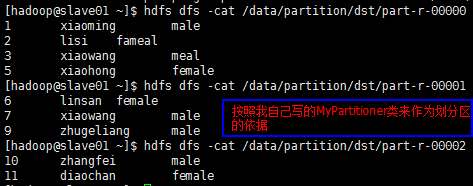
深入测试:(修改PartitionDriver类的如下代码)
//设置分区类

wcJob.setPartitionerClass(MyPartitoner.class);

wcJob.setNumReduceTasks(3);//这个数字和MyPartitioner类中的三种分区依据相对应
//如果将数字调整大了(比如调整为4),那么只有分区依据的前三个文件有内容,多出任务对应的仅仅是个空分区、空文件;

//如果将数字调整小了(比如调整为2),那么将得不到任何一个分区结果

小结:
1、数据量需要达到一定的数量级使用hadoop集群来处理才是划算的
2、集群的计算性能取决于任务数量的多少,设置任务数量必须充分考虑到集群的计算能力(比如:物理节点数量);
a、Map设置的任务数量作为最小值参考
b、Reduce的任务数默认是1(使用的也是默认的Partitioner类),如果设置了则启动设置的数量;
不管MapTask还是ReduceTask,只要任务数量越多则并发能力越强,处理效率会在一定程度上越高,但是设置的任务数量必须参考集群中的物理节点数量,如果设置的任务数量过多,会导致每个物理节点上分摊的任务数量越多,处理器并发每一个任务产生的计算开销越大,任务之间因处理负载导致相互之间的影响非常大,任务失败率上升(任务失败时会重新请求进行计算,最多重新请求3次),计算性能反而下降,因此在设计MapTask与ReduceTask任务数量时必须权衡利弊,折中考虑...
YARN集群的mapreduce测试(五)的更多相关文章
- YARN集群的mapreduce测试(六)
两张表链接操作(分布式缓存): ----------------------------------假设:其中一张A表,只有20条数据记录(比如group表)另外一张非常大,上亿的记录数量(比如use ...
- YARN集群的mapreduce测试(四)
将手机用户使用流量的数据进行分组,排序: 测试准备: 首先同步时间,然后master先开启hdfs集群,再开启yarn集群:用jps查看: master上: 先有NameNode.SecondaryN ...
- YARN集群的mapreduce测试(三)
将user表.group表.order表关:(类似于多表关联查询) 测试准备: 首先同步时间,然后 开启hdfs集群,开启yarn集群:在本地"/home/hadoop/test/" ...
- YARN集群的mapreduce测试(二)
只有mapTask任务没有reduceTask的情况: 测试准备: 首先同步时间,然后 开启hdfs集群,开启yarn集群:在本地"/home/hadoop/test/"目录创建u ...
- YARN集群的mapreduce测试(一)
hadoop集群搭建中配置了mapreduce的别名是yarn [hadoop@master01 hadoop]$ mv mapred-site.xml.template mapred-site.xm ...
- 大数据入门第八天——MapReduce详解(三)MR的shuffer、combiner与Yarn集群分析
/mr的combiner /mr的排序 /mr的shuffle /mr与yarn /mr运行模式 /mr实现join /mr全局图 /mr的压缩 今日提纲 一.流量汇总排序的实现 1.需求 对日志数据 ...
- Dubbo入门到精通学习笔记(十五):Redis集群的安装(Redis3+CentOS)、Redis集群的高可用测试(含Jedis客户端的使用)、Redis集群的扩展测试
文章目录 Redis集群的安装(Redis3+CentOS) 参考文档 Redis 集群介绍.特性.规范等(可看提供的参考文档+视频解说) Redis 集群的安装(Redis3.0.3 + CentO ...
- Yarn 集群环境 HA 搭建
环境准备 确保主机搭建 HDFS HA 运行环境 步骤一:修改 mapred-site.xml 配置文件 [root@node-01 ~]# cd /root/apps/hadoop-3.2.1/et ...
- Yarn篇--搭建yarn集群
一.前述 有了上次hadoop集群的搭建,搭建yarn就简单多了.废话不多说,直接来 二.规划 三.配置如下 yarn-site.xml配置 <property> <n ...
随机推荐
- webstorm验证码
2017-2-16 亲测可用 http://idea.imsxm.com/ webstorm10 注册码 User or company Name: EMBRACE ===== LICENSE KEY ...
- idea jetty 配置
一.jetty 网址下载地:https://www.eclipse.org/jetty/ 1.如下图红色箭头--> 点击Downloads 下载 2.选择最新版 .ZIP 下载 3.选择安装路径 ...
- Shell编写字符菜单管理-8
第8章 Shell编写字符菜单管理 一.shell函数定义function menu(){ echo 'this is a func!!';} 二.shell函数使用menu 三.cat命令的here ...
- repo 用法
repo的用法(zz) 注:repo只是google用Python脚本写的调用git的一个脚本,主要是用来下载.管理Android项目的软件仓库.(也就是说,他是用来管理给git管理的一个个仓库的) ...
- LAMP安装教程
LAMP环境配置安装注意安装步骤及说明事项. Linux + apache+mysql+php 附件: 1. 访问ftp报错 解决: 关闭selinux vi /etc/selinux/config ...
- eclipse项目无故报错,markers信息为An error occurred while filtering resources
eclipse项目无故报错,markers信息为An error occurred while filtering resources 描述:eclipse项目和resource文件上有红色的叉,其m ...
- day_8文件的操作
首先昨天讲的内容有 类型转换 1:数字类型: int () bool() float() 2:str 与int: int('10') | int('-10') | int('0') | fl ...
- MySQL--自增列学习
##=====================================================================================## 在数据库表设计中会纠 ...
- VS2013和NuGet
1.前言 有时候在使用VS2013时需要用到第三方的dll,这时候NuGet就是一个很方便的工具.但是这个小东东也是和VS不同的版本相关的,最开始不知道,乱安装一气,最后就是很多情况下不能用.这两天在 ...
- Apache Sentry部署
三台hadoop集群,分别是master.slave1和slave2.下面是这三台机器的软件分布: master:NameNode.ZK.HiveMetaSotre.HiveServer2.Sentr ...