
003 使用SpringMVC开发restful API--查询用户
一:介绍说明
1.介绍

2.restful api的成熟度

二:编写Restful API的测试用例
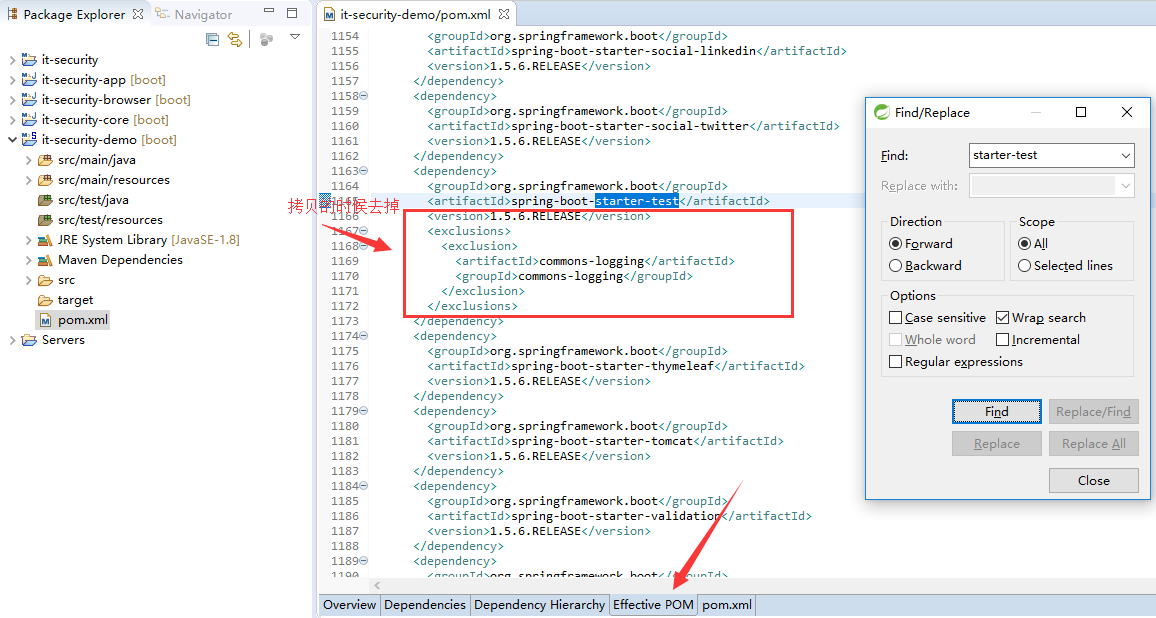
1.引入spring的测试框架
在effective pom中查找
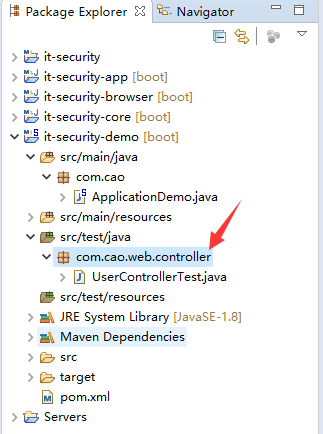
2.新建测试包,测试类
3.测试用例程序
 package com.cao.web.controller;

 import org.junit.Before;

 import org.junit.Test;

 import org.junit.runner.RunWith;

 import org.springframework.beans.factory.annotation.Autowired;

 import org.springframework.boot.test.context.SpringBootTest;

 import org.springframework.http.MediaType;

 import org.springframework.test.context.junit4.SpringRunner;

 import org.springframework.test.web.servlet.MockMvc;

 import org.springframework.test.web.servlet.request.MockMvcRequestBuilders;

 import org.springframework.test.web.servlet.result.MockMvcResultMatchers;

 import org.springframework.test.web.servlet.setup.MockMvcBuilders;

 import org.springframework.web.context.WebApplicationContext;

 //如何运行测试用例

 @RunWith(SpringRunner.class)

 //这是一个测试用例

 @SpringBootTest

 public class UserControllerTest {

     //伪造测试用例,不需要跑tomcat,运行会很快

     @Autowired

     private WebApplicationContext wac;

     //伪造的一个mvc环境

     private MockMvc mockMvc;

     @Before

     public void setup() {

         //初始化这个环境

         mockMvc=MockMvcBuilders.webAppContextSetup(wac).build();

     }

     @Test

     public void whenQuerySuccess() throws Exception {

         //发送请求

         mockMvc.perform(MockMvcRequestBuilders.get("/user")

                 .contentType(MediaType.APPLICATION_JSON_UTF8))

             .andExpect(MockMvcResultMatchers.status().isOk())

             .andExpect(MockMvcResultMatchers.jsonPath("$.length()").value(3));

     }

 }
4.执行效果

三:使用注解声明RestfulAPI
1.常用注解
@RestController标明此controller提供RestAPI
@RequestMapping及其变体,映射url到java
@RequestParam映射请求参数到java方法上的参数、
@PageableDefault指定分页参数默认值
2.@RestController与@RequestMapping小测试
控制类
 package com.cao.web.controller;

 import java.util.ArrayList;

 import java.util.List;

 import org.springframework.web.bind.annotation.RequestMapping;

 import org.springframework.web.bind.annotation.RequestMethod;

 import org.springframework.web.bind.annotation.RestController;

 import com.cao.dto.User;

 //此controller可以提供restful服务

 @RestController

 public class UserController {

     @RequestMapping(value="/user",method=RequestMethod.GET)

     public List<User> query(){

         List<User> userList=new ArrayList<>();

         userList.add(new User());

         userList.add(new User());

         userList.add(new User());

         return userList;

     }

 }
User.java
新建dto包
 package com.cao.dto;

 public class User {

     private String username;

     private String password;

     public String getUsername() {

         return username;

     }

     public void setUsername(String username) {

         this.username = username;

     }

     public String getPassword() {

         return password;

     }

     public void setPassword(String password) {

         this.password = password;

     }

 }
3.效果
说明,服务已经建立起来了。

4.@RequestParam小测试【单个参数】
常规的用法
测试类
 package com.cao.web.controller;

 import org.junit.Before;

 import org.junit.Test;

 import org.junit.runner.RunWith;

 import org.springframework.beans.factory.annotation.Autowired;

 import org.springframework.boot.test.context.SpringBootTest;

 import org.springframework.http.MediaType;

 import org.springframework.test.context.junit4.SpringRunner;

 import org.springframework.test.web.servlet.MockMvc;

 import org.springframework.test.web.servlet.request.MockMvcRequestBuilders;

 import org.springframework.test.web.servlet.result.MockMvcResultMatchers;

 import org.springframework.test.web.servlet.setup.MockMvcBuilders;

 import org.springframework.web.context.WebApplicationContext;

 //如何运行测试用例

 @RunWith(SpringRunner.class)

 //这是一个测试用例

 @SpringBootTest

 public class UserControllerTest {

     //伪造测试用例,不需要跑tomcat,运行会很快

     @Autowired

     private WebApplicationContext wac;

     //伪造的一个mvc环境

     private MockMvc mockMvc;

     @Before

     public void setup() {

         //初始化这个环境

         mockMvc=MockMvcBuilders.webAppContextSetup(wac).build();

     }

     @Test

     public void whenQuerySuccess() throws Exception {

         //发送请求

         mockMvc.perform(MockMvcRequestBuilders.get("/user")

                 .param("username", "Job")

                 .contentType(MediaType.APPLICATION_JSON_UTF8))

             .andExpect(MockMvcResultMatchers.status().isOk())

             .andExpect(MockMvcResultMatchers.jsonPath("$.length()").value(3));

     }

 }
控制类
 package com.cao.web.controller;

 import java.util.ArrayList;

 import java.util.List;

 import org.springframework.web.bind.annotation.RequestMapping;

 import org.springframework.web.bind.annotation.RequestMethod;

 import org.springframework.web.bind.annotation.RequestParam;

 import org.springframework.web.bind.annotation.RestController;

 import com.cao.dto.User;

 //此controller可以提供restful服务

 @RestController

 public class UserController {

     @RequestMapping(value="/user",method=RequestMethod.GET)

     public List<User> query(@RequestParam String username){

         List<User> userList=new ArrayList<>();

         System.out.println("username="+username);

         userList.add(new User());

         userList.add(new User());

         userList.add(new User());

         return userList;

     }

 }
RequestParam的其他参数

 package com.cao.web.controller;

 import java.util.ArrayList;

 import java.util.List;

 import org.springframework.web.bind.annotation.RequestMapping;

 import org.springframework.web.bind.annotation.RequestMethod;

 import org.springframework.web.bind.annotation.RequestParam;

 import org.springframework.web.bind.annotation.RestController;

 import com.cao.dto.User;

 //此controller可以提供restful服务

 @RestController

 public class UserController {

     @RequestMapping(value="/user",method=RequestMethod.GET)

     public List<User> query(@RequestParam(name="username",required=false,defaultValue="Tom") String name){

         List<User> userList=new ArrayList<>();

         System.out.println("name="+name);

         userList.add(new User());

         userList.add(new User());

         userList.add(new User());

         return userList;

     }

 }
这里主要是要注意一下别名。
5.使用类组装多个参数【多个参数进行传递】
这里主要是说上面的RequestParam不再满足的时候,主要的场景是复杂的多请求参数时
测试类
 package com.cao.web.controller;

 import org.junit.Before;

 import org.junit.Test;

 import org.junit.runner.RunWith;

 import org.springframework.beans.factory.annotation.Autowired;

 import org.springframework.boot.test.context.SpringBootTest;

 import org.springframework.http.MediaType;

 import org.springframework.test.context.junit4.SpringRunner;

 import org.springframework.test.web.servlet.MockMvc;

 import org.springframework.test.web.servlet.request.MockMvcRequestBuilders;

 import org.springframework.test.web.servlet.result.MockMvcResultMatchers;

 import org.springframework.test.web.servlet.setup.MockMvcBuilders;

 import org.springframework.web.context.WebApplicationContext;

 //如何运行测试用例

 @RunWith(SpringRunner.class)

 //这是一个测试用例

 @SpringBootTest

 public class UserControllerTest {

     //伪造测试用例,不需要跑tomcat,运行会很快

     @Autowired

     private WebApplicationContext wac;

     //伪造的一个mvc环境

     private MockMvc mockMvc;

     @Before

     public void setup() {

         //初始化这个环境

         mockMvc=MockMvcBuilders.webAppContextSetup(wac).build();

     }

     @Test

     public void whenQuerySuccess() throws Exception {

         //发送请求

         mockMvc.perform(MockMvcRequestBuilders.get("/user")

                 .param("username", "Job")

                 .param("age", "18")

                 .param("xxx", "XXX")

                 .contentType(MediaType.APPLICATION_JSON_UTF8))

             .andExpect(MockMvcResultMatchers.status().isOk())

             .andExpect(MockMvcResultMatchers.jsonPath("$.length()").value(3));

     }

 }
控制类
 package com.cao.web.controller;

 import static org.mockito.Matchers.contains;

 import java.util.ArrayList;

 import java.util.List;

 import org.apache.commons.lang.builder.ReflectionToStringBuilder;

 import org.apache.commons.lang.builder.ToStringStyle;

 import org.springframework.web.bind.annotation.RequestMapping;

 import org.springframework.web.bind.annotation.RequestMethod;

 import org.springframework.web.bind.annotation.RequestParam;

 import org.springframework.web.bind.annotation.RestController;

 import com.cao.dto.User;

 import com.cao.dto.UserQueryCondition;

 //此controller可以提供restful服务

 @RestController

 public class UserController {

     @RequestMapping(value="/user",method=RequestMethod.GET)

     public List<User> query(UserQueryCondition condition){

         //反射的方法来打印

         System.out.println(ReflectionToStringBuilder.toString(condition, ToStringStyle.MULTI_LINE_STYLE));

         //

         List<User> userList=new ArrayList<>();

         userList.add(new User());

         userList.add(new User());

         userList.add(new User());

         return userList;

     }

 }
UserQueryCondition.java
 package com.cao.dto;

 public class UserQueryCondition {

     private String username;

     private int age;

     private int ageTo;

     private String xxx;

     public String getUsername() {

         return username;

     }

     public void setUsername(String username) {

         this.username = username;

     }

     public int getAge() {

         return age;

     }

     public void setAge(int age) {

         this.age = age;

     }

     public int getAgeTo() {

         return ageTo;

     }

     public void setAgeTo(int ageTo) {

         this.ageTo = ageTo;

     }

     public String getXxx() {

         return xxx;

     }

     public void setXxx(String xxx) {

         this.xxx = xxx;

     }

 }
效果

6.@Pageable
测试类
 package com.cao.web.controller;

 import org.junit.Before;

 import org.junit.Test;

 import org.junit.runner.RunWith;

 import org.springframework.beans.factory.annotation.Autowired;

 import org.springframework.boot.test.context.SpringBootTest;

 import org.springframework.http.MediaType;

 import org.springframework.test.context.junit4.SpringRunner;

 import org.springframework.test.web.servlet.MockMvc;

 import org.springframework.test.web.servlet.request.MockMvcRequestBuilders;

 import org.springframework.test.web.servlet.result.MockMvcResultMatchers;

 import org.springframework.test.web.servlet.setup.MockMvcBuilders;

 import org.springframework.web.context.WebApplicationContext;

 //如何运行测试用例

 @RunWith(SpringRunner.class)

 //这是一个测试用例

 @SpringBootTest

 public class UserControllerTest {

     //伪造测试用例,不需要跑tomcat,运行会很快

     @Autowired

     private WebApplicationContext wac;

     //伪造的一个mvc环境

     private MockMvc mockMvc;

     @Before

     public void setup() {

         //初始化这个环境

         mockMvc=MockMvcBuilders.webAppContextSetup(wac).build();

     }

     @Test

     public void whenQuerySuccess() throws Exception {

         //发送请求

         mockMvc.perform(MockMvcRequestBuilders.get("/user")

                 .param("username", "Job")

                 .param("age", "18")

                 .param("xxx", "XXX")

                 //分页,查第三页,每页15条,按照age降序

                 .param("page", "3")

                 .param("size", "15")

                 .param("sort", "age,desc")

                 //

                 .contentType(MediaType.APPLICATION_JSON_UTF8))

             .andExpect(MockMvcResultMatchers.status().isOk())

             .andExpect(MockMvcResultMatchers.jsonPath("$.length()").value(3));

     }

 }
控制类
 package com.cao.web.controller;

 import static org.mockito.Matchers.contains;

 import java.util.ArrayList;

 import java.util.List;

 import org.apache.commons.lang.builder.ReflectionToStringBuilder;

 import org.apache.commons.lang.builder.ToStringStyle;

 import org.springframework.data.domain.Pageable;

 import org.springframework.data.web.PageableDefault;

 import org.springframework.web.bind.annotation.RequestMapping;

 import org.springframework.web.bind.annotation.RequestMethod;

 import org.springframework.web.bind.annotation.RequestParam;

 import org.springframework.web.bind.annotation.RestController;

 import com.cao.dto.User;

 import com.cao.dto.UserQueryCondition;

 //此controller可以提供restful服务

 @RestController

 public class UserController {

     @RequestMapping(value="/user",method=RequestMethod.GET)

     public List<User> query(UserQueryCondition condition,@PageableDefault(size=13) Pageable pageable){

         //反射的方法来打印

         System.out.println(ReflectionToStringBuilder.toString(condition, ToStringStyle.MULTI_LINE_STYLE));

         //

         System.out.println(pageable.getPageSize());

         System.out.println(pageable.getPageNumber());

         System.out.println(pageable.getSort());

         //

         List<User> userList=new ArrayList<>();

         userList.add(new User());

         userList.add(new User());

         userList.add(new User());

         return userList;

     }

 }
效果

003 使用SpringMVC开发restful API--查询用户的更多相关文章
- 006 使用SpringMVC开发restful API四--用户信息的修复与删除,重在注解的定义
一:任务 1.任务 常用的验证注解 自定义返回消息 自定义校验注解 二:Hibernate Validator 1.常见的校验注解 2.程序 测试类 /** * @throws Exception * ...
- 004 使用SpringMVC开发restful API二--编写用户详情
一:编写用户详情服务 1.任务 @PathVariable隐射url片段到java方法的参数 在url声明中使用正则表达式 @JsonView控制json输出内容 二:@PathVariable 1. ...
- 007 使用SpringMVC开发restful API五--异常处理
一:任务 1.任务 Spring Boot中默认的错误机制处理机制 自定义异常处理 二:Spring Boot中的默认错误处理机制 1.目前 浏览器访问的时候, restful 接口主要是根据状态码进 ...
- 005 使用SpringMVC开发restful API三--处理创建请求
一:主要任务 1.说明 @RequestBody 映射请求体到java方法的参数 日期类型参数的处理 @Valid注解 BindingResult验证请求参数的合法性并处理校验结果 二:@Reques ...
- springmvc/springboot开发restful API
非rest的url写法: 查询 GET /user/query?name=tom 详情 GET /user/getinfo? 创建 POST /user/create?name=tom 修改 POST ...
- ASP.NET Core Web API 开发-RESTful API实现
ASP.NET Core Web API 开发-RESTful API实现 REST 介绍: 符合REST设计风格的Web API称为RESTful API. 具象状态传输(英文:Representa ...
- 使用Spring MVC开发RESTful API
第3章 使用Spring MVC开发RESTful API Restful简介 第一印象 左侧是传统写法,右侧是RESTful写法 用url描述资源,而不是行为 用http方法描述行为,使用http状 ...
- flask开发restful api系列(8)-再谈项目结构
上一章,我们讲到,怎么用蓝图建造一个好的项目,今天我们继续深入.上一章中,我们所有的接口都写在view.py中,如果几十个,还稍微好管理一点,假如上百个,上千个,怎么找?所有接口堆在一起就显得杂乱无章 ...
- flask开发restful api
flask开发restful api 如果有几个原因可以让你爱上flask这个极其灵活的库,我想蓝图绝对应该算上一个,部署蓝图以后,你会发现整个程序结构非常清晰,模块之间相互不影响.蓝图对restfu ...
随机推荐
- iOS 横屏模态进入下一级界面, 竖屏退出
首先 Deployment Info 设置 除了 Upside Down 都勾选 然后,在AppDelegate.h 文件中 添加属性 @property(nonatomic,assign)NSI ...
- C语言学习及应用笔记之三:C语言const关键字及其使用
在C语言程序中,const关键字也是经常会用到的一个关键字,那么使用const关键字的目的是什么呢?事实上,在程序中使用const关键字的主要目的就是为了向使用者传递设计者的一些意图. 事实上,无论我 ...
- Oracle 网络监听配置管理
Oracle 网络配置与管理 详细信息可以参考以下信息: [学习目标] 一.原理解析 二.配置侦听器(LISTENER) 三.配置客户端网络服务名 四.关于注册 五.查询某服务是静态还是动态注册 Or ...
- Linux下的启动oracle的EM的命令
Linux下的启动oracle的EM的命令 1.启动数据库 su - oracle $sqlplus / as sysdba sql>startup 2.启动监听 $lsnrctl LSNRCT ...
- 在 Confluence 中启用 HTTP 响应压缩
Confluence 能够支持 HTTP 的 GZip 传输编码.这个意味着 Confluence 将可以把数据压缩后传输给用户,这种配置能够针对不稳定的互联网状态下的传输速度缓慢和不稳定并且能够降低 ...
- Confluence 6 Oracle 创建数据库用户
创建用户后并且指派权限: 使用 sqlplus 命令行工具通过命令行来访问 Oracle sqlplus user/password <as sysdba|as sysoper> 如果你的 ...
- GoogLeNet 之 Inception v1 v2 v3 v4
论文地址 Inception V1 :Going Deeper with Convolutions Inception-v2 :Batch Normalization: Accelerating De ...
- HTML&javaSkcript&CSS&jQuery&ajax(九)
一.HTML 1.单选按钮 <form action="><inpput type="radio" name="sex" value ...
- CF979E
非常好的dp,非常考dp的能力 很显然是个计数问题,那么很显然要么是排列组合,要么是递推,这道题很显然递推的面更大一些. 那么我们来设计一下状态: 设状态f[i][j][k][p]表示目前到了第i个点 ...
- PyCharm+SVN
首先电脑安装svn,并且确svn/bin下面有svn.exe文件 没有bin/svn.exe解决方法: 重新打开TortoiseSVN安装文件-Modify-Next后在command line cl ...