
iOS开发-分页栏和选取器的使用
一、分页栏
创建一个新的项目,Subclass of的值选中UIViewController,然后在storyboard中删除根视图,在右下方拖出一个Tab Bar Controller
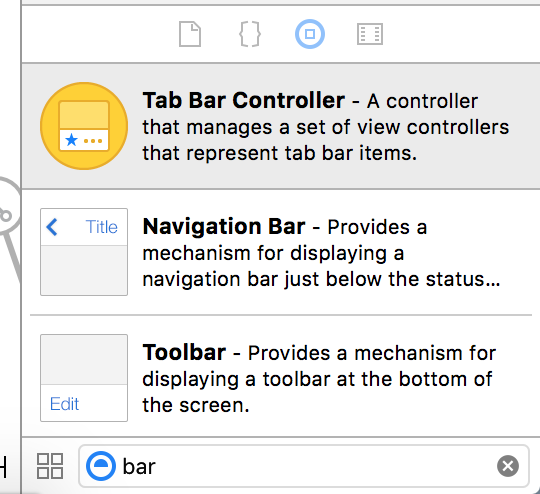
新增分页,只需从右下方拖出一个普通的View Controller,按住鼠标右键从分页栏控制器拖动到新视图控制器上释放,在弹出面板中的Relationship Segue标题下选中view controllers,使用这些分页要给他们创建Cocoa Touch Class 并关联。
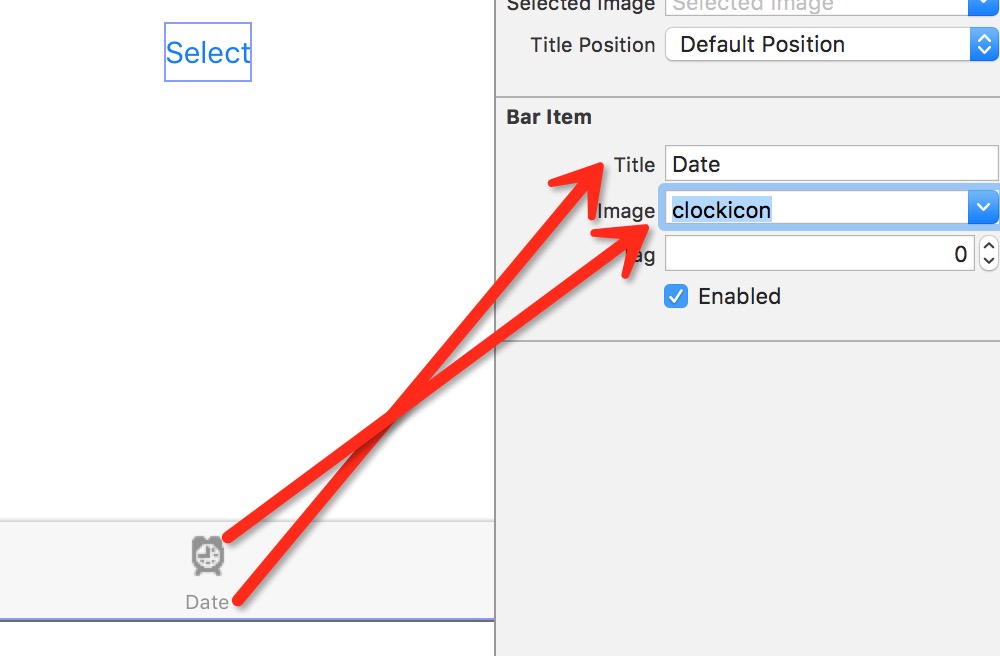
设置分页栏底部的标题与图标,如图:

二、选取器
选取器分为Date Picker和Picker View,前者是日期选取器,后者为一般选取器,可以任意定制用途。

(一)下面实现一个功能:点击按钮,弹出一个警告视图显示当前在日期选取器中选定的日期和时间
1)往Date分页上拖出一个Date Picker和一个按钮,并设置约束
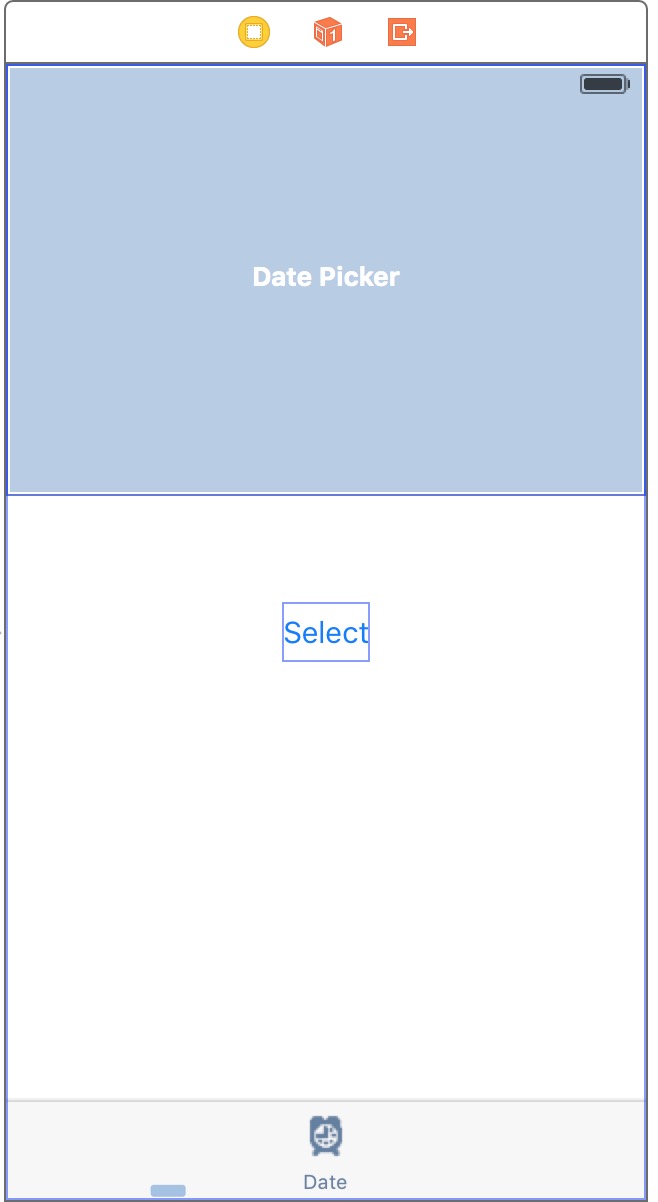
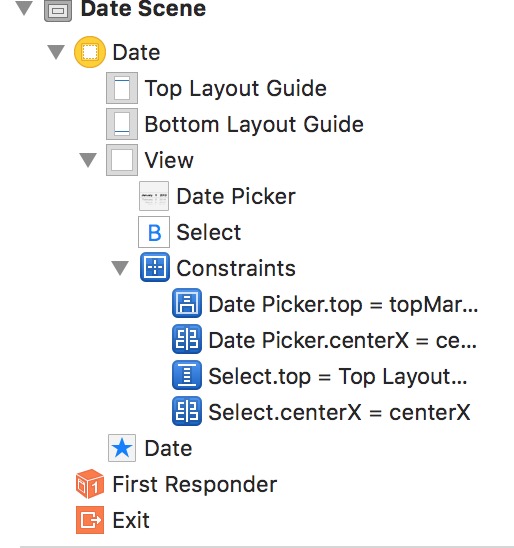
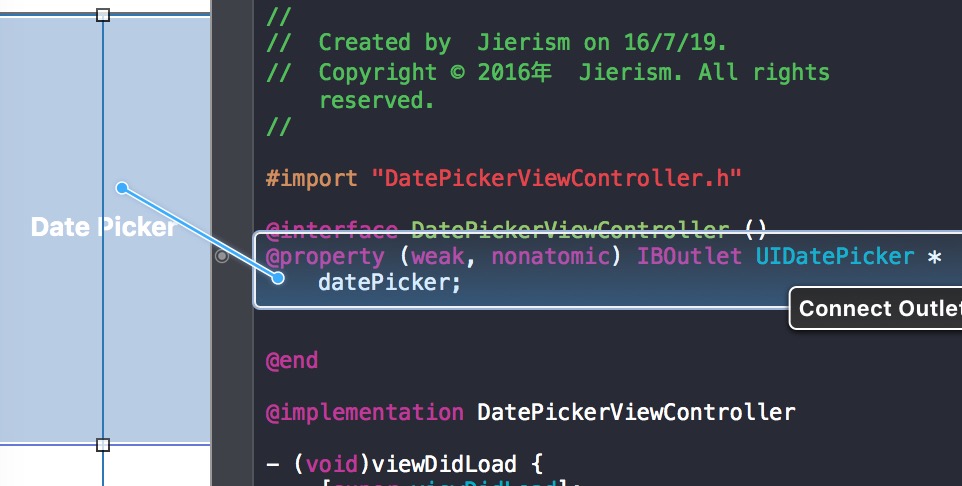
2)创建日期选取器的输出接口,选中Date Picker,按住右键拖动到实现文件,创建一个名为datePicker的输出接口,如图:
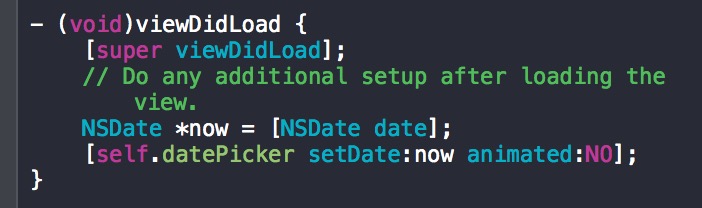
3)加载此视图时,选取器都会重置为当前的日期和时间的实现代码,在viewDidLoad方法中编写,如图:
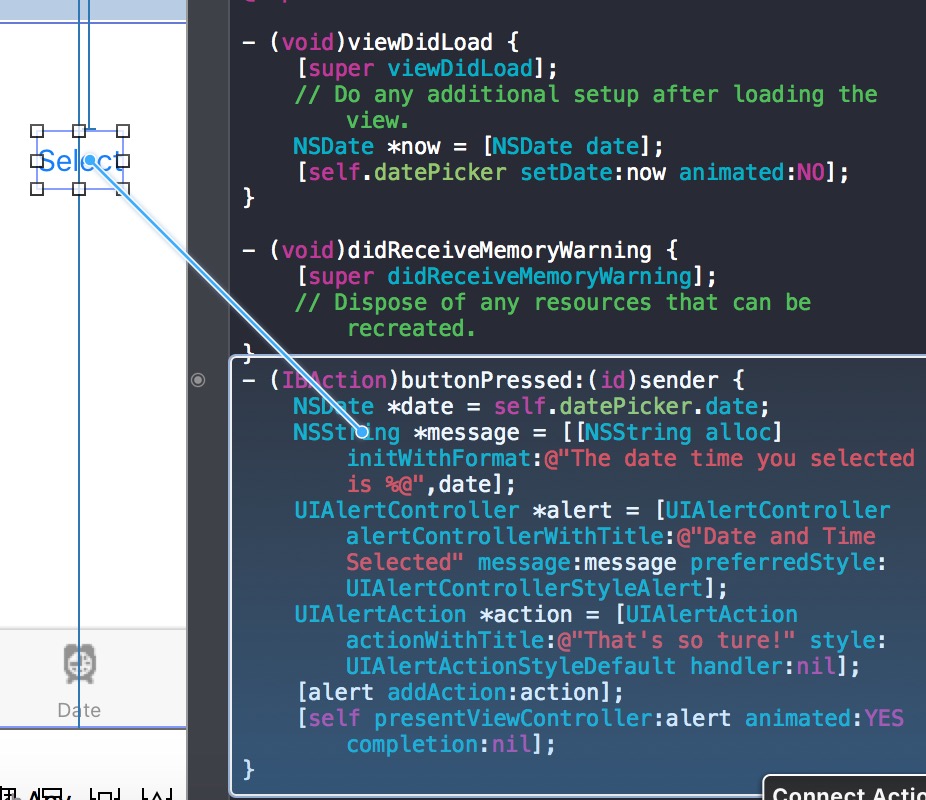
4)实现功能的操作方法,选中按钮,按住右键拖动到实现文件下方,创建一个名为buttonPressed的操作方法,并编写代码,如图:
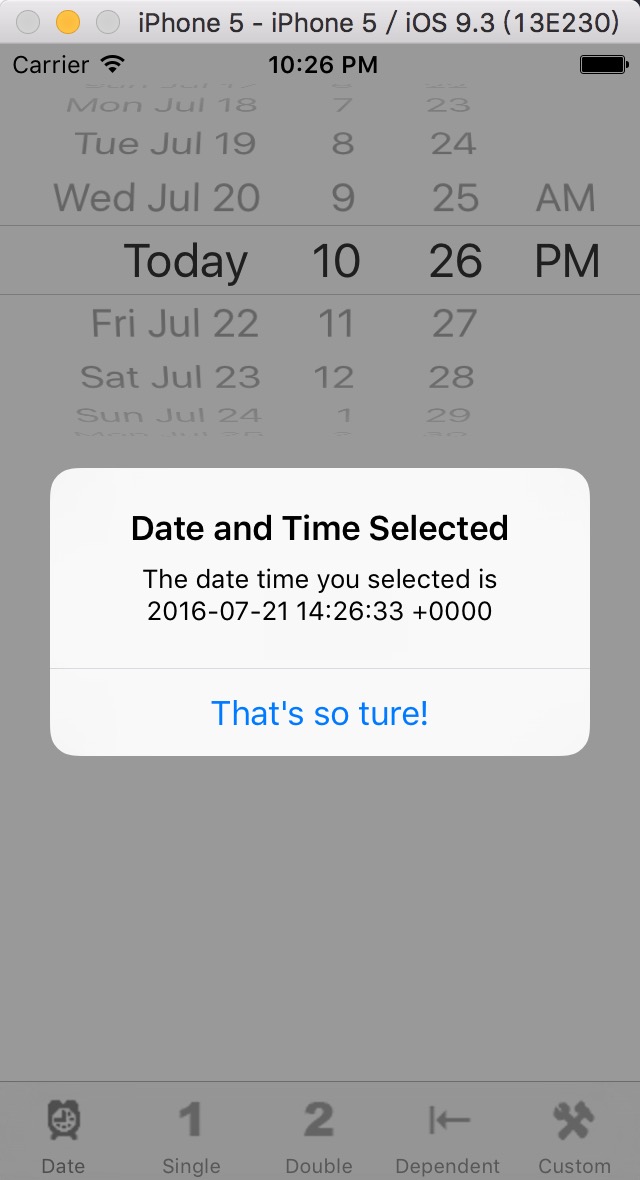
5)实现效果,显示的是格林威治标准时间
(二)自定义的选取器视图的实现,下面记录几个要点,与上面相同的步骤就不说了
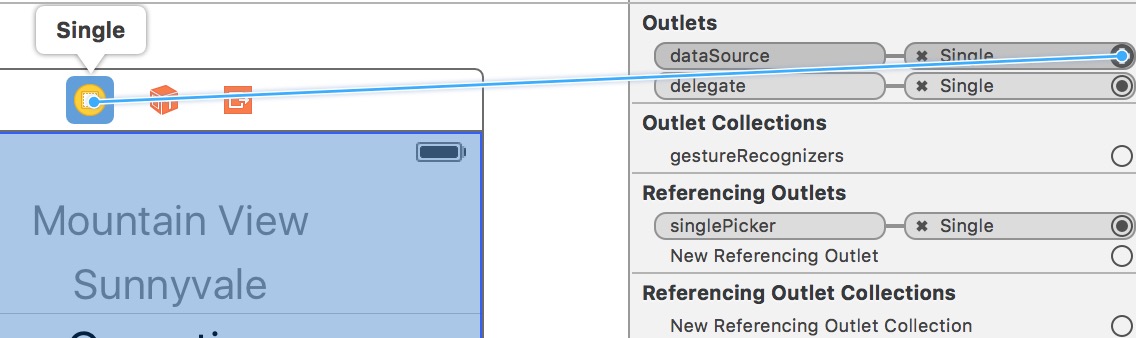
1)将控制器实现为数据源和委托,关联dateSource和delegate,如图:
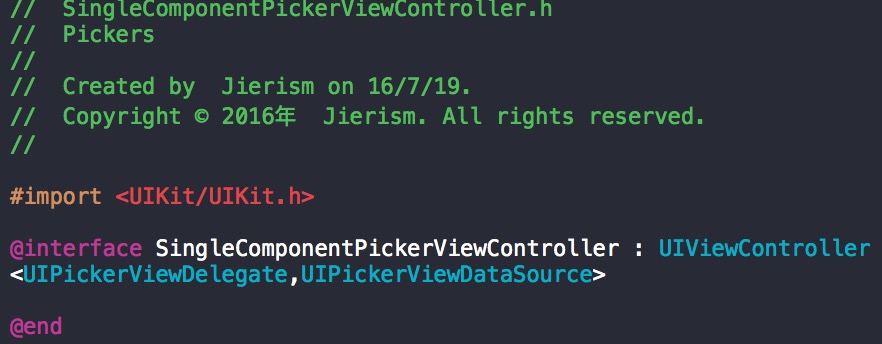
2)在.h文件中添加协议
3)创建一个数组,用于向选取器提供数据,并将其赋给characterNames属性,代码如下:

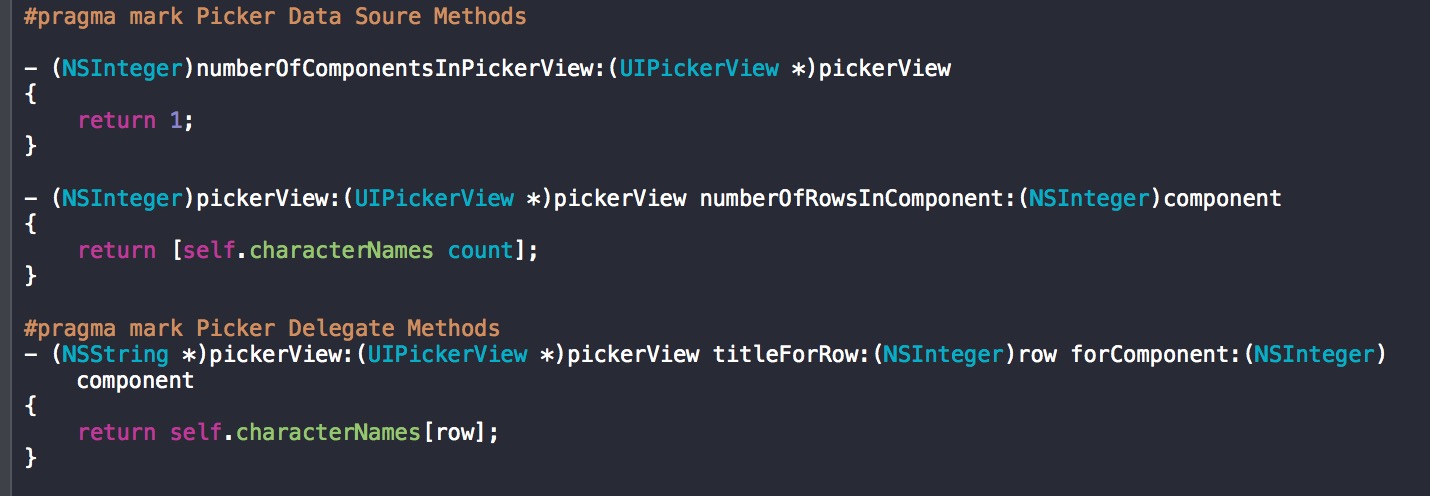
4)按钮的方法和数据源、委托的方法实现,结合上下图
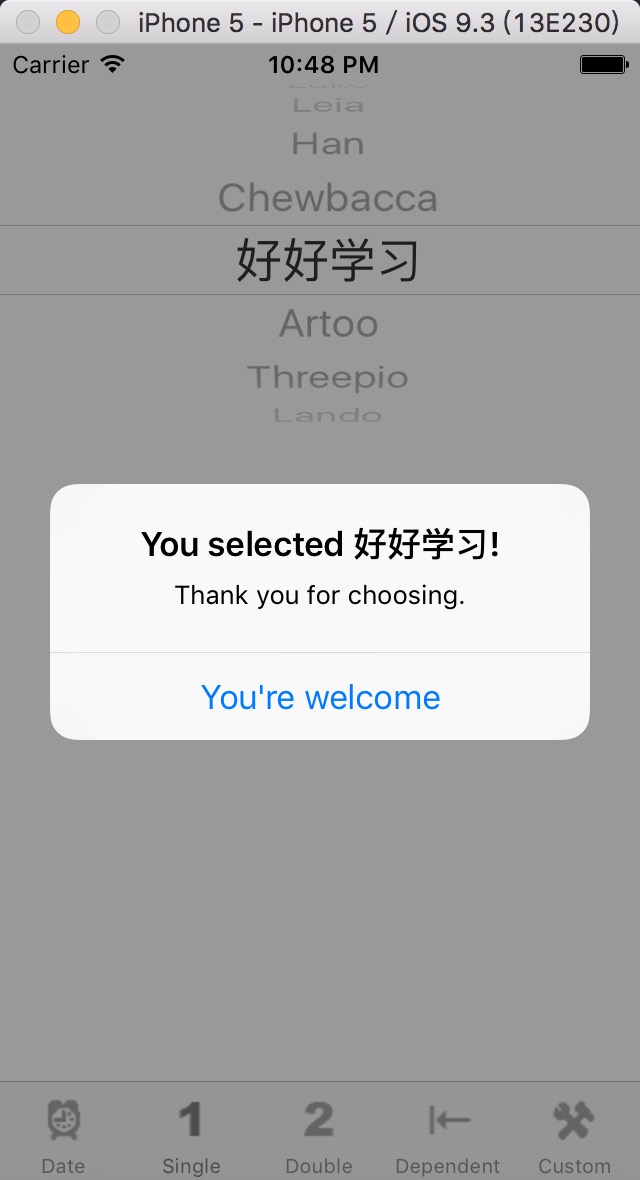
5)实现效果
(三) 实现多滚轮选取器
1)添加委托与数据源协议,与上面相同。
<UIPickerViewDelegate,UIPickerViewDataSource>
2)定义两个选取器滚轮相应的索引值常量,以及相应的两个数组
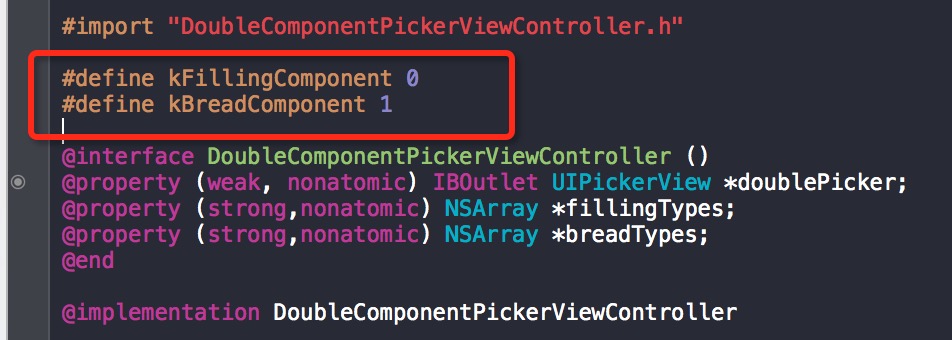
3)其他方法的实现跟一个选取器差不多,这里只是多了一个判断使用哪个滚轮,代码如下:
@implementation DoubleComponentPickerViewController

- (void)viewDidLoad {

    [super viewDidLoad];

    // Do any additional setup after loading the view.

    // 初始化滚轮的内容

    self.fillingTypes = @[@"Ham",

                       @"Turkey",

                       @"Peanut Butter",

                       @"Tuna Salad",

                       @"Chicken Salad",

                       @"Roast Beef",

                       @"Vegemite"];

    self.breadTypes = @[@"White",

                        @"Whole Wheat",

                        @"Rye",@"Sourdough",

                        @"Seven Grain"];

}

- (void)didReceiveMemoryWarning {

    [super didReceiveMemoryWarning];

    // Dispose of any resources that can be recreated.

}

- (IBAction)buttonPressed:(id)sender {

    NSInteger fillingRow = [self.doublePicker selectedRowInComponent:kFillingComponent];

    NSInteger breadRow = [self.doublePicker selectedRowInComponent:kBreadComponent];

    NSString *filling = self.fillingTypes[fillingRow];

    NSString *bread = self.breadTypes[breadRow];

    NSString *message = [[NSString alloc] initWithFormat:@"Your %@ on %@ bread will be right up.",filling,bread];

    UIAlertController *alert = [UIAlertController alertControllerWithTitle:@"Thank you for your order" message:message preferredStyle:UIAlertControllerStyleAlert];

    UIAlertAction *action = [UIAlertAction actionWithTitle:@"Great!" style:UIAlertActionStyleDefault handler:nil];

    [alert addAction:action];

    [self presentViewController:alert animated:YES completion:nil];

}

#pragma mark Picker Data Soure Methods

- (NSInteger)numberOfComponentsInPickerView:(UIPickerView *)pickerView

{

    // 滚轮数目2个

    return ;

}

- (NSInteger)pickerView:(UIPickerView *)pickerView numberOfRowsInComponent:(NSInteger)component

{

    if (component == kBreadComponent) {

        return [self.breadTypes count];

    }else{

        return [self.fillingTypes count];

    }

}

#pragma mark Picker Delegate Methods

- (NSString *)pickerView:(UIPickerView *)pickerView titleForRow:(NSInteger)row forComponent:(NSInteger)component

{

    if (component == kBreadComponent) {

        return self.breadTypes[row];

    }else{

        return self.fillingTypes[row];

    }

}

@end
4)运行效果

(四)实现有依赖关系的选取器,即其中的内容变化会引起另一个中的内容变化
由于步骤大同小异,这里只po代码了。。。
//

//  DependentComponentPickerViewController.m

//  Pickers

//

//  Created by  Jierism on 16/7/19.

//  Copyright © 2016年  Jierism. All rights reserved.

//

#import "DependentComponentPickerViewController.h"

#define kStateComponent 0

#define kZipComponent 1

@interface DependentComponentPickerViewController ()

@property (weak, nonatomic) IBOutlet UIPickerView *dependentPicker;

@property (strong,nonatomic) NSDictionary *stateZips;

@property (strong,nonatomic) NSArray *states;

@property (strong,nonatomic) NSArray *zips;

@end

@implementation DependentComponentPickerViewController

- (void)viewDidLoad {

    [super viewDidLoad];

    // Do any additional setup after loading the view.

    NSBundle *bundle = [NSBundle mainBundle];

    NSURL *plistURL = [bundle URLForResource:@"statedictionary" withExtension:@"plist"];

    self.stateZips = [NSDictionary dictionaryWithContentsOfURL:plistURL];

    NSArray *allStates = [self.stateZips allKeys];

    NSArray *sortedStates = [allStates sortedArrayUsingSelector:@selector(compare:)];

    self.states = sortedStates;

    NSString *selectedState = self.states[];

    self.zips = self.stateZips[selectedState];

}

- (void)didReceiveMemoryWarning {

    [super didReceiveMemoryWarning];

    // Dispose of any resources that can be recreated.

}

- (IBAction)buttonPressed:(id)sender {

    NSInteger stateRow = [self.dependentPicker selectedRowInComponent:kStateComponent];

    NSInteger zipRow = [self.dependentPicker selectedRowInComponent:kZipComponent];

    NSString *state = self.states[stateRow];

    NSString *zip = self.states[zipRow];

    NSString *title = [[NSString alloc] initWithFormat:@"You selected zip code %@.",zip];

    NSString *message = [[NSString alloc] initWithFormat:@"%@ is in %@",zip,state];

    UIAlertController *alert = [UIAlertController alertControllerWithTitle:title message:message preferredStyle:UIAlertControllerStyleAlert];

    UIAlertAction *action = [UIAlertAction actionWithTitle:@"OK" style:UIAlertActionStyleDefault handler:nil];

    [alert addAction:action];

    [self presentViewController:alert animated:YES completion:nil];

}

#pragma mark Picker Data Source Methods

- (NSInteger)numberOfComponentsInPickerView:(UIPickerView *)pickerView

{

    return ;

}

- (NSInteger)pickerView:(UIPickerView *)pickerView numberOfRowsInComponent:(NSInteger)component

{

    if (component == kStateComponent) {

        return [self.states count];

    }else{

        return [self.zips count];

    }

}

#pragma mark Picker Delegate Methods

- (NSString *)pickerView:(UIPickerView *)pickerView titleForRow:(NSInteger)row forComponent:(NSInteger)component

{

    if (component == kStateComponent) {

        return self.states[row];

    }else{

        return self.zips[row];

    }

}

- (void)pickerView:(UIPickerView *)pickerView didSelectRow:(NSInteger)row inComponent:(NSInteger)component

{

    if (component == kStateComponent) {

        NSString *selectedState = self.states[row];

        self.zips = self.stateZips[selectedState];

        [self.dependentPicker reloadComponent:kZipComponent];

        [self.dependentPicker selectRow: inComponent:kZipComponent animated:YES];

    }

}

// 调整选取器占用的宽度

- (CGFloat)pickerView:(UIPickerView *)pickerView widthForComponent:(NSInteger)component

{

    CGFloat pickerWidth = pickerView.bounds.size.width;

    if (component == kZipComponent) {

        return pickerWidth/;

    }else{

        return *pickerWidth/;

    }

}

@end
注意这里加入了一个.plist文件,涉及到包的使用。什么是包?
包(bundle )是一种特定类型的文件夹,其中的内容遵循特定的结构。应用程序和框架都是包,这个调用返回的包对象表示我们的应用程序。
(五)用选取器实现的滚轮小游戏
相同的内容也不说了,详见代码
1)接口的声明,这里还添加了游戏声音

2)往选取器里面加载图片
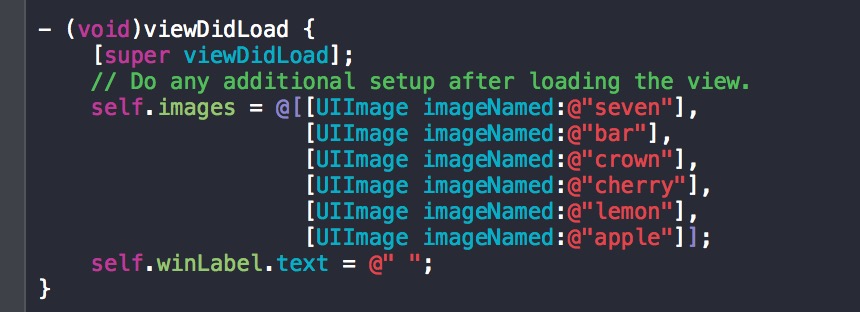
3)实现点击按钮,选取器开始滚动,并在滚动过程中隐藏按钮
- (void)showButton {

    self.button.hidden = NO;

}

- (IBAction)spin:(id)sender {

    BOOL win = NO;

    int numInRow = ;

    int lastVal = -;

    for (int i = ; i <  ; i++) {

        int newValue = arc4random_uniform((uint)[self.images count]);

        if (newValue == lastVal) {

            numInRow++;

        }else{

            numInRow = ;

        }

        lastVal = newValue;

        [self.picker selectRow:newValue inComponent:i animated:YES];

        [self.picker reloadComponent:i];

        if (numInRow >= ) {

            win = YES;

        }

    }

    if (_crunchSoundID == ) {

        NSString *path = [[NSBundle mainBundle] pathForResource:@"crunch" ofType:@"wav"];

        NSURL *soundURL = [NSURL fileURLWithPath:path];

        AudioServicesCreateSystemSoundID((__bridge CFURLRef)soundURL, &_crunchSoundID);

    }

    AudioServicesPlaySystemSound(_crunchSoundID);

    if (win) {

        [self performSelector:@selector(playWinSound) withObject:nil afterDelay:0.5];

    }else{

        [self performSelector:@selector(showButton) withObject:nil afterDelay:0.5];

    }

    // 隐藏按钮

    self.button.hidden = YES;

    self.winLabel.text = @" ";

}
4)播放声音的方法,点击按钮和获胜时会被调用,播放相应的音乐

5)数据源协议和委托的方法
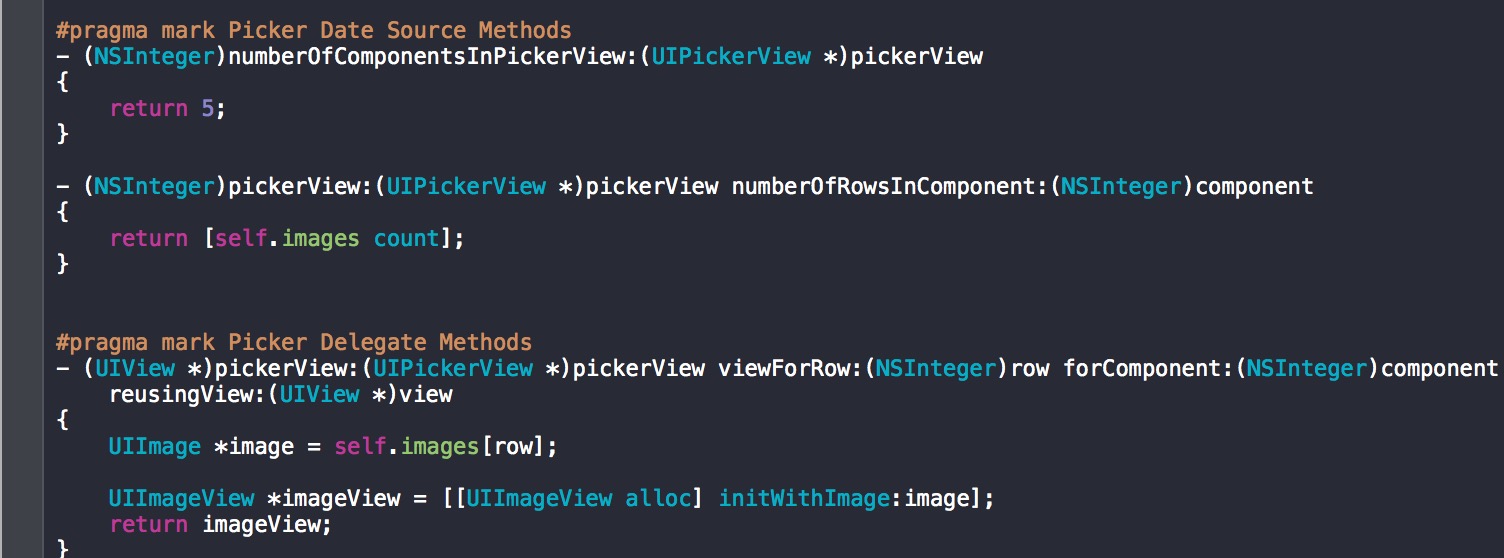
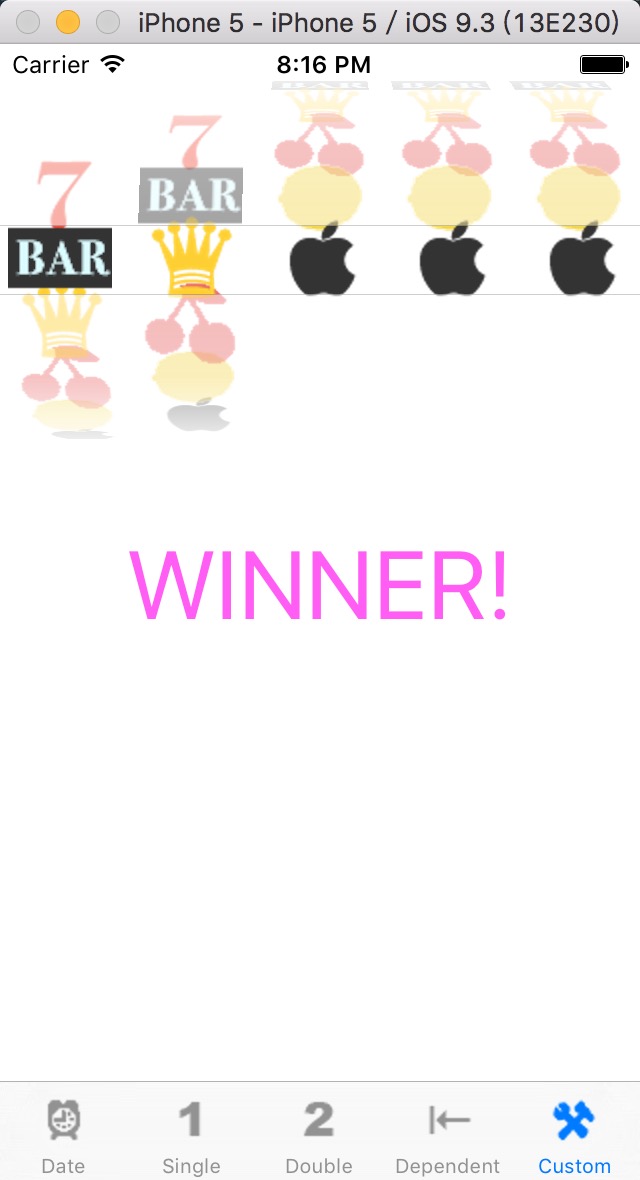
6)运行效果

iOS开发-分页栏和选取器的使用的更多相关文章
- IOS开发—UIDatePicker 日期/时间选取器(滚轮)
UIDatePicker 是一个控制器类,封装了 UIPickerView,但是他是UIControl的子类,专门用于接受日期.时间和持续时长的输入.日期选取器的各列会按照指定的风格进行自动配置,这样 ...
- IOS开发之简单音频播放器
今天第一次接触IOS开发的UI部分,之前学OC的时候一直在模拟的使用Target-Action回调模式,今天算是真正的用了一次.为了熟悉一下基本控件的使用方法,和UI部分的回调,下面开发了一个特别简易 ...
- ios开发:一个音乐播放器的设计与实现
github地址:https://github.com/wzpziyi1/MusicPlauer 这个Demo,关于歌曲播放的主要功能都实现了的.下一曲.上一曲,暂停,根据歌曲的播放进度动态滚动歌词, ...
- ios开发学习- 简易音乐播放器2 (基于iPhone4s屏幕尺寸)-- 歌词解析--plist文件应用--imageNamed图片加载耗内存
声明:(部分图片来自网络,如果侵犯了您的权益请联系我,会尽快删除!) 又是音乐播放器,不过这次和上次不一样了,准确说这次更像播放器了,初学者不建议看这个,可以先看前面一个音乐播放器(1),当然 我没加 ...
- iOS开发-简单的图片查看器
现在你只要拿着手机,不管你Android还是iOS,新闻类的App不可避免都有一个功能就是图片查看,做个专题,查看一下内容,App Store中也有专门针对图片浏览的App,鉴于目前所知有限,无法做到 ...
- iOS开发——导航栏的一些小设置
1.导航栏的隐藏与显示:navigationBarHidden - (void)viewWillAppear:(BOOL)animated { [super viewWillAppear:YES]; ...
- 《精通iOS开发》书籍目录
1.欢迎来到iOS和Swift世界 2.创建一个新项目 3.实现基本交互 4.更丰富的用户界面 5.自动旋转和自动调整大小 6.多视图应用 7.分页栏与选取器 8.表视图简介 9.导航控制器和表视图 ...
- 我的iOS开发系列博文
之前目录性的总结了发表过的关于OC方面的文章,今天在目录性的总结一下有关iOS开发的文章.走过路过不要错过哦,今天的博文也全都是干货.写技术博客与大家交流一下思想也是不错的. 下面是我的技术博客中有关 ...
- 重新想象 Windows 8 Store Apps (27) - 选取器: 联系人选取窗口, 自定义联系人选取窗口
原文:重新想象 Windows 8 Store Apps (27) - 选取器: 联系人选取窗口, 自定义联系人选取窗口 [源码下载] 重新想象 Windows 8 Store Apps (27) - ...
随机推荐
- 锋利的JQuery-认识Jquery
今天开始学习菜鸟的JQuery,这本书在一前看过一遍了,但是由于虽然看了,但是将近一年在工作中基本上没有用上,很是悲催,菜鸟想,用一到两个星期时间把这本书看一遍吧.就像菜鸟前面的jsdom一样,菜鸟写 ...
- API HOOK技术
API HOOK技术是一种用于改变API执行结果的技术,Microsoft 自身也在Windows操作系统里面使用了这个技术,如Windows兼容模式等. API HOOK 技术并不是计算机病毒专有技 ...
- linux 入门教程
linux入门教程 搜索 Linux入门教程 前言 第一章 关于Linux的历史 第二章 图形界面还是命令窗口 第三章 Linux操作系统的安装 第四章 初步进入linux世界 第五章 Linux系统 ...
- poj3252
好了,我的数论渣爆了………… 首先[n,m]内的round number显然就是f[m]-f[n-1] 即问0~x内有多少round number: 设x的二进制位数为t: 首先很好分析出在这个范围 ...
- Unity3D之如何创建正确的像素比在屏幕上
关于这篇文章的命名,实在不知道怎么命名好,大概功能就是:比如一张宽高为100x100的图片显示在屏幕上,那2D摄像头的Size值为多少时,屏幕上显示出来图片大小和图片的实际像素一致. 这里涉及到一个G ...
- JS实用代码收集
1.JSON对象转换为字符串 //JSON对象转字符串 function jsonParseString(o) { try { if (o == undefined) { return "& ...
- android studio 安装总结
Android Studio 的安装和配置篇(Windows篇<转> http://www.jianshu.com/p/fc03942548cc# 中间gradle下载比较慢:解决方法 需 ...
- java jvm学习笔记一
欢迎装载请说明出处:http://blog.csdn.net/yfqnihao java的class只在需要的时候才内转载入内存,并由java虚拟机的执行引擎来执行,而执行引擎从总的来说主要的执行方式 ...
- SQL Server 触发器:表的特定字段更新时,触发Update触发器
create trigger TR_MasterTable_Updateon MasterTableafter updateas if update ([Type])--当Type字段被更新时,才会触 ...
- 【JMeter】Jmeter引入第三方jar包
Jmeter做remoteService,里面用到一个实体:clickEntity,是在一个第三方jar包定义的:com.bj58.opt.ad_logparser-0.0.18-SNAPSHOT.j ...