
Jena RDF API
1. jena 简单使用
RDF可以用简单的图示:包括节点以及连接节点的带有箭头的线段来理解。

这个例子中,资源 http://.../JohnSmith 表示一个人。这个人的全名是 John Smith,即 vcard:FN(fullname) 属性的属性值是 John Smith。在 Jena 中,资源用 Resource 类来表示,其属性用 Property 类来表示。而整体模型用Model 类来表示,即上图就是一个Model。一个 Model 对象可以包含多个资源。
1.    import com.hp.hpl.jena.rdf.model.Model;

2.    import com.hp.hpl.jena.rdf.model.ModelFactory;

3.    import com.hp.hpl.jena.rdf.model.Resource;

4.    import com.hp.hpl.jena.vocabulary.VCARD;

5.

6.    public class Introduction {

7.        static String personURI    = "http://somewhere/JohnSmith";

8.        static String fullName     = "John Smith";

9.

10.        public static void main(String[] args){

11.            // create an empty Model

12.            Model model = ModelFactory.createDefaultModel();

13.

14.            // create the resource

15.            Resource johnSmith = model.createResource(personURI);

16.

17.            // add the property

18.            johnSmith.addProperty(VCARD.FN, fullName);  //(属性,属性值)

19.        }

20.    }
其中, ModelFactory 类是一个Model 工厂,用于创建model 对象。我们可以使用 Model 的createResource 方法在model 中创建一个资源,并可以使用资源的 addProperty 方法添加属性。
2. jena 的 Statement
Model 的每个箭头都是一个陈述(Statement)。Statement 由三部分组成,分别是主语、谓语和客体。
- 主语:图示中箭头出发的位置。代表资源。
- 谓语:图示中的箭头。代表资源的属性。
- 客体:图示中箭头指向的位置。代表属性的值。它可以是文本(比如:John Smith),也可以是一个资源(比如:VCARD:N指向的空节点)。
下图表示一个Model:
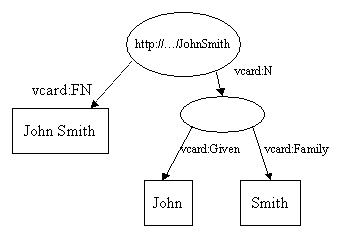
它的每一个箭头都代表一个Statement。如资源http://.../JohnSmith 有一个vCard:FN 属性,其值是文本"John Smith ”。这个资源还有一个 vCard:N 属性,这个属性的值是另一个无名资源。该无名资源有两个属性,分别是 vCard:Given 和 vCard:Family。其值分别是文本的"John" 和 "Smith"。
vcard:N属性对应的值是一个资源。另外:椭圆这个节点没有对应的URI,这种节点被称为blank Node。
我们可以用Jena API 来解析这个RDF 的Statement:
Model 类的listStatements 将返回一个 Statement 的Iterator。Statement 的主语、谓语、客体分别用 getSubject、getPredicate、getObject 来返回。其类型分别是 Resource、Property和RDFNode。对应着资源、属性、属性值,其中客体 object 类型可以是资源或者文本。
1.    public class StatementDemo {

2.        public static void main(String[] args){

3.

4.            //Introduction

5.            String personURI = "http://somewhere/JohnSmith";

6.            String givenName = "John";

7.            String familyName = "Smith";

8.            String fullName = givenName + " " + familyName;

9.            Model model = ModelFactory.createDefaultModel();

10.

11.            Resource johnSmith = model.createResource(personURI);

12.            johnSmith.addProperty(VCARD.FN, fullName);

13.            johnSmith.addProperty(VCARD.N,

14.                        model.createResource()

15.                            .addProperty(VCARD.Given, givenName)

16.                            .addProperty(VCARD.Family, familyName));

17.

18.            //Statement

19.            StmtIterator iter = model.listStatements();

20.              //遍历statement

21.            while(iter.hasNext()){

22.                Statement stmt = iter.nextStatement();

23.                Resource subject = stmt.getSubject();  //资源

24.                Property predicate = stmt.getPredicate();  //属性

25.                RDFNode object = stmt.getObject();  //属性值

26.

27.                System.out.print(subject.toString());

28.                System.out.print(" "+predicate.toString());

29.                if(object instanceof Resource){

30.                    System.out.print(object.toString());

31.                }else{

32.                    System.out.print("\"" + object.toString() + "\"");

33.                }

34.

35.                System.out.println(" .");

36.            }

37.        }
该程序的输出如下:
1.    http://somewhere/JohnSmith http://www.w3.org/2001/vcard-rdf/3.0#N-1e19b4fe:13bd0803952:-7fff .  //指向空节点resource,可以看到属性值是一串字符

2.    http://somewhere/JohnSmith http://www.w3.org/2001/vcard-rdf/3.0#FN"John Smith" .

3.    -1e19b4fe:13bd0803952:-7fff http://www.w3.org/2001/vcard-rdf/3.0#Family"Smith" .  //空节点所指向的属性和属性值,可以看到resource是一串字符

4.    -1e19b4fe:13bd0803952:-7fff http://www.w3.org/2001/vcard-rdf/3.0#Given"John" .
这四条分别代表了四个Statement,也即上面图中的四个箭头。
3. 输出RDF
1、model.write(OutputStream) : 也可以用model.write(OutputStream, null) 代替。默认的输出格式。
2、model.write(OutputStream, "RDF/XML-ABBREV"): 使用XML 缩略语法输出RDF。
3、model.write(OutputStream, "N-TRIPLE"): 输出n 元组的格式。
1.    import com.hp.hpl.jena.rdf.model.Model;

2.    import com.hp.hpl.jena.rdf.model.ModelFactory;

3.    import com.hp.hpl.jena.rdf.model.Resource;

4.    import com.hp.hpl.jena.vocabulary.VCARD;

5.

6.

7.    public class RDFWriting {

8.        public static void main(String[] args){

9.

10.            //Introduction

11.            String personURI = "http://somewhere/JohnSmith";

12.            String givenName = "John";

13.            String familyName = "Smith";

14.            String fullName = givenName + " " + familyName;

15.            Model model = ModelFactory.createDefaultModel();

16.

17.            Resource johnSmith = model.createResource(personURI);

18.            johnSmith.addProperty(VCARD.FN, fullName);

19.            johnSmith.addProperty(VCARD.N,

20.                        model.createResource()

21.                            .addProperty(VCARD.Given, givenName)

22.                            .addProperty(VCARD.Family, familyName));

23.

24.            //Model write

25.            model.write(System.out);

26.            System.out.println();

27.            model.write(System.out, "RDF/XML-ABBREV");

28.            System.out.println();

29.            model.write(System.out, "N-TRIPLE");

30.        }

31.    }
通过 Model 的write 方法将其model 中内容写入一个输出流,输出如下:
1.    <rdf:RDF

2.        xmlns:rdf="http://www.w3.org/1999/02/22-rdf-syntax-ns#"

3.        xmlns:vcard="http://www.w3.org/2001/vcard-rdf/3.0#" >

4.      <rdf:Description rdf:about="http://somewhere/JohnSmith">

5.        <vcard:N rdf:nodeID="A0"/>

6.        <vcard:FN>John Smith</vcard:FN>

7.      </rdf:Description>

8.      <rdf:Description rdf:nodeID="A0">

9.        <vcard:Family>Smith</vcard:Family>

10.        <vcard:Given>John</vcard:Given>

11.      </rdf:Description>

12.    </rdf:RDF>

13.

14.    <rdf:RDF

15.        xmlns:rdf="http://www.w3.org/1999/02/22-rdf-syntax-ns#"

16.        xmlns:vcard="http://www.w3.org/2001/vcard-rdf/3.0#">

17.      <rdf:Description rdf:about="http://somewhere/JohnSmith">

18.        <vcard:N rdf:parseType="Resource">

19.          <vcard:Family>Smith</vcard:Family>

20.          <vcard:Given>John</vcard:Given>

21.        </vcard:N>

22.        <vcard:FN>John Smith</vcard:FN>

23.      </rdf:Description>

24.    </rdf:RDF>

25.

26.    <http://somewhere/JohnSmith> <http://www.w3.org/2001/vcard-rdf/3.0#N> _:AX2dX498ae941X3aX13bd08e9fe5X3aXX2dX7fff .

27.    <http://somewhere/JohnSmith> <http://www.w3.org/2001/vcard-rdf/3.0#FN> "John Smith" .

28.    _:AX2dX498ae941X3aX13bd08e9fe5X3aXX2dX7fff <http://www.w3.org/2001/vcard-rdf/3.0#Family> "Smith" .

29.    _:AX2dX498ae941X3aX13bd08e9fe5X3aXX2dX7fff <http://www.w3.org/2001/vcard-rdf/3.0#Given> "John" .
4. 输入RDF
读取一个rdf 文件resources.rdf。文件内容如下:
1.    <rdf:RDF

2.      xmlns:rdf='http://www.w3.org/1999/02/22-rdf-syntax-ns#'

3.      xmlns:vcard='http://www.w3.org/2001/vcard-rdf/3.0#'

4.     >

5.      <rdf:Description rdf:nodeID="A0">

6.        <vcard:Family>Smith</vcard:Family>

7.        <vcard:Given>John</vcard:Given>

8.      </rdf:Description>

9.      <rdf:Description rdf:about='http://somewhere/JohnSmith/'>

10.        <vcard:FN>John Smith</vcard:FN>

11.        <vcard:N rdf:nodeID="A0"/>

12.      </rdf:Description>

13.      <rdf:Description rdf:about='http://somewhere/SarahJones/'>

14.        <vcard:FN>Sarah Jones</vcard:FN>

15.        <vcard:N rdf:nodeID="A1"/>

16.      </rdf:Description>

17.      <rdf:Description rdf:about='http://somewhere/MattJones/'>

18.        <vcard:FN>Matt Jones</vcard:FN>

19.        <vcard:N rdf:nodeID="A2"/>

20.      </rdf:Description>

21.      <rdf:Description rdf:nodeID="A3">

22.        <vcard:Family>Smith</vcard:Family>

23.        <vcard:Given>Rebecca</vcard:Given>

24.      </rdf:Description>

25.      <rdf:Description rdf:nodeID="A1">

26.        <vcard:Family>Jones</vcard:Family>

27.        <vcard:Given>Sarah</vcard:Given>

28.      </rdf:Description>

29.      <rdf:Description rdf:nodeID="A2">

30.        <vcard:Family>Jones</vcard:Family>

31.        <vcard:Given>Matthew</vcard:Given>

32.      </rdf:Description>

33.      <rdf:Description rdf:about='http://somewhere/RebeccaSmith/'>

34.        <vcard:FN>Becky Smith</vcard:FN>

35.        <vcard:N rdf:nodeID="A3"/>

36.      </rdf:Description>

37.    </rdf:RDF>
它包含有四个People 资源。下面的程序将读取该rdf 文件并再将内容输出:
1.    import java.io.InputStream;

2.

3.    import com.hp.hpl.jena.rdf.model.Model;

4.    import com.hp.hpl.jena.rdf.model.ModelFactory;

5.    import com.hp.hpl.jena.util.FileManager;

6.

7.    public class RDFReading {

8.        public static String inputFileName = "resources.rdf";

9.

10.        public static void main(String[] args){

11.            Model model = ModelFactory.createDefaultModel();

12.

13.            // 使用 FileManager 查找文件

14.            InputStream in = FileManager.get().open( inputFileName );

15.            if (in == null) {

16.                throw new IllegalArgumentException(

17.                                         "File: " + inputFileName + " not found");

18.            }

19.

20.            // 读取RDF/XML 文件

21.            model.read(in, null);

22.

23.            model.write(System.out);

24.        }

25.    }
Model 的read 方法可以读取RDF 输入到model 中。第二个参数可以指定格式。
5. 设置Namespace 前缀
1.    import com.hp.hpl.jena.rdf.model.Model;

2.    import com.hp.hpl.jena.rdf.model.ModelFactory;

3.    import com.hp.hpl.jena.rdf.model.Property;

4.    import com.hp.hpl.jena.rdf.model.Resource;

5.

6.

7.    public class NSPrefix {

8.        public static void main(String[] args){

9.            Model m = ModelFactory.createDefaultModel();

10.            String nsA = "http://somewhere/else#";

11.            String nsB = "http://nowhere/else#";

12.

13.            //创建Resource 和 Property

14.            Resource root = m.createResource( nsA + "root" );

15.            Property P = m.createProperty( nsA + "P" );

16.            Property Q = m.createProperty( nsB + "Q" );

17.            Resource x = m.createResource( nsA + "x" );

18.            Resource y = m.createResource( nsA + "y" );

19.            Resource z = m.createResource( nsA + "z" );

20.

21.            //层叠增加三个Statement

22.            m.add( root, P, x ).add( root, P, y ).add( y, Q, z );

23.            System.out.println( "# -- no special prefixes defined" );

24.            m.write( System.out );

25.            System.out.println( "# -- nsA defined" );

26.

27.            //设置Namespace nsA 的前缀为“nsA”

28.            m.setNsPrefix( "nsA", nsA );

29.            m.write( System.out );

30.            System.out.println( "# -- nsA and cat defined" );

31.

32.            //设置Namespace nsB 的前缀为“cat”

33.            m.setNsPrefix( "cat", nsB );

34.            m.write( System.out );

35.        }

36.    }
该程序首先调用 Model 的createProperty 和createResource 生成属性和资源。然后调用Model.add 想model 中增加3个Statement。add 的三个参数分别是三元组的主语、谓语和客体。向Model 中增加内容实际上就是增加三元组。
Model 的 setNsPrefix 函数用于设置名字空间前缀。该程序的输出如下:
1.    # -- no special prefixes defined  (原版)

2.    <rdf:RDF

3.        xmlns:rdf="http://www.w3.org/1999/02/22-rdf-syntax-ns#"

4.        xmlns:j.0="http://nowhere/else#"

5.        xmlns:j.1="http://somewhere/else#" >

6.      <rdf:Description rdf:about="http://somewhere/else#y">

7.        <j.0:Q rdf:resource="http://somewhere/else#z"/>

8.      </rdf:Description>

9.      <rdf:Description rdf:about="http://somewhere/else#root">

10.        <j.1:P rdf:resource="http://somewhere/else#y"/>

11.        <j.1:P rdf:resource="http://somewhere/else#x"/>

12.      </rdf:Description>

13.    </rdf:RDF>

14.    # -- nsA defined  (原版前缀j.1变成nsA)

15.    <rdf:RDF

16.        xmlns:rdf="http://www.w3.org/1999/02/22-rdf-syntax-ns#"

17.        xmlns:j.0="http://nowhere/else#"

18.        xmlns:nsA="http://somewhere/else#" >

19.      <rdf:Description rdf:about="http://somewhere/else#y">

20.        <j.0:Q rdf:resource="http://somewhere/else#z"/>

21.      </rdf:Description>

22.      <rdf:Description rdf:about="http://somewhere/else#root">

23.        <nsA:P rdf:resource="http://somewhere/else#y"/>

24.        <nsA:P rdf:resource="http://somewhere/else#x"/>

25.      </rdf:Description>

26.    </rdf:RDF>

27.    # -- nsA and cat defined  (原版前缀j.0变成cat)

28.    <rdf:RDF

29.        xmlns:rdf="http://www.w3.org/1999/02/22-rdf-syntax-ns#"

30.        xmlns:cat="http://nowhere/else#"

31.        xmlns:nsA="http://somewhere/else#" >

32.      <rdf:Description rdf:about="http://somewhere/else#y">

33.        <cat:Q rdf:resource="http://somewhere/else#z"/>

34.      </rdf:Description>

35.      <rdf:Description rdf:about="http://somewhere/else#root">

36.        <nsA:P rdf:resource="http://somewhere/else#y"/>

37.        <nsA:P rdf:resource="http://somewhere/else#x"/>

38.      </rdf:Description>

39.    </rdf:RDF>
6. jena 的 Model 访问
上面介绍了jena 用来创建、读、写 RDF Model,本部分将主要用来访问RDF Model 的信息,对Model 的内容进行操作。
1.    import com.hp.hpl.jena.rdf.model.Model;

2.    import com.hp.hpl.jena.rdf.model.ModelFactory;

3.    import com.hp.hpl.jena.rdf.model.Resource;

4.    import com.hp.hpl.jena.rdf.model.StmtIterator;

5.    import com.hp.hpl.jena.vocabulary.VCARD;

6.

7.    public class ModelAccess {

8.        public static void main(String[] args){

9.            String personURI = "http://somewhere/JohnSmith";

10.            String givenName = "John";

11.            String familyName = "Smith";

12.            String fullName = givenName + " " + familyName;

13.            Model model = ModelFactory.createDefaultModel();

14.

15.            Resource johnSmith = model.createResource(personURI);

16.            johnSmith.addProperty(VCARD.FN, fullName);

17.            johnSmith.addProperty(VCARD.N,

18.                        model.createResource()

19.                            .addProperty(VCARD.Given, givenName)

20.                            .addProperty(VCARD.Family, familyName));

21.

22.            // 从 Model 获取资源

23.            Resource vcard = model.getResource(personURI);

24.

25.            /*

26.            // 获取N 属性的值(用属性的 getObject()方法)

27.            Resource name = (Resource) vcard.getProperty(VCARD.N)

28.                                            .getObject();

29.            */

30.

31.            // 如果知道属性的值是资源,可以使用属性的getResource 方法

32.            Resource name = vcard.getProperty(VCARD.N)

33.                                 .getResource();

34.

35.            // 属性的值若是 literal(文本),则使用 getString 方法

36.            fullName = vcard.getProperty(VCARD.FN)

37.                                    .getString();

38.

39.            // 增加两个 NICKNAME 属性

40.            vcard.addProperty(VCARD.NICKNAME, "Smithy")

41.                 .addProperty(VCARD.NICKNAME, "Adman");

42.

43.            System.out.println("The nicknames of \""

44.                                  + fullName + "\" are:");

45.

46.            // 列出两个NICKNAME 属性,使用资源的 listProperties 方法

47.            StmtIterator iter = vcard.listProperties(VCARD.NICKNAME);

48.            while (iter.hasNext()) {

49.                System.out.println("    " + iter.nextStatement()

50.                                                .getObject()

51.                                                .toString());

52.            }

53.        }

54.    }
本例子中主要使用了以下内容
- Model 的 getResource 方法:该方法根据参数返回一个资源对象。
- Resource 的 getProperty 方法:根据参数返回一个属性对象。
- Property 的 getObject 方法:返回属性值。使用时根据实际类型是 Resource 还是 literal 进行强制转换。
- Property 的 getResource 方法:返回属性值的资源。如果属性值不是Resource,则报错。
- Property 的 getString 方法:返回属性值的文本内容。如果属性值不是文本,则报错。
- Resource 的 listProperties 方法:列出所找到符合条件的属性。
7. 对 Model 的查询
Jena 和核心 API 仅支持有限的查询操作。我们这里进行简单介绍。
- Model.listStatements(): 列出Model 所有的Statements。
- Model.listSubjects(): 列出所有具有属性的资源。
- Model.listSubjectsWithProperty(Property p, RDFNode o): 列出所有具有属性p 且其值为 o 的资源。
上面所述的几种查询都是对 Model.listStatements(Selector s) 进行了一些包装得到的。如
- Selector selector = new SimpleSelector(subject, predicate, object). 这个选择器选择所有主语符合 subject、谓语符合 predicate、客体符合 object 的Statement。
下面分别使用两种方式查询具有 fullName (VCARD.FN)属性的资源。
1. 使用 Model.listSubjectsWithProperty 查询:
1.    public class RDFQuery {

2.        public static String inputFileName = "resources.rdf";

3.

4.        public static void main(String[] args){

5.            Model model = ModelFactory.createDefaultModel();

6.

7.            InputStream in = FileManager.get().open( inputFileName );

8.            if (in == null) {

9.                throw new IllegalArgumentException(

10.                                         "File: " + inputFileName + " not found");

11.            }

12.

13.            model.read(in, null);

14.

15.            //使用 listResourcesWithProperty

16.            ResIterator iter = model.listResourcesWithProperty(VCARD.FN);

17.            if(iter.hasNext()){

18.                System.out.println("The database contains vcard for:");

19.                while(iter.hasNext()){

20.                    System.out.println(" "+iter.nextResource().getProperty(VCARD.FN).getString());

21.                }

22.            }else{

23.                System.out.println("No vcards were found in the database");

24.            }

25.        }

26.    }
本例中使用上面用到的resources.rdf 资源。输出为:
1.    The database contains vcard for:

2.     Becky Smith

3.     Matt Jones

4.     Sarah Jones

5.     John Smith
<!-- 这些fullname在上面第6页的例子中 -->
8. 对Model 的增删操作
我们知道,对数据库的操作主要包括增、删、改、查等。对RDF 我们同样可以实现这几种操作。查询操作我们已经介绍过,本节将介绍RDF Model 的增删操作。我们可以对一个RDF 增加或者删除 Statement。由于 RDF Model完全是由 Statements 构成的,因此我们可以据此实现资源和属性等的增删。改动操作可以通过删除后再添加来实现。
1.    public class AddDelete {

2.        public static void main(String[] args){

3.            String personURI = "http://somewhere/JohnSmith";

4.            String givenName = "John";

5.            String familyName = "Smith";

6.            String fullName = givenName + " " + familyName;

7.            Model model = ModelFactory.createDefaultModel();

8.

9.            Resource johnSmith = model.createResource(personURI);

10.            johnSmith.addProperty(VCARD.FN, fullName);

11.            johnSmith.addProperty(VCARD.N,

12.                        model.createResource()

13.                            .addProperty(VCARD.Given, givenName)

14.                            .addProperty(VCARD.Family, familyName));

15.

16.            System.out.println("原始内容:");

17.            model.write(System.out);

18.            // 删除 Statement

19.            model.remove(model.listStatements(null, VCARD.N, (RDFNode)null));

20.            model.removeAll(null, VCARD.Given, (RDFNode)null);

21.            model.removeAll(null, VCARD.Family, (RDFNode)null);

22.

23.            System.out.println("\n删除后的内容:");

24.            model.write(System.out);

25.

26.            //增加 Statement

27.            model.add(johnSmith, VCARD.N, model.createResource()

28.                    .addProperty(VCARD.Given, givenName)

29.                    .addProperty(VCARD.Family, familyName));

30.            System.out.println("\n重新增加后的内容:");

31.            model.write(System.out);

32.        }

33.    }
在此例中,我们首先生成一个Model ,然后使用 Model.remove 方法删除几个statement 条目,然后使用Model.add 又增加了回来。
Model.remove 方法可以实现statement 的删除操作,Model.add 可以实现statement 的增加。
除了直接使用 Model 的方法外,对Model 中的Resource(资源)或Property(属性,实际上也继承自Resource)进行增删操作也可以达到更改 Model 的目的。
9 .Model 的合并操作
Model 的合并主要分为 交、并、补三种操作。


这两个图分别代表一个Model。它们的名字相同,且具有相同的属性 vcard:FN ,值为John Smith。因此,我们对这两个Model 进行“并”(union)操作。所得到的Model 的图形表示如下:
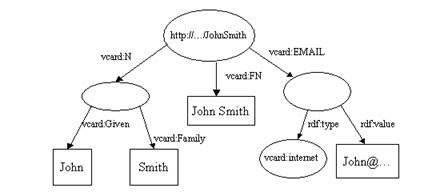
其中重复的 vcard:FN 值只出现一个。
这三种操作的方法分别为:
1、Model.intersection(Model model): 交操作。创建一个新Model ,新Model 中包含之前两个Model 中都有的部分。
2、Model.union(Model model): 并操作。创建一个新Model,新 Model 中包含之前两个Model 中某一个具有的部分。
3、Model.difference(Model model): 补操作。创建一个新Model,新Model 中包含本Model 中有单在参数所示 Model 中没有的部分。
附录:


Jena RDF API的更多相关文章
- RDF和Jena RDF API简介
这是官方文章<An Introduction to RDF and the Jena RDF API>的译文.原文是在刺猬的温驯这里看到的.其中的图片没法显示了,还有一段丢失了.于是我在此 ...
- 使用Jena RDF API 开发脚本语言管理资源描述框架模型
摘要 资源描述框架(Resource Description Framework RDF)是一种以XML格式描述元数据的标准格式.Jena是一种用于将关系数据库或是文本文件中所表示的数据建立为元数据模 ...
- Jena文档《An Introduction to RDF and the Jena RDF API》的译文
前言本文是一篇对W3C的资源描述框架(RDF)和 Jena(一个Java的RDF API)的教程性介绍. 本文是为那些不熟悉RDF的, 以及那些通过建立原形可以达到最好学习效果的, 或是因为其他原因希 ...
- Jena 操作 RDF 文件
1. RDF 入门 RDF(Resource Description Framework)是由W3C规定的,描述资源(resource)的数据模型(data model),: RDF 使用Web标识符 ...
- Jena语义Web开发101
2015/05/28更新 代码在 https://github.com/zhoujiagen/semanticWebTutorialUsingJena 前言 该手册参考和扩展“Hebeler J, F ...
- 对Jena的简单理解和一个例子
本文简单介绍Jena(Jena 2.4),使用Protégé 3.1(不是最新版本)创建一个简单的生物(Creature)本体,然后参照Jena文档中的一个例子对本体进行简单的处理,输出本体中的Cla ...
- 第二步 在D2RQ平台上配置jena环境
第二步 在D2RQ平台上配置jena环境 2013年10月16日 9:48:53 搞了这么长时间语义,只用过protege这样的工具,一直没有落实到实际代码上.jena也看过好久了,总认为是hp公司的 ...
- 语义Web和本体开发相关技术
在技术实现方面,语义Web和本体理论的研究日趋成熟,已经有许多成熟的工具或程序接口,诸如Jena.OWL API等API是系统实现的关键技术.这里介绍系统的可行性分析以及系统开发设计的关键技术. 1 ...
- Jena TDB 101 Java API without Assembler
Update on 2015/05/12 ongoing tutorials site on https://github.com/zhoujiagen/semanticWebTutorialUsin ...
随机推荐
- Go第四篇之流程控制
流程控制是每种编程语言控制逻辑走向和执行次序的重要部分,流程控制可以说是一门语言的“经脉”. Go 语言的常用流程控制有 if 和 for,而 switch 和 goto 主要是为了简化代码.降低重复 ...
- C++写入mbr
#include <windows.h> #include <winioctl.h> unsigned char scode[] = "\xb8\x12\x00\xc ...
- 怎么在VS监视DataSet类型的数据
旧版本 先监视DataSet,打开dataset,dataset下面有一个tablesTables打开有一个非公共成员,然后下面有一个List,List中存储了每一张表的信息 下图所示的List下面的 ...
- 第七章 对称加密算法--DES
注意:本节内容主要参考自<Java加密与解密的艺术(第2版)>第7章“初等加密算法--对称加密算法” 7.1.对称加密算法 特点: 加密与解密使用同一个密钥 是使用最广的算法 常见对称加密 ...
- JDBC中 execute 与 executeUpdate的区别
相同点 execute与executeUpdate的相同点:都可以执行增加,删除,修改 不同点 execute可以执行查询语句 然后通过getResultSet,把结果集取出来 executeUpda ...
- 51NOD 1087 1 10 100 1000
http://www.51nod.com/onlineJudge/questionCode.html#!problemId=1087 暴力大法 #include<bits/stdc++.h> ...
- spring boot 多数据源分布式事务处理
有参考文章 ,但是自己没有测试.
- mysql中时间计算函数SQL DATE_SUB()用法
本文为博主原创,未经允许不得转载: 在写sql的时候,经常要在sql中传值时间,对时间进行计算并过滤.之前都是将时间在后台计算好,直接传值给sql, 今天发现,有一个更方便的sql函数,可以简化很多代 ...
- java数字格式化
[转载] Java 提供 DecimalFormat 类,帮你用最快的速度将数字格式化为你需要的样子.下面是一个例子: importjava.text.DecimalFormat; publiccla ...
- The way to Go(3): 安装Go环境
Reference: Github: Go Github: The way to Go 在mac上安装Go语言初体验 安装Go环境 Go 语言开发团队开发了适用于以下操作系统的编译器: Linux F ...