
r.js的build.js的详细配置解析
{
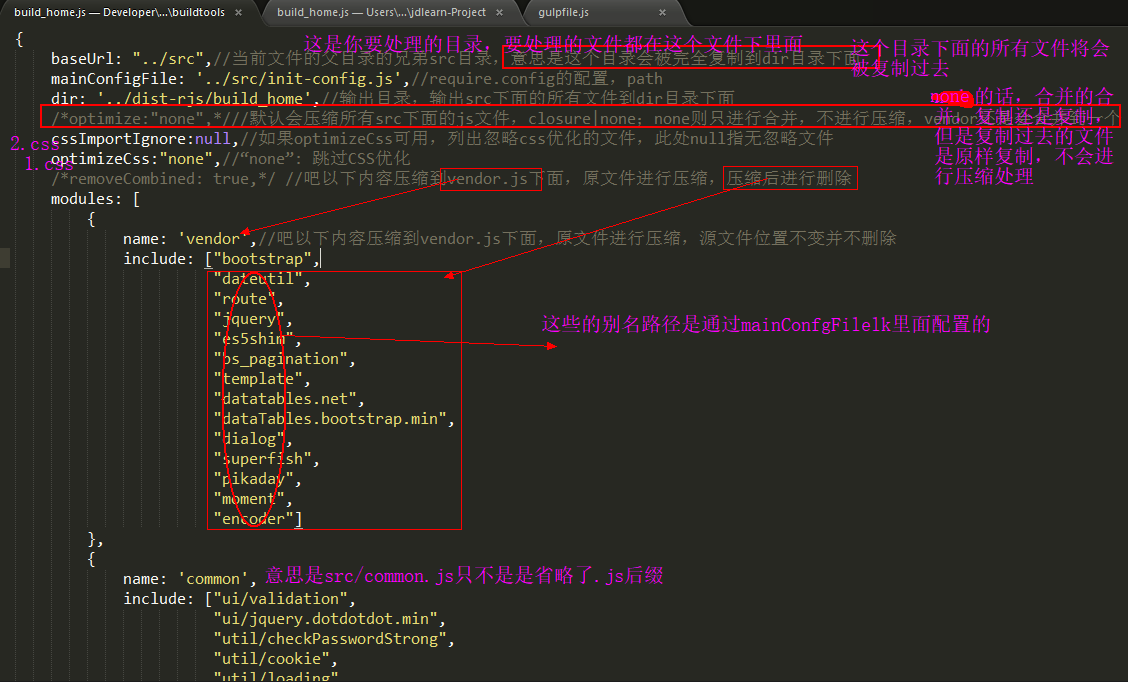
baseUrl: "../src",//当前文件的父目录的兄弟src目录,意思是这个目录会被完全复制到dir目录下面
mainConfigFile: '../src/init-config.js',//require.config的配置,path
dir: '../dist-rjs/build_home',//输出目录,输出src下面的所有文件到dir目录下面
/*optimize:"none",*///默认会压缩所有src下面的js文件,closure|none;none则只进行合并,不进行压缩,vendor还是会合并到一个
cssImportIgnore:null,//如果optimizeCss可用,列出忽略css优化的文件,此处null指无忽略文件
optimizeCss:"none",//“none”: 跳过CSS优化
/*removeCombined: true,*/ //吧以下内容压缩到vendor.js下面,原文件进行压缩,压缩后进行删除
modules: [
{
name: 'vendor',//吧以下内容压缩到vendor.js下面,原文件进行压缩,源文件位置不变并不删除
include: ["bootstrap",
"dateutil",
"route",
"jquery",
"es5shim",
"bs_pagination",
"template",
"datatables.net",
"dataTables.bootstrap.min",
"dialog",
"superfish",
"pikaday",
"moment",
"encoder"]
},
{
name: 'common',
include: ["ui/validation",
"ui/jquery.dotdotdot.min",
"util/checkPasswordStrong",
"util/cookie",
"util/loading",
"util/httpPrompt",
"util/humanNumber",
"util/md5",
"util/nuclear",
"util/pageHelp",
"util/storage",
"util/validators",
"util/vCode",
"service/service"],
exclude: ['vendor','appUrls']
},
//////////这两个模块在pop-shared-web-components中,这里仅做占位/////////////
{
name: 'navMenus'
},
{
name: 'appUrls'
},
////////////////////////////////////////////////////////////////////////////
{
name: 'init-config',
exclude: ['vendor', 'common','navMenus','appUrls']
},
{
name: 'modules/investor/investor/blacklist/index',
exclude: ['common','vendor','appUrls']
},
{
name: 'modules/investor/investor/change/index',
exclude: ['common','vendor','appUrls']
},
{
name: 'modules/investor/investor/ecode/index',
exclude: ['common','vendor','appUrls']
},
{
name: 'modules/investor/investor/frozen/index',
exclude: ['common','vendor','appUrls']
},
{
name: 'modules/investor/investor/holding/index',
exclude: ['common','vendor','appUrls']
},
{
name: 'modules/investor/investor/huStock/index',
exclude: ['common','vendor','appUrls']
},
{
name: 'modules/investor/investor/income/index',
exclude: ['common','vendor','appUrls']
},
{
name: 'modules/investor/investor/luckly/index',
exclude: ['common','vendor','appUrls']
},
{
name: 'modules/investor/investor/shenStock/index',
exclude: ['common','vendor','appUrls']
},
{
name: 'modules/error/forbiddenNotBind',
exclude: ['common','vendor','appUrls']
}
]
}
见图实例
r.js的build.js的详细配置解析的更多相关文章
- r.js 配置文件 build.js 不完整注释
-----------------------------------------------------------------------r.js 配置文件 example.build.js ...
- webpack详细配置解析
阅读本文之前,先看下面这个webpack的配置文件,如果每一项你都懂,那本文能带给你的收获也许就比较有限,你可以快速浏览或直接跳过:如果你和十天前的我一样,对很多选项存在着疑惑,那花一段时间慢慢阅读本 ...
- log4j详细配置解析
出自:http://www.blogjava.net/zJun/archive/2006/06/28/55511.html Log4J的配置文件(Configuration File)就是用来设置记录 ...
- webpack4打包报错ERROR in multi ./src/main.js dist/bundle.js
webpack打包测试: 上边将mode01.js模块及main.js主文件编写完成,下边使用webpack对这些js文件进行打包 1.进入程序目录,执行webpack main.js build.j ...
- r.js build.js配置
/* * This is an example build file that demonstrates how to use the build system for * require.js. * ...
- r.js合并实践 --项目中用到require.js做生产时模块开发 r.js build.js配置详解
本文所用源代码已上传,需要的朋友自行下载:点我下载 第一步: 全局安装 npm install -g requirejs 第二步: 1.以下例子主要实现功能, 1)引用jq库获取dom中元素文本, ...
- r.js 配置文件 example.build.js 不完整注释
/* * This is an example build file that demonstrates how to use the build system for * require.js. * ...
- 转: requirejs压缩打包r.js使用示例 2 (~~很详细的教程)
这一篇来认识下打包工具的paths参数,在入门一中 就介绍了require.config方法的paths参数.用来配置jquery模块的文件名(jQuery作为AMD模块时id为“jquery”, 但 ...
- vue-cli的webpack模版项目配置解析-build/dev-server.js
我们在使用vue-cli搭建vuejs项目(Vuejs实例-01使用vue-cli脚手架搭建Vue.js项目)的时候,会自动生成一系列文件,其中就包含webpack配置文件.我们现在来看下,这些配置到 ...
随机推荐
- 进程间通信之WM_COPYDATA方式反思,回顾和总结
许多Windows程序开发者喜欢使用WM_COPYDATA来实现一些进程间的简单通信(笔者也正在学习共享内存的一些知识来实现一些更高级的通信),这篇文章描述了笔者在使用这项技术时候的一些总结以及所遇到 ...
- C、C++数据类型所占字节数
C标准中并没有详细给出规定那个基本类型应该是多少字节数.详细与机器.OS.编译器有关,比方相同是在32bits的操作系统系,VC++的编译器下int类型为占4个字节:而tuborC下则是2个字节. 所 ...
- 【Raspberry pi】GPIO使用指南
http://www.cnblogs.com/qtsharp/archive/2013/02/28/2936800.html 树莓派RaspberryPi的RPi.GPIO使用指南 Python操 ...
- 4190. Prime Palindromes 一亿以内的质数回文数
Description The number 151 is a prime palindrome because it is both a prime number and a palindrome ...
- Yolo+Windows 配置(详细版)
一.配置环境 VS2013+显卡GtX1080ti+CUDA7.5+Opencv3.1.0+pthread pthread:ftp://sourceware.org/pub/pthreads-win ...
- Linq to Entity 多条件 OR查询
技术背景:框架MVC,linq to Entity 需要一定的lambda书写能力 问题:在简单的orm中完成一些简单的增删查改是通过where insert delete update 完成的,但是 ...
- duboo服务调用不到的原因(dubbo启动消费者报错:No provider available for the service)
com.alibaba.dubbo.rpc.RpcException: Failed to invoke the method queryTemplate in the service com.x.a ...
- 160719、Spring + Dubbo + zookeeper (linux) 框架搭建
转载一篇博客,写得不错(至少我参考一下搭建成功了) 转载地址:http://my.oschina.net/wangt10/blog/522799 dubbo简介 节点角色说明: Provider: 暴 ...
- Dart SDK在Linux上的下载及配置
Dart SDK在Linux上的下载及配置 首先建议想要学习Dart的小伙伴选择Linux开发环境比较好,具体原因就不多说了.如果想要尝试在Window或Mac上安装Dart SDK的话可以参考Ins ...
- The 12 Months of the Year