
定制Dynamics CRM标准导出功能:不能导出指定列的值
关注本人微信和易信公众号: 微软动态CRM专家罗勇 ,回复239或者20161203可方便获取本文,同时可以在第一间得到我发布的最新的博文信息,follow me!我的网站是 www.luoyong.me 。
using System;

using Microsoft.Xrm.Sdk;

using System.Text;

using Microsoft.Xrm.Sdk.Query;

using System.Linq;

using System.Collections.Generic;

using System.Xml.Serialization;

using System.IO;

namespace CrmVSSolution.Plugins

{

    public class PreTestRetrieveMultiple : IPlugin

    {

        public void Execute(IServiceProvider serviceProvider)

        {

            // Extract the tracing service for use in debugging sandboxed plug-ins.

            // If you are not registering the plug-in in the sandbox, then you do

            // not have to add any tracing service related code.

            ITracingService tracingService =

            (ITracingService)serviceProvider.GetService(typeof(ITracingService));

            // Obtain the execution context from the service provider.

            IPluginExecutionContext context = (IPluginExecutionContext)

            serviceProvider.GetService(typeof(IPluginExecutionContext));

            IOrganizationServiceFactory serviceFactory =

            (IOrganizationServiceFactory)serviceProvider.GetService(typeof(IOrganizationServiceFactory));

            IOrganizationService service = serviceFactory.CreateOrganizationService(context.UserId);

            StringBuilder sb = new StringBuilder();

            sb.Append("Depth=");

            sb.Append(context.Depth);

            sb.Append(";PrimaryEntityName=");

            sb.Append(context.PrimaryEntityName);

            sb.Append(";PrimaryEntityId=");

            sb.Append(context.PrimaryEntityId);

            sb.Append(";BusinessUnitId=");

            sb.Append(context.BusinessUnitId);

            sb.Append(";InitiatingUserId=");

            sb.Append(context.InitiatingUserId);

            sb.Append(";IsExecutingOffline");

            sb.Append(context.IsExecutingOffline);

            sb.Append(";IsInTransaction=");

            sb.Append(context.IsInTransaction);

            sb.Append(";IsOfflinePlayback=");

            sb.Append(context.IsOfflinePlayback);

            sb.Append(";IsolationMode=");

            sb.Append(context.IsolationMode);

            sb.Append(";MessageName=");

            sb.Append(context.MessageName);

            sb.Append(";OperationId=");

            sb.Append(context.OperationId);

            sb.Append(";OrganizationId=");

            sb.Append(context.OrganizationId);

            sb.Append(";OrganizationName=");

            sb.Append(context.OrganizationName);

            sb.Append(";OutputParameters=");

            if (context.OutputParameters != null)

            {

                sb.Append("{");

                foreach (var outputpara in context.OutputParameters)

                {

                    sb.Append(outputpara.Key);

                    sb.Append("=");

                    sb.Append(outputpara.Value.ToString());

                }

                sb.Append("}");

            }

            else

            {

                sb.Append("null");

            }

            sb.Append(";OwningExtension=");

            if (context.OwningExtension != null)

            {

                sb.Append("{LogicalName=");

                sb.Append(context.OwningExtension.LogicalName);

                sb.Append(";Name=");

                sb.Append(context.OwningExtension.Name);

                sb.Append(";Id=");

                sb.Append(context.OwningExtension.Id);

            }

            else

            {

                sb.Append("null");

            }

            sb.Append(";ParentContext=");

            if (context.ParentContext != null)

            {

                sb.Append(context.ParentContext.ToString());

            }

            else

            {

                sb.Append("null");

            }

            sb.Append(";PostEntityImages=");

            if (context.PostEntityImages != null)

            {

                sb.Append("{");

                foreach (var postimg in context.PostEntityImages)

                {

                    sb.Append("Key=");

                    sb.Append(postimg.Key);

                    sb.Append(";Value.Id=");

                    sb.Append(postimg.Value.Id);

                    sb.Append(";Value.LogicalName=");

                    sb.Append(postimg.Value.LogicalName);

                    foreach (var attr in postimg.Value.Attributes)

                    {

                        sb.Append("Attr=");

                        sb.Append(attr.Key);

                        sb.Append(";Value=");

                        sb.Append(attr.Value.ToString());

                    }

                }

                sb.Append("}");

            }

            else

            {

                sb.Append("null");

            }

            sb.Append(";PreEntityImages=");

            if (context.PreEntityImages != null)

            {

                sb.Append("{");

                foreach (var preimg in context.PreEntityImages)

                {

                    sb.Append("Key=");

                    sb.Append(preimg.Key);

                    sb.Append(";Value.Id=");

                    sb.Append(preimg.Value.Id);

                    sb.Append(";Value.LogicalName=");

                    sb.Append(preimg.Value.LogicalName);

                    foreach (var attr in preimg.Value.Attributes)

                    {

                        sb.Append("Attr=");

                        sb.Append(attr.Key);

                        sb.Append(";Value=");

                        sb.Append(attr.Value.ToString());

                    }

                }

                sb.Append("}");

            }

            else

            {

                sb.Append("null");

            }

            sb.Append(";SecondaryEntityName=");

            sb.Append(context.SecondaryEntityName);

            sb.Append(";RequestId=");

            sb.Append(context.RequestId.HasValue ? context.RequestId.Value.ToString() : "null");

            sb.Append(";Stage=");

            sb.Append(context.Stage);

            sb.Append(";UserId=");

            sb.Append(context.UserId);

            sb.Append(";InputParameters=");

            if (context.InputParameters != null)

            {

                sb.Append("{");

                foreach (var inputpara in context.InputParameters)

                {

                    sb.Append(inputpara.Key);

                    sb.Append("=");

                    sb.Append(inputpara.Value.ToString());

                    if (inputpara.Key == "Query")

                    {

                        var queryexp = inputpara.Value as QueryExpression;

                        sb.Append("ColumnSet={");

                        foreach (var col in queryexp.ColumnSet.Columns)

                        {

                            sb.Append(col);

                            sb.Append(",");

                        }

                        sb.Append("}");

                        sb.Append("LinkEntities={");

                        if (queryexp.LinkEntities != null)

                        {

                            sb.Append("LinkEntity={");

                            foreach (var linkentity in queryexp.LinkEntities.Where(x => x.LinkToEntityName == "ly_test"))

                            {

                                sb.Append("LinkToEntityName=");

                                sb.Append(linkentity.LinkToEntityName);

                                sb.Append(";LinkFromEntityName=");

                                sb.Append(linkentity.LinkFromEntityName);

                                sb.Append(";LinkColumnSet={");

                                sb.Append(string.Join(",", linkentity.Columns.Columns));

                                sb.Append("}");

                            }

                            sb.Append("}");

                        }

                        else

                        {

                            sb.Append("null");

                        }

                        sb.Append("}");

                    }

                }

                sb.Append("}");

            }

            else

            {

                sb.Append("null");

            }

            sb.Append("当前用户拥有角色:");

            sb.Append(string.Join(",", GetUserRoles(service, context.UserId)));

            if (context.InputParameters.Contains("Query") && context.InputParameters["Query"] is QueryExpression)

            {

                //throw new InvalidPluginExecutionException("不是管理员不能导出!");//这个错误提示不会展示在前台给用户看到

                QueryExpression objQueryExpression = (QueryExpression)context.InputParameters["Query"];

                sb.Append("查找的主实体是:");

                sb.Append(objQueryExpression.EntityName);

                sb.Append("查询表达式是:");

                XmlSerializer xmlSerializer = new XmlSerializer(objQueryExpression.GetType());

                using (StringWriter textWriter = new StringWriter())

                {

                    xmlSerializer.Serialize(textWriter, objQueryExpression);

                    sb.Append(textWriter.ToString());

                }

            }

            var entity = new Entity("annotation");

            entity["subject"] = "execute retrievemultiple";

            entity["objectid"] = new EntityReference("ly_test", Guid.Parse("B707DE1B-CF99-E611-8161-000D3A80C8B8"));

            entity["notetext"] = sb.ToString();

            service.Create(entity);

        }

        public IEnumerable<string> GetUserRoles(IOrganizationService service, Guid userId)

        {

            string fetchXml = string.Format(@"<fetch version='1.0' output-format='xml-platform' mapping='logical' distinct='true' no-lock='true'>

<entity name='role'>

<attribute name='name' />

<link-entity name='systemuserroles' from='roleid' to='roleid' visible='false' intersect='true'>

<link-entity name='systemuser' from='systemuserid' to='systemuserid' alias='ad'>

<filter type='and'>

<condition attribute='systemuserid' operator='eq' value='{0}' />

</filter>

</link-entity>

</link-entity>

</entity>

</fetch>", userId);

            EntityCollection entities = service.RetrieveMultiple(new FetchExpression(fetchXml));

            return entities.Entities.Select(x => x.GetAttributeValue<string>("name"));

        }

    }

}
Depth=1;PrimaryEntityName=ly_test;PrimaryEntityId=00000000-0000-0000-0000-000000000000;BusinessUnitId=487cdd4b-26a3-e511-80c6-000d3a807ec7;InitiatingUserId=e9cd027f-26a3-e511-80c6-000d3a807ec7;IsExecutingOffline:False;IsInTransaction=False;IsOfflinePlayback=False;IsolationMode=2;MessageName=RetrieveMultiple;OperationId=00000000-0000-0000-0000-000000000000;OrganizationId=bd2a5c49-6b08-4eda-8a15-84159d9fd349;OrganizationName=Demo;OutputParameters={};OwningExtension={LogicalName=sdkmessageprocessingstep;Name=CrmVSSolution.Plugins.PreTestRetrieveMultiple: RetrieveMultiple of ly_test;Id=544ba42f-baae-e611-816e-000d3a80c8b8;ParentContext=null;PostEntityImages={};PreEntityImages={};SecondaryEntityName=none;RequestId=null;Stage=20;UserId=e9cd027f-26a3-e511-80c6-000d3a807ec7;InputParameters={Query=Microsoft.Xrm.Sdk.Query.QueryExpressionColumnSet={ly_name,modifiedon,ly_minutessincecreated,createdon,ly_testid,processid,ly_name,ly_minutessincecreated,modifiedon,createdon,}LinkEntities={LinkEntity={}}}当前用户拥有角色:System Customizer,计划经理,计划员,系统管理员;查找的主实体是:ly_test;查询表达式是:<?xml version="1.0" encoding="utf-16"?>

<QueryExpression _tmplitem="3" xmlns:xsd="http://www.w3.org/2001/XMLSchema" xmlns:xsi="http://www.w3.org/2001/XMLSchema-instance">

<ExtensionData _tmplitem="3" ></ExtensionData>

<Distinct _tmplitem="3" >false</Distinct>

<NoLock _tmplitem="3" >true</NoLock>

<PageInfo _tmplitem="3" >

<PageNumber _tmplitem="3" >1</PageNumber>

<Count _tmplitem="3" >50</Count>

<ReturnTotalRecordCount _tmplitem="3" >true</ReturnTotalRecordCount>

<ExtensionData _tmplitem="3" ></ExtensionData>

</PageInfo>

<LinkEntities _tmplitem="3" >

<LinkEntity _tmplitem="3" >

<LinkFromAttributeName _tmplitem="3" >processid</LinkFromAttributeName>

<LinkFromEntityName _tmplitem="3" >ly_test</LinkFromEntityName>

<LinkToEntityName _tmplitem="3" >workflow</LinkToEntityName>

<LinkToAttributeName _tmplitem="3" >workflowid</LinkToAttributeName>

<JoinOperator _tmplitem="3" >LeftOuter</JoinOperator>

<LinkCriteria _tmplitem="3" >

<FilterOperator _tmplitem="3" >And</FilterOperator>

<Conditions _tmplitem="3" ></Conditions>

<Filters _tmplitem="3" ></Filters>

<IsQuickFindFilter _tmplitem="3" >false</IsQuickFindFilter>

<ExtensionData _tmplitem="3" ></ExtensionData>

</LinkCriteria>

<LinkEntities _tmplitem="3" />

<Columns _tmplitem="3" >

<AllColumns _tmplitem="3" >false</AllColumns>

<Columns _tmplitem="3" >

<string _tmplitem="3" >versionnumber</string>

</Columns>

<ExtensionData _tmplitem="3" ></ExtensionData>

</Columns>

<EntityAlias _tmplitem="3" >processidworkflowworkflowid</EntityAlias>

<Orders _tmplitem="3" ></Orders>

<ExtensionData _tmplitem="3" ></ExtensionData>

</LinkEntity>

</LinkEntities>

<Criteria _tmplitem="3" >

<FilterOperator _tmplitem="3" >And</FilterOperator>

<Conditions _tmplitem="3" ></Conditions>

<Filters _tmplitem="3" ></Filters>

<IsQuickFindFilter _tmplitem="3" >false</IsQuickFindFilter>

<ExtensionData _tmplitem="3" ></ExtensionData>

</Criteria>

<Orders _tmplitem="3" >

<OrderExpression _tmplitem="3" >

<AttributeName _tmplitem="3" >ly_name</AttributeName>

<OrderType _tmplitem="3" >Ascending</OrderType>

<ExtensionData _tmplitem="3" ></ExtensionData>

</OrderExpression>

</Orders>

<EntityName _tmplitem="3" >ly_test</EntityName>

<ColumnSet _tmplitem="3" >

<AllColumns _tmplitem="3" >false</AllColumns>

<Columns _tmplitem="3" >

<string _tmplitem="3" >ly_name</string>

<string _tmplitem="3" >modifiedon</string>

<string _tmplitem="3" >ly_minutessincecreated</string>

<string _tmplitem="3" >createdon</string>

<string _tmplitem="3" >ly_testid</string>

<string _tmplitem="3" >processid</string>

<string _tmplitem="3" >ly_name</string>

<string _tmplitem="3" >ly_minutessincecreated</string>

<string _tmplitem="3" >modifiedon</string>

<string _tmplitem="3" >createdon</string>

</Columns>

<ExtensionData _tmplitem="3" ></ExtensionData>

</ColumnSet>

<TopCount _tmplitem="3" xsi:nil="true" ></TopCount>

</QueryExpression>
using System;

using Microsoft.Xrm.Sdk;

using Microsoft.Xrm.Sdk.Query;

using System.Linq;

using System.Collections.Generic;

namespace CrmVSSolution.Plugins

{

    public class PreTestRetrieveMultiple : IPlugin

    {

        public void Execute(IServiceProvider serviceProvider)

        {

            ITracingService tracingService =

            (ITracingService)serviceProvider.GetService(typeof(ITracingService));

            IPluginExecutionContext context = (IPluginExecutionContext)

            serviceProvider.GetService(typeof(IPluginExecutionContext));

            IOrganizationServiceFactory serviceFactory =

            (IOrganizationServiceFactory)serviceProvider.GetService(typeof(IOrganizationServiceFactory));

            IOrganizationService service = serviceFactory.CreateOrganizationService(context.UserId);

            //context.Depth = 2是导出的时候执行

            if (context.Depth ==  && context.InputParameters.Contains("Query") && context.InputParameters["Query"] is QueryExpression)

            {

                if (!GetUserRoles(service, context.UserId).Contains("系统管理员"))

                {

                    throw new InvalidPluginExecutionException("不是管理员不能导出!");//这个错误提示不会展示在前台给用户看到

                }

                QueryExpression objQueryExpression = (QueryExpression)context.InputParameters["Query"];

                objQueryExpression.ColumnSet = new ColumnSet(objQueryExpression.ColumnSet.Columns.Where(col => col != "ly_decimal").ToArray());

            }

        }

        public IEnumerable<string> GetUserRoles(IOrganizationService service, Guid userId)

        {

            string fetchXml = string.Format(@"<fetch version='1.0' output-format='xml-platform' mapping='logical' distinct='true' no-lock='true'>

<entity name='role'>

<attribute name='name' />

<link-entity name='systemuserroles' from='roleid' to='roleid' visible='false' intersect='true'>

<link-entity name='systemuser' from='systemuserid' to='systemuserid' alias='ad'>

<filter type='and'>

<condition attribute='systemuserid' operator='eq' value='{0}' />

</filter>

</link-entity>

</link-entity>

</entity>

</fetch>", userId);

            EntityCollection entities = service.RetrieveMultiple(new FetchExpression(fetchXml));

            return entities.Entities.Select(x => x.GetAttributeValue<string>("name"));

        }

    }

}

using System;

using Microsoft.Xrm.Sdk;

using Microsoft.Xrm.Sdk.Query;

using System.Linq;

namespace CrmVSSolution.Plugins

{

    public class PreTestSubRetrieveMultiple : IPlugin

    {

        public void Execute(IServiceProvider serviceProvider)

        {

            ITracingService tracingService =

            (ITracingService)serviceProvider.GetService(typeof(ITracingService));

            IPluginExecutionContext context = (IPluginExecutionContext)

            serviceProvider.GetService(typeof(IPluginExecutionContext));

            IOrganizationServiceFactory serviceFactory =

            (IOrganizationServiceFactory)serviceProvider.GetService(typeof(IOrganizationServiceFactory));

            IOrganizationService service = serviceFactory.CreateOrganizationService(context.UserId);

            //context.Depth=2是导出的时候执行

            if (context.Depth ==  && context.InputParameters.Contains("Query") && context.InputParameters["Query"] is QueryExpression)

            {

                QueryExpression objQueryExpression = (QueryExpression)context.InputParameters["Query"];

                if (objQueryExpression.LinkEntities != null) //当这个不能导出的实体作为关联的父实体加入了视图列,也需要过滤

                {

                    foreach (var linkentity in objQueryExpression.LinkEntities.Where(x => x.LinkToEntityName == "ly_test"))

                    {

                        linkentity.Columns = new ColumnSet(linkentity.Columns.Columns.Where(col => col != "ly_decimal").ToArray());

                    }

                }

            }

        }

    }

}
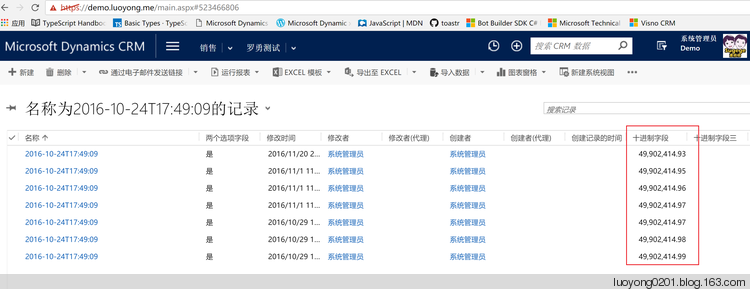
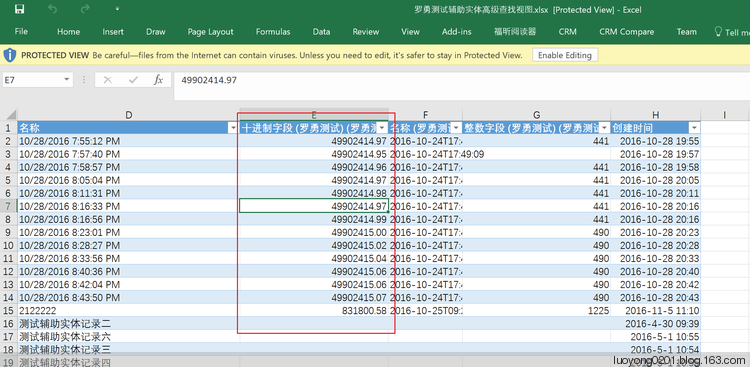
然后我可以看到效果,这个列的值导不出来了。
public void Execute(IServiceProvider serviceProvider)

{

    var executionContext = serviceProvider.GetService<IPluginExecutionContext>();

    var parentContext = executionContext.ParentContext;

    if (parentContext != null &&

        (parentContext.MessageName == "ExportToExcel" ||

         parentContext.MessageName == "ExportDynamicToExcel"))

    {

        // Place your logic here

    }

}
定制Dynamics CRM标准导出功能:不能导出指定列的值的更多相关文章
- Dynamics CRM的Associate功能
Dynamics CRM有一种特殊的关联关系叫Associate,一般常见于为用户分配角色.给团队添加用户.团队添加角色.队列添加用户等等.在一些特定场景下我们不可能把所有的操作都通过手动来完成尤其是 ...
- Dynamics CRM 通过RetrieveEntityRibbonRequest和RetrieveApplicationRibbonRequest导出实体的Ribbon XML
今天看到勇哥的博客介绍了两个request指令用来导出实体的Ribbon XML,在没有工具之前编辑ribbon都是手工导出xml然后编辑的对于很多一开始接触CRM就用工具的人可能不是很熟悉.查了下这 ...
- Dynamics CRM 插件Plugin中获取和更新时间字段值的准确转换
前面两篇介绍了后台代码通过组织服务获取更新时间字段.窗体javascript通过Odata获取更新时间字段,最后篇来实验下在插件中的获取和更新时间字段是否需要时制的转化,为何说是最后篇呢,因为在CRM ...
- oracle导入导出功能
1.普通版:oracle导入导出功能:导出exp 用户名/密码@SID file=f:\xx.dmp owner=用户名 导入imp 用户名/密码@SID full=y file=f:\xx.dmp ...
- Dynamics CRM 2016 的新特性
新版本CRM (2016 with update 0.1) 发布已有几个月了,总结一下新特性,从几个方面来看: 1. 针对整合功能的新特性 (1) 增加了CRM App for Outlook. 这个 ...
- Dynamics CRM实体系列之图表
本节开始讲解Dynamics CRM的图表功能.任何产品基本上都会有数据分析的工具,Dynamics CRM当然也不例外,作为一个专门做销售管理的软件数据分析自然也是对于销售管理者的决策有很大的作用的 ...
- Dynamics CRM导出数据到Excel
原创地址:http://www.cnblogs.com/jfzhu/p/4276212.html 转载请注明出处 Pivot Table是微软BI的一个重要工具,所以这里讲一下Dynamics CRM ...
- Dynamics CRM 报表导出EXCEL 列合并问题的解决方法
CRM中的报表导出功能提供了多种格式,excel就是其中之一,这次遇到的问题是导出后打开excel列明合并的问题,具体如下看着相当不美观,物料名称字段占了AB两列,品牌占了CD两列等等. 该问题的源头 ...
- Dynamics CRM 修改Excel 最大导出记录限制及 最大上传文件限制
CRM默认的Excel最大导出记录是10000条,最大上传文件限制为5m. 这样的限制可以满足少量数据的批量更新,但是如果数据量比较大的话需要修改最大的导出记录限制,和上传文件的大小,网上有的是直接修 ...
随机推荐
- [WPF 自定义控件]开始一个自定义控件库项目
1. 目标 我实现了一个自定义控件库,并且打算用这个控件库作例子写一些博客.这个控件库主要目标是用于教学,希望通过这些博客初学者可以学会为自己或公司创建自定义控件,并且对WPF有更深入的了解. 控件库 ...
- git push 时用户的配置
Pycharm临时配置git提交的账户:git 修改当前的project的用户名的命令为:git config user.name 你的目标用户名**;git 修改当前的project提交邮箱的命令为 ...
- JMeter压测“java.net.SocketException: Socket closed”解决方法
报错详情: java.net.SocketException: Socket closed at java.net.SocketInputStream.socketRead0(Native Metho ...
- python 使用tesseract进行图片识别
from PIL import Image import pytesseract text = pytesseract.image_to_string(Image.open(r'E:\guo\2432 ...
- 关于kubernetes我们还有什么可做的?
kubernetes在容器编排大战中由于应用的可移植性以及支持混合云/多云部署方式上的灵活性.加上开放可扩展的理念,使得周边社区非常活跃.从既有调研结果看,kubernetes已成为容器编排领域的标准 ...
- JavaScript动态加载script方式引用百度地图API,Uncaught ReferenceError: BMap is not defined
百度地图官网文档介绍使用JSSDK时,仅提供了2种引入方式: script引入 异步加载 实际工作场景中仅某一两个页面或者只是单纯有功能需要用到百度地图,所以没有必要在 index.html 中全局引 ...
- 解决Python3.6.5+Django2.0集成xadmin后台点击添加或者内容详情报 list index out of range 的错误
一 问题说明在创建Model的时候,如果存在类型是DateTimeField的字段,则在xadmin后端管理界面里,对该Model进行添加操作的时候,会报list index out of range ...
- springboot入门以及配置文件
springboot入门以及配置文件 SpringBoot是什么? Spring Boot它本身并不提供Spring框架的核心特性以及扩展功能,只是用于快速.敏捷地开发新一代基于Spring框架的应用 ...
- The Preliminary Contest for ICPC Asia Shanghai 2019
传送门 B. Light bulbs 题意: 起初\(n\)个位置状态为\(0\),\(m\)次操作,每次操作更换区间状态:\(0\)到\(1\),\(1\)到\(0\). 共有\(T,T\leq 1 ...
- 2019-2020-1 20199305《Linux内核原理与分析》第四周作业
MenuOS的构造 一.Linux源代码的关键目录 block:存放块设备管理代码: crypto:存放常见加密算法的C语言代码: Documentation:存放一些文档: drivers:驱动目录 ...