
spring 5.x 系列第4篇 —— spring AOP (代码配置方式)
文章目录
源码Gitub地址:https://github.com/heibaiying/spring-samples-for-all
一、说明
1.1 项目结构说明
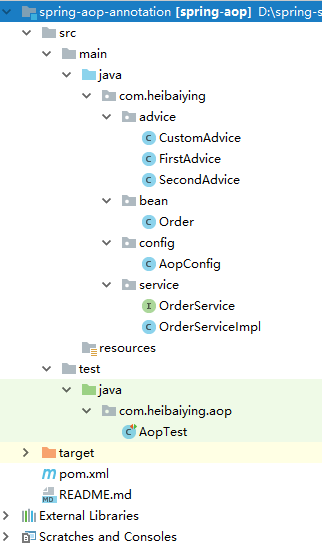
- 切面配置位于com.heibaiying.config下AopConfig.java文件;
- 自定义切面位于advice下,其中CustomAdvice是标准的自定义切面,FirstAdvice和SecondAdvice用于测试多切面共同作用于同一个被切入点时的执行顺序;
- OrderService是待切入方法。
1.2 依赖说明
除了spring的基本依赖外,需要导入aop依赖包
 <!--aop 相关依赖-->
<dependency>
    <groupId>org.springframework</groupId>
    <artifactId>spring-aop</artifactId>
    <version>${spring-base-version}</version>
</dependency>
二、spring aop
2.1 创建待切入接口及其实现类
public interface OrderService {

    Order queryOrder(Long id);

    Order createOrder(Long id, String productName);
}
public class OrderServiceImpl implements OrderService {

    public Order queryOrder(Long id) {
        return new Order(id, "product", new Date());
    }

    public Order createOrder(Long id, String productName) {
        // 模拟抛出异常
        // int j = 1 / 0;
        return new Order(id, "new Product", new Date());
    }
}
2.2 创建自定义切面类
注:@Pointcut的值可以是多个切面表达式的组合。
/**
 * @author : heibaiying
 * @description : 自定义切面
 */
@Aspect
@Component //除了加上@Aspect外 还需要声明为spring的组件 @Aspect只是一个切面声明
public class CustomAdvice {

    /**
     * 使用 || , or  表示或
     * 使用 && , and 表示与
     * ! 表示非
     */
    @Pointcut("execution(* com.heibaiying.service.OrderService.*(..)) && !execution(* com.heibaiying.service.OrderService.deleteOrder(..))")
    private void pointCut() {

    }

    @Before("pointCut()")
    public void before(JoinPoint joinPoint) {
        //获取节点名称
        String name = joinPoint.getSignature().getName();
        Object[] args = joinPoint.getArgs();
        System.out.println(name + "方法调用前:获取调用参数" + Arrays.toString(args));
    }

    // returning 参数用于指定返回结果与哪一个参数绑定
    @AfterReturning(pointcut = "pointCut()", returning = "result")
    public void afterReturning(JoinPoint joinPoint, Object result) {
        System.out.println("后置返回通知结果" + result);
    }

    @Around("pointCut()")
    public Object around(ProceedingJoinPoint joinPoint) throws Throwable {
        System.out.println("环绕通知-前");
        //调用目标方法
        Object proceed = joinPoint.proceed();
        System.out.println("环绕通知-后");
        return proceed;
    }

    // throwing 参数用于指定抛出的异常与哪一个参数绑定
    @AfterThrowing(pointcut = "pointCut()", throwing = "exception")
    public void afterThrowing(JoinPoint joinPoint, Exception exception) {
        System.err.println("后置异常通知:" + exception);
    }

    @After("pointCut()")
    public void after(JoinPoint joinPoint) {
        System.out.println("后置通知");
    }
}
2.3 配置切面
/**
 * @author : heibaiying
 * @description : 开启切面配置
 */
@Configuration
@ComponentScan("com.heibaiying.*")
@EnableAspectJAutoProxy // 开启@Aspect注解支持 等价于<aop:aspectj-autoproxy>
public class AopConfig {
}
2.4 测试切面
@RunWith(SpringRunner.class)
@ContextConfiguration(classes = AopConfig.class)
public class AopTest {

    @Autowired
    private OrderService orderService;

    @Test
    public void saveAndQuery() {
        orderService.createOrder(1283929319L, "手机");
        orderService.queryOrder(4891894129L);
    }

    /**
     * 多个切面作用于同一个切入点时,可以用@Order指定切面的执行顺序
     * 优先级高的切面在切入方法前执行的通知(before)会优先执行,但是位于方法后执行的通知(after,afterReturning)反而会延后执行
     */
    @Test
    public void delete() {
        orderService.deleteOrder(12793179L);
    }
}
2.5 切面执行顺序
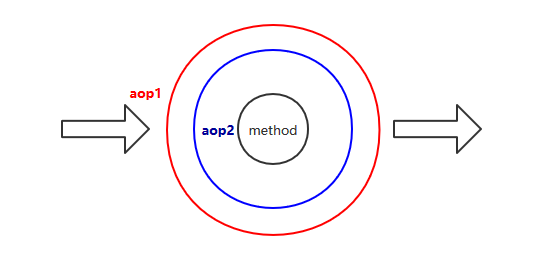
多个切面作用于同一个切入点时,可以用@Order指定切面的执行顺序
优先级高的切面在切入方法前执行的通知(before)会优先执行,但是位于方法后执行的通知(after,afterReturning)反而会延后执行,类似于同心圆原理。
附: 关于切面表达式的说明
切面表达式遵循以下格式:
execution(modifiers-pattern? ret-type-pattern declaring-type-pattern?name-pattern(param-pattern)
            throws-pattern?)
- 除了返回类型模式,名字模式和参数模式以外,所有的部分都是可选的;
*,它代表了匹配任意的返回类型;()匹配了一个不接受任何参数的方法, 而(..)匹配了一个接受任意数量参数的方法(零或者更多)。 模式(*)匹配了一个接受一个任何类型的参数的方法。 模式(*,String)匹配了一个接受两个参数的方法,第一个可以是任意类型,第二个则必须是String类型。
下面给出一些常见切入点表达式的例子。
任意公共方法的执行:
execution(public * *(..))任何一个以“set”开始的方法的执行:
execution(* set*(..))AccountService接口的任意方法的执行:execution(* com.xyz.service.AccountService.*(..))定义在service包里的任意方法的执行:
execution(* com.xyz.service.*.*(..))定义在service包或者子包里的任意方法的执行:
execution(* com.xyz.service..*.*(..))在service包里的任意连接点(在Spring AOP中只是方法执行) :
within(com.xyz.service.*)在service包或者子包里的任意连接点(在Spring AOP中只是方法执行) :
within(com.xyz.service..*)实现了
AccountService接口的代理对象的任意连接点(在Spring AOP中只是方法执行) :this(com.xyz.service.AccountService)
更多表达式可以参考官方文档:Declaring a Pointcut
附:源码Gitub地址:https://github.com/heibaiying/spring-samples-for-all
spring 5.x 系列第4篇 —— spring AOP (代码配置方式)的更多相关文章
- spring 5.x 系列第2篇 —— springmvc基础 (代码配置方式)
文章目录 一.搭建hello spring工程 1.1 项目搭建 1.2 相关注解说明 二.配置自定义拦截器 三.全局异常处理 四.参数绑定 4.1 参数绑定 4.2 关于日期格式转换的三种方法 五. ...
- spring 5.x 系列第18篇 —— 整合websocket (代码配置方式)
源码Gitub地址:https://github.com/heibaiying/spring-samples-for-all 一.说明 1.1 项目结构说明 项目模拟一个简单的群聊功能,为区分不同的聊 ...
- spring 5.x 系列第16篇 —— 整合dubbo (代码配置方式)
文章目录 一. 项目结构说明 二.项目依赖 三.公共模块(dubbo-ano-common) 四. 服务提供者(dubbo-ano-provider) 4.1 提供方配置 4.2 使用注解@Servi ...
- spring 5.x 系列第14篇 —— 整合RabbitMQ (代码配置方式)
源码Gitub地址:https://github.com/heibaiying/spring-samples-for-all 一.说明 1.1 项目结构说明 本用例关于rabbitmq的整合提供简单消 ...
- spring 5.x 系列第12篇 —— 整合memcached (代码配置方式)
文章目录 一.说明 1.1 XMemcached客户端说明 1.2 项目结构说明 1.3 依赖说明 二.spring 整合 memcached 2.1 单机配置 2.2 集群配置 2.3 存储基本类型 ...
- spring 5.x 系列第10篇 —— 整合mongodb (代码配置方式)
源码Gitub地址:https://github.com/heibaiying/spring-samples-for-all 一.说明 1.1 项目结构说明 配置文件位于com.heibaiying. ...
- spring 5.x 系列第17篇 —— 整合websocket (xml配置方式)
源码Gitub地址:https://github.com/heibaiying/spring-samples-for-all 一.说明 1.1 项目结构说明 项目模拟一个简单的群聊功能,为区分不同的聊 ...
- spring 5.x 系列第15篇 —— 整合dubbo (xml配置方式)
文章目录 一. 项目结构说明 二.项目依赖 三.公共模块(dubbo-common) 四. 服务提供者(dubbo-provider) 4.1 productService是服务的提供者( 商品数据用 ...
- spring 5.x 系列第13篇 —— 整合RabbitMQ (xml配置方式)
源码Gitub地址:https://github.com/heibaiying/spring-samples-for-all 一.说明 1.1 项目结构说明 本用例关于rabbitmq的整合提供简单消 ...
- spring 5.x 系列第11篇 —— 整合memcached (xml配置方式)
文章目录 一.说明 1.1 XMemcached客户端说明 1.2 项目结构说明 1.3 依赖说明 二.spring 整合 memcached 2.1 单机配置 2.2 集群配置 2.3 存储基本类型 ...
随机推荐
- 基于Web实现在线绘画拓扑图[GraphEditor]
网络拓扑图本来已经整理有一段时间了,一次项目会议写集中边界监控系统的时候上级要求使用可以在系统中画网络拓扑图,没办法当时找不到现有的程序来参考 只能硬着头皮,顶着风险来完成[当然来边界安全的,当然要安 ...
- uwp - 上滑隐藏导航栏下滑显示
原文:uwp - 上滑隐藏导航栏下滑显示 好久没写博客了,因为忙着工作.昨天周末填坑需要做一个上滑列表数据时隐藏导航栏下滑时显示的效果,下面分享一下我的做法,希望能给你带来帮助. 思路是通过判断滚动条 ...
- 1 tcp/ip协议
该协议是一个协议族,并是说具体某个协议下图中的协议都属于tcp/ip协议.他是用来规范互联网中电脑间数据传输的. 该协议可以分为4层或者7层 4层,实际层数: 链路层 网络层 传输层 应用层 7层,理 ...
- python代码风格检查工具──pylint
pylint是一个python代码检查工具,可以帮助python程序员方便地检查程序代码的语法和风格,通过这个工具,可以使你的python代码尽量保持完美,哈哈.具体可以检查什么东西呢?比如你写了 f ...
- Spring综合Struts2
1.1. Spring综合Struts2 1) 该Spring用户手机WEB-INF下一个 2) 把Spring配置文件配置到web.xml中 <!-- 引入Spr ...
- Python 绘图利器 —— ggplot
安装: 命令行:pip install ggplot 1. 杂项 NameError: name 'ggsave' is not defined. Python ggplot- ggsave func ...
- 你所不知道的 Kindle - 阅读微信公众号文章
Kindle 是一款非常优秀的阅读设备,它为我们提供了非常舒服的阅读体验,并且配合强大的亚马逊图书资源,应该是目前最好的阅读设备之一.Kindle 在已有的成就下还一直在努力提升用户体验.为中国用户开 ...
- x:Static
用途:访问代码中的变量等 后台定义一个变量 public partial class GetStaticFromBackgroundCode : Window { public static stri ...
- npm学习(-)
了解npm请前往https://www.npmjs.cn/getting-started/what-is-npm/ npm 由三个独立的部分组成: 网站 注册表(registry) 命令行工具 (CL ...
- TinyMCE插件CodeSample前后端应用
后端使用插件CodeSample方法: <html> <textarea id="editor_id" name="content" plac ...