
jsp+servlet分页查询
分页查询
减少服务器内存开销
提高用户体验
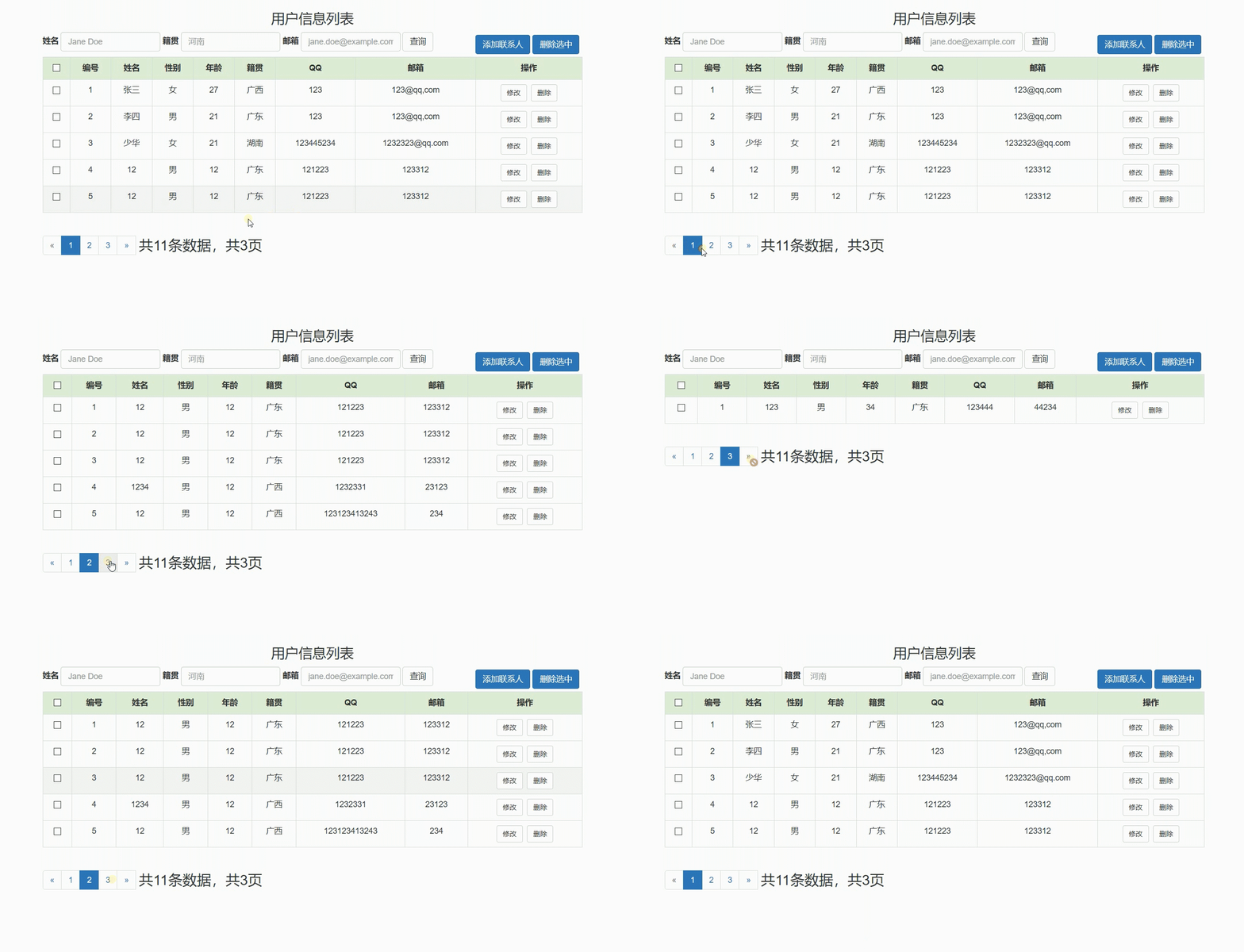
效果图
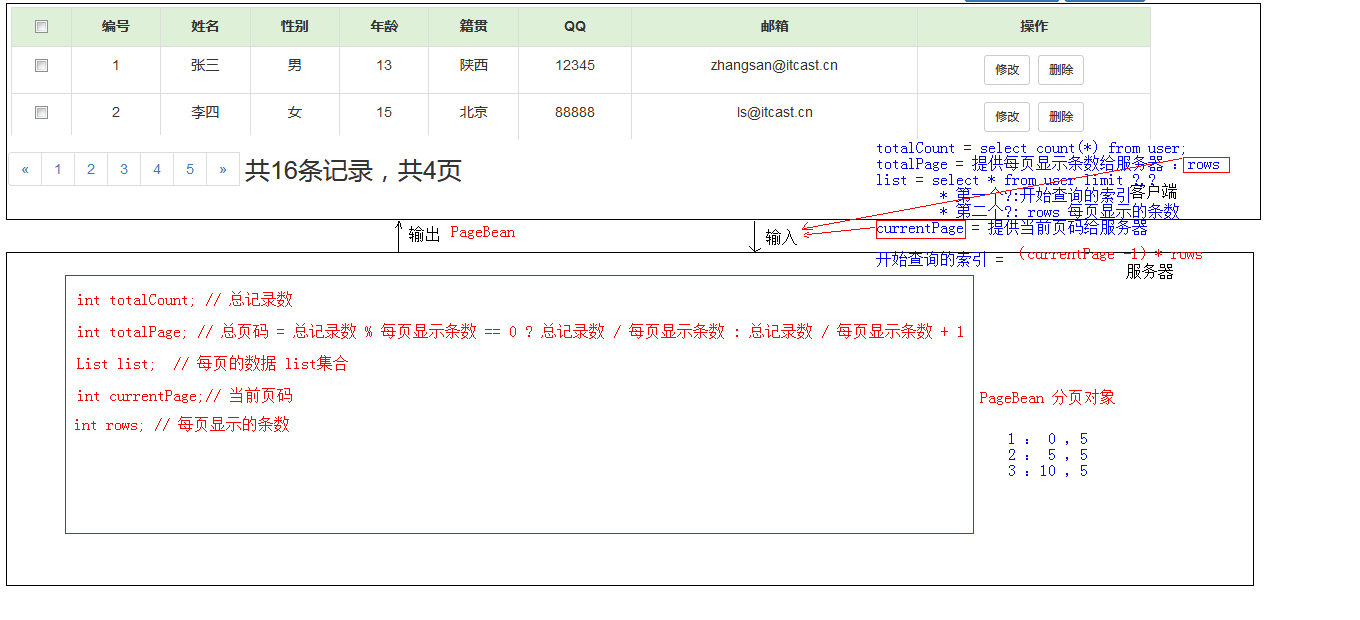
思绪图
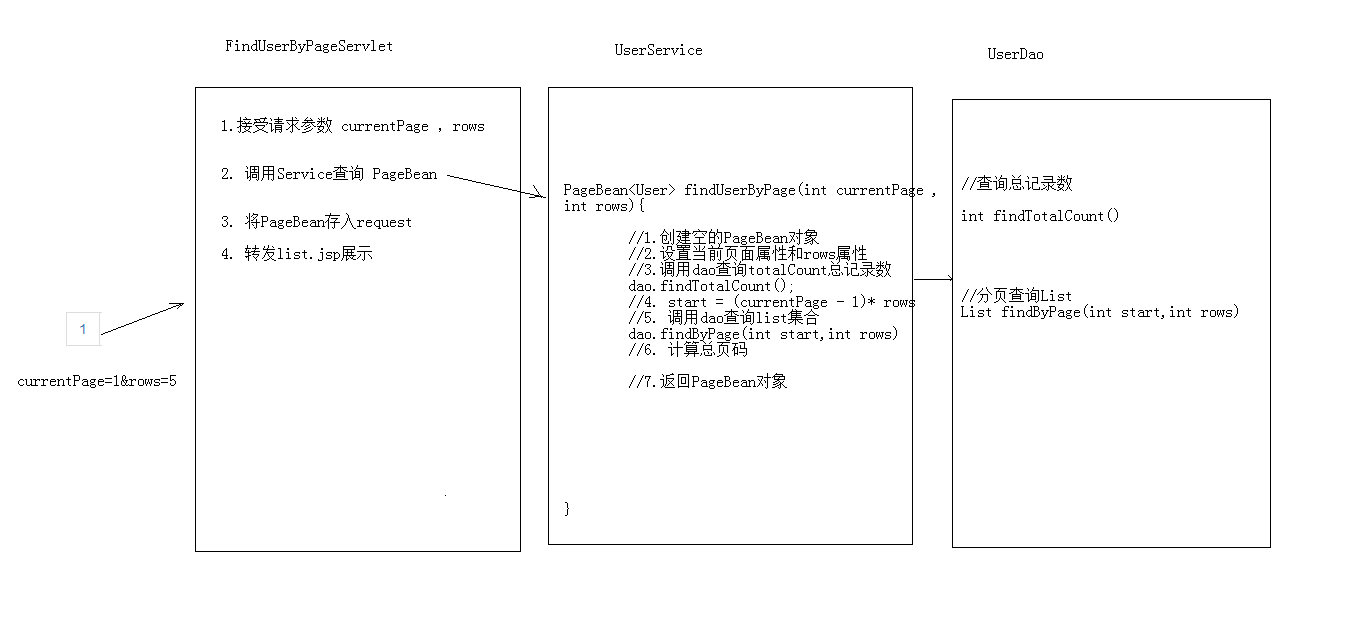
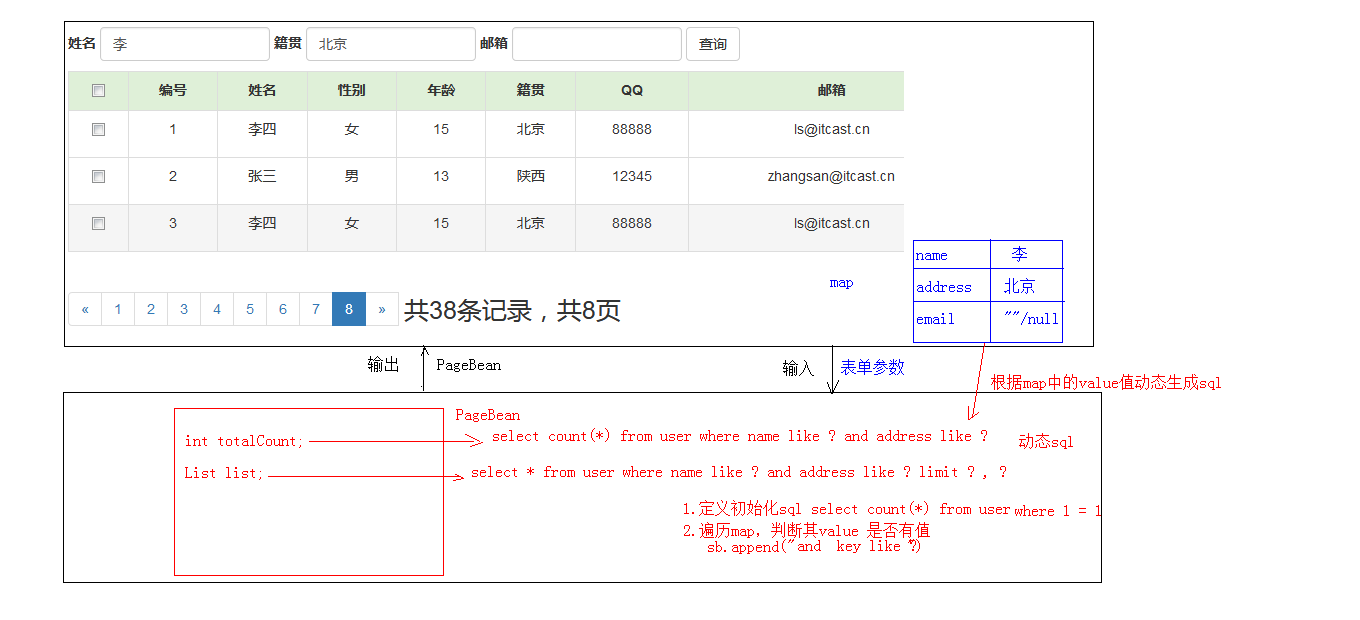
分页显示Bean文件代码
package cn.ytmj.findlist.domain;

import java.util.List;

/**

 * @author rui

 * @create 2019-08-17 23:34

 * 分页对象

 * 使用泛型为多种页面提供服务

 */

public class PageBean<T> {

    private int totalCount;  //总记录数

    private int  totalPage; // 总页数

    private List<T> list;   //每页的数据list集合

    private int currentPage; //当前页码

    private int rows; //每页显示的条数

    public PageBean(){}

    public int getTotalCount() {

        return totalCount;

    }

    public void setTotalCount(int totalCount) {

        this.totalCount = totalCount;

    }

    public int getTotalPage() {

        return totalPage;

    }

    public void setTotalPage(int totalPage) {

        this.totalPage = totalPage;

    }

    public List<T> getList() {

        return list;

    }

    public void setList(List<T> list) {

        this.list = list;

    }

    public int getCurrentPage() {

        return currentPage;

    }

    public void setCurrentPage(int currentPage) {

        this.currentPage = currentPage;

    }

    public int getRows() {

        return rows;

    }

    public void setRows(int rows) {

        this.rows = rows;

    }

    @Override

    public String toString() {

        return "PageBean{" +

                "totalCount=" + totalCount +

                ", totalPage=" + totalPage +

                ", list=" + list +

                ", currentPage=" + currentPage +

                ", rows=" + rows +

                '}';

    }

}
FindUserByPageServlet代码
@WebServlet("/findUserByPageServlet")

public class FindUserByPageServlet extends HttpServlet {

    protected void doPost(HttpServletRequest request, HttpServletResponse response) throws ServletException, IOException {

        //获取数据

        String currentPage = request.getParameter("currentPage");

        String rows = request.getParameter("rows");

        if(null==currentPage||"".equals(currentPage)){

            currentPage="1";

        }

        if(null==rows||"".equals(rows)){

            rows="5";

        }

        //调用service

        UserService userService = new UserServiceImpl();

        PageBean<User> pageBean = userService.findUserByPage(Integer.parseInt(currentPage), Integer.parseInt(rows));

        request.setAttribute("pageBean", pageBean);

        //转发

        request.getRequestDispatcher("/list.jsp").forward(request, response);

    }

    protected void doGet(HttpServletRequest request, HttpServletResponse response) throws ServletException, IOException {

        this.doPost(request, response);

    }

}

}
service
PageBean<User> findUserByPage(int currentPage, int rows);
serviceimpl
   public class UserServiceImpl implements UserService {

    UserDao userDao = new UserDaoImpl();

   @Override

    public PageBean<User> findUserByPage(int currentPage, int rows) {

        PageBean<User> pageBean = new PageBean<>();

        if (currentPage <= 0) {

            currentPage = 1;

        }

        int totalCount = userDao.findTotalCount();

        //计算总页数

        int totalPage = totalCount % ows == 0 ? totalCount / rows : totalCount / rows + 1;

        pageBean.setTotalPage(totalPage);

        if (currentPage > totalPage) {

            currentPage = totalPage;

        }

        List<User> list = userDao.findUserByPage(currentPage, rows);

        pageBean.setTotalCount(totalCount);

        pageBean.setCurrentPage(currentPage);

        pageBean.setRows(rows);

        pageBean.setList(list);

        return pageBean;

    }

}
dao
	//查询当前页面的所有数据

    List<User> findUserByPage(int currentPage, int rows);

	//总条数

    int findTotalCount();
daoimpl
通过JDBCUtils获取DataSource
package cn.ytmj.findlist.util;

import com.alibaba.druid.pool.DruidDataSourceFactory;

import javax.sql.DataSource;

import java.io.IOException;

import java.io.InputStream;

import java.sql.Connection;

import java.sql.SQLException;

import java.util.Properties;

/**

 * JDBC工具类 使用Durid连接池

 */

public class JDBCUtils {

    private static DataSource ds ;

    static {

        try {

            //1.加载配置文件

            Properties pro = new Properties();

            //使用ClassLoader加载配置文件,获取字节输入流

            InputStream is = JDBCUtils.class.getClassLoader().getResourceAsStream("druid.properties");

            pro.load(is);

            //2.初始化连接池对象

            ds = DruidDataSourceFactory.createDataSource(pro);

        } catch (IOException e) {

            e.printStackTrace();

        } catch (Exception e) {

            e.printStackTrace();

        }

    }

    /**

     * 获取连接池对象

     */

    public static DataSource getDataSource(){

        return ds;

    }

    /**

     * 获取连接Connection对象

     */

    public static Connection getConnection() throws SQLException {

        return  ds.getConnection();

    }

}
 public class UserDaoImpl implements UserDao {

    private JdbcTemplate jdbcTemplate = new JdbcTemplate(JDBCUtils.getDataSource());

    @Override

    public List<User> findUserByPage(int currentPage, int rows) {

        String sql = "select * from user limit ? , ? ";

        List<User> list = jdbcTemplate.query(sql, new BeanPropertyRowMapper<User>(User.class), (currentPage - 1) * rows, rows);

        return list;

    }

    @Override

    public int findTotalCount() {

        String sql = "select count(*) from user";

        int count = jdbcTemplate.queryForObject(sql,Integer.class);

        return count;

    }

 }
jsp页面分页显示相关代码
Bootstrap分页按钮模板(轻微修改),以备后用
<div style="float: left">
<nav>
<ul class="pagination">
<li>
<a href="#" aria-label="Previous">
<span aria-hidden="true">«</span>
</a>
</li>
<li class="active"><a href="#">1 <span class="sr-only"></span></a></li>
<li><a href="#">2</a></li>
<li><a href="#">3</a></li>
<li><a href="#">4</a></li>
<li><a href="#">5</a></li>
<li>
<a href="#" aria-label="Next">
<span aria-hidden="true">»</span>
</a>
</li>
<span style="font-size: 25px ;margin-left: 5px">共16条数据,共4页</span>
</ul>
</nav>
</div>
修改后jsp代码
<div style="float: left">
<nav>
<ul class="pagination">
<%-- 判断是否是第一页--%>
<c:if test="${pageBean.currentPage==1}">
<li class="disabled">
</c:if>
<c:if test="${pageBean.currentPage!=1}">
<li>
</c:if>
<a href="${pageContext.request.contextPath}/findUserByPageServlet?currentPage=${pageBean.currentPage-1}&rows=5"
aria-label="Previous">
<span aria-hidden="true">«</span>
</a>
</li>
<c:forEach var="i" varStatus="s" step="1" begin="1" end="${pageBean.totalPage}">
<c:if test="${pageBean.currentPage == i}">
<li class="active">
<a href="${pageContext.request.contextPath}/findUserByPageServlet?currentPage=${i}&rows=5"
name="li">${i}</a></li>
</c:if>
<c:if test="${pageBean.currentPage != i}">
<li>
<a href="${pageContext.request.contextPath}/findUserByPageServlet?currentPage=${i}&rows=5"
name="li">${i}</a></li>
</c:if>
</c:forEach>
<%-- 判断是否是最后页--%>
<c:if test="${pageBean.currentPage >= pageBean.totalPage}">
<li class="disabled">
</c:if>
<c:if test="${pageBean.currentPage!=pageBean.totalPage}">
<li>
</c:if>
<a href="${pageContext.request.contextPath}/findUserByPageServlet?currentPage=${pageBean.currentPage+1}&rows=5"
aria-label="Next">
<span aria-hidden="true">»</span>
</a>
</li>
<span style="font-size: 25px ;margin-left: 5px">共${pageBean.totalCount}条数据,共${pageBean.totalPage}页</span>
</ul>
</nav>
</div>
</div>
jsp+servlet实现登录,数据操作(分页查询,模糊查询等)githubhttps://github.com/PoetryAndYou/List-Operation
jsp+servlet分页查询的更多相关文章
- 用Hibernate和Struts2+jsp实现分页查询、修改删除
1.首先用get的方法传递一个页数过去 2.通过Struts2跳转到Action 3.通过request接受主页面index传过的页数,此时页数是1, 然后调用service层的方法获取DAO层分页查 ...
- Servlet分页查询
分页查询: 1.逻辑分页查询:用户第一次访问时就把全部数据访问出来,添加到一个大集合中,然后放到session中,进行转发.通过页码等的计算,把要显示的内容添加到一个小集合中,转发.遍历小集合以显示当 ...
- Java_Web三大框架之Hibernate+jsp+HQL分页查询
分页查询无处不在.使用Hibernate+jsp+HQL进行分页查询. 第一步:编写房屋实体类和House.hbm.xml映射. /* * 房屋实体类 */ public class House { ...
- Jsp/servlet分页五要素
分页5要素: * 1)pageIndex 当前页 * 2)startIndex 从第几条数据开始 * 3)countAll 总条目数 * 4)pageSize 每页大小 * 5)pageCount 总 ...
- JSP+Servlet+javabean+oracle实现页面多条件模糊查询
之前写过一篇JSP+Servlet+javabean+mysql实现页面多条件模糊查询 使用的是mysql进行的分页查询,mysql用limit控制,而oracle则是用rownum,今天第一次写or ...
- JSP+Servlet+javabean+mysql实现页面多条件模糊查询
需求: 一般列表页上面会有一个查询框,有各种的查询条件组合,一般都采用模糊查询方式 ,以下以自己做的实例来说明一下实现方法: 需要实现的界面原型:要满足条件: 1.单选分类,点GO按扭 2.单独输入标 ...
- 基于jsp+servlet图书管理系统之后台用户信息查询操作
上一篇的博客写的是插入操作,且附有源码和数据库,这篇博客写的是查询操作,附有从头至尾写的代码(详细的注释)和数据库! 此次查询操作的源码和数据库:http://download.csdn.net/de ...
- javabean+servlet+jsp实现分页
前端实现用ligerUI实现分页,感觉用框架确实简单,闲着无聊,模拟着liger的分页界面实现了一遍(只要是功能,样式什么无视) 这里用基础的三层架构+servlet+jsp实现,思路很简单,把所有分 ...
- Servlet+jsp的分页案例
查询的分页,在web中经常用到.一般,分页要维护的信息很多,我们把这些相关的信息,分装到一个类中,PageBean.具体如下: package cn.itcast.utils; import java ...
随机推荐
- unittest中HTMLTestRunner模块生成
unittest里面是不能生成html格式报告的,需要导入一个第三方的模块:HTMLTestRunner 一.导入HTMLTestRunner 方法1.这个模块下载不能通过pip安装了,只能下载后手动 ...
- 利用 js 的一些函数调用,排序
编辑器:Sublime Text 3 1.冒泡排序 let arr = new Array(5,9,3,6,7,8,4,2,);bubbleSort(arr);console.log(arr);fun ...
- php代码Xdebug调试使用笔记
0x01 Xdebug简介 Xdebug是一个开放源代码的PHP程序调试器 运行流程: 0x02 Xdebug配置 日志 xdebug.trace_output_dir: 日志追踪输出目录 xdeb ...
- 解决seajs ie8 对象不支持charAt 属性。
在使用 seajs做项目,今天偶然发现在ie9以下的ie版本会 报出 对象不支持charAt 属性.刚开始还以为是自己写的js部分出了问题,经过几个小时的奋战.最终找到了其根源.在sea-debug. ...
- 小白学 Python(5):基础运算符(上)
人生苦短,我选Python 前文传送门 小白学 Python(1):开篇 小白学 Python(2):基础数据类型(上) 小白学 Python(3):基础数据类型(下) 小白学 Python(4):变 ...
- Python之文件的使用
文件概述 读写文件是最常见的IO操作.Python内置了读写文件的函数,用法和C是兼容的. 读写文件前,我们先必须了解一下,在磁盘上读写文件的功能都是由操作系统提供的,现代操作系统不允许普通的程序直接 ...
- 微信小程序初级教程
小程序代码构成 JSON 配置 WXML 模版 WXSS 样式 JS 逻辑交互 JSON 配置 在小程序中,JSON扮演的静态配置的角色. 小程序配置 app.json { "pages&q ...
- 解决Zend OPcache huge_code_pages: mmap(HUGETLB) failed: Cannot allocate memory报错
前几日看到鸟哥介绍的 <让你的PHP7更快之Hugepage>, 于是想试试手给服务器加上,参照格式安装好扩展,调整好配置文件,然后重启php-fpm,结果启动一直报Zend OPcach ...
- vue-cli2、vue-cli3脚手架详细讲解
前言: vue脚手架指的是vue-cli它是vue官方提供的一个快速构建单页面(SPA)环境配置的工具,cli 就是(command-line-interface ) 命令行界面 .vue-cli是 ...
- (day30)GIL + 线程相关知识点
目录 昨日内容 进程互斥锁 队列 进程间通信 生产者与消费者模型 线程 什么是线程 为什么使用线程 创建线程的两种方式 线程对象的属性 线程互斥锁 今日内容 GIL全局解释器锁 多线程的作用 计算密集 ...