
Nginx防盗链、访问控制、解析PHP相关配置及Nginx代理
6月11日任务
12.13 Nginx防盗链
12.14 Nginx访问控制
12.15 Nginx解析php相关配置
12.16 Nginx代理
扩展
502问题汇总 http://ask.apelearn.com/question/9109
location优先级 http://blog.lishiming.net/?p=100
12.13 Nginx防盗链
设置防盗链的配置内容可以和前一章静态文件不记录日志和过期时间放同一个配置文件里面
[root@jimmylinux- ~]# vim /usr/local/nginx/conf/vhost/test.com.conf

把之前的配置内容加#注释掉,然后增加以下内容。

location ~* ^.+\.(gif|jpg|png|swf|flv|rar|zip|doc|pdf|gz|bz2|jpeg|bmp|xls)$

{

    expires 7d;

    valid_referers none blocked server_names  *.test.com ;  定义白名单内容

    if ($invalid_referer) {  如果不是白名单内容的

        return ;          就会直接返回403报错

    }

    access_log off;

}
重新加载配置文件并测试
[root@jimmylinux- ~]# /usr/local/nginx/sbin/nginx -t

nginx: the configuration file /usr/local/nginx/conf/nginx.conf syntax is ok

nginx: configuration file /usr/local/nginx/conf/nginx.conf test is successful

[root@jimmylinux- ~]# /usr/local/nginx/sbin/nginx -s reload

[root@jimmylinux- ~]# curl -x127.0.0.: -I test.com/.gif

HTTP/1.1  OK

Server: nginx/1.12.

Date: Sat,  Jun  :: GMT

Content-Type: image/gif

Content-Length:

Last-Modified: Fri,  Jun  :: GMT

Connection: keep-alive

ETag: "5b1a9dbf-b"

Expires: Sat,  Jun  :: GMT

Cache-Control: max-age=

Accept-Ranges: bytes

[root@jimmylinux- ~]# curl -e "http://www.baidu.com/1.txt" -x127.0.0.: -I test.com/.gif

HTTP/1.1  Forbidden

Server: nginx/1.12.

Date: Sat,  Jun  :: GMT

Content-Type: text/html

Content-Length:

Connection: keep-alive

[root@jimmylinux- ~]# curl -e "http://www.test.com/1.txt" -x127.0.0.: -I test.com/.gif

HTTP/1.1  OK

Server: nginx/1.12.

Date: Sat,  Jun  :: GMT

Content-Type: image/gif

Content-Length:

Last-Modified: Fri,  Jun  :: GMT

Connection: keep-alive

ETag: "5b1a9dbf-b"

Expires: Sat,  Jun  :: GMT

Cache-Control: max-age=

Accept-Ranges: bytes

[root@jimmylinux- ~]# cat /tmp/test.com.log

127.0.0.1 - [/Jun/::: +] test.com "/1.jif"  "-" "curl/7.29.0"

127.0.0.1 - [/Jun/::: +] test.com "/index.html"  "-" "curl/7.29.0"

127.0.0.1 - [/Jun/::: +] test.com "/index.html"  "-" "curl/7.29.0"

127.0.0.1 - [/Jun/::: +] test.com "/2.jsfsdfsd"  "-" "curl/7.29.0"
12.14 Nginx访问控制
对很重要或者机密的目录,不想让别人查看访问,只有指定的白名单才能够访问。
需求1:访问/admin/目录的请求,只允许某几个IP访问。
1、编辑配置文件vhost/test.com.conf
[root@jimmylinux- ~]# vim /usr/local/nginx/conf/vhost/test.com.conf

添加以下内容

location /admin/  指定目录

    {

    allow 192.168.52.128;  先允许的白名单,如果匹配,不再执行后面的。

    allow 127.0.0.1;

    deny all;              如果不匹配白名单,所有非白名单都被禁止访问。

    }
2、重新加载配置文件并测试
[root@jimmylinux- ~]# /usr/local/nginx/sbin/nginx -s reload  重新加载配置文件

[root@jimmylinux- ~]# curl -e "http://www.baidu.com/1.txt" -x127.0.0.: -I test.com/admin/  测试白名单IP

HTTP/1.1  OK  白名单IP可以正常访问

Server: nginx/1.12.

Date: Sun,  Jun  :: GMT

Content-Type: text/html

Content-Length:

Last-Modified: Thu,  Jun  :: GMT

Connection: keep-alive

ETag: "5b195c2a-13"

Accept-Ranges: bytes

[root@jimmylinux- ~]# curl -x192.168.52.: -I test.com/admin/

HTTP/1.1  OK

Server: nginx/1.12.

Date: Sun,  Jun  :: GMT

Content-Type: text/html

Content-Length:

Last-Modified: Thu,  Jun  :: GMT

Connection: keep-alive

ETag: "5b195c2a-13"

Accept-Ranges: bytes

[root@jimmylinux- ~]# ifconfig

ens33: flags=<UP,BROADCAST,RUNNING,MULTICAST>  mtu

        inet 192.168.52.128  netmask 255.255.255.0  broadcast 192.168.52.255

        inet6 fe80::897e:66dd:a48a:880a  prefixlen   scopeid 0x20<link>

        ether :0c::b6:7b:  txqueuelen   (Ethernet)

        RX packets   bytes  (100.0 KiB)

        RX errors   dropped   overruns   frame

        TX packets   bytes  (109.5 KiB)

        TX errors   dropped  overruns   carrier   collisions

ens37: flags=<UP,BROADCAST,MULTICAST>  mtu

        ether :0c::b6:7b:4f  txqueuelen   (Ethernet)

        RX packets   bytes  (0.0 B)

        RX errors   dropped   overruns   frame

        TX packets   bytes  (0.0 B)

        TX errors   dropped  overruns   carrier   collisions

lo: flags=<UP,LOOPBACK,RUNNING>  mtu

        inet 127.0.0.1  netmask 255.0.0.0

        inet6 ::  prefixlen   scopeid 0x10<host>

        loop  txqueuelen   (Local Loopback)

        RX packets   bytes  (5.0 KiB)

        RX errors   dropped   overruns   frame

        TX packets   bytes  (5.0 KiB)

        TX errors   dropped  overruns   carrier   collisions

[root@jimmylinux- ~]# dhclient ens37    自动获取ens37网卡的IP地址

[root@jimmylinux- ~]# ifconfig

ens33: flags=<UP,BROADCAST,RUNNING,MULTICAST>  mtu

        inet 192.168.52.128  netmask 255.255.255.0  broadcast 192.168.52.255

        inet6 fe80::897e:66dd:a48a:880a  prefixlen   scopeid 0x20<link>

        ether :0c::b6:7b:  txqueuelen   (Ethernet)

        RX packets   bytes  (107.4 KiB)

        RX errors   dropped   overruns   frame

        TX packets   bytes  (114.7 KiB)

        TX errors   dropped  overruns   carrier   collisions

ens37: flags=<UP,BROADCAST,RUNNING,MULTICAST>  mtu

        inet 192.168.228.128  netmask 255.255.255.0  broadcast 192.168.228.255

        inet6 fe80::3ffa:fcb5:66bb:be03  prefixlen   scopeid 0x20<link>

        ether :0c::b6:7b:4f  txqueuelen   (Ethernet)

        RX packets   bytes  (3.7 KiB)

        RX errors   dropped   overruns   frame

        TX packets   bytes  (2.7 KiB)

        TX errors   dropped  overruns   carrier   collisions

lo: flags=<UP,LOOPBACK,RUNNING>  mtu

        inet 127.0.0.1  netmask 255.0.0.0

        inet6 ::  prefixlen   scopeid 0x10<host>

        loop  txqueuelen   (Local Loopback)

        RX packets   bytes  (5.0 KiB)

        RX errors   dropped   overruns   frame

        TX packets   bytes  (5.0 KiB)

        TX errors   dropped  overruns   carrier   collisions

[root@jimmylinux- ~]# curl -x192.168.228.: -I test.com/admin/  再次访问自动获取的IP地址

HTTP/1.1  Forbidden  报错403状态码,因为自动获取的IP地址并不是白名单

Server: nginx/1.12.

Date: Sun,  Jun  :: GMT

Content-Type: text/html

Content-Length:

Connection: keep-alive

[root@jimmylinux- ~]# cat /tmp/test.com.log  查看日志

127.0.0.1 - [/Jun/::: +] test.com "/1.jif"  "-" "curl/7.29.0"

127.0.0.1 - [/Jun/::: +] test.com "/index.html"  "-" "curl/7.29.0"

127.0.0.1 - [/Jun/::: +] test.com "/index.html"  "-" "curl/7.29.0"

127.0.0.1 - [/Jun/::: +] test.com "/2.jsfsdfsd"  "-" "curl/7.29.0"

127.0.0.1 - [/Jun/::: +] test.com "/admin/"  "http://www.baidu.com/1.txt" "curl/7.29.0"

192.168.52.128 - [/Jun/::: +] test.com "/admin/"  "-" "curl/7.29.0"

192.168.228.128 - [/Jun/::: +] test.com "/admin/"  "-" "curl/7.29.0"  日志记录非白名单IP访问,直接报错403状态码
需求2:还可以针对正则匹配,只要是符合关键词内容的,都被拒绝访问。
1、同样编辑配置文件。
[root@jimmylinux-001 ~]# vim /usr/local/nginx/conf/vhost/test.com.conf

添加以下内容

    location ~ .*(upload|image)/.*\.php$

{

    deny all;

}
2、重新加载配置文件并测试
[root@jimmylinux- ~]# /usr/local/nginx/sbin/nginx -s reload  加载配置文件

[root@jimmylinux- ~]# mkdir /data/wwwroot/test.com/upload/   创建测试目录


[root@jimmylinux- ~]# echo "welcome" > /data/wwwroot/test.com/upload/.php  创建测试文件1.php


[root@jimmylinux- ~]# curl -x127.0.0.: test.com/upload/.php  访问测试

<html>

<head><title> Forbidden</title></head>  符合正则条件以php结尾的都被拒绝访问,使用报错403状态码。

<body bgcolor="white">

<center><h1> Forbidden</h1></center>

<hr><center>nginx/1.12.</center>

</body>

</html>

[root@jimmylinux- ~]# echo "welcome" > /data/wwwroot/test.com/upload/.txt  创建另外一个非正则条件的测试文件1.txt

[root@jimmylinux- ~]# curl -x127.0.0.: test.com/upload/.txt  访问测试

welcome    可以正常访问,因为txt结尾的不匹配配置文件中定义的关键词。

[root@jimmylinux- ~]# !cat

cat /tmp/test.com.log

127.0.0.1 - [/Jun/::: +] test.com "/1.jif"  "-" "curl/7.29.0"

127.0.0.1 - [/Jun/::: +] test.com "/index.html"  "-" "curl/7.29.0"

127.0.0.1 - [/Jun/::: +] test.com "/index.html"  "-" "curl/7.29.0"

127.0.0.1 - [/Jun/::: +] test.com "/2.jsfsdfsd"  "-" "curl/7.29.0"

127.0.0.1 - [/Jun/::: +] test.com "/admin/"  "http://www.baidu.com/1.txt" "curl/7.29.0"

192.168.52.128 - [/Jun/::: +] test.com "/admin/"  "-" "curl/7.29.0"

192.168.228.128 - [/Jun/::: +] test.com "/admin/"  "-" "curl/7.29.0"

127.0.0.1 - [/Jun/::: +] test.com "/upload/1.php"  "-" "curl/7.29.0"

127.0.0.1 - [/Jun/::: +] test.com "/upload/1.txt"  "-" "curl/7.29.0"
需求3:根据user_agent设置限制
1、同样编辑配置文件
[root@jimmylinux- ~]# vim /usr/local/nginx/conf/vhost/test.com.conf

添加以下内容

    if ($http_user_agent ~ 'Spider/3.0|YoudaoBot|Tomato')

{

    return ;  deny all 和 return 403效果一样

}
2、重新加载配置文件并测试
[root@jimmylinux- ~]# /usr/local/nginx/sbin/nginx -s reload


[root@jimmylinux- ~]# curl -A "Tomatofsldjfs" -x127.0.0.: test.com/upload/.txt

<html>

<head><title> Forbidden</title></head>

<body bgcolor="white">

<center><h1> Forbidden</h1></center>

<hr><center>nginx/1.12.</center>

</body>

</html>


[root@jimmylinux- ~]# curl -A "Tomatofsldjfs" -x127.0.0.: -I test.com/upload/.txt

HTTP/1.1  Forbidden

Server: nginx/1.12.

Date: Sun,  Jun  :: GMT

Content-Type: text/html

Content-Length:

Connection: keep-alive

[root@jimmylinux- ~]# curl -A "tomatofsldjfs" -x127.0.0.: -I test.com/upload/.txt  小写字母tom开头的就可以正常访问,因为匹配的是大写Tom开头。

HTTP/1.1  OK

Server: nginx/1.12.

Date: Sun,  Jun  :: GMT

Content-Type: text/plain

Content-Length:

Last-Modified: Sun,  Jun  :: GMT

Connection: keep-alive

ETag: "5b1d38d7-8"

Accept-Ranges: bytes

[root@jimmylinux- ~]# vim /usr/local/nginx/conf/vhost/test.com.conf
if ($http_user_agent ~* 'Spider/3.0|YoudaoBot|Tomato') 如果不区分大小写tom开头,编辑配置文件,在匹配后面加一个*即可。
   {
   return 403;
   }
[root@jimmylinux-001 ~]# /usr/local/nginx/sbin/nginx -s reload
[root@jimmylinux-001 ~]# curl -A "tomatofsldjfs" -x127.0.0.1:80 -I test.com/upload/1.txt 小写tom也会报错
HTTP/1.1 403 Forbidden
Server: nginx/1.12.1
Date: Sun, 10 Jun 2018 15:00:36 GMT
Content-Type: text/html
Content-Length: 169
Connection: keep-alive
[root@jimmylinux-001 ~]# curl -A "Tomatofsldjfs" -x127.0.0.1:80 -I test.com/upload/1.txt 大写Tom也会报错
HTTP/1.1 403 Forbidden
Server: nginx/1.12.1
Date: Sun, 10 Jun 2018 15:00:45 GMT
Content-Type: text/html
Content-Length: 169
Connection: keep-alive
12.15 Nginx解析php相关配置
1、编辑配置文件test.com.conf
[root@jimmylinux- ~]# vim /usr/local/nginx/conf/vhost/test.com.conf

添加以下内容

location ~ \.php$

    {

        include fastcgi_params;

        fastcgi_pass unix:/tmp/php-fcgi.sock;

        fastcgi_index index.php;

        fastcgi_param SCRIPT_FILENAME /data/wwwroot/test.com$fastcgi_script_name;

    }
2、新建一个php文件
[root@jimmylinux- ~]# vim /data/wwwroot/test.com/.php

写入以下内容

<?php

phpinfo();
3、以上2步都没有-s重新加载配置文件,我们先进行测试。
[root@jimmylinux- ~]# curl -x127.0.0.: test.com/.php

<?php          并没有解析成功,而是直接显示了源代码。

phpinfo();
如果-s重新加载配置文件,在测试就可以正常解析了。
4、遇到502状态码报错的可能性分析
第①种情况:
[root@jimmylinux- ~]# vim /usr/local/nginx/conf/vhost/test.com.conf 修改配置文件

这个时候去访问就会出现502报错
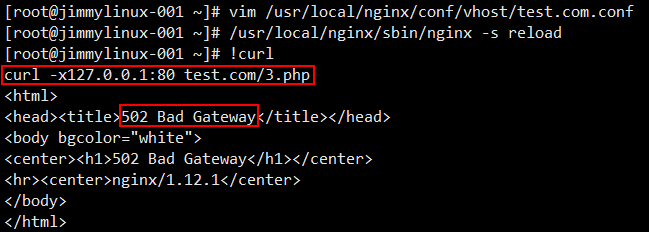

遇到这样的情况,需要先看看这个文件 php-fpm.conf 里面定义的listen是什么路径,那么在test.com.conf配置文件中就要写成一致的。
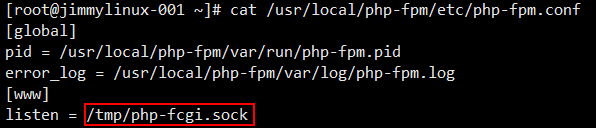
第②种情况:
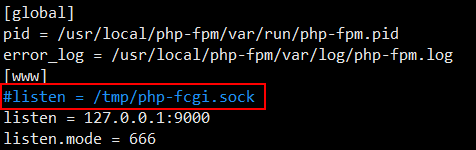
不监听sock,改为监听IP和端口。
[root@jimmylinux- ~]# vim /usr/local/php-fpm/etc/php-fpm.conf 编辑配置文件,不监听sock,在listen前面加#注释掉。
[root@jimmylinux-001 ~]# /etc/init.d/php-fpm reload 修改完配置文件,需要重启php。

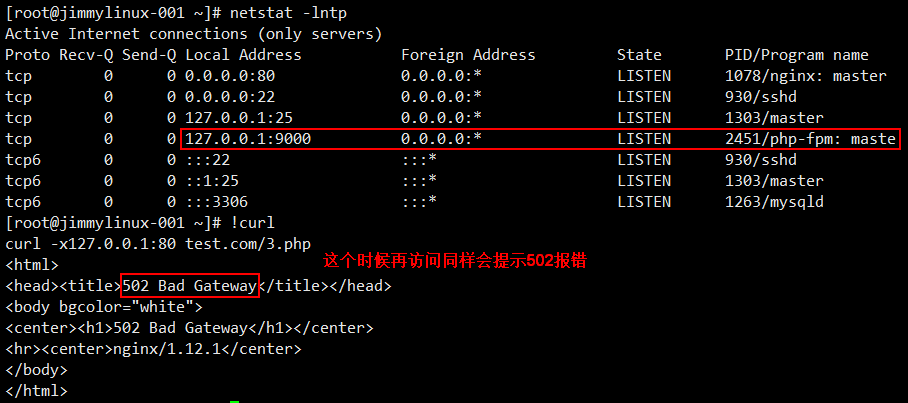
此时既然知道监听的是IP和端口,那么就要在test.com.conf配置文件中修改内容(9000端口后面忘记加;)。
[root@jimmylinux- ~]# vim /usr/local/nginx/conf/vhost/test.com.conf
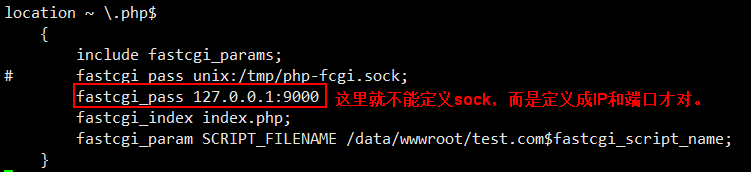
[root@jimmylinux- ~]# /usr/local/nginx/sbin/nginx -s reload  重新加载

[root@jimmylinux- ~]# curl -x127.0.0.: test.com/.php  再次访问就正常了
另外还需要注意的是

第③种情况:
php-fpm.conf配置文件中listen.mode的权限
[root@jimmylinux- ~]# vim /usr/local/php-fpm/etc/php-fpm.conf 这个配置文件中listen.mode = (一定要设置成666权限)
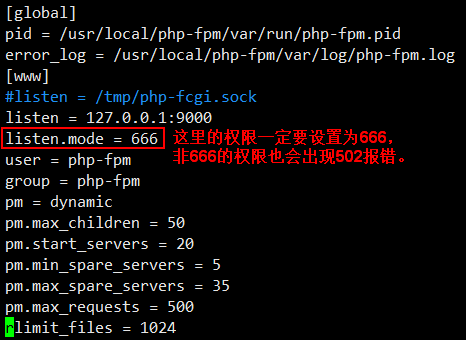
第④种情况:
php-fpm服务资源耗尽了,比如查询mysql很慢的时候,也会出现502报错。
12.16 Nginx代理
例如:用户需要访问web服务器,但是这个web服务器是私网,用户没有办法直接访问,需要找一个中间者,那么这个中间者必须要有一个特性,可以和web服务器及用户互通,所以就可以成为一个中间者,作为用户和web服务器的一个代理者,帮你去访问,然后把结果返回给用户。

操作步骤如下:
1、进入到vhost目录
[root@jimmylinux- ~]# cd /usr/local/nginx/conf/vhost
2、新建proxy.conf文件
[root@jimmylinux- vhost]# vim proxy.conf  新建proxy.conf文件

加入以下内容

server

{

    listen ;

    server_name ask.apelearn.com;  定义域名

    location /

    {

        proxy_pass      http://121.201.9.155/;  远程服务端(web服务器)

        proxy_set_header Host   $host;

        proxy_set_header X-Real-IP      $remote_addr;

        proxy_set_header X-Forwarded-For $proxy_add_x_forwarded_for;

    }

}
3、重新加载配置文件并测试
[root@jimmylinux- vhost]# /usr/local/nginx/sbin/nginx -t

nginx: the configuration file /usr/local/nginx/conf/nginx.conf syntax is ok

nginx: configuration file /usr/local/nginx/conf/nginx.conf test is successful

[root@jimmylinux- vhost]# /usr/local/nginx/sbin/nginx -s reload

[root@jimmylinux- vhost]# curl ask.apelearn.com/robots.txt    robots是针对蜘蛛索引的一个列表,一般网站都有这个robots。

#

# robots.txt for MiWen

#

User-agent: *

Disallow: /?/admin/

Disallow: /?/people/

Disallow: /?/question/

Disallow: /account/

Disallow: /app/

Disallow: /cache/

Disallow: /install/

Disallow: /models/

Disallow: /crond/run/

Disallow: /search/

Disallow: /static/

Disallow: /setting/

Disallow: /system/

Disallow: /tmp/

Disallow: /themes/

Disallow: /uploads/

Disallow: /url-*

Disallow: /views/
Nginx防盗链、访问控制、解析PHP相关配置及Nginx代理的更多相关文章
- Linux centos VMware Nginx防盗链、Nginx访问控制、Nginx解析php相关配置、Nginx代理
一.Nginx防盗链 配置如下,可以和上面的配置结合起来 location ~* ^.+\.(gif|jpg|png|swf|flv|rar|zip|doc|pdf|gz|bz2|jpeg|bmp|x ...
- nginx防盗链、nginx访问控制、nginx解析php相关配制、nginx代理
1.nginx防盗链编辑:vim /usr/local/nginx/conf/vhost/test.com.conf写入: location ~* ^.+\.(gif|jpg|png|swf|flv| ...
- centos LAMP第二部分apache配置 下载discuz!配置第一个虚拟主机 安装Discuz! 用户认证 配置域名跳转 配置apache的访问日志 配置静态文件缓存 配置防盗链 访问控制 apache rewrite 配置开机启动apache tcpdump 第二十节课
centos LAMP第二部分apache配置 下载discuz!配置第一个虚拟主机 安装Discuz! 用户认证 配置域名跳转 配置apache的访问日志 配置静态文件缓存 配置防盗链 ...
- Nginx防盗链配置案例配置,Nginx的知识分享
防盗链的含义:网站内容不在自己服务器上,而通过技术手段,绕过别人放广告有利益的最终页,直接在自己的有广告有利益的页面上向最终用户提供此内容. 常常是一些名不见经传的小网站来盗取一些有实力的大网站的地址 ...
- Nginx 防盗链配置
防盗链一般都是流媒体配置 location ~* \.(jpg|jpeg|png|bmg|swf|mp4|mp4|mmf|zip|rar|swf|flv)$ { // 对jpg|jpeg|png|bm ...
- nginx防盗链配置
Ps:防盗链的意义就是保证自己的版权,不免网站的流量流失,为他人做嫁衣.下面是网上看到的三种方法: 修改 /usr/local/nginx/conf/nginx.conf 这个配置文件.找到locat ...
- 使用NGINX+LUA实现WAF功能 和nginx 防盗链
使用NGINX+LUA实现WAF功能 一.了解WAF 1.1 什么是WAF Web应用防护系统(也称:网站应用级入侵防御系统 .英文:Web Application Firewall,简称: WAF) ...
- Nginx系列二:(Nginx Rewrite 规则、Nginx 防盗链、Nginx 动静分离、Nginx+keepalived 实现高可用)
一.Nginx Rewrite 规则 1. Nginx rewrite规则 Rewrite规则含义就是某个URL重写成特定的URL(类似于Redirect),从某种意义上说为了美观或者对搜索引擎友好, ...
- nginx之旅(第二篇):nginx日志管理、nginx防盗链、nginx虚拟主机
一.nginx日志管理 Nginx访问日志主要有两个参数控制 1) log_format #用来定义记录日志的格式(可以定义多种日志格式,取不不同名字即可) log_format log_name s ...
随机推荐
- LeetCode刷题总结-数组篇(中)
本文接着上一篇文章<LeetCode刷题总结-数组篇(上)>,继续讲第二个常考问题:矩阵问题. 矩阵也可以称为二维数组.在LeetCode相关习题中,作者总结发现主要考点有:矩阵元素的遍历 ...
- SSH隧道的使用
合作部门提供的 redis 集群,kafka 集群,限制条件:无 vpn,仅能通过特定跳板机(无 root 权限)连接调试开发. 想要实现:本地开发连接其 redis 集群,kafka 集群进行开发调 ...
- Java IO编程——文件拷贝
在操作系统里面有一个copy命令,这个命令的主要功能是可以实现文件的拷贝处理,现在要求模拟这个命令,通过初始化参数输入拷贝的源文件路径与拷贝的目标路径实现文件的拷贝处理. 需求分析: ·需要实现文件的 ...
- Zabbix 四 主动模式
本次的主机192.168.131.8 被动模式. 将zabbix4.4.4的源码包放过去,解压安装依赖准备编译安装,并创建zabbix账户. tar -xf zabbix-4.4.0.tar.gz & ...
- CSP-S模拟57
这次的T1是来送温暖的. T2T3挺神的. T1. 不会 T2. 容斥,挺神的 T3. 考场上被卡常卡掉10分让我很难受.....(虽然说$O(n)$过$1e8$本来就不太行) 考场上:疯狂化简式子, ...
- OpenCV的Mat构造函数
1.函数说明 构造函数:public Mat(int rows, int cols, MatType type, IntPtr data, long step = 0) 可以通过数据指针构造Mat对象 ...
- 易初大数据 2019年11月14日 spss笔记 王庆超
“均匀分布”的随机数 需要打开本章的数据文件“sim.sav.”. 1.设置随机数种子 1选择[转换]--[随机数字生成器],勾选‘设置起点’,并在‘固定值’ 的下‘值’中输入一个用户给定的数值.该数 ...
- PHP根据ip获取地理位置(通过高德地图接口)
PHP根据ip获取地理位置(通过高德地图接口)<pre>//restapi.amap.com/v3/ip?key=2004f145cf3a39a72e9ca70ca4b2a1dc& ...
- 利用Python获取统计自己的qq群成员信息
利用python获取自己的qq群成员信息! 首先说明一下需要使用的工具以及技术:python3 + selenium selenium安装方法:pip install selenium 前提:获取自己 ...
- PHP 核心特性 - 匿名函数
提出 在匿名函数出现之前,所有的函数都需要先命名才能使用 function increment($value) { return $value + 1; } array_map('increment' ...