
iptables工作常用操作
正确的设置iptables命令汇总
iptables -P INPUT ACCEPT
iptables -F
iptables -X
iptables -Z
iptables -I INPUT -p tcp --dport 22 -j ACCEPT
iptables -I INPUT -p tcp --dport 8080 -j ACCEPT
iptables -A INPUT -p icmp --icmp-type 8 -j ACCEPT
iptables -A INPUT -m state --state ESTABLISHED,RELATED -j ACCEPT
iptables -A OUTPUT -m state --state ESTABLISHED,RELATED -j ACCEPT
iptables -A INPUT -i lo  -j ACCEPT
iptables -A INPUT  -j DROP
显示如下,其中lo口的再source列显示成为了0.0.0.0/0 刚开始以为放行了所有IP呢,实际测试是lo口。正常工作
[root@cenos ~]# iptables -L -n
Chain INPUT (policy ACCEPT)
target     prot opt source               destination
ACCEPT     tcp  --  0.0.0.0/0            0.0.0.0/0           tcp dpt:8080
ACCEPT     tcp  --  0.0.0.0/0            0.0.0.0/0           tcp dpt:22
ACCEPT     icmp --  0.0.0.0/0            0.0.0.0/0           icmp type 8
ACCEPT     all  --  0.0.0.0/0            0.0.0.0/0           state RELATED,ESTABLISHED
ACCEPT     all  --  0.0.0.0/0            0.0.0.0/0
DROP       all  --  0.0.0.0/0            0.0.0.0/0

Chain FORWARD (policy ACCEPT)
target     prot opt source               destination

Chain OUTPUT (policy ACCEPT)
target     prot opt source               destination
ACCEPT     all  --  0.0.0.0/0            0.0.0.0/0           state RELATED,ESTABLISHED
[root@cenos ~]#
前面添加允许的规则,最后追加一条规则拒绝其它所有的,无论什么协议的
链规则默认是ACCEPT,不推荐改成DROP,后面最后会演示隐患
关于上面的一些问题汇总
刚开始把lo口放行的改成了如下
iptables -A INPUT -s 127.0.0.1/8 -j ACCEPT
这样的话自己去连自己只能通过127.0.0.1去连接了。经过自己的IPV4连接出现不通的情况。如下测试
[root@linux-node1 ~]# telnet 192.168.56.11 9292
Trying 192.168.56.11...
^C
[root@linux-node1 ~]# telnet 127.0.0.1 9292
Trying 127.0.0.1...
Connected to 127.0.0.1.
Escape character is '^]'.
^]
telnet> quit
Connection closed.
[root@linux-node1 ~]#
如果再添加一条命令,也能正常工作了。但是每次针对不同的主机都要修改源地址。觉得麻烦了
iptables -I INPUT -s 192.168.56.11/32 -j ACCEPT
测试如下
[root@linux-node1 ~]# iptables -I INPUT -s 192.168.56.11/32 -j ACCEPT
[root@linux-node1 ~]# telnet 192.168.56.11 9292
Trying 192.168.56.11...
Connected to 192.168.56.11.
Escape character is '^]'.
^C^]
telnet> quit
Connection closed.
[root@linux-node1 ~]#
放行自己出去的包回来命令解释
iptables -A INPUT -m state --state ESTABLISHED,RELATED -j ACCEPT
iptables -A OUTPUT -m state --state ESTABLISHED,RELATED -j ACCEPT
测试正常添加,ping百度可以返回
[root@linux-node1 ~]# iptables -L -n
Chain INPUT (policy ACCEPT)
target     prot opt source               destination

Chain FORWARD (policy ACCEPT)
target     prot opt source               destination

Chain OUTPUT (policy ACCEPT)
target     prot opt source               destination
[root@linux-node1 ~]# iptables -I INPUT -p tcp --dport 22 -j ACCEPT
[root@linux-node1 ~]# iptables -A INPUT -m state --state ESTABLISHED,RELATED -j ACCEPT
[root@linux-node1 ~]# iptables -A OUTPUT -m state --state ESTABLISHED,RELATED -j ACCEPT
[root@linux-node1 ~]# iptables -A INPUT  -j DROP
[root@linux-node1 ~]# iptables -L -n
Chain INPUT (policy ACCEPT)
target     prot opt source               destination
ACCEPT     tcp  --  0.0.0.0/0            0.0.0.0/0            tcp dpt:22
ACCEPT     all  --  0.0.0.0/0            0.0.0.0/0            state RELATED,ESTABLISHED
DROP       all  --  0.0.0.0/0            0.0.0.0/0

Chain FORWARD (policy ACCEPT)
target     prot opt source               destination

Chain OUTPUT (policy ACCEPT)
target     prot opt source               destination
ACCEPT     all  --  0.0.0.0/0            0.0.0.0/0            state RELATED,ESTABLISHED
[root@linux-node1 ~]#
##ping 百度测试下
[root@linux-node1 ~]# ping baidu.com -c 3
PING baidu.com (123.125.115.110) 56(84) bytes of data.
64 bytes from 123.125.115.110 (123.125.115.110): icmp_seq=1 ttl=128 time=37.9 ms
64 bytes from 123.125.115.110 (123.125.115.110): icmp_seq=2 ttl=128 time=35.9 ms
64 bytes from 123.125.115.110 (123.125.115.110): icmp_seq=3 ttl=128 time=35.8 ms

--- baidu.com ping statistics ---
3 packets transmitted, 3 received, 0% packet loss, time 2003ms
rtt min/avg/max/mdev = 35.852/36.593/37.967/0.972 ms
[root@linux-node1 ~]#
测试错误添加方式
注意这个命令要在最终的drop之前
[root@linux-node1 ~]# iptables -F
[root@linux-node1 ~]# iptables -L -n
Chain INPUT (policy ACCEPT)
target     prot opt source               destination

Chain FORWARD (policy ACCEPT)
target     prot opt source               destination

Chain OUTPUT (policy ACCEPT)
target     prot opt source               destination
[root@linux-node1 ~]# iptables -I INPUT -p tcp --dport 22 -j ACCEPT
[root@linux-node1 ~]# iptables -A INPUT  -j DROP
[root@linux-node1 ~]# iptables -A OUTPUT -m state --state ESTABLISHED,RELATED -j ACCEPT
[root@linux-node1 ~]# iptables -A INPUT -m state --state ESTABLISHED,RELATED -j ACCEPT
[root@linux-node1 ~]# ping baidu.com -c 3
ping: baidu.com: Name or service not known
[root@linux-node1 ~]# iptables -L -n
Chain INPUT (policy ACCEPT)
target     prot opt source               destination
ACCEPT     tcp  --  0.0.0.0/0            0.0.0.0/0            tcp dpt:22
DROP       all  --  0.0.0.0/0            0.0.0.0/0
ACCEPT     all  --  0.0.0.0/0            0.0.0.0/0            state RELATED,ESTABLISHED

Chain FORWARD (policy ACCEPT)
target     prot opt source               destination

Chain OUTPUT (policy ACCEPT)
target     prot opt source               destination
ACCEPT     all  --  0.0.0.0/0            0.0.0.0/0            state RELATED,ESTABLISHED
[root@linux-node1 ~]#

所以
注意这个命令要在最终的drop之前
禁止别人ping自己,ACCEPT就允许了
禁止ping
[root@data-1-1 ~]# iptables -A INPUT -p icmp --icmp-type 8 -j DROP
[root@data-1-1 ~]# iptables -L -n
Chain INPUT (policy ACCEPT)
target     prot opt source               destination
DROP       icmp --  0.0.0.0/0            0.0.0.0/0            icmptype 8

Chain FORWARD (policy ACCEPT)
target     prot opt source               destination

Chain OUTPUT (policy ACCEPT)
target     prot opt source               destination
[root@data-1-1 ~]#

测试别的机器无法ping通它
[root@linux-node1 ~]# ping 10.0.2.11 -c 3
PING 10.0.2.11 (10.0.2.11) 56(84) bytes of data.

--- 10.0.2.11 ping statistics ---
3 packets transmitted, 0 received, 100% packet loss, time 2000ms

[root@linux-node1 ~]#
注意iptables -I 和iptables -A是有区别的
-A和-I参数分别为添加到规则末尾和规则最前面
看到有些人使用-P改了默认的链的规则。我极其不推荐
比如下面方式、最后把链默认的改成了DROP方式
iptables -P INPUT ACCEPT
iptables -F
iptables -X
iptables -Z
iptables -A INPUT -i lo -j ACCEPT
iptables -A INPUT -p tcp --dport 22 -j ACCEPT
iptables -A INPUT -p icmp --icmp-type 8 -j ACCEPT
iptables -A INPUT -m state --state RELATED,ESTABLISHED -j ACCEPT
iptables -P INPUT DROP
iptables -P OUTPUT ACCEPT
iptables -P FORWARD DROP
我来演示下隐患
后期如果调整iptables时不小心执行了iptables -F时机器就无法连接了
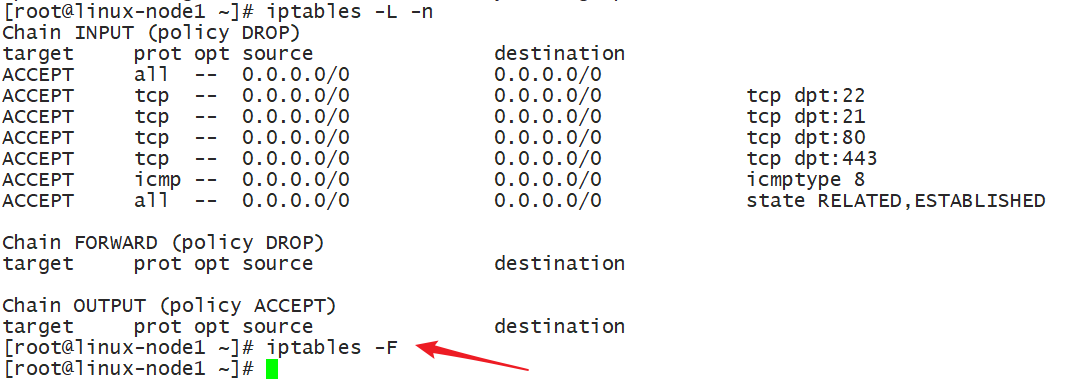
xshell连接不上机器了
就是因为防火墙的INPUT 链默认被改成了DROP的规则
我执行iptables -F 清除了所有规则,也就无法连接22端口了
通过控制台登录查看下
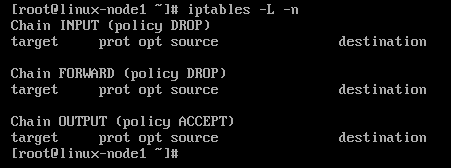
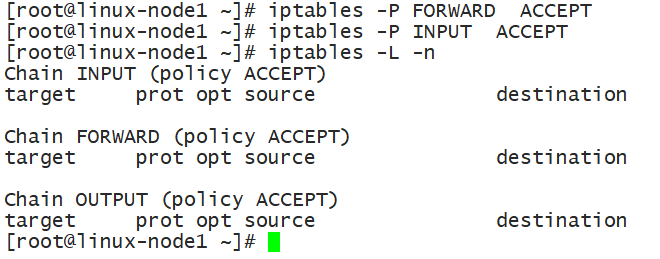
修复问题
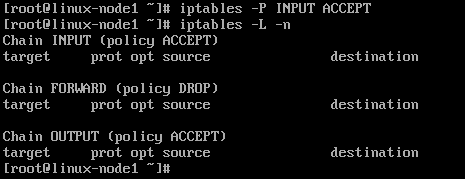
[root@linux-node1 ~]# iptables -P FORWARD ACCEPT
[root@linux-node1 ~]# iptables -P INPUT ACCEPT
补充部分2
centos最小化安装默认没iptables。当执行下面命令如下提示
[root@linux-node1 ~]# service iptables save
The service command supports only basic LSB actions (start, stop, restart, try-restart, reload, force-reload, status). For other actions, please try to use systemctl.
[root@linux-node1 ~]# systemctl restart iptables.service
Failed to restart iptables.service: Unit not found.
需要安装iptables-services
yum install iptables-services

iptables-services 和 iptables 是不一样的

安装了 services才有/etc/sysconfig/iptables
iptables工作常用操作的更多相关文章
- Stream流的基本介绍以及在工作中的常用操作(去重、排序以及数学运算等)
平时工作中,我在处理集合的时候,总是会用到各种流操作,但是往往在处理一些较为复杂的集合时,还是会出现无法灵活运用api的场景,这篇文章的目的,主要是为介绍一些工作中使用流时的常用操作,例如去重.排序和 ...
- Iptables工作原理使用详解
Iptables防火墙简介 Iptables名词和术语 Iptables工作流程 基本语法 Filter 参数说明 NAT表: Icmp协议 TCP FLAG 标记 什么是状态检测 iptables的 ...
- Linux常用操作练习
Linux常用操作练习 练习一:安装CentOS 1.设置为1G内存(才有图形界面).10G硬盘 2.分给交换分区2G(4G一下2G,8G-32G分4G-8G) 练习二:安装CentOS迷你版 1.安 ...
- Linux 笔记 - 第十五章 MySQL 常用操作和 phpMyAdmin
博客地址:http://www.moonxy.com 一.前言 前面几章介绍了 MySQL 的安装和简单的配置,只会这些还不够,作为 Linux 系统管理员,我们还需要掌握一些基本的操作,以满足日常管 ...
- mongodb的常用操作
对于nosql之前工作中有用到bekerlydb,最近开始了解mongodb,先简单写下mongodb的一些常用操作,当是个总结: 1.mongodb使用数据库(database)和集合(collec ...
- Adb工具常用操作-转(二)
一. PC与模拟器或真机交换文件(adb pull和adb push) 在开发阶段或其他原因,经常需要将PC上的文件复制到模拟器或真机上,或将模拟机和真机上的文件复制到PC上.使用adb pull和a ...
- Adb工具常用操作(一)
一.启动或关闭server 1.3 Android SDK中的常用命令行工具 在<Android SDK安装目录>\tools目录中带了很多命令行工具.虽然一般的开发人员并不需要完全掌握 ...
- vb listview 的常用操作
常用操作:获取当前行数和列数: MsgBox "行数:" & ListView1.ListItems.Count & "列数:" & L ...
- vim常用操作技巧与配置
vi是linux与unix下的常用文本编辑器,其运行稳定,使用方便,本文将分两部分对其常用操作技巧和配置进行阐述,其中参考了网上的一些文章,对作者表示感谢 PART1 操作技巧 说明: 以下的例子中 ...
随机推荐
- 在当前TestSuite/TestCase run之前先run另一个TestSuite/TestCase
在当前的TestSuite/TestCase的Setup Script里面写上这段代码: import com.eviware.soapui.model.support.PropertiesMap l ...
- Docker数据卷持久化
Docker提供三种不同的方式将数据从宿主机挂载到容器中:volumes,bind mounts和tmpfs. volumes:Docker管理宿主机文件系统的一部分(/var/lib/docker/ ...
- ajax csrf
data 里加 csrfmiddlewaretoken:$("[name='csrfmiddlewaretoken']").val(), 还要再 form表单里加{% csrf_t ...
- 同一脚本sh 脚本名 报Syntax error: "(" unexpected而./脚本名不报错,求解!!
同一脚本sh 脚本名 执行时报Syntax error: "(" unexpected:而./脚本名执行不报错,为什么呢 脚本内容如下: function usage(){ ech ...
- 2018-2019-2 《网络对抗技术》Exp0 Kali安装 Week1 20165326
kali的安装及配置 目录 下载 安装 相关配置 一.下载 官方下载网址https://www.kali.org/downloads/ 选择64位的.iso文件下载 返回 二.安装kali 打开VMw ...
- 数据库between and
在此记录一下,between相当于大于等于,and相当于小于,举个例子:select * from A where modefytime between '31-3月 -16' and '1-4月 - ...
- linux安装虚拟机ping不通网关,ping不通外网问题解决(nat模式)
1.将网关字段改成自己想要的字段
- CSS效果:焦点图片
HTML: <html lang="en"> <head> <meta charset="UTF-8"> <meta ...
- fdisk语法
Linux下的fdisk功能是极其强大的,用它可以划分出最复杂的分区,下面简要介绍一下它的用法: 对于IDE硬盘,每块盘有一个设备名:对应于主板的四个IDE接口,设备名依次为:/dev/hda,/de ...
- Linux 驱动——Button驱动5(atomic)原子量
button_drv.c驱动文件: #include <linux/module.h>#include <linux/kernel.h>#include <linux/f ...